Learn About On-Demand HPC and AI Platforms on OCI
The key production themes are authenticated browser acceptance, GPU Lustre positioning, golden image standardization, shared interactive application runtimes, and project governance automation.
In this solution playbook, you learn how to deploy an on-demand HPC and AI platform on OCI using Open OnDemand (OOD), Slurm workload management, GPU autoscaling, and a multi-tier storage architecture. Researchers, data scientists, and engineers can securely access interactive AI and HPC environments through a web browser. The platform dynamically scales GPU and compute resources based on workload demand.
The architecture combines the following capabilities:
- Browser-based HPC and AI access using Open OnDemand.
- Secure single sign-on (SSO) integration using Microsoft Entra ID and OpenID Connect (OIDC).
- Slurm-based workload orchestration for interactive and batch jobs.
- Autoscaling CPU and GPU partitions for AI, ML, remote desktop, and HPC workloads.
- Tiered storage using OCI Object Storage , OCI File Storage (FSS), JuiceFS, and File Storage with Lustre.
- Centralized Linux identity management using FreeIPA.
- Integrated monitoring using Prometheus and Grafana.
- Multi-user project isolation and quota management.
Before You Begin
- OCI Compute documentation
- File Storage with Lustre documentation
- OCI Load Balancer documentation
- OCI Identity and Access Management documentation
- OCI Network Security Groups documentation
The delivery team should be familiar with:
- Slurm workload manager and partition design.
- Linux high-performance computing (HPC) environments and shared file systems.
- OCI networking, compute, graphics processing unit (GPU) shapes, and storage services.
- Open OnDemand and Batch Connect applications.
- GPU-based AI and ML workloads.
- Monitoring stacks such as Prometheus and Grafana.
- Golden image lifecycle management for autoscale nodes.
Architecture
The following architecture combines OCI infrastructure services with proven open source HPC tooling to provide a secure, scalable platform for batch and interactive workloads:
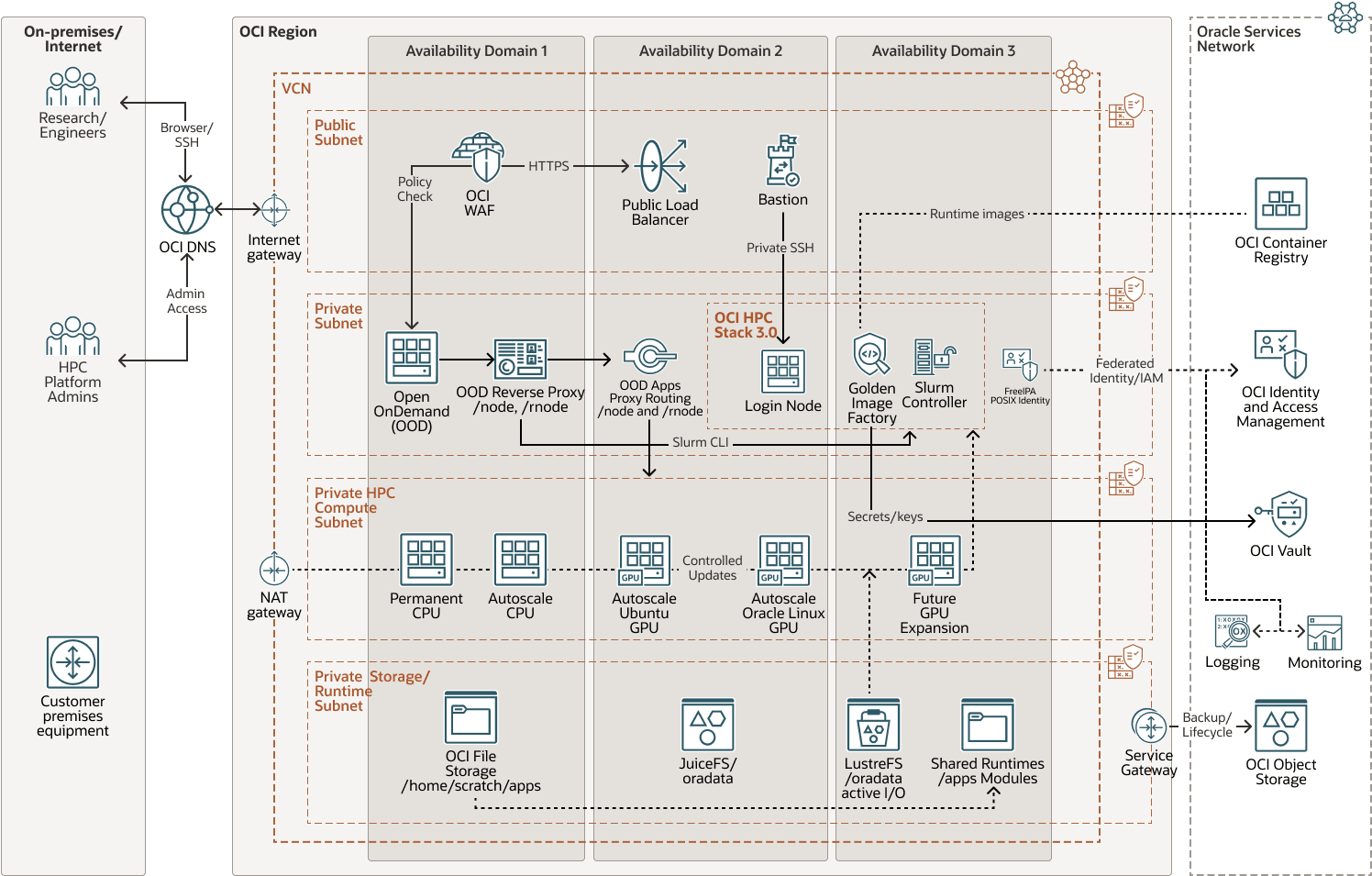
demand-platform-hpc-oci-arch-oracle.zip#GUID-F742FC96-7096-438E-B982-1BC39ECB93FD
At a high level, users reach OOD over HTTPS and authenticate through Microsoft Entra ID. OOD provides browser access to files, shell sessions, Job Composer, and interactive applications. Slurm schedules work across permanent and autoscaling CPU and GPU partitions. OCI automation provisions compute capacity on demand, and node bootstrap logic prepares identity, Slurm runtime, GPU devices, shared application paths, and storage mounts before user workloads start.
This architecture applies hands-on implementation patterns across OOD 4.2, Slurm autoscale CPU nodes, Remote Desktop/noVNC, Job Composer partition selection, GPU node bootstrap flows, /odata data mounting, /lustre access patterns, and OOD /rnode routing.
Users and access layer
- OCI Load Balancer provides HTTPS access to the OOD endpoint.
- Optional web application firewall (WAF), NSGs, or allowlists enforce perimeter controls.
- Microsoft Entra ID provides OIDC authentication for browser users.
- Bastion or restricted SSH paths provide controlled administrator access.
Open OnDemand server
- OOD dashboard provides browser entry for HPC users.
- Files and Shell applications provide file and shell operations.
- Job Composer submits Slurm jobs.
- Batch Connect apps provide Remote Desktop, VS Code, JupyterLab , and RStudio sessions.
/nodeand/rnoderoutes proxy interactive services on compute nodes.
HPC cluster
Slurm 25.11.0 manages the HPC environment, which includes controller nodes, login nodes, permanent compute partitions, autoscaling CPU partitions, and autoscaling GPU partitions.
- Slurm controller
hosts
slurmctld,slurmdbd, accounting data, and autoscale integration scripts. - Login node provides controlled command-line submission and troubleshooting access.
- Permanent compute partition hosts workloads that require immediate capacity.
- Autoscaling CPU partitions provide elastic CPU capacity for batch and interactive workloads.
- Autoscaling GPU partitions provide elastic GPU capacity by workload type and image lane.
Multi-tier storage architecture
| Path | Backing layer | Main purpose |
|---|---|---|
/home
|
OCI File Storage | User home directories and OOD state |
/scratch
|
OCI File Storage or high-performance shared storage | Working data and temporary job output |
/apps
|
OCI File Storage | Shared application and module trees |
/odata
|
JuiceFS backed by OCI Object Storage | Durable shared datasets and project data |
/lustre
|
File Storage with Lustre | High-throughput AI training, checkpointing, and HPC simulation I/O |
Identity management
FreeIPA provides centralized Linux identity and access management for the HPC layer. Project groups map to Slurm accounts to enforce multi-tenant access controls, quotas, and chargeback or showback models.
Monitoring and automation
Prometheus and Grafana collect operational signals across OOD, Slurm, compute nodes, GPU runtime, and storage. Background automation keeps node bootstrap, host synchronization, and cleanup workflows consistent as cluster capacity scales.
Recommendations
The following recommendations are based on practical implementation patterns for OCI HPC and OOD environments.
Use Dedicated Compartments
Separate infrastructure resources into OCI compartments for networking, identity, storage, shared services, GPU compute, and monitoring.
Deploy GPU Pools by Workload Type
Create separate Slurm partitions for interactive AI development, production training, inference workloads, batch HPC jobs, and Lustre-required GPU workloads.
Use Autoscaling Aggressively
- Use short suspend intervals for expensive GPU nodes.
- Use warm pools only for latency-sensitive workloads.
- Set separate scaling policies by partition and GPU type.
- Use health checks that verify
munge,slurmd, node name registration, generic resources (GRES), mounts, and interactive runtime readiness.
Isolate storage workloads
- Use FSS for home directories, OOD state, and interactive development.
- Use Object Storage with JuiceFS for durable shared datasets.
- Use Lustre for high-throughput training, checkpointing, and simulation output.
Secure interactive access
- Use OIDC-based SSO integration with Microsoft Entra ID for OOD.
- Use HTTPS-only access and restricted SSH administration.
- Use private subnets for compute nodes.
- Prefer NSGs over broad security lists where possible.
- Use least-privilege Oracle Cloud Infrastructure Identity and Access Management (OCI IAM) policies.
- Use project-based FreeIPA groups and Slurm accounts.
- Enforce OOD Shell allowlists and
/rnodehost regex controls.
Implement observability for user workflows
- Track Slurm node state and failed job reasons.
- Track autoscale resume and repair logs.
- Track GPU health and
nvidia-smioutputs. - Track
mungeandslurmdservice state. - Track FSS, JuiceFS, and Lustre mount health.
- Track OOD Apache, Passenger, and per-user PUN errors.
- Track FreeIPA, DNS, LDAP, and Kerberos service health.
Preserve OOD customizations during upgrades
Treat OOD upgrades as application releases and verify or reapply custom widgets, Job Composer partition handling, Batch Connect apps, Shell and Files allowlists, and proxy host controls after each upgrade.
Considerations
Consider the following points when deploying this reference architecture.
Performance
GPU-intensive AI workloads can generate significant network and storage traffic.
- Place GPU nodes, Lustre, and storage paths in the same region and availability domain where possible.
- Use high-bandwidth networking for GPU and storage-heavy workloads.
- Minimize cross-region data movement.
- Tune Slurm scheduling policies for GPU locality and partition-specific behavior.
- Pre-bake GPU images with stable runtime dependencies to reduce cold-start time.
Security
Protect sensitive AI and research workloads by using private subnets for compute nodes, restricting SSH access, enforcing least-privilege OCI IAM policies, encrypting storage tiers, integrating centralized identity management, and enabling audit logging and monitoring.
Availability
Consider high availability for Slurm controllers, OOD web backends, FreeIPA services, shared storage systems, and monitoring infrastructure.
Improve resilience by deploying redundant controllers, backing up Slurm accounting databases, validating FreeIPA service auto-start, and keeping OOD rollback backups before upgrades.
Cost
GPU infrastructure can represent the largest operational expense.
- Use autoscaling GPU partitions.
- Automatically suspend idle GPU nodes.
- Separate development, interactive, and production training partitions.
- Prefer durable OCI Object Storage for inactive datasets.
- Use golden images to shorten start time and reduce failed cold-start cycles.
Operations
The most important operational lesson is that readiness must be measured from the user workflow, not only from the cloud console.
For interactive jobs, verify Slurm job state, node service state, storage mounts, interactive application listeners, OOD /node and /rnode routing, and browser start behavior after authentication.
Production readiness checklist
- OOD deployment across redundant web backends.
- Microsoft Entra ID OIDC routing and logout behavior.
- Job Composer partition selection across all exposed Slurm partitions.
- Remote Desktop launch, noVNC connectivity, and
/rnodeproxy routing. - Autoscale CPU node bootstrap and interactive workload acceptance.
- GPU node bootstrap, NVIDIA runtime checks, GRES registration, and Slurm health.
- Shared interactive application runtimes under
/appsfor Code Server and JupyterLab. - OOD custom helper compatibility after version upgrades.
About Required Services and Roles
- OCI Identity and Access Management / Identity Domain
- OCI Networking
- OCI DNS
- OCI Load Balancer
- OCI Bastion
- OCI Compute
- OCI Block Volumes
- OCI File Storage
- File Storage with Lustre
- OCI Object Storage
- OCI Registry
- OCI Vault
- OCI Monitoring, OCI Logging, OCI Notifications, and OCI Audit
- Optional OCI Web Application Firewall and Oracle Cloud Guard
- Platform services: Open OnDemand, Slurm, FreeIPA, Linux/POSIX identity, and shared runtime tooling
These are the roles needed for each service.
| Service Name: Role | Required to... |
|---|---|
OCI IAM/Identity Domain: manage groups, manage dynamic-groups, manage policies |
Create and maintain UAT administrator groups, dynamic groups, and least-privilege IAM policies. Restrict this role to tenancy or identity administrators. |
OCI Networking: manage virtual-network-family |
Create and maintain VCN, public/private subnets, route tables, Internet Gateway, NAT Gateway, Service Gateway, NSGs, and security lists. |
OCI DNS: manage dns |
Manage public or delegated DNS records for the OOD endpoint and related ingress names. |
OCI Load
Balancer: manage load-balancers |
Create and operate the public HTTPS ingress tier for OOD and route traffic to private OOD backends. |
OCI Web Application
Firewall (optional): manage waf-family |
Protect the public application endpoint with WAF policies, access rules, and web ingress controls when WAF is enabled for UAT. |
OCI Bastion: manage bastion-family |
Create audited, time-bound administrative SSH sessions to private login, controller, or administration hosts. |
OCI Compute: manage instance-family and manage compute-management-family |
Provision and operate OOD hosts, login node, Slurm controller, FreeIPA, CPU/GPU workers, autoscaling pools, and image pipeline instances. |
OCI Block Volumes: manage volume-family |
Manage boot volumes and attached block volumes for platform, controller, login, and compute nodes. |
OCI File Storage: manage file-family |
Manage shared POSIX file systems, mount targets, export sets, and exports for /home, /scratch, and /apps.
|
File Storage with Lustre: manage lustre-file-family |
Operate the high-throughput /lustre file system for active HPC/AI workload I/O when enabled.
|
OCI Object Storage: manage object-family or scoped manage buckets and manage objects |
Store JuiceFS backing data, durable project data, backups, lifecycle data, and optional Lustre import/export content. |
OCI Registry: manage repos or scoped read repos |
Push or pull runtime and application images used by the golden image pipeline and shared platform runtimes. |
OCI Vault/Keys/Secrets: manage vaults, manage keys, manage secret-family; runtime nodes should use read secret-family only when required
|
Store credentials, keys, tokens, and integration secrets without hardcoding them on instances or in scripts. |
OCI Monitoring: read metrics and manage alarms |
View UAT capacity/performance metrics and configure operational alarms. |
OCI Logging: manage log-groups, read log-content, use unified-configuration |
Manage log groups, search logs, and configure log agents or unified agent settings. |
OCI Notifications: manage ons-family |
Create alarm topics and subscriptions for operational notifications. |
OCI Audit: read audit-events |
Review OCI API activity for governance, troubleshooting, and activity review. |
Cloud Guard (optional): read cloud-guard-family; manage cloud-guard-family only with governance approval
|
Review security posture and findings. Enable responder administration only when explicitly approved. |
Dynamic group for compute/OOD/Slurm instances: read buckets, scoped manage objects, read repos, use metrics, use log-content, optional read secret-family |
Allow platform instances to access approved OCI Object Storage buckets, pull images, emit telemetry, and retrieve approved secrets using instance principals. |
Dynamic group for image pipeline: manage instance-family, manage volume-family, read object-family, scoped manage repos, optional read secret-family |
Build, validate, promote, and publish golden images or runtime artifacts without using long-lived user API keys. |
Dynamic group for File Storage with Lustre sync (if used): read buckets and scoped manage objects |
Allow File Storage with Lustre import/export or synchronization with approved OCI Object Storage buckets. |
OOD application role: OOD user / OOD admin |
Allow users to access Files, Shell, Desktop, Code Server, JupyterLab, and jobs; allow platform admins to manage OOD configuration and apps. |
Slurm role: user, account/partition admin, or scheduler admin |
Submit jobs, manage accounts/partitions/QOS, and operate CPU/GPU scheduling policies. |
Linux/POSIX role: POSIX user/group and controlled sudo |
Control shell login, file permissions, project group access, and emergency administration on platform nodes. |
FreeIPA / identity service role: identity administrator |
Manage POSIX identity, groups, HBAC/DNS where applicable, and host/user enrollment for UAT. |
See Oracle Products, Solutions, and Services to get what you need.