Secure immutable enterprise backups with Commvault and OCI Object Storage
Build a secure, scalable, and immutable backup repository with Commvault and OCI Object Storage. Commvault uses OCI Object Storage as the backup target while Oracle Cloud Infrastructure (OCI) retention rules provide write once, read many (WORM) protection, and prevent backup data from being modified or deleted during the configured retention period.
OCI Object Storage is a highly durable, scalable, and cost-effective object storage service that supports multiple storage tiers to optimize cost and performance for different backup retention requirements. By combining Commvault with OCI Object Storage immutable storage capabilities, organizations can strengthen cyber resilience, support regulatory compliance, and protect backup data against ransomware, malicious actions, and accidental deletion.
Architecture
Commvault MediaAgent uses OCI credentials such as tenancy OCID, user OCID, API key fingerprint, and private key to authenticate and transfer backup data over HTTPS.
The target bucket must exist in the appropriate OCI compartment before configuring the storage.
Commvault supports the Standard, Infrequent Access, and Archive storage tiers of OCI Object Storage. It also supports bucket-level retention and allows OCI Object Storage retention rules to implement write once, read many (WORM) protection for backup data.
Both deployment models use OCI networking and identity services to provide secure connectivity and access control. OCI Service Gateway enables private communication with OCI Object Storage, while IAM policies enforce least-privilege access to backup resources and retention rules.
The architecture supports hybrid and cloud-only deployment models.
Hybrid Deployment Model
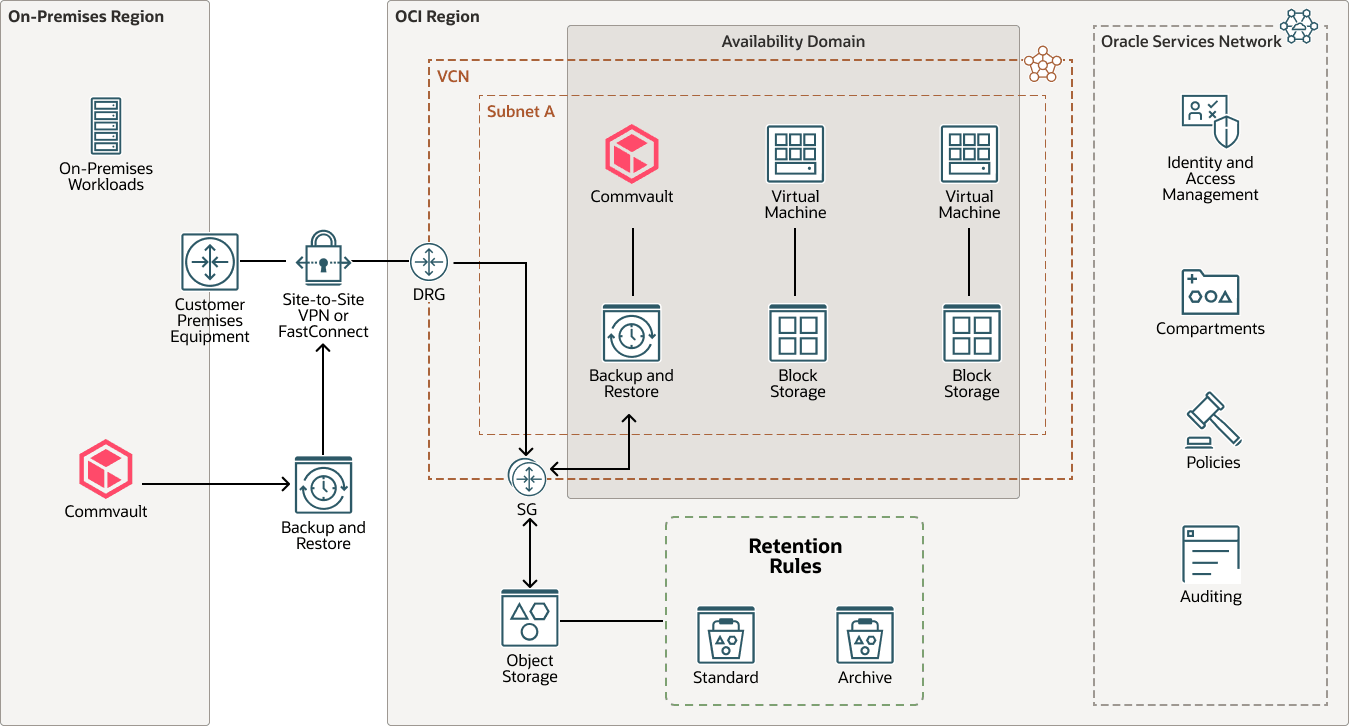
Description of the illustration hybrid-commvault-oci-fastconnect-arch.png
hybrid-commvault-oci-fastconnect-arch-oracle.zip#GUID-A01B37ED-5C0B-44E4-A532-BC6BE00C4EF6
Use the hybrid deployment model when workloads run both on premises and in OCI, and you want OCI Object Storage to be the centralized immutable backup target. The on-premises environment sends backup copies to OCI through OCI FastConnect or OCI Site-to-Site VPN. The dynamic routing gateway (DRG) and service gateway (SG) keep data traffic on private paths.
For workloads running in OCI, deploy a Commvault access node with the MediaAgent component. The access node provides the proxy functionality required to protect OCI virtual machines, while the MediaAgent moves backup data to OCI Object Storage. Keeping these components close to the protected OCI workloads helps avoid unnecessary data movement across the connection between the on-premises environment and OCI.
Cloud-Only Deployment Model
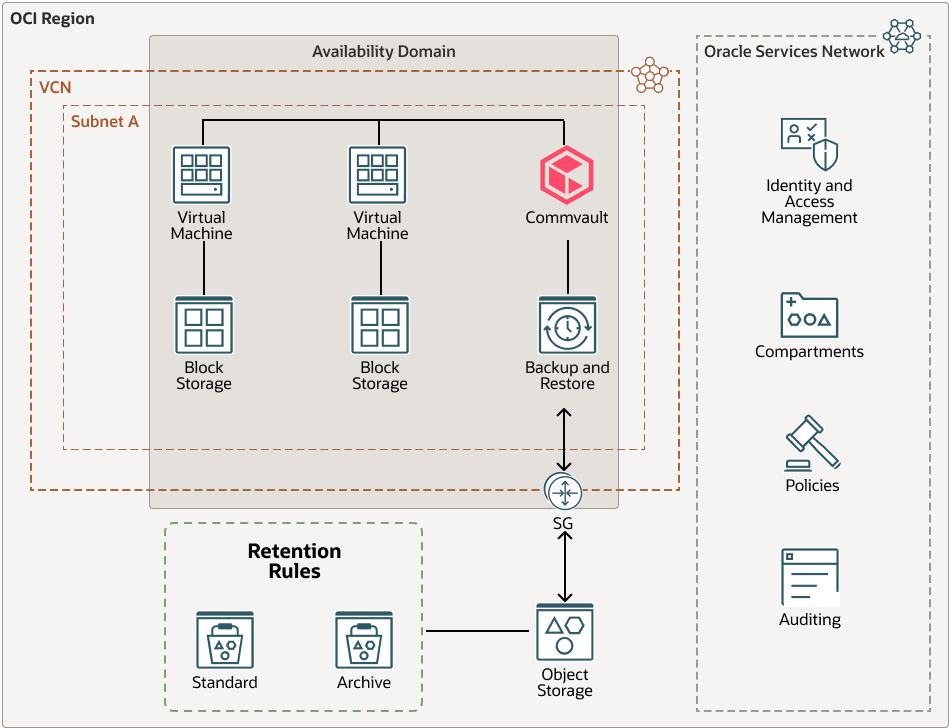
Description of the illustration cloud-commvault-oci-deployment-arch.png
cloud-commvault-oci-deployment-arch-oracle.zip#GUID-133F5569-9DA5-46D4-9D34-511A0F89AD8C
Use the cloud-only deployment model when the protected workloads and Commvault infrastructure run only in OCI. Use this model for cloud-native or migrated workloads that don't require an on-premises backup path. The MediaAgent sends backups directly to OCI Object Storage through an OCI Service Gateway while keeping backup traffic on the Oracle Cloud network.
Architecture Components
This architecture has the following components:
- Commvault:
Manages backup and recovery operations. An access node with the MediaAgent component moves backup data from protected OCI workloads to OCI Object Storage.
- Availability domain
Availability domains are standalone, independent data centers within a region. The physical resources in each availability domain are isolated from the resources in the other availability domains, which provides fault tolerance. Availability domains don’t share infrastructure such as power or cooling, or the internal availability domain network. So, a failure at one availability domain shouldn't affect the other availability domains in the region.
- Compartment
Compartments are cross-regional logical partitions within an OCI tenancy. Use compartments to organize, control access, and set usage quotas for your Oracle Cloud resources. In a given compartment, you define policies that control access and set privileges for resources.
- Dynamic routing gateway
(DRG)
The DRG is a virtual router that provides a path for private network traffic between VCNs in the same region, between a VCN and a network outside the region, such as a VCN in another OCI region, an on-premises network, or a network in another cloud provider.
- OCI FastConnect
Oracle Cloud Infrastructure FastConnect creates a dedicated, private connection between your data center and OCI. FastConnect provides higher-bandwidth options and a more reliable networking experience when compared with internet-based connections.
- On-premises network
This is a local network used by your organization.
- OCI region
An OCI region is a localized geographic area that contains one or more data centers, hosting availability domains. Regions are independent of other regions, and vast distances can separate them (across countries or even continents).
- Service
gateway
A service gateway provides access from a VCN to other services, such as Oracle Cloud Infrastructure Object Storage. The traffic from the VCN to the Oracle service travels over the Oracle network fabric and does not traverse the internet.
- OCI Site-to-Site VPN
OCI Site-to-Site VPN provides IPSec VPN connectivity between your on-premises network and VCNs on OCI. The IPSec protocol suite encrypts IP traffic before the packets are transferred from the source to the destination and decrypts the traffic when it arrives.
- OCI virtual cloud
network and subnet
A virtual cloud network (VCN) is a customizable, software-defined network that you set up in an OCI region. Like traditional data center networks, VCNs give you control over your network environment. A VCN can have multiple non-overlapping classless inter-domain routing (CIDR) blocks that you can change after you create the VCN. You can segment a VCN into subnets, which can be scoped to a region or to an availability domain. Each subnet consists of a contiguous range of addresses that don't overlap with the other subnets in the VCN. You can change the size of a subnet after creation. A subnet can be public or private.
- OCI Block Volumes
With Oracle Cloud Infrastructure Block Volumes, you can create, attach, connect, and move storage volumes, and change volume performance to meet your storage, performance, and application requirements. After you attach and connect a volume to an instance, you can use the volume like a regular hard drive. You can also disconnect a volume and attach it to another instance without losing data.
- OCI Compute
With Oracle Cloud Infrastructure Compute, you can provision and manage compute hosts in the cloud. You can launch compute instances with shapes that meet your resource requirements for CPU, memory, network bandwidth, and storage. After creating a compute instance, you can access it securely, restart it, attach and detach volumes, and terminate it when you no longer need it.
- OCI Object Storage
OCI Object Storage provides access to large amounts of structured and unstructured data of any content type, including database backups, analytic data, and rich content such as images and videos. You can safely and securely store data directly from applications or from within the cloud platform. You can scale storage without experiencing any degradation in performance or service reliability.
Use standard storage for "hot" storage that you need to access quickly, immediately, and frequently. Use archive storage for "cold" storage that you retain for long periods of time and seldom or rarely access.
Recommendations
Network
Design network connectivity according to backup throughput and recovery requirements.
- Use OCI FastConnect for high-volume backup traffic or predictable network performance.
- Use OCI Site-to-Site VPN when bandwidth and latency requirements are lower.
- For OCI-based deployments, use OCI Service Gateway and appropriate route tables to keep OCI Object Storage traffic on the Oracle Cloud network.
Object Storage
Configure OCI Object Storage to align backup retention, recovery objectives, and storage costs.
- Create dedicated buckets for workloads that require the same retention period.
- Select the Standard, Infrequent Access, or Archive tier based on your recovery objectives and cost requirements.
- When using the Archive tier, evaluate recovery time objectives (RTO), restore workflows, and retrieval costs before using it for critical backup copies.
Security
Protect backup repositories by restricting network exposure and administrative privileges.
- Disable public access to backup buckets.
- Apply the principle of least privilege to IAM policies.
- Create a dedicated identity for Commvault and restrict its permissions to the required compartments and buckets.
- Separate backup administration from OCI Object Storage administration.
Retention Rules
OCI Object Storage implements immutability by using bucket-level retention rules. When WORM Storage Lock is enabled from the Command Center on an OCI Object Storage target, Commvault automatically configures the corresponding retention rule on the bucket.
- Validate the retention configuration in a nonproduction environment before locking the rule.
- Locking a retention rule is irreversible.
- A mandatory 14-day waiting period applies before the lock becomes effective.
- After the rule is locked, the retention period can only be increased.
- Removing a locked retention rule requires deleting the bucket after all objects have expired and the bucket is empty.
Encryption and monitoring
Protect backup data and monitor storage operations.
- Data stored in OCI Object Storage is encrypted by default.
- When customer-managed encryption is required, use OCI Vault.
Considerations
Performance
- Size network connectivity, the MediaAgent, and backup windows according to the protected data volume.
- Validate backup and restore throughput by using representative workloads before production deployment.
Availability
- OCI Object Storage is a regional service.
- For disaster recovery requirements, evaluate cross-region replication or independent backup copies.
- Consider the impact of retention rules on replication and recovery operations.
Cost
- Evaluate storage capacity, API requests, and data retrieval costs.
- If using the Archive tier, consider restoration costs and recovery times.
- Objects protected by retention rules can't be deleted before the configured retention period expires.
Operations
- Plan storage capacity growth before enabling immutable retention.
- Monitor bucket utilization, backup growth, and overlapping retention periods.
- Retained objects remain protected until the configured retention period expires.
Security
- Immutability complements but doesn't replace identity and access controls.
- Protect API credentials and use MFA where applicable.
- Apply least-privilege IAM policies.
- Separate backup administration from OCI Object Storage administration.
Compliance
- Define retention periods according to regulatory and business requirements.
- Validate retention policies before locking bucket retention rules.
- After a retention rule is locked, the retention period can only be increased.