Integrate Oracle Fusion Cloud Applications audit events with SIEM platforms
Oracle Fusion Cloud Applications generate rich audit events that can support security monitoring, compliance reporting, governance reviews, and security investigations. However, the challenge is not only extracting audit records from Fusion Applications, but also delivering them reliably into downstream monitoring, archival, and analytics platforms without creating tightly coupled integrations.
This architecture demonstrates how Oracle Cloud Infrastructure Streaming serves as the central event backbone for integrating Fusion Applications audit data with security information and event management (SIEM) platforms such as Splunk, while also supporting archival and additional downstream consumers. A single OCI Streaming stream can simultaneously support multiple independent consumers, including SIEM integrations, analytics platforms, and OCI Object Storage archival pipelines.
Functional Architecture
The following diagram illustrates this functional architecture.
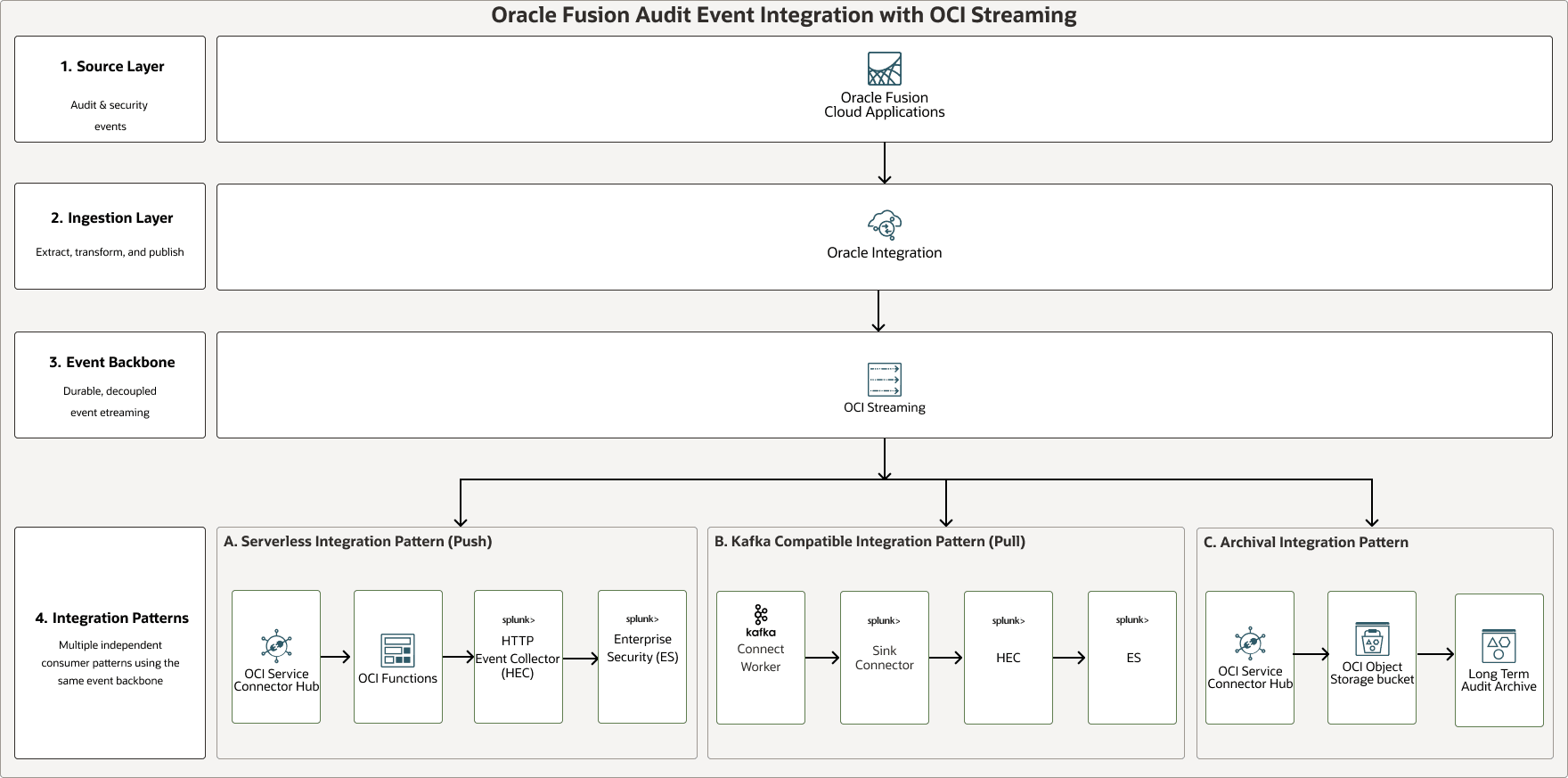
Description of the illustration integrate-fusion-cloud-audit-siem-platform.png
integrate-fusion-cloud-audit-siem-platform-oracle.zip#GUID-0AAB6818-A850-45E9-93D8-B87C2D20FCD3
Fusion Applications generate audit and security events, while Oracle Integration extracts, transforms, and publishes those events into OCI Streaming. This creates a decoupled architecture where Fusion Applications event publishing is separated from downstream archival and SIEM ingestion responsibilities.
- Event Archival: Stores audit events in an OCI Object Storage Bucket for retention, compliance, and later investigation.
- Event Push: Sends events towards Splunk using OCI Connector Hub and OCI Functions, where the Function decodes, normalizes, and forwards the payload to Splunk through the HTTP Event Collector (HEC).
- Event Pull: Supports a consumer-driven pattern where a Kafka-compatible consumer reads from OCI Streaming and uses the Splunk Sink Connector to forward events to Splunk HEC.
Overall, this design allows Fusion audit events to be published once into OCI Streaming and used for multiple purposes including long-term archival, near real-time SIEM forwarding, and scalable consumer-driven ingestion into Splunk. This improves separation of concerns, supports independent scaling, and prevents the Fusion Applications extraction process from being tightly coupled to Splunk availability or ingestion behavior.
This architecture has the following components:
- OCI Functions
Oracle Cloud Infrastructure Functions is a fully-managed, multitenant, highly scalable, on-demand, Functions-as-a-Service (FaaS) platform. It is powered by the Fn Project open source engine. OCI Functions enables you to deploy your code, and either call it directly or trigger it in response to events. OCI Functions uses Docker containers hosted in Oracle Cloud Infrastructure Registry.
- Oracle Integration for SaaS
Oracle Integration is a fully-managed, preconfigured environment that allows you to integrate cloud and on-premises applications, automate business processes, and develop visual applications. It uses an SFTP-compliant file server to store and retrieve files and allows you to exchange documents with business-to-business trading partners by using a portfolio of hundreds of adapters and recipes to connect with Oracle and third-party applications.
Oracle Integration for SaaS, a streamlined version of Oracle Integration, gives you the features and benefits of Oracle Integration with a focus on SaaS.
- Kafka Streams
Kafka Streams is a client library for building applications and microservices, where the input and output data are stored in Kafka clusters. It combines the simplicity of writing and deploying standard Java and Scala applications on the client side with the benefits of Kafka's server-side cluster technology.
- OCI Object Storage
OCI Object Storage provides access to large amounts of structured and unstructured data of any content type, including database backups, analytic data, and rich content such as images and videos. You can safely and securely store data directly from applications or from within the cloud platform. You can scale storage without experiencing any degradation in performance or service reliability.
Use standard storage for "hot" storage that you need to access quickly, immediately, and frequently. Use archive storage for "cold" storage that you retain for long periods of time and seldom or rarely access.
- OCI Streaming
Oracle Cloud Infrastructure Streaming provides a fully-managed, scalable, and durable storage solution for ingesting continuous, high-volume streams of data that you can access and process in real time. You can use OCI Streaming for ingesting high-volume data, such as application logs, operational telemetry, web click-stream data; or for other use cases where data is produced and processed continually and sequentially in a publish-subscribe messaging model.
- OCI Connector Hub
Oracle Cloud Infrastructure Connector Hub is a message bus platform that orchestrates data movement between services on OCI. You can use connectors to move data from a source service to a target service. Connectors also enable you to optionally specify a task (such as a function) to perform on the data before it is delivered to the target service.
You can use OCI Connector Hub to quickly build a logging aggregation framework for security information and event management (SIEM) systems.
Recommendations
Your requirements might differ.
Oracle Integration
- Use Oracle Integration as the orchestration layer for Fusion Applications audit extraction, transformation, and publication to OCI Streaming. Keep the integration loosely coupled from downstream SIEM or archival systems so changes to Splunk, Kafka Connect, or OCI Object Storage pipelines don't require changes to the Fusion Applications extraction flow.
- Use scheduled integrations for incremental audit extraction. Implement incremental extraction patterns using checkpoints or equivalent state-tracking mechanisms. Store and advance a checkpoint, such as the last successful audit end date, after every successful run. This helps prevent gaps in audit collection while reducing duplicate processing of already-extracted audit records.
- Externalize configuration values such as product, business object type, audit interval, run mode, stream name, and Fusion Applications API endpoint. Don't hard code these values in the integration flow so you can reuse the same integration pattern for Human Capital Management (HCM), Enterprise Resource Planning (ERP), Supply Chain Management (SCM), and other Fusion Applications audit event types.
- Configure fault handling in Oracle Integration. Capture failed API calls, transformation errors, and publish failures separately so that failed audit windows can be replayed without manually reprocessing the entire audit history.
OCI Streaming
OCI Streaming serves as the durable event backbone for the architecture, decoupling Fusion Applications audit extraction from downstream consumers. OCI Streaming provides a Kafka-compatible interface, allowing existing Kafka ecosystem components, such as Kafka Connect, to consume events directly without requiring a self-managed Apache Kafka cluster. This enables organizations to reuse existing Kafka-based integrations while benefiting from a fully managed OCI Streaming service. Audit events published to the stream can be consumed independently by serverless integrations, Kafka-compatible consumers, and archival pipelines, providing replay capability, consumer isolation, scalable event distribution, and support for future integrations and long-term retention.
- Choose the stream partition count carefully before creating the stream. Consider expected throughput, partition key strategy, and how consumers read the stream before stream creation.
- Select an appropriate partition key strategy for audit events. For example, use a stable key such as source application, product, business object type, or tenant identifier when ordering is required within that logical group. Avoid using a single static key for all messages because it can concentrate traffic on one partition.
- Set stream retention based on the operational replay requirement. OCI Streaming retention and partition limits are creation-time design considerations. For audit pipelines, size retention to cover expected SIEM outages, maintenance windows, and reprocessing needs.
- Use separate streams or stream pools when isolation is required between different audit domains, environments, or sensitivity levels.
OCI Connector Hub
- Use OCI Connector Hub when you need managed movement of streaming data to downstream Oracle Cloud Infrastructure targets such as OCI Functions or OCI Object Storage. OCI Connector Hub provides a central place to define, run, and monitor data movement between OCI services.
- Create separate connectors for separate purposes. For example, use one connector from OCI Streaming to OCI Functions for SIEM forwarding, and another connector from OCI Streaming to OCI Object Storage for raw audit archival.
- Monitor OCI Connector Hub metrics and configure alarms for connector errors and messages written to targets.
OCI Functions
- Use OCI Functions primarily for transformation, normalization, enrichment, and protocol adaptation between OCI Streaming and downstream SIEM platforms. Use OCI Functions for push-based SIEM integration when you want a serverless processing layer between OCI Streaming and Splunk HEC.
- Keep OCI Functions logic focused and stateless. The function performs decoding, validation, normalization, enrichment, and forwarding and doesn't store durable state inside the function. Use streaming offsets, OCI Object Storage archival, or external metadata stores for replay and recovery requirements.
- Store Splunk HEC tokens and other sensitive configuration in OCI Vault or a secure secret-management mechanism. Don't hardcode credentials in function source code, deployment files, or logs.
- Enable function logs and include correlation fields such as stream name, partition, offset, source product, event type, and delivery status. This helps troubleshoot failures across Fusion Applications, Oracle Integration, OCI Streaming, OCI Connector Hub, functions, and Splunk.
Kafka Connect
- Use Kafka Connect when your organization already operates Kafka infrastructure and has Kafka operational expertise or an existing Kafka Connect platform.
- In production, run Kafka Connect as a managed service instead of an unmanaged shell process. Configure restart policies, centralized logging, monitoring, and alerting.
- Use secure Transport Layer Security (TLS) configuration for Splunk HEC. Don't disable SSL certificate validation in production.
- Size Kafka Connect tasks and worker infrastructure based on event volume, Splunk ingestion limits, retry behavior, and expected recovery time after downtime. Use dedicated OCI Compute instances for high-volume audit pipelines.
Splunk and SIEM Integration
- Normalize audit events before ingestion into Splunk. Include consistent fields such as source system, product, business object, event type, user, timestamp, action, object identifier, and raw payload reference. This makes events easier to search, correlate, and use in dashboards or detection.
- Use dedicated Splunk source, sourcetype, and index values for Fusion Applications audit events.
- Plan for Splunk HEC failures. Implement retry handling, timeout handling, and clear error logging. For high-assurance audit pipelines, keep raw events in OCI Streaming and OCI Object Storage so failed SIEM delivery can be replayed.
- Avoid sending unnecessary sensitive fields to the SIEM. Apply field-level filtering, masking, or tokenization where required by the organization's privacy, compliance, and data minimization policies.
OCI Object Storage Archival
- Use OCI Object Storage as the long-term system of record for raw audit events.
- Define lifecycle policies for audit archive buckets. Object Lifecycle Management can move objects to a different storage tier or delete supported resources based on lifecycle rules. Use this to align retention with regulatory, forensic, and cost requirements.
- Partition archived objects by date, source, product, and environment.
- Audit archives often contain sensitive user, role, and business-object activity, so limit access to security operations, compliance, and authorized investigation teams.
OCI Identity and Access Management ( OCI IAM) and Access Control
- Use least-privilege OCI IAM policies for every component. Use dynamic groups as a way to group compute instances and other resources as principal actors so they can make OCI API calls. Use dynamic groups and policies for functions, compute-based Kafka Connect workers, and OCI Connector Hub access where applicable.
- Use separate credentials for Fusion Applications API access, OCI Streaming access, and Splunk HEC access. Rotate credentials regularly and avoid sharing one credential across development, test, and production environments.
Monitoring and Operations
- Create end-to-end health checks across the full pipeline: Fusion Applications API extraction, Oracle Integration scheduled run status, stream publish rate, stream consumer lag, service connector delivery, function execution, Kafka Connect connector status, Splunk HEC response, and OCI Object Storage archival.
- Use OCI Logging and OCI Monitoring for operational visibility. OCI Logging provides searchable logs and log groups for organizing logs and applying OCI IAM policies. Use alarms for failed Oracle Integration runs, OCI Connector Hub errors, OCI Functions errors, Kafka Connect failures, and sudden drops in event volume.
- Track both technical and business-level metrics.
Data Governance and Compliance
- Classify Fusion Applications audit events before routing them downstream. Events can include user activity, privileged operations, role changes, Personally Identifiable Information (PII) updates, and business-object changes, so approve downstream consumers only when their authorization matches the data sensitivity.
- Define retention separately for OCI Streaming, Splunk, and OCI Object Storage. OCI Streaming retention is for short-term replay, Splunk retention is for detection and investigation, and OCI Object Storage retention is for compliance and long-term audit evidence.
Considerations
Choose an Integration Pattern
Use the following requirements to choose an integration pattern:
| Requirement | Recommended Pattern |
|---|---|
| Serverless OCI native integration | Push model |
| Existing Kafka ecosystem | Pull model |
| Lowest operational overhead | Push model |
| Existing Kafka operations team | Pull model |
| Fastest implementation | Push model |
| Enterprise Kafka standardization | Pull model |
Performance
- Size OCI Streaming partitions based on expected Fusion Applications audit event volume, peak extraction windows, and downstream consumer throughput.
- Use a stable partition key, such as Fusion Applications product, business object, or tenant identifier, when ordering is required within a logical group.
- Tune Oracle Integration schedules and batch sizes to avoid excessive Fusion Applications API calls while still meeting audit latency requirements.
- Monitor consumer lag for OCI Functions, Kafka Connect, and SIEM ingestion to detect downstream bottlenecks early.
- Keep transformation logic lightweight in Oracle Integration and OCI Functions. Use downstream analytics or SIEM tooling for complex enrichment where possible.
Security
- Use least-privilege OCI IAM policies for Oracle Integration, OCI Streaming, OCI Connector Hub, OCI Functions, OCI Object Storage, and Kafka Connect workers.
- Store Splunk HEC tokens, Fusion Applications credentials, and other secrets in OCI Vault or an approved secrets-management service. Don't hardcode secrets in integrations, functions, connector configuration, or logs.
- Restrict access to raw audit archives because Fusion Applications audit events can contain sensitive user activity, role changes, and business-object changes.
- Use Oracle Cloud Guard, Security Zones, network security groups (NSGs), and logging policies to detect misconfiguration and enforce security best practices.
Availability
- Design for replay by retaining events in OCI Streaming long enough to cover SIEM outages, maintenance windows, and downstream failures.
- Archive raw audit events to OCI Object Storage so events can be reprocessed if Splunk, Kafka Connect, or OCI Functions fail.
- Configure retry, timeout, and dead-letter handling patterns for Fusion Applications API calls, stream publishing, function delivery, and Splunk HEC ingestion.
- Deploy production resources across highly available OCI services and use regional subnets where applicable.
Cost
- Choose stream retention, partition count, OCI Object Storage retention, and Splunk ingestion volume based on actual compliance and operational requirements.
- Avoid sending unnecessary audit fields or duplicate events to Splunk.
- Use OCI Object Storage lifecycle policies to move older audit archives to lower-cost storage tiers or delete them after the required retention period.
- Monitor OCI Functions execution time, streaming throughput, Kafka Connect compute usage, and OCI Object Storage growth.
- Separate development, test, and production pipelines so non-production environments use smaller stream sizes, shorter retention, and lower-cost infrastructure where appropriate.
- Archive long-term audit records to OCI Object Storage and use lifecycle policies to reduce SIEM retention costs.