About Transcribing Video Knowledge with Oracle Autonomous AI Database, MCP, and Oracle AI Agent Studio
Using keyword search, context switching, and repeated question-and-answer through support channels often result in inconsistent answers.
- Ingest video transcripts and metadata into Oracle Autonomous AI Database 26ai.
- Generate vector embeddings and a vector index for semantic retrieval over transcript moments.
- Expose retrieval as a tool through the Autonomous AI Database MCP server by using certain AI Agent tools.
- Use Oracle AI Agent Studio for Fusion Applications as the supervisory agent to invoke retrieval tools and produce a grounded summary.
- Present answers in a user interface that includes timecoded playback links.
In this solution playbook, you learn how to implement a pattern that makes video knowledge discoverable and usable in context.
Workflow
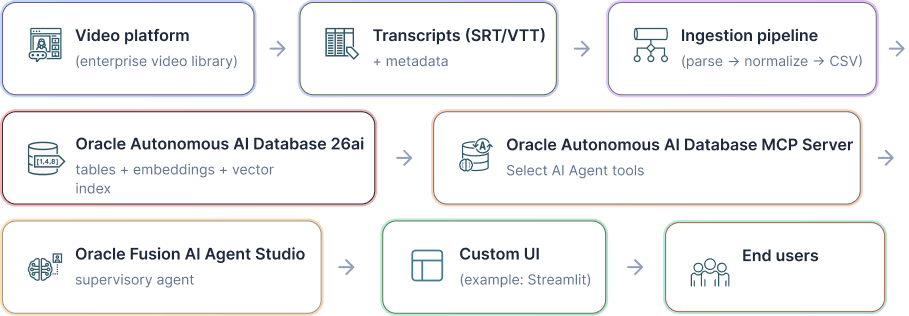
The workflow connects a video platform, transcript processing, Oracle Autonomous AI Database , the Autonomous AI Database, MCP server, Oracle AI Agent Studio, and a custom user interface.
This workflow separates a source side and an intelligence and serving side to keep content ingestion concerns distinct from retrieval and response orchestration.
The workflow has the following component responsibilities:
- Outside the OCI Region: Hosts the video platform and transcript extraction processes that prepare source assets for ingestion.
- Video platform: Serves as the enterprise video library and provides transcript files and metadata for downstream processing.
- Ingestion pipeline: Normalizes transcript formats into a consistent schema with video ID, locale, timestamps, and text, then emits load-ready CSV output.
- Inside the OCI Region: Hosts retrieval, tool exposure, orchestration, and user-serving components for semantic search and grounded responses.
- Oracle AI Agent Studio 26ai : Stores transcript snippets, generates embeddings, hosts a vector index, and runs vector similarity queries.
- Autonomous AI Database MCP server: Exposes database retrieval as callable tools for agent workflows and other clients.
- Oracle AI Agent Studio: Orchestrates tool invocation and returns a concise, grounded summary plus citations with video and timestamps.
- User interface: Displays the answer and supports playback of the relevant video at the exact timestamp.
You can adapt the template to your organizational needs. You can choose where to host the user interface, how to segment network boundaries, and how to integrate identity and access controls.
- UI choice and hosting: You can use Streamlit, Oracle AI Agent Studio, or another web frontend. Hosting location determines the authentication, session, and HTTPS controls you apply.
- Database and MCP placement: Place Autonomous AI Database 26ai and the MCP server in a VCN with private endpoints for production deployments.
- Video source placement: The source platform can be on-premises, software as a service, or OCI-resident. Use secure extraction, transfer, and staging patterns based on source location.
- Agent invocation security: Apply Oracle AI Agent Studio REST API security controls and store credentials in a secret manager instead of static configuration files.
Before You Begin
Review the following documentation:
- Oracle AI Agent Studio
- Autonomous AI Database
- Oracle Cloud Infrastructure Networking
- Oracle Cloud Infrastructure Vault
- Oracle Cloud Infrastructure Generative AI
Use the following prerequisites for this implementation:
- An OCI tenancy and a compartment to deploy Autonomous AI Database 26ai.
- Network access to Autonomous AI Database with mTLS wallet-based access for this reference implementation.
- A SQL client. SQLcl is recommended for scripted loads.
- Terraform, if you use the infrastructure-as-code path.
- Oracle AI Agent Studio access, if you use the orchestration path.
Apply Oracle AI Agent Studio least-privilege guidance.
- Use a dedicated deployment identity, either a user or dynamic group, for provisioning and automation.
- Grant only the permissions required to create and manage Autonomous AI Database resources in the target compartment.
- Grant Oracle Cloud Infrastructure Object Storage read and write access only if you store model artifacts or pipeline outputs in OCI Object Storage.
- Read secrets from your secret manager instead of embedding secrets in configuration files.
Prepare the following inputs:
- Video transcript files in SRT or VTT format and a stable video ID for each video.
- A video playback URL strategy. This implementation constructs playback URLs from
VIDEO_PARENT_IDandVIDEO_ID. - A locale strategy, for example
en-US,es-ES, orja-JP.
About Required Services and Roles
This solution requires the following services and roles:
- Oracle AI Agent Studio
- Autonomous AI Database 26ai
- OCI Networking
- OCI Vault
- Video platform or source system
- Custom UI host
- OCI Generative AI (optional)
These are the roles needed for each service.
| Service Name: Role | Required to... |
|---|---|
Oracle AI Agent Studio: AI_AGENT_ADMIN (or AGENT_STUDIO_ADMINISTRATOR_ABSTRACT) |
Create the agent, register the MCP tool, and configure the workflow that calls retrieval. |
Oracle AI Agent Studio: AI_AGENT_USER |
Invoke the published agent from the UI or an embedded experience. |
Autonomous AI Database 26ai: manage autonomous-database-family |
Provision the database, enable MCP support, and manage lifecycle operations. |
Autonomous AI Database (in-database role): ADMIN |
Create schemas, load transcript data, generate embeddings, build the vector index, and register the retrieval tool. |
Autonomous AI Database (in-database role): RAG_OWNER (custom schema) |
Own transcript tables, embeddings, metadata, and the retrieval package or functions. |
Autonomous AI Database (in-database role): MCP_USER (custom schema) |
Run only the approved retrieval tool exposed through MCP and don't grant broad SQL privileges. |
OCI Networking (recommended for production) : manage virtual-network-family |
Place Autonomous AI Database and MCP in a VCN with private endpoints, subnets, NSGs, and routing that keeps retrieval traffic private. |
OCI Vault: manage secret-family and read secret-bundles |
Store database or Oracle AI Agent Studio credentials and inject them at runtime instead of hardcoding them. |
Video platform or source system: Platform access or API credentials |
Export transcripts and metadata from the source video system for ingestion. |
Custom UI host: Application admin or deployer access |
Deploy the Streamlit, Visual Builder, or custom web UI and configure endpoint and playback settings. |
OCI Generative AI (optional): use generative-ai-family |
Generate query embeddings outside the database when the deployment doesn't use in-database embeddings. |
See Oracle Products, Solutions, and Services to get what you need.