Migrate Oracle workloads to Oracle AI Database@AWS using Oracle ZDM Logical Online
Oracle AI Database@AWS is a cloud database service that lets you access Oracle Cloud Infrastructure (OCI)-managed Exadata infrastructure inside Amazon Web Services (AWS) data centers. The service lets you migrate on-premises Oracle workloads to AWS, giving your business-critical applications low-latency connectivity to your Oracle databases. With Oracle AI Database@AWS, you also have access to Oracle Real Application Clusters (Oracle RAC) and Oracle Exadata performance for mission-critical applications in AWS. The service integrates with other AWS services, and you get a single invoice through AWS Marketplace that includes Oracle AI Database@AWS billing charges. Oracle AI Database@AWS usage counts toward AWS commitments.
Oracle Zero Downtime Migration is Oracle's premier solution for a simplified and automated migration experience, providing zero to negligible downtime for the production system depending on the migration scenario. Oracle ZDM allows you to migrate your on-premises Oracle AI Database databases directly and seamlessly to and between Oracle AI Database@Azure, Oracle AI Database@Google Cloud, Oracle AI Database@AWS, and Oracle-owned infrastructure, including Oracle Exadata Database Machine on premises, Oracle Exadata Cloud@Customer, and OCI. Oracle ZDM supports a wide range of Oracle AI Database versions and ensures minimal to no production database impact during the migration.
This reference architecture discusses the architecture defined for migrating from Oracle Database to Oracle AI Database@AWS, Oracle Autonomous AI Database on Dedicated Exadata Infrastructure, or Oracle Exadata Database Service on Dedicated Infrastructure using the Oracle ZDM Logical Online method, which leverages Data Pump for data export and import and uses Amazon Simple Storage Service (Amazon S3) to store the Data Pump dump files. Additionally, it uses Oracle GoldenGate to keep the source and target databases in sync and achieve minimal downtime migration.
Architecture
The architecture keeps the source Oracle AI Database instance operational while synchronizing data to the Oracle AI Database@AWS environment, orchestrated by a Oracle ZDM service host.
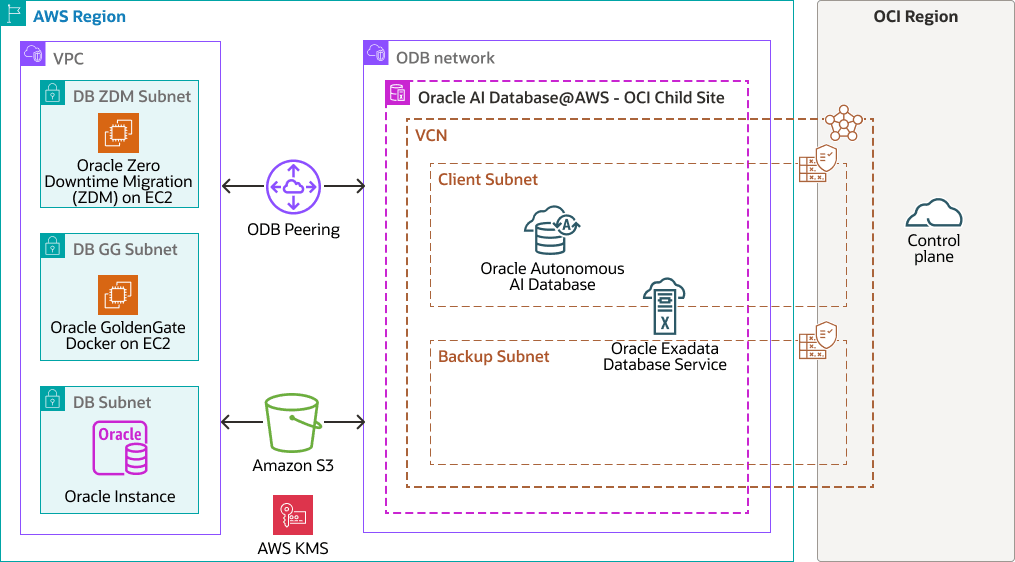
migrate-oracle-zdm-dbataws-arch-oracle.zip#GUID-73055D9C-4807-4B52-871E-CA093AE75374
Core components involved in this migration:
- Source: Oracle AI Database (single instance or multi-availability zone).
- Target: Oracle AI Database@AWS, Oracle Autonomous AI Database on Dedicated Exadata Infrastructure, or Oracle Exadata Database Service on Dedicated Infrastructure.
- Orchestration: Oracle ZDM service host (running on Amazon Elastic Compute Cloud).
- Data transfer: Amazon S3 bucket (stores Data Pump export dumps).
- Replication engine: Oracle GoldenGate (running on an Amazon EC2 instance, typically in a hub configuration) to capture and apply real-time changes.
This architecture supports the following AWS components:
- AWS region
AWS regions are separate geographic areas. They consist of multiple, physically separated, and isolated availability zones that are connected with low latency, high throughput, highly redundant networking.
- AWS availability zone
Availability zones are highly available data centers within each AWS region.
- Amazon virtual private cloud and subnet
Amazon virtual private cloud (VPC) enables you to launch AWS resources into a virtual network you've defined. This virtual network resembles a traditional network that you operate in your own data center, with the benefits of using the scalable infrastructure of AWS. After you create an VPC, you can add subnets.
A subnet is a range of IP addresses in your Amazon VPC. You can create AWS resources, such as Amazon EC2 instances, in specific subnets.
- Amazon Simple Storage Service (Amazon
S3)
Amazon Simple Storage Service (Amazon S3) (S3) is a cloud-based object storage service. Amazon S3 provides a scalable, secure, and durable platform for storing data. Amazon S3 can be used for managed backups.
- ODB network
An ODB network is a private network that hosts Oracle AI Database@AWS in a specified availability zone. You can set up an ODB peering connection between an ODB network and a VPC to connect to your Oracle databases.
This architecture supports the following OCI components:
- OCI Vault
Oracle Cloud Infrastructure Vault enables you to create and centrally manage the encryption keys that protect your data and the secret credentials that you use to secure access to your resources in the cloud. The default key management is Oracle-managed keys. You can also use customer-managed keys which use OCI Vault. OCI Vault offers a rich set of REST APIs to manage vaults and keys.
- OCI Object Storage
OCI Object Storage provides access to large amounts of structured and unstructured data of any content type, including database backups, analytic data, and rich content such as images and videos. You can safely and securely store data directly from applications or from within the cloud platform. You can scale storage without experiencing any degradation in performance or service reliability.
Use standard storage for "hot" storage that you need to access quickly, immediately, and frequently. Use archive storage for "cold" storage that you retain for long periods of time and seldom or rarely access.
- Network security group
(NSG)
NSGs act as virtual firewalls for your cloud resources. With the zero-trust security model of OCI you control the network traffic inside a VCN. An NSG consists of a set of ingress and egress security rules that apply to only a specified set of virtual network interface cards (VNICs) in a single VCN.
- OCI virtual cloud
network and subnet
A virtual cloud network (VCN) is a customizable, software-defined network that you set up in an OCI region. Like traditional data center networks, VCNs give you control over your network environment. A VCN can have multiple non-overlapping classless inter-domain routing (CIDR) blocks that you can change after you create the VCN. You can segment a VCN into subnets, which can be scoped to a region or to an availability domain. Each subnet consists of a contiguous range of addresses that don't overlap with the other subnets in the VCN. You can change the size of a subnet after creation. A subnet can be public or private.
- OCI region
An OCI region is a localized geographic area that contains one or more data centers, hosting availability domains. Regions are independent of other regions, and vast distances can separate them (across countries or even continents).
- Oracle Database Autonomous Recovery
Service
Oracle Database Autonomous Recovery Service is a fully managed service designed to protect Oracle AI Databases from data loss and cyber threats. It offers faster backups with reduced database overhead, reliable recovery with validated backups, and real-time protection enabling recovery to within less than a second of an outage or ransomware attack. This service provides a centralized data protection dashboard and is recommended for backing up Oracle AI Databases with high resiliency.
- Oracle Autonomous AI Database on Dedicated Exadata
Infrastructure
Oracle Autonomous AI Database on Dedicated Exadata Infrastructure is a fully-managed, preconfigured database environment that you can use for transaction processing and data warehousing workloads. OCI handles creating, backing up, patching, upgrading, and tuning the database.
- Oracle Exadata Database Service on Dedicated
Infrastructure
Oracle Exadata Database Service on Dedicated Infrastructure enables you to leverage the power of Exadata in the cloud. Oracle Exadata Database Service delivers proven Oracle AI Database capabilities on purpose-built, optimized Oracle Exadata infrastructure in the public cloud. Built-in cloud automation, elastic resource scaling, security, and fast performance for all Oracle AI Database workloads helps you simplify management and reduce costs.
Migrate
Prerequisites
Before starting the migration, complete the following prerequisites:
- Deploy the target environment: Provision Oracle AI Database@AWS and the required target database service - Oracle Autonomous AI Database on Dedicated Exadata Infrastructure or Oracle Exadata Database Service on Dedicated Infrastructure. Confirm the target database version, character set, options, schemas, tablespaces, users, roles, and application dependencies are compatible with the source Oracle AI Database.
- Establish private connectivity: Create the Amazon virtual private cloud, ODB network, and ODB peering connection. Ensure that non-overlapping CIDR ranges, routing, DNS resolution, and security rules allow communication among the source Oracle AI Database host, the Oracle ZDM host, the Oracle GoldenGate hub, Amazon S3, and the Oracle AI Database@AWS target.
- Deploy Oracle ZDM and Oracle GoldenGate: Install the supported Oracle ZDM release on a dedicated Amazon Elastic Compute Cloud Linux host. Deploy a supported Oracle GoldenGate hub or container on EC2 with private connectivity to both source and target databases.
- Prepare the source Oracle AI
Database: Enable Amazon S3 integration, supplemental logging, force logging, and
ENABLE_GOLDENGATE_REPLICATION. Create and validate the required Data Pump and Oracle GoldenGate administrative users and privileges. Ensure that archive log retention is sufficient to cover the full export, import, and Oracle GoldenGate catch-up period. - Prepare Amazon S3: Use an S3 bucket in the same AWS Region as the source database instance. Configure least-privilege IAM access, encryption at rest, access logging, lifecycle policies, and a dedicated migration prefix for Data Pump dump files.
- Size the migration components: Size the Oracle ZDM host and Oracle GoldenGate hub for concurrent database connections, Extract and Replicat processing, and expected transaction volume. Size Oracle GoldenGate trail storage for peak change rate, planned migration duration, and recovery margin. Size Amazon S3 for the complete Data Pump export, logs, and retained rollback artifacts. Confirm ExaDB-D or ADB-D compute, storage, and service limits before provisioning.
Logical Online Migration Phases
Logical Online migration phases using Oracle ZDM, Oracle GoldenGate, Amazon S3, and Data Pump are as follows:
- Install the Oracle ZDM service host on a separate Linux host (Amazon Elastic Compute Cloud). Configure the response file with source and target connection strings (Oracle Autonomous AI Database on Dedicated Exadata Infrastructure/Oracle Exadata Database Service on Dedicated Infrastructure), Amazon S3 bucket credentials, and Oracle GoldenGate hub details. Initialize Oracle ZDM to manage the migration lifecycle.
- Start the migration in Oracle
ZDM to run automated fleet readiness checks, including network connectivity between the Oracle
ZDM host, Amazon S3, source database host, and the target database and validating that the source user has the required
DATAPUMP_EXP_FULL_DATABASEprivileges. - Configure an Oracle GoldenGate Extract microservice to capture real-time DML and DDL from the source Oracle AI Database into trail files. Oracle ZDM connects to the Oracle GoldenGate hub and creates the Change Data Capture (CDC) Extract process. The Extract attaches to the source Oracle AI Database instance through the Oracle GoldenGate process and stores changes in local trail files to be processed after the initial load.
- Start a
DBMS_DATAPUMPexport on the source Oracle AI Database and write dump files directly to the specified Amazon S3 bucket using Amazon S3 integration. This phase creates a point-in-time snapshot of the source schema and data. - Import the Data Pump dumps into the target database on Oracle AI Database@AWS. For Oracle Exadata Database Service on Dedicated Infrastructure, copy the dump files to the VM cluster shared mount before importing them into the database. During this step, Oracle ZDM manages the creation of schemas, tables, indexes, and constraints on the target.
- After the Data Pump import is complete, configure and start a Oracle GoldenGate Replicat microservice on the Oracle GoldenGate hub to read the trail files captured since phase 3 and apply changes to the target, resolving the data gap created during the export and import phase.
- Monitor Oracle GoldenGate replication lag, the time difference between transactions occurring on the source and being applied to the target, until it is near zero to ensure the target is a real-time replica.
- Cut over to the target database after minimizing lag:
- Briefly stop application traffic to the source Oracle AI Database.
- Ensure all remaining transactions in the source database logs are captured and applied to the target.
- Validate full synchronization between source and target.
- Update the target to be primary for application connections.
- Finalize the migration in Oracle Zero Downtime Migration by removing Extract and Replicat configurations, cleaning up temporary trail files on the Oracle GoldenGate hub, and optionally deleting Amazon S3 dump files. The migration is then marked as Succeeded in the Oracle ZDM console.
Considerations
Key network, limit, integration, and access prerequisites when deploying this reference architecture to Oracle AI Database@AWS.
Consider the following points when deploying this reference architecture:
-
Network: Plan your network connectivity in advance to define your network address space (CIDR) and topologies. You need at least one Amazon virtual private cloud (VPC) to peer with the ODB network. The CIDR blocks must not overlap with any Amazon VPC subnet, OCI VCN, or any database clients.
-
Service limits: Before provisioning, review the OCI service limits to ensure that they meet your needs. Oracle AI Database@AWS has a default limit of two database servers and three storage servers. If you require additional capacity, raise a service limit increase request.
-
Amazon S3 integration: Ensure Amazon S3 integration is enabled for the ODB network that is attached to the Oracle Exadata Database Service on Dedicated Infrastructure VM cluster, so the VM cluster can read dump files from the Amazon S3 bucket.
-
AWS access key: An AWS access key is required to read files from the Amazon S3 bucket. Create a standalone AWS user for this purpose and use that user's access key and secret key during the migration.
Monitor
- OCI Monitoring and Alarms: Use OCI Monitoring to view ExaDB-D VM-cluster and database metrics such as CPU, memory, storage/ASM utilization, I/O, database sessions, and availability. Configure alarms and notifications for threshold breaches and migration-impact conditions.
- OCI Database Management (Diagnostics & Management): Enable it for the ExaDB-D target to monitor database health, configuration, performance, SQL activity, connections, and transactions. Use Performance Hub and AWR Explorer to diagnose target database performance before and after cutover.
- OCI Logging and OCI Audit: Use OCI Logging for service logs, including VCN Flow Logs, and OCI Audit for administrative/API activity. These help diagnose connectivity, access, and configuration changes affecting the Database@AWS environment.
- Oracle Log Analytics: Centralize and correlate database-adjacent, network, and service logs; use dashboards, trend analysis, anomaly detection, and root-cause investigation for migration incidents.
- OCI Ops Insights: Use capacity planning, resource-utilization trends, SQL-performance analysis, and AWR-based insights to establish a target baseline and forecast post-migration demand.
- OCI Management Dashboards: Create a single operational dashboard combining Oracle ZDM status, Oracle GoldenGate lag, Data Pump progress, ExaDB-D metrics, alarms, and application validation signals.
- AWS-native monitoring integration: Use Amazon CloudWatch, EventBridge, and CloudTrail alongside OCI tooling for AWS-side infrastructure, events, and audit visibility.
Realize Value Beyond Migration
This architecture provides more than a low-downtime migration path:
- Reduced business disruption: Oracle Data Pump provides the initial load while Oracle GoldenGate continuously captures and applies changes, minimizing the production outage required for application cutover.
- Controlled and repeatable execution: Oracle ZDM standardizes readiness checks, orchestration, phase tracking, and error handling, reducing manual migration risk.
- Modernized database platform: Oracle AI Database@AWS combines Oracle AI Database capabilities, Exadata performance, and Oracle Real Application Clusters (Oracle RAC) availability with low-latency proximity to AWS-hosted applications.
- Improved operational resilience: The target platform can be integrated with backup, recovery, monitoring, and security services to strengthen recovery readiness after migration.
- Foundation for optimization: After migration, teams can right-size databases, modernize application connectivity, consolidate operational practices, improve performance, and adopt additional Oracle AI Database@AWS capabilities.
- Reusable migration factory: The Oracle ZDM host, Oracle GoldenGate patterns, monitoring dashboards, validation scripts, and cutover runbooks can be reused for subsequent Oracle AI Database-to-Oracle AI Database@AWS migrations.
Explore More
Curated resources to learn more about Oracle AI Database@AWS services and migration options.
Learn more about Oracle AI Database@AWS:
- Oracle Database@AWS documentation (Oracle)
- Oracle Database@AWS documentation (AWS)
- Provision Oracle Exadata Database Service on Dedicated Infrastructure in Oracle AI Database@AWS Tutorial
- Get started with Oracle Autonomous AI Database on Dedicated Exadata Infrastructure on Oracle AI Database@AWS Tutorial
- ODB Peering Connection
Migration to Oracle AI Database@AWS:
- Video: Migrate Oracle Databases to Oracle Exadata Database Service on Dedicated Infrastructure on Oracle AI Database@AWS (6:05)
- Physical online migration to Oracle Exadata Database Service on Dedicated Infrastructure on Oracle AI Database@AWS
- Physical offline migration to Oracle Exadata Database Service on Dedicated Infrastructure on Oracle AI Database@AWS
- Logical online migration to Oracle Exadata Database Service on Dedicated Infrastructure on Oracle AI Database@AWS
- Logical offline migration to Oracle Exadata Database Service on Dedicated Infrastructure on Oracle AI Database@AWS
- Logical online migration to Oracle Autonomous AI Database on Dedicated Exadata Infrastructure on Oracle AI Database@AWS
- Logical offline migration to Oracle Autonomous AI Database on Dedicated Exadata Infrastructure on Oracle AI Database@AWS