Filter by Logical Group
Filter screens by a logical group to focus data on a screen to just the drives and media included in that group.
Use the "Contains" and "Doesn't Contain" operators rather than "Is" and "Isn't" because drives and media can belong to more than one logical group at a time. The "Is" and "Isn't" operators require an exclusive match and therefore may select no records at all when the drives or media belong to multiple groups.
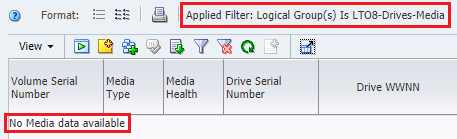
Example of using the "Is" operator when filtering by logical group
On the Media – Overview screen, using the filter "Logical Group(s) Is LTO8-Drives-Media" selects no records because all the drives and media in the group also belong to at least one other group.
The "Is" operator selects only drives and media that belong exclusively to the specified logical groups. If the drives and media belong to any other groups as well, they are not selected by the filter.

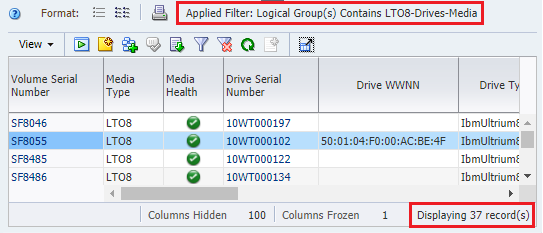
Example of using the "Contains" Operator when Filtering by Logical Group
Using the filter operator "Contains" instead of "Is" selects all media records in the logical group (this case 37). The "Contains" operator selects drives and media that belong to the specified logical groups, as well as any number of other groups.
How Changes to Logical Group Definitions Affect Filters
If a filter uses a logical group, modifications to the definition of the logical group affect the behavior of the filter.
For example, if you make the policies of a dynamic group more restricted, such as selecting only T10K cleaning media vs all T10K media. The number of results produced by the logical group filter will be reduced. If you change the name of the logical group, the filter will select no results because the old logical group name is still used in the filter. You must update the filter to use the new name.
Where Can I Use Logical Group Filtering?
You can only use logical group filtering for some screens, policies, and dashboard panes.
Filter by logical group on the following screens:
- Drives Overview and Drive Analysis
- Media Overview and Media Analysis
Use logical groups in the selection criteria for the following types of policies:
- Alert policies
- Media validation policies
Filter the following dashboard panes by logical group.
Graph Panes
- Drive Health
- Drive Utilization
- I/O Throughput
- Library Drive Bays
- Library Media Slots
- Maximum Mount Times
- Media Health
- Mounts
Table Panes
- Drives Requiring the Most Cleanings Per Meter
- Drives Watch List
- Media Watch List
- Monitored Device Trends
Report Panes
- Data Read Report
- Data Written Report
- Drives Health Report
- Media Health Report
- Monitored Device Counts