Enabling SSO (BUI)

This section describes how to configure SAML 2.0–based Single Sign-On (SSO) on the appliance using the browser user interface (BUI).

SSO configuration is performed as part of the HTTPS service. Before configuring SSO, ensure that the requirements described in SSO Configuration are met.

Configuring SSO requires the following authorization scopes on the appliance:

  • Minimal required authorizations: administer, configure, and restart services.

  • If the user is authorized to configure the HTTPS service, no additional authorization is needed to configure SSO.

  1. Log in to the BUI with administrative privileges.
  2. From the Configuration menu, select Services, then HTTPS.

    The HTTPS configuration is displayed.
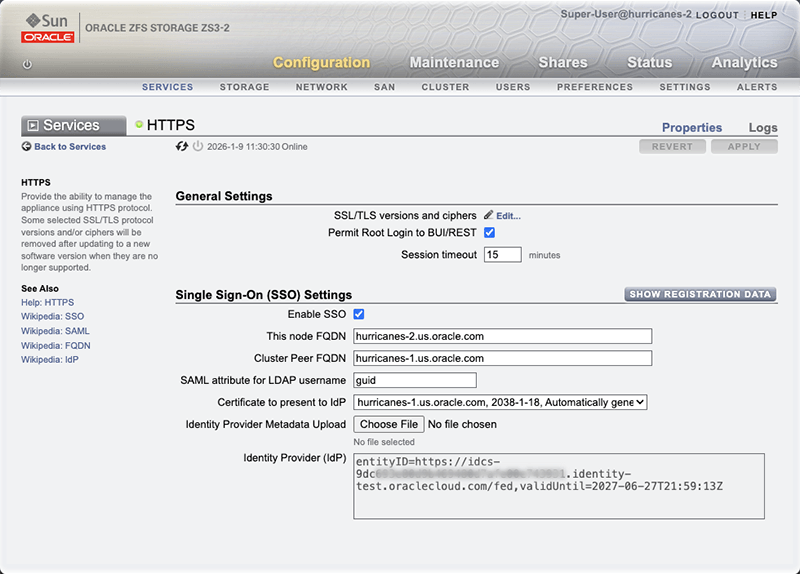

    HTTPS configuration
  3. In the Single Sign-On (SSO) section, select Enable SSO.
  4. Set the fully qualified domain name (FQDN) for the appliance.

    The identity provider (IdP) must be able to ping the appliance nodes using their FQDNs. The entity IDs required for SAML registration with the IdP are derived from the FQDNs.

    • This node fully qualified domain name (FQDN) - Specify the appliance FQDN.

    • (Cluster only) Cluster Peer FQDN - Specify the FQDN of the peer node in the cluster configuration. This field is disabled on a standalone appliance.

  5. Configure the SSO settings.
    • SAML attribute for LDAP username - Specify the SAML attribute that returns the LDAP username of the authenticated user. Oracle Identity Cloud Service (IDCS) stores the LDAP username in the "guid" SAML attribute. A different attribute might be used by other identity providers.

    • Certificate to present to IdP - Select the certificate for securing the communication between the ZFS Storage Appliance and the identity provider.

      Note:

      If you prefer to use a new TLS certificate, navigate to Configuration > Settings > Certificates to import it. Then return to this BUI window and select the new certificate from the list.

  6. Upload the IdP metadata.

    Select Choose File to upload the metadata file you downloaded from the IdP. Its entity ID and expiration data are automatically retrieved from the metadata file.

  7. Apply the configuration.
  8. View service provider registration information.

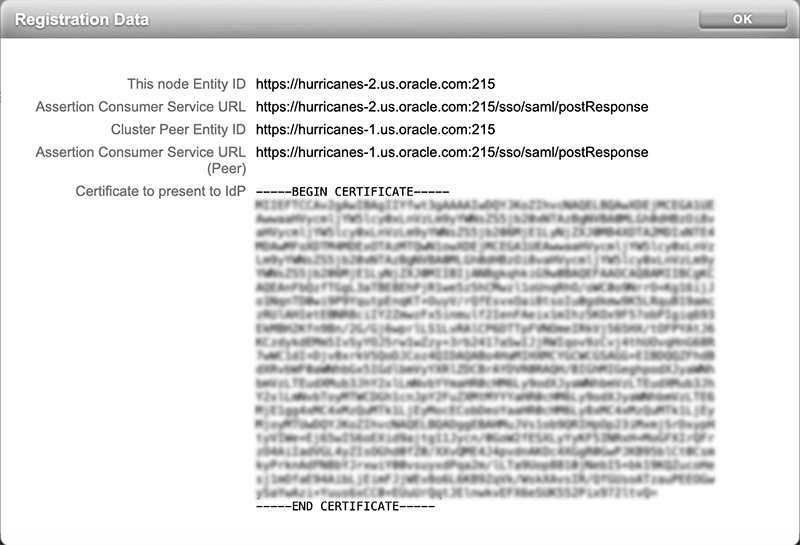
    After enabling SSO, select Show Registration Data to view the registration details provided by the appliance, including:

    • Service provider entity ID

    • Assertion Consumer Service (ACS) url

    • Service provider certificate


    Identity Provider registration details

  9. Provide this information to the IdP as required.

To disable SSO, clear the Enable SSO option and apply changes. There's no need to manually remove the configuration parameters.