Replicación de datos entre bases de datos en la nube de la misma región
Descubra cómo configurar Oracle Cloud Infrastructure GoldenGate para replicar datos entre dos bases de datos de IA autónomas.
Visión general
Oracle Cloud Infrastructure GoldenGate permite replicar bases de datos soportadas dentro de la misma región. Los siguientes pasos le guiarán a través del proceso para instanciar una base de datos de destino mediante Oracle Data Pump y replicar datos del origen en el destino.
Este inicio rápido también está disponible como LiveLab: Ver el taller
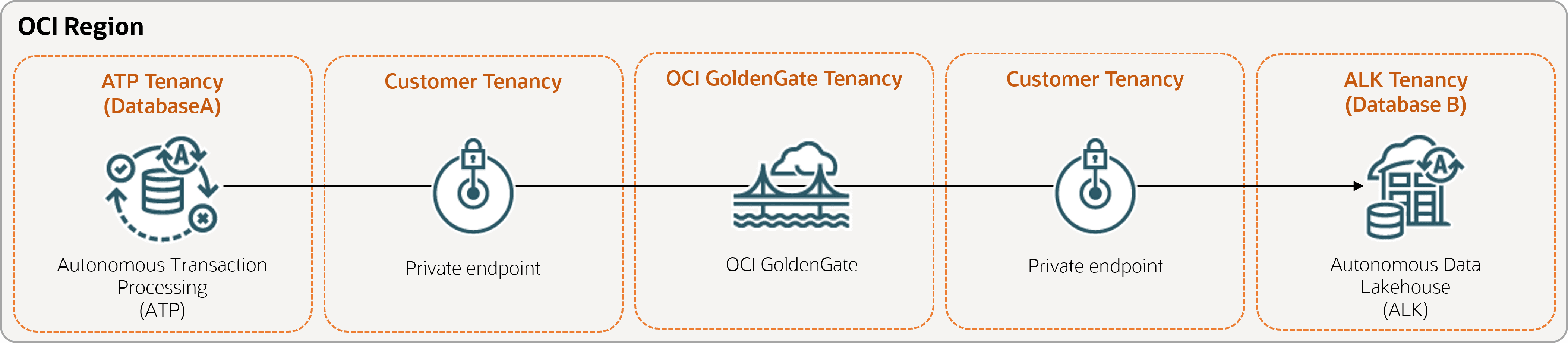
Descripción de la ilustración Same-Region.png
Antes de empezar
Para completar correctamente este inicio rápido, debe tener:
-
Una base de datos de origen existente
-
Una base de datos destino existente
-
La base de datos de origen y destino deben estar en un único arrendamiento, en la misma región
-
Si necesita datos de ejemplo, descargue Archive.zip y, a continuación, siga las instrucciones de Laboratorio 1, Tarea 3: Carga del esquema ATP.
Tarea 1: Configuración del entorno
-
Cree una conexión de origen de Oracle Autonomous AI Transaction Processing (ATP).
-
Cree una conexión de destino de Autonomous AI Lakehouse (ALK).
-
Utilice la herramienta SQL para activar el registro complementario:
ALTER DATABASE ADD SUPPLEMENTAL LOG DATA -
Ejecute la siguiente consulta en la herramienta SQL para asegurarse de que
support_mode=FULLpara todas las tablas de la base datos de origen:select * from DBA_GOLDENGATE_SUPPORT_MODE where owner = 'SRC_OCIGGLL';
Tarea 2: Creación del Extract integrado
Un Extract integrado captura los cambios en curso en la base de datos de origen.
-
En la página Detalles del despliegue, seleccione Iniciar consola.
-
Si es necesario, introduzca oggadmin para el nombre de usuario y la contraseña que ha utilizado al crear el despliegue y, a continuación, seleccione Conectar.
-
Agregar datos de transacción y una tabla de puntos de control:
-
Abra el menú, seleccione Conexiones de base de datos y, a continuación, seleccione el menú.
-
Seleccione Conectar a base de datos SourceDB.
-
En el menú de navegación, seleccione Trandata (Datos de transacción) y, a continuación, Add Trandata (icono más).
-
En Nombre de esquema, introduzca
SRC_OCIGGLLy, a continuación, seleccione Enviar. -
Para verificarlo, introduzca
SRC_OCIGGLLen el campo Buscar y seleccione Buscar. -
Abra el menú, seleccione Conexiones de base de datos y, a continuación, seleccione el menú.
-
Seleccione Conectar a base de datos TargetDB.
-
En el menú de navegación, seleccione Checkpoint (Punto de control) y, a continuación, Add Checkpoint (Agregar punto de control) (icono más).
-
En Tabla de puntos de control, introduzca
"SRCMIRROR_OCIGGLL"."CHECKTABLE"y, a continuación, seleccione Enviar.
-
-
Nota: Consulte opciones adicionales de parámetros de extracción para obtener más información sobre los parámetros que puede utilizar para especificar tablas de origen.
En la página Parámetros de extracción, agregue las siguientes líneas en
EXTTRAIL <trail-name>:-- Capture DDL operations for listed schema tables ddl include mapped -- Add step-by-step history of to the report file. Useful when troubleshooting. ddloptions report -- Write capture stats per table to the report file daily. report at 00:01 -- Rollover the report file weekly. Useful when IE runs -- without being stopped/started for long periods of time to -- keep the report files from becoming too large. reportrollover at 00:01 on Sunday -- Report total operations captured, and operations per second -- every 10 minutes. reportcount every 10 minutes, rate -- Table list for capture table SRC_OCIGGLL.*; -
Compruebe si hay transacciones de larga duración. Ejecute el siguiente script en la base de datos de origen:
select start_scn, start_time from gv$transaction where start_scn < (select max(start_scn) from dba_capture);Si la consulta devuelve alguna fila, debe buscar el SCN de la transacción y, a continuación, confirmar o realizar un rollback de la transacción.
Tarea 3: Exportación de datos mediante Oracle Data Pump (ExpDP)
Utilice Oracle Data Pump (ExpDP) para exportar datos de la base de datos de origen a Oracle Object Store.
-
Cree un bucket de Oracle Object Store.
Tome nota del espacio de nombres y del nombre del bucket para utilizarlos con los scripts de exportación e importación.
-
Cree un token de autenticación y, a continuación, copie y pegue la cadena de token en un editor de texto para su uso posterior.
-
Cree una credencial en la base de datos de origen, sustituyendo
<user-name>y<token>por su nombre de usuario de cuenta de Oracle Cloud y la cadena de token que ha creado en el paso anterior:BEGIN DBMS_CLOUD.CREATE_CREDENTIAL( credential_name => 'ADB_OBJECTSTORE', username => '<user-name>', password => '<token>' ); END; -
Ejecute el siguiente script en la base de datos de origen para crear el trabajo Exportar datos. Asegúrese de sustituir
<region>,<namespace>y<bucket-name>en el URI de Object Store según corresponda.SRC_OCIGGLL.dmpes un archivo que se creará cuando se ejecute este script.DECLARE ind NUMBER; -- Loop index h1 NUMBER; -- Data Pump job handle percent_done NUMBER; -- Percentage of job complete job_state VARCHAR2(30); -- To keep track of job state le ku$_LogEntry; -- For WIP and error messages js ku$_JobStatus; -- The job status from get_status jd ku$_JobDesc; -- The job description from get_status sts ku$_Status; -- The status object returned by get_status BEGIN -- Create a (user-named) Data Pump job to do a schema export. h1 := DBMS_DATAPUMP.OPEN('EXPORT','SCHEMA',NULL,'SRC_OCIGGLL_EXPORT','LATEST'); -- Specify a single dump file for the job (using the handle just returned) -- and a directory object, which must already be defined and accessible -- to the user running this procedure. DBMS_DATAPUMP.ADD_FILE(h1,'https://objectstorage.<region>.oraclecloud.com/n/<namespace>/b/<bucket-name>/o/SRC_OCIGGLL.dmp','ADB_OBJECTSTORE','100MB',DBMS_DATAPUMP.KU$_FILE_TYPE_URIDUMP_FILE,1); -- A metadata filter is used to specify the schema that will be exported. DBMS_DATAPUMP.METADATA_FILTER(h1,'SCHEMA_EXPR','IN (''SRC_OCIGGLL'')'); -- Start the job. An exception will be generated if something is not set up properly. DBMS_DATAPUMP.START_JOB(h1); -- The export job should now be running. In the following loop, the job -- is monitored until it completes. In the meantime, progress information is displayed. percent_done := 0; job_state := 'UNDEFINED'; while (job_state != 'COMPLETED') and (job_state != 'STOPPED') loop dbms_datapump.get_status(h1,dbms_datapump.ku$_status_job_error + dbms_datapump.ku$_status_job_status + dbms_datapump.ku$_status_wip,-1,job_state,sts); js := sts.job_status; -- If the percentage done changed, display the new value. if js.percent_done != percent_done then dbms_output.put_line('*** Job percent done = ' \|\| to_char(js.percent_done)); percent_done := js.percent_done; end if; -- If any work-in-progress (WIP) or error messages were received for the job, display them. if (bitand(sts.mask,dbms_datapump.ku$_status_wip) != 0) then le := sts.wip; else if (bitand(sts.mask,dbms_datapump.ku$_status_job_error) != 0) then le := sts.error; else le := null; end if; end if; if le is not null then ind := le.FIRST; while ind is not null loop dbms_output.put_line(le(ind).LogText); ind := le.NEXT(ind); end loop; end if; end loop; -- Indicate that the job finished and detach from it. dbms_output.put_line('Job has completed'); dbms_output.put_line('Final job state = ' \|\| job_state); dbms_datapump.detach(h1); END;
Tarea 4: Instanciación de la base de datos de destino mediante Oracle Data Pump (ImpDP)
Utilice Oracle Data Pump (ImpDP) para importar datos a la base de datos de destino desde SRC_OCIGGLL.dmp que se ha exportado de la base de datos de origen.
-
Cree una credencial en la base de datos de destino para acceder a Oracle Object Store (utilizando la misma información de la sección anterior).
BEGIN DBMS_CLOUD.CREATE_CREDENTIAL( credential_name => 'ADB_OBJECTSTORE', username => '<user-name>', password => '<token>' ); END; -
Ejecute el siguiente script en la base de datos de destino para importar datos desde
SRC_OCIGGLL.dmp. Asegúrese de sustituir<region>,<namespace>y<bucket-name>en el URI de Object Store según corresponda:DECLARE ind NUMBER; -- Loop index h1 NUMBER; -- Data Pump job handle percent_done NUMBER; -- Percentage of job complete job_state VARCHAR2(30); -- To keep track of job state le ku$_LogEntry; -- For WIP and error messages js ku$_JobStatus; -- The job status from get_status jd ku$_JobDesc; -- The job description from get_status sts ku$_Status; -- The status object returned by get_status BEGIN -- Create a (user-named) Data Pump job to do a "full" import (everything -- in the dump file without filtering). h1 := DBMS_DATAPUMP.OPEN('IMPORT','FULL',NULL,'SRCMIRROR_OCIGGLL_IMPORT'); -- Specify the single dump file for the job (using the handle just returned) -- and directory object, which must already be defined and accessible -- to the user running this procedure. This is the dump file created by -- the export operation in the first example. DBMS_DATAPUMP.ADD_FILE(h1,'https://objectstorage.<region>.oraclecloud.com/n/<namespace>/b/<bucket-name>/o/SRC_OCIGGLL.dmp','ADB_OBJECTSTORE',null,DBMS_DATAPUMP.KU$_FILE_TYPE_URIDUMP_FILE); -- A metadata remap will map all schema objects from SRC_OCIGGLL to SRCMIRROR_OCIGGLL. DBMS_DATAPUMP.METADATA_REMAP(h1,'REMAP_SCHEMA','SRC_OCIGGLL','SRCMIRROR_OCIGGLL'); -- If a table already exists in the destination schema, skip it (leave -- the preexisting table alone). This is the default, but it does not hurt -- to specify it explicitly. DBMS_DATAPUMP.SET_PARAMETER(h1,'TABLE_EXISTS_ACTION','SKIP'); -- Start the job. An exception is returned if something is not set up properly. DBMS_DATAPUMP.START_JOB(h1); -- The import job should now be running. In the following loop, the job is -- monitored until it completes. In the meantime, progress information is -- displayed. Note: this is identical to the export example. percent_done := 0; job_state := 'UNDEFINED'; while (job_state != 'COMPLETED') and (job_state != 'STOPPED') loop dbms_datapump.get_status(h1, dbms_datapump.ku$_status_job_error + dbms_datapump.ku$_status_job_status + dbms_datapump.ku$_status_wip,-1,job_state,sts); js := sts.job_status; -- If the percentage done changed, display the new value. if js.percent_done != percent_done then dbms_output.put_line('*** Job percent done = ' \|\| to_char(js.percent_done)); percent_done := js.percent_done; end if; -- If any work-in-progress (WIP) or Error messages were received for the job, display them. if (bitand(sts.mask,dbms_datapump.ku$_status_wip) != 0) then le := sts.wip; else if (bitand(sts.mask,dbms_datapump.ku$_status_job_error) != 0) then le := sts.error; else le := null; end if; end if; if le is not null then ind := le.FIRST; while ind is not null loop dbms_output.put_line(le(ind).LogText); ind := le.NEXT(ind); end loop; end if; end loop; -- Indicate that the job finished and gracefully detach from it. dbms_output.put_line('Job has completed'); dbms_output.put_line('Final job state = ' \|\| job_state); dbms_datapump.detach(h1); END;
Tarea 5: Adición y ejecución de un Replicat sin integrar
-
Agregue y ejecute un Replicat.
En la pantalla Archivo de parámetros, sustituya
MAP *.*, TARGET *.*;por el siguiente script:-- Capture DDL operations for listed schema tables ddl include mapped -- Add step-by-step history of ddl operations captured -- to the report file. Very useful when troubleshooting. ddloptions report -- Write capture stats per table to the report file daily. report at 00:01 -- Rollover the report file weekly. Useful when PR runs -- without being stopped/started for long periods of time to -- keep the report files from becoming too large. reportrollover at 00:01 on Sunday -- Report total operations captured, and operations per second -- every 10 minutes. reportcount every 10 minutes, rate -- Table map list for apply DBOPTIONS ENABLE_INSTANTIATION_FILTERING; MAP SRC_OCIGGLL.*, TARGET SRCMIRROR_OCIGGLL.*;Nota:
DBOPTIONS ENABLE_INSTATIATION_FILTERINGactiva el filtrado de CSN en las tablas importadas mediante Oracle Data Pump. Para obtener más información, consulte la referencia de DBOPTIONS. -
Realice inserciones en la base de datos origen:
-
Vuelva a la consola de Oracle Cloud y utilice el menú de navegación para volver a Oracle AI Database, Autonomous AI Transaction Processing y, a continuación, SourceDB.
-
En la página Detalles de SourceDB, seleccione Acciones de base de datos y, a continuación, SQL.
-
Introduzca las siguientes inserciones y, a continuación, seleccione Ejecutar script:
Insert into SRC_OCIGGLL.SRC_CITY (CITY_ID,CITY,REGION_ID,POPULATION) values (1000,'Houston',20,743113); Insert into SRC_OCIGGLL.SRC_CITY (CITY_ID,CITY,REGION_ID,POPULATION) values (1001,'Dallas',20,822416); Insert into SRC_OCIGGLL.SRC_CITY (CITY_ID,CITY,REGION_ID,POPULATION) values (1002,'San Francisco',21,157574); Insert into SRC_OCIGGLL.SRC_CITY (CITY_ID,CITY,REGION_ID,POPULATION) values (1003,'Los Angeles',21,743878); Insert into SRC_OCIGGLL.SRC_CITY (CITY_ID,CITY,REGION_ID,POPULATION) values (1004,'San Diego',21,840689); Insert into SRC_OCIGGLL.SRC_CITY (CITY_ID,CITY,REGION_ID,POPULATION) values (1005,'Chicago',23,616472); Insert into SRC_OCIGGLL.SRC_CITY (CITY_ID,CITY,REGION_ID,POPULATION) values (1006,'Memphis',23,580075); Insert into SRC_OCIGGLL.SRC_CITY (CITY_ID,CITY,REGION_ID,POPULATION) values (1007,'New York City',22,124434); Insert into SRC_OCIGGLL.SRC_CITY (CITY_ID,CITY,REGION_ID,POPULATION) values (1008,'Boston',22,275581); Insert into SRC_OCIGGLL.SRC_CITY (CITY_ID,CITY,REGION_ID,POPULATION) values (1009,'Washington D.C.',22,688002); -
En la consola de despliegue de OCI GoldenGate, seleccione el nombre de extracción (UAEXT) y, a continuación, seleccione Estadísticas. Verifique que SRC_OCIGGLL.SRC_CITY se muestra con 10 inserciones.
-
Vuelva a la pantalla Visión general, seleccione el nombre de Replicat (REP) y, a continuación, seleccione Estadísticas. Verifique que SRCMIRROR_OCIGGLL.SRC_CITY se muestra con 10 inserciones
-