Continuous Consumption Discounts
Oracle Cloud Infrastructure (OCI) continuous consumption discounts (CCDs) help you turn predictable usage into continuous savings. You commit to defined usage or capacity under specified terms, and OCI applies the CCD pricing rule to eligible usage.
A continuous consumption discount consists of two core components: a CCD offer and a CCD commitment.
- A CCD offer describes terms available to an eligible customer or subscription. It identifies the products or usage meters, quantity rules, pricing, geographic scope, commitment duration, and other conditions. It also states when you can act on the offer and which values you can select. An available offer alone doesn't create a CCD billable charge.Tip
When you review eligible offers, select the baseline usage you expect to sustain. Usage above that baseline can remain flexible as long as you meet the baseline. - A CCD commitment records a customer obligation under an accepted offer. A commitment identifies the subscription selected, defined quantity, covered products, pricing rule, billing basis, and start and end conditions. It determines the billable usage and applies a specific pricing rule to that usage.
You review commitments, discover eligible CCD offers, and create new commitments on the Continuous Consumption Discounts page.
A signed contract can also establish a commitment, and these display on the Continuous Consumption Discounts page, as well.
How do CCDs work?
A CCD commitment has both a usage component and a pricing component. Using both components, the commitment determines (1) the billable usage and (2) the pricing rule to apply that usage.
- Usage component
- Commitment type: You're charged for the entire committed usage, regardless of how much you actually use.
- Allocated type: You're charged for eligible resources allocated to you, including resources available for use but currently idle.
- Active type: You're charged for actual eligible metered usage.
For example, let's say an offer lets you commit to a defined number of compute units per hour for a specified term. You select 100 units and an allowed start time. The resulting commitment records those choices. If its billing basis is committed usage, you pay for the 100-unit baseline even in an hour when you use only 70 units. The pricing for usage above 100 units follows the offer's overage terms.
Important
A CCD pricing commitment alone doesn't reserve capacity. Separate reservations, allocations, or delivery terms govern availability. Under committed usage, baseline charges can begin at the effective start even if you haven't launched resources. - Pricing component
The CCD commitment applies the specified discount or pricing rule to applicable usage. The commitment defines which products, resources, or usage meters qualify, along with the scope and effective period of that pricing rule.
For more information, see Understanding What a CCD Offer Covers.
The CCD Offer and Commitment Lifecycle
Here's how you work with CCD offers and commitments:
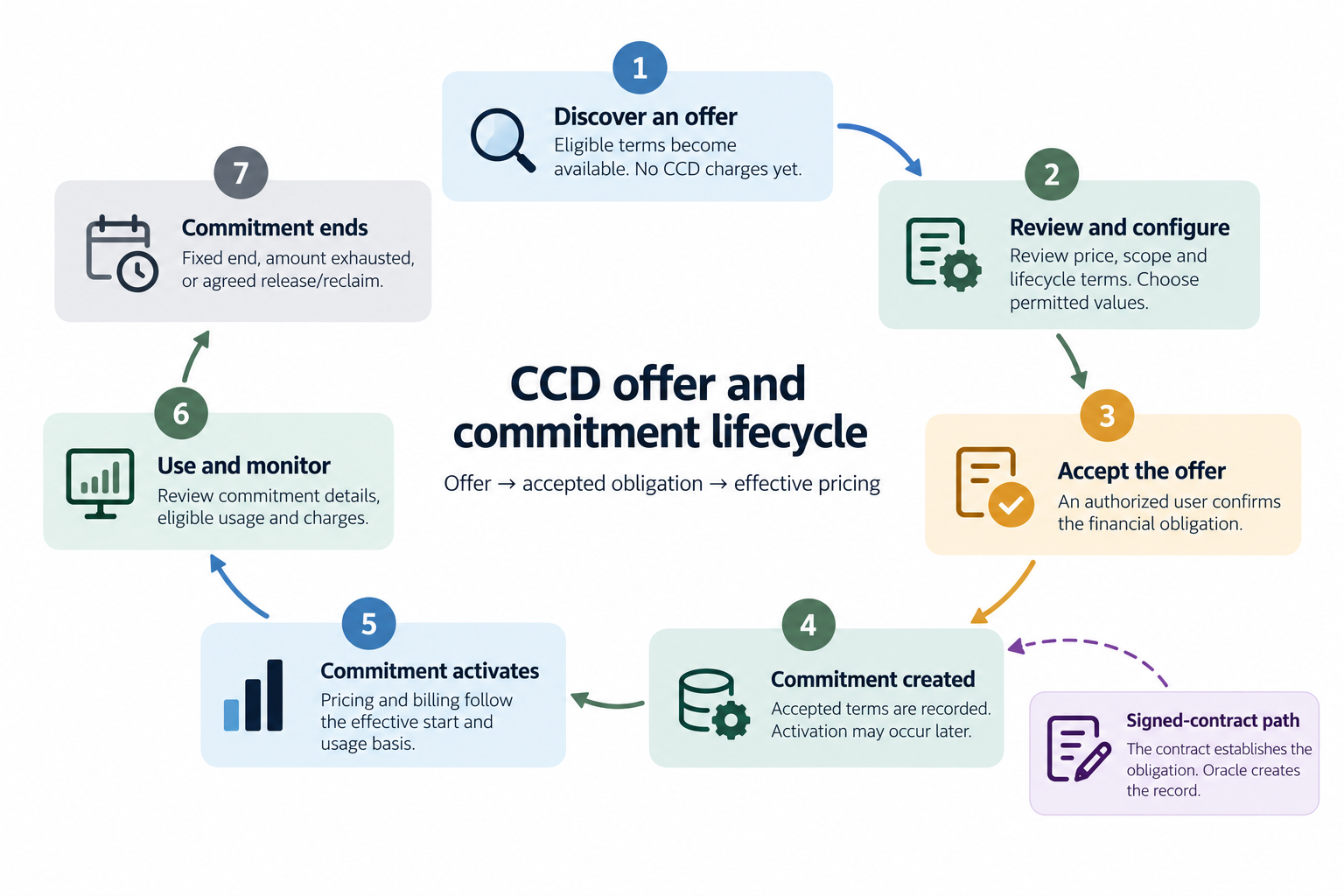
Some Flex pricing continues beyond the minimum period while capacity is retained. In the previous image, the circular layout doesn't imply automatic renewal.
| CCD Lifecycle Step | Description | More Information |
|---|---|---|
| 1. Discover an offer | From the Continuous Consumption Discounts page, select Create commitment to review eligible CCD offers. | |
|
2. Review and configure 3. Accept the offer 4. Commitment created |
Review the offer's price, scope, and lifecycle terms, and select permitted values, such as SKU quantity, if allowed. You then confirm the financial obligation by creating the commitment. (Note that activation may occur later.) |
|
| 5. Commitment activates | Pricing and billing follow the effective start and usage basis. | |
| 6. Use and monitor | Review commitment details, eligible usage, and charges. | Reviewing and Reconciling CCD Charges |
| 7. Commitment ends | Fixed end, amount exhausted, or agreed release/reclaim. | When a Commitment Ends |
CCD Commitment Offer Sources
Continuous consumption discounts are constructed in four different ways:
- Contract-defined commitment
- Contract-created offer only
- Flex capacity offer
- OCI-generated offer
Each type determines how the offer originates, how the commitment is created, and which mechanisms govern its operation. It doesn't, by itself, determine the billing basis or end condition.
All CCD commitments can be viewed through the Oracle Cloud Console and the Continuous Consumption Discounts API, subject to your access permissions.
| Commitment Offer Source | Description |
|---|---|
| Contract-defined |
This type is used when the signed contract itself establishes the customer's CCD obligation. The contract specifies the committed quantity or amount, products, pricing, term, scope, and applicable conditions. Oracle uses the executed contract terms to create the corresponding CCD offer and commitment records. The customer accepts this CCD by signing the contract. Note: You don't manually create contract-defined commitments from eligible offers. Instead, these types of commitments are displayed on the Continuous Consumption Discounts page for review and reconciliation. Check that its subscription, product quantities, pricing, dates or activation condition, and contract reference match your order. A future-dated or delivery-dependent commitment can exist before its billing begins. The contract's charging terms govern when charges apply. Example: A signed order commits the customer to a stated quantity of GPU capacity in a specified region under an agreed price and activation rule. Oracle creates the commitment from that order. If activation depends on resource handover, signing the order is distinct from the event that starts the applicable CCD pricing. |
| Contract offer |
Use this type when the contract gives you the right to create a CCD commitment later, without establishing that CCD draw immediately. Oracle constructs the offer from the contract's eligible products, prices, duration, validity window, and quantity limits. You decide whether to exercise that right within the permitted bounds. To create a commitment, select the offer, enter only the values it allows you to select, and confirm the resulting obligation. Configurable values can include quantity and start time. Other terms remain fixed by the offer. If the offer covers a bundle, its component rules apply to your selection. Example: A contract sets a compute price and a three-year commitment duration, but lets you select the quantity during a three-month offer window. A commitment created within that window follows its own three-year duration. Expiration of the offer closes new commitments; it doesn't end the commitment you already created. Before acting on a contract offer: Review existing commitments for the same subscription and products. An additional commitment can add a financial obligation. Whether you can use an offer once or more than once, and any total draw limit, depends on its governing terms. Contact your Oracle sales representative if the displayed offer doesn't match your contract. |
| Flex |
Flex offers originate from OCI capacity and pricing processes rather than a bespoke signed CCD order. OCI constructs an offer for identified capacity with a defined product or shape, quantity, location, price, minimum commitment period, reclaim conditions, and acceptance deadline. You review the fixed terms and accept or decline; you don't negotiate them by editing the offer. Acceptance creates the commitment. Activation and billing then follow its accepted start rule and usage basis. Review whether allocated capacity is billable while idle, how unavailable capacity is treated, and how resources are delivered. The offer must distinguish its acceptance deadline, minimum commitment period, and conditions that end the allocation and pricing. For a Flex offer whose pricing continues while you retain the capacity, the end of the minimum commitment period isn't the actual CCD end. Pricing can continue until you release the capacity or OCI reclaims it under the accepted terms. After the commitment term is complete, you must terminate the instance to release the capacity and end the CCD. Stopping an instance doesn't end a CCD. Reclamation means that OCI takes back the Flex capacity allocated to you. OCI can reclaim the capacity only after the commitment term is complete and after providing the advance notice specified by the offer's reclaim term. OCI can send this notice before the commitment term ends, but reclamation must satisfy both conditions. Example: You accept a Flex offer with a 10-day commitment term and a 3-day reclaim term. To reclaim the capacity on day 10, when the commitment term is complete, OCI must notify you by day 7. If OCI sends the notice on day 9, the earliest it can reclaim the capacity is day 12. CCD pricing continues while you retain the capacity, according to the accepted terms. Note: Flex commitments are binding and can't be edited or canceled. |
| OCI-generated | OCI services or platform processes construct these offers under approved commercial rules. An offer can be directed to a specific subscription or made available to a broader eligible population. Its terms identify the products or bundle, permitted quantities, pricing, location, validity window, and lifecycle conditions. An OCI-generated offer can be fixed or configurable. For a fixed offer, review and accept the stated terms. For a configurable offer, select only the allowed inputs and review the resulting obligation before confirmation. In both cases, customer action creates the commitment; discovery of the offer alone doesn't activate CCD pricing. Example: OCI presents an eligible subscription with an offer for a predictable compute baseline. The customer selects an allowed quantity and start time, then confirms. The commitment records the selected values and applicable pricing and billing rules. |
Understanding What a CCD Offer Covers
A CCD offer defines the products, quantities, and eligibility scope available for a commitment. Before accepting an offer, confirm that you understand the following about the offer:
- What am I committing to, and how is the quantity measured?
- Which resources and usage qualify for CCD pricing?
- Which products am I committing to together, and how are their quantities related (bundled)?
After selecting an offer, the resulting commitment records the accepted terms and any selections you've made.
Understand the product and unit
A SKU is Oracle's product identifier for a billable item. A meter records a service's usage in a defined unit, such as compute unit-hours (OCPU-hours) or data transferred. Check the product, its billing unit, and time period.
Some OCI Compute shapes are billed through multiple SKUs. For example, a Compute shape can have separate SKUs for memory and OCPUs. An instance with 4 OCPUs and 32 GB of memory running for one hour incurs charges for both 4 OCPU-hours and 32 GB-hours.
For an hourly commitment, a quantity of 100 units means 100 units in each covered hour, rather than 100 total unit-hours over the commitment term. For example, a commitment to 100 OCPUs each hour represents 1,000 OCPU-hours over 10 hours—not a total allowance of 100 OCPU-hours.
Check which usage qualifies
A CCD offer defines the subscription eligibility and scope of the resulting commitment. The scope can include the service and meter, region, availability domain, tenancy, compartment, or qualifying resource allocation. Usage must match the commitment's SKU and eligibility scope to receive CCD pricing. If multiple services report usage under the same SKU, only usage from services covered by the commitment qualifies.
A single-region commitment applies only in the specified region. An all-region commitment applies across the eligible regions defined by its terms. Check service, region, and realm availability for the offer you select. Usage outside the defined CCD region does not receive that CCD price.
Moving a resource or changing its service, meter, or subscription can change whether its usage qualifies.
Review bundled products and quantities
A bundle groups multiple products or meters under one CCD offer and commitment. Each component has its own unit, quantity rule, and pricing treatment. The components are committed together according to the offer's rules. Note that a bundle does not mean that every component is free or shares one unit price.
- A fixed-ratio bundle derives component quantities from the primary SKU quantity. For illustration, a bundle requiring 16 GB of memory per Oracle Compute Unit (OCPU) produces 3,072 GB for 192 OCPUs. (These quantities are illustrative and don't represent a specific available OCI shape, CCD offer, or price.)
- A customer-selected bundle permits component quantities within specified bounds. Review every component and select permitted component quantities within the offer's bounds, before confirming. Calculate the commitment obligation using all billable components, rather than the primary product alone. Quantities, ratios, optional components, and supported bundle sizes depend on the offer.
Check resource availability separately
A CCD pricing commitment doesn't by itself reserve resources. Capacity reservations and service-specific allocation processes govern availability.
If your CCD uses committed usage, baseline charges begin at its effective start even if you haven't launched resources. Confirm the capacity and activation terms before accepting the offer.
How CCD Usage and Pricing Determine Charges
CCD billing determines the billable quantity, then applies the commitment's price to that quantity.
CCD billing has two steps:
- Metering determines the billable quantity (usage basis)
- Pricing, also called rating, applies the applicable price (pricing rule)
To understand the resulting charge, consider both the usage basis and the pricing rule. The same discounted unit price can produce different charges under different usage bases.
How Usage is Applied
The commitment's usage basis determines what you pay for.
| Usage Basis | Billable Quantity |
|---|---|
| Committed |
You're billed for the committed baseline starting at the effective start, regardless of actual usage or resource availability under this basis. When eligible actual usage is below the baseline, the billing mechanism can add usage to satisfy the commitment floor. This added amount is called committed usage. It represents the minimum obligation, not additional resources you consumed. Example: For an hourly baseline of 100 units, if covered actual usage is 70, the shortfall is 30. The baseline billable amount is 100 units. If actual eligible usage is 130, the baseline covers 100 and the remaining 30 follow the applicable overage rule. This example assumes one hourly SKU, no overlapping commitment, and a simple quantity floor. |
| Allocated |
You're billed for qualifying capacity allocated and available for you to use, including capacity that's available but idle. The service's availability rules determine exclusions for unavailable capacity, such as broken nodes where applicable. The signed or selected quantity and the billable available quantity can differ. Example: A 100-unit allocation has 90 available units and 10 units excluded as unavailable under the accepted terms. If you actively use 70 of the available units, the allocated basis charges for 90. Check how the service records delivery, availability changes, replacements, and release; stopping a workload can leave its capacity allocated. |
| Active |
You're billed for actual eligible metered usage. Idle resources that don't generate the qualifying usage aren't billed under this CCD usage basis. Example: 70 qualifying units of usage are rated as 70 rather than automatically raised to a 100-unit floor. Other service charges or separately stated obligations can still apply. |
Intervals and unmatched usage
The commitment's measurement interval determines when usage is compared with the baseline. For an hourly commitment, don't assume that excess use in one hour offsets a shortfall in another. Monthly or other aggregation requires explicit support and terms; it's not implied by a monthly invoice.
Usage outside the commitment's product, service, time, or geographic scope follows its applicable non-CCD pricing or another qualifying arrangement. Usage over the covered amount follows the overage terms. Before accepting an offer, confirm whether charges are based on committed usage, allocated capacity, or actual usage. Don't infer the billing basis from the offer's source type.
CCDs start and end at whole-hour boundaries and apply to eligible usage in hourly intervals. Excess usage in one hour doesn't automatically offset a shortfall in another. Other aggregation requires explicit support in the terms.
How Pricing is Applied
After the billable quantity is determined, the commitment's pricing rule determines the charge. Review both the pricing rule and the billable quantity to understand your total obligation, including how usage outside CCD coverage is charged. Note that any discount percentage shown is a discount off the list price.
System-generated prices
Flex and OCI-generated offers can use prices produced by OCI pricing processes. Those processes construct the offer price; they don't replace the customer's accepted pricing terms with an unexplained new rate.
Baseline and overage example
Assume a committed-usage baseline of 100 units per hour, a CCD price of $0.80 per unit, and an overage price of $1.00. (These are illustrative values, not Oracle prices.) With 70 units of actual eligible usage, the baseline charge is $80: 70 covered units plus 30 committed-usage units, each at $0.80. Without the commitment, 70 units at $1.00 would cost $70.
With 130 units of eligible usage, the charge is $110: 100 × $0.80 plus 30 × $1.00. Without the commitment, those units would cost $130. The example shows why a sustainable baseline matters. Taxes, other services, reservations, credits, and adjustments are outside this example.
| Actual Eligible Usage | Calculation with CCD | Charge with CCD | Charge without CCD at $1.00 per Unit |
|---|---|---|---|
| 70 units | (70 covered + 30 committed-usage) x $0.80 | $80 | $70 |
| 130 units | (100 x $0.80) + (30 x $1.00) | $110 | $130 |
Select a baseline you expect to sustain. A discounted unit price can still produce a higher total charge when usage is below the committed baseline.
What happens outside CCD coverage
The applicable contract, subscription rate card, on-demand rate, or other approved pricing arrangement determines the charge for usage not covered by this CCD. Don't assume that overage or post-CCD usage always returns to list price, or that all usage receives the CCD rate. Review the offer's explicit overage and post-end treatment.
For a bundle, calculate each component's billable quantity at its applicable price and then add the charges. An estimate that shows only the primary component cannot establish the total bundle obligation.
When a Commitment Begins
A CCD commitment's effective start determines when its usage and pricing rules begin to apply. Depending on the accepted terms, activation can follow a specified time or a qualifying capacity-delivery event. Review the start conditions before accepting an offer so you understand when billing can begin.
Offer validity and commitment activation
Offer validity controls when you can create a commitment. It doesn't determine when that commitment starts billing. A commitment's creation time, requested or contract-defined start, and effective activation time can differ.
Hourly boundaries and the default start
CCDs begin on whole-hour boundaries and apply in hourly intervals. Customer creation or acceptance doesn't start CCD pricing at the minute you confirm. The default depends on the offer source. Review the exact start timestamp before confirming.
- Contract-created commitments follow the governing contract. A contract-created offer-only commitment defaults to the acceptance time rounded up to the next whole hour; you can select another permitted hour in the future. For example, acceptance at 10:10 UTC or 10:40 UTC defaults to 11:00 UTC.
- Flex starts at the acceptance time rounded up to the next whole hour, plus one additional hour. Acceptance at 10:10 UTC or 10:40 UTC therefore starts at 12:00 UTC.
- An OCI-generated offer specifies its start rule and whether you can select a future start. Check its confirmed timestamp rather than assuming it follows either contract-offer or Flex timing.
Specified date and time
CCD usage and pricing apply from the validated effective start. Retain the confirmed timestamp and timezone. A calendar date alone doesn't identify the first covered hour. For example, a start of 2026-11-01 at 12:00 UTC covers the interval beginning at 12:00 UTC. Earlier usage is outside that fixed-time CCD.
Verified availability or handover
Where the accepted terms make activation depend on capacity delivery or availability, the qualifying service event determines the actual start. An estimated delivery date, acceptance timestamp, or order status isn't evidence that resources have been handed over.
When a Commitment Ends
A CCD commitment's accepted terms determine when its usage and pricing rules stop applying. Depending on those terms, the end can follow a specified time, exhaustion of a defined usage or monetary amount, or a qualifying capacity release or reclaim event.
-
Fixed date or elapsed term
CCDs end on whole-hour boundaries. A fixed-end commitment stops applying its rule at the effective end hour. Where the service calculates the end from a duration, use the returned timestamp rather than converting months into 30-day periods. Calendar rules and timezone affect the exact result.
Example: Under an exclusive end boundary of 2026-12-01 at 00:00 UTC, the final covered hourly interval is 30 November from 23:00 to 00:00 UTC. The interval starting on 1 December at 00:00 UTC is outside the CCD. In this example, the end is exclusive. Check the confirmed effective timestamp and boundary convention for your commitment.
-
Usage or monetary amount exhausted
Where an offer supports an amount-based end, the commitment ends or changes treatment when its defined qualifying usage or monetary counter reaches the threshold. The terms must identify the unit or currency, what counts toward the threshold, and the rate applied to the interval that crosses it.
Example: A 10,000-unit-hour threshold with 9,950 counted unit-hours has 50 remaining. This alone does not specify a final date. Subsequent usage and the threshold-crossing rule determine the effective end hour. Late usage or corrections can change the recorded end. Don't infer a mid-hour end from the counter.
-
Capacity released or reclaimed
For a commitment governed by resource custody, pricing can continue while qualifying capacity remains allocated to you. A release or reclaim event supplies the effective end, subject to the minimum obligation and notice terms. The end of a minimum period identifies the earliest applicable exit boundary, not necessarily when you actually return the capacity.
Check the required release action for the service. Stopping or deleting a resource might not release its reserved or allocated capacity. Retain confirmation of the release or reclaim and its effective time. If multiple end conditions apply, the accepted terms must explain their precedence and how they interact with minimum payment obligations.
Example: A Flex commitment ends after the commitment term has completed and either OCI reclaims the resource or the customer releases the resource (terminates their instance).
Reviewing and Reconciling CCD Charges
Use commitment details and billing reports to check that CCD charges match the terms you accepted. If you find a discrepancy, gather the relevant records before contacting Oracle Support.
To access cost reports, open Billing & Cost Management. Under Cost Management, select Cost and Usage Reports. Reports are listed in the tenancy's home region. The CCD fields available in each report and any reporting delays determine how much detail you can verify directly.
See Cost Analysis Overview and Cost and Usage Reports Overview.
Required IAM Policy to View and Accept Offers
You can accept an eligible CCD offer through the OCI Console or the Continuous Consumption Discounts API. Acceptance creates a financial commitment. The person accepting must be a tenancy administrator with the required authority, or a user explicitly granted that authority through OCI Identity and Access Management (IAM). Signing in or viewing an offer does not, by itself, authorize acceptance.
To use Oracle Cloud Infrastructure, an administrator must be a member of a group granted security access in a policy by a tenancy administrator. This access is required whether you're using the Console or the REST API with an SDK, CLI, or other tool. If you get a message that you don't have permission or are unauthorized, verify with the tenancy administrator what type of access you have and which compartment your access works in.
If you're new to policies, see Getting Started with Policies and Policy Builder Policy Templates.
Manage commitments from the correct tenancy
For an OCI organization, manage CCDs from the parent tenancy associated with the subscription. For a standalone tenancy, use that tenancy. Access to resources in a child tenancy doesn't automatically grant the right to accept a commitment for the parent subscription. Confirm tenancy and subscription before acting.
Delegate acceptance authority to a group
A tenancy administrator creates or selects a group for authorized users, adds those users, and creates the policy in the tenancy's root compartment.
This example grants subscription-read, offer-read, and commitment-management access:
Allow group <group_name> to READ subscription in tenancy
Allow group <group_name> to READ ocs-ccd-offers in tenancy
Allow group <group_name> to MANAGE ocs-ccd-commitments in tenancy
Use the same group in all three statements.
- The first statement permits reading subscriptions. (This is required because commitments are created against a subscription.)
- The second statement permits reading eligible offers.
- The third statement grants commitment management authority, including creation from an eligible offer. Restrict this group to users permitted to enter financial obligations.
Management access doesn't override eligibility, quantity limits, or commercial cancellation rules.
Provide viewing access separately
For users who only need to review offers and commitments, grant read access without management authority:
Allow group <group_name> to READ subscription in tenancy
Allow group <group_name> to READ ocs-ccd-offers in tenancy
Allow group <group_name> to READ ocs-ccd-commitments in tenancy
Read-only access lets you view offers but doesn't let you accept them.
Since commitments are created against a subscription, viewing access should also include access to subscriptions.
The API caller requires the same applicable IAM authority as a Console user. (API credentials authenticate the caller; IAM policies authorize the action.)
If you can't accept an offer
Ask your administrator to check group membership, identity domain, both policy statements, and the correct parent or standalone tenancy. Confirm the subscription and offer remain eligible and valid. Cloud Advisor access and cost-report access are separate from authority to accept a CCD.