Managing One-Click Sign-In with Passkeys
One-Click Sign-In in Oracle Cloud Infrastructure (OCI) Identity and Access Management (IAM) lets users sign in to supported applications with a FIDO passkey without entering a username.
Overview
One-Click Sign-In uses Web Authentication (WebAuthn) and FIDO passkeys to provide a usernameless sign-in experience. When a user accesses an application for which One-Click Sign-In is enabled, IAM starts a WebAuthn authentication request. The user's authenticator presents an available passkey for the authenticating domain or identity domain.
You must create a Service Request (SR) with the Identity team to enable the required feature flag for this functionality. See Support Requests.
| Term | Description |
|---|---|
| One-Click Sign-In | A passwordless and usernameless sign-in method that uses a discoverable FIDO passkey. The user completes authentication with a single verification action, such as using a fingerprint, facial recognition, device PIN, or security key. |
| Fast ID Online (FIDO) | An authentication standard that uses public-key cryptography to authenticate users without requiring a password. In an IAM identity domain, users can enroll a FIDO passkey authenticator for authentication. |
| Passkey | A FIDO credential that an authenticator uses to verify a user's identity. A passkey can use device verification, such as biometrics or a PIN, or a security key. |
| Discoverable credential | A public-key credential that an authenticator can find without the relying party first providing a credential ID. One-Click Sign-In uses discoverable credentials so that the user doesn't need to enter a username before authentication. |
| Authenticator | A device or component that verifies the user and uses the user's passkey to authenticate. An authenticator can be built into a device or can be an external security key. |
| Platform authenticator | An authenticator that's built into a client device and typically can't be removed from that device. Examples include Windows Hello and Touch ID. |
| Cross-platform authenticator | A removable authenticator that can be used with different client devices. A hardware security key is an example of a cross-platform authenticator. |
| Web Authentication (WebAuthn) | A web authentication standard that enables a browser and authenticator to use public-key credentials for authentication. One-Click Sign-In uses WebAuthn to communicate between the browser, authenticator, and relying party. |
| Relying party | The service or application that requests authentication and uses the authentication result to grant access. For One-Click Sign-In, IAM acts as the relying party. |
| User verification | Verification that the person using an authenticator is the authorized user. User verification can use a fingerprint, facial recognition, a device PIN, or another method supported by the authenticator. |
| Attestation | A process during authenticator enrollment that provides information that a relying party can use to assess the authenticator. |
Discoverable Credentials
One-Click Sign-In requires WebAuthn discoverable credentials, also called resident credentials.
In a standard FIDO authentication flow, IAM already has user context before it requests authentication and can identify a specific credential. One-Click Sign-In starts before IAM knows which user is signing in. IAM therefore starts WebAuthn authentication without identifying a specific credential.
The authenticator uses the identity domain information in the WebAuthn request to find available discoverable credentials. After the user selects and verifies a passkey, the WebAuthn response provides the information that IAM needs to identify the user and validate the authentication.
A FIDO enrollment that doesn't contain a discoverable credential can't be used for One-Click Sign-In.
One-Click Sign-In Flow
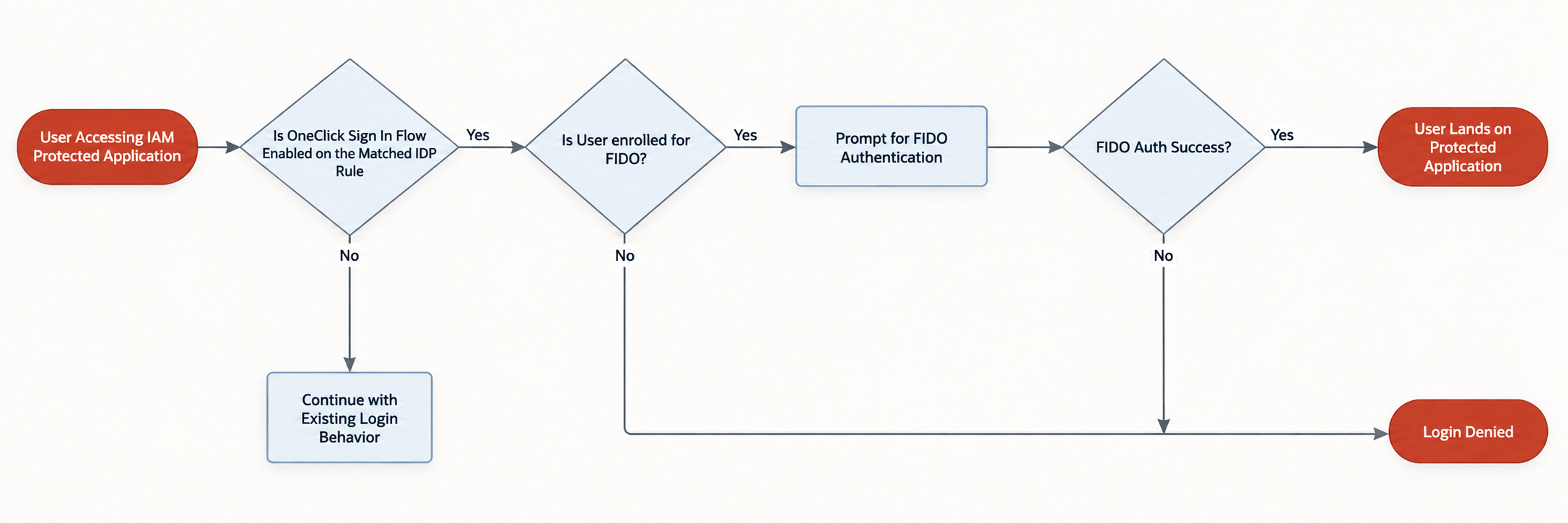
The following flow shows how IAM completes One-Click Sign-In without requiring username entry.
-
The user opens an IAM-protected application.
-
IAM evaluates the identity provider policy rule that applies to the application.
-
If One-Click Sign-In is enabled for the applicable rule, IAM starts FIDO authentication without first requesting a username.
-
The browser invokes WebAuthn without identifying a specific user credential.
-
The authenticator presents the discoverable passkeys that are available for the identity domain.
-
The user selects and verifies a passkey.
-
The authenticator signs the authentication challenge and returns the WebAuthn response.
-
IAM validates the response, identifies the user, and creates the user's session.
-
IAM returns the user to the application.
FIDO Attestation
Attestation provides information that IAM can use during FIDO enrollment to validate a supported authenticator registration.
For this feature, IAM supports attestation verification for the none and self attestation statement formats. During enrollment, IAM validates the WebAuthn registration data and processes the supported attestation format. IAM records the verification outcome with the authenticator enrollment.
If validation of supported attestation data fails, the enrollment doesn't complete successfully. Other attestation statement formats aren't supported for attestation verification for this feature.
Attestation occurs during FIDO enrollment. It isn't performed as a separate enrollment or verification step during the One-Click Sign-In authentication flow.
Configure One-Click Sign-In
Configure FIDO passkeys to create discoverable credentials, and enable One-Click Sign-In for the identity provider policy rule that applies to an application.
You must be an identity domain administrator with permission to manage authentication factors and identity provider policies.
One-Click Sign-In supports FIDO passkeys only. Configure FIDO passkey enrollment to require discoverable credentials before users enroll the passkeys that they plan to use with One-Click Sign-In.
When a user accesses the application, IAM evaluates the applicable identity provider policy rule. If One-Click Sign-In is enabled, IAM starts the FIDO One-Click Sign-In flow.
One-Click Sign-In is enabled at the application level through the applicable identity provider policy rule. Domain-level enablement isn't supported.
Sign In with One-Click Sign-In
Sign in to an application with an enrolled FIDO passkey without entering a username.
Your administrator must enable One-Click Sign-In for the application, and you must already have a supported FIDO passkey that contains a discoverable credential.
The authenticator signs the authentication challenge. IAM validates the WebAuthn response, identifies your account from the passkey response, creates your session, and returns you to the application.
One-Click Sign-In Limitations
Review the authentication, enrollment, and configuration limitations for One-Click Sign-In.
-
One-Click Sign-In supports FIDO passkeys only. Other authentication factors aren't supported.
-
You can enable One-Click Sign-In only for an application through its applicable identity provider policy rule. Domain-level enablement isn't supported.
-
Passkey enrollment isn't available as part of the One-Click Sign-In flow. Users must enroll a supported FIDO passkey separately before using One-Click Sign-In.
-
Multifactor authentication isn't performed as part of the One-Click Sign-In flow.
-
Existing FIDO enrollments that don't contain discoverable credentials aren't supported for One-Click Sign-In.
-
Attestation verification for this feature supports the none and self attestation statement formats. Other attestation statement formats aren't supported.
-
In this release, IAM doesn't support a fallback login factor if one-click authentication doesn't work.