Autonomous AI Database (Dedicated) - Automatic
Learn how to create a backup for your Autonomous AI Database using the Automatic Backup option.
You can configure automatic backup by using the OCI Console, OCI CLI, or Terraform.
Oracle AI Database@AWS provides the following three (3) choices as the Backup destination for Oracle Autonomous AI Database on Dedicated Infrastructure in the OCI console.
-
Amazon S3 (Default)
-
Object Storage
-
Autonomous Recovery Service (Recommended)
To use the automatic backup option, you need to select one of the choices described above while creating an Autonomous Database.
Amazon S3
-
From the OCI console, navigate to Autonomous Container Database.
-
During the creation of an Autonomous Container Database, select Amazon S3 from the Backup destination list, enter your Backup retention period between 7 and 95 days.
-
You can modify the retention period after the database has been provisioned.
Object Storage
-
From the OCI console, navigate to Autonomous Container Database.
-
During the creation of an Autonomous Container Database, select Object Storage from the Backup destination list.
-
Enter your Backup retention period between 7 and 95 days. You can modify the retention period after the database has been provisioned.
Autonomous Recovery Service
-
From the OCI console, navigate to Autonomous Container Database.
-
During the creation of an Autonomous Container Database, select Autonomous Recovery Service (Recommended) from the Backup destination list.
-
Enter your Backup retention period between 7 and 95 days. You can modify the retention period after the database has been provisioned.
Automatic Backup from the OCI Console
-
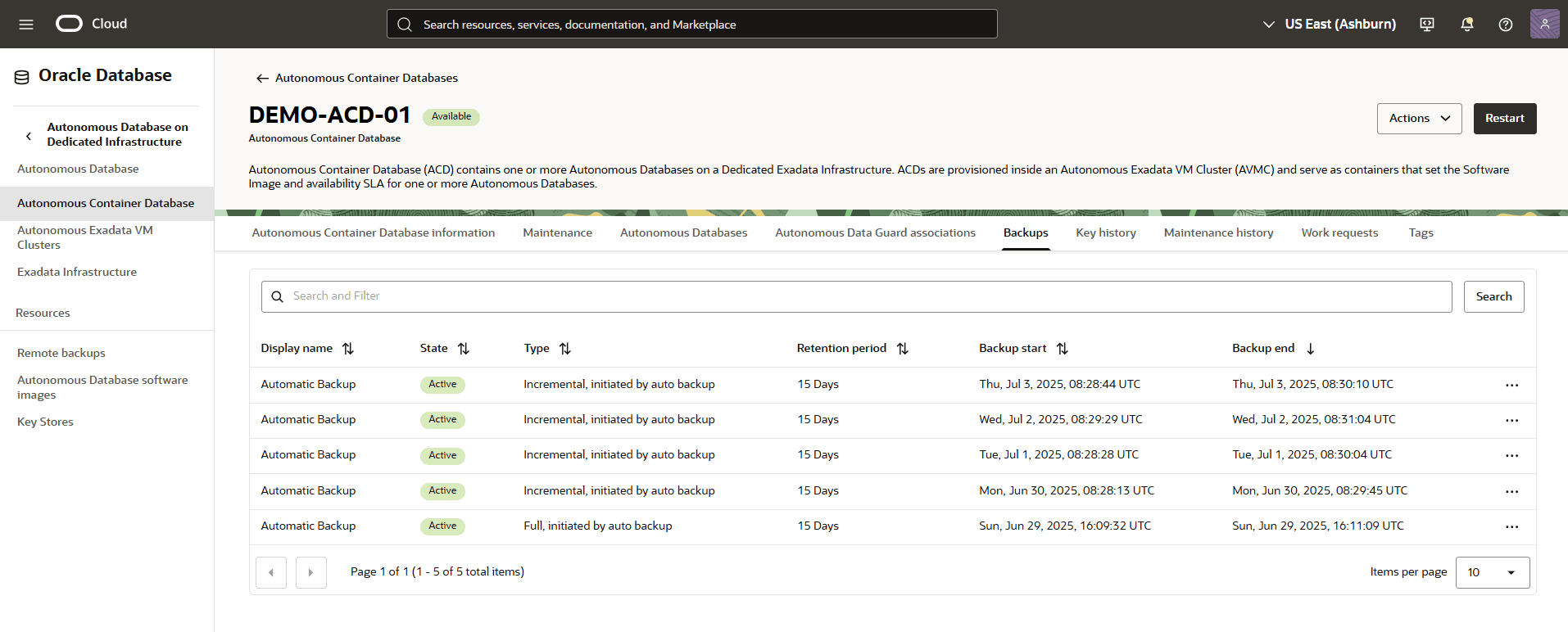
From the OCI console, you can navigate to Autonomous Container Database, and then select Backups tab.
-
From the Backups tab, you can view details of your backup such as State, Type, Retention period, Backup Start and Backup end.
-
You can configure automatic backup by using the OCI Console, OCI CLI, or Terraform.
There is currently no content for this page. Oracle AI Database@AWS team intends to add content here, and this placeholder text is provided until that text is added. The Oracle AI Database@AWS team is excited about future new features, enhancements, and fixes to this product and this accompanying documentation. We strongly recommend you watch this page for those updates.
There is currently no content for this page. Oracle AI Database@AWS team intends to add content here, and this placeholder text is provided until that text is added. The Oracle AI Database@AWS team is excited about future new features, enhancements, and fixes to this product and this accompanying documentation. We strongly recommend you watch this page for those updates.