Data Subsetting Overview
Data subsetting (also referred to as just “subsetting”) creates smaller, representative datasets from production data while preserving referential integrity and the relationships required for applications to function correctly. Teams can extract only the data needed for development, testing, analytics, or model training, accelerating environment provisioning, reducing costs, and minimizing exposure to sensitive data. In non-production environments, subsetting can be combined with data masking to provide additional protection.
The Challenge and Solution
As data volumes and complexity grow, creating full database copies for development and testing becomes time-consuming, costly, and inefficient. Oracle Data Safe’s Data Subsetting feature enables developers to provision databases quickly using smaller, focused copies that preserve referential integrity. Teams can provide each developer with a dedicated test environment, reducing contention and preventing one developer’s changes from affecting another’s work. Because these copies are lightweight and quick to create, teams can refresh them frequently. When self-service provisioning is enabled, developers can also create database copies on demand.
For application testing, subsetting can provide more realistic and reliable test data than synthetic or masked data alone because it preserves the real-world variations found in production data. Creating masked or synthetic datasets that reproduce these variations can be challenging, and cloning and masking full-size databases can be time-consuming. Subsetting reduces test data size while retaining the data needed for each testing scenario.
Use Cases
The top use cases for subsetting are as follows:
- Faster, secure application testing
- Targeted data extraction for business analysis
- Model training and validation
- Data sovereignty
Faster, Secure Application Testing
For faster, secure application testing, development, and QA, test teams can use smaller, referentially intact datasets instead of full production databases, which are often too large, costly, and risky for test environments. Subsetting makes these datasets easier to manage while enabling accurate testing, shorter test cycles, lower infrastructure, storage, and processing costs, and reduced risk of exposing sensitive data.
For example, suppose an original dataset contains 10 million customers, 100 million orders, and 100 million transaction records, occupying 50 TB. A subsetting policy can select 1% of the rows and apply a masking policy, producing a smaller, masked dataset containing 100,000 customers, 1 million orders, and 1 million transaction records. The resulting dataset occupies 50 GB, as illustrated below.
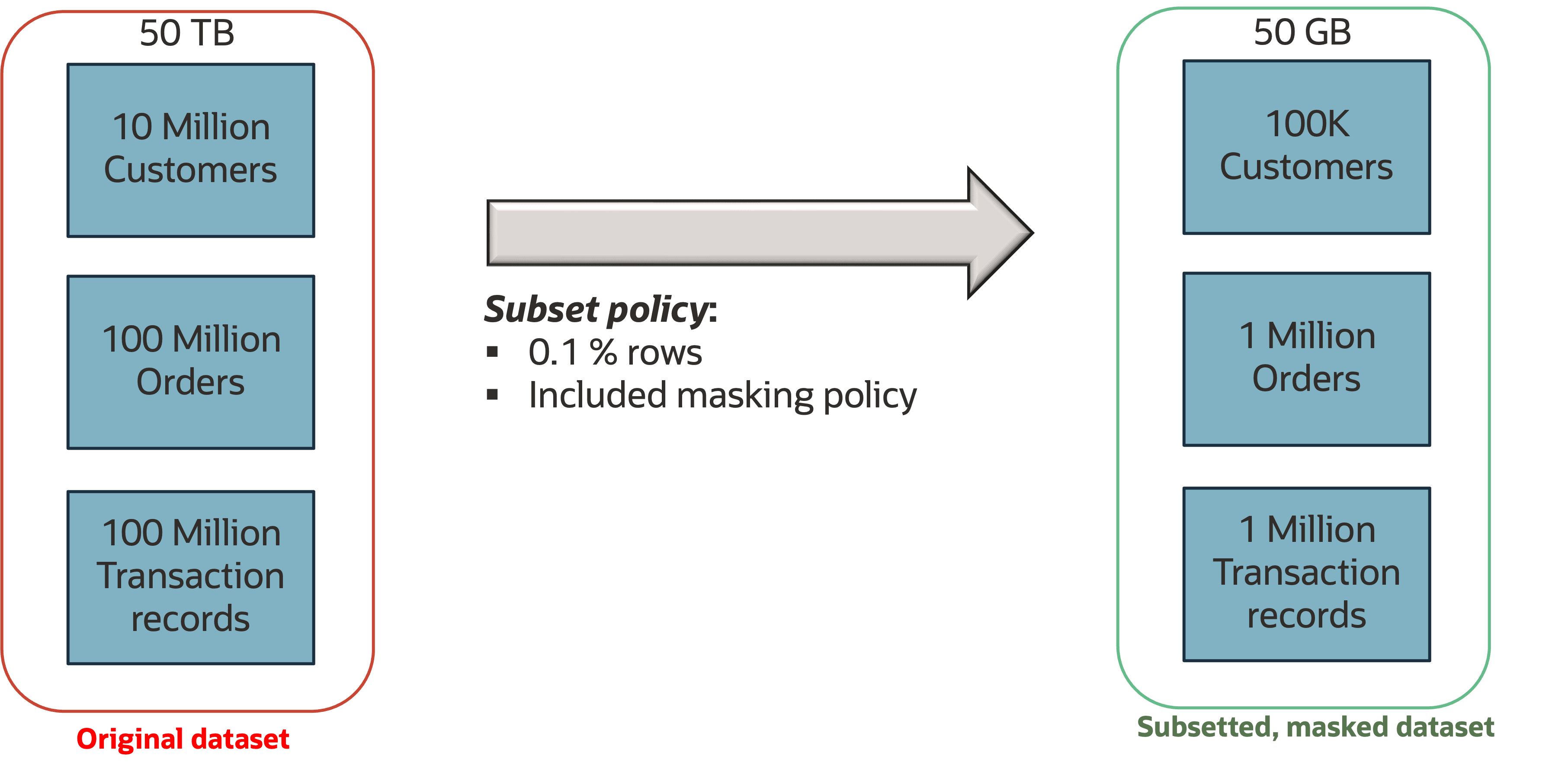
Description of the illustration faster-secure-application-testing.png
Targeted Data Extraction for Business Analysis
For targeted business analysis, organizations can use conditional extraction, such as by time period or region, to provide analysts with focused datasets while preserving data integrity. This approach avoids the performance challenges of analyzing full datasets, enables targeted insights into areas such as regional sales and quarterly trends, and accelerates analysis by working with only the most relevant data.
For example, financial analysts can create a targeted dataset from quarterly sales data by filtering on a specific year and quarter, such as sale_year = 2024 and quarter = 'Q4'. Similarly, healthcare analysts can filter the PATIENTS and TREATMENT tables by patient age and diagnosis to analyze treatment outcomes for a specific group while preserving the relationships between patients and their treatment records. This example is illustrated below.
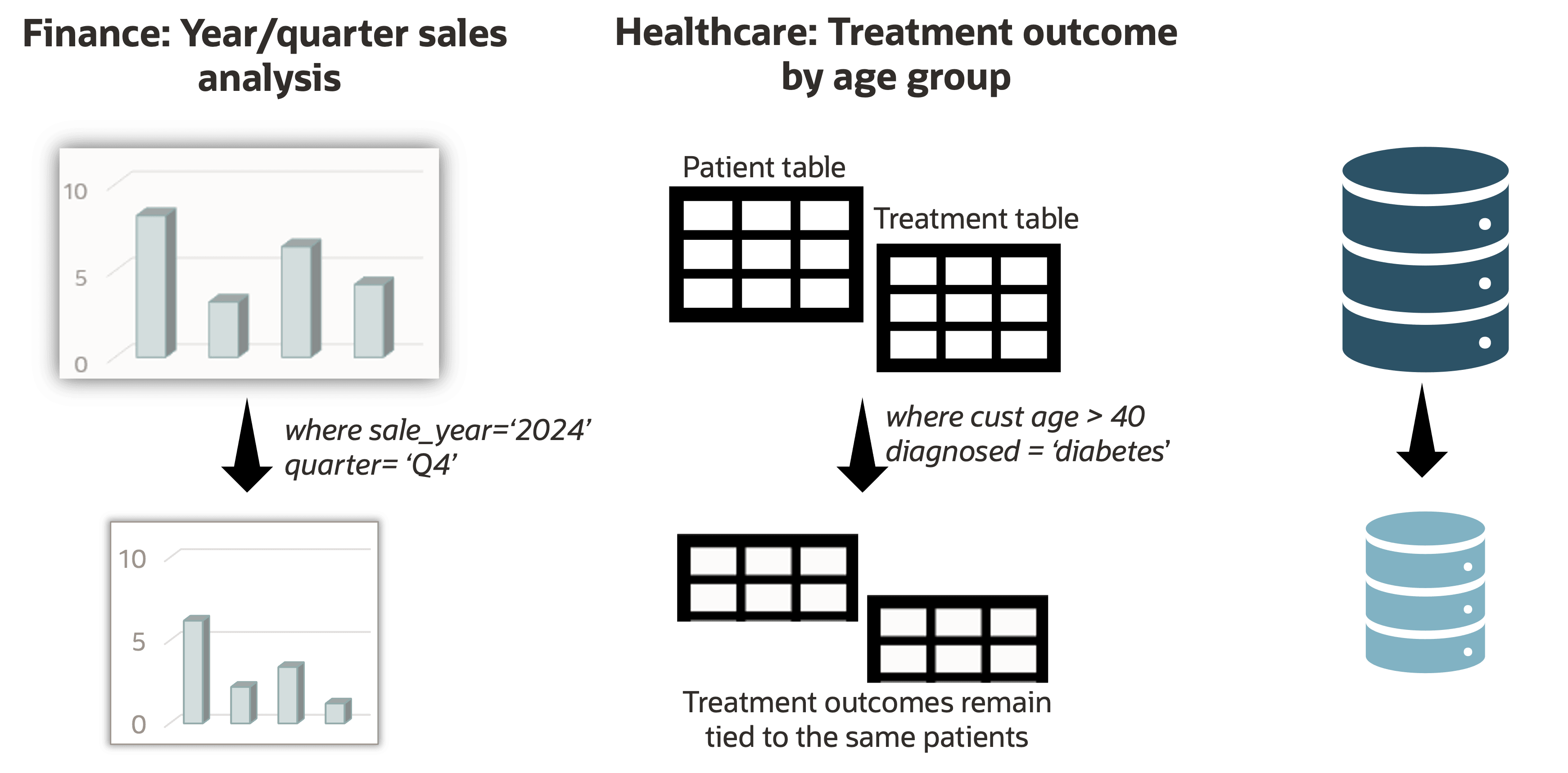
Description of the illustration targeted-data-extraction-for-business-analysis.png
Data Sovereignty
For data sovereignty, organizations can provide partners, customers, and offshore teams with only the specific data they need and are legally permitted to access. This approach simplifies compliance, minimizes data exposure, and supports safer data sharing through carefully scoped subsets.
Subsetting Policies
A subsetting policy defines the source schemas, data selection rules, table relationships, and processing options used to create a targeted dataset. The Relationship graph and processing chain help you understand and validate how data will be subsetted before running the job.
Subsetting Policy Scope
You can create a subsetting policy using either a sensitive data model (SDM) or target database schemas.
- SDM: Schemas and relationships defined in the SDM are added to the policy automatically.
- Target database: You can select specific schemas to include in the policy or select all schemas.
Subsetting Rules
Subsetting rules specify which data to include and how it should be processed. The workflow for creating a rule begins by selecting a driving table, then defining a rule, and then defining processing options for related tables. A driving table is a subsetting table that serves as the starting point for data selection and propagation, and is needed if you’ve selected specific schemas to include in the subsetting policy. You can visualize the expected impact, modify the rules as needed, and review the processing order before running the subsetting job.
The following table describes how you can define a rule by percentage, condition, or both.
| Rule Type | Description | Example |
|---|---|---|
| Percentage | Selects a specified percentage of rows from a table. | Select 10% of the EMPLOYEES table. |
| Condition | Selects rows that meet a specified WHERE condition. |
WHERE SALES_REGION = 'EMEA' |
| Condition and percentage | Selects rows that meet a specified WHERE condition, and then selects a specified percentage of rows from the table. |
WHERE REGION_ID = 'EMEA', Select 10% of the filtered EMEA rows. |
You have the option to specify whether a rule should propagate to the following kinds of related tables. Options given for these related tables are such that integrity will not be broken for any combination of options selected.
- Ancestors: Propagates the rule to parent tables (tables that the driving table depends on). You can keep only referenced rows or keep all rows (default).
- Descendants: Propagates the rule to child tables (tables that depend on the driving table). You can keep only referencing rows (default) or delete all rows.
- Other related tables: Propagates the rule to tables that are related to the driving table, excluding ancestor and descendant paths. You can keep the maximum number of rows possible, propagate the subset rule (keep only related rows in other related tables that are related to the retained rows in the driving table - default), or keep the minimum number of rows.
Relationship Graph
The relationship graph, as shown in the diagram below, displays the relationships between tables in the selected schemas. It is generated when the policy is created. You can use the relationship graph to understand how data relationships affect subsetting and rule propagation.
- Boxes represent tables. The driving table is green. Ancestor tables are blue. Descendant tables are orange. Other related tables are grey. Temporary tables, external tables, nested tables, AQ queue tables, materialized views, IOT overflow tables, attribute-clustered heap tables, blockchain tables, and immutables are not supported.
- Lines represent relationships between tables. A solid line is a database level relationship. A dotted line is an application level relationship, which is a relationship between two columns whose relationship is not defined in the target database. You can define application level relationships and composite relations when creating a subsetting policy and in Data Discovery.
When viewing the relationship graph, you can configure how related tables are processed during subsetting. You can keep the minimum number of rows required to preserve referential integrity, propagate the subsetting rule to other related tables (default), or keep the maximum number of rows possible without breaking referential integrity.
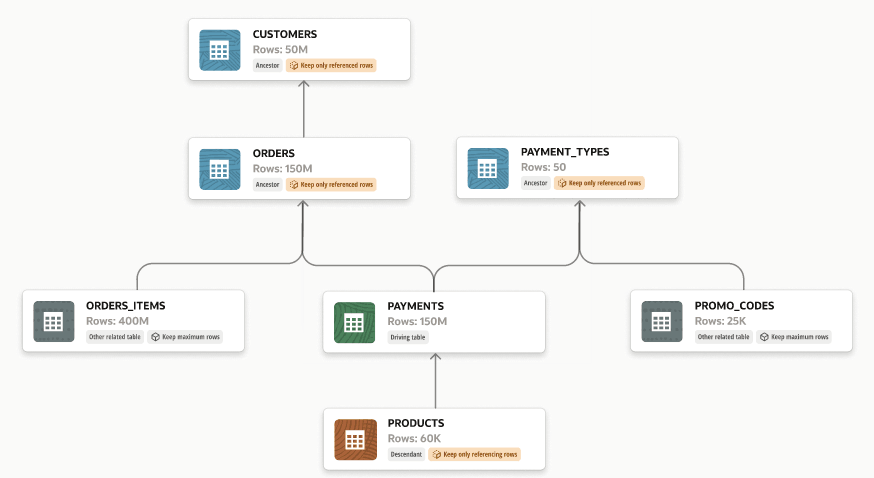
Description of the illustration relationship-graph-data-subsetting.png
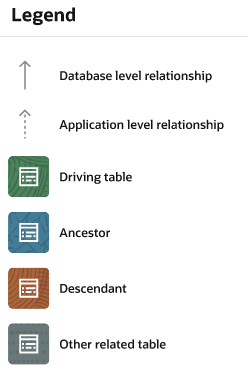
Description of the illustration relationship-graph-legend.png
Processing Sequence
The processing sequence shows the order in which table relationships are processed for a subsetting rule. It is generated when the rule is created and can help you verify that the policy will produce the expected results.
Advanced Subsetting Features
Subsetting includes the following advanced features:
-
Configure rules for tables unrelated to the tables being subsetted: For unrelated tables, you can choose to retain all the data or permanently remove all the rows from the unrelated tables in the database. The default is to retain all the data.
-
Configuring the degree of parallelism: This feature lets you control parallel execution during data subsetting. Allowed values are None (no parallelism), Default (Oracle Database chooses the optimal degree of parallelism. This is selected by default.), or an integer that specifies the number of parallel execution servers for a single operation.
-
Disable redo log generation during subsetting: By default, subsetting disables redo and flashback logging to purge original data from logs. For test scenarios where rollback/retry is needed, you can enable logging and use the flashback database to recover original data after subsetting. This option is not selected by default.
-
Recompile invalid objects: You can choose how to recompile invalid objects after subsetting. Options include not compiling, recompiling sequentially, and recompiling in parallel. None is selected by default.
-
Refresh statistics after subsetting: You can choose to refresh database optimizer statistics for subsetted tables after data reduction. This helps to ensure accurate query plans, but may increase processing time. This option is not selected by default.
-
Automatic use of the user’s default tablespace: If a custom tablespace is not specified during a subsetting job, then the default tablespace of the database user used for subsetting is automatically used for the job.
-
Complex filtering: Data subsetting supports complex filtering criteria that can be translated into
WHEREclauses when retrieving source data. To help create accurate filters, the interface can display table columns and relationships, validate syntax, and identify errors. Filters can use either static values or separately defined parameters, making it easier to provide and update values such as employee IDs. -
Pre- and Post-Subsetting Scripts: You can configure scripts to run before or after the subsetting process. These options are not configured by default.
-
Data masking with subsetting: You can configure a subsetting job to perform data masking following the subsetting operations. This option is enabled by default if a masking policy is associated with the subsetting policy.
Subsetting Jobs
You can start or abort a subsetting job and monitor its progress, including elapsed time, estimated completion time, completed steps, the current step, and remaining steps. After the job finishes, you can download its logs.
Subsetting pre-checks run automatically when you start a subsetting job to identify potential issues. You can also run them in advance by generating a Subsetting Readiness Report. A subsetting policy is required to run pre-checks.
After a subsetting job is completed, you can view a subsetting report. You can also generate and download this report in PDF or XLS format.
Subsetting Workflow
Subsetting provides an end-to-end workflow for creating and managing targeted data subsets.
Oracle recommends that you use the following approach and workflow to subset data with Oracle Data Safe.
-
Important: Create a backup of your production database. For example, you can use Recovery Manager (RMAN) and Oracle Cloud Storage service (or any other backup location) to create and store your production backups. You never want to subset the actual production database.
-
Clone the backup of your production database to create a stage database. Do not expose the stage database to users. Create the stage database on the Oracle Cloud with supported services.
-
If you plan to create a subsetting policy using an SDM, discover sensitive data on the stage database and generate a sensitive data model. See Use Data Discovery.
-
If you plan to perform data masking when you subset data, create masking formats (if needed) and a masking policy. Run a pre-masking check and complete any remediation recommendations. See Use Data Masking to create new masking formats, Use Data Masking to create a masking policy, and Pre-Masking Check.
-
You have two options to configure and run a subsetting job:
-
Option 1: Subset a database by using the wizard. In the wizard, you can configure all the subsetting options and then run the subsetting job. A readiness check is automatically triggered before the subsetting job runs. See Subset a Database.
-
Option 2: Create a subsetting policy first, manually run a subsetting readiness check and remediate issues in the database or subsetting policy, and then run the subsetting job. See Create and Manage Subsetting Policies, Run and Manage Subsetting Readiness Reports, and then Subset a Database.
-
Prerequisites for Using Data Subsetting in Oracle Data Safe
These are the prerequisites for using the Data Subsetting feature in Oracle Data Safe:
-
Register the target databases that you want to use with Data Subsetting.
-
Target database credentials are required for data subsetting.
-
Grant the Data Subsetting role (
DS$DATA_SUBSETTING_ROLE) on the target database. A Database Administrator can grant this role to the Oracle Data Safe Service account on the target database. If a table to be subsetted contains aLONGdata type column, you must also grant the database user theDELETE ANY TABLEprivilege. -
Obtain permission in Oracle Cloud Infrastructure Identity and Access Management (IAM) to use the Data Subsetting feature in Oracle Data Safe. An OCI administrator can grant these permissions. These resources require permissions:
-
data-safe-subsetting-policies -
data-safe-subsetting-reportsIn order to perform data subsetting, a user will need
managepermissions ondata-safe-subsetting-reportsin the compartment of the target database. -
data-safe-subsetting-policy-health-report -
data-safe-work-requests
-
-
(Optional) Obtain permission in IAM to use the Data Masking feature in Oracle Data Safe. Data Masking can be used in conjunction with Data Subsetting.
-
data-safe-masking-policies -
data-safe-masking-reportsIn order to perform data masking a user will need
managepermissions ondata-safe-masking-reportsin the compartment of the target database. -
data-safe-masking-policy-health-report -
data-safe-library-masking-formats
As an alternative to selectively granting permissions, you can grant permissions on
data-safe-subsetting-familyanddata-safe-masking-familyin the relevant compartments, which would include permissions on all of the resources above. See data-safe-subsetting-family Resource and data-safe-masking-family Resource. -