View Patch Compliance
The Patch compliance page in Security Assessment provides a bird’s-eye view of the current patching posture (quarterly Release Updates) across your Oracle database fleet. With the increasing sophistication of AI-driven cyber-attacks, keeping databases up to date with the latest security patch is more critical than ever to protect against emerging threats. This page helps organizations assess their overall patch compliance and identify target databases that require attention.
At the top of the page, two charts provide a high-level overview of your patching posture, while the summary table at the bottom offers detailed information for each target database. You can filter the data on the page by compartment and target database group.
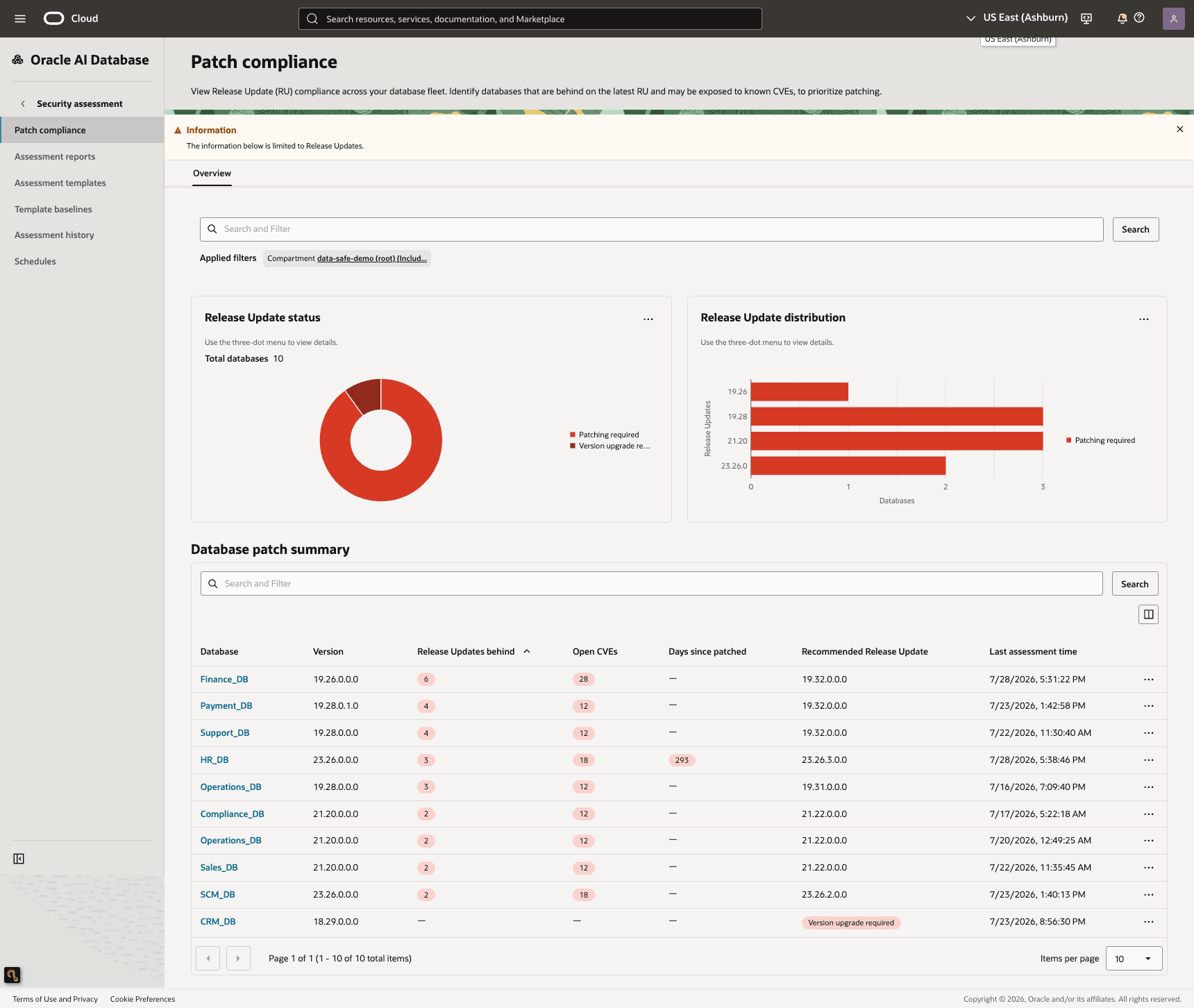
Description of the illustration patch-compliance-page.png
Release Update Status Chart
The Release Update status pie chart shows you the number of target databases by patch compliance status. The patch compliance statuses are as follows:
- Patching required
- On latest Release Update
- Release Update information unavailable
- Version upgrade required
You can drill down into each patch compliance status to view more information about each target database.
Release Update Distribution Chart
The Release Update distribution bar chart displays the number of target databases by Release Update (RU) version. The bars are color-coded to indicate the patch compliance status for each RU:
- Green: All target databases for a given database release are running the latest RU.
- Red: One or more target databases for a given database release are not on the latest RU and require patching.
Database Patch Summary Table
The Database patch summary table lists the following details for each target database:
- Target database name (as registered in Oracle Data Safe)
- Version
- Release Updates behind
- Open CVEs
- Days since patched
- Recommended Release Update
- Last Updated (or Assessed) date and time
Drill Down into the Release Update Status
-
In the section titled Release Update status, select the three dots, and then select one of the following options to open a panel with more detail:
- View targets requiring patching: View the list of target databases that are behind the latest available RU and should be reviewed for patching.
- View targets requiring version upgrade: View the list of target databases that require a version upgrade to get them up to the latest RU.
- View targets with patch information unavailable: View the list of databases for which Release Update information could not be determined.
- View targets on latest patch: View the list of databases that are on the latest available RU.
-
In the panel, view the list of databases, their versions, and, if applicable, the number of RUs behind.
-
If needed, filter by compartment and target database group.
-
Navigate between pages by selecting the arrow buttons at the bottom of the table. You can set the number of items per page.
-
To refresh the data for a target database, select its three dots, and then select Refresh data.
-
Select Close to close the panel.
Refresh the Data in the Database Patch Summary Table
-
Locate the row for the target database whose data you want to refresh.
-
Select the three dots at the end of the row, and then select Refresh data.
The Refresh data panel displays the progress of a patch compliance data refresh after you initiate a refresh operation. The panel remains open while the refresh is in progress and provides the current status of the operation.
The panel includes the following information:
- Status message: Indicates the current state of the refresh operation (for example, Resource run in progress).
- Progress: Displays the completion percentage of the refresh operation.
- Refresh status: Indicates whether the patch compliance data refresh is in progress or has completed.
-
Keep the panel open to monitor the progress of the refresh. After the refresh completes, close the panel and return to the Patch compliance page to view the updated information.