Replica i dati tra database cloud nella stessa area
Scopri come impostare Oracle Cloud Infrastructure GoldenGate per replicare i dati tra due database AI autonomi.
Panoramica
Oracle Cloud Infrastructure GoldenGate ti consente di replicare i database supportati all'interno della stessa area. I passi riportati di seguito descrivono come creare un'istanza di un database di destinazione utilizzando Oracle Data Pump e replicare i dati dall'origine alla destinazione.
Questo Quickstart è disponibile anche come LiveLab: Visualizza il workshop
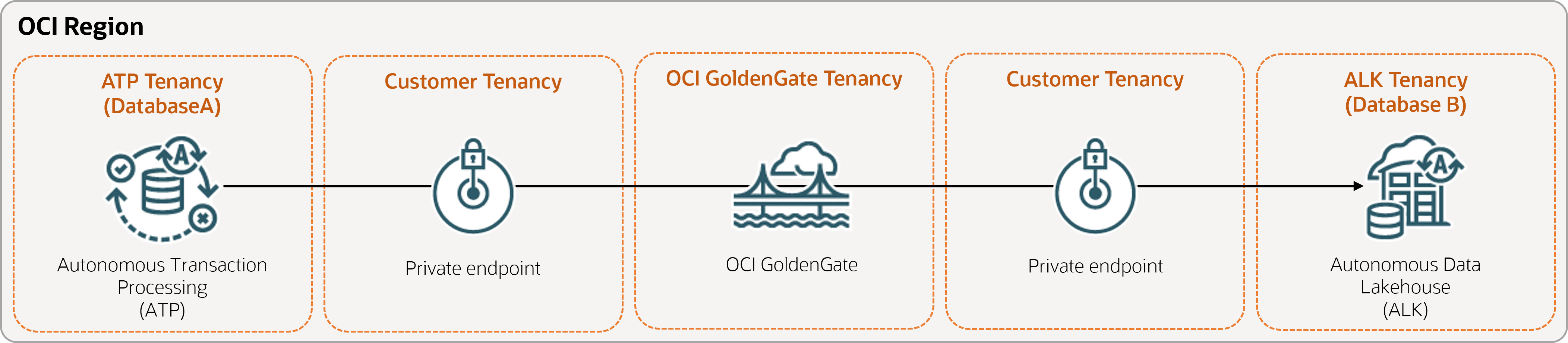
Descrizione dell'illustrazione same-region.png
Prima di iniziare
Per completare correttamente questo avvio rapido, è necessario disporre dei seguenti elementi:
-
Database di origine esistente
-
Un database di destinazione esistente
-
Il database di origine e di destinazione deve trovarsi in una singola tenancy, nella stessa area
-
Se sono necessari dati di esempio, scaricare Archive.zip, quindi seguire le istruzioni riportate in Lab 1, Task 3: Carica lo schema ATP.
Task 1: Impostare l'ambiente
-
Creare una connessione ATP (Oracle Autonomous AI Transaction Processing) di origine.
-
Creare una connessione ALK (Autonomous AI Lakehouse) di destinazione.
-
Utilizzare lo strumento SQL per abilitare il log supplementare:
ALTER DATABASE ADD SUPPLEMENTAL LOG DATA -
Eseguire la query seguente nello strumento SQL per assicurarsi che
support_mode=FULLper tutte le tabelle del database di origine:select * from DBA_GOLDENGATE_SUPPORT_MODE where owner = 'SRC_OCIGGLL';
Task 2: Creazione dell'estrazione integrata
Un'estrazione integrata acquisisce le modifiche in corso al database di origine.
-
Nella pagina Dettagli distribuzione selezionare Avvia console.
-
Se necessario, immettere oggadmin per il nome utente e la password utilizzati durante la creazione della distribuzione, quindi selezionare Connetti.
-
Aggiungi dati transazione e tabella checkpoint:
-
Aprire il menu di navigazione, quindi selezionare Connessioni DB.
-
Selezionare Connetti a database SourceDB.
-
Nel menu di navigazione selezionare Trandata, quindi selezionare Aggiungi Trandata (icona più).
-
Per Nome schema, immettere
SRC_OCIGGLL, quindi selezionare Sottometti. -
Per verificare, immettere
SRC_OCIGGLLnel campo Cerca e selezionare Cerca. -
Aprire il menu di navigazione, quindi selezionare Connessioni DB.
-
Selezionare Connetti a database TargetDB.
-
Nel menu di navigazione selezionare Checkpoint, quindi selezionare Aggiungi checkpoint (icona più).
-
Per Tabella checkpoint, immettere
"SRCMIRROR_OCIGGLL"."CHECKTABLE", quindi selezionare Sottometti.
-
-
Nota: per ulteriori informazioni sui parametri che è possibile utilizzare per specificare le tabelle di origine, vedere opzioni aggiuntive dei parametri di estrazione.
Nella pagina Estrai parametri, aggiungere le righe seguenti in
EXTTRAIL <trail-name>:-- Capture DDL operations for listed schema tables ddl include mapped -- Add step-by-step history of to the report file. Useful when troubleshooting. ddloptions report -- Write capture stats per table to the report file daily. report at 00:01 -- Rollover the report file weekly. Useful when IE runs -- without being stopped/started for long periods of time to -- keep the report files from becoming too large. reportrollover at 00:01 on Sunday -- Report total operations captured, and operations per second -- every 10 minutes. reportcount every 10 minutes, rate -- Table list for capture table SRC_OCIGGLL.*; -
Controllare le transazioni a esecuzione prolungata. Eseguire lo script seguente nel database di origine:
select start_scn, start_time from gv$transaction where start_scn < (select max(start_scn) from dba_capture);Se la query restituisce righe, è necessario individuare l'SCN della transazione e quindi eseguire il commit o il rollback della transazione.
Task 3: Esportare i dati utilizzando Oracle Data Pump (ExpDP)
Utilizzare Oracle Data Pump (ExpDP) per esportare i dati dal database di origine in Oracle Object Store.
-
Crea un bucket dell'area di memorizzazione degli oggetti Oracle.
Prendere nota dello spazio di nomi e del nome del bucket da utilizzare con gli script di esportazione e importazione.
-
Creare un token di autenticazione, quindi copiare e incollare la stringa di token in un editor di testo per utilizzarla in un secondo momento.
-
Creare una credenziale nel database di origine, sostituendo
<user-name>e<token>con il nome utente dell'account Oracle Cloud e la stringa di token creata nel passo precedente:BEGIN DBMS_CLOUD.CREATE_CREDENTIAL( credential_name => 'ADB_OBJECTSTORE', username => '<user-name>', password => '<token>' ); END; -
Eseguire lo script seguente nel database di origine per creare il job Esporta dati. Assicurarsi di sostituire
<region>,<namespace>e<bucket-name>nell'URI dell'area di memorizzazione degli oggetti di conseguenza.SRC_OCIGGLL.dmpè un file che verrà creato durante l'esecuzione dello script.DECLARE ind NUMBER; -- Loop index h1 NUMBER; -- Data Pump job handle percent_done NUMBER; -- Percentage of job complete job_state VARCHAR2(30); -- To keep track of job state le ku$_LogEntry; -- For WIP and error messages js ku$_JobStatus; -- The job status from get_status jd ku$_JobDesc; -- The job description from get_status sts ku$_Status; -- The status object returned by get_status BEGIN -- Create a (user-named) Data Pump job to do a schema export. h1 := DBMS_DATAPUMP.OPEN('EXPORT','SCHEMA',NULL,'SRC_OCIGGLL_EXPORT','LATEST'); -- Specify a single dump file for the job (using the handle just returned) -- and a directory object, which must already be defined and accessible -- to the user running this procedure. DBMS_DATAPUMP.ADD_FILE(h1,'https://objectstorage.<region>.oraclecloud.com/n/<namespace>/b/<bucket-name>/o/SRC_OCIGGLL.dmp','ADB_OBJECTSTORE','100MB',DBMS_DATAPUMP.KU$_FILE_TYPE_URIDUMP_FILE,1); -- A metadata filter is used to specify the schema that will be exported. DBMS_DATAPUMP.METADATA_FILTER(h1,'SCHEMA_EXPR','IN (''SRC_OCIGGLL'')'); -- Start the job. An exception will be generated if something is not set up properly. DBMS_DATAPUMP.START_JOB(h1); -- The export job should now be running. In the following loop, the job -- is monitored until it completes. In the meantime, progress information is displayed. percent_done := 0; job_state := 'UNDEFINED'; while (job_state != 'COMPLETED') and (job_state != 'STOPPED') loop dbms_datapump.get_status(h1,dbms_datapump.ku$_status_job_error + dbms_datapump.ku$_status_job_status + dbms_datapump.ku$_status_wip,-1,job_state,sts); js := sts.job_status; -- If the percentage done changed, display the new value. if js.percent_done != percent_done then dbms_output.put_line('*** Job percent done = ' \|\| to_char(js.percent_done)); percent_done := js.percent_done; end if; -- If any work-in-progress (WIP) or error messages were received for the job, display them. if (bitand(sts.mask,dbms_datapump.ku$_status_wip) != 0) then le := sts.wip; else if (bitand(sts.mask,dbms_datapump.ku$_status_job_error) != 0) then le := sts.error; else le := null; end if; end if; if le is not null then ind := le.FIRST; while ind is not null loop dbms_output.put_line(le(ind).LogText); ind := le.NEXT(ind); end loop; end if; end loop; -- Indicate that the job finished and detach from it. dbms_output.put_line('Job has completed'); dbms_output.put_line('Final job state = ' \|\| job_state); dbms_datapump.detach(h1); END;
Task 4: creare un'istanza del database di destinazione utilizzando Oracle Data Pump (ImpDP)
Utilizzare Oracle Data Pump (ImpDP) per importare i dati nel database di destinazione dal file SRC_OCIGGLL.dmp esportato dal database di origine.
-
Creare una credenziale nel database di destinazione per accedere all'area di memorizzazione degli oggetti Oracle (utilizzando le stesse informazioni nella sezione precedente).
BEGIN DBMS_CLOUD.CREATE_CREDENTIAL( credential_name => 'ADB_OBJECTSTORE', username => '<user-name>', password => '<token>' ); END; -
Eseguire lo script seguente nel database di destinazione per importare i dati da
SRC_OCIGGLL.dmp. Assicurarsi di sostituire<region>,<namespace>e<bucket-name>nell'URI dell'area di memorizzazione degli oggetti di conseguenza:DECLARE ind NUMBER; -- Loop index h1 NUMBER; -- Data Pump job handle percent_done NUMBER; -- Percentage of job complete job_state VARCHAR2(30); -- To keep track of job state le ku$_LogEntry; -- For WIP and error messages js ku$_JobStatus; -- The job status from get_status jd ku$_JobDesc; -- The job description from get_status sts ku$_Status; -- The status object returned by get_status BEGIN -- Create a (user-named) Data Pump job to do a "full" import (everything -- in the dump file without filtering). h1 := DBMS_DATAPUMP.OPEN('IMPORT','FULL',NULL,'SRCMIRROR_OCIGGLL_IMPORT'); -- Specify the single dump file for the job (using the handle just returned) -- and directory object, which must already be defined and accessible -- to the user running this procedure. This is the dump file created by -- the export operation in the first example. DBMS_DATAPUMP.ADD_FILE(h1,'https://objectstorage.<region>.oraclecloud.com/n/<namespace>/b/<bucket-name>/o/SRC_OCIGGLL.dmp','ADB_OBJECTSTORE',null,DBMS_DATAPUMP.KU$_FILE_TYPE_URIDUMP_FILE); -- A metadata remap will map all schema objects from SRC_OCIGGLL to SRCMIRROR_OCIGGLL. DBMS_DATAPUMP.METADATA_REMAP(h1,'REMAP_SCHEMA','SRC_OCIGGLL','SRCMIRROR_OCIGGLL'); -- If a table already exists in the destination schema, skip it (leave -- the preexisting table alone). This is the default, but it does not hurt -- to specify it explicitly. DBMS_DATAPUMP.SET_PARAMETER(h1,'TABLE_EXISTS_ACTION','SKIP'); -- Start the job. An exception is returned if something is not set up properly. DBMS_DATAPUMP.START_JOB(h1); -- The import job should now be running. In the following loop, the job is -- monitored until it completes. In the meantime, progress information is -- displayed. Note: this is identical to the export example. percent_done := 0; job_state := 'UNDEFINED'; while (job_state != 'COMPLETED') and (job_state != 'STOPPED') loop dbms_datapump.get_status(h1, dbms_datapump.ku$_status_job_error + dbms_datapump.ku$_status_job_status + dbms_datapump.ku$_status_wip,-1,job_state,sts); js := sts.job_status; -- If the percentage done changed, display the new value. if js.percent_done != percent_done then dbms_output.put_line('*** Job percent done = ' \|\| to_char(js.percent_done)); percent_done := js.percent_done; end if; -- If any work-in-progress (WIP) or Error messages were received for the job, display them. if (bitand(sts.mask,dbms_datapump.ku$_status_wip) != 0) then le := sts.wip; else if (bitand(sts.mask,dbms_datapump.ku$_status_job_error) != 0) then le := sts.error; else le := null; end if; end if; if le is not null then ind := le.FIRST; while ind is not null loop dbms_output.put_line(le(ind).LogText); ind := le.NEXT(ind); end loop; end if; end loop; -- Indicate that the job finished and gracefully detach from it. dbms_output.put_line('Job has completed'); dbms_output.put_line('Final job state = ' \|\| job_state); dbms_datapump.detach(h1); END;
Task 5: Aggiunta ed esecuzione di un Replicat non integrato
-
Aggiungere ed eseguire Replicat.
Nella schermata File dei parametri sostituire
MAP *.*, TARGET *.*;con lo script seguente:-- Capture DDL operations for listed schema tables ddl include mapped -- Add step-by-step history of ddl operations captured -- to the report file. Very useful when troubleshooting. ddloptions report -- Write capture stats per table to the report file daily. report at 00:01 -- Rollover the report file weekly. Useful when PR runs -- without being stopped/started for long periods of time to -- keep the report files from becoming too large. reportrollover at 00:01 on Sunday -- Report total operations captured, and operations per second -- every 10 minutes. reportcount every 10 minutes, rate -- Table map list for apply DBOPTIONS ENABLE_INSTANTIATION_FILTERING; MAP SRC_OCIGGLL.*, TARGET SRCMIRROR_OCIGGLL.*;Nota:
DBOPTIONS ENABLE_INSTATIATION_FILTERINGabilita il filtro CSN sulle tabelle importate utilizzando Oracle Data Pump. Per ulteriori informazioni, vedere Riferimento DBOPTIONS. -
Eseguire inserimenti nel database di origine:
-
Tornare alla console di Oracle Cloud e utilizzare il menu di navigazione per tornare a Oracle AI Database, Autonomous AI Transaction Processing e quindi a SourceDB.
-
Nella pagina Dettagli SourceDB, selezionare Azioni database, quindi SQL.
-
Immettere gli inserimenti riportati di seguito, quindi selezionare Esegui script.
Insert into SRC_OCIGGLL.SRC_CITY (CITY_ID,CITY,REGION_ID,POPULATION) values (1000,'Houston',20,743113); Insert into SRC_OCIGGLL.SRC_CITY (CITY_ID,CITY,REGION_ID,POPULATION) values (1001,'Dallas',20,822416); Insert into SRC_OCIGGLL.SRC_CITY (CITY_ID,CITY,REGION_ID,POPULATION) values (1002,'San Francisco',21,157574); Insert into SRC_OCIGGLL.SRC_CITY (CITY_ID,CITY,REGION_ID,POPULATION) values (1003,'Los Angeles',21,743878); Insert into SRC_OCIGGLL.SRC_CITY (CITY_ID,CITY,REGION_ID,POPULATION) values (1004,'San Diego',21,840689); Insert into SRC_OCIGGLL.SRC_CITY (CITY_ID,CITY,REGION_ID,POPULATION) values (1005,'Chicago',23,616472); Insert into SRC_OCIGGLL.SRC_CITY (CITY_ID,CITY,REGION_ID,POPULATION) values (1006,'Memphis',23,580075); Insert into SRC_OCIGGLL.SRC_CITY (CITY_ID,CITY,REGION_ID,POPULATION) values (1007,'New York City',22,124434); Insert into SRC_OCIGGLL.SRC_CITY (CITY_ID,CITY,REGION_ID,POPULATION) values (1008,'Boston',22,275581); Insert into SRC_OCIGGLL.SRC_CITY (CITY_ID,CITY,REGION_ID,POPULATION) values (1009,'Washington D.C.',22,688002); -
Nella console di distribuzione OCI GoldenGate, selezionare il nome di estrazione (UAEXT), quindi selezionare Statistiche. Verificare che SRC_OCIGGLL.SRC_CITY sia elencato con 10 inserimenti.
-
Tornare alla schermata Panoramica, selezionare Replicat name (REP), quindi selezionare Statistics. Verificare che SRCMIRROR_OCIGGLL.SRC_CITY sia elencato con 10 inserimenti
-