Implementazione di un servizio di ricerca automatica IdP
Come illustrato in precedenza, OAM/SP può essere configurato per utilizzare un servizio di ricerca automatica IdP remoto la cui funzione è determinare quale IdP utilizzare per l'operazione SSO Federation.
La specifica SAML 2.0 "Identity Provider Discovery Service Protocol and Profile" pubblicata da OASIS definisce il protocollo di interazione tra un SP SAML 2.0 e un servizio di ricerca automatica IdP.
Questo articolo implementa un IdP Discovery Service di esempio e quindi configura OAM/SP per l'utilizzo di tale servizio.
-
Il servizio deve supportare il protocollo definito dalla specifica SAML 2.0 "Identity Provider Discovery Service Protocol and Profile"
-
Il servizio è HTTP e può essere distribuito ovunque
-
OAM/SP è configurato per reindirizzare l'utente al servizio remoto quando si avvia un'operazione SSO Federation
IdP Protocollo del servizio di ricerca automatica
Come accennato in precedenza, il flusso di IdP Discovery Service viene descritto nella specifica (http://docs.oasis-open.org/security/saml/Post2.0/sstc-saml-idp-discovery.pdf?) ed è costituito dai seguenti passi:
-
SP è configurato per utilizzare un servizio di ricerca automatica IdP remoto per determinare l'IdP da utilizzare per l'operazione SSO Federation
-
L'SP reindirizza l'utente al servizio di ricerca automatica IdP tramite un reindirizzamento HTTP 302 e fornisce i parametri riportati di seguito nella stringa di query
-
entityID: l'emittente/ProviderIDdi OAM/SP -
returnIDParam: il nome del parametro della stringa di query che il servizio deve utilizzare per il parametro contenente il valore IdPProviderIDquando l'utente viene reindirizzato a OAM/SP -
return: l'URL da utilizzare per reindirizzare l'utente a OAM/SP
-
-
Il servizio determina il file IdP da utilizzare
-
Il servizio reindirizza l'utente a OAM/SP tramite un reindirizzamento HTTP 302 in base al parametro di query "return" specificato dal provider di servizi e fornisce i seguenti parametri nella stringa di query
-
Un parametro di query contenente il valore IdP
ProviderID. Il nome di tale parametro di query viene specificato dall'SP nel parametro di queryreturnIDParam.
A parte lo scambio di protocollo, il servizio può essere implementato in qualsiasi modo ritenuto accettabile dall'implementatore.
Servizio personalizzato
Panoramica
In questo esempio, scrivere un servizio che:
-
Tenere presente una lista di IdPs noti a cui fanno riferimento gli identificativi
ProviderID/Issuer -
Consentire all'utente di selezionare il IdP da utilizzare da un elenco a discesa
-
Salvare la scelta dell'utente in un cookie denominato
IDPDiscService -
In fase di esecuzione, il servizio verifica se
IDPDiscServiceè presente -
Se è presente e contiene un valore IdP valido, il servizio reindirizza automaticamente l'utente all'SP con il valore
ProviderID/Issuerdell'IdP: non viene eseguita alcuna interazione con l'utente -
In caso contrario, il servizio visualizza una pagina contenente un elenco a discesa del IdPs noto
In termini di attuazione:
-
Usa una pagina JSP
-
Distribuire il file WAR/JSP in un contenitore J2EE remoto, diverso dal server WLS in cui è in esecuzione OAM
Pagine di esempio
Il servizio di ricerca automatica personalizzato IdP è costituito da due pagine JSP:
-
landing.jsp
-
Pagina in cui l'utente viene reindirizzato dal provider di servizi al servizio
-
Verificare innanzitutto se il cookie
IDPDiscServiceè presente e contiene un IdP noto -
Se presente, reindirizza l'utente all'SP con
ProviderID/Issuerdell'IdP -
In caso contrario, viene visualizzata una pagina in cui viene richiesto all'utente di selezionare un IdP
-
La pagina che richiede all'utente di selezionare un IdP è composta da un elenco a discesa
-
Dopo aver sottomesso la scelta, l'utente invia i dati alla pagina
/idpdiscoveryservice/submit.jsp -
Questa pagina è accessibile tramite
/idpdiscoveryservice/landing.jsp -
submit.jspPagina in cui l'utente pubblica la propria scelta, dalanding.jsp -
Salva IdP nel cookie
IDPDiscService -
Il valore è IDP con codifica
Base64 -
ProviderID/Issuer -
Il cookie è contrassegnato come persistente
-
reindirizza l'utente all'SP con
-
IdP
ProviderID/Issuer
Implementazione
Pagina di destinazione
<%@ page buaer="5kb" autoFlush="true" session="false"%\> \<%@ page language="java"import="java.util.\*,sun.misc.\*,java.net.\*"%>

<%response.setHeader("Expires", "Sat, 1 Jan 200000:00:00 GMT"); response.setHeader("Cache-Control", "no-cache"); response.setHeader("Pragma", "no-cache"); request.setCharacterEncoding("UTF-8"); response.setContentType("text/html; charset=UTF-8");

// list of known IdPs, keys being the displayed names,and values the ProviderID/Issuer IDs

Map idps = new HashMap(); idps.put("AcmeIdP", "https://acme.com/fed"); idps.put("IdP1", "https://idp1.com/saml"); idps.put("MyIdentiyProvider.com", "https://myidentityprovider.com/saml2.0");

// entityID of the requesting SP

String entityID = request.getParameter("entityID");

// the query parameter that contains the IdP's ProviderID/Issuer when

// redirecting the user back to the SP

String returnIDParam = request.getParameter("returnIDParam");

// the URL where the user should be redirected at the SP

String returnURL = request.getParameter("return");

// check if the IDPDiscService cookie is set, and if it is a known IdP

Cookie\[\] cookies = request.getCookies();

if (cookies != null && cookies.length \> 0)

{

for (int i = 0; i \< cookies.length; i++)

{

if ("IDPDiscService".equals(cookies\[i\].getName()))

{

// decode the idp

BASE64Decoder b64 = new BASE64Decoder();

String idp = new

String(b64.decodeBuaer(cookies\[i\].getValue()));

if (idps.containsValue(idp))

{

// redirects to the SP

StringBuaer redirectStringBuaer = new

StringBuaer(returnURL);

if (returnURL.indexOf('?') == -1)

redirectStringBuaer.append("?");

else if (returnURL.charAt(returnURL.length() - 1)

!= '&')

redirectStringBuaer.append("&");

redirectStringBuaer.append(returnIDParam);

redirectStringBuaer.append("="); redirectStringBuaer.append(URLEncoder.encode(idp));

response.sendRedirect(redirectStringBuaer.toString());

return;

}

}

}

}

%>

<html>

<head>

<title>Select your Single Sign-On Server</title>

</head>

<body>

<p style="text-align: center;"\>Select your SingleSign-On Server</p>

<form action="/idpdiscoveryservice/submit.jsp" method="post" name="idpselection"/>

<input name="entityID" type="hidden" value="<%=entityID%\>" />

<input name="returnIDParam" type="hidden" value="<%=returnIDParam%\>" />

<input name="return" type="hidden" value="<%=returnURL%>" />

<p style="text-align: center;"\>Single Sign-On Server:

<select name="selectedidp"\>

<%Iterator idpsIterator = idps.keySet().iterator();while(idpsIterator.hasNext())

{

String displayIdP = (String)idpsIterator.next();

String providerIDIdP = (String)idps.get(displayIdP);
%>

<option value="<%=providerIDIdP%>">

<%=displayIdP%><option>

<%

}

%>

</select>

</p>

<p style="text-align: center;">

<input name="submit" type="submit"value="Submit" />

</p>

</form>

</body>

</html>
Invia pagina
<%@ page buaer="5kb" autoFlush="true" session="false"%> <%@ page language="java"import="java.util.*,sun.misc.*,java.net.*"%>

<%response.setHeader("Expires", "Sat, 1 Jan 200000:00:00 GMT"); response.setHeader("Cache-Control", "no-cache"); response.setHeader("Pragma", "no-cache"); request.setCharacterEncoding("UTF-8"); response.setContentType("text/html; charset=UTF-8");

// list of known IdPs with values being the ProviderID/Issuer IDs

List idps = new ArrayList(); idps.add("https://acme.com/fed"); idps.add("https://idp1.com/saml"); idps.add("https://myidentityprovider.com/saml2.0");

// entityID of the requesting SP

String entityID = request.getParameter("entityID");

// the query parameter that contains the IdP's ProviderID/Issuer when

// redirecting the user back to the SP

String returnIDParam =request.getParameter("returnIDParam");

// the URL where the user should be redirected at the SP

String returnURL = request.getParameter("return");

// the idp selected by the user

String idp = request.getParameter("selectedidp");

// check that the selected IdP is one of the known IdPs

if (!idps.contains(idp))

throw new Exception("Unknown IdP");

// save the idp in the IDPDiscService cookie

BASE64Encoder b64Encoder = new

BASE64Encoder();

response.addHeader("Set-Cookie", "IDPDiscService="

+

b64Encoder.encode(idp.getBytes()) + "; expires=Wed, 01-Jan-2020 00:00:00 GMT; path=/");

// redirects to the SP

StringBuaer redirectStringBuaer = new StringBuaer(returnURL); if (returnURL.indexOf('?') == -1) redirectStringBuaer.append("?");

else if (returnURL.charAt(returnURL.length() - 1) != '&')

redirectStringBuaer.append("&"); redirectStringBuaer.append(returnIDParam); redirectStringBuaer.append("="); redirectStringBuaer.append(URLEncoder.encode(idp));

response.sendRedirect(redirectStringBuaer.toString());

%>
Creazione package
Dopo aver inserito landing.jsp e submit.jsp in una directory che contiene solo tali file, creare idpDiscService.war WAR Ale utilizzando lo strumento JAR:
jar cvf idpDiscService.war *.jsp
Il contenuto di tale file WAR può essere visualizzato tramite il comando unzip: ` unzip -l idpDiscService.war Archivio: idpDiscService.war`
| Lunghezza | Data | Tempo | Nome |
|---|---|---|---|
| 0 | 01-09-2014 | 19.00 | METADATI/ |
| 76 | 01-09-2014 | 19.00 | META-INF/MANIFEST.MF |
| 2898 | 01-09-2014 | 19:57 | landing.jsp |
| 1838 | 01-09-2014 | 19:57 | submit.jsp |
| 4812 | 4 file |
Distribuire quindi questo file WAR in un contenitore J2EE utilizzando /idpdiscoveryservice come percorso radice. In questo modo entrambe le pagine sono accessibili tramite /idpdiscoveryservice /landing.jsp e /idpdiscoveryservice/submit.jsp.
Configurazione di OAM/SP
Per configurare OAM/SP per l'utilizzo di IdP Discovery Service, effettuare le operazioni riportate di seguito.
-
Immettere l'ambiente WLST eseguendo:
$IAM_ORACLE_HOME/common/bin/wlst.sh -
Connetti al server di amministrazione WLS:
connect() -
Passare alla diramazione Runtime dominio:
domainRuntime() -
Abilitare/disabilitare OAM/SP per utilizzare un servizio di ricerca automatica IdP: ` putBooleanProperty("/spglobal /idpdiscoveryserviceenabled", "true")`
-
Impostare la posizione del servizio di ricerca automatica IdP remoto:
putStringProperty("/spglobal /idpdiscoveryserviceurl","http://remote.idp.disc.service.com /idpdiscoveryservice/landing.jsp") -
Uscire dall'ambiente WLST:
exit()
Test
Quando viene richiamato OAM/SP per avviare un SSO Federation, l'utente viene reindirizzato al servizio IdP Discovery personalizzato (/idpdiscoveryservice/landing.jsp)
Nella prima visita, all'utente viene visualizzato un elenco a discesa e viene richiesto di selezionare un server SSO IdP:
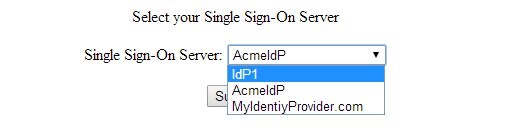
Descrizione dell'immagine IdP_SSO_Server.jpg
Quando si sottomette la scelta a /idpdiscoveryservice /submit.jsp, la pagina convalida la scelta, la salva nel cookie IDPDiscService e reindirizza l'utente a OAM/SP con l'IDP ProviderID: da lì, OAM/SP avvia Federation SSO con tale IdP.
Al successivo avvio di SSO Federation per l'utente OAM/SP:
-
Il server reindirizza l'utente al servizio IdP Discovery Service personalizzato (
/idpdiscoveryservice/landing.jsp) -
La pagina rileva il cookie
IDPDiscServicee decodificaProviderIDdell'IdP -
La pagina reindirizza l'utente a OAM/SP con
ProviderIDdell'IdP -
OAM/SP avvia SSO Federation con IdP.
Altre risorse di apprendimento
Esplora altri laboratori su docs.oracle.com/learn o visita altri contenuti di formazione gratuiti sul canale Oracle Learning YouTube. Inoltre, visitare education.oracle.com/learning-explorer per diventare un Oracle Learning Explorer.
Per la documentazione sul prodotto, visitare Oracle Help Center.
Implementing an IdP Discovery Service
F60448-01
September 2022
Copyright © 2022, Oracle and/or its affiliates.