同じリージョン内のクラウド・データベース間でのデータのレプリケート
2つのAutonomous AIデータベース間でデータをレプリケートするようにOracle Cloud Infrastructure GoldenGateを設定する方法について学習します。
概要
Oracle Cloud Infrastructure GoldenGateでは、同じリージョン内のサポートされているデータベースをレプリケートできます。次のステップでは、Oracle Data Pumpを使用してターゲット・データベースをインスタンス化し、ソースからターゲットにデータをレプリケートする方法について説明します。
このクイックスタートは、LiveLabとしても使用できます: ワークショップを見る
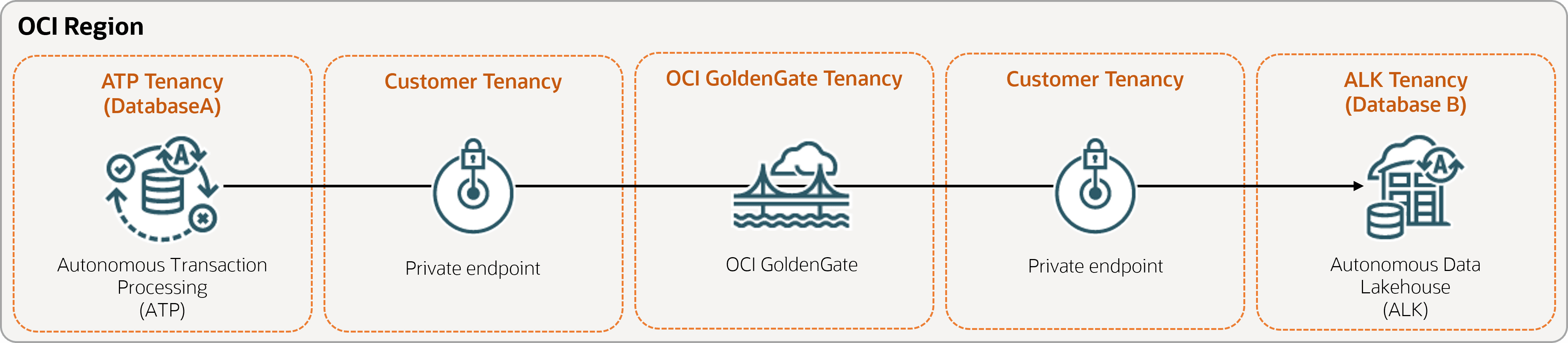
開始する前に
このクイック開始を正常に完了するには、次が必要です:
-
既存のソース・データベース
-
既存のターゲット・データベース
-
ソース・データベースとターゲット・データベースは、同じリージョン内の単一のテナンシに存在する必要があります
-
サンプル・データが必要な場合は、Archive.zipをダウンロードし、ラボ1、タスク3: ATPスキーマのロードの手順に従います。
タスク1: 環境の設定
-
ソースOracle Autonomous AI Transaction Processing (ATP)接続を作成します。
-
サプリメンタル・ロギングを有効にするには、SQLツールを使用します。
ALTER DATABASE ADD SUPPLEMENTAL LOG DATA -
次の問合せをSQLツールで実行して、ソース・データベース内のすべての表の
support_mode=FULLを確認します:select * from DBA_GOLDENGATE_SUPPORT_MODE where owner = 'SRC_OCIGGLL';
タスク2: 統合Extractの作成
統合Extractは、ソース・データベースに対する継続的な変更を取得します。
-
デプロイメントの詳細ページで、「コンソールの起動」を選択します。
-
必要に応じて、ユーザー名およびデプロイメントの作成時に使用したパスワードにoggadminと入力し、「サインイン」を選択します。
-
トランザクション データとチェックポイント テーブルを追加します。
-
ナビゲーション・メニューを開き、「DB接続」を選択します。
-
「Connect to database SourceDB」を選択します。
-
ナビゲーション・メニューで、「Trandata」を選択し、「Add Trandata」(プラス・アイコン)を選択します。
-
「スキーマ名」に
SRC_OCIGGLLと入力し、「送信」を選択します。 -
確認するには、「検索」フィールドに
SRC_OCIGGLLと入力し、「検索」を選択します。 -
ナビゲーション・メニューを開き、「DB接続」を選択します。
-
「Connect to database TargetDB」を選択します。
-
ナビゲーション・メニューで、「チェックポイント」を選択し、「チェックポイントの追加」(プラス・アイコン)を選択します。
-
「チェックポイント表」に
"SRCMIRROR_OCIGGLL"."CHECKTABLE"と入力し、「発行」を選択します。
-
-
ノート:ソース表を指定するために使用できるパラメータの詳細は、追加の抽出パラメータ・オプションを参照してください。
「Extractパラメータ」ページで、
EXTTRAIL <trail-name>の下に次の行を挿入します:-- Capture DDL operations for listed schema tables ddl include mapped -- Add step-by-step history of to the report file. Useful when troubleshooting. ddloptions report -- Write capture stats per table to the report file daily. report at 00:01 -- Rollover the report file weekly. Useful when IE runs -- without being stopped/started for long periods of time to -- keep the report files from becoming too large. reportrollover at 00:01 on Sunday -- Report total operations captured, and operations per second -- every 10 minutes. reportcount every 10 minutes, rate -- Table list for capture table SRC_OCIGGLL.*; -
長時間実行トランザクションを確認します。ソース・データベースで次のスクリプトを実行します:
select start_scn, start_time from gv$transaction where start_scn < (select max(start_scn) from dba_capture);問合せでなんらかの行が返された場合は、トランザクションのSCNを特定してから、トランザクションをコミットまたはロールバックする必要があります。
タスク3: Oracle Data Pump (ExpDP)を使用したデータのエクスポート
Oracle Data Pump (ExpDP)を使用して、ソース・データベースからOracle Object Storeにデータをエクスポートします。
-
Oracle Object Storeバケットを作成します。
エクスポートおよびインポート・スクリプトで使用するネームスペースおよびバケット名をメモしておいてください。
-
認証トークンを作成し、後で使用するためにトークン文字列をコピーしてテキスト・エディタに貼り付けます。
-
ソース・データベースに資格証明を作成し、
<user-name>および<token>を、前のステップで作成したOracle Cloudアカウントのユーザー名およびトークン文字列に置き換えます:BEGIN DBMS_CLOUD.CREATE_CREDENTIAL( credential_name => 'ADB_OBJECTSTORE', username => '<user-name>', password => '<token>' ); END; -
ソース・データベースで次のスクリプトを実行して、データのエクスポート・ジョブを作成します。オブジェクト・ストアURIの
<region>、<namespace>および<bucket-name>を適宜置き換えてください。SRC_OCIGGLL.dmpは、このスクリプトの実行時に作成されるファイルです。DECLARE ind NUMBER; -- Loop index h1 NUMBER; -- Data Pump job handle percent_done NUMBER; -- Percentage of job complete job_state VARCHAR2(30); -- To keep track of job state le ku$_LogEntry; -- For WIP and error messages js ku$_JobStatus; -- The job status from get_status jd ku$_JobDesc; -- The job description from get_status sts ku$_Status; -- The status object returned by get_status BEGIN -- Create a (user-named) Data Pump job to do a schema export. h1 := DBMS_DATAPUMP.OPEN('EXPORT','SCHEMA',NULL,'SRC_OCIGGLL_EXPORT','LATEST'); -- Specify a single dump file for the job (using the handle just returned) -- and a directory object, which must already be defined and accessible -- to the user running this procedure. DBMS_DATAPUMP.ADD_FILE(h1,'https://objectstorage.<region>.oraclecloud.com/n/<namespace>/b/<bucket-name>/o/SRC_OCIGGLL.dmp','ADB_OBJECTSTORE','100MB',DBMS_DATAPUMP.KU$_FILE_TYPE_URIDUMP_FILE,1); -- A metadata filter is used to specify the schema that will be exported. DBMS_DATAPUMP.METADATA_FILTER(h1,'SCHEMA_EXPR','IN (''SRC_OCIGGLL'')'); -- Start the job. An exception will be generated if something is not set up properly. DBMS_DATAPUMP.START_JOB(h1); -- The export job should now be running. In the following loop, the job -- is monitored until it completes. In the meantime, progress information is displayed. percent_done := 0; job_state := 'UNDEFINED'; while (job_state != 'COMPLETED') and (job_state != 'STOPPED') loop dbms_datapump.get_status(h1,dbms_datapump.ku$_status_job_error + dbms_datapump.ku$_status_job_status + dbms_datapump.ku$_status_wip,-1,job_state,sts); js := sts.job_status; -- If the percentage done changed, display the new value. if js.percent_done != percent_done then dbms_output.put_line('*** Job percent done = ' \|\| to_char(js.percent_done)); percent_done := js.percent_done; end if; -- If any work-in-progress (WIP) or error messages were received for the job, display them. if (bitand(sts.mask,dbms_datapump.ku$_status_wip) != 0) then le := sts.wip; else if (bitand(sts.mask,dbms_datapump.ku$_status_job_error) != 0) then le := sts.error; else le := null; end if; end if; if le is not null then ind := le.FIRST; while ind is not null loop dbms_output.put_line(le(ind).LogText); ind := le.NEXT(ind); end loop; end if; end loop; -- Indicate that the job finished and detach from it. dbms_output.put_line('Job has completed'); dbms_output.put_line('Final job state = ' \|\| job_state); dbms_datapump.detach(h1); END;
タスク4: Oracle Data Pump (ImpDP)を使用したターゲット・データベースのインスタンス化
Oracle Data Pump (ImpDP)を使用して、ソース・データベースからエクスポートしたSRC_OCIGGLL.dmpからターゲット・データベースにデータをインポートします。
-
Oracle Object Storeにアクセスするための資格証明をターゲット・データベースに作成します(前述の項と同じ情報を使用します)。
BEGIN DBMS_CLOUD.CREATE_CREDENTIAL( credential_name => 'ADB_OBJECTSTORE', username => '<user-name>', password => '<token>' ); END; -
ターゲット・データベースで次のスクリプトを実行して、
SRC_OCIGGLL.dmpからデータをインポートします。オブジェクト・ストアURIの<region>、<namespace>および<bucket-name>を適宜置き換えてください:DECLARE ind NUMBER; -- Loop index h1 NUMBER; -- Data Pump job handle percent_done NUMBER; -- Percentage of job complete job_state VARCHAR2(30); -- To keep track of job state le ku$_LogEntry; -- For WIP and error messages js ku$_JobStatus; -- The job status from get_status jd ku$_JobDesc; -- The job description from get_status sts ku$_Status; -- The status object returned by get_status BEGIN -- Create a (user-named) Data Pump job to do a "full" import (everything -- in the dump file without filtering). h1 := DBMS_DATAPUMP.OPEN('IMPORT','FULL',NULL,'SRCMIRROR_OCIGGLL_IMPORT'); -- Specify the single dump file for the job (using the handle just returned) -- and directory object, which must already be defined and accessible -- to the user running this procedure. This is the dump file created by -- the export operation in the first example. DBMS_DATAPUMP.ADD_FILE(h1,'https://objectstorage.<region>.oraclecloud.com/n/<namespace>/b/<bucket-name>/o/SRC_OCIGGLL.dmp','ADB_OBJECTSTORE',null,DBMS_DATAPUMP.KU$_FILE_TYPE_URIDUMP_FILE); -- A metadata remap will map all schema objects from SRC_OCIGGLL to SRCMIRROR_OCIGGLL. DBMS_DATAPUMP.METADATA_REMAP(h1,'REMAP_SCHEMA','SRC_OCIGGLL','SRCMIRROR_OCIGGLL'); -- If a table already exists in the destination schema, skip it (leave -- the preexisting table alone). This is the default, but it does not hurt -- to specify it explicitly. DBMS_DATAPUMP.SET_PARAMETER(h1,'TABLE_EXISTS_ACTION','SKIP'); -- Start the job. An exception is returned if something is not set up properly. DBMS_DATAPUMP.START_JOB(h1); -- The import job should now be running. In the following loop, the job is -- monitored until it completes. In the meantime, progress information is -- displayed. Note: this is identical to the export example. percent_done := 0; job_state := 'UNDEFINED'; while (job_state != 'COMPLETED') and (job_state != 'STOPPED') loop dbms_datapump.get_status(h1, dbms_datapump.ku$_status_job_error + dbms_datapump.ku$_status_job_status + dbms_datapump.ku$_status_wip,-1,job_state,sts); js := sts.job_status; -- If the percentage done changed, display the new value. if js.percent_done != percent_done then dbms_output.put_line('*** Job percent done = ' \|\| to_char(js.percent_done)); percent_done := js.percent_done; end if; -- If any work-in-progress (WIP) or Error messages were received for the job, display them. if (bitand(sts.mask,dbms_datapump.ku$_status_wip) != 0) then le := sts.wip; else if (bitand(sts.mask,dbms_datapump.ku$_status_job_error) != 0) then le := sts.error; else le := null; end if; end if; if le is not null then ind := le.FIRST; while ind is not null loop dbms_output.put_line(le(ind).LogText); ind := le.NEXT(ind); end loop; end if; end loop; -- Indicate that the job finished and gracefully detach from it. dbms_output.put_line('Job has completed'); dbms_output.put_line('Final job state = ' \|\| job_state); dbms_datapump.detach(h1); END;
タスク5: 非統合Replicatの追加および実行
-
「パラメータ・ファイル」画面で、
MAP *.*, TARGET *.*;を次のスクリプトに置き換えます:-- Capture DDL operations for listed schema tables ddl include mapped -- Add step-by-step history of ddl operations captured -- to the report file. Very useful when troubleshooting. ddloptions report -- Write capture stats per table to the report file daily. report at 00:01 -- Rollover the report file weekly. Useful when PR runs -- without being stopped/started for long periods of time to -- keep the report files from becoming too large. reportrollover at 00:01 on Sunday -- Report total operations captured, and operations per second -- every 10 minutes. reportcount every 10 minutes, rate -- Table map list for apply DBOPTIONS ENABLE_INSTANTIATION_FILTERING; MAP SRC_OCIGGLL.*, TARGET SRCMIRROR_OCIGGLL.*;ノート:
DBOPTIONS ENABLE_INSTATIATION_FILTERINGによって、Oracle Data Pumpを使用してインポートした表に対するCSNフィルタリングが可能になります。詳細は、DBOPTIONSのリファレンスを参照してください。 -
ソース・データベースへの挿入の実行:
-
Oracle Cloudコンソールに戻り、ナビゲーション・メニューを使用して「Oracle AI Database」、「Autonomous AI Transaction Processing」、「SourceDB」の順に戻ります。
-
SourceDBの詳細ページで、「データベース・アクション」、「SQL」の順に選択します。
-
次の挿入を入力し、「スクリプトの実行」を選択します。
Insert into SRC_OCIGGLL.SRC_CITY (CITY_ID,CITY,REGION_ID,POPULATION) values (1000,'Houston',20,743113); Insert into SRC_OCIGGLL.SRC_CITY (CITY_ID,CITY,REGION_ID,POPULATION) values (1001,'Dallas',20,822416); Insert into SRC_OCIGGLL.SRC_CITY (CITY_ID,CITY,REGION_ID,POPULATION) values (1002,'San Francisco',21,157574); Insert into SRC_OCIGGLL.SRC_CITY (CITY_ID,CITY,REGION_ID,POPULATION) values (1003,'Los Angeles',21,743878); Insert into SRC_OCIGGLL.SRC_CITY (CITY_ID,CITY,REGION_ID,POPULATION) values (1004,'San Diego',21,840689); Insert into SRC_OCIGGLL.SRC_CITY (CITY_ID,CITY,REGION_ID,POPULATION) values (1005,'Chicago',23,616472); Insert into SRC_OCIGGLL.SRC_CITY (CITY_ID,CITY,REGION_ID,POPULATION) values (1006,'Memphis',23,580075); Insert into SRC_OCIGGLL.SRC_CITY (CITY_ID,CITY,REGION_ID,POPULATION) values (1007,'New York City',22,124434); Insert into SRC_OCIGGLL.SRC_CITY (CITY_ID,CITY,REGION_ID,POPULATION) values (1008,'Boston',22,275581); Insert into SRC_OCIGGLL.SRC_CITY (CITY_ID,CITY,REGION_ID,POPULATION) values (1009,'Washington D.C.',22,688002); -
OCI GoldenGateデプロイメント・コンソールで、「Extract name (UAEXT)」を選択し、「Statistics」を選択します。SRC_OCIGGLL.SRC_CITYが10個の挿入とともにリストされていることを確認します。
-
「概要」画面に戻り、Replicat名(REP)を選択し、「統計」を選択します。SRCMIRROR_OCIGGLL.SRC_CITYが10個の挿入とともにリストされていることを確認します。
-