양방향 복제 구성
단방향 복제를 설정한 후에는 반대 방향으로 데이터를 복제하기 위한 몇 가지 추가 단계만 있습니다. 이 빠른 시작 예제는 자율운영 AI 트랜잭션 처리(ATP) 및 자율운영 AI 레이크하우스를 두 개의 클라우드 데이터베이스로 사용합니다.
시작하기 전에
이 빠른 시작을 계속하려면 동일한 테넌시 및 영역에 두 개의 기존 데이터베이스가 있어야 합니다. 샘플 데이터가 필요한 경우 Archive.zip을 다운로드한 다음 실습 1, 태스크 3: ATP 스키마 로드의 지침을 따릅니다.
개요
다음 단계에서는 Oracle Data Pump를 사용하여 대상 데이터베이스를 인스턴스화하고 동일한 영역에 있는 두 데이터베이스 간에 양방향 복제(양방향)를 설정하는 방법을 안내합니다.
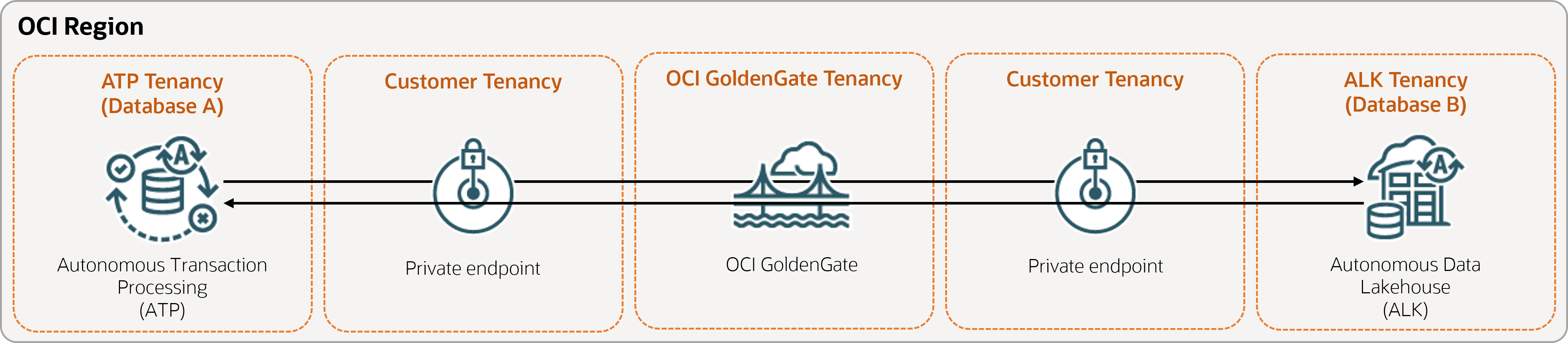
작업 1: 환경 설정
-
데이터베이스에 대한 접속을 생성합니다.
-
보완 로깅 활성화:
ALTER DATABASE ADD SUPPLEMENTAL LOG DATA -
다음 query를 실행하여 원본 데이터베이스의 모든 테이블에 대해
support_mode=FULL를 확인합니다.select * from DBA_GOLDENGATE_SUPPORT_MODE where owner = 'SRC_OCIGGLL'; -
데이터베이스 B에서 다음 query를 실행하여 데이터베이스의 모든 테이블에 대해
support_mode=FULL를 확인합니다.select * from DBA_GOLDENGATE_SUPPORT_MODE where owner = 'SRCMIRROR_OCIGGLL';
작업 2: 두 데이터베이스에 대한 트랜잭션 정보 및 체크포인트 테이블 추가
OCI GoldenGate 배치 콘솔에서 관리 서비스에 대한 [구성] 화면으로 이동한 후 다음을 완료합니다.
-
데이터베이스 A 및 B에 트랜잭션 정보를 추가합니다.
-
데이터베이스 A의 경우 스키마 이름에
SRC_OCIGGLL를 입력합니다. -
Database B의 경우 Schema Name에
SRCMIRROR_OCIGGLL를 입력합니다.주: 이 예와 다른 데이터 집합을 사용하는 경우 스키마 이름은 고유해야 하며 데이터베이스 스키마 이름과 일치해야 합니다.
-
-
데이터베이스 A 및 B에 대한 체크포인트 테이블 생성:
-
데이터베이스 A의 경우 체크포인트 테이블에
"SRC_OCIGGLL"."ATP_CHECKTABLE"를 입력합니다. -
데이터베이스 B의 경우 체크포인트 테이블에
"SRCMIRROR_OCIGGLL"."CHECKTABLE"를 입력합니다.
-
작업 3: 통합 Extract 생성
통합 추출은 소스 데이터베이스에 대한 지속적인 변경사항을 캡처합니다.
-
배치 세부정보 페이지에서 콘솔 실행을 선택합니다.
-
주: 소스 테이블을 지정하는 데 사용할 수 있는 매개변수에 대한 자세한 내용은 추가 추출 매개변수 옵션을 참조하십시오.
-
[매개변수 추출] 페이지에서
EXTTRAIL <extract-name>아래에 다음 행을 추가합니다.-- Capture DDL operations for listed schema tables ddl include mapped -- Add step-by-step history of -- to the report file. Very useful when troubleshooting. ddloptions report -- Write capture stats per table to the report file daily. report at 00:01 -- Rollover the report file weekly. Useful when IE runs -- without being stopped/started for long periods of time to -- keep the report files from becoming too large. reportrollover at 00:01 on Sunday -- Report total operations captured, and operations per second -- every 10 minutes. reportcount every 10 minutes, rate -- Table list for capture table SRC_OCIGGLL.*; -- Exclude changes made by GGADMIN tranlogoptions excludeuser ggadmin주:
tranlogoptions excludeuser ggadmin는 양방향 복제 시나리오에서ggadmin에 의해 적용된 트랜잭션을 다시 캡처하지 않습니다.
-
-
장기 실행 트랜잭션 확인:
-
소스 데이터베이스에서 다음 스크립트를 실행합니다.
select start_scn, start_time from gv$transaction where start_scn < (select max(start_scn) from dba_capture);query에서 행을 반환하면 트랜잭션의 SCN을 찾은 다음 트랜잭션을 커밋하거나 롤백해야 합니다.
-
작업 4: Oracle Data Pump를 사용하여 데이터 엑스포트(ExpDP)
Oracle Data Pump(ExpDP)를 사용하여 원본 데이터베이스의 데이터를 Oracle Object Store로 엑스포트합니다.
-
Oracle Object Store 버킷을 생성합니다.
Export 및 Import 스크립트에 사용할 네임스페이스와 버킷 이름을 기록해 둡니다.
-
인증 토큰을 생성한 다음 나중에 사용할 수 있도록 토큰 문자열을 복사하여 텍스트 편집기에 붙여 넣습니다.
-
소스 데이터베이스에 인증서를 생성하고
<user-name>및<token>를 이전 단계에서 생성한 Oracle Cloud 계정 사용자 이름 및 토큰 문자열로 바꿉니다.BEGIN DBMS_CLOUD.CREATE_CREDENTIAL( credential_name => 'ADB_OBJECTSTORE', username => '<user-name>', password => '<token>' ); END; -
소스 데이터베이스에서 다음 스크립트를 실행하여 데이터 익스포트 작업을 생성합니다. 객체 저장소 URI의
<region>,<namespace>및<bucket-name>를 적절히 바꿔야 합니다.SRC_OCIGGLL.dmp은 이 스크립트가 실행될 때 생성되는 파일입니다.DECLARE ind NUMBER; -- Loop index h1 NUMBER; -- Data Pump job handle percent_done NUMBER; -- Percentage of job complete job_state VARCHAR2(30); -- To keep track of job state le ku$_LogEntry; -- For WIP and error messages js ku$_JobStatus; -- The job status from get_status jd ku$_JobDesc; -- The job description from get_status sts ku$_Status; -- The status object returned by get_status BEGIN -- Create a (user-named) Data Pump job to do a schema export. h1 := DBMS_DATAPUMP.OPEN('EXPORT','SCHEMA',NULL,'SRC_OCIGGLL_EXPORT','LATEST'); -- Specify a single dump file for the job (using the handle just returned) -- and a directory object, which must already be defined and accessible -- to the user running this procedure. DBMS_DATAPUMP.ADD_FILE(h1,'https://objectstorage.<region>.oraclecloud.com/n/<namespace>/b/<bucket-name>/o/SRC_OCIGGLL.dmp','ADB_OBJECTSTORE','100MB',DBMS_DATAPUMP.KU$_FILE_TYPE_URIDUMP_FILE,1); -- A metadata filter is used to specify the schema that will be exported. DBMS_DATAPUMP.METADATA_FILTER(h1,'SCHEMA_EXPR','IN (''SRC_OCIGGLL'')'); -- Start the job. An exception will be generated if something is not set up properly. DBMS_DATAPUMP.START_JOB(h1); -- The export job should now be running. In the following loop, the job -- is monitored until it completes. In the meantime, progress information is displayed. percent_done := 0; job_state := 'UNDEFINED'; while (job_state != 'COMPLETED') and (job_state != 'STOPPED') loop dbms_datapump.get_status(h1,dbms_datapump.ku$_status_job_error + dbms_datapump.ku$_status_job_status + dbms_datapump.ku$_status_wip,-1,job_state,sts); js := sts.job_status; -- If the percentage done changed, display the new value. if js.percent_done != percent_done then dbms_output.put_line('*** Job percent done = ' \|\| to_char(js.percent_done)); percent_done := js.percent_done; end if; -- If any work-in-progress (WIP) or error messages were received for the job, display them. if (bitand(sts.mask,dbms_datapump.ku$_status_wip) != 0) then le := sts.wip; else if (bitand(sts.mask,dbms_datapump.ku$_status_job_error) != 0) then le := sts.error; else le := null; end if; end if; if le is not null then ind := le.FIRST; while ind is not null loop dbms_output.put_line(le(ind).LogText); ind := le.NEXT(ind); end loop; end if; end loop; -- Indicate that the job finished and detach from it. dbms_output.put_line('Job has completed'); dbms_output.put_line('Final job state = ' \|\| job_state); dbms_datapump.detach(h1); END;
작업 5: Oracle Data Pump(ImpDP)를 사용하여 대상 데이터베이스 인스턴스화
Oracle Data Pump(ImpDP)를 사용하여 소스 데이터베이스에서 익스포트된 SRC_OCIGGLL.dmp에서 대상 데이터베이스로 데이터를 임포트합니다.
-
이전 섹션의 동일한 정보를 사용하여 Oracle Object Store에 액세스할 수 있도록 Target Database에 인증서를 생성합니다.
BEGIN DBMS_CLOUD.CREATE_CREDENTIAL( credential_name => 'ADB_OBJECTSTORE', username => '<user-name>', password => '<token>' ); END; -
대상 데이터베이스에서 다음 스크립트를 실행하여
SRC_OCIGGLL.dmp에서 데이터를 임포트합니다. 객체 저장소 URI의<region>,<namespace>및<bucket-name>를 적절하게 바꿔야 합니다.DECLARE ind NUMBER; -- Loop index h1 NUMBER; -- Data Pump job handle percent_done NUMBER; -- Percentage of job complete job_state VARCHAR2(30); -- To keep track of job state le ku$_LogEntry; -- For WIP and error messages js ku$_JobStatus; -- The job status from get_status jd ku$_JobDesc; -- The job description from get_status sts ku$_Status; -- The status object returned by get_status BEGIN -- Create a (user-named) Data Pump job to do a "full" import (everything -- in the dump file without filtering). h1 := DBMS_DATAPUMP.OPEN('IMPORT','FULL',NULL,'SRCMIRROR_OCIGGLL_IMPORT'); -- Specify the single dump file for the job (using the handle just returned) -- and directory object, which must already be defined and accessible -- to the user running this procedure. This is the dump file created by -- the export operation in the first example. DBMS_DATAPUMP.ADD_FILE(h1,'https://objectstorage.<region>.oraclecloud.com/n/<namespace>/b/<bucket-name>/o/SRC_OCIGGLL.dmp','ADB_OBJECTSTORE',null,DBMS_DATAPUMP.KU$_FILE_TYPE_URIDUMP_FILE); -- A metadata remap will map all schema objects from SRC_OCIGGLL to SRCMIRROR_OCIGGLL. DBMS_DATAPUMP.METADATA_REMAP(h1,'REMAP_SCHEMA','SRC_OCIGGLL','SRCMIRROR_OCIGGLL'); -- If a table already exists in the destination schema, skip it (leave -- the preexisting table alone). This is the default, but it does not hurt -- to specify it explicitly. DBMS_DATAPUMP.SET_PARAMETER(h1,'TABLE_EXISTS_ACTION','SKIP'); -- Start the job. An exception is returned if something is not set up properly. DBMS_DATAPUMP.START_JOB(h1); -- The import job should now be running. In the following loop, the job is -- monitored until it completes. In the meantime, progress information is -- displayed. Note: this is identical to the export example. percent_done := 0; job_state := 'UNDEFINED'; while (job_state != 'COMPLETED') and (job_state != 'STOPPED') loop dbms_datapump.get_status(h1, dbms_datapump.ku$_status_job_error + dbms_datapump.ku$_status_job_status + dbms_datapump.ku$_status_wip,-1,job_state,sts); js := sts.job_status; -- If the percentage done changed, display the new value. if js.percent_done != percent_done then dbms_output.put_line('*** Job percent done = ' \|\| to_char(js.percent_done)); percent_done := js.percent_done; end if; -- If any work-in-progress (WIP) or Error messages were received for the job, display them. if (bitand(sts.mask,dbms_datapump.ku$_status_wip) != 0) then le := sts.wip; else if (bitand(sts.mask,dbms_datapump.ku$_status_job_error) != 0) then le := sts.error; else le := null; end if; end if; if le is not null then ind := le.FIRST; while ind is not null loop dbms_output.put_line(le(ind).LogText); ind := le.NEXT(ind); end loop; end if; end loop; -- Indicate that the job finished and gracefully detach from it. dbms_output.put_line('Job has completed'); dbms_output.put_line('Final job state = ' \|\| job_state); dbms_datapump.detach(h1); END;
작업 6: 비통합 Replicat 추가 및 실행
-
-
Parameter File 화면에서
MAP *.*, TARGET *.*;을 다음 스크립트로 바꿉니다.-- Capture DDL operations for listed schema tables ddl include mapped -- Add step-by-step history of ddl operations captured -- to the report file. Very useful when troubleshooting. ddloptions report -- Write capture stats per table to the report file daily. report at 00:01 -- Rollover the report file weekly. Useful when PR runs -- without being stopped/started for long periods of time to -- keep the report files from becoming too large. reportrollover at 00:01 on Sunday -- Report total operations captured, and operations per second -- every 10 minutes. reportcount every 10 minutes, rate -- Table map list for apply DBOPTIONS ENABLE_INSTANTIATION_FILTERING; MAP SRC_OCIGGLL.*, TARGET SRCMIRROR_OCIGGLL.*;주:
DBOPTIONS ENABLE_INSTATIATION_FILTERING는 Oracle Data Pump를 사용하여 임포트된 테이블에 대해 CSN 필터링을 사용으로 설정합니다. 자세한 내용은 DBOPTIONS Reference를 참조하십시오.
-
-
데이터베이스 A에서 몇 가지 변경 작업을 수행하여 데이터베이스 B로 복제된 것을 확인합니다.
작업 7: 데이터베이스 B에서 데이터베이스 A로 복제 구성
데이터베이스 A에서 데이터베이스 B로 설정된 1-6개의 복제를 수행합니다. 다음 단계에서는 데이터베이스 B에서 데이터베이스 A로의 복제를 설정합니다.
-
데이터베이스 B에서 추출 추가 및 실행 EXTRAIL <extract-name> 뒤의 추출 매개변수 페이지에서 다음을 포함해야 합니다.
-- Table list for capture table SRCMIRROR_OCIGGLL.*; -- Exclude changes made by GGADMIN tranlogoptions excludeuser ggadmin -
데이터베이스 A에 Replicat를 추가하고 실행합니다. Parameters 페이지에서
MAP *.*, TARGET *.*;를 다음으로 바꿉니다.MAP SRCMIRROR_OCIGGLL.*, TARGET SRC_OCIGGLL.*; -
데이터베이스 B에서 몇 가지 변경 작업을 수행하여 데이터베이스 A에 복제된 내용을 확인합니다.