Adding Oracle JET to an Existing JavaScript Application
You can add Oracle JET to your existing JavaScript application by extracting the oraclejet.zip file into the site root of your application and including references to the Oracle JET libraries and CSS as needed.
To add Oracle JET to an existing JavaScript application:
- Extract
oraclejet.zipinto the site root of your application.For example, if your application's site root is
Site Root, extractoraclejet.zipintoSite Root. After extraction, your site root folder will contain the following Oracle JET files and folders as shown in the NetBeans IDE.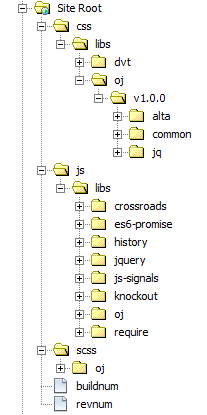
The
cssfolder contains the themes included with Oracle JET, and thescssfolder contains the SASS source files for the Oracle JET themes. For additional information about Oracle JET theming, see Theming Applications.The
jsfolder contains the Oracle JET libraries and third party libraries, and thebuildnumandrevnumfiles identify the Oracle JET build number and version. For additional information about the libraries included in Oracle JET, see What's Included in Oracle JET.