JSON_OBJECT
Syntax 
Description of the illustration json_object.eps
json_object_content::= 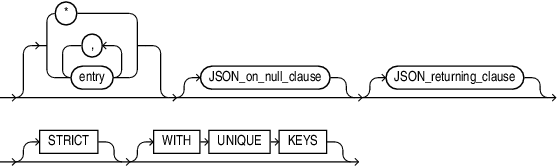
Description of the illustration json_object_content.eps
entry::=
Description of the illustration entry.gif
Description of the illustration entry.eps
regular_entry::=
Description of the illustration regular_entry.gif
Description of the illustration regular_entry.eps
format_clause::=

Description of the illustration format_clause.gif
Description of the illustration format_clause.eps
wildcard::=
Description of the illustration wildcard.gif
Description of the illustration wildcard.eps
JSON_on_null_clause::= 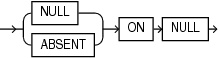
Description of the illustration json_on_null_clause.eps
JSON_returning_clause::= 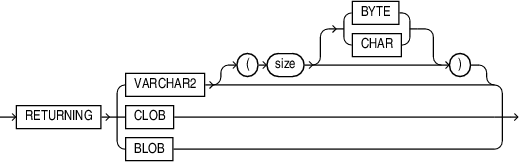
Description of the illustration json_returning_clause.eps
Purpose
The SQL/JSON function JSON_OBJECT takes as its input either a sequence of key-value pairs or one object type instance. A collection type cannot be passed to JSON_OBJECT.
It returns a JSON object that contains an object member for each of those key-value pairs.
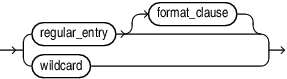
entry
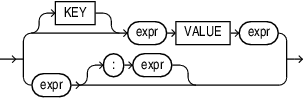
regular_entry: Use this clause to specify a property key-value pair.
regular_entry
-
KEYis optional and is provided for semantic clarity. -
Use the optional expr to specify the property key name as a case-sensitive text literal.
-
Use expr to specify the property value. For expr, you can specify any expression that evaluates to a SQL numeric literal, text literal, date, or timestamp. The date and timestamp data types are printed in the generated JSON object or array as JSON strings following the ISO date format. If expr evaluates to a numeric literal, then the resulting property value is a JSON number value; otherwise, the resulting property value is a case-sensitive JSON string value enclosed in double quotation marks.
You can use the colon to separate
JSON_OBJECTentries.Example
SELECT JSON_OBJECT(
'name' : first_name || ' ' || last_name,
'email' : email,
'phone' : phone_number,
'hire_date' : hire_date
)
FROM employees
WHERE employee_id = 140;
format_clause
Specify FORMAT JSON after an input expression to declare that the value that results from it represents JSON data, and will therefore not be quoted in the output.
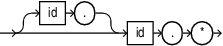
wildcard
Wildcard entries select multiple columns and can take the form of , table., view., or t_alias.. Use wildcard entries to map all the columns from a table, subquery, or view to a JSON object without explicitly naming all of the columns in the query. In this case wildcard entries are used in the same way that they are used directly in a select_list.
Example 1
In the resulting JSON object, the key names are equal to the names of the corresponding columns.
SELECT JSON_OBJECT(*)
FROM employees
WHERE employee_id = 140;
Output 1
{"EMPLOYEE_ID":140,"FIRST_NAME":"Joshua","LAST_NAME":"Patel","EMAIL":"JPAT
EL","PHONE_NUMBER":"650.121.1834","HIRE_DATE":"2006-04-
06T00:00:00","JOB_ID":"ST_CLERK","SALARY":2500,"COMMISSION_PCT":null,"MAN
AGER_ID":123,"DEPARTMENT_ID":50}
Example 2
This query selects columns from a specific table in a join query.
SELECT JSON_OBJECT('NAME' VALUE first_name, d.*)
FROM employees e, departments d
WHERE e.department_id = d.department_id
AND e.employee_id =140
Example 3
This query converts the departments table to a single JSON array value.
SELECT JSON_ARRAYAGG(JSON_OBJECT(*))
FROM departments
JSON_on_null_clause
Use this clause to specify the behavior of this function when expr evaluates to null.
-
NULLONNULL- When NULL ON NULL is specified, then a JSON NULL value is used as a value for the given key.SELECT JSON_OBJECT('key1' VALUE NULL) evaluates to {"key1" : null} -
ABSENTONNULL- If you specify this clause, then the function omits the property key-value pair from the JSON object.
JSON_returning_clause
Use this clause to specify the type of return value. One of :
-
VARCHAR2specifying the size as a number of bytes or characters. The default is bytes. If you omit this clause, or specify the clause without specifying the size value, thenJSON_ARRAYreturns a character string of typeVARCHAR2(4000). Refer to VARCHAR2 Data Type for more information. Note that when specifying theVARCHAR2data type elsewhere in SQL, you are required to specify a size. However, in the JSON_returning_clause you can omit the size. -
CLOBto return a character large object containing single-byte or multi-byte characters. -
BLOBto return a binary large object of theAL32UTF8character set. -
WITH TYPENAME
STRICT
Specify the STRICT clause to verify that the output of the JSON generation function is correct JSON. If the check fails, a syntax error is raised.
Example 1: Output string appears within quotes, because FORMAT JSON is not used
SELECT JSON_OBJECT ('name' value 'Foo') FROM DUAL
Output:
JSON_OBJECT('NAME'VALUE'FOO'FORMATJSON)
-------------------------------------------------
{"name":"Foo"}
Example 2: No quotes around output string when FORMAT JSON is used.
SELECT JSON_OBJECT ('name' value 'Foo' FORMAT JSON ) FROM DUAL
Output:
JSON_OBJECT('NAME'VALUE'FOO'FORMATJSON)
-------------------------------------------------
{"name":Foo}
Example 3: JSON Syntax error when FORMAT JSON STRICT is used.
SELECT JSON_OBJECT ('name' value 'Foo' FORMAT JSON STRICT ) FROM DUAL
Output:
ORA-40441: JSON syntax error
WITH UNIQUE KEYS
Specify WITH UNIQUE KEYS to guarantee that generated JSON objects have unique keys.
Example
The following example returns JSON objects that each contain two property key-value pairs:
SELECT JSON_OBJECT (
    KEY 'deptno' VALUE d.department_id,
    KEY 'deptname' VALUE d.department_name
    ) "Department Objects"
  FROM departments d
  ORDER BY d.department_id;

Department Objects
----------------------------------------
{"deptno":10,"deptname":"Administration"}
{"deptno":20,"deptname":"Marketing"}
{"deptno":30,"deptname":"Purchasing"}
{"deptno":40,"deptname":"Human Resources"}
{"deptno":50,"deptname":"Shipping"}
. . .
JSON_OBJECT Column Entries
In some cases you might want to have JSON object key names match the names of the table columns to avoid repeating the column name in the key value expression. For example:
SELECT JSON_OBJECT(
'first_name' VALUE first_name,
'last_name' VALUE last_name,
'email' VALUE email,
'hire_date' VALUE hire_date
)
FROM employees
WHERE employee_id = 140;

{"first_name":"Joshua","last_name":"Patel","email":"JPATEL","hire_date":"2006-04-
06T00:00:00"}
In such cases you can use a shortcut, where a single column value may be specified as input and the corresponding object entry key is inferred from the name of the column. For example:
SELECT JSON_OBJECT(first_name, last_name, email, hire_date)
FROM employees
WHERE employee_id = 140;

{"first_name":"Joshua","last_name":"Patel","email":"JPATEL","hire_date":"2006-04-
06T00:00:00"}
You can use quoted or non-quoted identifiers for column names. If you use non-quoted identifiers, then the case-sensitive value of the identifier, as written in the query, is used to generate the corresponding object key value. However for the purpose of referencing the column value, the identifier is still case-insensitive. For example:
SELECT JSON_OBJECT(eMail)
FROM employees
WHERE employee_id = 140

{"eMail":"JPATEL"}
Notice that the capital ‘M’ as typed in the column name is preserved.
See Also: Generation of JSON Data Using SQL