Planning the Configuration
Plan how to configure your Oracle GoldenGate for HP to suit your own business requirements.
This topic outlines techniques and procedures for the following configuration tasks.
This topic includes the following sections:
Planning Overview
Before running Oracle GoldenGate, you must make some decisions regarding your Oracle GoldenGate installation. This includes determining your required resources and their configuration. Other planning considerations include:
-
Are you capturing change data from TMF-enabled or non-TMF-enabled applications?
-
Are you transmitting data to targets over TCP/IP?
-
Which topology configurations are you using?
-
How much data communications capacity is required between the source and target systems?
-
How much additional disk space is required to accommodate replication?
-
Can Oracle GoldenGate accommodate present and future transaction volumes?
-
How much overhead will Oracle GoldenGate add to the source and target systems?
-
How can you scale Oracle GoldenGate to meet high volume requirements?
Configuring TMF-Enabled Processing
Extract and its servant program Audserv read TMF data in large blocks (upwards of 28K at a time) before transferring the data to an Oracle GoldenGate trail. This requires a small percentage of I/O messages because Audserv retrieves blocks of records from audit cache rather than from disk.
You must consider several factors when planning for Audserv to read TMF data. These include:
Changing the Layout of a File or Table
Occasionally column layouts are changed to add or delete columns for source files and tables. This means if you need to change a layout of a file or table following some recommended procedures will help to avoid having any impact on Oracle GoldenGate processes.
SQL/MP tables that are altered to add columns are automatically extracted. To replicate these changes to a target MP table only requires that Replicat uses REPNEWCOLUMNS. Otherwise alter the target, then the source.
MP tables that are dropped and re-created only requires the Target node be updated first, then the source. If the tables are currently open by Extract or Replicat, you can issue a CLOSEFILES command from GGSCI. Table Create and Drop is not supported.
For changes to Enscribe DDL records in a dictionary, the dictionary should be updated first on both systems for its corresponding record definition. If the file is to be purged and re-created, and the end to end Extract(s) and Replicat are all using GETFILEOPS, nothing more is required. If the physical file is not changing and only the DDL, then stop/start the Extract(s) and Replicat.
Note:
- Best practice is to complete file and table maintenance is while little to no DML is taking place.
- If any parameter file(s) contains specific detailed column mapping might need additional changes depending on what has changed with the new layout and the target, especially if the target is on OpenSys.
- If your Extract is using
FORMAT RELEASEto exclude metadata in trails, then you must stop the Extract(s) and Replicat, complete file and table maintenance, RunDEFGEN(with the sameFORMAT RELEASE`` as your Extract), transfer the newSOURCEDEFSfile to the target, and restart the processes.
Ensuring All Audit is Processed
Various system events can require that you ensure all audit records are processed before the event occurs. Examples include system maintenance, (such as an operating system upgrade), TMF shutdown, and other events. Failing to do so can result in missed data.
There are several methods for verifying that Extract is current with TMF activity.
-
Use the GGSCI
SEND EXTRACT AUDITENDcommand to determine Extract's position in the audit trail. If the response indicates that all audit is processed, Extract has no more work to do assuming that TMF-related applications are down or idle. -
Use the GGSCI
ADD MARKERcommand to insert a marker record into the audit trails after some significant event (such as taking the application down). Once Extract and Replicat have processed the marker, you can assume that all records before that point have been processed. -
Issue the
INFO EXTRACTcommand from GGSCI, which returns the Extract lag (approximate number of bytes and time behind the audit trails). If the status isRUNNINGand the number of bytes behind is less than 5000, it is likely that all audit has been processed. -
Issue a
LAG EXTRACTcommand from GGSCI which reports the current lag times.
Keeping Necessary Audit Available for Extract
TMF purges audit trails it no longer requires, because it has no knowledge of outside processes that depend on it, such as Extract. This means you must plan how to keep audit trails available. This section discusses several options:
-
Configure the audit trails to make disk dumps, and let Extract read them.
-
Configure the audit trails to make tape dumps, and let Extract restore the audit.
-
Include the
DISKTHRESHOLDparameter in the Manager parameter file, so Manager warns you when audit trails are in danger of being purged.
Using Tape Dumps as an Alternative Location
If you specify a tape as the alternative location, Extract displays a message asking the operator to restore the tape. The Extract program restores tape dumps to one of two locations before processing the audit. In order of preference, the locations are:
-
The first restore volume configured for the audit trail with TMFCOM
-
The original location of the file
Restoring tape dumps before run time can be convenient. To determine which tapes must be restored for a specific Extract group, use the GGSCI STATUS EXTRACT command. The command lists the names of required audit files and whether they exist on disk or tape. All files on tape must be restored. The GGSCI STATUS AUDITTRAIL command lists the names of all audit trails required across all Extract groups.
Minimizing Vulnerability to Outages
Extended network or target system outages can have an adverse impact on Extract processing. When the intended target system is unavailable, Extract cannot process the audit trail. If the target system remains down, critical audit will eventually be deleted from the system before it can be processed.
To prevent this problem, extract the data to a local trail for Replicat to access over Expand. This solution only applies when both the source and target are NonStop systems.
An alternative is to extract the data from the audit trails to an intermediate Oracle GoldenGate trail on the source, then configure a second Extract to move data to the target system. This ensures that data can always be extracted.
Outages also pose problems for transactions that are distributed across nodes. See “Configuring for Distributed Network Transactions” for information on ensuring transaction integrity for distributed transactions.
Configuring FUP RELOAD Activity
FUP RELOAD commands are used to optimize database storage and access. They also generate a large amount of audit compared with typical activity. This can cause Extract to fall significantly behind the current location in the audit trails, sometimes requiring audit tape dumps to be restored. This process requires operator intervention.
You can often avoid tape restores by scheduling FUP RELOADs more effectively. Schedule reloads less frequently, or over several periods rather than all at once (For instance, reload 20% of the database each night for five nights, instead of reloading 100% of the database in a single evening.)
Data Compression
You can optionally configure Oracle GoldenGate to compress data before sending it over TCP/IP. The Collector automatically decompresses it on the target system. To compress records over TCP/IP, include the COMPRESS and COMPRESSTHRESHOLD options in the RMTHOST parameter statement.
-
COMPRESSspecifies that outgoing block of extracted changes are compressed, resulting in a typical 4 to1 ratio or better. -
COMPRESSTHRESHOLDsets the minimum byte size for which compression will occur. The default is1000bytes.
For TMF-audited Enscribe files, set the NonStop AUDITCOMPRESS file attribute when creating the file. For non-TMF files, specify the COMPRESSUPDATES argument in the Logger configuration.
Compressed Enscribe Records
Whether TMF or non-TMF, Enscribe compression transfers the following data (rather than sending all field values).
-
Each fragment of the record that changed
-
The key fragment of the record
-
Four additional bytes per fragment indicating fragment position and length
The format of a compressed Enscribe record is as follows:
| Field | Description |
|---|---|
field offset |
The offset within the original record of the changed value (2 bytes) |
field length |
The length of field value (2 bytes) |
field value |
The data, including null or varchar length indicators |
The first field in a compressed Enscribe record is the primary or system key.
Compressed SQL Records
By default, SQL updates are compressed in the audit trails. This means each SQL update record includes the following data.
-
Each column that was
SETin the SQLUPDATEstatement -
Each key column in each row updated
-
Four additional bytes per column indicating column number and length
The format of a compressed SQL record is as follows:
| Argument | Description |
|---|---|
field index |
The ordinal index of the SQL column within the source tables (2 bytes) |
field length |
The length of field value (2 bytes) |
field value |
The data, including null or varchar length indicators |
DCOMPRESS File Attribute Not Supported
Turn off the NonStop DCOMPRESS file attribute for both SQL tables and Enscribe files extracted using TMF audit trails. When DCOMPRESS is on, compression occurs within each data block, which prevents the resolution of entire record values. Extract is permitted, but unpredictable results can occur.
AUDITCOMPRESS File Attribute Considerations
When update operations occur on a file or table with audit compression on, only changed columns or fields and those that are part of the primary key are recorded. This means the full update images are not immediately available to Extract. Instead, a compressed image is retrieved and written.
This is acceptable for replication because only changes are required. However, problems can occur in the following circumstances:
-
A selection clause includes columns that are not part of the source file's primary key.
-
Columns are mapped, and the primary key of the target is different than that of the source.
-
User exits or custom applications do not anticipate compressed records, which are more complex to process.
Extract provides an option to retrieve full record images from the original database. However, retrieving each update can slow processing considerably. The options you use, and whether you use audit compression, is based on your application’s requirements.
The NonStop AUDITCOMPRESS attribute is controlled at the file and table level using FUP and SQLCI.
Configuring for Distributed Network Transactions
In a multi-node environment a single transaction may include changes to files on more than one node. For example, a customer’s order may require updates to the customer file on `A, the customer account file on \B, and the order file on \C. `Updates like these, as well as updates to tables that are partitioned across nodes, are referred to as distributed network transactions.
To help ensure the completeness of the transaction when one node experiences an outage, you should configure components that coordinate the updates for distributed network transactions. This avoids part of a transaction being committed while the changes going to a disabled node are lost.
The following processes play a part in this coordination. The required configuration setup is explained for each component.
-
Manager
When using a Coordinator,
PURGEOLDEXTRACTSshould be defined for the Manager rather than Replicat or Extract. This allows consideration of Coordinator checkpoints to ensure trail files are not purged before Coordinator has completed processing them. See “Recommendations for Managing Trail Purges” for more information.Also the Manager on the node where the Coordinator resides may optionally be configured to
AUTOSTARTthe Coordinator process. -
Extract
There are no configuration changes needed for Extract, but if it has the
PURGEOLDEXTRACTSparameter, this should be moved to the Manager. -
Replicat
The
COORDINATORparameter is added to the Replicat parameter file to define the name of the process that is coordinating its distributed transactions. When the Replicat encounters a distributed transaction, it communicates with this Coordinator to determine when it can process that transaction.If the Replicat has the
PURGEOLDEXTRACTSparameter, it should be moved to the Manager to allow consideration of the Coordinator's checkpoints. -
READERparameters are included in theCOORDINATORparameter file. These are used to configure Reader processes when the Coordinator is started.The Reader scans the local Oracle GoldenGate trail for distributed transactions. When one is found, the Reader gathers local transaction information and sends it to the Coordinator process.
Note: If Readers will not be configured because distributed network transactions do not need to be replicated, the Extract parameter
EXCLUDEGGSTRANSRECScan be used. This will suppress the creation of trail records that track distributed network transactions.
-
Coordinator
A Coordinator process must be added on one of the nodes in the system. This is added using the GGSCI
ADDCOORDINATORcommand. The parameter file for it includesREADERparameters to establish the Reader process for each node and Oracle GoldenGate trail.Figure 1: Process flow for distributed network transaction support
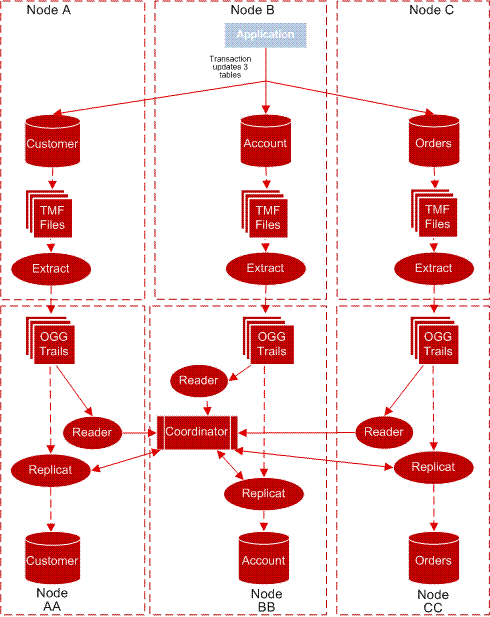
Description of the illustration config_network_trans.gif
Example 2-1 Sample Coordinator Parameter File
COORDINATOR COORD1
FASTREADS
READER EXTTRAIL \NY.$DATA
5.GGSDAT.AA, PROCESS $GGRD1, CPU 1, PRI 180
READER EXTTRAIL \LA.$DATA01.GGSDAT.BB, PROCESS $GGRD2
READER EXTTRAIL \FL.$DATA2.GGSDAT.CC, CPU 1, PRI 170
Coordinator receives information from the Readers, tallies the number of changes that have been received, and stores checkpoints. Coordinator uses this information to respond to queries from the Replicats on each of the nodes asking if the transaction is complete. When all of the operations for the transaction have verified their arrival, Coordinator releases the transaction to the Replicats for processing.
The following diagram shows an example of coordination processes for a distributed network transaction that spans three nodes, with each node replicated to a backup node.
Re-configuring TMF
When facts about the audit trails change, the checkpoints recorded by Extract can be invalidated, and TMF must be re-configured.
Before re-configuring TMF:
-
Use the GGSCI
INFO EXTRACT *command to ensure that all Extract groups have processed through the end of the last audit file. -
Use the GGSCI
DELETE ATCONFIG *command to delete the current audit management parameters. -
Delete all Extract groups.
After TMF is reconfigured:
- Manually re-add all of the Extract groups.
Using TMFCOM, dynamically add and delete the volumes on which audit files are located. Deleting an ACTIVE or a RESTORE volume can have adverse effects. Before deleting a volume, make sure all groups have processed outstanding audit on that volume, or copy all files on that volume to the alternative location. After a volume is deleted, the Extract process and Manager will not be able to find the associated audit. You can add an ACTIVE or RESTORE volume with no impact on Extract operations.
Configuring Non-TMF-Enabled Processing
To capture data from non-TMF applications, you must bind GGSLIB to the user application. GGSLIB will intercept certain NonStop commands in the application’s place, while Logger will write data to a log trail. This causes the following planning issues:
Maintaining Data Integrity
The following issues can cause GGSLIB and Logger to miss records and/or compromise data integrity:
-
Log processes are stopped by an operator while the application is updating a database. Several safeguards are built in to deal with this potential problem.
-
If a log process is stopped from TACL by process number, which can happen accidentally, the backup process takes over with no loss of data.
-
If a log process is stopped from TACL by name, this is assumed to be a mistake (because the proper method is the GGSCI
STOP LOGGERcommand). Manager immediately restarts log processes stopped this way, although records can be lost if this occurs while there is activity in the system. -
Double CPU failure occurs, taking down both the primary and backup log process CPUs. When this happens, other data integrity issues will surface on NonStop as a whole, such as loss of file buffers.
-
Application programs are not bound with GGSLIB. This can happen when a program is omitted from the initial bind list. This can also happen when migrating new object code into production, then forgetting to perform the GGSLIB bind. To avoid this problem, include GGSLIB binding into version control procedures and check any programs that generate warnings (See “Authentication for Bound Programs” for more detail.)
-
An application process is killed from TACL. This can mean that reads from or writes to the database could be lost in transit to the log process, depending on the timing of the
STOPcommand. This is not a problem when issuingFREEZEandSTOPcommands to Pathway servers. -
Extract or Replicat processes fall far behind Logger. Eventually, log trails are recycled by Manager, regardless of whether they are required by Extract or Replicat. EMS warnings can be generated to alert operators to this condition. This most likely happens when a network or target system is down for an extended period.
Supported File Types and Operations
GGSLIB and Logger behave according to the following rules regarding file operations.
-
The following file types are supported: Key-sequenced, entry-sequenced, queue-files, syskey-files, relative and unstructured file operations. However, updates to edit files and the spooler cannot be extracted. Unstructured files must be extracted explicitly (using the
GETUNSTRUCTUREDparameter in the Logger parameter file). -
Bulk I/O operations, i.e. operations that use
SETMODE, are supported. The current list ofSETMODEs includes:-
1 - Set file security
-
2 - Set file owner
-
3 - Set write verification
-
57 - Set serial writes
-
90 - Set buffered
-
92 - Set maxextents
-
93 - Set unstructured buffer length
-
94 - Set auditcompress
-
97 - Set licensed
-
123 - Set generic lock key length
-
138 - Set/Reset corrupt
-
153 - Set variable length audit compression
FUP DUP,FUP LOADandSELECT n AREAin COBOL programs are also included. -
-
To extract bulk I/O operations, specify the
GETBULKIOoption in the Logger parameter file.FUP COPYis supported by default. UseGETFILEOPSin Extract and Replicat to propagate these operations to the target database. -
FILEALTER,CREATE,DUP,PURGE,PURGEDATA, andRENAMEoperations (to disk files) are supported. -
The following
CONTROLoperations are supported:-
2 - set end-of-line
-
20 -
PURGEDATA -
21 - Allocate/Deallocate extents
-
-
Use
GETFILEOPSin Extract and Replicat to propagate the operations listed above to the target database. -
Undocumented, privileged function calls used by
FUP DUPandFUP LOADto change file labels are supported (This requiresPRIVLIBto be licensed and included as Replicat's user library.) These functions are required to fully implementFUP DUPandFUP LOADof key-sequenced files.
Authentication for Bound Programs
An exit can be activated within NonStop Safeguard to access the Oracle GoldenGate module SFGEXIT. This program runs as an independent process to monitor non-audited file opens for update access. (Opens for audited files or SQL tables and read-only opens are ignored.) When a non-audited open is found, SFGEXIT determines if the opening program has the Oracle GoldenGate intercept library bound to it. If it does not, the following warning is issued to EMS to alert the user that updates may occur without replication.
GoldenGate Library is not bound to *`$vol.subvol.program_name`* and it may update *`$vol.subvol.application filename`*System Utilities That Update Databases
Standard NonStop utilities, notably FUP and TACL, perform file operations such as CREATE, COPY, PURGE, PURGEDATA, DUP, LOAD, and RENAME. You can monitor these activities by binding GGSLIB to these utilities just as you would to an application program.
Private Memory and Stack Space
GGSLIB routines minimize stack space requirements. By doing so, programs are ensured there will be enough stack room for typical activities.
For its own working space, GGSLIB allocates a small private memory segment to handle in-transit I/O buffers and keep its own state variables.
Impact on Existing Application Performance
GGSLIB and Logger add a small amount of overhead to existing application activities. Messages to log processes are sent asynchronously (NOWAIT) to avoid making the application wait for logging to occur. In addition, log processes write all data sequentially into buffered files for the best possible performance.
Configuring Oracle Goldengate Global Operations
User can configure Oracle GoldenGate global operations.
GLOBALS Parameter File
Oracle Goldengate provides the GLOBALS parameter file to standardize Oracle Goldengate configuration. Typically, you set global parameters when you install Oracle Goldengate. Once set, you rarely need to change them. Some of the operations you can standardize are:
-
The time out value when GGSCI communicates with Oracle GoldenGate components
-
NonStop nodes in the network
-
The refresh interval
-
TACL
DEFINEsforGGS_AUDCFGandGGS_PREFIXwhen not using the default
To support versatility, some of the parameters set in GLOBALS can be temporarily overridden by other Oracle GoldenGate programs.
See Oracle GoldenGate Parameters for more information about global parameters.
Changing the Default Location of AUDCFG
Run BUILDMAC or NLDLIB to change the default location where an instance of BASELIB, GGSLIB, GGSSRL, or GGSDLL will look for the AUDCFG segment. When it builds the new library, the macro prompts to ask if you want to change the AUDCFG location. If the answer is yes, you will be prompted for the new default $VOL.SUBVOL location.
If you want multiple Oracle GoldenGate environments to each have a different location for the AUDCFG segment, each environment will need a unique copy of GGSLIB or BASELIB linked with the location specific to that environment.
If the library specifies a different location for the AUDCFG than the DEFINES included in the GLOBALS parameters, the GLOBALS DEFINES will override the library.
Configuring Replication
Replicat provides a high degree of flexibility when processing data between files; however, there can be logical restrictions involved for which you must plan. This section details different scenarios that require additional planning, including:
Replicating SQL Tables with System Keys
Entry-sequenced SQL tables with non-unique keys are sometimes difficult to replicate accurately. This is because their keys are a SYSKEY value generated by the system. Replicat has no control over the SYSKEY value when replicating an insert operation into the target table; therefore subsequent update and delete records cannot be replicated exactly. Even though the SYSKEY value of the original record is known, the replicated record has a different SYSKEY value, requiring you to create a workaround so your keys resolve properly.
There are two methods for working with this issue. You can specify a view that contains all columns from the base table excluding the SYSKEY. Use the view as the target in the replication MAP, along with a KEYCOLS specification to define a different method for accessing the table for delete and update operations. This requires each target row to have some type of unique identifier, such as a unique index.
Another method is to add a column called GGS_SYSKEY to your target table, then map the source SYSKEY value to the GGS_SYSKEY column. Specify GGS_SYSKEY in the KEYCOL option of the map argument and use the FORCEUSESYSKEY parameter.
Replicating Primary Key Updates
Although Nonstop Enscribe and SQL/MP do not allow changes to primary keys, operations for primary key updates may be received from Oracle GoldenGate systems running for other databases. To maintain compatibility, Oracle GoldenGate for NonStop processes these primary key update operations by deleting the record and then inserting it with the same data, but a new primary key.
Primary key updates for Enscribe entry-sequenced and queue files are not supported and will generate an error.
The default is to process primary key updates, but a parameter is available to turn this off and discard the record. Contact Oracle GoldenGate Technical Support to use this parameter.
Missing Row Errors
Because values are needed for the columns that were not changed, an error will occur if the record cannot be fetched from the target database.
If HANDLECOLLISIONS is turned on and the fetch fails, there is an attempt to insert the missing record. Otherwise if REPERROR responses have been defined for a missing row, the rules specified by the REPERROR will be applied.
Non-Audited Target
An error message is returned if an unaudited Enscribe record is deleted and then the insert of the new primary key record fails. Because it is not possible to back out the records processed since the last checkpoint, the system will advance the checkpoint to the record that is in error. User intervention will be required to correct the target record and restart the Replicat.
-
For a file system error, correct the cause of the problem and insert the record from the discard file. Then skip over the primary key update record by advancing the checkpoint RBA to the next record.
-
If the insert generates a duplicate error, try to determine if the discarded record is more correct than the target record. If it is, delete the record in the file and replace it with the discarded record. Then skip over the primary key update record by advancing the checkpoint RBA to the next record.
Compressed Updates to Enscribe Targets
TARGETDEF using DICTIONARY or SOURCEDEFS is required when:
-
Compressed updates are being replicated to an Enscribe target database.
-
For sending Enscribe data to OpenSys, seeOracle GoldenGate Self Describing Trail Files
Files and Tables Other Than Key-Sequenced
You can replicate files and tables that are not key-sequenced, but there will be conditions that apply.
For relative files, Oracle GoldenGate forces the relative key of the target file to be the same as the source, so target records can be found for updates and deletes. The condition is that you can only replicate from a single source to a single target.
You have more flexibility if the relative file or table has a unique index. Then the columns in that index can be specified with KEYCOLS to identify a path for update and delete statements. However, any application that stores system keys as foreign keys in other tables will have unreliable results.
For entry-sequenced files or tables, selective replication (that is, where selection criteria are applied) is only feasible for inserts. This is due to the difficulty identifying the correct target record for updates. Selective replication from one source to one target is feasible for relative files and tables.
Entry-sequenced files can be replicated in the same order when the source database is TMF audited because the TMF data is in the correct order. If the source database is non-TMF, and GGSLIB is used to extract the data, records may be written to the target file in a different order than they appear in the source. This has a corresponding effect when updates to entry-sequenced records are processed: the record address of the source may be different from that in the target, resulting in a missing or incorrect update.
To get around this, when replicating a non-TMF entry-sequenced file from one source to one target, you can use the parameter and option ENTRYSEQUPDATES EXACTKEY. This requires the target file to be opened with PROTECTED or EXCLUSIVE access so other processes (including other Replicats) can not update the file. See Oracle GoldenGate Parameters for more information on how to use this parameter.
See “Bi-Directional Replication” for information on an environment not limited to single source updating a single target.
Load Balancing and Performance Issues
Replicat often proves to be a bottleneck when initially configured, especially for hot site applications that replicate the entire database. This bottleneck is because Replicat often mimics the original application’s processing. In general, this may mean many more random, unbuffered I/Os. In contrast, Extract and Logger perform serial, buffered I/Os, usually in large blocks.
To solve this problem, configure multiple Replicat processes, each of which replicates a portion of the overall data.
One way to do this is assign different files or tables to different Replicat processes. This is conceptually simple. For example, if an application consists of data in four tables, TAB1, TAB2, TAB3, and TAB4, let Replicat process #1 replicate TAB1 and TAB2, while Replicat process #2 replicates TAB3 and TAB4.
A more complex option is to split the same file or table among multiple Replicat processes. This might be necessary, for example, when one million inserts and updates per day might occur against FILE1, while in the rest of the system only 100,000 inserts and updates occur. In this case, the optimal configuration may be two Replicat processes for FILE1. This is accomplished in two steps:
-
Let Extract split the data into two trails. Each trail contains half the data for
FILE1. To split the data, use theWHERE,RANGE, orFILTERclause of the Extract file parameter. -
Assign a Replicat process to each of the resulting trails.
Example 2-2 Splitting to Two Trails
EXTRACT DEMO
EXTTRAIL \NY.$DATA1.GGSDAT.E1
TABLE $DATA.MASTER.ACCOUNT, WHERE (ACCOUNT < 500000);
EXTTRAIL \NY.$DATA3.GGSDAT.E2
TABLE $DATA.MASTER.ACCOUNT, WHERE (ACCOUNT >= 500000);
A Replicat group is then dedicated to process each of the trails above.
Splitting up tables among different Extract processes may temporarily upset original transaction integrity boundaries, because two or more processes may be replicating a single transaction.
The following Extract parameter file splits $DATA.MASTER.ACCOUNT into two trails.
Potential Problems with Audit Compressed Files
When replicating records selected with WHERE criteria from a source file with audit compression, update records can be missed (deletes and inserts will always be extracted). You can guarantee that all updates are processed by omitting fields that are not part of the primary key from your WHERE clauses. Primary key fields are always present in compressed update records.
When mapping selected columns with COLMAP, audit compression also causes potential conflicts. If the key of the target file includes a field not contained in the key of the source, target updates can fail. Updates require the presence of the entire key to guarantee success.
The easiest method for avoiding these conflicts is to turn off audit compression for source tables and files. This may or may not be feasible depending on the characteristics of your transaction load.
Conflicts with Updating the Target
If both Oracle GoldenGate and another application are allowed to update a target, conflicts can arise unless you establish rules to avoid them. For example, application #1 might update a record in the source database that application #2 has deleted from the target database. In such cases, it is impossible for Oracle GoldenGate to apply the source update at the target because the record to update no longer exists.
As a general rule, Replicat should have control over ranges of data that other applications cannot update. However, if conflicts are tolerable, Oracle GoldenGate provides features that allow operations to continue uninterrupted when errors occur:
-
Use the
REPERROR(error,IGNORE) parameter entries to ignore errors that otherwise cause transactions to abort. -
Use
OVERRIDEDUPSandINSERTMISSINGUPDATESto ensure all updates are inserted. -
Review the Replicat discard file for operations that failed, and determine corrective measures.
Many-to-One Replication
When replicating many files to one file (collecting), applications should ensure that each source file manages a specific range of keys. If different source files can update the same key value, there can be conflicts at the target. For example, if two source tables receive an insert with the same key, both operations cannot be applied at the target because a duplicate error will result (Guardian error 10, SQL error -8227).
Oracle GoldenGate provides several alternatives for dealing with this problem. One is the HANDLECOLLISIONS parameter that directs Replicat to insert the latest version of the record, even if the key exists. HANDLECOLLISIONS ignores missing update and delete conditions. Another option is to restrict the range of values replicated from each source with WHERE criteria. Most often the best alternative is to avoid the possibility of such conflicts as part of the application’s processing rules.
Bi-Directional Replication
Sometimes, you may want to have two or more files replicating data to each other. In such cases, have each file manage a unique range of keys directly, as in the many-to-one case above. The difference here is that each file will hold data it manages, along with data replicated from the other file. In this way, each file can act as a backup for the other. The application should ensure that replicated data is read-only in such cases.
Because both files must be replicated, each replicated change will itself be extracted and replicated back to its source, which will cause errors. There are two methods for avoiding this condition:
-
Restrict the ranges of key values that are extracted and replicated using
WHEREcriteria. -
Use the
IGNOREREPLICATEparameter in Extract processing. This parameter causes Extract to discard any operations that were applied by Replicat processes. Note:PURGEDATAis a DDL statement that is automatically committed and not linked to any transaction, soGETPURGEDATASis not supported for audited files in a bidirectional configuration. In this case loop detection is not effective andIGNOREPURGEDATASmust be included in the Extract parameters.
Replicating Data to Non-TMF Enabled Databases
You can stimulate overall system performance by implementing buffering on your non-TMF Enscribe databases. To do so, turn on file buffering for target database files with the FUP ALTER filename, BUFFERED command. This imposes no real risk because the data is mirrored at the source system and can be recovered from there.
Use the NOAUDITREPS Replicat parameter to avoid unnecessary event messages regarding non-audited target files.
Replicating New SQL Columns
To replicate new SQL columns that were created since the current Extract and Replicat processes were started, include REPNEWCOLUMNS in the Replicat parameter file. REPNEWCOLUMNS replicates the SQL ALTER TABLE ADD COLUMN statements to create the new columns in the target.
Alternatively, you can specify GETNEWCOLUMNS to update table definitions when a column change is detected on a source table. GETNEWCOLUMNS ensures that data in columns created after Replicat starts up (using ALTER TABLE ADD COLUMN on the source system) are accounted for.
Configuring for Maximum Throughput
You can maximize throughput by modifying Extract, Replicat, or both. This section details strategies for implementing Oracle GoldenGate parameters to achieve data management that suits your needs.
Extraction
Techniques for maximizing throughput on Extract depends on whether the source system produces TMF trails or non-TMF logs.
TMF Extraction
In most cases, only a single instance of Extract is required to extract and transmit data to the target system. A single Extract is advantageous because TMF audit trails are only read once.
In rare cases, extracting high volumes of SQL UPDATE statements requires multiple instances of Extract.
Non-TMF Data Extraction
Non-TMF logging is linearly scalable by adding more Logger processes to the configuration. Because there is no penalty for adding Logger processes to the configuration, Oracle GoldenGate recommends allocating plenty of slack for high volume activity. In most cases, two or three Logger processes is more than enough to achieve the desired throughput.
Replication
To achieve required throughput, more Replicat processes may be required. This is because Replicat’s I/O activity tends to be random access, as opposed to Logger and Extract I/O, which is serial, blocked and buffered.
You can add Replicat processes to achieve near linear performance gains. However, to ensure good performance, no more than three Replicat processes should read each Oracle GoldenGate trail. Otherwise, excessively redundant reads result, sometimes causing contention issues on the trail’s disk.
Latency Issues
Latency often refers to the difference in time between when an update occurs on the source database and when that same update is replicated on the target database. In this respect, latency measures the amount of time “behind” that the target system is from the source system, and can be important when determining the target database’s accuracy. Database latency is especially important in certain bi-directional scenarios when two systems might update the same record in different databases at virtually the same time.
Another measure of latency is the lag between an update on the source and the time at which that update has been stored on the target system for later replication. This measure of latency represents the potential for the amount of data lost in a disaster. Once data has been transmitted to the target, it will be replicated eventually and is not exposed to the risk of disaster.
Capacity Planning
Through testing, Oracle GoldenGate has compiled some capacity planning guidelines, presented in the following sections. Consider these observations as guidelines; actual performance depends on many of the factors previously discussed including network topology, operating systems, etc.
TMF Data Extraction
Oracle GoldenGate output figures are far less than the audit generated, because extracted data does not include alternate keys, SQL indexes, FUP RELOAD information and assorted audit records.
Non-TMF Data Extraction
Non-TMF extracts are linearly scalable. Therefore, the potential extraction rate of data is close to the system limits for existing application activity.
Data Transfer into Oracle GoldenGate Trails
The potential for data transfer is around 75-80% of the communication channel’s actual potential. When this limit is reached, you can split data into multiple trails to achieve greater throughput with parallelism.
Replicat Throughput
The potential throughput of Replicat is greater than that of the database I/O performed on the source system. Replicat performs essentially the same I/Os on the target system as were performed on the source system, excluding reads. In addition, Replicat uses transaction grouping features as mentioned earlier to improve TMF-related performance
Changing Default Component Names
GGSCI provides default names for processes, parameter files, and report files. You may want to change these defaults to make them more descriptive. For example, you may want to denote the parameter files and reports associated with a particular Extract or Replicat group (when have multiple Extracts and Replicats).
To change default component names:
-
Launch GGSCI.
-
Specify the define
=GGS_PREFIXusing the following syntax.
GGSCI> <a id="d3842e2423"></a>ADD DEFINE =GGS_PREFIX, CLASS MAP, FILE $*`prefix`*Where:
*`prefix`* consists of two letters.
Consider the example:
GGSCI> ADD DEFINE =GGS_PREFIX, CLASS MAP, FILE $EFThis example changes the following default components.
- The <a id="d3842e2445"></a>Manager process name changes from `$GGMGR` to` $EFMGR`.
- <a id="d3842e2458"></a>Logger process names become `$EFLnn` instead of `$GGLnn`.
- <a id="d3842e2471"></a>Parameter files are stored in the `EFSPARM` subvolume rather than `GGSPARM`.
- <a id="d3842e2486"></a>Report files are stored in the `EFSRPT` subvolume rather than `GGSRPT`.
- <a id="d3842e2499"></a>Extract processes are called `$EFEnn` rather than `$GGEnn`.
- <a id="d3842e2512"></a>Replicat processes are called `$EFRnn` rather than `$GGRnn`.
- <a id="d3842e2525"></a>Syncfile processes are called `$EFSnn` rather than `$GGSnn.`
- <a id="d3842e2537"></a>Coordinator processes are called `$EFCnn` rather than `$GGCnn`.
- One way to tell GGSCI and application programs bound with GGSLIB where to establish and retrieve configuration information is to use the
=GGS_AUDCFGdefine. Alternatively the location can be specified when runningBUILDMACorNLDLIB. When this location is not provided with one of these methods, the default is$SYSTEM.GGS.AUDCFG.
GGSCI> ADD DEFINE =GGS_AUDCFG, CLASS MAP, FILE *`config_file`*Where:
*`config_file`* is a file name, and the file portion of the file name is no longer than six characters.
Using Wildcards
You can use wildcard arguments to express volumes, subvolumes, files and tables. However, you can’t use wildcard arguments to express views. Oracle GoldenGate allows wildcards to be expressed as a question mark (?) or an asterisk (\*). An asterisk matches any number of characters, whereas a question mark matches only a single character.
The wildcard expression in the following example refers to any file set in the specified volume and subvolume:
FILE $DATA1.MYSUB.*;In this next example, the wildcard expression refers to any volume $DATAn, where n represents the fifth character in the volume name, and any file in the specified subvolume:
FILE $DATA?.MYSUB.*;By default, Oracle GoldenGate initially allocates 100 wildcard entries. You can change this initial allocation using the MAXWILDCARDENTRIES parameter in the GLOBALS, Extract, and Replicat parameter files. Once this initial MAXWILDCARDENTRIES allocation is exhausted, the program will allocate an additional 100 entries each time it needs more.
When you specify MAXWILDCARDENTRIES in the GLOBALS parameter file, that specification becomes the default. You can override that default using the MAXWILDCARDENTRIES parameter in the Extract or Replicat parameter files. Ensure that a View exists before the Extract is started.
Most parameters that specify file names or table names can use wildcard expressions. Exceptions are documented in the parameter’s description.
Support for DDL and DDL2
Oracle GoldenGate for HP NonStop supports Enscribe Data Definition Language dictionary builds for DDL or DDL2. The versions that are supported include the following:
-
C20 and C30 operating system, DDL Version 5
-
D00, D10 and D20 operating system, DDL Version 6
-
D30 and later, DDL Version 7
-
H01 and later, DDL Version 8 and DDL2 Version 9
An error will be generated if a valid version is not identified.
No parameters are required for DDL2 support. Definitions of either size are supported for column mapping. User exits support record manipulation on the DDL2 large record formats by using a new set of function calls. See the user exit function calls in the Oracle GoldenGate Parameters for details.
Specifying Internet Protocol Addresses
Manager and Extract can be restricted to a specific IP address by using the IPINTERFACE stand-alone parameter or the@ip_addressoption of TCPIPPROCESSNAME.
- This example using the
IPINTERFACEstand-alone parameter sets the IP address to2001:db8:2010:5040:4fff:ffff:ffff:28.
IPINTERFACE 2001:db8:2010:5040:4fff:ffff:ffff:28- This example using the @ip_address option of
TCPIPPROCESSNAMEparameter sets the process name to$ZTC4and its IP address to2001:db8:2010:5040:4fff:ffff:ffff:28.
TCPIPPROCESSNAME $ZTC4@2001:db8:2010:5040:4fff:ffff:ffff:28Targets can be restricted using options of the RMTHOST parameter.
- This example using the
IPINTERFACEoption sets the IP address of the host to2001:db8:2010:5040:4fff:ffff:ffff:28
RMTHOST host01, MGRPORT 12345,
IPINTERFACE 2001:db8:2010:5040:4fff:ffff:ffff:28- This example using the@ip_addressoption of
TCPIPPROCESSNAMEsets process name to$ZTC1and IP address to2001:db8:2010:5040:4fff:ffff:ffff:28.
RMTHOST host01, MGRPORT 12345,
TCPIPPROCESSNAME $ztc1@2001:db8:2010:5040:4fff:ffff:ffff:28
See the Oracle GoldenGate Parameters for more details on how to use these parameters.
Oracle GoldenGate for HP NonStop supports Internet Protocol versions 4 and 6 (IPv4 and IPv6.) If an IP address is specified for Manager or Extract, the matching version must be configured for that host or an error is generated. If a name is specified for the host and both IPv4 and IPv6 are configured for that host, the default is to use IPv6. The parameter USEIPV4ONLY forces Extract to use IPv4.