CREATE PROFILE
Note: Oracle recommends that you use the Database Resource Manager rather than this SQL statement to establish resource limits. The Database Resource Manager offers a more flexible means of managing and tracking resource use. For more information on the Database Resource Manager, refer to Oracle Database Administrator’s Guide.
Purpose
Use the CREATE PROFILE statement to create a profile, which is a set of limits on database resources. If you assign the profile to a user, then that user cannot exceed these limits.
To specify resource limits for a user, you must:
-
Enable resource limits dynamically with the
ALTERSYSTEMstatement or with the initialization parameterRESOURCE_LIMIT. This parameter does not apply to password resources. Password resources are always enabled. -
Create a profile that defines the limits using the
CREATEPROFILEstatement -
Assign the profile to the user using the
CREATEUSERorALTERUSERstatement
In a multitenant environment, different profiles can be assigned to a common user in the root and in a PDB. When the common user logs in to the PDB, a profile whose setting applies to the session depends on whether the settings are password-related or resource-related.
-
Password-related profile settings are fetched from the profile that is assigned to the common user in the root. For example, suppose you assign a common profile
c##prof(in whichFAILED_LOGIN_ATTEMPTSis set to 1) to common userc##adminin the root. In a PDB that user is assigned a local profilelocal_prof(in whichFAILED_LOGIN_ATTEMPTSis set to 6.) Common userc##adminis allowed only one failed login attempt when he or she tries to log in to the PDB whereloc_profis assigned to him. -
Resource-related profile settings specified in the profile assigned to a user in a PDB get used without consulting resource-related settings in a profile assigned to the common user in the root. For example, if the profile
local_profthat is assigned to userc##adminin a PDB hasSESSIONS_PER_USERset to 2, thenc##adminis only allowed only 2 concurrent sessions when he or she logs in to the PDBloc_profis assigned to him, regardless of value of this setting in a profile assigned to him in the root. See Also: Oracle Database Security Guide for a detailed description and explanation of how to use password management and protection
Prerequisites
To create a profile, you must have the CREATE PROFILE system privilege.
To specify the CONTAINER clause, you must be connected to a multitenant container database (CDB). To specify CONTAINER = ALL, the current container must be the root. To specify CONTAINER = CURRENT, the current container must be a pluggable database (PDB).
  <div class="infoboxnote" markdown="1">

  **See Also:**

  - [ALTER SYSTEM](ALTER-SYSTEM.html#GUID-2C638517-D73A-41CA-9D8E-A62D1A0B7ADB) for information on enabling resource limits dynamically

  - [*Oracle Database Reference*](/pls/topic/lookup?ctx=en/database/oracle/oracle-database/19/sqlrf&id=REFRN10188) for information on the `RESOURCE_LIMIT` parameter

  - [CREATE USER](CREATE-USER.html#GUID-F0246961-558F-480B-AC0F-14B50134621C) and [ALTER USER](ALTER-USER.html#GUID-9FCD038D-8193-4241-85CD-2F4723B27D44) for information on profiles

  </div>
Syntax
create_profile::= 
Description of the illustration create_profile.eps
resource_parameters::= 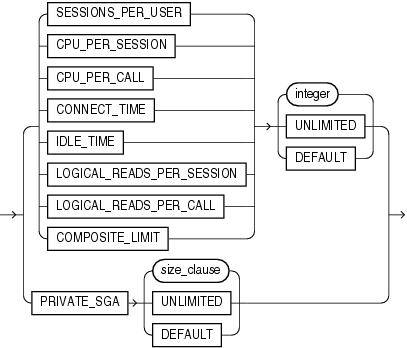
Description of the illustration resource_parameters.eps
password_parameters::= 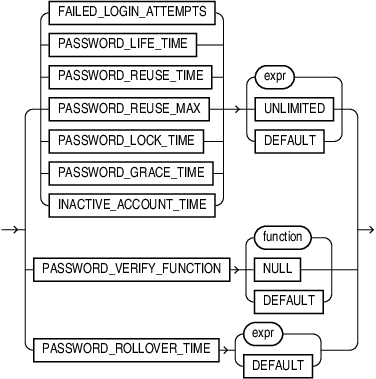
Description of the illustration password_parameters.eps
Semantics
profile
Specify the name of the profile to be created. The name must satisfy the requirements listed in “Database Object Naming Rules”. Use profiles to limit the database resources available to a user for a single call or a single session.
In a non-CDB, a profile name cannot begin with C## or c##.
In a CDB, the requirements for a profile name are as follows:
-
The name of a common profile must begin with characters that are a case-insensitive match to the prefix specified by the
COMMON_USER_PREFIXinitialization parameter. By default, the prefix isC##. -
The name of a local profile must not begin with characters that are a case-insensitive match to the prefix specified by the
COMMON_USER_PREFIXinitialization parameter. Regardless of the value ofCOMMON_USER_PREFIX, the name of a local profile can never begin withC##orc##. Note: If the value ofCOMMON_USER_PREFIXis an empty string, then there are no requirements for common or local profile names with one exception: the name of a local profile can never begin withC##orc##. Oracle recommends against using an empty string value because it might result in conflicts between the names of local and common profiles when a PDB is plugged into a different CDB, or when opening a PDB that was closed when a common user was created.
Oracle Database enforces resource limits in the following ways:
-
If a user exceeds the
CONNECT_TIMEorIDLE_TIMEsession resource limit, then the database rolls back the current transaction and ends the session. When the user process next issues a call, the database returns an error. -
If a user attempts to perform an operation that exceeds the limit for other session resources, then the database aborts the operation, rolls back the current statement, and immediately returns an error. The user can then commit or roll back the current transaction, and must then end the session.
-
If a user attempts to perform an operation that exceeds the limit for a single call, then the database aborts the operation, rolls back the current statement, and returns an error, leaving the current transaction intact.
Note:
-
You can use fractions of days for all parameters that limit time, with days as units. For example, 1 hour is 1/24 and 1 minute is 1/ 1440.
-
You can specify resource limits for users regardless of whether the resource limits are enabled. However, Oracle Database does not enforce the limits until you enable them.
See Also: “Creating a Profile: Example”
UNLIMITED
When specified with a resource parameter, UNLIMITED indicates that a user assigned this profile can use an unlimited amount of this resource. When specified with a password parameter, UNLIMITED indicates that no limit has been set for the parameter.
DEFAULT
Specify DEFAULT if you want to omit a limit for this resource in this profile. A user assigned this profile is subject to the limit for this resource specified in the DEFAULT profile. The DEFAULT profile initially defines unlimited resources. You can change those limits with the ALTER PROFILE statement.
Any user who is not explicitly assigned a profile is subject to the limits defined in the DEFAULT profile. Also, if the profile that is explicitly assigned to a user omits limits for some resources or specifies DEFAULT for some limits, then the user is subject to the limits on those resources defined by the DEFAULT profile.
resource_parameters
SESSIONS_PER_USER
Specify the number of concurrent sessions to which you want to limit the user.
Specify the CPU time limit for a session, expressed in hundredth of seconds.
Specify the CPU time limit for a call (a parse, execute, or fetch), expressed in hundredths of seconds.
CONNECT_TIME
Specify the total elapsed time limit for a session, expressed in minutes.
IDLE_TIME
Specify the permitted periods of continuous inactive time during a session, expressed in minutes. Long-running queries and other operations are not subject to this limit.
When you set an idle timeout of X minutes, note that the session will take a couple of additional minutes to be terminated.
On the client application side, the error message shows up only the next time, when the idle client attempts to issue a new command.
LOGICAL_READS_PER_SESSION
Specify the permitted number of data blocks read in a session, including blocks read from memory and disk.
Specify the permitted number of data blocks read for a call to process a SQL statement (a parse, execute, or fetch).
PRIVATE_SGA
Specify the amount of private space a session can allocate in the shared pool of the system global area (SGA). Refer to size_clause for information on that clause. Note: This limit applies only if you are using shared server architecture. The private space for a session in the SGA includes private SQL and PL/SQL areas, but not shared SQL and PL/SQL areas.
Specify the total resource cost for a session, expressed in service units. Oracle Database calculates the total service units as a weighted sum of CPU_PER_SESSION, CONNECT_TIME, LOGICAL_READS_PER_SESSION, and PRIVATE_SGA.
  <div class="infoboxnote" markdown="1">

  **See Also:**

  - [ALTER RESOURCE COST](ALTER-RESOURCE-COST.html#GUID-92DCB41E-5113-4722-8A54-E90E1AE7DB54) for information on how to specify the weight for each session resource

  - "[Setting Profile Resource Limits: Example](CREATE-PROFILE.html#GUID-ABC7AE4D-64A8-4EA9-857D-BEF7300B64C3\_\_I2120023)"

  </div>
password_parameters
Use the following clauses to set password parameters. Parameters that set lengths of time-that is, all the password parameters except FAILED_LOGIN_ATTEMPTS and PASSWORD_REUSE_MAX-are interpreted in number of days. For testing purposes you can specify minutes (n/1440) or even seconds (n/86400) for these parameters. You can also use a decimal value for this purpose (for example .0833 for approximately one hour). The minimum value is 1 second. The maximum value is 24855 days. For FAILED_LOGIN_ATTEMPTS and PASSWORD_REUSE_MAX, you must specify an integer.
Specify the number of consecutive failed attempts to log in to the user account before the account is locked. If you omit this clause, then the default is 10 times.
Specify the number of days the same password can be used for authentication. If you also set a value for PASSWORD_GRACE_TIME, then the password expires if it is not changed within the grace period, and further connections are rejected. If you omit this clause, then the default is 180 days.
See Also: Oracle Database Security Guide for information on setting PASSWORD_LIFE_TIME to a low value
PASSWORD_REUSE_TIME and PASSWORD_REUSE_MAX
These two parameters must be set in conjunction with each other. PASSWORD_REUSE_TIME specifies the number of days before which a password cannot be reused. PASSWORD_REUSE_MAX specifies the number of password changes required before the current password can be reused. For these parameter to have any effect, you must specify a value for both of them.
-
If you specify a value for both of these parameters, then the user cannot reuse a password until the password has been changed the number of times specified for
PASSWORD_REUSE_MAXduring the number of days specified forPASSWORD_REUSE_TIME.For example, if you specify
PASSWORD_REUSE_TIMEto 30 andPASSWORD_REUSE_MAXto 10, then the user can reuse the password after 30 days if the password has already been changed 10 times. -
If you specify a value for either of these parameters and specify
UNLIMITEDfor the other, then the user can never reuse a password. -
If you specify
DEFAULTfor either parameter, then Oracle Database uses the value defined in theDEFAULTprofile. By default, all parameters are set toUNLIMITEDin theDEFAULTprofile. If you have not changed the default setting ofUNLIMITEDin theDEFAULTprofile, then the database treats the value for that parameter asUNLIMITED. -
If you set both of these parameters to
UNLIMITED, then the database ignores both of them. This is the default if you omit both parameters.
Specify the number of days an account will be locked after the specified number of consecutive failed login attempts. If you omit this clause, then the default is 1 day.
Specify the number of days after the grace period begins during which a warning is issued and login is allowed. If you omit this clause, then the default is 7 days.
INACTIVE_ACCOUNT_TIME
Specify the permitted number of consecutive days of no logins to the user account, after which the account will be locked. The minimum value is 15 days. The maximum value is 24855. If you omit this clause, then the default is UNLIMITED.
You can pass a PL/SQL password complexity verification script as an argument to CREATE PROFILE by specifying PASSWORD_VERIFY_FUNCTION. Oracle Database provides a default script, but you can write your own function or use third-party software instead.
-
For function, specify the name of the password complexity verification routine. The function must exist in the
SYSschema and you must haveEXECUTEprivilege on the function. -
Specify
NULLto indicate that no password verification is performed.
If you specify expr for any of the password parameters, then the expression can be of any form except scalar subquery expression.
Restriction on Password Parameters
When you assign a profile to an external user or a global user, the password parameters do not take effect for that user.
See Also: “Setting Profile Password Limits: Example”
PASSWORD_ROLLOVER_TIME
You must configure a non-zero limit for the PASSWORD_ROLLOVER_TIME user profile parameter in order to enable the gradual database password rollover. You can configure this parameter using CREATE PROFILE or ALTER PROFILE.
Use expr to specify a value for PASSWORD_ROLLOVER_TIME in days. You must specify hours as a fraction of one day. For example, if you want to set the limit to four hours, expr would be 4/24 .
The granularity of the PASSWORD_ROLLOVER_TIME limit value is one second. For example, you can have a limit of one hour plus three minutes and five seconds by providing an expr like this: ( 1/24) + ( 3/1440) + (5/86400) ) .
The default setting for PASSWORD_ROLLOVER_TIME is 0, which means that gradual password rollover is disabled.
Example
The example sets the gradual password rollover time period to 1 day:
CREATE PROFILE usr_prof LIMIT PASSWORD_ROLLOVER_TIME 1Limits on PASSWORD_ROLLOVER_TIME:
-
Specify a value of 0 for
PASSWORD_ROLLOVER_TIMEif you want to disable the password rollover period. -
Specify a positive value for
PASSWORD_ROLLOVER_TIMEto enable the password rollover feature for all users who are members of the profile. -
The minimum value you can specify for
PASSWORD_ROLLOVER_TIMEis one hour. You do this by entering1/24. If you want to set the password rollover time to six hours, you enter6/24as the value forPASSWORD_ROLLOVER_TIME. -
The value for
PASSWORD_ROLLOVER_TIMEcannot exceed either 60 days, or the current value of thePASSWORD_GRACE_TIMElimit of the profile, or the current value of thePASSWORD_LIFE_TIMElimit of the profile; whichever is lowest.
To find user accounts that are currently in the password rollover period, query the ACCOUNT_STATUS column of the DBA_USERS data dictionary view. The status will be IN ROLLOVER.
The password rollover period begins the moment the user changes their password.
See Also: Configuring Authentication
CONTAINER Clause
The CONTAINER clause applies when you are connected to a CDB. However, it is not necessary to specify the CONTAINER clause because its default values are the only allowed values.
-
To create a common profile, you must be connected to the root. You can optionally specify
CONTAINER=ALL, which is the default when you are connected to the root. -
To create a local profile, you must be connected to a PDB. You can optionally specify
CONTAINER=CURRENT, which is the default when you are connected to a PDB.
Examples
Creating a Profile: Example
The following statement creates the profile new_profile:
CREATE PROFILE new_profile
  LIMIT PASSWORD_REUSE_MAX 10
        PASSWORD_REUSE_TIME 30;
Setting Profile Resource Limits: Example
The following statement creates the profile app_user:
CREATE PROFILE app_user LIMIT
   SESSIONS_PER_USER          UNLIMITED
   CPU_PER_SESSION            UNLIMITED
   CPU_PER_CALL               3000
   CONNECT_TIME               45
   LOGICAL_READS_PER_SESSION  DEFAULT
   LOGICAL_READS_PER_CALL     1000
   PRIVATE_SGA                15K
   COMPOSITE_LIMIT            5000000;
If you assign the app_user profile to a user, then the user is subject to the following limits in subsequent sessions:
-
The user can have any number of concurrent sessions.
-
In a single session, the user can consume an unlimited amount of CPU time.
-
A single call made by the user cannot consume more than 30 seconds of CPU time.
-
A single session cannot last for more than 45 minutes.
-
In a single session, the number of data blocks read from memory and disk is subject to the limit specified in the
DEFAULTprofile. -
A single call made by the user cannot read more than 1000 data blocks from memory and disk.
-
A single session cannot allocate more than 15 kilobytes of memory in the SGA.
-
In a single session, the total resource cost cannot exceed 5 million service units. The formula for calculating the total resource cost is specified by the
ALTERRESOURCECOSTstatement. -
Since the
app_userprofile omits a limit forIDLE_TIMEand for password limits, the user is subject to the limits on these resources specified in theDEFAULTprofile.
Setting Profile Password Limits: Example
The following statement creates the app_user2 profile with password limits values set:
CREATE PROFILE app_user2 LIMIT
   FAILED_LOGIN_ATTEMPTS 5
   PASSWORD_LIFE_TIME 60
   PASSWORD_REUSE_TIME 60
   PASSWORD_REUSE_MAX 5
   PASSWORD_VERIFY_FUNCTION ora12c_verify_function
   PASSWORD_LOCK_TIME 1/24
   PASSWORD_GRACE_TIME 10
   INACTIVE_ACCOUNT_TIME 30;
This example uses the default Oracle Database password verification function, ora12c_verify_function. Refer to Oracle Database Security Guide for information on using this verification function provided or designing your own verification function.