FLASHBACK DATABASE
Purpose
Use the FLASHBACK DATABASE statement to return the database to a past time or system change number (SCN). This statement provides a fast alternative to performing incomplete database recovery.
Following a FLASHBACK DATABASE operation, in order to have write access to the flashed back database, you must reopen it with an ALTER DATABASE OPEN RESETLOGS statement.
See Also: Oracle Database Backup and Recovery User’s Guide for more information on FLASHBACK DATABASE
Prerequisites
You must have the SYSDBA, SYSBACKUP, or SYSDG system privilege.
If you are connected to a multitenant container database (CDB):
-
To flash back a CDB, you must be connected to the root and you must have the
SYSDBA,SYSBACKUP, orSYSDGsystem privilege granted commonly. -
To flash back a PDB you must be connected to the root and you must have the
SYSDBA,SYSBACKUP, orSYSDGsystem privilege granted commonly, or you must be connected to the PDB you want to flash back and you must have theSYSDBA,SYSBACKUP, orSYSDGsystem privilege, granted commonly or granted locally in that PDB.
A fast recovery area must have been prepared for the database. The database must have been put in FLASHBACK mode with an ALTER DATABASE FLASHBACK ON statement unless you are flashing the database back to a guaranteed restore point. The database must be mounted but not open.
In addition:
-
The database must run in
ARCHIVELOGmode. -
The database must be mounted, but not open, with a current control file. The control file cannot be a backup or re-created. When the database control file is restored from backup or re-created, all existing flashback log information is discarded.
-
The database must contain no online tablespaces for which flashback functionality was disabled with the SQL statement
ALTERTABLESPACE...FLASHBACKOFF.
See Also:
-
Oracle Database Backup and Recovery User’s Guide and the
ALTERDATABASE... flashback_mode_clause for information on putting the database inFLASHBACKmode -
CREATE RESTORE POINT for information on restore points and guaranteed restore points
Syntax
flashback_database::= 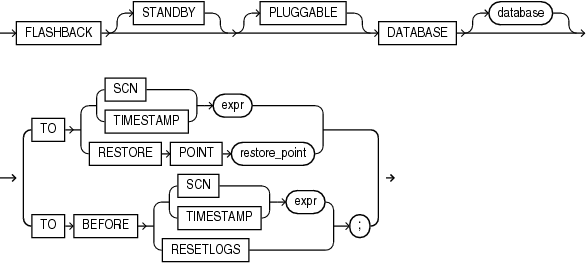
Description of the illustration flashback_database.eps
Semantics
When you issue a FLASHBACK DATABASE statement, Oracle Database first verifies that all required archived and online redo logs are available. If they are available, then it reverts all currently online data files in the database to the SCN or time specified in this statement.
-
The amount of Flashback data retained in the database is controlled by the
DB_FLASHBACK_RETENTION_TARGETinitialization parameter and the size of the fast recovery area. You can determine how far back you can flash back the database by querying theV$FLASHBACK_DATABASE_LOGview. -
If insufficient data remains in the database to perform the flashback, then you can use standard recovery procedures to recover the database to a past point in time.
-
If insufficient data remains for a set of data files, then the database returns an error. In this case, you can take those data files offline and reissue the statement to revert the remainder of the database. You can then attempt to recover the offline data files using standard recovery procedures. See Also: Oracle Database Backup and Recovery User’s Guide for more information on recovering data files
STANDBY
Specify STANDBY to revert the standby database to an earlier SCN or time. If the database is not a standby database, then the database returns an error. If you omit this clause, then database can be either a primary or a standby database.
See Also: Oracle Data Guard Concepts and Administration for information on how you can use FLASHBACK DATABASE on a standby database to achieve different delays
PLUGGABLE
Specify PLUGGABLE to flash back a PDB. You must specify this clause whether the current container is the root or the PDB you want to flash back.
Restrictions on Flashing Back a PDB
-
You cannot flash back a proxy PDB.
-
If the CDB is in shared undo mode, then you can only flash back a PDB to a clean PDB restore point. Refer to the CLEAN clause of
CREATERESTOREPOINTfor more information.
database
If you are flashing back a non-CDB or a CDB, then you can optionally specify the name of the database to be flashed back. If you omit database, then Oracle Database flashes back the database identified by the value of the initialization parameter DB_NAME.
If you are flashing back a PDB and the current container is the root, then use database to specify the name of the PDB to be flashed back. If you are flashing back a PDB and the current container is that PDB, then you can optionally use database to specify the PDB name.
TO SCN Clause
Specify a system change number (SCN):
-
TO SCNreverts the database back to its state at the specified SCN. -
TO BEFORE SCNreverts the database back to its state at the system change number just preceding the specified SCN.
You can determine the current SCN by querying the CURRENT_SCN column of the V$DATABASE view. This in turn lets you save the SCN to a spool file, for example, before running a high-risk batch job.
TO TIMESTAMP Clause
Specify a valid datetime expression.
-
TO TIMESTAMPreverts the database back to its state at the specified timestamp. -
TO BEFORE TIMESTAMPreverts the database back to its state one second before the specified timestamp.
You can represent the timestamp as an offset from a determinate value, such as SYSDATE, or as an absolute system timestamp.
TO RESTORE POINT Clause
Specify this clause to flash back the database to the specified restore point. If you have not enabled flashback database, then this is the only clause you can specify in this FLASHBACK DATABASE statement. If the database is not in FLASHBACK mode, as described in the “Prerequisites” section above, then this is the only clause you can specify for this statement.
RESETLOGS
Specify TO BEFORE RESETLOGS to flash the database back to just before the last resetlogs operation (ALTER DATABASE OPEN RESETLOGS).
See Also: Oracle Database Backup and Recovery User’s Guide for more information about this clause
Examples
Assuming that you have prepared a fast recovery area for the database and enabled media recovery, enable database FLASHBACK mode and open the database with the following statements:
STARTUP MOUNT
ALTER DATABASE FLASHBACK ON;
ALTER DATABASE OPEN;
With your database open for at least a day, you can flash back the database one day with the following statements:
SHUTDOWN DATABASE
STARTUP MOUNT
FLASHBACK DATABASE TO TIMESTAMP SYSDATE-1;