CREATE INDEX
Purpose
Use the CREATE INDEX statement to create an index on:
-
One or more columns of a table, a partitioned table, an index-organized table, or a cluster
-
One or more scalar typed object attributes of a table or a cluster
-
A nested table storage table for indexing a nested table column
An index is a schema object that contains an entry for each value that appears in the indexed column(s) of the table or cluster and provides direct, fast access to rows. The maximum size of a single index entry is dependent on the block size of the database.
Oracle Database supports several types of index:
-
Normal indexes. (By default, Oracle Database creates B-tree indexes.)
-
Bitmap indexes, which store rowids associated with a key value as a bitmap.
-
Partitioned indexes, which consist of partitions containing an entry for each value that appears in the indexed column(s) of the table.
-
Function-based indexes, which are based on expressions. They enable you to construct queries that evaluate the value returned by an expression, which in turn may include built-in or user-defined functions.
-
Domain indexes, which are instances of an application-specific index of type indextype. <div class="infoboxnote" markdown="1"> Note:
- [*Oracle Database Concepts*](/pls/topic/lookup?ctx=en/database/oracle/oracle-database/19/sqlrf&id=CNCPT811) for a discussion of indexes

- [*Oracle Database Reference*](/pls/topic/lookup?ctx=en/database/oracle/oracle-database/19/sqlrf&id=REFRN0043) for more information about the limits related to index size

- [ALTER INDEX](ALTER-INDEX.html#GUID-D8F648E7-8C07-4C89-BB71-862512536558) and [DROP INDEX](DROP-INDEX.html#GUID-F60F75DF-2866-4F93-BB7F-8FCE64BF67B6)

</div>
Prerequisites
To create an index in your own schema, one of the following conditions must be true:
-
The table or cluster to be indexed must be in your own schema.
-
You must have the
INDEXobject privilege on the table to be indexed. -
You must have the
CREATEANYINDEXsystem privilege.
To create an index in another schema, you must have the CREATE ANY INDEX system privilege. Also, the owner of the schema to contain the index must have either the UNLIMITED TABLESPACE system privilege or space quota on the tablespaces to contain the index or index partitions.
To create a function-based index, in addition to the prerequisites for creating a conventional index, if the index is based on user-defined functions, then those functions must be marked DETERMINISTIC. A function-based index is executed with the credentials of the index owner, so the index owner must have the EXECUTE object privilege on the function.
To create a domain index in your own schema, in addition to the prerequisites for creating a conventional index, you must also have the EXECUTE object privilege on the indextype. If you are creating a domain index in another user’s schema, then the index owner also must have the EXECUTE object privilege on the indextype and its underlying implementation type. Before creating a domain index, you should first define the indextype.
See Also: CREATE INDEXTYPE
Syntax
create_index::= 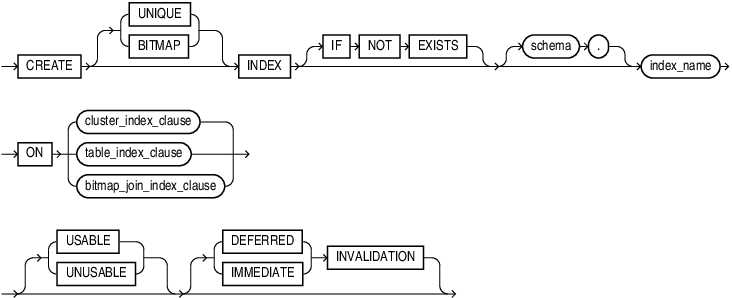
Description of the illustration create_index.eps
(cluster_index_clause::=, table_index_clause::=, bitmap_join_index_clause::=)
cluster_index_clause::= 
Description of the illustration cluster_index_clause.eps
table_index_clause::= 
Description of the illustration table_index_clause.eps
bitmap_join_index_clause::= 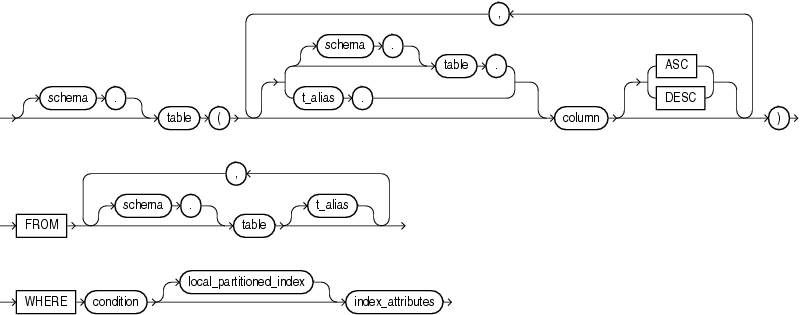
Description of the illustration bitmap_join_index_clause.eps
(local_partitioned_index::=, index_attributes::=)
index_expr::= 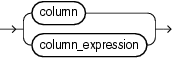
Description of the illustration index_expr.eps
index_properties::= 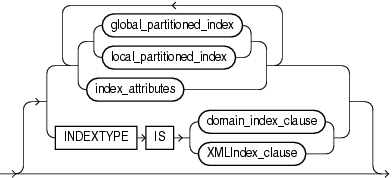
Description of the illustration index_properties.eps
(global_partitioned_index::=, local_partitioned_index::=, index_attributes::=, domain_index_clause::=, XMLIndex_clause::=)
index_attributes::= 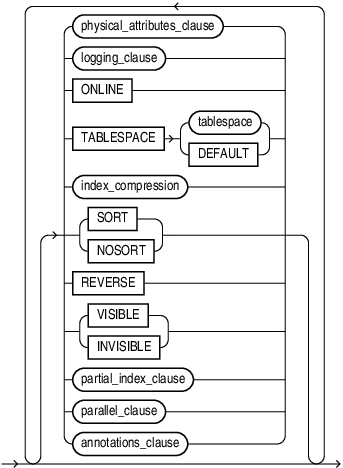
Description of the illustration index_attributes.eps
(physical_attributes_clause::=, logging_clause::=, index_compression::=, partial_index_clause::=, parallel_clause::=, annotations_clause)
physical_attributes_clause::= 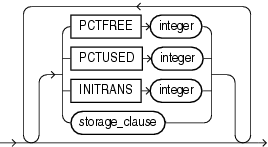
Description of the illustration physical_attributes_clause.eps
logging_clause::= 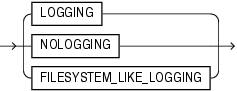
Description of the illustration logging_clause.eps
index_compression::= 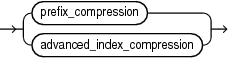
Description of the illustration index_compression.eps
prefix_compression::= 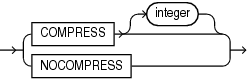
Description of the illustration prefix_compression.eps
advanced_index_compression::= 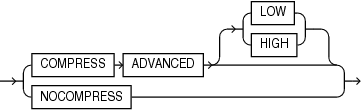
Description of the illustration advanced_index_compression.eps
partial_index_clause::= 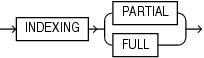
Description of the illustration partial_index_clause.eps
domain_index_clause::= 
Description of the illustration domain_index_clause.eps
local_domain_index_clause::= 
Description of the illustration local_domain_index_clause.eps
XMLIndex_clause::= 
Description of the illustration xmlindex_clause.eps
( The XMLIndex_parameters_clause is documented in Oracle XML DB Developer’s Guide.)
local_XMLIndex_clause::= 
Description of the illustration local_xmlindex_clause.eps
(The XMLIndex_parameters_clause is documented in Oracle XML DB Developer’s Guide.)
global_partitioned_index::= 
Description of the illustration global_partitioned_index.eps
(index_partitioning_clause::=, individual_hash_partitions::=, hash_partitions_by_quantity::=)
individual_hash_partitions::= 
Description of the illustration individual_hash_partitions.eps
(read_only_clause and indexing_clause: not supported in table_index_clause, partitioning_storage_clause::=)
partitioning_storage_clause::= 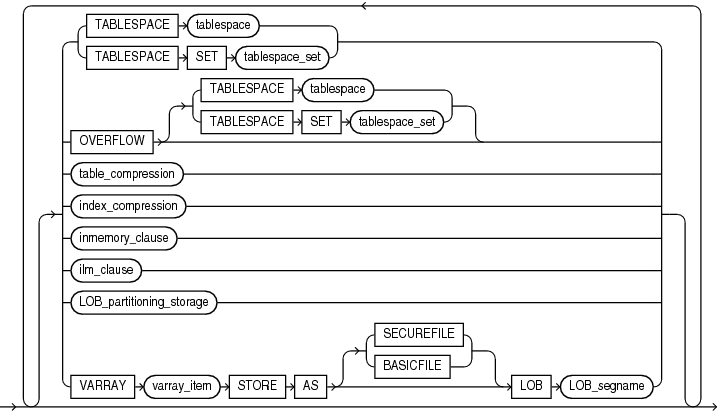
Description of the illustration partitioning_storage_clause.eps
(TABLESPACE SET, table_compression, inmemory_clause, and ilm_clause not supported with CREATE INDEX, index_compression::=, LOB_partitioning_storage::=)
LOB_partitioning_storage::= 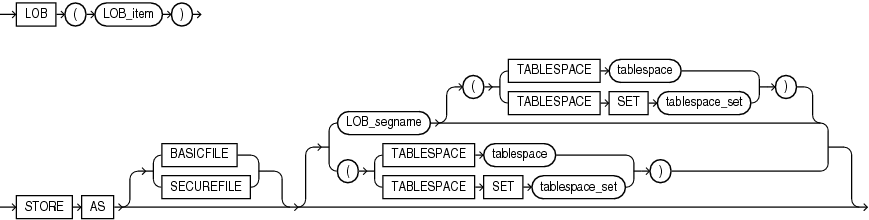
Description of the illustration lob_partitioning_storage.eps
(TABLESPACE SET: not supported with CREATE INDEX)
hash_partitions_by_quantity::= 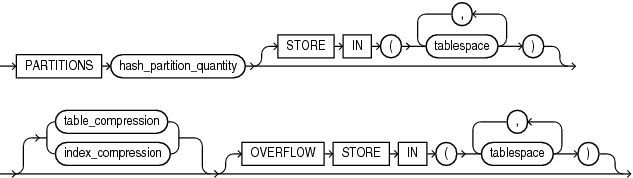
Description of the illustration hash_partitions_by_quantity.eps
index_partitioning_clause::= 
Description of the illustration index_partitioning_clause.eps
(segment_attributes_clause::=)
local_partitioned_index::= 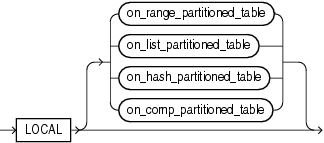
Description of the illustration local_partitioned_index.eps
(on_range_partitioned_table::=, on_list_partitioned_table::=, on_hash_partitioned_table::=, on_comp_partitioned_table::=)
on_range_partitioned_table::= 
Description of the illustration on_range_partitioned_table.eps
(segment_attributes_clause::=)
on_list_partitioned_table::= 
Description of the illustration on_list_partitioned_table.eps
(segment_attributes_clause::=)
segment_attributes_clause::= 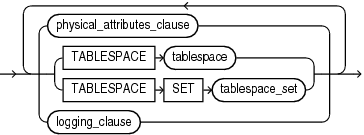
Description of the illustration segment_attributes_clause.eps
(physical_attributes_clause::=, TABLESPACE SET: not supported with CREATE INDEX, logging_clause::=
on_hash_partitioned_table::= 
Description of the illustration on_hash_partitioned_table.eps
on_comp_partitioned_table::= 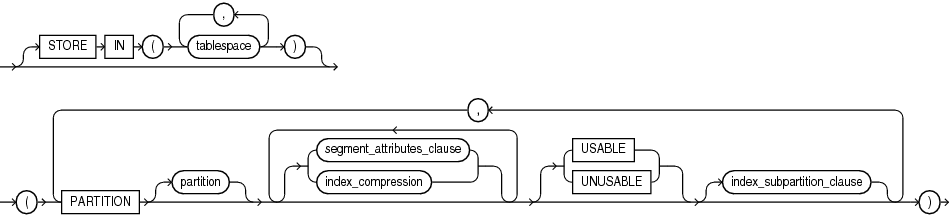
Description of the illustration on_comp_partitioned_table.eps
(segment_attributes_clause::=, index_compression::=, index_subpartition_clause::=)
index_subpartition_clause::= 
Description of the illustration index_subpartition_clause.eps
parallel_clause::= 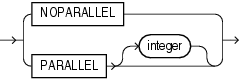
Description of the illustration parallel_clause.eps
Semantics
UNIQUE
Specify UNIQUE to indicate that the value of the column (or columns) upon which the index is based must be unique.
Restrictions on Unique Indexes
Unique indexes are subject to the following restrictions:
-
You cannot specify both
UNIQUEandBITMAP. -
You cannot specify
UNIQUEfor a domain index. See Also: “Unique Constraints” for information on the conditions that satisfy a unique constraint
BITMAP
Specify BITMAP to indicate that index is to be created with a bitmap for each distinct key, rather than indexing each row separately. Bitmap indexes store the rowids associated with a key value as a bitmap. Each bit in the bitmap corresponds to a possible rowid. If the bit is set, then it means that the row with the corresponding rowid contains the key value. The internal representation of bitmaps is best suited for applications with low levels of concurrent transactions, such as data warehousing.
Note: Oracle does not index table rows in which all key columns are null except in the case of bitmap indexes. Therefore, if you want an index on all rows of a table, then you must either specify NOT NULL constraints for the index key columns or create a bitmap index.
Restrictions on Bitmap Indexes
Bitmap indexes are subject to the following restrictions:
-
You cannot specify
BITMAPwhen creating a global partitioned index. -
You cannot create a bitmap secondary index on an index-organized table unless the index-organized table has a mapping table associated with it.
-
You cannot specify both
UNIQUEandBITMAP. -
You cannot specify
BITMAPfor a domain index. -
A bitmap index can have a maximum of 30 columns. <div class="infoboxnote" markdown="1">
**See Also:**

- [*Oracle Database Concepts*](/pls/topic/lookup?ctx=en/database/oracle/oracle-database/19/sqlrf&id=CNCPT811) and [*Oracle Database SQL Tuning Guide*](/pls/topic/lookup?ctx=en/database/oracle/oracle-database/19/sqlrf&id=TGSQL850) for more information about using bitmap indexes

- [CREATE TABLE](CREATE-TABLE.html#GUID-F9CE0CC3-13AE-4744-A43C-EAC7A71AAAB6) for information on mapping tables

- "[Bitmap Index Examples](CREATE-INDEX.html#GUID-1F89BBC0-825F-4215-AF71-7588E31D8BFE\_\_I2129648)"

</div>
IF NOT EXISTS
Specifying IF NOT EXISTS has the following effects:
-
If the index does not exist, a new one is created at the end of the statement.
-
If the index exists, it is detected and a new one is not created.
You cannot specify IF EXISTS with CREATE statements.
Note: You can use IF [NOT] EXISTS only from Release 19.28 and up.
schema
Specify the schema to contain the index. If you omit schema, then Oracle Database creates the index in your own schema.
index
Specify the name of the index to be created. The name must satisfy the requirements listed in Database Object Naming Rules.
See Also: Creating an Index: Example and Creating an Index on an XMLType Table: Example
cluster_index_clause
Use the cluster_index_clause to identify the cluster for which a cluster index is to be created. If you do not qualify cluster with schema, then Oracle Database assumes the cluster is in your current schema. You cannot create a cluster index for a hash cluster.
See Also: CREATE CLUSTER and “Creating a Cluster Index: Example”
table_index_clause
Specify the table on which you are defining the index. If you do not qualify table with schema, then Oracle Database assumes the table is contained in your own schema.
You create an index on a nested table column by creating the index on the nested table storage table. Include the NESTED_TABLE_ID pseudocolumn of the storage table to create a UNIQUE index, which effectively ensures that the rows of a nested table value are distinct.
See Also: “Indexes on Nested Tables: Example”
You can perform DDL operations (such as ALTER TABLE, DROP TABLE, CREATE INDEX) on a temporary table only when no session is bound to it. A session becomes bound to a temporary table by performing an INSERT operation on the table. A session becomes unbound to the temporary table by issuing a TRUNCATE statement or at session termination, or, for a transaction-specific temporary table, by issuing a COMMIT or ROLLBACK statement.
Restrictions on the table_index_clause
This clause is subject to the following restrictions:
-
If index is locally partitioned, then table must be partitioned.
-
If table is index-organized, then this statement creates a secondary index. The index contains the index key and the logical rowid of the index-organized table. The logical rowid excludes columns that are also part of the index key. You cannot specify
REVERSEfor this secondary index, and the combined size of the index key and the logical rowid should be less than the block size. -
If table is a temporary table, then index will also be temporary with the same scope (session or transaction) as table. The following restrictions apply to indexes on temporary tables:
-
The only part of index_properties you can specify is index_attributes.
-
Within index_attributes, you cannot specify the physical_attributes_clause, the parallel_clause, the logging_clause, or
TABLESPACE. -
You cannot create a domain index or a partitioned index on a temporary table.
-
-
You cannot create an index on an external table. See Also: CREATE TABLE and Oracle Database Concepts for more information on temporary tables
t_alias
Specify a correlation name (alias) for the table upon which you are building the index. Note: This alias is required if the index_expr references any object type attributes or object type methods. See “Creating a Function-based Index on a Type Method: Example” and “Indexing on Substitutable Columns: Examples”.
index_expr
For index_expr, specify the column or column expression upon which the index is based.
You can create multiple indexes on the same set of columns, column expressions, or both if the following conditions are met:
-
The indexes are of different types, use different partitioning, or have different uniqueness properties.
-
Only one of the indexes is
VISIBLEat any given time. See Also: Oracle Database Administrator’s Guide for more information on creating multiple indexes
##
column
Specify the name of one or more columns in the table. A bitmap index can have a maximum of 30 columns. Other indexes can have as many as 32 columns. These columns define the index key.
If a unique index is local nonprefixed (see local_partitioned_index), then the index key must contain the partitioning key.
See Also: Oracle Database VLDB and Partitioning Guide for information on prefixed and nonprefixed indexes
You can create an index on a scalar object attribute column or on the system-defined NESTED_TABLE_ID column of the nested table storage table. If you specify an object attribute column, then the column name must be qualified with the table name. If you specify a nested table column attribute, then it must be qualified with the outermost table name, the containing column name, and all intermediate attribute names leading to the nested table column attribute.
When you create an index on a column or expression with a declared or derived named collation other than BINARY, or a declared or derived pseudo-collation USING_NLS_SORT_CI or USING_NLS_SORT_AI, the database creates a functional index on the function NLSSORT. See Oracle Database Globalization Support Guide for more information.
Creating an Index on an Extended Data Type Column
If column is an extended data type column, then you may receive a “maximum key length exceeded” error when attempting to create the index. The maximum key length for an index varies depending on the database block size and some additional index metadata stored in a block. For example, for databases that use the Oracle standard 8K block size, the maximum key length is approximately 6400 bytes.
To work around this situation, you must shorten the length of the values you want to index, using one of the following methods:
-
Create a function-based index to shorten the values stored in the extended data type column as part of the expression used for the index definition.
-
Create a virtual column to shorten the values stored in the extended data type column as part of the expression used for the virtual column definition and build a normal index on the virtual column. Using a virtual column also enables you to leverage functionality for regular columns, such as collecting statistics and using constraint and triggers.
For both methods you can use either the SUBSTR or STANDARD_HASH function to shorten the values of the extended data type column to build an index. These methods have the following advantages and disadvantages:
-
Use the
SUBSTRfunction to return a substring, or prefix, of column that is an acceptable length for the index key. This type of index can be used for equality, IN-list, and range predicates on the original column without the need to specify theSUBSTRcolumn as part of the predicate. Refer to SUBSTR for more information.
Using the STANDARD_HASH function is likely to create an index that is more compact than the substring-based index and may result in fewer unnecessary index accesses. This type of index can be used for equality and IN-list predicates on the original column without the need to specify the STANDARD_HASH column as part of the predicate. Refer to STANDARD_HASH for more information.
The following example shows how to create a function-based index on an extended data type column:
CREATE INDEX index ON table (SUBSTR(column, 1, n));For n, specify a prefix length that is large enough to differentiate between values in column.
The following example shows how to create a virtual column for an extended data type column, and then create an index on the virtual column:
ALTER TABLE table ADD (new_hash_column AS (STANDARD_HASH(column)));
CREATE INDEX index ON table (new_hash_column);
See Also: “Extended Data Types” for more information on extended data types
Restrictions on Index Columns
The following restrictions apply to index columns:
-
You cannot create an index on columns or attributes whose type is user-defined,
LONG,LONGRAW, LOB, orREF, except that Oracle Database supports an index onREFtype columns or attributes that have been defined with aSCOPEclause. -
Only normal (B-tree) indexes can be created on encrypted columns, and they can only be used for equality searches.
column_expression
Specify an expression built from columns of table, constants, SQL functions, and user-defined functions. When you specify column_expression, you create a function-based index.
See Also: “Column Expressions”, “Notes on Function-based Indexes”, “Restrictions on Function-based Indexes”, and “Function-Based Index Examples”
Name resolution of the function is based on the schema of the index creator. User-defined functions used in column_expression are fully name resolved during the CREATE INDEX operation.
After creating a function-based index, collect statistics on both the index and its base table using the DBMS_STATS package. Such statistics will enable Oracle Database to correctly decide when to use the index.
Function-based unique indexes can be useful in defining a conditional unique constraint on a column or combination of columns. Refer to “Using a Function-based Index to Define Conditional Uniqueness: Example” for an example.
See Also: Oracle Database PL/SQL Packages and Types Reference for more information on the DBMS_STATS package
Notes on Function-based Indexes
The following notes apply to function-based indexes:
-
When you subsequently query a table that uses a function-based index, Oracle Database will not use the index unless the query filters out nulls. However, Oracle Database will use a function-based index in a query even if the columns specified in the
WHEREclause are in a different order than their order in the column_expression that defined the function-based index.See Also: “Function-Based Index Examples”
-
If the function on which the index is based becomes invalid or is dropped, then Oracle Database marks the index
DISABLED. Queries on aDISABLEDindex fail if the optimizer chooses to use the index. DML operations on aDISABLEDindex fail unless the index is also markedUNUSABLEand the parameterSKIP_UNUSABLE_INDEXESis set totrue. Refer to ALTER SESSION for more information on this parameter. -
If a public synonym for a function, package, or type is used in column_expression, and later an actual object with the same name is created in the table owner’s schema, then Oracle Database disables the function-based index. When you subsequently enable the function-based index using
ALTERINDEX...ENABLEorALTERINDEX...REBUILD, the function, package, or type used in the column_expression continues to resolve to the function, package, or type to which the public synonym originally pointed. It will not resolve to the new function, package, or type. -
If the definition of a function-based index generates internal conversion to character data, then use caution when changing NLS parameter settings. Function-based indexes use the current database settings for NLS parameters. If you reset these parameters at the session level, then queries using the function-based index may return incorrect results. Two exceptions are the collation parameters (
NLS_SORTandNLS_COMP). Oracle Database handles the conversions correctly even if these have been reset at the session level. -
Oracle Database cannot convert data in all cases, even when conversion is explicitly requested. For example, an attempt to convert the string
'105 lbs'fromVARCHAR2toNUMBERusing theTO_NUMBERfunction fails with an error. Therefore, if column_expression contains a data conversion function such asTO_NUMBERorTO_DATE, and if a subsequentINSERTorUPDATEstatement includes data that the conversion function cannot convert, then the index will cause theINSERTorUPDATEstatement to fail. -
If column_expression contains a datetime format model, then the function-based index expression defining the column may contain format elements that are different from those specified. For example, define a function-based index using the
yyyydatetime format element:
CREATE INDEX cust_eff_ix ON customers
  (NVL(cust_eff_to, TO_DATE('9000-01-01 00:00:00', '**yyyy**-mm-dd hh24:mi:ss')));
Query the ALL_IND_EXPRESSIONS view to see that the function-based index expression defining the column uses the syyyy datetime format element:
SELECT column_expression
  FROM all_ind_expressions
  WHERE index_name='CUST_EFF_IX';

COLUMN_EXPRESSION

------------------------------------------------------------------------------
NVL("CUST_EFF_TO",TO_DATE(' 9000-01-01 00:00:00', '**syyyy**-mm-dd hh24:mi:ss'))
Restrictions on Function-based Indexes
Function-based indexes are subject to the following restrictions:
-
The value returned by the function referenced in column_expression is subject to the same restrictions as are the index columns of a B-tree index. Refer to “Restrictions on Index Columns”.
-
Any user-defined function referenced in column_expression must be declared as
DETERMINISTIC. -
For a function-based globally partitioned index, the column_expression cannot be the partitioning key.
-
The column_expression can be any of the forms of expression described in Column Expressions.
-
All functions must be specified with parentheses, even if they have no parameters. Otherwise Oracle Database interprets them as column names.
-
Any function you specify in column_expression must return a repeatable value. For example, you cannot specify the
SYSDATEorUSERfunction or theROWNUMpseudocolumn. See Also: CREATE FUNCTION and Oracle Database PL/SQL Language Reference
ASC | DESC
Use ASC or DESC to indicate whether the index should be created in ascending or descending order. Indexes on character data are created in ascending or descending order of the character values in the database character set.
Oracle Database treats descending indexes as if they were function-based indexes. As with other function-based indexes, the database does not use descending indexes until you first analyze the index and the table on which the index is defined. See the column_expression clause of this statement.
Ascending unique indexes allow multiple NULL values. However, in descending unique indexes, multiple NULL values are treated as duplicate values and therefore are not permitted.
Restriction on Ascending and Descending Indexes
You cannot specify either of these clauses for a domain index. You cannot specify DESC for a reverse index. Oracle Database ignores DESC if index is bitmapped or if the COMPATIBLE initialization parameter is set to a value less than 8.1.0.
index_attributes
Specify the optional index attributes.
physical_attributes_clause
Use the physical_attributes_clause to establish values for physical and storage characteristics for the index.
If you omit this clause, then Oracle Database sets PCTFREE to 10 and INITRANS to 2.
Restriction on Index Physical Attributes
You cannot specify the PCTUSED parameter for an index.
See Also: physical_attributes_clause and storage_clause for a complete description of these clauses
TABLESPACE
For tablespace, specify the name of the tablespace to hold the index, index partition, or index subpartition. If you omit this clause, then Oracle Database creates the index in the default tablespace of the owner of the schema containing the index.
For a local index, you can specify the keyword DEFAULT in place of tablespace. New partitions or subpartitions added to the local index will be created in the same tablespace(s) as the corresponding partitions or subpartitions of the underlying table.
index_compression
The index_compression clauses let you enable or disable index compression for the index. Specify the COMPRESS clause of prefix_compression to enable prefix compression for the index, specify the COMPRESS ADVANCED clause of advanced_index_compression to enable advanced index compression for the index, or specify the NOCOMPRESS clause of either prefix_compression or advanced_index_compression to disable compression for the index. The default is NOCOMPRESS.
If you want to use compression for a partitioned index, then you must create the index with compression enabled at the index level. You can subsequently enable and disable the compression setting for individual partitions of such a partitioned index. You can also enable and disable compression when rebuilding individual partitions. You can modify an existing nonpartitioned index to enable or disable compression only when rebuilding the index.
Specify COMPRESS to enable prefix compression, also known as key compression, which eliminates repeated occurrence of key column values. Use integer to specify the prefix length (number of prefix columns to compress). You can specify prefix compression for indexes that are nonunique or unique indexes of at least two columns.
-
For unique indexes, the range of valid prefix length values is from 1 to the number of key columns minus 1. The default prefix length is the number of key columns minus 1.
-
For nonunique indexes, the range of valid prefix length values is from 1 to the number of key columns. The default prefix length is the number of key columns.
advanced_index_compression
Specify this clause to enable advanced index compression. Advanced index compression improves compression ratios significantly while still providing efficient access to indexes. Therefore, advanced index compression works well on all supported indexes, including those indexes that are not good candidates for prefix compression.
-
COMPRESSADVANCEDLOW- This level compresses the index less than theHIGHlevel, but provides faster access to the index. You can specify this clause for indexes that are nonunique or unique indexes of at least two columns. Before enablingCOMPRESSADVANCEDLOW, the database must be at12.1.0or higher compatibility level. -
COMPRESSADVANCEDHIGH- This level compresses the index more than theLOWlevel, but provides slower access to the index. You can specify this clause for indexes that are nonunique or unique indexes of one or more columns. Before enablingCOMPRESSADVANCEDHIGH, the database must be at12.2.0or higher compatibility level.
If you omit the LOW and HIGH keywords, then the default is HIGH.
Restrictions on Index Compression
The following restrictions apply to index compression:
-
You cannot specify prefix compression or advanced index compression for a bitmap index.
-
You cannot specify advanced index compression for index-organized tables. <div class="infoboxnote" markdown="1">
**See Also:**

- [*Oracle Database Administrator's Guide*](/pls/topic/lookup?ctx=en/database/oracle/oracle-database/19/sqlrf&id=ADMIN14307) for more information on prefix compression and advanced index compression

- "[Compressing an Index: Example](CREATE-INDEX.html#GUID-1F89BBC0-825F-4215-AF71-7588E31D8BFE\_\_I2129467)"

</div>
partial_index_clause
You can specify this clause only when creating an index on a partitioned table. Specify INDEXING FULL to create a full index. Specify INDEXING PARTIAL to create a partial index. The default is INDEXING FULL.
A full index includes all partitions in the underlying table, regardless of their indexing properties. A partial index includes only partitions in the underlying table with an indexing property of ON.
If a partial index is a local partitioned index, then index partitions that correspond with table partitions with an indexing property of ON are marked USABLE. Index partitions that correspond with table partitions with an indexing property of OFF are marked UNUSABLE.
If the underlying table is a composite-partitioned table, then the preceding conditions for index partitions and table partitions apply instead to index subpartitions and table subpartitions.
Restrictions on Partial Indexes
Partial indexes are subject to the following restrictions:
-
The underlying table of a partial index cannot be a nonpartitioned table.
-
Unique indexes cannot be partial indexes. This applies to indexes created with the
CREATEUNIQUEINDEXstatement and indexes that are implicitly created when you specify a unique constraint on one or more columns. See Also:CREATETABLEindexing_clause for information on the indexing property
SORT | NOSORT
By default, Oracle Database sorts indexes in ascending order when it creates the index. You can specify NOSORT to indicate to the database that the rows are already stored in the database in ascending order, so that Oracle Database does not have to sort the rows when creating the index. If the rows of the indexed column or columns are not stored in ascending order, then the database returns an error. For greatest savings of sort time and space, use this clause immediately after the initial load of rows into a table. If you specify neither of these keywords, then SORT is the default.
Restrictions on NOSORT
This parameter is subject to the following restrictions:
-
You cannot specify
REVERSEwith this clause. -
You cannot use this clause to create a cluster index partitioned or bitmap index.
-
You cannot specify this clause for a secondary index on an index-organized table.
REVERSE
Specify REVERSE to store the bytes of the index block in reverse order, excluding the rowid.
Restrictions on Reverse Indexes
Reverse indexes are subject to the following restrictions:
-
You cannot specify
NOSORTwith this clause. -
You cannot reverse a bitmap index or an index on an index-organized table.
VISIBLE | INVISIBLE
Use this clause to specify whether the index is visible or invisible to the optimizer. An invisible index is maintained by DML operations, but it is not be used by the optimizer during queries unless you explicitly set the parameter OPTIMIZER_USE_INVISIBLE_INDEXES to TRUE at the session or system level.
To determine whether an existing index is visible or invisible to the optimizer, you can query the VISIBILITY column of the USER_, DBA_, ALL_INDEXES data dictionary views.
See Also: Oracle Database Administrator’s Guide for more information on this feature
logging_clause
Specify whether the creation of the index will be logged (LOGGING) or not logged (NOLOGGING) in the redo log file. This setting also determines whether subsequent Direct Loader (SQL*Loader) and direct-path INSERT operations against the index are logged or not logged. LOGGING is the default.
If index is nonpartitioned, then this clause specifies the logging attribute of the index.
If index is partitioned, then this clause determines:
-
The default value of all partitions specified in the
CREATEstatement, unless you specify the logging_clause in thePARTITIONdescription clause -
The default value for the segments associated with the index partitions
-
The default value for local index partitions or subpartitions added implicitly during subsequent
ALTERTABLE...ADDPARTITIONoperations
The logging attribute of the index is independent of that of its base table.
If you omit this clause, then the logging attribute is that of the tablespace in which it resides.
See Also:
-
logging_clause for a full description of this clause
-
Oracle Database VLDB and Partitioning Guide for more information about logging and parallel DML
ONLINE
Specify ONLINE to indicate that DML operations on the table will be allowed during creation of the index.
Restrictions on Online Index Building
Online index building is subject to the following restrictions:
-
Parallel DML is not supported during online index building. If you specify
ONLINEand then issue parallel DML statements, then Oracle Database returns an error. -
You can specify
ONLINEfor a bitmap index or a cluster index as long as you setCOMPATIBLEto 10 or higher. -
You cannot specify
ONLINEfor a conventional index on aUROWIDcolumn. -
For a nonunique secondary index on an index-organized table, the number of index key columns plus the number of primary key columns that are included in the logical rowid in the index-organized table cannot exceed 32. The logical rowid excludes columns that are part of the index key. See Also: Oracle Database Concepts for a description of online index building and rebuilding
parallel_clause
Specify the parallel_clause if you want creation of the index to be parallelized.
For complete information on this clause, refer to parallel_clause in the documentation on CREATE TABLE.
annotations_clause
For the full semantics of the annotations clause see annotations_clause.
Index Partitioning Clauses
Use the global_partitioned_index clause and the local_partitioned_index clauses to partition index.
The storage of partitioned database entities in tablespaces of different block sizes is subject to several restrictions. Refer to Oracle Database VLDB and Partitioning Guide for a discussion of these restrictions.
See Also: “Partitioned Index Examples”
global_partitioned_index
The global_partitioned_index clause lets you specify that the partitioning of the index is user defined and is not equipartitioned with the underlying table. By default, nonpartitioned indexes are global indexes.
You can partition a global index by range or by hash. In both cases, you can specify up to 32 columns as partitioning key columns. The partitioning column list must specify a left prefix of the index column list. If the index is defined on columns a, b, and c, then for the columns you can specify (a, b, c), or (a, b), or (a, c), but you cannot specify (b, c) or (c) or (b, a). If you specify a partition name, then it must conform to the rules for naming schema objects and their parts as described in “Database Object Naming Rules”. If you omit the partition names, then Oracle Database assigns names of the form SYS_Pn.
GLOBAL PARTITION BY RANGE
Use this clause to create a range-partitioned global index. Oracle Database will partition the global index on the ranges of values from the table columns you specify in the column list.
See Also: “Creating a Range-Partitioned Global Index: Example”
GLOBAL PARTITION BY HASH
Use this clause to create a hash-partitioned global index. Oracle Database assigns rows to the partitions using a hash function on values in the partitioning key columns.
See Also: The CREATE TABLE clause hash_partitions for information on the two methods of hash partitioning and “Creating a Hash-Partitioned Global Index: Example”
Restrictions on Global Partitioned Indexes
Global partitioned indexes are subject to the following restrictions:
-
The partitioning key column list cannot contain the
ROWIDpseudocolumn or a column of typeROWID. -
The only property you can specify for hash partitions is tablespace storage. Therefore, you cannot specify LOB or varray storage clauses in the partitioning_storage_clause of individual_hash_partitions.
-
You cannot specify the
OVERFLOWclause of hash_partitions_by_quantity, as that clause is valid only for index-organized table partitions. -
In the partitioning_storage_clause, you cannot specify table_compression or the inmemory_clause, but you can specify index_compression. Note: If your enterprise has or will have databases using different character sets, then use caution when partitioning on character columns. The sort sequence of characters is not identical in all character sets.
See Also: Oracle Database Globalization Support Guide for more information on character set support
index_partitioning_clause
Use this clause to describe the individual index partitions. The number of repetitions of this clause determines the number of partitions. If you omit partition, then Oracle Database generates a name with the form SYS_Pn.
For VALUES LESS THAN (value_list), specify the noninclusive upper bound for the current partition in a global index. The value list is a comma-delimited, ordered list of literal values corresponding to the column list in the global_partitioned_index clause. Always specify MAXVALUE as the value of the last partition.
Note: If the index is partitioned on a DATE column, and if the date format does not specify the first two digits of the year, then you must use the TO_DATE function with a 4-character format mask for the year. The date format is determined implicitly by NLS_TERRITORY or explicitly by NLS_DATE_FORMAT. Refer to Oracle Database Globalization Support Guide for more information on these initialization parameters.
See Also: “Range Partitioning Example”
local_partitioned_index
The local_partitioned_index clauses let you specify that the index is partitioned on the same columns, with the same number of partitions and the same partition bounds as table. For composite-partitioned tables, this clause lets you specify that the index is subpartitioned on the same columns, with the same number of subpartitions and the same subpartition bounds as table. Oracle Database automatically maintains local index partitioning as the underlying table is repartitioned.
If you specify only the keyword LOCAL and do not specify a subclause, then Oracle Database creates each index partition in the same tablespace as its corresponding table partition and assigns it the same name as its corresponding table partition. If table is a composite-partitioned table, then Oracle Database creates each index subpartition in the same tablespace as its corresponding table subpartition and assigns it the same name as its corresponding table subpartition.
If you specify a partition name, then it must conform to the rules for naming schema objects and their parts as described in “Database Object Naming Rules”. If you omit a partition name, then Oracle Database generates a name that is consistent with the corresponding table partition. If the name conflicts with an existing index partition name, then the database uses the form SYS_Pn.
on_range_partitioned_table
This clause lets you specify the names and attributes of index partitions on a range-partitioned table. If you specify this clause, then the number of PARTITION clauses must be equal to the number of table partitions, and in the same order.
You cannot specify prefix compression for an index partition unless you have specified prefix compression for the index.
For more information on the USABLE and UNUSABLE clauses, refer to USABLE | UNUSABLE.
on_list_partitioned_table
The on_list_partitioned_table clause is identical to on_range_partitioned_table.
on_hash_partitioned_table
This clause lets you specify names and tablespace storage for index partitions on a hash-partitioned table.
If you specify any PARTITION clauses, then the number of these clauses must be equal to the number of table partitions. You can optionally specify tablespace storage for one or more individual partitions. If you do not specify tablespace storage either here or in the STORE IN clause, then the database stores each index partition in the same tablespace as the corresponding table partition.
The STORE IN clause lets you specify one or more tablespaces across which Oracle Database will distribute all the index hash partitions. The number of tablespaces need not equal the number of index partitions. If the number of index partitions is greater than the number of tablespaces, then the database cycles through the names of the tablespaces.
For more information on the USABLE and UNUSABLE clauses, refer to USABLE | UNUSABLE.
on_comp_partitioned_table
This clause lets you specify the name and attributes of index partitions on a composite-partitioned table.
The STORE IN clause is valid only for range-hash or list-hash composite-partitioned tables. It lets you specify one or more default tablespaces across which Oracle Database will distribute all index hash subpartitions for all partitions. You can override this storage by specifying different default tablespace storage for the subpartitions of an individual partition in the second STORE IN clause in the index_subpartition_clause.
For range-range, range-list, and list-list composite-partitioned tables, you can specify default attributes for the range or list subpartitions in the PARTITION clause. You can override this storage by specifying different attributes for the range or list subpartitions of an individual partition in the SUBPARTITION clause of the index_subpartition_clause.
You cannot specify prefix compression for an index partition unless you have specified prefix compression for the index.
For more information on the USABLE and UNUSABLE clauses, refer to USABLE | UNUSABLE.
index_subpartition_clause
This clause lets you specify names and tablespace storage for index subpartitions in a composite-partitioned table.
The STORE IN clause is valid only for hash subpartitions of a range-hash and list-hash composite-partitioned table. It lets you specify one or more tablespaces across which Oracle Database will distribute all the index hash subpartitions. The SUBPARTITION clause is valid for all subpartition types.
If you specify any SUBPARTITION clauses, then the number of those clauses must be equal to the number of table subpartitions. If you specify a subpartition name, then it must conform to the rules for naming schema objects and their parts as described in “Database Object Naming Rules”. If you omit subpartition, then the database generates a name that is consistent with the corresponding table subpartition. If the name conflicts with an existing index subpartition name, then the database uses the form SYS_SUBPn.
The number of tablespaces need not equal the number of index subpartitions. If the number of index subpartitions is greater than the number of tablespaces, then the database cycles through the names of the tablespaces.
If you do not specify tablespace storage for subpartitions either in the on_comp_partitioned_table clause or in the index_subpartition_clause, then Oracle Database uses the tablespace specified for index. If you also do not specify tablespace storage for index, then the database stores the subpartition in the same tablespace as the corresponding table subpartition.
For more information on the USABLE and UNUSABLE clauses, refer to CREATE INDEX … USABLE | UNUSABLE.
domain_index_clause
Use the domain_index_clause to indicate that index is a domain index, which is an instance of an application-specific index of type indextype.
Creating a domain index requires a number of preceding operations. You must first create an implementation type for an indextype. You must also create a functional implementation and then create an operator that uses the function. Next you create an indextype, which associates the implementation type with the operator. Finally, you create the domain index using this clause. Refer to Extended Examples, which contains an example of creating a simple domain index, including all of these operations.
index_expr
In the index_expr (in table_index_clause), specify the table columns or object attributes on which the index is defined. You can define multiple domain indexes on a single column only if the underlying indextypes are different and the indextypes support a disjoint set of user-defined operators.
Restrictions on Domain Indexes
Domain indexes are subject to the following restrictions:
-
The index_expr (in table_index_clause) can specify only a single column, and the column cannot be of data type
REF, varray, nested table,LONG, orLONGRAW. -
You cannot create a bitmap or unique domain index.
-
You cannot create a domain index on a temporary table.
-
You can create local domain indexes on only range-, list-, hash-, and interval-partitioned tables, with one exception: You cannot create a local domain index on an automatic list-partitioned table.
-
Domain indexes can be created only on table columns declared with collation
BINARY,USING_NLS_COMP,USING_NLS_SORT, orUSING_NLS_SORT_CS. See Oracle Database Globalization Support Guide for more information.
indextype
For indextype, specify the name of the indextype. This name should be a valid schema object that has already been created.
If you have installed Oracle Text, then you can use various built-in indextypes to create Oracle Text domain indexes. For more information on Oracle Text and the indexes it uses, refer to Oracle Text Reference.
See Also: CREATE INDEXTYPE
Use this clause to specify that the index is a local index on a partitioned table.
-
The
PARTITIONSclause lets you specify names for the index partitions. The number of partitions you specify must match the number of partitions in the base table. If you omit this clause, then the database creates the partitions with system-generated names of the formSYS_Pn. -
The
PARAMETERSclause lets you specify the parameter string specific to an individual partition. If you omit this clause, then the parameter string associated with the index is also associated with the partition.
Use the parallel_clause to parallelize creation of the domain index. For a nonpartitioned domain index, Oracle Database passes the explicit or default degree of parallelism to the ODCIIndexCreate cartridge routine, which in turn establishes parallelism for the index. For local domain indexes, this clause causes the index partitions to be created in parallel.
See Also: Oracle Database Data Cartridge Developer’s Guide for complete information on the Oracle Data Cartridge Interface (ODCI) routines
PARAMETERS
In the PARAMETERS clause, specify the parameter string that is passed uninterpreted to the appropriate ODCI indextype routine. The maximum length of the parameter string is 1000 characters.
When you specify this clause at the top level of the syntax, the parameters become the default parameters for the index partitions. If you specify this clause as part of the local_domain_index_clause, then you override any default parameters with parameters for the individual partition.
After the domain index is created, Oracle Database invokes the appropriate ODCI routine. If the routine does not return successfully, then the domain index is marked FAILED. The only operations supported on an failed domain index are DROP INDEX and (for non-local indexes) REBUILD INDEX.
See Also: Oracle Database Data Cartridge Developer’s Guide for information on the Oracle Data Cartridge Interface (ODCI) routines
XMLIndex_clause
The XMLIndex_clause lets you define an XMLIndex index, typically on a column contain XML data. An XMLIndex index is a type of domain index designed specifically for the domain of XML data.
XMLIndex_parameters_clause
This clause lets you specify information about the path table and about the secondary indexes corresponding to the components of XMLIndex. This clause also lets you specify information about the structured component of the index. The maximum length of the parameter string is 1000 characters.
When you specify this clause at the top level of the syntax, the parameters become the parameters of the index and the default parameters for the index partitions. If you specify this clause as part of the local_xmlindex_clause clause, then you override any default parameters with parameters for the individual partition.
See Also: Oracle XML DB Developer’s Guide for the syntax and semantics of the XMLIndex_parameters_clause, as well as detailed information about the use of XMLIndex
bitmap_join_index_clause
Use the bitmap_join_index_clause to define a bitmap join index. A bitmap join index is defined on a single table. For an index key made up of dimension table columns, it stores the fact table rowids corresponding to that key. In a data warehousing environment, the table on which the index is defined is commonly referred to as a fact table, and the tables with which this table is joined are commonly referred to as dimension tables. However, a star schema is not a requirement for creating a join index.
ON
In the ON clause, first specify the fact table, and then inside the parentheses specify the columns of the dimension tables on which the index is defined.
FROM
In the FROM clause, specify the joined tables.
WHERE
In the WHERE clause, specify the join condition.
If the underlying fact table is partitioned, then you must also specify one of the local_partitioned_index clauses (see local_partitioned_index).
Restrictions on Bitmap Join Indexes
In addition to the restrictions on bitmap indexes in general (see BITMAP), the following restrictions apply to bitmap join indexes:
-
You cannot create a bitmap join index on a temporary table.
-
No table may appear twice in the
FROMclause. -
You cannot create a function-based join index.
-
The dimension table columns must be either primary key columns or have unique constraints.
-
If a dimension table has a composite primary key, then each column in the primary key must be part of the join.
-
You cannot specify the local_partitioned_index clause unless the fact table is partitioned.
-
A bitmap join index definition can only reference columns with collation
BINARY,USING_NLS_COMP,USING_NLS_SORT, orUSING_NLS_SORT_CS. For any of these collations, index keys are collated and the join condition is evaluated using theBINARYcollation. See Oracle Database Globalization Support Guide for more information.
Note: Oracle Database Data Warehousing Guide for information on fact and dimension tables and on using bitmap indexes in a data warehousing environment
USABLE | UNUSABLE
You can specify the USABLE and UNUSABLE keywords:
-
For an index, in the
CREATEINDEXstatement -
For an index partition, in the on_range_partitioned_table, on_list_partitioned_table, on_hash_partitioned_table, and on_comp_partitioned_table clauses
-
For an index subpartition, in the index_subpartition_clause
For nonpartitioned indexes, specify UNUSABLE to create an index in an unusable state. An unusable index must be rebuilt, or dropped and re-created, before it can be used. Specify USABLE to create an index in a usable state. USABLE is the default.
For partitioned indexes, specify USABLE or UNUSABLE as follows:
-
If you specify
UNUSABLEfor the index, then all index partitions are markedUNUSABLE. -
If you specify
USABLEfor the index, then all index partitions are markedUSABLE. -
If you do not specify
USABLEorUNUSABLEfor the index, then all index partitions are markedUSABLE. The exception is a local partial index. If you specify theLOCALandINDEXINGPARTIALclauses, and do not specifyUSABLEorUNUSABLE, then each index partition is markedUSABLEif the indexing property of its corresponding table partition isON, orUNUSABLEif the indexing property of its corresponding table partition isOFF.
You can override the preceding conditions by specifying USABLE or UNUSABLE for a specific index partition.
If the underlying table is a composite-partitioned table, then the preceding conditions for index partitions and table partitions apply instead to index subpartitions and table subpartitions.
After you create a partitioned index, you can choose to rebuild specific index partitions or subpartitions to make them USABLE. Doing so can be useful if you want to maintain indexes only on some index partitions or subpartitions-for example, if you want to enable index access for new partitions but not for old partitions.
When an index, or some partitions or subpartitions of an index, are created UNUSABLE, no segment is allocated for the unusable object. The unusable index or index partition consumes no space in the database.
If an index, or some partitions or subpartitions of the index, are marked UNUSABLE, then the index will be considered as an access path by the optimizer only under the following circumstances: the optimizer must know at compile time which partitions are to be accessed, and all of those partitions to be accessed must be marked USABLE. Therefore, the query cannot contain any bind variables.
Restrictions on USABLE | UNUSABLE
The following restrictions apply when marking an index USABLE or UNUSABLE:
-
You cannot specify this clause for an index on a temporary table.
-
Unusable indexes or index partitions will still have a segment under the following conditions:
-
The index (or index partition) is owned by
SYS,SYSTEM,PUBLIC,OUTLN, orXDB -
The index (or index partition) is stored in dictionary-managed tablespaces
-
The global partitioned or nonpartitioned index on a partitioned table becomes unusable due to a partition maintenance operation
-
{ DEFERRED | IMMEDIATE } INVALIDATION
This clause lets you control when the database invalidates dependent cursors while creating the index. It has the same semantics here as for the ALTER INDEX statement. Refer to { DEFERRED | IMMEDIATE } INVALIDATION in the documentation on ALTER INDEX for the full semantics of this clause.
Examples
General Index Examples
Creating an Index: Example
The following statement shows how the sample index ord_customer_ix on the customer_id column of the sample table oe.orders was created:
CREATE INDEX ord_customer_ix
   ON orders (customer_id);
Compressing an Index: Example
To create the ord_customer_ix_demo index with the COMPRESS clause, you might issue the following statement:
CREATE INDEX ord_customer_ix_demo
   ON orders (customer_id, sales_rep_id)
   COMPRESS 1;
The index will compress repeated occurrences of customer_id column values.
Creating an Index in NOLOGGING Mode: Example
If the sample table orders had been created using a fast parallel load (so all rows were already sorted), then you could issue the following statement to quickly create an index.
/* Unless you first sort the table oe.orders, this example fails
   because you cannot specify NOSORT unless the base table is
   already sorted.
*/
CREATE INDEX ord_customer_ix_demo
   ON orders (order_mode)
   NOSORT
   NOLOGGING;
Creating a Cluster Index: Example
To create an index for the personnel cluster, which was created in “Creating a Cluster: Example”, issue the following statement:
CREATE INDEX idx_personnel ON CLUSTER personnel;No index columns are specified, because cluster indexes are automatically built on all the columns of the cluster key. For cluster indexes, all rows are indexed.
Creating an Index on an XMLType Table: Example
The following example creates an index on the area element of the xwarehouses table (created in “XMLType Table Examples”):
CREATE INDEX area_index ON xwarehouses e
   (EXTRACTVALUE(VALUE(e),'/Warehouse/Area'));
Such an index would greatly improve the performance of queries that select from the table based on, for example, the square footage of a warehouse, as shown in this statement:
SELECT e.getClobVal() AS warehouse
   FROM xwarehouses e
   WHERE EXISTSNODE(VALUE(e),'/Warehouse[Area>50000]') = 1;
See Also: EXISTSNODE and VALUE
Function-Based Index Examples
The following examples show how to create and use function-based indexes.
Creating a Function-Based Index: Example
The following statement creates a function-based index on the employees table based on an uppercase evaluation of the last_name column:
CREATE INDEX upper_ix ON employees (UPPER(last_name));See the “Prerequisites” for the privileges and parameter settings required when creating function-based indexes.
To increase the likelihood that Oracle Database will use the index rather than performing a full table scan, be sure that the value returned by the function is not null in subsequent queries. For example, this statement will use the index, unless some other condition exists that prevents the optimizer from doing so:
SELECT first_name, last_name
   FROM employees WHERE UPPER(last_name) IS NOT NULL
   ORDER BY UPPER(last_name);
Without the WHERE clause, Oracle Database may perform a full table scan.
In the next statements showing index creation and subsequent query, Oracle Database will use index income_ix even though the columns are in reverse order in the query:
CREATE INDEX income_ix
   ON employees(salary + (salary*commission_pct));

SELECT first_name||' '||last_name "Name"
   FROM employees
   WHERE (salary*commission_pct) + salary > 15000
   ORDER BY employee_id;
Creating a Function-Based Index on a LOB Column: Example
The following statement uses the text_length function to create a function-based index on a LOB column in the sample pm schema. See Oracle Database PL/SQL Language Reference for the example that creates this function. The example selects rows from the sample table print_media where that CLOB column has fewer than 1000 characters.
CREATE INDEX src_idx ON print_media(text_length(ad_sourcetext));

SELECT product_id FROM print_media
   WHERE text_length(ad_sourcetext) < 1000
   ORDER BY product_id;

PRODUCT_ID
----------
      2056
      2268
      3060
      3106
Creating a Function-based Index on a Type Method: Example
This example entails an object type rectangle containing two number attributes: length and width. The area() method computes the area of the rectangle.
CREATE TYPE rectangle AS OBJECT
( length   NUMBER,
  width    NUMBER,
  MEMBER FUNCTION area RETURN NUMBER DETERMINISTIC
);

CREATE OR REPLACE TYPE BODY rectangle AS
  MEMBER FUNCTION area RETURN NUMBER IS
  BEGIN
   RETURN (length*width);
  END;
END;
Now, if you create a table rect_tab of type rectangle, you can create a function-based index on the area() method as follows:
CREATE TABLE rect_tab OF rectangle;
CREATE INDEX area_idx ON rect_tab x (x.area());
You can use this index efficiently to evaluate a query of the form:
SELECT * FROM rect_tab x WHERE x.area() > 100;Using a Function-based Index to Define Conditional Uniqueness: Example
The following statement creates a unique function-based index on the oe.orders table that prevents a customer from taking advantage of promotion ID 2 (“blowout sale”) more than once:
CREATE UNIQUE INDEX promo_ix ON orders
   (CASE WHEN promotion_id =2 THEN customer_id ELSE NULL END,
    CASE WHEN promotion_id = 2 THEN promotion_id ELSE NULL END);

INSERT INTO orders (order_id, order_date, customer_id, order_total, promotion_id)
   VALUES (2459, systimestamp, 106, 251, 2);
1 row created.

INSERT INTO orders (order_id, order_date, customer_id, order_total, promotion_id)
   VALUES (2460, systimestamp+1, 106, 110, 2);
insert into orders (order_id, order_date, customer_id, order_total, promotion_id)
*
ERROR at line 1:
ORA-00001: unique constraint (OE.PROMO_IX) violated
The objective is to remove from the index any rows where the promotion_id is not equal to
- Oracle Database does not store in the index any rows where all the keys are
NULL. Therefore, in this example, bothcustomer_idandpromotion_idare mapped toNULLunless promotion_id is equal to 2. The result is that the index constraint is violated only if promotion_id is equal to 2 for two rows with the samecustomer_idvalue.
Partitioned Index Examples
Creating a Range-Partitioned Global Index: Example
The following statement creates a global prefixed index cost_ix on the sample table sh.sales with three partitions that divide the range of costs into three groups:
CREATE INDEX cost_ix ON sales (amount_sold)
   GLOBAL PARTITION BY RANGE (amount_sold)
      (PARTITION p1 VALUES LESS THAN (1000),
       PARTITION p2 VALUES LESS THAN (2500),
       PARTITION p3 VALUES LESS THAN (MAXVALUE));
Creating a Hash-Partitioned Global Index: Example
The following statement creates a hash-partitioned global index cust_last_name_ix on the sample table sh.customers with four partitions:
CREATE INDEX cust_last_name_ix ON customers (cust_last_name)
  GLOBAL PARTITION BY HASH (cust_last_name)
  PARTITIONS 4;
Creating an Index on a Hash-Partitioned Table: Example
The following statement creates a local index on the category_id column of the hash_products partitioned table (which was created in “Hash Partitioning Example”). The STORE IN clause immediately following LOCAL indicates that hash_products is hash partitioned. Oracle Database will distribute the hash partitions between the tbs1 and tbs2 tablespaces:
CREATE INDEX prod_idx ON hash_products(category_id) LOCAL
   STORE IN (tbs_01, tbs_02);
The creator of the index must have quota on the tablespaces specified. See CREATE TABLESPACE for examples that create tablespaces tbs_01 and tbs_02.
Creating an Index on a Composite-Partitioned Table: Example
The following statement creates a local index on the composite_sales table, which was created in “Composite-Partitioned Table Examples”. The STORAGE clause specifies default storage attributes for the index. However, this default is overridden for the five subpartitions of partitions q3_2000 and q4_2000, because separate TABLESPACE storage is specified.
The creator of the index must have quota on the tablespaces specified. See CREATE TABLESPACE for examples that create tablespaces tbs_02 and tbs_03.
CREATE INDEX sales_ix ON composite_sales(time_id, prod_id)
   STORAGE (INITIAL 1M)
   LOCAL
   (PARTITION q1_1998,
    PARTITION q2_1998,
    PARTITION q3_1998,
    PARTITION q4_1998,
    PARTITION q1_1999,
    PARTITION q2_1999,
    PARTITION q3_1999,
    PARTITION q4_1999,
    PARTITION q1_2000,
    PARTITION q2_2000
      (SUBPARTITION pq2001, SUBPARTITION pq2002,
       SUBPARTITION pq2003, SUBPARTITION pq2004,
       SUBPARTITION pq2005, SUBPARTITION pq2006,
       SUBPARTITION pq2007, SUBPARTITION pq2008),
    PARTITION q3_2000
      (SUBPARTITION c1 TABLESPACE tbs_02,
       SUBPARTITION c2 TABLESPACE tbs_02,
       SUBPARTITION c3 TABLESPACE tbs_02,
       SUBPARTITION c4 TABLESPACE tbs_02,
       SUBPARTITION c5 TABLESPACE tbs_02),
    PARTITION q4_2000
      (SUBPARTITION pq4001 TABLESPACE tbs_03,
       SUBPARTITION pq4002 TABLESPACE tbs_03,
       SUBPARTITION pq4003 TABLESPACE tbs_03,
       SUBPARTITION pq4004 TABLESPACE tbs_03)
);
Bitmap Index Examples
The following creates a bitmap index on the table oe.hash_products, which was created in “Hash Partitioning Example”:
CREATE BITMAP INDEX product_bm_ix
   ON hash_products(list_price)
   LOCAL(PARTITION ix_p1 TABLESPACE tbs_01,
         PARTITION ix_p2,
         PARTITION ix_p3 TABLESPACE tbs_02,
         PARTITION ix_p4 TABLESPACE tbs_03)
   TABLESPACE tbs_04;
Because hash_products is a partitioned table, the bitmap join index must be locally partitioned. In this example, the user must have quota on tablespaces specified. See CREATE TABLESPACE for examples that create tablespaces tbs_01, tbs_02, tbs_03, and tbs_04.
The next series of statements shows how one might create a bitmap join index on a fact table using a join with a dimension table.
CREATE TABLE hash_products
    ( product_id          NUMBER(6)
    , product_name        VARCHAR2(50)
    , product_description VARCHAR2(2000)
    , category_id         NUMBER(2)
    , weight_class        NUMBER(1)
    , warranty_period     INTERVAL YEAR TO MONTH
    , supplier_id         NUMBER(6)
    , product_status      VARCHAR2(20)
    , list_price          NUMBER(8,2)
    , min_price           NUMBER(8,2)
    , catalog_url         VARCHAR2(50)
    , CONSTRAINT          pk_product_id PRIMARY KEY (product_id)
    , CONSTRAINT          product_status_lov_demo
                          CHECK (product_status in ('orderable'
                                                  ,'planned'
                                                  ,'under development'
                                                  ,'obsolete')
 ) )
 PARTITION BY HASH (product_id)
 PARTITIONS 5
 STORE IN (example);

CREATE TABLE sales_quota
    ( product_id          NUMBER(6)
    , customer_name       VARCHAR2(50)
    , order_qty           NUMBER(6)
  ,CONSTRAINT u_product_id UNIQUE(product_id)
 );

CREATE BITMAP INDEX product_bm_ix
   ON hash_products(list_price)
   FROM hash_products h, sales_quota s
   WHERE h.product_id = s.product_id
   LOCAL(PARTITION ix_p1 TABLESPACE example,
         PARTITION ix_p2,
         PARTITION ix_p3 TABLESPACE example,
         PARTITION ix_p4,
         PARTITION ix_p5 TABLESPACE example)
   TABLESPACE example;
Indexes on Nested Tables: Example
The sample table pm.print_media contains a nested table column ad_textdocs_ntab, which is stored in storage table textdocs_nestedtab. The following example creates a unique index on storage table textdocs_nestedtab:
CREATE UNIQUE INDEX nested_tab_ix
      ON textdocs_nestedtab(NESTED_TABLE_ID, document_typ);
Including pseudocolumn NESTED_TABLE_ID ensures distinct rows in nested table column ad_textdocs_ntab.
Indexing on Substitutable Columns: Examples
You can build an index on attributes of the declared type of a substitutable column. In addition, you can reference the subtype attributes by using the appropriate TREAT function. The following example uses the table books, which is created in “Substitutable Table and Column Examples”. The statement creates an index on the salary attribute of all employee authors in the books table:
CREATE INDEX salary_i
   ON books (TREAT(author AS employee_t).salary);
The target type in the argument of the TREAT function must be the type that added the attribute being referenced. In the example, the target of TREAT is employee_t, which is the type that added the salary attribute.
If this condition is not satisfied, then Oracle Database interprets the TREAT function as any functional expression and creates the index as a function-based index. For example, the following statement creates a function-based index on the salary attribute of part-time employees, assigning nulls to instances of all other types in the type hierarchy.
CREATE INDEX salary_func_i ON persons p
   (TREAT(VALUE(p) AS part_time_emp_t).salary);
You can also build an index on the type-discriminant column underlying a substitutable column by using the SYS_TYPEID function.
Note: Oracle Database uses the type-discriminant column to evaluate queries that involve the IS OF type condition. The cardinality of the typeid column is normally low, so Oracle recommends that you build a bitmap index in this situation.
The following statement creates a bitmap index on the typeid of the author column of the books table:
CREATE BITMAP INDEX typeid_i ON books (SYS_TYPEID(author)); <div class="infoboxnote" markdown="1">
**See Also:**
- [*Oracle Database PL/SQL Language Reference*](/pls/topic/lookup?ctx=en/database/oracle/oracle-database/19/sqlrf&id=LNPLS01383) to see the creation of the type hierarchy underlying the `books` table
- the functions [TREAT](TREAT.html#GUID-037C0CD3-C256-4A02-80E0-C6F15147C5BF) and [SYS_TYPEID](SYS_TYPEID.html#GUID-4E3D45A1-7433-495D-9062-88505A1496E0) and the condition "[IS OF type Condition](IS-OF-type-Condition.html#GUID-7254E4C7-0194-4C1F-A3B2-2CFB0AD907CD)"
</div>