CREATE MATERIALIZED ZONEMAP
Purpose
Use the CREATE MATERIALIZED ZONEMAP statement to create a zone map.
A zone map is a special type of materialized view that stores information about zones. A zone is a set of contiguous data blocks on disk that stores the values of one or more table columns. Multiple zones are usually required to store all of the values of the table columns. A zone map tracks the minimum and maximum table column values stored in each zone.
Zone maps enable you to reduce the I/O and CPU costs of table scans. When a SQL statement contains predicates on columns in a zone map, the database compares the predicate values to the minimum and maximum table column values stored in each zone to determine which zones to read during SQL execution.
Oracle Database supports the following types of zone maps:
-
A basic zone map is defined on a single table and maintains zone information for specified columns in that table.
You can create a basic zone map either by specifying the create_zonemap_on_table clause, or by specifying the create_zonemap_as_subquery clause where the
FROMclause of the defining subquery specifies a single table. -
A join zone map is defined on two or more joined tables and maintains zone information for specified columns in any of the joined tables.
You can create a join zone map by specifying the create_zonemap_as_subquery clause. The
FROMclause of the defining subquery must specify a table that is left outer joined with one or more other tables.
Zone maps are commonly used with star schemas in data warehousing environments. However, a star schema is not a requirement for creating a zone map. In either case, this reference uses star schema terminology to refer to the tables in a zone map. In a join zone map, the outer table of the join(s) is referred to as the fact table, and the tables with which this table is joined are referred to as dimension tables. Collectively these tables are called the base tables of the zone map. In a basic zone map, the single table on which the zone map is defined is referred to as both the fact table and the base table of the zone map.
A base table of a zone map can be a partitioned or composite-partitioned table. In this case, the zone map maintains minimum and maximum column values for each partition (and subpartition) as well as for each zone.
You can create zone maps for use with or without attribute clustering:
-
To create a zone map for use with attribute clustering, use either of the following methods:
-
Use the
CREATEMATERIALIZEDZONEMAPstatement and include attribute clustered columns in the zone map. Refer to the attribute_clustering_clause ofCREATETABLEand the attribute_clustering_clause clause ofALTERTABLEfor more information. -
Specify the
WITHMATERIALIZEDZONEMAPclause while creating or modifying an attribute clustered table. Refer to the zonemap_clause ofCREATETABLEand the MODIFY CLUSTERING clause ofALTERTABLEfor more information.
-
-
To create a zone map for use without attribute clustering, use the
CREATEMATERIALIZEDZONEMAPstatement and include columns that are not attribute clustered in the zone map. See Also: Oracle Database Data Warehousing Guide for more information on zone maps
Prerequisites
To create a zone map in your own schema:
-
You must have the
CREATEMATERIALIZEDVIEWsystem privilege and either theCREATETABLEorCREATEANYTABLEsystem privilege. -
You must have access to any base tables of the zone map that you do not own, either through a
READorSELECTobject privilege on each of the tables or through theREADANYTABLEorSELECTANYTABLEsystem privilege.
To create a zone map in another user’s schema:
-
You must have the
CREATEANYMATERIALIZEDVIEWsystem privilege. -
The owner of the zone map must have the
CREATETABLEsystem privilege. The owner must also have access to any base tables of the zone map that the schema owner does not own, either through aREADorSELECTobject privilege on each of the tables or through theREADANYTABLEorSELECTANYTABLEsystem privilege.
To create a refresh-on-commit zone map (REFRESH ON COMMIT clause), in addition to the preceding privileges, you must have the ON COMMIT REFRESH object privilege on any base tables that you do not own or you must have the ON COMMIT REFRESH system privilege. Unlike materialized views, you can create a refresh-on-commit zone map even if there are no materialized view logs on the base tables.
When you create a zone map, Oracle Database creates one internal table and at least one index, all in the schema of the zone map. Oracle Database uses these objects to maintain the zone map data. You must have the privileges necessary to create these objects, and you must have sufficient quota in the target tablespace to store these objects or you must have the UNLIMITED TABLESPACE system privilege.
Syntax
create_materialized_zonemap::= 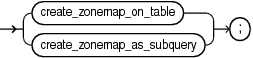
Description of the illustration create_materialized_zonemap.eps
create_zonemap_on_table::= 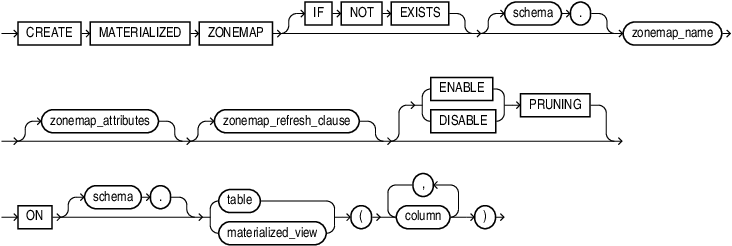
Description of the illustration create_zonemap_on_table.eps
create_zonemap_as_subquery::= 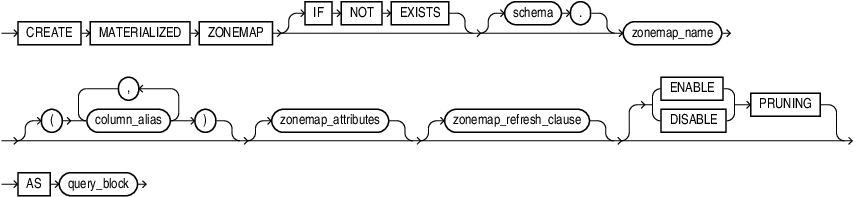
Description of the illustration create_zonemap_as_subquery.eps
zonemap_attributes::= 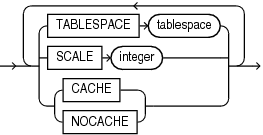
Description of the illustration zonemap_attributes.eps
zonemap_refresh_clause::= 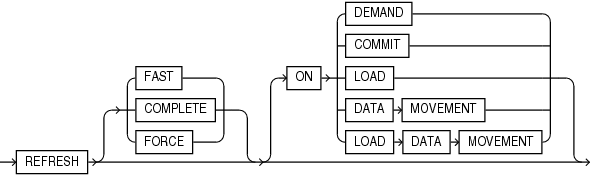
Description of the illustration zonemap_refresh_clause.eps
Note: When specifying the zonemap_refresh_clause, you must specify at least one clause after the REFRESH keyword.
Semantics
IF NOT EXISTS
Specifying IF NOT EXISTS has the following effects:
-
If the materialized zonemap does not exist, a new one is created at the end of the statement.
-
If the materialized zonemap exists, it is detected and a new one is not created.
You cannot specify IF EXISTS with CREATE statements.
Note: You can use IF [NOT] EXISTS only from Release 19.28 and up.
create_zonemap_on_table
Use this clause to create a basic zone map.
ON Clause
In the ON clause, first specify the fact table for the zone map, and then inside the parentheses specify one or more columns of the fact table to be included in the zone map.
For each specified fact table column, Oracle creates two columns in the zone map. These two columns contain the minimum and maximum values of the fact table column in each zone. Oracle generates names for the zone map columns of the form MIN_1_column and MAX_1_column for the first specified fact table column, MIN_2_column and MAX_2_column for the second specified fact table column, and so on.
If you omit schema, then Oracle assumes the fact table is in your own schema. The fact table can be a table or a materialized view
create_zonemap_as_subquery
Use this clause to create a basic zone map or a join zone map. To create a basic zone map, specify a single base table in the FROM clause of the defining subquery. To create a join zone map, specify a table that is left outer joined to one or more other tables in the FROM clause of the defining subquery.
column_alias
You can specify a column alias for each table column to be included in the zone map. The column alias list explicitly resolves any column name conflict, eliminating the need to specify aliases in the SELECT list of the defining subquery. If you specify any column alias in this clause, then you must specify an alias for each column in the SELECT list of the defining subquery. The first column alias you specify must be ZONE_ID$, which corresponds to the first column in the SELECT list, the SYS_OP_ZONE_ID function expression.
AS query_block
Specify the defining subquery of the zone map. The subquery must consist of a single query_block. You can specify only the SELECT, FROM, WHERE, and GROUP BY clauses of query_block, and those clauses must satisfy the following requirements:
-
The first column in the
SELECTlist must be theSYS_OP_ZONE_IDfunction expression. Refer to SYS_OP_ZONE_ID for more information. -
The remaining columns in the
SELECTlist must be function expressions that return minimum and maximum values for the columns you want to include in the zone map. For each column, specify a pair of function expressions of the following form:
MIN([table.]column), MAX([table.]column)For table, specify the name or table alias for the table that contains the column. The table can be a fact table or dimension table. For column, specify the name or column alias for the column.
-
The
FROMclause can specify a fact table alone, or a fact table and one or more dimension tables with each dimension table left outer joined to the fact table. You can specifyLEFT[OUTER]JOINsyntax in theFROMclause, or apply the outer join operator (+) to dimension table columns in the join condition in theWHEREclause. You can optionally specify a table alias for any of the tables in theFROMclause. Fact tables and dimension tables can be tables or materialized views. -
In the
WHEREclause, you can specify only left outer join conditions using the outer join operator(+). -
You must specify a
GROUPBYclause with the sameSYS_OP_ZONE_IDfunction expression that you specified for the first column of theSELECTlist.
schema
Specify the schema to contain the zone map. If you omit schema, then Oracle Database creates the zone map in your schema.
zonemap_name
Specify the name of the zone map to be created. The name must satisfy the requirements listed in “Database Object Naming Rules”.
zonemap_attributes
Use this clause to specify the following attributes for the zone map: TABLESPACE, SCALE, PCTFREE, PCTUSED, and CACHE or NOCACHE.
TABLESPACE
Specify the tablespace in which the zone map is to be created. If you omit this clause, then Oracle Database creates the zone map in the default tablespace of the schema containing the zone map.
SCALE
This clause lets you specify the zone map scale, which determines the number of contiguous disk blocks that form a zone. The scale is an integer value that represents a power of 2. For example, a scale of 10 means up to 2 raised to the 10th power, or 1024, contiguous disk blocks will form a zone. For integer, specify a value between 4 and 16, inclusive. The recommended value is 10; this is the default.
PCTFREE
Specify an integer representing the percentage of space in each data block of the zone map reserved for future updates to rows of the zone map. The integer value must be between 0 and 99, inclusive. The default value is 10. Refer to physical_attributes_clause for more information on the PCTFREE parameter.
PCTUSED
Specify an integer representing the minimum percentage of used space that Oracle maintains for each data block of the zone map. The integer value must be between 0 and 99, inclusive. The default value is 40. Refer to physical_attributes_clause for more information on the PCTUSED parameter.
CACHE | NOCACHE
For data that will be accessed frequently, CACHE specifies that the blocks retrieved for this zone map are placed at the most recently used end of the least recently used (LRU) list in the buffer cache when a full table scan is performed.
NOCACHE specifies that the blocks are placed at the least recently used end of the LRU list. The default is NOCACHE.
zonemap_refresh_clause
Use this clause to specify the default refresh method and mode for the zone map. If you do not specify a refresh method (FAST, COMPLETE, or FORCE), then FORCE is the default method. If you do not specify a refresh mode (ON clauses), then ON LOAD DATA MOVEMENT is the default mode.
FAST
Specify FAST to indicate the fast refresh method, which performs the refresh according to the changes that have occurred to the base tables. While zone maps are internally implemented as a type of materialized view, materialized view logs on base tables are not needed to perform a fast refresh of a zone map
COMPLETE
Specify COMPLETE to indicate the complete refresh method, which is implemented by executing the defining query of the zone map. If you request a complete refresh, then Oracle Database performs a complete refresh even if a fast refresh is possible.
FORCE
Specify FORCE to indicate that when a refresh occurs, Oracle Database will perform a fast refresh if one is possible or a complete refresh if fast refresh is not possible. This is the default.
ON DEMAND
Specify ON DEMAND to indicate that database will not refresh the zone map unless you manually issue an ALTER MATERIALIZED ZONEMAP … REBUILD statement. If you specify this clause, then the zone map is referred to as a refresh-on-demand zone map. Refer to REBUILD in the documentation on ALTER MATERIALIZED ZONEMAP for more information on rebuilding a zone map.
ON COMMIT
Specify ON COMMIT to indicate that a refresh is to occur whenever the database commits a transaction that operates on a base table of the zone map. If you specify this clause, then the zone map is referred to as a refresh-on-commit zone map. This clause may increase the time taken to complete the commit, because the database performs the refresh operation as part of the commit process.
ON LOAD
Specify ON LOAD to indicate that a refresh is to occur at the end of a direct-path insert (serial or parallel) resulting either from an INSERT or a MERGE operation.
ON DATA MOVEMENT
Specify ON DATA MOVEMENT to indicate that a refresh is to occur at the end of the following data movement operations:
-
Data redefinition using the
DBMS_REDEFINITIONpackage -
Table partition maintenance operations that are specified by the following clauses of
ALTERTABLE: coalesce_table, merge_table_partitions, move_table_partition, and split_table_partition
ON LOAD DATA MOVEMENT
Specify ON LOAD DATA MOVEMENT to indicate that a refresh is to occur at the end of a direct-path insert or a data movement operation. This is the default.
ENABLE | DISABLE PRUNING
This clause lets you control the use of the zone map for pruning.
-
Specify
ENABLEPRUNINGto enable use of the zone map for pruning. This is the default. -
Specify
DISABLEPRUNINGto disable use of the zone map for pruning. The optimizer will not use the zone map for pruning, but the database will continue to maintain the zone map.
If the setting is ENABLE PRUNING, then the optimizer will consider using the zone map for pruning during SQL operations that include any of the following conditions:
-
Comparison conditions:
=,<=,<,>=,>The condition must be a simple comparison condition that has a column name on one side and a literal or bind variable on the other side. For example:
WHERE country_name = 'United States of America'
WHERE country_name = :country1
WHERE 10000 >= salary-
INconditionThe
INcondition must have a column name on the left side and an expression list of literals or bind variables on the right side. For example:
WHERE country_name IN ('Germany', 'India', 'United Kingdom')
WHERE country_name IN (:country1, :country2, :country3)
WHERE prod_id IN (20, 48, 132, 143)-
LIKEconditionThe
LIKEcondition must have a column name on the left side and a text literal on the right side. The text literal is the pattern for theLIKEcondition and it must contain at least one pattern matching character. Valid pattern matching characters are the underscore (_), which matches exactly one character, and the percent sign (%), which matches zero or more characters. The first character of the pattern cannot be a pattern matching character. For example:
WHERE prod_name LIKE 'DVD%'
WHERE prod_name LIKE 'Model%Cordless%Battery'
WHERE prod_name LIKE 'CD%Pack of _'
See Also: Conditions for more information on conditions
Restrictions on Zone Maps
Zone maps are subject to the following restrictions:
-
A table can be a fact table for at most one zone map. A table can be a dimension table for multiple zone maps. A table can be a fact table for one zone map and a dimension table for other zone maps.
-
A base table of a zone map cannot be an external table, an index-organized table, a remote table, a temporary table, or a view.
-
A base table of a zone map cannot be in the schema of the user
SYS. -
A zone map cannot be partitioned.
-
You can define a zone map on a column of any scalar data type other than
BFILE,BLOB,CLOB,LONG,LONGRAW, orNCLOB. -
All joins specified in the defining subquery of a zone map must be left outer equijoins with the fact table on the left side.
-
If the
FROMclause of the defining subquery for a zone map references a materialized view, then you must refresh that materialized view before refreshing the zone map. -
You cannot perform DML operations directly on a zone map.
-
Each column of the zone map must have one of the following declared collations:
BINARYorUSING_NLS_COMP.
Examples
The following statement creates a basic zone map called sales_zmap. The zone map tracks columns cust_id and prod_id in the table sales.
CREATE MATERIALIZED ZONEMAP sales_zmap
  ON sales(cust_id, prod_id);
The following statement creates a basic zone map called sales_zmap that is similar to the zone map created in the previous example. However, this statement uses a defining subquery to create the zone map.
CREATE MATERIALIZED ZONEMAP sales_zmap
  AS SELECT SYS_OP_ZONE_ID(rowid),
            MIN(cust_id), MAX(cust_id),
            MIN(prod_id), MAX(prod_id)
     FROM sales
     GROUP BY SYS_OP_ZONE_ID(rowid);
The following statement creates a join zone map called sales_zmap. The fact table for the zone map is sales and the zone map has one dimension table: customers. The zone map tracks two columns in the dimension table: cust_state_province and cust_city.
CREATE MATERIALIZED ZONEMAP sales_zmap
  AS SELECT SYS_OP_ZONE_ID(s.rowid),
            MIN(cust_state_province), MAX(cust_state_province),
            MIN(cust_city), MAX(cust_city)
     FROM sales s
          LEFT OUTER JOIN customers c ON s.cust_id = c.cust_id
     GROUP BY SYS_OP_ZONE_ID(s.rowid);
The following statement creates a join zone map called sales_zmap. The fact table for the zone map is sales and the zone map has two dimension tables: products and customers. The zone map tracks five columns in the dimension tables: prod_category and prod_subcategory in the products table, and country_id, cust_state_province, and cust_city in the customers table.
CREATE MATERIALIZED ZONEMAP sales_zmap
  AS SELECT SYS_OP_ZONE_ID(s.rowid),
            MIN(prod_category), MAX(prod_category),
            MIN(prod_subcategory), MAX(prod_subcategory),
            MIN(country_id), MAX(country_id),
            MIN(cust_state_province), MAX(cust_state_province),
            MIN(cust_city), MAX(cust_city)
    FROM sales s
       LEFT OUTER JOIN products p ON s.prod_id = p.prod_id
       LEFT OUTER JOIN customers c ON s.cust_id = c.cust_id
    GROUP BY sys_op_zone_id(s.rowid);
The following statement creates a join zone map that is identical to the zone map created in the previous example. The only difference is that the previous example uses the LEFT OUTER JOIN syntax in the FROM clause and the following example uses the outer join operator (+) in the WHERE clause.
CREATE MATERIALIZED ZONEMAP sales_zmap
  AS SELECT SYS_OP_ZONE_ID(s.rowid),
            MIN(prod_category), MAX(prod_category),
            MIN(prod_subcategory), MAX(prod_subcategory),
            MIN(country_id), MAX(country_id),
            MIN(cust_state_province), MAX(cust_state_province),
            MIN(cust_city), MAX(cust_city)
     FROM sales s, products p, customers c
     WHERE s.prod_id = p.prod_id(+) AND
           s.cust_id = c.cust_id(+)
     GROUP BY sys_op_zone_id(s.rowid);