ALTER ROLE
Purpose
Use the ALTER ROLE statement to change the authorization needed to enable a role.
See Also:
-
CREATE ROLE for information on creating a role
-
SET ROLE for information on enabling or disabling a role for your session
Prerequisites
You must either have been granted the role with the ADMIN OPTION or have ALTER ANY ROLE system privilege.
Before you alter a role to IDENTIFIED GLOBALLY, you must:
-
Revoke all grants of roles identified externally to the role and
-
Revoke the grant of the role from all users, roles, and
PUBLIC.
The one exception to this rule is that you should not revoke the role from the user who is currently altering the role.
To specify the CONTAINER clause, you must be connected to a multitenant container database (CDB). To specify CONTAINER = ALL, the current container must be the root. To specify CONTAINER = CURRENT, the current container must be a pluggable database (PDB).
Syntax
alter_role::= 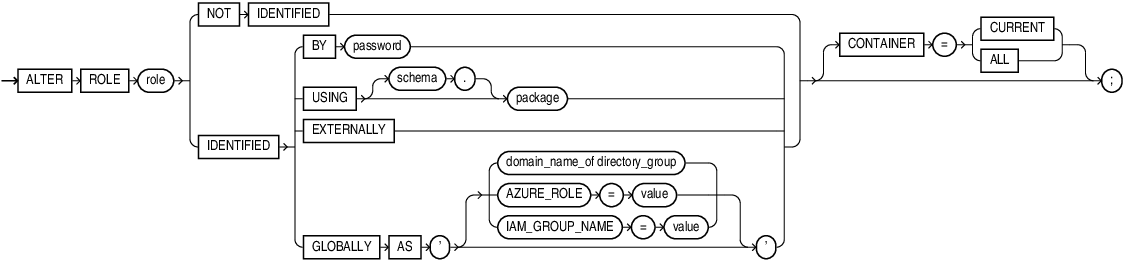
Description of the illustration alter_role.eps
Semantics
The keywords, parameters, and clauses in the ALTER ROLE statement all have the same meaning as in the CREATE ROLE statement.
Specify GLOBALLY with AS to map a directory group to a global role when using centrally managed users. The directory group is identified by its domain name.
Restriction on Altering a Role
You cannot alter a NOT IDENTIFIED role to any of the IDENTIFIED types if it is granted to another role.
Notes on Altering a Role:
-
User sessions in which the role is already enabled are not affected.
-
If you change a role identified by password to an application role (with the
USINGpackage clause), then password information associated with the role is lost. Oracle Database will use the new authentication mechanism the next time the role is to be enabled. -
If you have the
ALTERANYROLEsystem privilege and you change a role that isIDENTIFIEDGLOBALLYtoIDENTIFIEDBYpassword,IDENTIFIEDEXTERNALLY, orNOTIDENTIFIED, then Oracle Database grants you the altered role with theADMINOPTION, as it would have if you had created the role identified nonglobally.
For more information, refer to CREATE ROLE and to the examples that follow.
Examples
Changing Role Identification: Example
The following statement changes the role warehouse_user (created in “Creating a Role: Example”) to NOT IDENTIFIED:
ALTER ROLE warehouse_user NOT IDENTIFIED;Changing a Role Password: Example
This statement changes the password on the dw_manager role (created in “Creating a Role: Example”) to data:
ALTER ROLE dw_manager
   IDENTIFIED BY data;
Users granted the dw_manager role must subsequently use the new password data to enable the role.
Application Roles: Example
The following example changes the dw_manager role to an application role using the hr.admin package:
ALTER ROLE dw_manager IDENTIFIED USING hr.admin;