REGEXP_REPLACE
Syntax
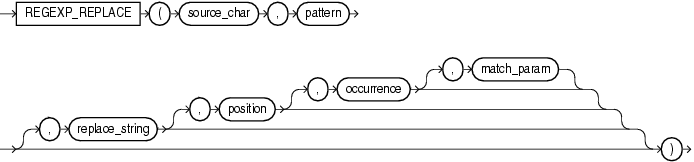
Description of the illustration regexp_replace.gif
Purpose
REGEXP_REPLACE extends the functionality of the REPLACE function by letting you search a string for a regular expression pattern. By default, the function returns source_char with every occurrence of the regular expression pattern replaced with replace_string. The string returned is in the same character set as source_char. The function returns VARCHAR2 if the first argument is not a LOB and returns CLOB if the first argument is a LOB.
This function complies with the POSIX regular expression standard and the Unicode Regular Expression Guidelines. For more information, refer to Oracle Regular Expression Support.
-
source_char is a character expression that serves as the search value. It is commonly a character column and can be of any of the data types
CHAR,VARCHAR2,NCHAR,NVARCHAR2,CLOBorNCLOB. -
pattern is the regular expression. It is usually a text literal and can be of any of the data types
CHAR,VARCHAR2,NCHAR, orNVARCHAR2. It can contain up to 512 bytes. If the data type of pattern is different from the data type of source_char, then Oracle Database converts pattern to the data type of source_char. For a listing of the operators you can specify in pattern, refer to Oracle Regular Expression Support. -
replace_string can be of any of the data types
CHAR,VARCHAR2,NCHAR,NVARCHAR2,CLOB, orNCLOB. If replace_string is aCLOBorNCLOB, then Oracle truncates replace_string to 32K. The replace_string can contain up to 500 backreferences to subexpressions in the form\n, wherenis a number from 1 to 9. If you want to include a backslash (``) in replace_string, then you must precede it with the escape character, which is also a backslash. For example, to replace\2you would enter\2. For more information on backreference expressions, refer to the notes to “
Oracle Regular Expression Support”, Table D-1. -
position is a positive integer indicating the character of source_char where Oracle should begin the search. The default is 1, meaning that Oracle begins the search at the first character of source_char.
-
occurrence is a nonnegative integer indicating the occurrence of the replace operation:
-
If you specify 0, then Oracle replaces all occurrences of the match.
-
If you specify a positive integer n, then Oracle replaces the nth occurrence.
If occurrence is greater than 1, then the database searches for the second occurrence beginning with the first character following the first occurrence of pattern, and so forth. This behavior is different from the
INSTRfunction, which begins its search for the second occurrence at the second character of the first occurrence. -
-
match_param is a character expression of the data type
VARCHAR2orCHARthat lets you change the default matching behavior of the function. The behavior of this parameter is the same for this function as forREGEXP_COUNT. Refer to REGEXP_COUNT for detailed information.
See Also:
-
in Oracle Database Globalization Support Guide for the collation determination rules, which define the collation
REGEXP_REPLACEuses to compare characters from source_char with characters from pattern, and for the collation derivation rules, which define the collation assigned to the character return value of this function
Examples
The following example examines phone_number, looking for the pattern xxx.xxx.xxxx. Oracle reformats this pattern with (xxx) xxx-xxxx.
SELECT
  REGEXP_REPLACE(phone_number,
                 '([[:digit:]]{3})\.([[:digit:]]{3})\.([[:digit:]]{4})',
                 '(\1) \2-\3') "REGEXP_REPLACE"
  FROM employees
  ORDER BY "REGEXP_REPLACE";

REGEXP_REPLACE
--------------------------------------------------------------------------------
(515) 123-4444
(515) 123-4567
(515) 123-4568
(515) 123-4569
(515) 123-5555
. . .
The following example examines country_name. Oracle puts a space after each non-null character in the string.
SELECT
  REGEXP_REPLACE(country_name, '(.)', '\1 ') "REGEXP_REPLACE"
  FROM countries;

REGEXP_REPLACE
--------------------------------------------------------------------------------
A r g e n t i n a
A u s t r a l i a
B e l g i u m
B r a z i l
C a n a d a
. . .
The following example examines the string, looking for two or more spaces. Oracle replaces each occurrence of two or more spaces with a single space.
SELECT
  REGEXP_REPLACE('500   Oracle     Parkway,    Redwood  Shores, CA',
                 '( ){2,}', ' ') "REGEXP_REPLACE"
  FROM DUAL;

REGEXP_REPLACE
--------------------------------------
500 Oracle Parkway, Redwood Shores, CA
REGEXP_REPLACE pattern matching: Examples
The following statements create a table regexp_temp and insert values into it:
CREATE TABLE regexp_temp(empName varchar2(20), emailID varchar2(20));

INSERT INTO regexp_temp (empName, emailID) VALUES ('John Doe', 'johndoe@example.com');
INSERT INTO regexp_temp (empName, emailID) VALUES ('Jane Doe', 'janedoe@example.com');
The following statement replaces the string ‘Jane’ with ‘John’:
SELECT empName, REGEXP_REPLACE (empName, 'Jane', 'John') "STRING_REPLACE" FROM regexp_temp;

EMPNAME		STRING_REPLACE
--------	--------------
John Doe	John Doe
Jane Doe	John Doe
The following statement replaces the string ‘John’ with ‘Jane’:
SELECT empName, REGEXP_REPLACE (empName, 'Jane', 'John') "STRING_REPLACE" FROM regexp_temp;

EMPNAME		STRING_REPLACE
--------	--------------
John Doe	Jane Doe
Jane Doe	Jane Doe
Div:
Live SQL:
View and run a related example on Oracle Live SQL at REGEXP_REPLACE - Pattern Matching
REGEXP_REPLACE: Examples
The following statement replaces all the numbers in a string:
WITH strings AS (
  SELECT 'abc123' s FROM dual union all
  SELECT '123abc' s FROM dual union all
  SELECT 'a1b2c3' s FROM dual
)
  SELECT s "STRING", regexp_replace(s, '[0-9]', '') "MODIFIED_STRING"
  FROM strings;

  STRING               MODIFIED_STRING
-------------------- --------------------
abc123               abc
123abc               abc
a1b2c3               abc
The following statement replaces the first numeric occurrence in a string:
WITH strings AS (
  SELECT 'abc123' s from DUAL union all
  SELECT '123abc' s from DUAL union all
  SELECT 'a1b2c3' s from DUAL
)
  SELECT s "STRING", REGEXP_REPLACE(s, '[0-9]', '', 1, 1) "MODIFIED_STRING"
  FROM   strings;

 STRING               MODIFIED_STRING
-------------------- --------------------
abc123               abc23
123abc               23abc
a1b2c3               ab2c3
The following statement replaces the second numeric occurrence in a string:
WITH strings AS (
  SELECT 'abc123' s from DUAL union all
  SELECT '123abc' s from DUAL union all
  SELECT 'a1b2c3' s from DUAL
)
  SELECT s "STRING", REGEXP_REPLACE(s, '[0-9]', '', 1, 2) "MODIFIED_STRING"
  FROM   strings;

STRING               MODIFIED_STRING
-------------------- --------------------
abc123               abc13
123abc               13abc
a1b2c3               a1bc3
The following statement replaces multiple spaces in a string with a single space:
WITH strings AS (
  SELECT 'Hello  World' s FROM dual union all
  SELECT 'Hello        World' s FROM dual union all
  SELECT 'Hello,   World  !' s FROM dual
)
  SELECT s "STRING", regexp_replace(s, ' {2,}', ' ') "MODIFIED_STRING"
  FROM   strings;

 STRING               MODIFIED_STRING
-------------------- --------------------
Hello  World         Hello World
Hello        World   Hello World
Hello,   World  !    Hello, World !
The following statement converts camel case strings to a string containing lower case words separated by an underscore:
WITH strings as (
  SELECT 'AddressLine1' s FROM dual union all
  SELECT 'ZipCode' s FROM dual union all
  SELECT 'Country' s FROM dual
)
  SELECT s "STRING",
         lower(regexp_replace(s, '([A-Z0-9])', '_\1', 2)) "MODIFIED_STRING"
  FROM strings;

  STRING               MODIFIED_STRING
-------------------- --------------------
AddressLine1         address_line_1
ZipCode              zip_code
Country              country
The following statement converts the format of a date:
WITH date_strings AS (
  SELECT  '2015-01-01' d from dual union all
  SELECT '2000-12-31' d from dual union all
  SELECT '900-01-01' d from dual
)
  SELECT d "STRING",
         regexp_replace(d, '([[:digit:]]+)-([[:digit:]]{2})-([[:digit:]]{2})', '\3.\2.\1') "MODIFIED_STRING"
  FROM date_strings;

  STRING               MODIFIED_STRING
-------------------- --------------------
2015-01-01           01.01.2015
2000-12-31           31.12.2000
900-01-01            01.01.900
The following statement replaces all the letters in a string with ‘1’:
WITH strings as (
  SELECT 'NEW YORK' s FROM dual union all
  SELECT 'New York' s FROM dual union all
  SELECT 'new york' s FROM dual
)
  SELECT s "STRING",
        regexp_replace(s, '[a-z]', '1', 1, 0, 'i') "CASE_INSENSITIVE",
        regexp_replace(s, '[a-z]', '1', 1, 0, 'c') "CASE_SENSITIVE",
        regexp_replace(s, '[a-zA-Z]', '1', 1, 0, 'c') "CASE_SENSITIVE_MATCHING"
  FROM  strings;

  STRING     CASE_INSEN CASE_SENSI CASE_SENSI
---------- ---------- ---------- ----------
NEW YORK   111 1111   NEW YORK   111 1111
New York   111 1111   N11 Y111   111 1111
new york   111 1111   111 1111   111 1111