JSON_SERIALIZE
Syntax
json_serialize
- Added EMPTY ARRAY and OBEJCT options.–>
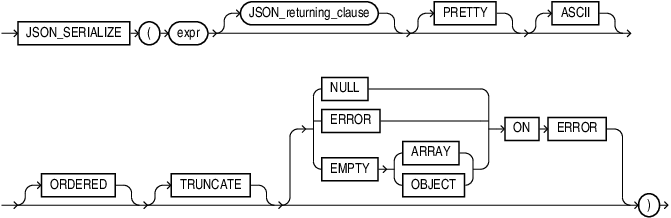
Description of the illustration json_serialize.gif
json_returning_clause
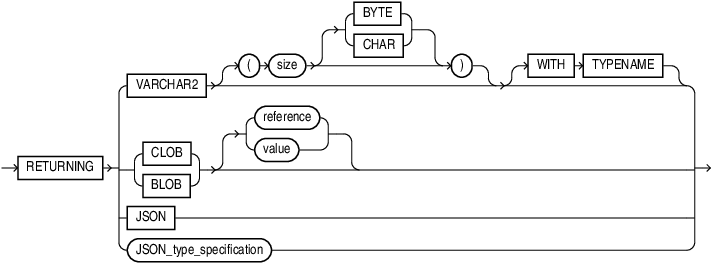
Description of the illustration json_returning_clause.gif
Purpose
json_serialize takes JSON data of any SQL data type ( BLOB,CLOB, JSON, or VARCHAR2 ) as input and returns a textual representation of it. You typically use it to transform the result of a query.
You can use json_serialize to convert binary JSON data to textual form (CLOB or VARCHAR2), or to transform textual JSON data by pretty-printing it or escaping non-ASCII Unicode characters in it.
When Oracle SQL function vector_serialize is applied to a JSON type instance, any non- standard Oracle scalar JSON value is returned as a standard JSON scalar value.
When you apply vector_serialize to a VECTOR type instance, it returns a textual JSON array of numbers.
Note: You can serialize a VECTOR instance to a textual JSON array of numbers using SQL functionvector_serialize. (Function json_serialize serializes only JSON data.) See VECTOR_SERIALIZE
See Also: Oracle SQL Function JSON_SERIALIZE of the JSON Developer’s Guide.
expr
expr is the input expression. Can be any one of type JSON, VARCHAR2, CLOB, or BLOB.
JSON_returning_clause::=
You can use the JSON_returning_clause to specify the return type of the function. One of BOOLEAN, BLOB, CLOB, JSON, or VARCHAR2.
The default return type is VARCHAR2(4000).
If the return type is RAW or BLOB, it contains UTF8 encoded JSON text.
PRETTY
Specify PRETTY if you want the result to be formatted for human readability.
ASCII
Specify ASCII if you want non-ASCII characters to be output using JSON escape sequences.
ORDERED
Specify ORDERED if you want consistent sorting of the output. This places _id and _metadata members first, then sorts the remaining members alphabetically by field name. When you combine ORDERED with PRETTY, the _id and _metadata members are still first. The remaining members are then sorted by type group and field name: first scalars, followed by objects, then arrays. The members of each group are sorted alphabetically by field name.
Example 1
SELECT
  JSON_SERIALIZE ( '{
   "xArray": [], "cArray": [], "_id" : {}, "_currency" : "€",
   "bObject": {}, "yObject" : {}, "zScalar": 1, "aScalar": 2
  }'
  ORDERED
) ORDERED_JSON;
Output:
ORDERED_JSON
{"_id":{},"_currency":"€","aScalar":2,"bObject":{},"cArray":[],"xArray":[],"yObject":{},"zScalar":1}
Example 2
SELECT
  JSON_SERIALIZE ( '{
     "xArray": [], "cArray": [], "_id" : {}, "_currency" : "€",
     "bObject": {}, "yObject" : {}, "zScalar": 1, "aScalar": 2
    }'
    ASCII PRETTY ORDERED
  ) ASCII_PRETTY_ORDERED_JSON;
ASCII_PRETTY_ORDERED_JSON
{
"_id" :
{
},
"_currency" : "\u20AC",
"aScalar" : 2,
"zScalar" : 1,
"bObject" :
{
},
"yObject" :
{
},
"cArray" :
[
],
"xArray" :
[
]
}TRUNCATE
Specify TRUNCATE, if you want the textual output in the result document to fit into the buffer of the specified return type .
JSON_on_error_clause::=
Specify JSON_on_error_clause to control the handling of processing errors.
ERROR ON ERROR is the default.
EMPTY ON ERROR is not supported.
If you specify TRUNCATE with JSON_on_error_clause, then a value too large for the return type will be truncated to fit into the buffer instead of raising an error.
Example
SELECT JSON_SERIALIZE ('{a:[1,2,3,4]}' RETURNING VARCHAR2(3) TRUNCATE ERROR ON ERROR) from dual
--------
{"a