CREATE ASSERTION
Purpose
Assertions are boolean expressions that have the semantics of a constraint. The database must ensure the truth of these boolean expressions while transactions change data and commit these changes.
Prerequisites
Assertions are schema-level objects. If the boolean expression references tables of other schemas, you must have the required object-privileges to access these tables.
When a foreign key constraint references a parent table in another schema, you are required to have the REFERENCES object privilege on the parent table.
For assertions to reference tables in another schema you require the ASSERTION REFERENCES object privilege on those tables. Also note that you must prefix these tables from other schemas with their schema-name (SYNONYMs are unsupported in assertions).
To create a assertion in your own schema, you must have the CREATE ASSERTION system privilege. With the CREATE ASSERTION privilege you can alter and drop assertions in the same schema using ALTER ASSERTION and DROP ASSERTION.
To create assertions in any schema or a specified schema, you must have the CREATE ANY ASSERTION [ON SCHEMA...] system privilege.
Note that constraints and assertions live in the same namespace: an assertion cannot have a name already in use by a constraint in the same schema, and vice-versa.
Syntax
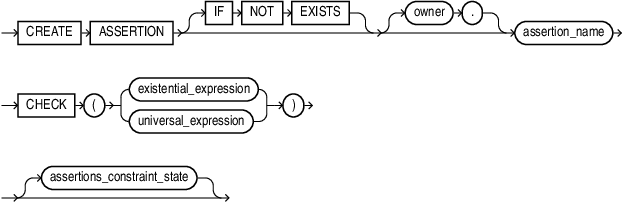
Description of the illustration create_assertion.gif
existential_expression::=

Description of the illustration existential_expression.gif
universal_expression::=

Description of the illustration universal_expression.gif
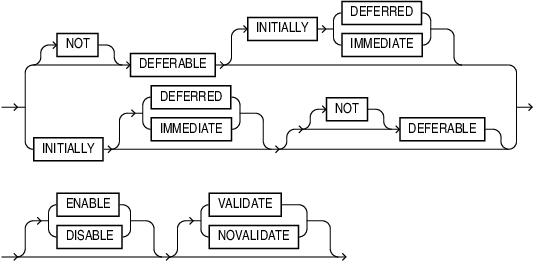
assertions_constraint_state::=
Description of the illustration assertions_constraint_state.gif
Semantics
IF NOT EXISTS
Specifying IF NOT EXISTS will mask the ORA-00955: name is already used by an existing object error when you attempt to create an assertion that already exists.
existential_expression
The subquery in the [NOT] EXISTS must access base schema tables and can be equijoins of multiple tables. The subquery can have regular column filters that are logically AND-ed, or OR-d.
These column filters predicates can,
-
Involve comparisons between columns and/or literals using
<,>,<>(!=),BETWEEN. -
Include any operation on columns such as
+,-,*,/,SUBSTR,UPPER. -
Be of form
T1.c1 + T2.C2 = T3.C3.
The subquery can also have a mix of nested [NOT] EXISTS subquery predicates, which can go up to three levels deep. These nested subqueries can be correlated to query-blocks further up, or uncorrelated. Alternatively you can use [NOT] IN syntax instead of [NOT] EXISTS syntax.
universal_expression
Assertions introduces a new ALL...SATISFY clause. ALL...SATISFY reduces the number of negations when specifying assertions. The following example illustrates the new syntax.
Create Assertion with existential_expression
CREATE ASSERTION no_empty_departments CHECK
(NOT EXISTS
  (SELECT 'an empty department'
     FROM dept d
     WHERE NOT EXISTS
                   (SELECT 'an employee in the department'
                      FROM emp e
                      WHERE e.deptno = d.deptno
                      AND e.deptno IS NOT NULL)));
The above assertion mandates that every department have at least one employee. Note that the specification uses two negations: there are two (nested) NOT EXISTS predicates.
You can specify the same assertion with universal_expression that removes the negations.
Create Assertion with universal_expression
CREATE ASSERTION no_empty_departments CHECK
(ALL (SELECT d.deptno
       FROM dept d) da
 SATISFY
  (EXISTS
    (SELECT ''
       FROM emp e
       WHERE e.deptno = da.deptno
AND e.deptno IS NOT NULL)));-
ALLevaluates a table subquery (ALLquery_block). -
For each row of the subquery, the test condition is evaluated by
SATISFYboolean expression . -
If the test condition is True for all rows, then the
ALL...SATISFYpredicate is True. This includes the special case, when there are no rows,ALL...SATISFYis True . -
If the test condition is False for at least one row, then the
ALL...SATISFYpredicate is False. -
Otherwise, the
ALL...SATISFYpredicate is Unknown, which, just as with constraints, is considered True.
[NOT] DEFERRABLE [ INTIALLY ] IMMEDIATE | DEFERRED
Assertions can be in different states DEFERRABLE or NOT DEFERRABLE and INITIALLY IMMEDIATE or INITIALLY DEFERRED. The behavior is the same as constraints.
DEFERRABLE Clause
The DEFERRABLE and NOT DEFERRABLE parameters indicate whether or not, in subsequent transactions, assertion checking can be deferred until the end of the transaction using the SET CONSTRAINT(S) statement. If you omit this clause, then the default is NOT DEFERRABLE.
-
Specify
NOT DEFERRABLEto indicate that in subsequent transactions you cannot use theSET CONSTRAINT[S]clause to defer checking of this assertion until the transaction is committed. The checking of aNOT DEFERRABLE SQLassertion can never be deferred to the end of the transaction. -
Specify
DEFERRABLEto indicate that in subsequent transactions you can use theSET CONSTRAINT[S]clause to defer checking of this assertion until aCOMMITstatement is submitted. If the assertion check fails, then the database returns an error and the transaction is not committed. This setting in effect lets you disable the constraint temporarily while making changes to the database that might violate the constraint until all the changes are complete.
You cannot alter the deferrability of an assertion. Whether you specify either of these parameters, or make the assertion NOT DEFERRABLE implicitly by specifying neither of them, you cannot specify this clause in an ALTER ASSERTION statement. You must drop the assertion and re-create it.
See Also: SET CONSTRAINT[S]
INTIALLY Clause
The INITIALLY clause establishes the default checking behavior for assertions that are DEFERRABLE. The INITIALLY setting can be overridden by a SET CONSTRAINT[S] statement in a subsequent transaction.
-
Specify
INITIALLY IMMEDIATEto have the database check the assertion at the end of each subsequent SQL statement. If you do not specifyINITIALLY, then the default isINITIALLY IMMEDIATE. -
Specify
INITIALLY DEFERREDto have the database check the assertion at the end of subsequent transactions.This clause is not valid if you have declared the constraint to be
NOT DEFERRABLE, because aNOT DEFERRABLEconstraint is automaticallyINITIALLY IMMEDIATEand cannot ever beINITIALLY DEFERRED.
ENABLE | DISABLE , VALIDATE | NOVALIDATE
Assertions can have two properties:
-
ENABLEorDISABLEThis property determines whether the assertion is enforced on execution of DML statements.
-
VALIDATEorNOVALIDATEThis property determines whether all data in the involved tables of a assertion, currently obey the assertion.
Combining these two properties results in four possible states:
-
ENABLEVALIDATEAll data obeys the assertion. This means that the existing data in referenced tables was validated when the assertion was enabled, as well as any subsequent data changes made by DML statements.
-
ENABLENOVALIDATEAll data may not obey the assertion. This means that the existing data in the referenced tables was not validated when the constraint was enabled, but any subsequent data changes made by DML statements were validated.
-
DISABLEVALIDATEAll data in referenced tables obey the assertion, and execution of potentially violating DML statements is not allowed. This setting was introduced in Oracle release 8.1 specifically for constraints on partitioned tables in a data warehouse environment. This state does not apply to assertions.
-
DISABLENOVALIDATEAll data may not obey the assertion, and the assertion is not enforced during DML statement execution.
The following rules govern the default settings of the properties, ENABLE/DISABLE and VALIDATE/NOVALIDATE with an assertion, which is the same behavior as with constraints:
-
If neither of them is specified, then
ENABLE/VALIDATEis the default. -
If only
ENABLEis specified, thenVALIDATEis the default. -
If only
DISABLEis specified, thenNOVALIDATEis the default. -
If only
VALIDATEis specified, thenENABLEis the default. -
If only
NOVALIDATEis specified, thenENABLEis the default.
Similar to ALL/USER/DBA_CONSTRAINTS for constraints, the columns STATUS and VALIDATED expose the properties in ALL/USER/DBA_ASSERTIONS.
-
USER_ASSERTIONS: shows assertions owned (created) by the current schema. -
DBA_ASSERTIONS: shows assertions created by any schema in the current PDB. -
ALL_ASSERTIONS: shows assertions owned by the current schema, and assertions owned by a different schema for which the assertion involves at least one table on which the current schema has at least one object privilege (SELECT,INSERT,UPDATE, orDELETE). In this latter case the definition of the assertion will not be revealed (i.e. it will be NULL), for security reasons (the defining SQL can involve other tables on which current schema has no object privileges).
Assertions must be deterministic. Non-deterministic function calls in assertions are disallowed. This includes, but is not limited to ` SYSDATE, SYSTIMESTAMP, SYS_CONTEXT, USERENV, USER, CURRENT_SCHEMA, CURRENT_USER, SESSION_USER` .
Other SQL language features that you cannot use with assertions are:
-
DDL views
-
Materialized views
-
Temporary tables
-
Virtual columns
-
Synonyms (all object references in assertions must be to base schema tables)
-
GROUP BY,HAVINGand aggregation functions -
Outer joins
-
ANSI join syntax
-
Scalar subqueries
-
Hierarchical queries
-
Set operators
-
Lateral inline views, cross joins, cross apply, outer apply
-
LOB,BFILE,LONG,JSON, andADTcolumns -
External tables
-
Partition extension clause
-
Table
SAMPLEclause -
Row limit clause
-
WITHclause -
PL/SQL functions, including (pipelined) table functions, and functions written in C. This includes (deterministic) functions that do not access tables
-
Analytic functions
-
Database links
-
PIVOT,UNPIVOT -
MODEL -
MATCH RECOGNIZE -
Flashback query
-
FETCH FIRST -
JSON/XML/GRAPHtables -
ONLYof an object view -
Quantified comparison predicates (
ANY,SOME,ALL)
Assertions are only supported in the default READ COMMITTED isolation level: validation of assertions is not supported in isolation level SERIALIZABLE.
Examples
Example 1: There must be a president
The following statement creates an assertion to validate that a company has a president:
CREATE ASSERTION IF NOT EXISTS company_must_have_a_president
CHECK (
  EXISTS (
    SELECT 'a president'
    FROM employees
    WHERE job_id = 'AD_PRES'
   )
);
To create this assertion, there must be at least one row in the table where job_id = 'AD_PRES'. If no such row exists, the statement will raise an error and the assertion will not be created.
If an object named company_must_have_a_president already exists, this statement completes without error. The existing object remains unchanged and this assertion is not created.
Example 2: There must be no overlapping job history
The following statement creates an assertion to validate that a staff member cannot have overlapping dates in their job history. This uses an existential expression to validate the business rule:
CREATE ASSERTION no_overlapping_job_history
CHECK (
  NOT EXISTS (
    SELECT 'overlapping job history'
    FROM job_history jh1,
         job_history jh2
    WHERE jh1.employee_id = jh2.employee_id
    AND jh1.ROWID <> jh2.ROWID
    AND jh1.start_date < jh2.end_date
    AND jh1.end_date > jh2.start_date
   )
);
The following is an equivalent assertion, written using a universal expression with a boolean expression in the SATISFY clause:
CREATE ASSERTION no_overlapping_job_history
CHECK (
  ALL (
    SELECT jh1.start_date first_start, jh1.end_date first_end,
           jh2.start_date next_start, jh2.end_date next_end
    FROM job_history jh1, job_history jh2
    WHERE jh1.employee_id = jh2.employee_id
    AND jh1.ROWID <> jh2.ROWID
  ) jh
  SATISFY (
      jh.first_end <= jh.next_start
   OR jh.first_start >= jh.next_end
 )
);
Note: both versions of this assertion assume a check constraint is present to ensure start dates are before end dates.
Example 3: Staff must earn less than their manager
The following statement creates an assertion to ensure that an employee’s salary is less than their manager’s:
CREATE ASSERTION staff_earn_less_than_manager
CHECK (
  ALL (
    SELECT staff.salary staff_salary,
           mgr.salary manager_salary
    FROM hr.employees staff,
         hr.employees mgr
    WHERE staff.manager_id = mgr.employee_id
    AND staff.manager_id IS NOT NULL
  ) staff
  SATISFY (
    staff_salary < manager_salary
  )
) NOVALIDATE;
This creates the assertion in the current user’s schema, referencing the employees table in the HR schema. If the current user is not HR, it must be directly granted the ASSERTION REFERENCES privilege on the hr.employees table.
The assertion is created in the NOVALIDATE state, meaning there may be existing employee rows with a salary greater than their manager’s. The assertion is enabled, so the database will enforce this rule for future DML statements.
Example 4: Employees must earn within their pay bands
The following creates an assertion to validate that every employee’s salary is within the minimum and maximum allowed salary values for their job:
CREATE ASSERTION hr.salary_within_job_limit
CHECK (
  ALL (
    SELECT job_id, salary
    FROM hr.employees
  ) emp
  SATISFY (
    EXISTS (
      SELECT 'salary within pay band'
      FROM hr.jobs job
      WHERE emp.job_id = job.job_id
      AND emp.salary BETWEEN job.min_salary AND job.max_salary
     )
  )
)
DISABLE;
This assertion will be created in the HR schema. To run this assertion when connected as another user, your user must have either the CREATE ANY ASSERTION privilege or the CREATE ANY ASSERTION ON SCHEMA hr privilege.
This assertion is created in the DISABLE state, so no existing rows are checked, nor is this rule applied to future DML statements. This means it’s possible to store employee salaries outside the pay range for their job.
Example 5: Every department has an employee
The following statement creates an assertion to ensure every department has at least one employee:
CREATE ASSERTION employee_in_every_dept
CHECK (
  ALL (
    SELECT d.department_id
    FROM departments d
  ) d
  SATISFY (
    EXISTS (
      SELECT 'an employee' FROM employees e
      WHERE e.department_id = d.department_id
      AND e.department_id IS NOT NULL
    )
  )
)
DEFERRABLE INITIALLY DEFERRED;
By default, assertions are validated at the statement level. Assuming there is a foreign key from employees to departments, this creates a chicken-and-egg problem:
-
The assertion means you can’t insert a new department
-
The foreign means you can’t assign an employee to a non-existent department.
Declaring the assertion DEFERRABLE INITIALLY DEFERRED delays assertion validation until commit time. This enables you to insert a new department and its employees in the same transaction.
Example 6: Every department must have an employee without a criminal record
This assertion ensures that every department has at least one employee without a criminal record:
CREATE ASSERTION employee_without_criminal_record_in_every_dept
CHECK (
  ALL (
    SELECT d.department_id
    FROM departments d
  ) d
  SATISFY (
    EXISTS (
      SELECT 'an employee' FROM employees e
      WHERE e.department_id = d.department_id
      AND e.department_id IS NOT NULL
      AND NOT EXISTS (
        SELECT 'a criminal record'
        FROM criminal_records cr
        WHERE cr.employee_id = e.employee_id
      )
    )
  )
)
DEFERRABLE INITIALLY DEFERRED;
This could be rewritten using only existential expressions as follows:
CREATE ASSERTION employee_without_criminal_record_in_every_dept
CHECK (
  NOT EXISTS (
    SELECT 'a department'
    FROM departments d
    WHERE NOT EXISTS (
      SELECT 'an employee' FROM employees e
      WHERE e.department_id = d.department_id
      AND e.department_id IS NOT NULL
      AND NOT EXISTS (
        SELECT 'a criminal record'
        FROM criminal_records cr
        WHERE cr.employee_id = e.employee_id
      )
    )
  )
)
DEFERRABLE INITIALLY DEFERRED;
Both these examples represent the maximum level of nested [NOT] EXISTS predicates possible: three for existential expressions, two for universal expressions.
As with the example every department has an employee, this creates the assertions in the DEFERRABLE INITIALLY DEFERRED state to allow you to insert a new department and its employees in one transaction.
To make these assertions in the hr sample schema, first create this table:
CREATE TABLE criminal_records (
  employee_id INTEGER NOT NULL,
  conviction_date DATE NOT NULL,
  PRIMARY KEY ( employee_id, conviction_date )
);