ALTER ASSERTION
Purpose
Use ALTER ASSERTION to change the properties of an assertion, one of ENABLE, DISABLE, VALIDATE, NOVALIDATE.
Prerequisites
You must have the ALTER ANY ASSERTION [ ON SCHEMA ...] privilege to alter assertions in the specified schema or in any schema not your own.
Syntax
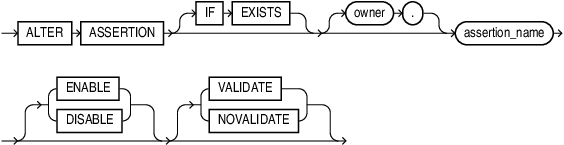
Description of the illustration alter_assertion.gif
Semantics
IF EXISTS
Specify IF EXISTS to prevent an error message in case the assertion you are trying to alter, doesn’t exist.
You cannot use IF NOT EXISTS with ALTER statements.
The following rules apply when you change the property of an assertion:
-
Moving from
DISABLEtoENABLE, by default, usesVALIDATE. Moving fromENABLEtoDISABLEusesNOVALIDATEby default.DISABLEVALIDATEis unsupported. -
Moving between
VALIDATEandNOVALIDATE, by default, leavesENABLEandDISABLEunchanged. -
Moving an assertion from
NOVALIDATEtoVALIDATE, requires a check of all data. This is potentially an expensive operation. -
Moving an assertion from
VALIDATEtoNOVALIDATEforgets that the data was ever checked. -
Moving an assertion from
ENABLE NOVALIDATEtoENABLE VALIDATEdoes not block reads, writes, or other DDL. This transition can be done using parallel execution for the validation query.
Examples
Example 1: Disabling an assertion
The following statement disables the assertion company_must_have_a_president:
ALTER ASSERTION IF EXISTS company_must_have_a_president
  DISABLE;
If there is no assertion with this name in the current schema, the statement take no action and completes without error.
Example 3: Validating an assertion
This statement validates the assertion staff_earn_less_than_manager:
ALTER ASSERTION staff_earn_less_than_manager
  VALIDATE;
This runs the assertion on all rows in the query. If existing rows violate the constraint, validation will fail and the statement will raise an error.
Example 3: Enabling an assertion without validation
This statement enables the assertion salary_within_job_limit in the HR schema without checking existing rows comply with it:
ALTER ASSERTION hr.salary_within_job_limit
  ENABLE NOVALIDATE;
If you’re not connected as the HR user, your user must have either of these privileges: ALTER ANY ASSERTION, ALTER ANY ASSERTION ON SCHEMA hr