CREATE TABLESPACE
Purpose
Use the CREATE TABLESPACE statement to create a tablespace, which is an allocation of space in the database that can contain schema objects.
-
A permanent tablespace contains persistent schema objects. Objects in permanent tablespaces are stored in data files.
-
An undo tablespace is a type of permanent tablespace used by Oracle Database to manage undo data if you are running your database in automatic undo management mode. Oracle strongly recommends that you use automatic undo management mode rather than using rollback segments for undo.
-
A temporary tablespace contains schema objects only for the duration of a session. Objects in temporary tablespaces are stored in temp files.
When you create a tablespace, it is initially a read/write tablespace. You can subsequently use the ALTER TABLESPACE statement to take the tablespace offline or online, add data files or temp files to it, or make it a read-only tablespace.
You can also drop a tablespace from the database with the DROP TABLESPACE statement.
See Also:
-
Oracle Database Concepts for information on tablespaces
-
ALTER TABLESPACE and DROP TABLESPACE for information on modifying and dropping tablespaces
Prerequisites
You must have the CREATE TABLESPACE system privilege. To create the SYSAUX tablespace, you must have the SYSDBA system privilege.
Before you can create a tablespace, you must create a database to contain it, and the database must be open.
See Also: CREATE DATABASE
To use objects in a tablespace other than the SYSTEM tablespace:
-
If you are running the database in automatic undo management mode, then at least one
UNDOtablespace must be online. -
If you are running the database in manual undo management mode, then at least one rollback segment other than the
SYSTEMrollback segment must be online.
Note: Oracle strongly recommends that you run your database in automatic undo management mode. For more information, refer to Oracle Database Administrator’s Guide.
Syntax
create_tablespace::=
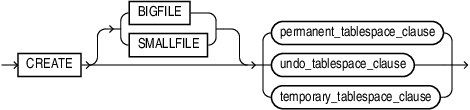
Description of the illustration create_tablespace.gif
(permanent_tablespace_clause::=, temporary_tablespace_clause::=, undo_tablespace_clause::=)
permanent_tablespace_clause::=
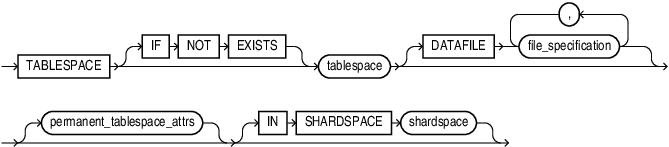
(file_specification::=, permanent_tablespace_attrs::=)
permanent_tablespace_attrs::=
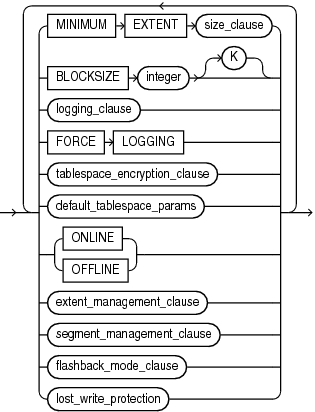
Description of the illustration permanent_tablespace_attrs.gif
(size_clause::=, logging_clause::=, tablespace_encryption_clause::=, default_tablespace_params::=, extent_management_clause::=, segment_management_clause::=, flashback_mode_clause::=)
logging_clause::=
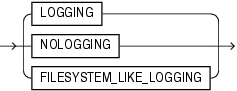
Description of the illustration logging_clause.gif
tablespace_encryption_clause::=

Description of the illustration tablespace_encryption_clause.gif
(tablespace_encryption_spec::=)
tablespace_encryption_spec::=

Description of the illustration tablespace_encryption_spec.gif
default_tablespace_params::=

Description of the illustration default_tablespace_params.gif
(default_table_compression::=, default_index_compression::=, inmemory_clause::=, ilm_clause::=-part of CREATE TABLE syntax, storage_clause::=)
Note: If you specify the DEFAULT clause, then you must specify at least one of the clauses default_table_compression, default_index_compression, inmemory_clause, ilm_clause, or storage_clause.
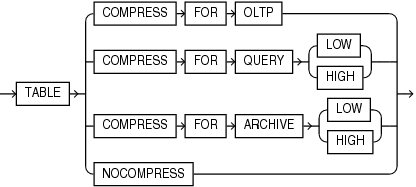
default_table_compression::=
Description of the illustration default_table_compression.gif
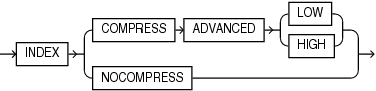
default_index_compression::=
Description of the illustration default_index_compression.gif
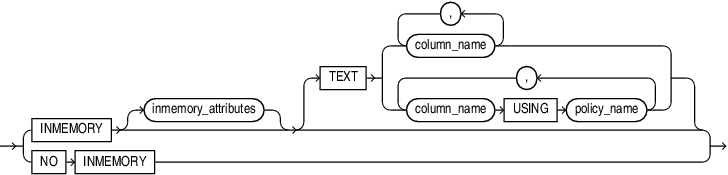
inmemory_clause::=
Description of the illustration inmemory_clause.gif
inmemory_attributes::=

Description of the illustration inmemory_attributes.gif
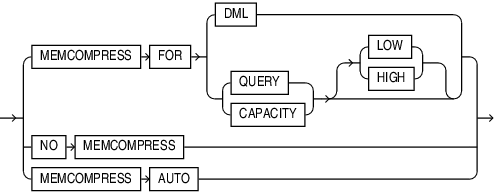
(inmemory_memcompress::=, inmemory_priority::=, inmemory_distribute_tablespace::=, inmemory_duplicate::=)
inmemory_memcompress::=
Description of the illustration inmemory_memcompress.gif
inmemory_priority::=
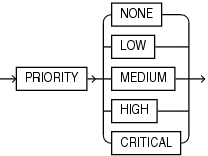
Description of the illustration inmemory_priority.gif
inmemory_distribute_tablespace::=
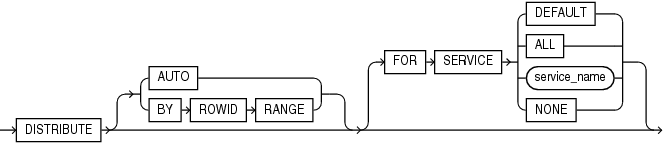
Description of the illustration inmemory_distribute_tablespace.gif
inmemory_duplicate::=
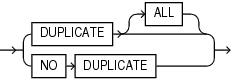
Description of the illustration inmemory_duplicate.gif
extent_management_clause::=

Description of the illustration extent_management_clause.gif
segment_management_clause::=

Description of the illustration segment_management_clause.gif
flashback_mode_clause::=
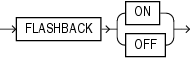
Description of the illustration flashback_mode_clause.gif
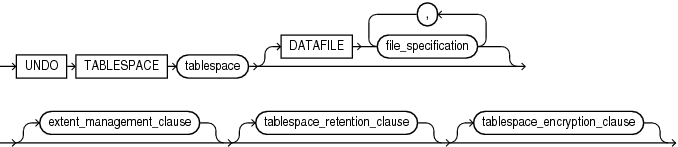
undo_tablespace_clause::=
Description of the illustration undo_tablespace_clause.gif
(file_specification::=, extent_management_clause::=, tablespace_retention_clause::=)
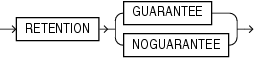
tablespace_retention_clause::=
Description of the illustration tablespace_retention_clause.gif
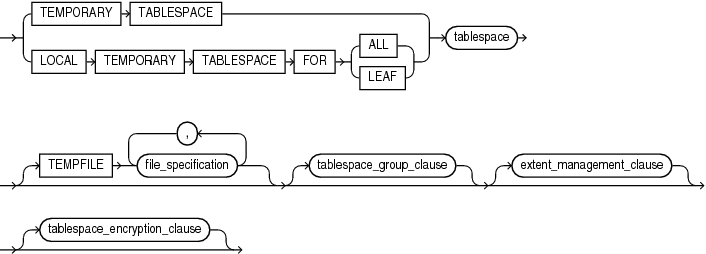
temporary_tablespace_clause::=
Description of the illustration temporary_tablespace_clause.gif
(file_specification::=, tablespace_group_clause::=, extent_management_clause::=, tablespace_encryption_clause::=)
tablespace_group_clause::=

Description of the illustration tablespace_group_clause.gif
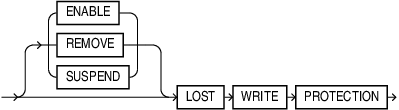
lost_write_protection::=
Description of the illustration lost_write_protection.gif
Semantics
BIGFILE | SMALLFILE
Use this clause to determine whether the tablespace is a bigfile or smallfile tablespace. This clause overrides any default tablespace type setting for the database.
-
A bigfile tablespace contains only one data file or temp file, which can contain up to approximately 4 billion (232) blocks. The minimum size of the single data file or temp file is 12 megabytes (MB) for a tablespace with 32K blocks and 7MB for a tablespace with 8K blocks. The maximum size of the single data file or temp file is 128 terabytes (TB) for a tablespace with 32K blocks and 32TB for a tablespace with 8K blocks.
-
A smallfile tablespace is a traditional Oracle tablespace, which can contain 1022 data files or temp files, each of which can contain up to approximately 4 million (222) blocks.
If you omit this clause, then Oracle Database uses the current default tablespace type of permanent or temporary tablespace that is set for the database. If you specify BIGFILE for a permanent tablespace, then the database by default creates a locally managed tablespace with automatic segment-space management.
Restriction on Bigfile Tablespaces
You can specify only one data file in the DATAFILE clause or one temp file in the TEMPFILE clause.
Note: Starting with Oracle Database 26ai, BIGFILE functionality is the default for SYSAUX, SYSTEM, and USER tablespaces.
See Also:
-
Oracle Database Administrator’s Guide for more information on using bigfile tablespaces
permanent_tablespace_clause
Use the following clauses to create a permanent tablespace. (Some of these clauses are also used to create a temporary or undo tablespace.)
tablespace
Specify the name of the tablespace to be created. The name must satisfy the requirements listed in “Database Object Naming Rules”.
IF NOT EXISTS
Specifying IF NOT EXISTS has the following effects:
-
If the tablespace does not exist, a new tablespace is created at the end of the statement.
-
If the tablespace exists, this is the tablespace you have at the end of the statement. A new one is not created because the older one is detected.
Using IF EXISTS with CREATE results in error: Incorrect IF NOT EXISTS clause for CREATE statement.
Note on the SYSAUX Tablespace
SYSAUX is a required auxiliary system tablespace. You must use the CREATE TABLESPACE statement to create the SYSAUX tablespace if you are upgrading from a release earlier than Oracle Database 11g. You must have the SYSDBA system privilege to specify this clause, and you must have opened the database in UPGRADE mode.
You must specify EXTENT MANAGEMENT LOCAL and SEGMENT SPACE MANAGEMENT AUTO for the SYSAUX tablespace. The DATAFILE clause is optional only if you have enabled Oracle Managed Files. See “DATAFILE | TEMPFILE Clause” for the behavior of the DATAFILE clause.
Take care to allocate sufficient space for the SYSAUX tablespace. For guidelines on creating this tablespace, refer to Oracle Database Upgrade Guide.
Restrictions on the SYSAUX Tablespace
You cannot specify OFFLINE or TEMPORARY for the SYSAUX tablespace.
DATAFILE | TEMPFILE Clause
Specify the data files to make up the permanent tablespace or the temp files to make up the temporary tablespace. Use the datafile_tempfile_spec form of file_specification to create regular data files and temp files in an operating system file system or to create Oracle Automatic Storage Management (Oracle ASM) disk group files.
You must specify the DATAFILE or TEMPFILE clause unless you have enabled Oracle Managed Files by setting a value for the DB_CREATE_FILE_DEST initialization parameter. For Oracle ASM disk group files, the parameter must be set to a multiple file creation form of Oracle ASM filenames. If this parameter is set, then the database creates a system-named 100 MB file in the default file destination specified in the parameter. The file has AUTOEXTEND enabled and an unlimited maximum size.
Note: Media recovery does not recognize temp files.
See Also:
-
Oracle Automatic Storage Management Administrator’s Guide for more information on using Oracle ASM
-
file_specification for a full description, including the
AUTOEXTENDparameter and the multiple file creation form of Oracle ASM filenames
Notes on Specifying Data Files and Temp Files
-
You can create a tablespace within an Oracle ASM disk group by providing only the disk group name in the datafile_tempfile_spec. In this case, Oracle ASM creates a data file in the specified disk group with a system-generated filename. The data file is auto-extensible with an unlimited maximum size and a default size of 100 MB. You can use the autoextend_clause to override the default size.
-
If you use one of the reference forms of the ASM_filename, which refers to an existing file, then you must also specify
REUSE.
Note: On some operating systems, Oracle does not allocate space for a temp file until the temp file blocks are actually accessed. This delay in space allocation results in faster creation and resizing of temp files, but it requires that sufficient disk space is available when the temp files are later used. To avoid potential problems, before you create or resize a temp file, ensure that the available disk space exceeds the size of the new temp file or the increased size of a resized temp file. The excess space should allow for anticipated increases in disk space use by unrelated operations as well. Then proceed with the creation or resizing operation.
See Also:
-
file_specification for a full description, including the
AUTOEXTENDparameter -
“Enabling Autoextend for a Tablespace: Example” and “Creating Oracle Managed Files: Examples”
permanent_tablespace_attrs
Use the permanent_tablespace_attrs clauses to set the attributes of the tablespace.
MINIMUM EXTENT Clause
This clause is valid only for a dictionary-managed tablespace. Specify the minimum size of an extent in the tablespace. This clause lets you control free space fragmentation in the tablespace by ensuring that the size of every used or free extent in a tablespace is at least as large as, and is a multiple of, the value specified in the size_clause.
See Also: size_clause for information on that clause and Oracle Database VLDB and Partitioning Guide for more information about using MINIMUM EXTENT to control fragmentation
BLOCKSIZE Clause
Use the BLOCKSIZE clause to specify a nonstandard block size for the tablespace. In order to specify this clause, the DB_CACHE_SIZE and at least one DB_nK_CACHE_SIZE parameter must be set, and the integer you specify in this clause must correspond with the setting of one DB_nK_CACHE_SIZE parameter setting.
Restriction on BLOCKSIZE
You cannot specify nonstandard block sizes for a temporary tablespace or if you intend to assign this tablespace as the temporary tablespace for any users.
Note: Oracle recommend that you do not store tablespaces with a 2K block size on 4K sector size disks, because performance degradation can result.
See Also: Oracle Database Reference for information on the DB_nK_CACHE_SIZE parameter and Oracle Database Concepts for information on multiple block sizes
logging_clause
Specify the default logging attributes of all tables, indexes, materialized views, materialized view logs, and partitions within the tablespace. This clause is not valid for a temporary or undo tablespace.
If you omit this clause, then the default is LOGGING. The exception is creating a tablespace in a PDB. In this case, if you omit this clause, then the tablespace uses the logging attribute of the PDB. Refer to the logging_clause of CREATE PLUGGABLE DATABASE for more information.
The tablespace-level logging attribute can be overridden by logging specifications at the table, index, materialized view, materialized view log, and partition levels.
See Also: logging_clause for a full description of this clause
FORCE LOGGING
Use this clause to put the tablespace into FORCE LOGGING mode. Oracle Database will log all changes to all objects in the tablespace except changes to temporary segments, overriding any NOLOGGING setting for individual objects. The database must be open and in READ WRITE mode.
This setting does not exclude the NOLOGGING attribute. You can specify both FORCE LOGGING and NOLOGGING. In this case, NOLOGGING is the default logging mode for objects subsequently created in the tablespace, but the database ignores this default as long as the tablespace or the database is in FORCE LOGGING mode. If you subsequently take the tablespace out of FORCE LOGGING mode, then the NOLOGGING default is once again enforced.
Note: FORCE LOGGING mode can have performance effects. Refer to Oracle Database Administrator’s Guide for information on when to use this setting.
Restriction on Forced Logging
You cannot specify FORCE LOGGING for an undo or temporary tablespace.
tablespace_encryption_clause
Use this clause to specify whether to create an encrypted or unencrypted tablespace. If you create an encrypted tablespace, then Transparent Data Encryption (TDE) is applied to all data files of the tablespace.
**ENCRYPT \| DECRYPT**
Specify ENCRYPT to create an encrypted tablespace. Specify DECRYPT to create an unencrypted tablespace.
If you omit this clause, then the value of the ENCRYPT_NEW_TABLESPACES initialization parameter determines whether the tablespace is encrypted upon creation. Refer to Oracle Database Reference for more information on the ENCRYPT_NEW_TABLESPACES initialization parameter.
Before issuing this clause, you must already have loaded the TDE master key into database memory or established a connection to the HSM. For more information, see the open_keystore clause of ADMINISTER KEY MANAGEMENT .
tablespace_encryption_spec
Use USING ‘encrypt_algorithm’ to specify the encryption algorithm.
Valid algorithms are AES256, AES192, AES128, and 3DES168.
Specify 'cipher_mode' to determine how the TDE encrypted tablespace uses the tablespace key to encrypt data blocks. You can specify XTS (an XEX-based mode with ciphertext stealing mode) only with the encyrption algorithms AES128 and AES256. For AES192 use CFB.
If you set the COMPATIBLE initialization parameter to 12.2 or higher, then the following algorithms are also valid: ARIA128, ARIA192, ARIA256, GOST256, and SEED128.
If you omit this clause, then the database uses AES128.
Starting with Oracle Database 26ai, the Transparent Data Encryption (TDE) decryption libraries for the GOST and SEED algorithms are deprecated, and encryption to GOST and SEED are desupported.
GOST 28147-89 has been deprecated by the Russian government, and SEED has been deprecated by the South Korean government. If you need South Korean government-approved TDE cryptography, then use ARIA instead. If you are using GOST 28147-89, then you must decrypt and encrypt with another supported TDE algorithm. The decryption algorithms for GOST 28147-89 and SEED are included in Oracle Database 26ai, but are deprecated, and the GOST encryption algorithm is desupported with Oracle Database 26ai. If you are using GOST or SEED for TDE encryption, then Oracle recommends that you decrypt and encrypt with another algorithm before upgrading to Oracle Database 26ai. However, with the exception of the HP Itanium platform, the GOST and SEED decryption libraries are available with Oracle Database 26ai, so you can also decrypt after upgrading.
See Also:
default_tablespace_params
The DEFAULT clause lets you specify default parameters for the tablespace.
default_table_compression
Use this clause to specify default compression of data for all tables created in the tablespace. This clause is not valid for a temporary tablespace. The subclauses of this clause have the same semantics as they have for the table_compression clause of the CREATE TABLE statement, with one exception: The COMPRESS FOR OLTP clause here is equivalent to the ROW STORE COMPRESS ADVANCED clause of CREATE TABLE. Refer to the table_compression clauses of CREATE TABLE for the full semantics of these subclauses.
default_index_compression
Use this clause to specify default compression of data for all indexes created in the tablespace. This clause is not valid for a temporary tablespace. The subclauses of this clause have the same semantics as they have for the advanced_index_compression clause of the CREATE INDEX statement. Refer to the advanced_index_compression clause of CREATE INDEX for the full semantics of these subclauses.
inmemory_clause
Use the inmemory_clause to specify the default In-Memory Column Store (IM column store) settings for all tables and materialized views created in the tablespace. This clause is not valid for a temporary tablespace.
-
Specify
INMEMORYto enable all tables and materialized views for the IM column store.You can optionally use the inmemory_attributes clause to specify how the table or materialized view data is stored in the IM column store. The inmemory_attributes clause has the same semantics in
CREATETABLEandCREATETABLESPACE. Refer to the inmemory_attributes clause ofCREATETABLEfor the full semantics of this clause. -
Specify
NOINMEMORYto disable all tables and materialized views for the IM column store. This is the default.
ilm_clause
Use the ilm_clause to specify default Automatic Data Optimization settings for all tables created in the tablespace. This clause is not valid for a temporary tablespace. Refer to the ilm_clause of CREATE TABLE for the full semantics of this clause.
storage_clause
Use the storage_clause to specify storage parameters for all objects created in the tablespace. This clause is not valid for a temporary tablespace or a locally managed tablespace. For a dictionary-managed tablespace, you can specify the following storage parameters with this clause: ENCRYPT, INITIAL, NEXT, MINEXTENTS, MAXEXTENTS, MAXSIZE, and PCTINCREASE. Refer to storage_clause for more information.
Note: The ENCRYPT clause of the storage_clause is supported for backward compatibility. However, beginning with Oracle Database 12c Release 2 (12.2), you can instead specify ENCRYPT in the tablespace_encryption_clause. Refer to tablespace_encryption_clause for more information.
See Also: “Creating Basic Tablespaces: Examples”
ONLINE | OFFLINE Clauses
Use these clauses to determine whether the tablespace is online or offline. This clause is not valid for a temporary tablespace.
Specify ONLINE to make the tablespace available immediately after creation to users who have been granted access to the tablespace. This is the default.
Specify OFFLINE to make the tablespace unavailable immediately after creation.
The data dictionary view DBA_TABLESPACES indicates whether each tablespace is online or offline.
extent_management_clause
The extent_management_clause lets you specify how the extents of the tablespace will be managed.
Note: After you have specified extent management with this clause, you can change extent management only by migrating the tablespace.
-
**
AUTOALLOCATEspecifies that the tablespace is system managed. Users cannot specify an extent size. You cannot specifyAUTOALLOCATEfor a temporary tablespace. -
**
UNIFORMspecifies that the tablespace is managed with uniform extents ofSIZEbytes.The defaultSIZEis 1 megabyte. All extents of temporary tablespaces are of uniform size, so this keyword is optional for a temporary tablespace. However, you must specifyUNIFORMin order to specifySIZE. You cannot specifyUNIFORMfor an undo tablespace.
If you do not specify AUTOALLOCATE or UNIFORM, then the default is UNIFORM for temporary tablespaces and AUTOALLOCATE for all other types of tablespaces.
If you do not specify the extent_management_clause, then Oracle Database interprets the MINIMUM EXTENT clause and the DEFAULT storage_clause to determine extent management.
Note: The DICTIONARY keyword is deprecated. It is still supported for backward compatibility. However, Oracle recommends that you create locally managed tablespaces. Locally managed tablespaces are much more efficiently managed than dictionary-managed tablespaces. The creation of new dictionary-managed tablespaces is scheduled for desupport.
See Also: Oracle Database Concepts for a discussion of locally managed tablespaces
Restrictions on Extent Management
Extent management is subject to the following restrictions:
-
A permanent locally managed tablespace can contain only permanent objects. If you need a locally managed tablespace to store temporary objects, for example, if you will assign it as a user’s temporary tablespace, then use the temporary_tablespace_clause.
-
If you specify this clause, then you cannot specify
DEFAULTstorage_clause,MINIMUMEXTENT, or the temporary_tablespace_clause.
See Also: Oracle Database Administrator’s Guide for information on changing extent management by migrating tablespaces and “Creating a Locally Managed Tablespace: Example”
segment_management_clause
The segment_management_clause is relevant only for permanent, locally managed tablespaces. It lets you specify whether Oracle Database should track the used and free space in the segments in the tablespace using free lists or bitmaps. This clause is not valid for a temporary tablespace.
Specify AUTO if you want the database to manage the free space of segments in the tablespace using a bitmap. If you specify AUTO, then the database ignores any specification for PCTUSED, FREELIST, and FREELIST GROUPS in subsequent storage specifications for objects in this tablespace. This setting is called automatic segment-space management and is the default.
MANUAL
Specify MANUAL if you want the database to manage the free space of segments in the tablespace using free lists. Oracle strongly recommends that you do not use this setting and that you create tablespaces with automatic segment-space management.
To determine the segment management of an existing tablespace, query the SEGMENT_SPACE_MANAGEMENT column of the DBA_TABLESPACES or USER_TABLESPACES data dictionary view.
Note:
If you specify AUTO segment management, then:
-
If you set extent management to
LOCALUNIFORM, then you must ensure that each extent contains at least 5 database blocks. -
If you set extent management to
LOCALAUTOALLOCATE, and if the database block size is 16K or greater, then Oracle manages segment space by creating extents with a minimum size of 5 blocks rounded up to 64K.
Restrictions on Automatic Segment-Space Management
This clause is subject to the following restrictions:
-
You can specify this clause only for a permanent, locally managed tablespace.
-
You cannot specify this clause for the
SYSTEMtablespace.
See Also:
-
Oracle Automatic Storage Management Administrator’s Guide for information on automatic segment-space management and when to use it
-
Oracle Database Reference for information on the data dictionary views
-
“Specifying Segment Space Management for a Tablespace: Example”
flashback_mode_clause
Use this clause in conjunction with the ALTER DATABASE FLASHBACK clause to specify whether the tablespace can participate in FLASHBACK DATABASE operations. This clause is useful if you have the database in FLASHBACK mode but you do not want Oracle Database to maintain Flashback log data for this tablespace.
This clause is not valid for temporary or undo tablespaces.
FLASHBACK ON
Specify FLASHBACK ON to put the tablespace in FLASHBACK mode. Oracle Database will save Flashback log data for this tablespace and the tablespace can participate in a FLASHBACK DATABASE operation. If you omit the flashback_mode_clause, then FLASHBACK ON is the default.
FLASHBACK OFF
Specify FLASHBACK OFF to take the tablespace out of FLASHBACK mode. Oracle Database will not save any Flashback log data for this tablespace. You must take the data files in this tablespace offline or drop them prior to any subsequent FLASHBACK DATABASE operation. Alternatively, you can take the entire tablespace offline. In either case, the database does not drop existing Flashback logs.
Note: The FLASHBACK mode of a tablespace is independent of the FLASHBACK mode of an individual table.
See Also:
-
Oracle Database Backup and Recovery User’s Guide for information on Oracle Flashback Database
-
ALTER DATABASE and FLASHBACK DATABASE for information on setting the
FLASHBACKmode of the entire database and reverting the database to an earlier version
lost_write_protection
Specify the lost_write_protection clause to create a storage area for lost write records. This storage area or shadow tablespace must be created, before you can enable lost write protection on datafiles and databases.
You may create as many shadow tablespaces as you need, and name them as you would any other tablespace.
Example: Create a Shadow Tablespace in a Database
This example creates the shadow tablespace sh_lwp1 for lost write protection:
CREATE BIGFILE TABLESPACE sh_lwp1 DATAFILE sh_lwp1.df SIZE 10M BLOCKSIZE 8K
  LOST WRITE PROTECTION;
To enable lost write protection on datafiles and databases, you must specify the lost_write_protection clause with the ALTER TABLESPACE, ALTER DATABASE, and ALTER PLUGGABLE DATABASE statements.
undo_tablespace_clause
Specify UNDO to create an undo tablespace. When you run the database in automatic undo management mode, Oracle Database manages undo space using the undo tablespace instead of rollback segments. This clause is useful if you are now running in automatic undo management mode but your database was not created in automatic undo management mode.
Oracle Database always assigns an undo tablespace when you start up the database in automatic undo management mode. If no undo tablespace has been assigned to this instance, then the database uses the SYSTEM rollback segment. You can avoid this by creating an undo tablespace, which the database will implicitly assign to the instance if no other undo tablespace is currently assigned.
The DATAFILE clause is described in “DATAFILE | TEMPFILE Clause”.
extent_management_clause
It is unnecessary to specify the extent_management_clause when creating an undo tablespace, because undo tablespaces must be locally managed tablespaces that use AUTOALLOCATE extent management. If you do specify this clause, then you must specify EXTENT MANAGEMENT LOCAL or EXTENT MANAGEMENT LOCAL AUTOALLOCATE, both of which are the same as omitting this clause. Refer to extent_management_clause for the full semantics of this clause.
tablespace_retention_clause
This clause is valid only for undo tablespaces.
-
RETENTIONGUARANTEEspecifies that Oracle Database should preserve unexpired undo data in all undo segments of tablespace even if doing so forces the failure of ongoing operations that need undo space in those segments. This setting is useful if you need to issue an Oracle Flashback Query or an Oracle Flashback Transaction Query to diagnose and correct a problem with the data. -
RETENTIONNOGUARANTEEreturns the undo behavior to normal. Space occupied by unexpired undo data in undo segments can be consumed if necessary by ongoing transactions. This is the default.
tablespace_encryption_clause
This clause has the same semantics for undo tablespaces as for permanent tablespaces. Refer to tablespace_encryption_clause in the documentation on permanent tablespaces for full information.
Restrictions on Undo Tablespaces
Undo tablespaces are subject to the following restrictions:
-
You cannot create database objects in this tablespace. It is reserved for system-managed undo data.
-
The only clauses you can specify for an undo tablespace are the
DATAFILEclause, the tablespace_retention_clause, the tablespace_encryption_clause, and the extent_management_clause to specify localAUTOALLOCATEextent management. You cannot specify localUNIFORMextent management or dictionary extent management using the extent_management_clause. All undo tablespaces are created permanent, read/write, and in logging mode. Values forMINIMUMEXTENTandDEFAULTSTORAGEare system generated.
See Also:
-
Oracle Database Administrator’s Guide for information on automatic undo management and undo tablespaces and Oracle Database Reference for information on the
UNDO_MANAGEMENTparameter -
CREATE DATABASE for information on creating an undo tablespace during database creation, and ALTER TABLESPACE and DROP TABLESPACE
temporary_tablespace_clause
Use this clause to create a temporary tablespace, which is an allocation of space in the database that can contain transient data that persists only for the duration of a session. This transient data cannot be recovered after process or instance failure.
The transient data can be user-generated schema objects such as temporary tables or system-generated data such as temp space used by hash joins and sort operations. When a temporary tablespace, or a tablespace group of which this tablespace is a member, is assigned to a particular user, then Oracle Database uses the tablespace for sorting operations in transactions initiated by that user.
You can create two types of temporary tablespaces:
-
You can create a shared temporary tablespace by specifying the
TEMPORARYTABLESPACEclause. A shared temporary tablespace stores temp files on shared disk, so that the temporary space is accessible to all database instances. Shared temporary tablespaces were available in prior releases of Oracle Database and were called “temporary tablespaces.” Elsewhere in this guide, the term “temporary tablespace” refers to a shared temporary tablespace unless specified otherwise. -
Starting with Oracle Database 12c Release 2 (12.2), you can create a local temporary tablespace by specifying the
LOCALTEMPORARYTABLESPACEclause. Local temporary tablespaces are useful in an Oracle Clusterware environment. They store a separate, nonshared temp files for each database instance, which can improve I/O performance. A local temporary tablespace must be aBIGFILEtablespace.-
Specify
FORALLto instruct the database to create separate, nonshared temp files for all HUB and LEAF nodes. -
Specify
FORLEAFto instruct the database to create separate nonshared temp files for only LEAF nodes.
-
TEMPFILE
The TEMPFILE clause is described in “DATAFILE | TEMPFILE Clause”.
tablespace_group_clause
This clause is relevant only for temporary tablespaces. Use this clause to determine whether tablespace is a member of a tablespace group. A tablespace group lets you assign multiple temporary tablespaces to a single user and increases the addressability of temporary tablespaces.
-
Specify a group name to indicate that tablespace is a member of this tablespace group. The group name cannot be the same as tablespace or any other existing tablespace. If the tablespace group already exists, then Oracle Database adds the new tablespace to that group. If the tablespace group does not exist, then the database creates the group and adds the new tablespace to that group.
-
Specify an empty string (‘ ‘) to indicate that tablespace is not a member of any tablespace group.
Restriction on Tablespace Groups
Tablespace groups support only shared temporary tablespaces. You cannot add a local temporary tablespace to a tablespace group.
extent_management_clause
The extent_management_clause is described in extent_management_clause.
tablespace_encryption_clause
This clause has the same semantics for temporary tablespaces as for permanent tablespaces. Refer to tablespace_encryption_clause in the documentation on permanent tablespaces for full information.
See Also:
-
ALTER TABLESPACE and “Adding a Temporary Tablespace to a Tablespace Group: Example” for information on adding a tablespace to a tablespace group
-
CREATE USER for information on assigning a temporary tablespace to a user
-
Oracle Database Administrator’s Guide for more information on tablespace groups
Restrictions on Temporary Tablespaces
The data stored in temporary tablespaces persists only for the duration of a session. Therefore, only a subset of the CREATE TABLESPACE clauses are relevant for temporary tablespaces. The only clauses you can specify for a temporary tablespace are the TEMPFILE clause, the tablespace_group_clause, the extent_management_clause, and the tablespace_encryption_clause.
Examples
These examples assume that your database is using 8K blocks.
Creating a Bigfile Tablespace: Example
The following example creates a bigfile tablespace bigtbs_01 with a data file bigtbs_f1.dbf of 20 MB:
CREATE BIGFILE TABLESPACE bigtbs_01
  DATAFILE 'bigtbs_f1.dbf'
  SIZE 20M AUTOEXTEND ON;
Creating an Undo Tablespace: Example
The following example creates a 10 MB undo tablespace undots1:
CREATE UNDO TABLESPACE undots1
   DATAFILE 'undotbs_1a.dbf'
   SIZE 10M AUTOEXTEND ON
   RETENTION GUARANTEE;
Creating a Temporary Tablespace: Example
This statement shows how the temporary tablespace that serves as the default temporary tablespace for database users in the sample database was created:
CREATE TEMPORARY TABLESPACE temp_demo
   TEMPFILE 'temp01.dbf' SIZE 5M AUTOEXTEND ON;
Assuming that the default database block size is 2K, and that each bit in the map represents one extent, then each bit maps 2,500 blocks.
The following example sets the default location for data file creation and then creates a tablespace with an Oracle-managed temp file in the default location. The temp file is 100 M and is autoextensible with unlimited maximum size. These are the default values for Oracle Managed Files:
ALTER SYSTEM SET DB_CREATE_FILE_DEST = '$ORACLE_HOME/rdbms/dbs';

CREATE TEMPORARY TABLESPACE tbs_05;
Adding a Temporary Tablespace to a Tablespace Group: Example
The following statement creates the tbs_temp_02 temporary tablespace as a member of the tbs_grp_01 tablespace group. If the tablespace group does not already exist, then Oracle Database creates it during execution of this statement:
CREATE TEMPORARY TABLESPACE tbs_temp_02
  TEMPFILE 'temp02.dbf' SIZE 5M AUTOEXTEND ON
  TABLESPACE GROUP tbs_grp_01;
Creating Basic Tablespaces: Examples
This statement creates a tablespace named tbs_01 with one data file:
CREATE TABLESPACE tbs_01
   DATAFILE 'tbs_f2.dbf' SIZE 40M
   ONLINE;
This statement creates tablespace tbs_03 with one data file and allocates every extent as a multiple of 500K:
CREATE TABLESPACE tbs_03
   DATAFILE 'tbs_f03.dbf' SIZE 20M
   LOGGING;
Enabling Autoextend for a Tablespace: Example
This statement creates a tablespace named tbs_02 with one data file. When more space is required, 500 kilobyte extents will be added up to a maximum size of 100 megabytes:
CREATE TABLESPACE tbs_02
   DATAFILE 'diskb:tbs_f5.dbf' SIZE 500K REUSE
   AUTOEXTEND ON NEXT 500K MAXSIZE 100M;
Creating a Locally Managed Tablespace: Example
The following statement assumes that the database block size is 2K.
CREATE TABLESPACE tbs_04 DATAFILE 'file_1.dbf' SIZE 10M
   EXTENT MANAGEMENT LOCAL UNIFORM SIZE 128K;
This statement creates a locally managed tablespace in which every extent is 128K and each bit in the bit map describes 64 blocks.
The following statement creates a locally managed tablespace with uniform extents and shows an example of a table stored in that tablespace:
CREATE TABLESPACE lmt1 DATAFILE 'lmt_file2.dbf' SIZE 100m REUSE
  EXTENT MANAGEMENT LOCAL UNIFORM SIZE 1M;

CREATE TABLE lmt_table1 (col1 NUMBER, col2 VARCHAR2(20))
  TABLESPACE lmt1 STORAGE (INITIAL 2m);
The initial segment size of the table is 2M.
The following example creates a locally managed tablespace without uniform extents:
CREATE TABLESPACE lmt2 DATAFILE 'lmt_file3.dbf' SIZE 100m REUSE
  EXTENT MANAGEMENT LOCAL;

CREATE TABLE lmt_table2 (col1 NUMBER, col2 VARCHAR2(20))
  TABLESPACE lmt2 STORAGE (INITIAL 2m MAXSIZE 100m);
The initial segment size of the table is 2M. Oracle Database determines the size of each extent and the total number of extents allocated to satisfy the initial segment size. The segment’s maximum size is limited to 100M.
Creating an Encrypted Tablespace: Example
In the following example, the first statement enables encryption for the database by opening the wallet. The second statement creates an encrypted tablespace.
wallet_passwordThe following example creates a tablespace encts2 using the encryption algoritm AES256 and cipher mode XTS:
CREATE TABLESPACE encts2 DATAFILE 'encts2.f' SIZE 1G ENCRYPTION USING AES256 MODE 'XTS' ENCRYPT;Specifying Segment Space Management for a Tablespace: Example
The following example creates a tablespace with automatic segment-space management:
CREATE TABLESPACE auto_seg_ts DATAFILE 'file_2.dbf' SIZE 1M
   EXTENT MANAGEMENT LOCAL
   SEGMENT SPACE MANAGEMENT AUTO;
Creating Oracle Managed Files: Examples
The following example sets the default location for data file creation and creates a tablespace with a data file in the default location. The data file is 100M and is autoextensible with an unlimited maximum size:
ALTER SYSTEM SET DB_CREATE_FILE_DEST = '$ORACLE_HOME/rdbms/dbs';

CREATE TABLESPACE omf_ts1;
The following example creates a tablespace with an Oracle-managed data file of 100M that is not autoextensible:
CREATE TABLESPACE omf_ts2 DATAFILE AUTOEXTEND OFF;