ALTER TABLE
Purpose
Use the ALTER TABLE statement to alter the definition of a nonpartitioned table, a partitioned table, a table partition, or a table subpartition. For object tables or relational tables with object columns, use ALTER TABLE to convert the table to the latest definition of its referenced type after the type has been altered.
Note: Oracle recommends that you use the ALTER MATERIALIZED VIEW LOG statement, rather than ALTER TABLE, whenever possible for operations on materialized view log tables.
See Also:
-
CREATE TABLE for information on creating tables
-
Oracle Text Reference for information on
ALTERTABLEstatements in conjunction with Oracle Text
Prerequisites
The table must be in your own schema, or you must have ALTER object privilege on the table, or you must have ALTER ANY TABLE system privilege.
Additional Prerequisites for Partitioning Operations
If you are not the owner of the table, then you need the DROP ANY TABLE privilege in order to use the d_table_partition or truncate_table_partition clause.
You must also have space quota in the tablespace in which space is to be acquired in order to use the add_table_partition, modify_table_partition, move_table_partition, and split_table_partition clauses.
When a partitioning operation cascades to reference-partitioned child tables, privileges are not required on the reference-partitioned child tables.
When using the exchange_partition_subpart clause, if the table data being exchanged contains an identity column and you are not the owner of both tables involved in the exchange, then you must have the ALTER ANY SEQUENCE system privilege.
You cannot use exchange_partition_subpart with SQL assertions.
You cannot partition a non-partitioned table that has an object type.
Additional Prerequisites for Constraints and Triggers
To enable a unique or primary key constraint, you must have the privileges necessary to create an index on the table. You need these privileges because the database creates an index on the columns of the unique or primary key in the schema containing the table.
To enable or disable triggers, the triggers must be in your schema or you must have the ALTER ANY TRIGGER system privilege.
See Also: CREATE INDEX for information on the privileges needed to create indexes
Additional Prerequisites When Using Object Types
To use an object type in a column definition when modifying a table, either that object must belong to the same schema as the table being altered, or you must have either the EXECUTE ANY TYPE system privilege or the EXECUTE object privilege for the object type.
Additional Prerequisites for Flashback Data Archive Operations
To use the flashback_archive_clause to enable historical tracking for the table, you must have the FLASHBACK ARCHIVE object privilege on the flashback data archive that will contain the historical data. To use the flashback_archive_clause to disable historical tracking for the table, you must have the FLASHBACK ARCHIVE ADMINSTER system privilege or you must be logged in as SYSDBA.
Additional Prerequisite for Referring to Editioned Objects
To specify an edition in the evaluation_edition_clause or the unusable_editions_clause, you must have the USE privilege on the edition.
Syntax
alter_table::=
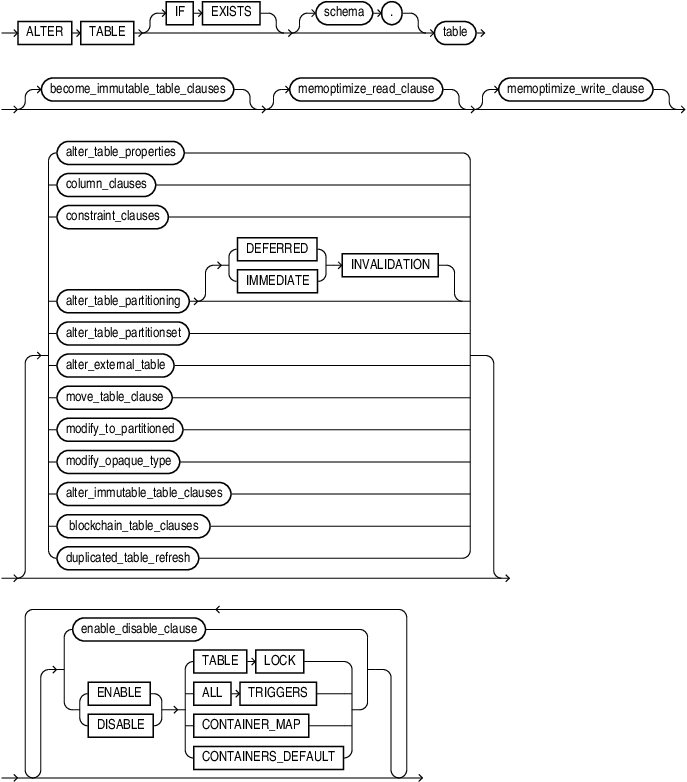
Description of the illustration alter_table.gif
Note: You must specify some clause after table. None of the clauses after table are required, but you must specify at least one of them.
Groups of ALTER TABLE syntax:
After each clause you will find links to its component subclauses.
become_immutable_table_clauses::=
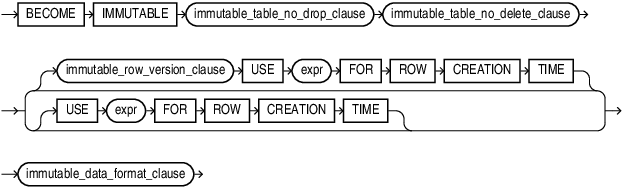
Description of the illustration become_immutable_table_clauses.gif
memoptimize_read_clause::=

Description of the illustration memoptimize_read_clause.gif
memoptimize_write_clause

Description of the illustration memoptimize_write_clause.gif
alter_table_properties::=
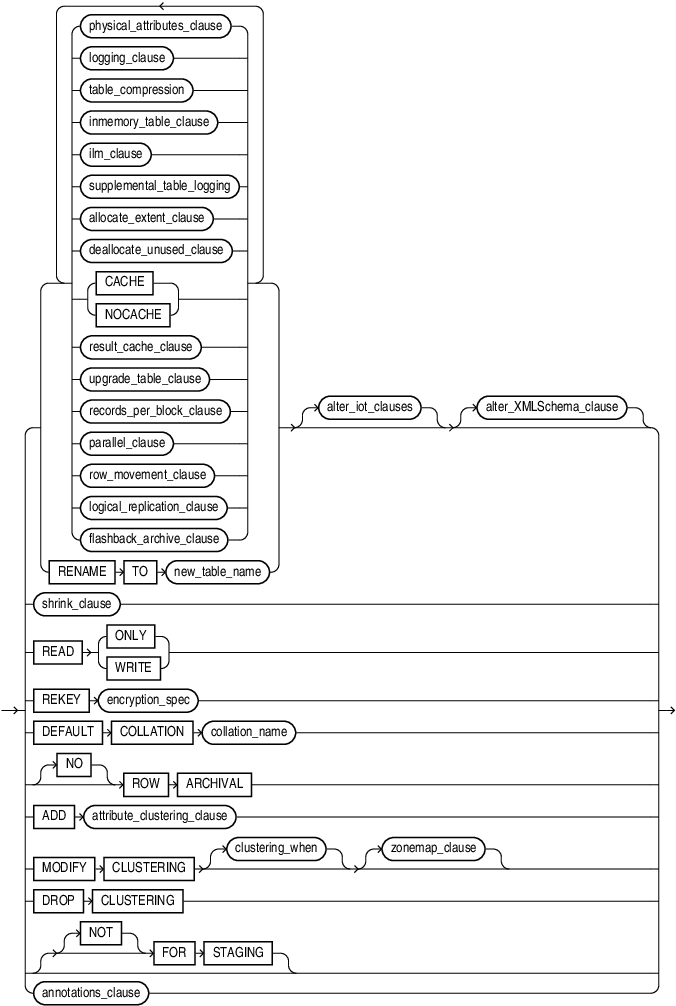
Description of the illustration alter_table_properties.gif
Note: If you specify the MODIFY CLUSTERING clause, then you must specify at least one of the clauses clustering_when or zonemap_clause.
(physical_attributes_clause::=, logging_clause::=, table_compression::=, inmemory_table_clause::=, ilm_clause::=, supplemental_table_logging::=, allocate_extent_clause::=, deallocate_unused_clause::= , upgrade_table_clause::=, records_per_block_clause::=, parallel_clause::=, row_movement_clause::=, logical_replication_clause::=, flashback_archive_clause::=, shrink_clause::=, attribute_clustering_clause::=, clustering_when::=, zonemap_clause::=, alter_iot_clauses::=, alter_XMLSchema_clause::=, annotations_clause::=)
physical_attributes_clause::=
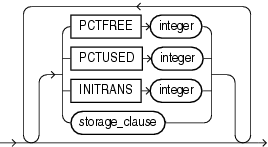
Description of the illustration physical_attributes_clause.gif
logging_clause::=
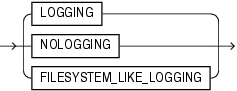
Description of the illustration logging_clause.gif
table_compression::=
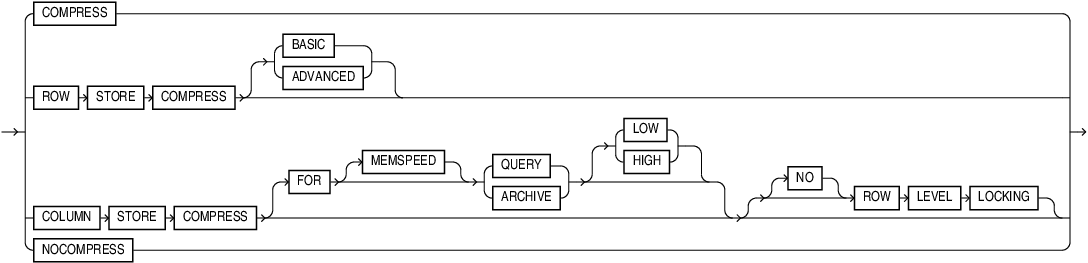
Description of the illustration table_compression.gif
inmemory_table_clause::=

Description of the illustration inmemory_table_clause.gif
(inmemory_attributes::=, inmemory_column_clause::=)
inmemory_attributes::=

Description of the illustration inmemory_attributes.gif
(inmemory_memcompress::=, inmemory_priority::=, inmemory_distribute::=, inmemory_duplicate::=)
inmemory_memcompress::=
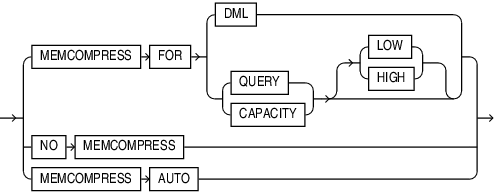
Description of the illustration inmemory_memcompress.gif
inmemory_priority::=
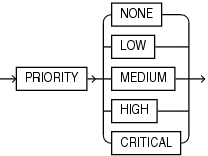
Description of the illustration inmemory_priority.gif
inmemory_distribute::=
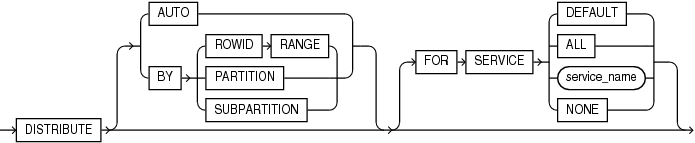
Description of the illustration inmemory_distribute.gif
inmemory_duplicate::=
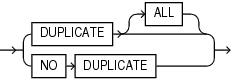
Description of the illustration inmemory_duplicate.gif
inmemory_spatial::=

Description of the illustration inmemory_spatial.gif
inmemory_column_clause::=

Description of the illustration inmemory_column_clause.gif
ilm_clause::=
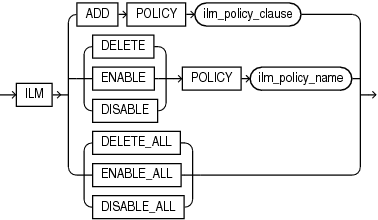
Description of the illustration ilm_clause.gif
ilm_policy_clause::=
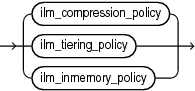
Description of the illustration ilm_policy_clause.gif
(ilm_compression_policy::=, ilm_tiering_policy::=, ilm_inmemory_policy::=)
ilm_compression_policy::=
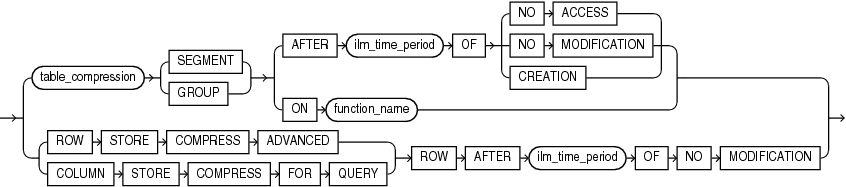
Description of the illustration ilm_compression_policy.gif
(table_compression::=, ilm_time_period::=)
ilm_tiering_policy::=
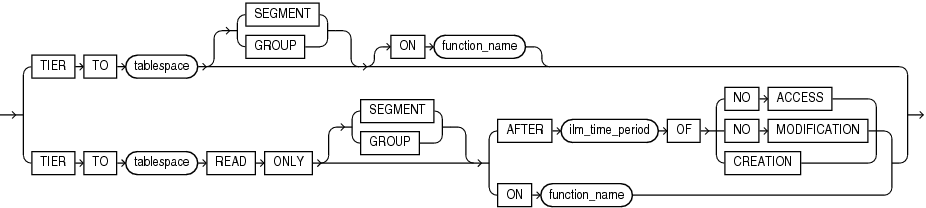
Description of the illustration ilm_tiering_policy.gif
ilm_inmemory_policy::=
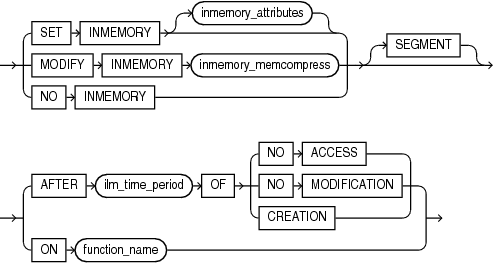
Description of the illustration ilm_inmemory_policy.gif
ilm_time_period::=
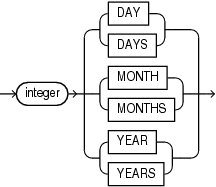
Description of the illustration ilm_time_period.gif
supplemental_table_logging::=
Description of the illustration supplemental_table_logging.gif
supplemental_log_grp_clause::=

Description of the illustration supplemental_log_grp_clause.gif
supplemental_id_key_clause::=
Description of the illustration supplemental_id_key_clause.gif
allocate_extent_clause::=
Description of the illustration allocate_extent_clause.gif
deallocate_unused_clause::=

Description of the illustration deallocate_unused_clause.gif
rename_lob_storage_clause::=

Description of the illustration rename_lob_storage_clause.gif
rename_lob_parameters::=

Description of the illustration lob_rename_parameters.gif
result_cache_clause::=
Description of the illustration result_cache_clause.gif
upgrade_table_clause::=

Description of the illustration upgrade_table_clause.gif
records_per_block_clause::=

Description of the illustration records_per_block_clause.gif
row_movement_clause::=
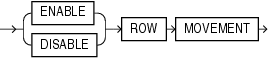
Description of the illustration row_movement_clause.gif
logical_replication_clause::=
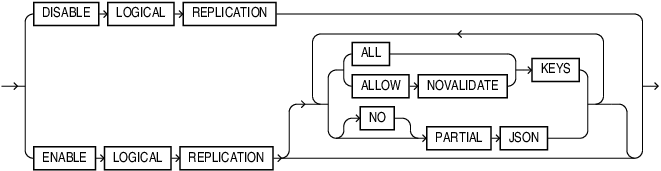
Description of the illustration logical_replication_clause.gif
flashback_archive_clause::=

Description of the illustration flashback_archive_clause.gif
alter_iot_clauses::=
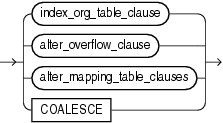
Description of the illustration alter_iot_clauses.gif
(alter_overflow_clause::=, alter_mapping_table_clauses::=)
index_org_table_clause::=
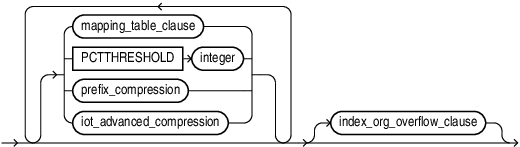
Description of the illustration index_org_table_clause.gif
(mapping_table_clauses::=, prefix_compression::=, index_org_overflow_clause::=)
mapping_table_clauses::=
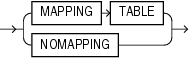
Description of the illustration mapping_table_clauses.gif
index_compression::=
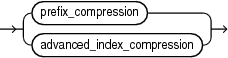
Description of the illustration index_compression.gif
prefix_compression::=
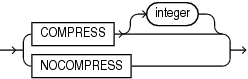
Description of the illustration prefix_compression.gif
iot_advanced_compression::=
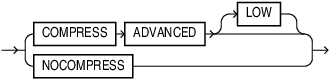
Description of the illustration iot_advanced_compression.gif
advanced_index_compression::=
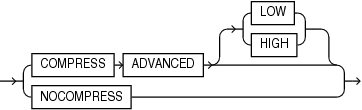
Description of the illustration advanced_index_compression.gif
index_org_overflow_clause::=

Description of the illustration index_org_overflow_clause.gif
(segment_attributes_clause::=)
partition_extended_name::=
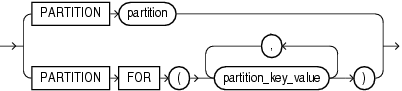
Description of the illustration partition_extended_name.gif
subpartition_extended_name::=
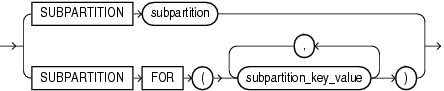
Description of the illustration subpartition_extended_name.gif
segment_attributes_clause::=
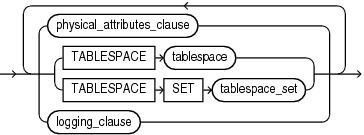
Description of the illustration segment_attributes_clause.gif
(physical_attributes_clause::=, TABLESPACE SET: not supported with ALTER TABLE, logging_clause::=)
alter_overflow_clause::=
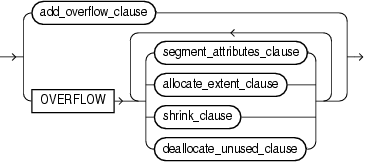
Description of the illustration alter_overflow_clause.gif
(segment_attributes_clause::=, allocate_extent_clause::=, shrink_clause::=, deallocate_unused_clause::=)
add_overflow_clause::=

Description of the illustration add_overflow_clause.gif
(segment_attributes_clause::=)
alter_mapping_table_clauses::=

Description of the illustration alter_mapping_table_clauses.gif
(allocate_extent_clause::=, deallocate_unused_clause::=)
shrink_clause::=

Description of the illustration shrink_clause.gif
attribute_clustering_clause::=

Description of the illustration attribute_clustering_clause.gif
(clustering_join::=, cluster_clause::=, clustering_when::=, zonemap_clause::=)
clustering_join::=

Description of the illustration clustering_join.gif
cluster_clause::=

Description of the illustration cluster_clause.gif
clustering_columns::=
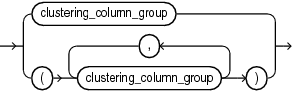
Description of the illustration clustering_columns.gif
clustering_column_group::=
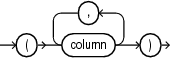
Description of the illustration clustering_column_group.gif
clustering_when::=

Description of the illustration clustering_when.gif
zonemap_clause::=

Description of the illustration zonemap_clause.gif
annotations_clause::=
For the full syntax and semantics of the annotations_clausesee annotations_clause.
column_clauses::=
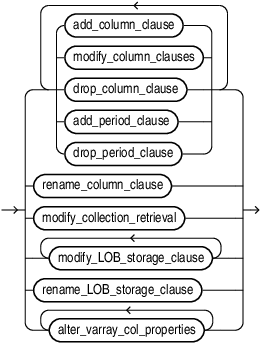
Description of the illustration column_clauses.gif
(add_column_clause::=, modify_column_clauses::=, drop_column_clause::=, add_period_clause::=, drop_period_clause::=, rename_column_clause::=, modify_collection_retrieval::=, modify_LOB_storage_clause::=, alter_varray_col_properties::=)
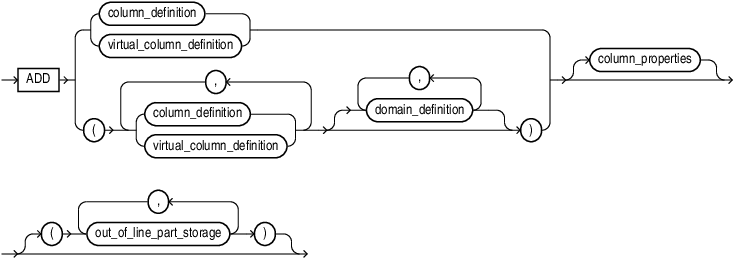
add_column_clause::=
Description of the illustration add_column_clause.gif
(column_definition::=, virtual_column_definition::=, column_properties::=, out_of_line_part_storage::=)
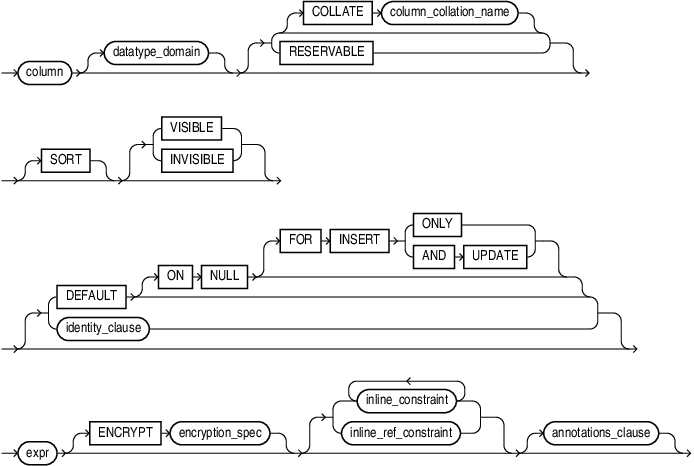
column_definition::=
Description of the illustration column_definition.gif
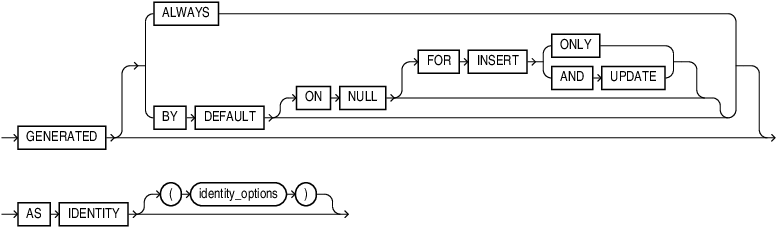
(identity_clause::=, encryption_spec::=, inline_constraint and inline_ref_constraint: constraint::=)
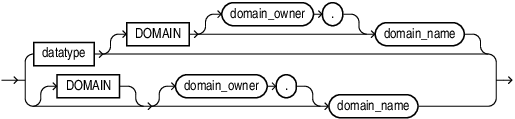
datatype_domain::=
Description of the illustration datatype_domain.gif
identity_clause::=
Description of the illustration identity_clause.gif
identity_options::=
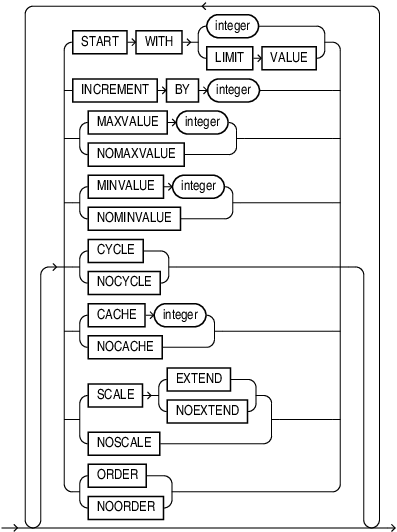
Description of the illustration identity_options.gif
virtual_column_definition::=
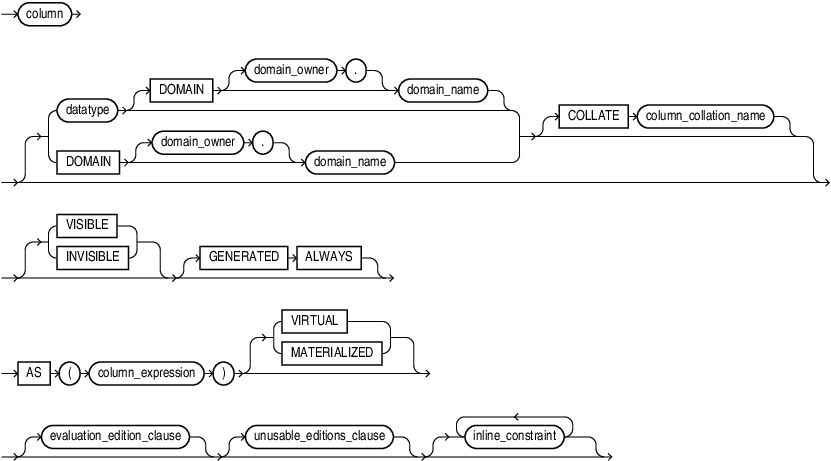
Description of the illustration virtual_column_definition.gif
(datatype::=,evaluation_edition_clause::=, unusable_editions_clause::=, constraint::=)
domain_definition::=
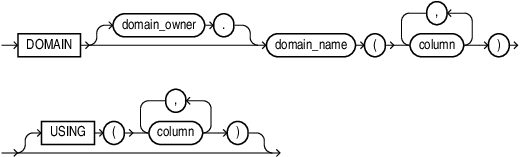
Description of the illustration domain_definition.gif
evaluation_edition_clause::=
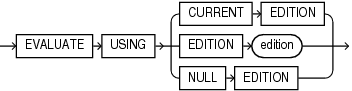
Description of the illustration evaluation_edition_clause.gif
unusable_editions_clause::=
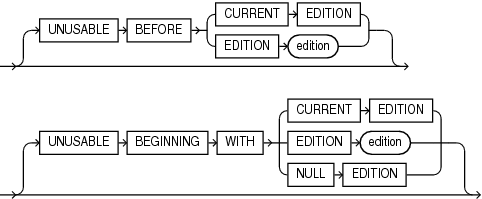
Description of the illustration unusable_editions_clause.gif
modify_column_clauses::=
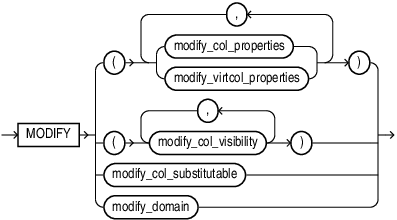
Description of the illustration modify_column_clauses.gif
(modify_col_properties::=, modify_virtcol_properties::=, modify_col_visibility::=, modify_col_substitutable::=,modify_domain::=)
modify_col_properties::=
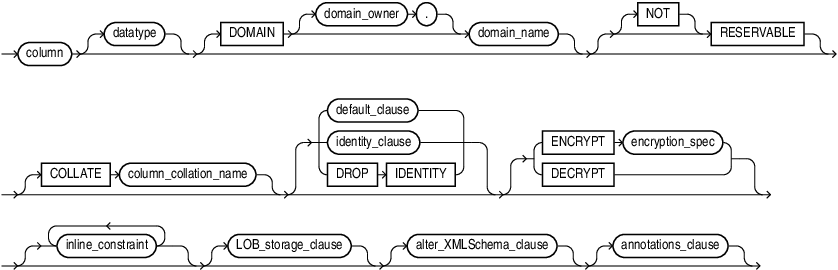
Description of the illustration modify_col_properties.gif
(datatype::=,default_clause::=, identity_clause::=, encryption_spec::=, constraint::=, LOB_storage_clause::=, alter_XMLSchema_clause::=, annotations_clause)
default_clause::=

Description of the illustration default_clause.gif
encryption_spec::=
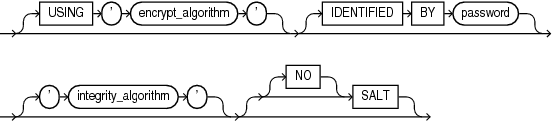
Description of the illustration encryption_spec.gif
modify_virtcol_properties::=

Description of the illustration modify_virtcol_properties.gif
(datatype::=,evaluation_edition_clause::=, unusable_editions_clause::=)
modify_col_visibility::=
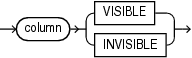
Description of the illustration modify_col_visibility.gif
modify_col_substitutable::=

Description of the illustration modify_col_substitutable.gif
modify_domain::=
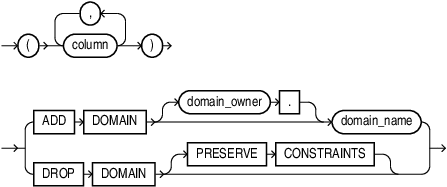
Description of the illustration modify_domain.gif
drop_column_clause::=
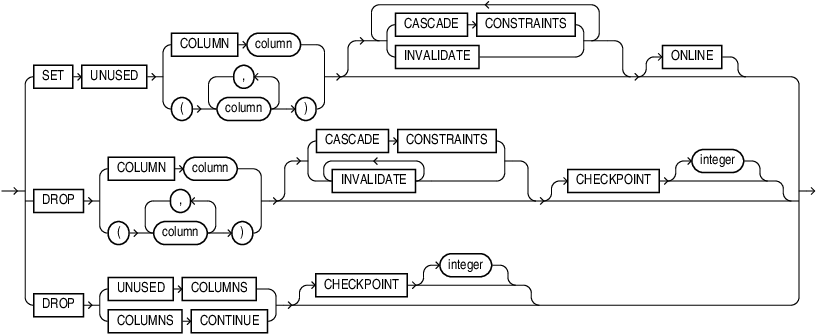
Description of the illustration drop_column_clause.gif
add_period_clause::=

Description of the illustration add_period_clause.gif
period_definition::=

Description of the illustration period_definition.gif
drop_period_clause::=

Description of the illustration drop_period_clause.gif
rename_column_clause::=

Description of the illustration rename_column_clause.gif
modify_collection_retrieval::=

Description of the illustration modify_collection_retrieval.gif
constraint_clauses::=
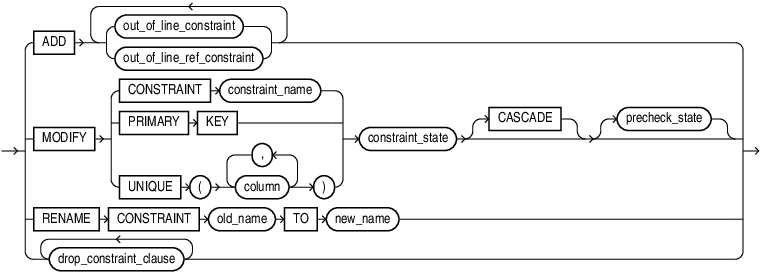
Description of the illustration constraint_clauses.gif
(out_of_line_constraint::=, out_of_line_ref_constraint::=, constraint_state::=)
drop_constraint_clause::=

Description of the illustration drop_constraint_clause.gif
column_properties::=
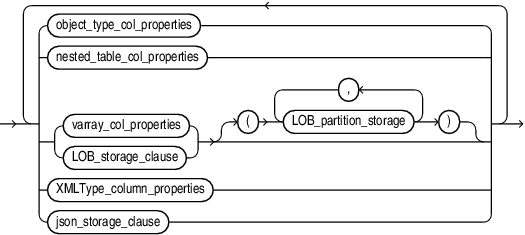
Description of the illustration column_properties.gif
out_of_line_part_storage::=
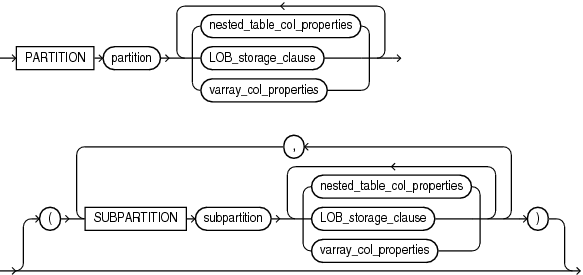
Description of the illustration out_of_line_part_storage.gif
object_type_col_properties::=

Description of the illustration object_type_col_properties.gif
substitutable_column_clause::=

Description of the illustration substitutable_column_clause.gif
nested_table_col_properties::=
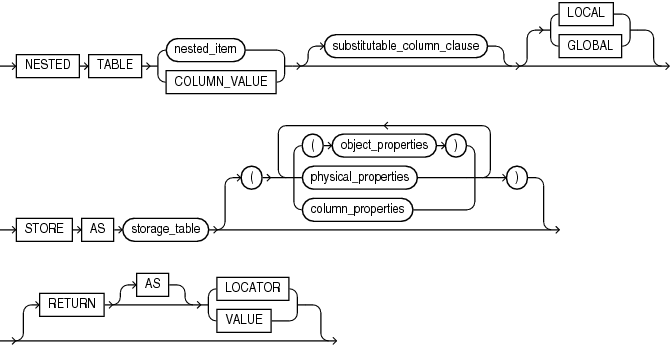
Description of the illustration nested_table_col_properties.gif
object_properties::=
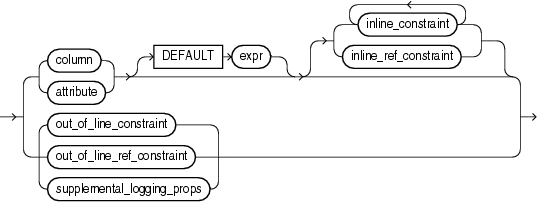
Description of the illustration object_properties.gif
For constraint clauses see constraint::=
supplemental_logging_props::=

Description of the illustration supplemental_logging_props.gif
(supplemental_log_grp_clause::=, supplemental_id_key_clause::=)
physical_properties::=
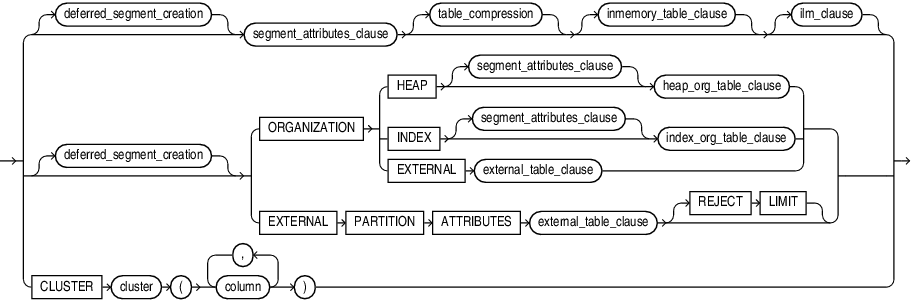
Description of the illustration physical_properties.gif
(deferred_segment_creation::=, segment_attributes_clause::=, table_compression::=, inmemory_table_clause::=-part of CREATE TABLE syntax, ilm_clause::=, heap_org_table_clause::=, index_org_table_clause::=, external_table_clause::=-part of CREATE TABLE syntax)
deferred_segment_creation::=

Description of the illustration deferred_segment_creation.gif
heap_org_table_clause::=

Description of the illustration heap_org_table_clause.gif
(table_compression::=, inmemory_table_clause::=-part of CREATE TABLE syntax, ilm_clause::=)
varray_col_properties::=

Description of the illustration varray_col_properties.gif
(substitutable_column_clause::=, varray_storage_clause::=)
varray_storage_clause::=

Description of the illustration varray_storage_clause.gif
LOB_storage_clause::=
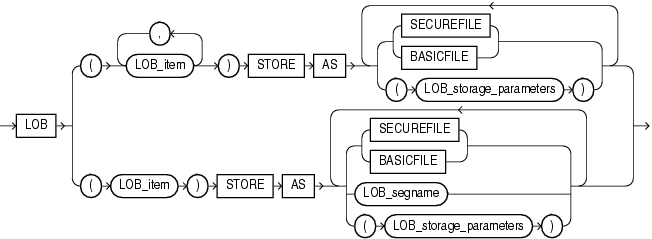
Description of the illustration lob_storage_clause.gif
LOB_storage_parameters::=
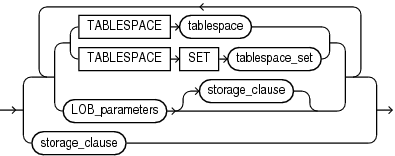
Description of the illustration lob_storage_parameters.gif
(TABLESPACE SET: not supported with ALTER TABLE, LOB_parameters::=, storage_clause::=)
LOB_parameters::=
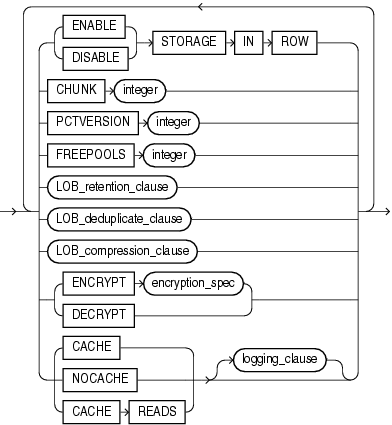
Description of the illustration lob_parameters.gif
(LOB_retention_clause::=, LOB_deduplicate_clause::=, LOB_compression_clause::=, encryption_spec::=, logging_clause::=)
modify_LOB_storage_clause::=

Description of the illustration modify_lob_storage_clause.gif
modify_LOB_parameters::=
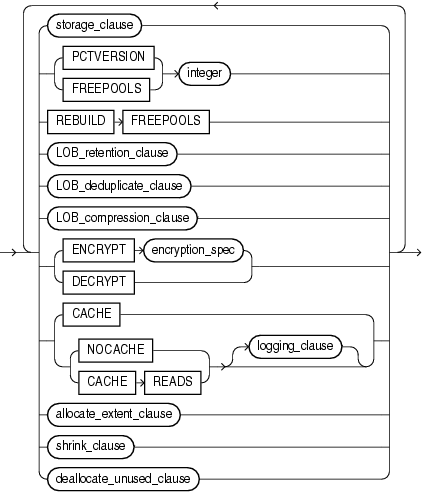
Description of the illustration modify_lob_parameters.gif
(storage_clause::=, LOB_retention_clause::=, LOB_compression_clause::=, encryption_spec::=, logging_clause::=, allocate_extent_clause::=, shrink_clause::=, deallocate_unused_clause::=)
LOB_retention_clause::=
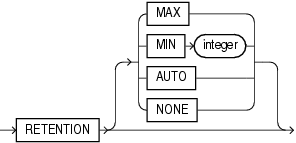
Description of the illustration lob_retention_clause.gif
LOB_deduplicate_clause::=
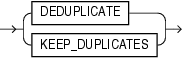
Description of the illustration lob_deduplicate_clause.gif
LOB_compression_clause::=
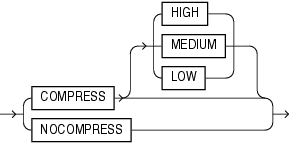
Description of the illustration lob_compression_clause.gif
alter_varray_col_properties::=

Description of the illustration alter_varray_col_properties.gif
LOB_partition_storage::=
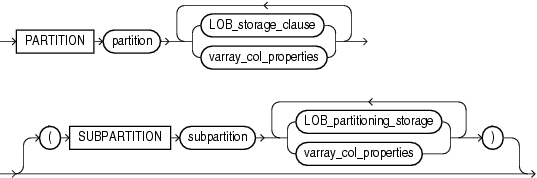
Description of the illustration lob_partition_storage.gif
(LOB_storage_clause::=, varray_col_properties::=, LOB_partitioning_storage::=)
LOB_partitioning_storage::=
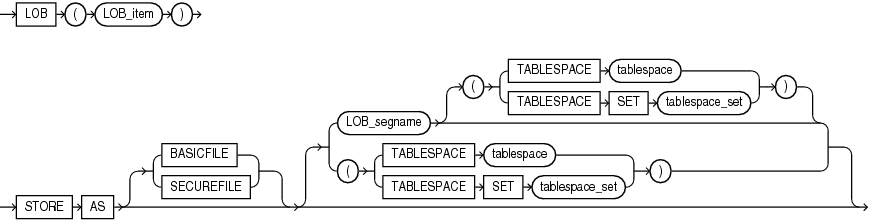
Description of the illustration lob_partitioning_storage.gif
(TABLESPACE SET: not supported with ALTER TABLE)
XMLType_column_properties::=

Description of the illustration xmltype_column_properties.gif
XMLType_storage::=
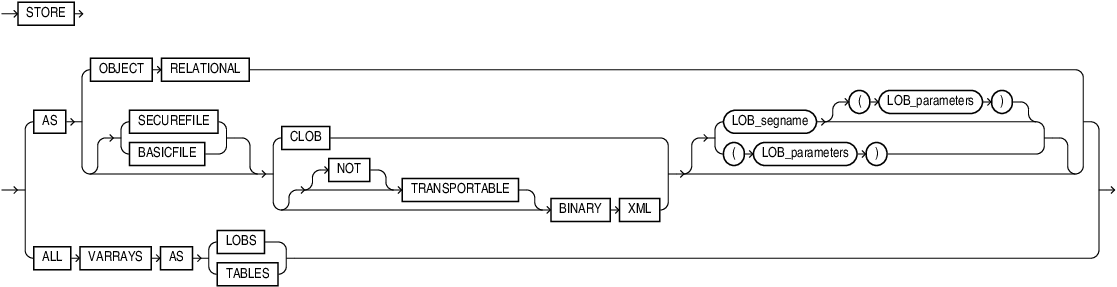
Description of the illustration xmltype_storage.gif
XMLSchema_spec::=
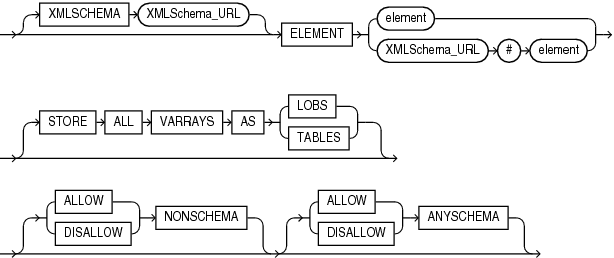
Description of the illustration xmlschema_spec.gif
alter_XMLSchema_clause::=
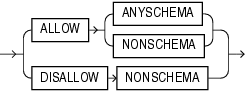
Description of the illustration alter_xmlschema_clause.gif
JSON_storage_clause::=

Description of the illustration json_storage_clause.gif
JSON_parameters::=
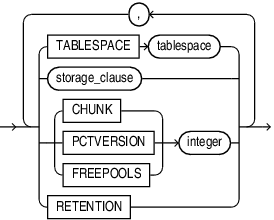
Description of the illustration json_parameters.gif
alter_external_table::=
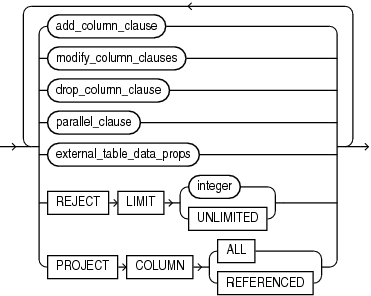
Description of the illustration alter_external_table.gif
(add_column_clause::=, modify_column_clauses::=, drop_column_clause::=, parallel_clause::=, external_table_data_props::=)
external_table_data_props::=
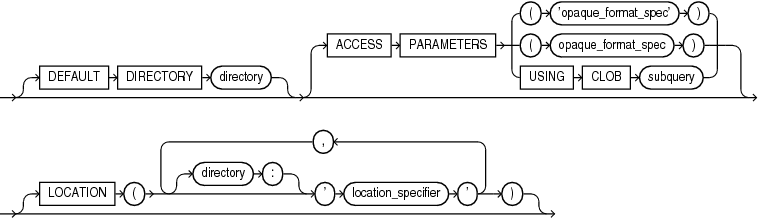
Description of the illustration external_table_data_props.gif
external_part_subpart_data_props::=

Description of the illustration external_part_subpart_data_props.gif
alter_table_partitioning::=
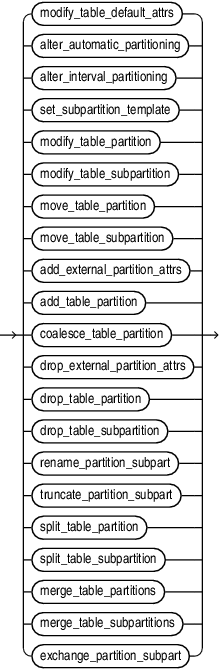
Description of the illustration alter_table_partitioning.gif
(modify_table_default_attrs::=, alter_automatic_partitioning::=, alter_interval_partitioning::=, set_subpartition_template::=, modify_table_partition::=, modify_table_subpartition::=, move_table_partition::=, move_table_subpartition::=, add_table_partition::=, coalesce_table_partition::=, drop_table_partition::=, drop_table_subpartition::=, rename_partition_subpart::=, truncate_partition_subpart::=, split_table_partition::=, split_table_subpartition::=, merge_table_partitions::=, merge_table_subpartitions::=, exchange_partition_subpart::=
modify_table_default_attrs::=
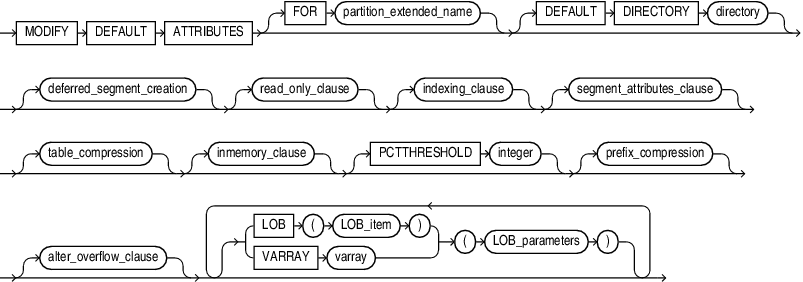
Description of the illustration modify_table_default_attrs.gif
(partition_extended_name::=, deferred_segment_creation::=, read_only_clause::=, indexing_clause::=, segment_attributes_clause::=, table_compression::=, inmemory_clause::=, prefix_compression::=, alter_overflow_clause::=, LOB_parameters::=)
read_only_clause::=
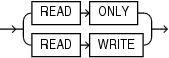
Description of the illustration read_only_clause.gif
indexing_clause::=
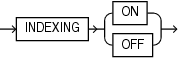
Description of the illustration indexing_clause.gif
inmemory_clause::=
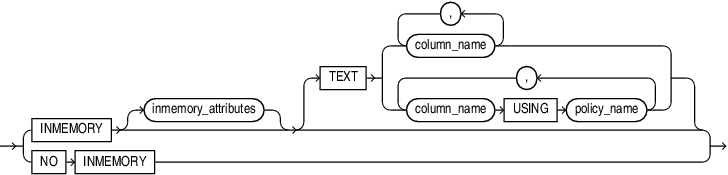
Description of the illustration inmemory_clause.gif
alter_automatic_partitioning::=
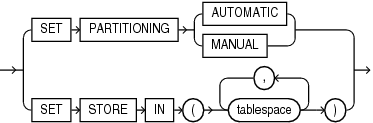
Description of the illustration alter_automatic_partitioning.gif
alter_interval_partitioning::=
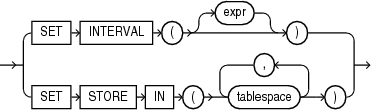
Description of the illustration alter_interval_partitioning.gif
set_subpartition_template::=
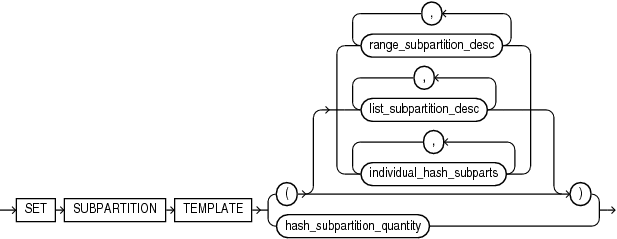
Description of the illustration set_subpartition_template.gif
(range_subpartition_desc::=, list_subpartition_desc::=, individual_hash_subparts::=)
modify_table_partition::=
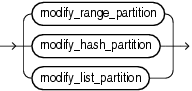
Description of the illustration modify_table_partition.gif
(modify_range_partition::=, modify_hash_partition::=, modify_list_partition::=)
modify_range_partition::=
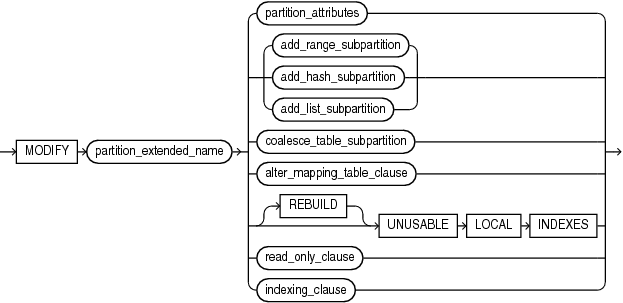
Description of the illustration modify_range_partition.gif
(partition_extended_name::=, partition_attributes::=, add_range_subpartition::=, add_hash_subpartition::=, add_list_subpartition::=, coalesce_table_subpartition::=, alter_mapping_table_clauses::=, read_only_clause::=, indexing_clause::=)
modify_hash_partition::=
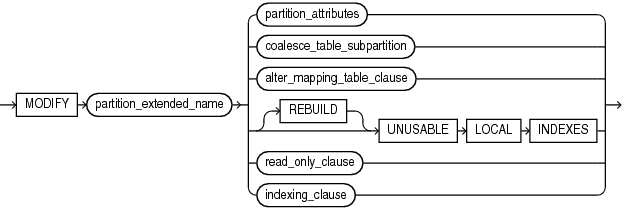
Description of the illustration modify_hash_partition.gif
(partition_extended_name::=, coalesce_table_subpartition::=, partition_attributes::=, alter_mapping_table_clauses::=, read_only_clause::=, indexing_clause::=)
modify_list_partition::=
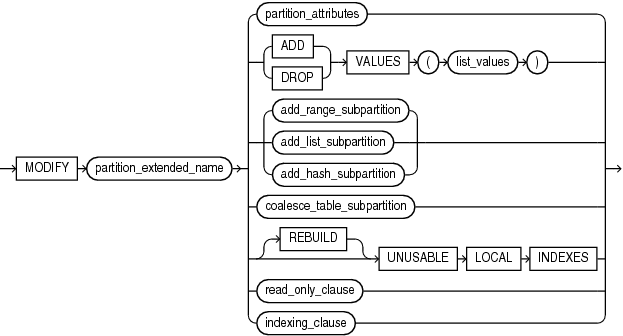
Description of the illustration modify_list_partition.gif
(partition_extended_name::=, partition_attributes::=, list_values::=, add_range_subpartition::=, add_list_subpartition::=, add_hash_subpartition::=, coalesce_table_subpartition::=, read_only_clause::=, indexing_clause::=)
modify_table_subpartition::=
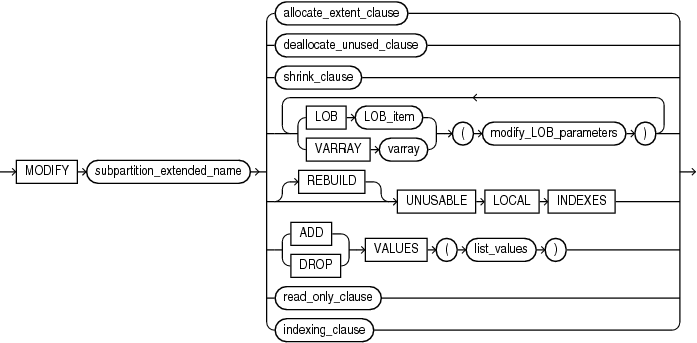
Description of the illustration modify_table_subpartition.gif
(subpartition_extended_name::=, allocate_extent_clause::=, deallocate_unused_clause::=, shrink_clause::=, modify_LOB_parameters::=, list_values::=, read_only_clause::=, indexing_clause::=)
move_table_partition::=
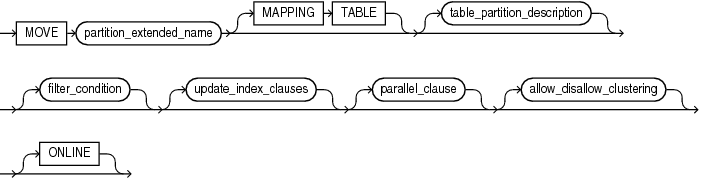
Description of the illustration move_table_partition.gif
(partition_extended_name::=, table_partition_description::=, filter_condition::=, update_index_clauses::=, parallel_clause::=, allow_disallow_clustering::=)
filter_condition::=

Description of the illustration filter_condition.gif
allow_disallow_clustering::=
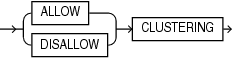
Description of the illustration allow_disallow_clustering.gif
move_table_subpartition::=
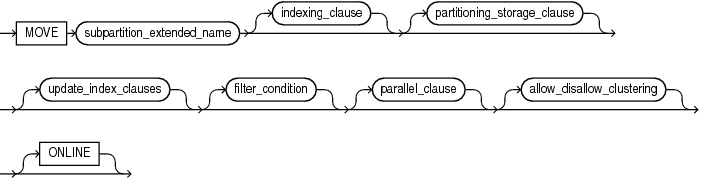
Description of the illustration move_table_subpartition.gif
(subpartition_extended_name::=, indexing_clause::=, partitioning_storage_clause::=, update_index_clauses::=, filter_condition::=, parallel_clause::=, allow_disallow_clustering::=)
add_external_partition_attrs

Description of the illustration add_external_partition_attrs.gif
add_table_partition::=
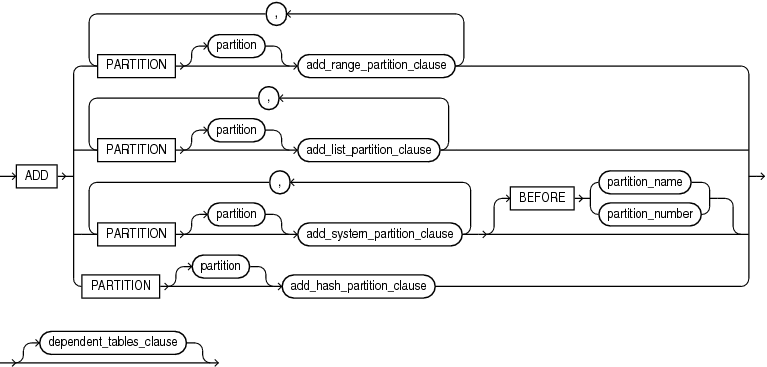
Description of the illustration add_table_partition.gif
(add_range_partition_clause::=, add_list_partition_clause::=, add_system_partition_clause::=, add_hash_partition_clause::=, dependent_tables_clause:=)
add_range_partition_clause::=
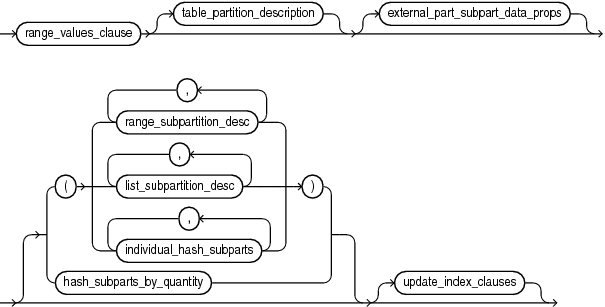
Description of the illustration add_range_partition_clause.gif
(range_values_clause::=, table_partition_description::=, external_part_subpart_data_props::=, range_subpartition_desc::=, list_subpartition_desc::=, individual_hash_subparts::=, hash_subparts_by_quantity::=, update_index_clauses::=)
add_hash_partition_clause::=

Description of the illustration add_hash_partition_clause.gif
(partitioning_storage_clause::=, update_index_clauses::=, parallel_clause::=, read_only_clause::=, indexing_clause::=)
add_list_partition_clause::=
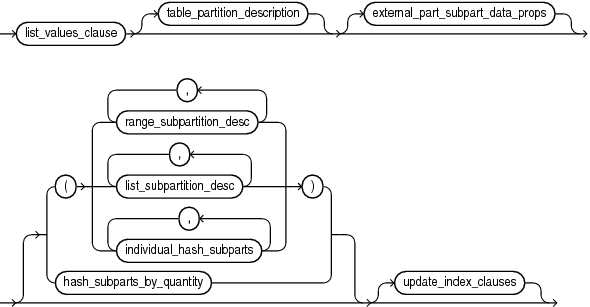
Description of the illustration add_list_partition_clause.gif
(list_values_clause::=, table_partition_description::=, external_part_subpart_data_props::=, range_subpartition_desc::=, list_subpartition_desc::=, individual_hash_subparts::=, hash_subparts_by_quantity::=, update_index_clauses::=)
add_system_partition_clause::=

Description of the illustration add_system_partition_clause.gif
(table_partition_description::=, update_index_clauses::=)
add_range_subpartition::=

Description of the illustration add_range_subpartition.gif
(range_subpartition_desc::=, dependent_tables_clause:=, update_index_clauses::=)
add_hash_subpartition::=

Description of the illustration add_hash_subpartition.gif
(individual_hash_subparts::=, dependent_tables_clause:=, update_index_clauses::=, parallel_clause::=)
add_list_subpartition::=

Description of the illustration add_list_subpartition.gif
(list_subpartition_desc::=, dependent_tables_clause:=, update_index_clauses::=)
dependent_tables_clause:=

Description of the illustration dependent_tables_clause.gif
coalesce_table_partition::=

Description of the illustration coalesce_table_partition.gif
(update_index_clauses::=, parallel_clause::=, allow_disallow_clustering::=)
coalesce_table_subpartition::=

Description of the illustration coalesce_table_subpartition.gif
(update_index_clauses::=, parallel_clause::=, allow_disallow_clustering::=)
drop_external_partition_attrs::=

Description of the illustration drop_external_partition_attrs.gif
drop_table_partition::=

Description of the illustration drop_table_partition.gif
(partition_extended_names::=, update_index_clauses::=, parallel_clause::=)
drop_table_subpartition::=

Description of the illustration drop_table_subpartition.gif
(subpartition_extended_names::=, update_index_clauses::=, parallel_clause::=)
rename_partition_subpart::=

Description of the illustration rename_partition_subpart.gif
(partition_extended_name::=, subpartition_extended_name::=)
truncate_partition_subpart::=
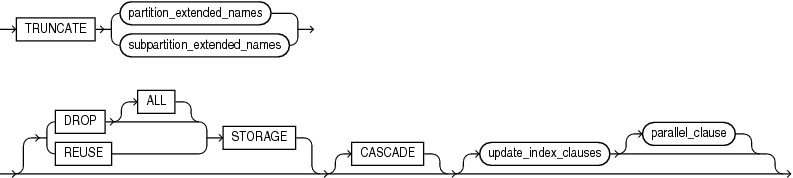
Description of the illustration truncate_partition_subpart.gif
(partition_extended_names::=, subpartition_extended_names::=, update_index_clauses::=, parallel_clause::=)
partition_extended_names::=
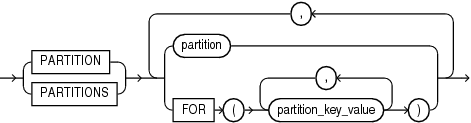
Description of the illustration partition_extended_names.gif
subpartition_extended_names::=
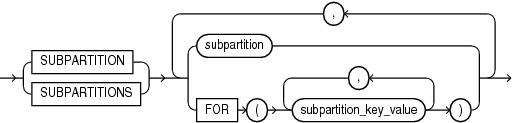
Description of the illustration subpartition_extended_names.gif
split_table_partition::=
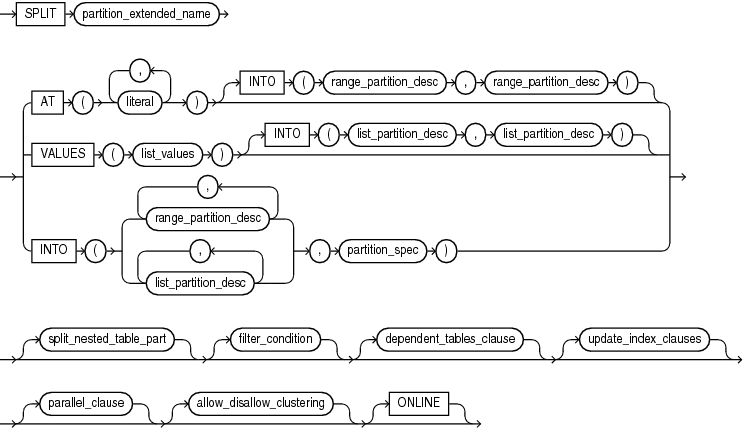
Description of the illustration split_table_partition.gif
(partition_extended_name::=, range_partition_desc::=, list_values::=, list_partition_desc::=, partition_spec::=, split_nested_table_part::=, filter_condition::=, dependent_tables_clause:=, update_index_clauses::=, parallel_clause::=, allow_disallow_clustering::=)
split_nested_table_part::=

Description of the illustration split_nested_table_part.gif
nested_table_partition_spec::=

Description of the illustration nested_table_partition_spec.gif
split_table_subpartition::=
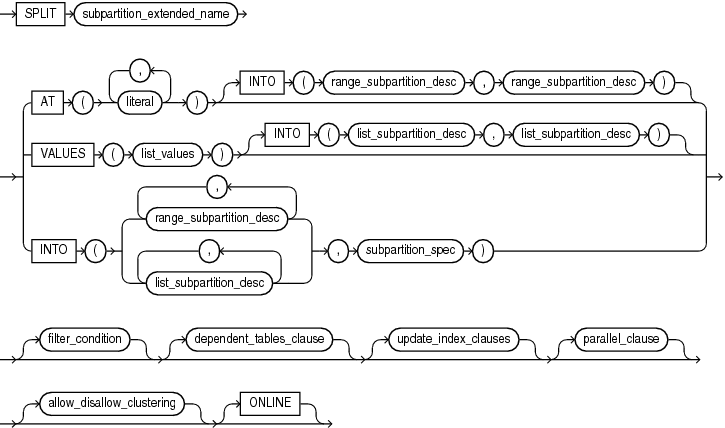
Description of the illustration split_table_subpartition.gif
(subpartition_extended_name::=, range_subpartition_desc::=, list_values::=, list_subpartition_desc::=, subpartition_spec::=, filter_condition::=, dependent_tables_clause:=, update_index_clauses::=, parallel_clause::=, allow_disallow_clustering::=
subpartition_spec::=

Description of the illustration subpartition_spec.gif
merge_table_partitions::=
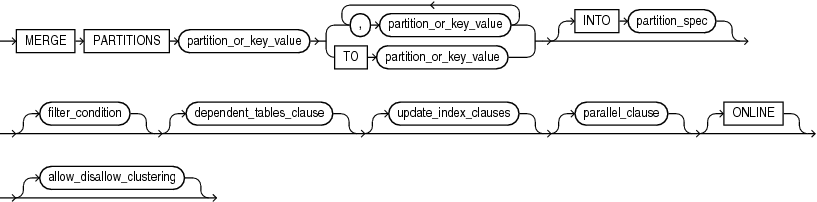
Description of the illustration merge_table_partitions.gif
(partition_or_key_value::=, partition_spec::=, filter_condition::=, dependent_tables_clause:=, update_index_clauses::=, parallel_clause::=, allow_disallow_clustering::=)
partition_or_key_value::=
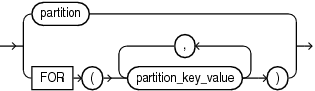
Description of the illustration partition_or_key_value.gif
merge_table_subpartitions::=
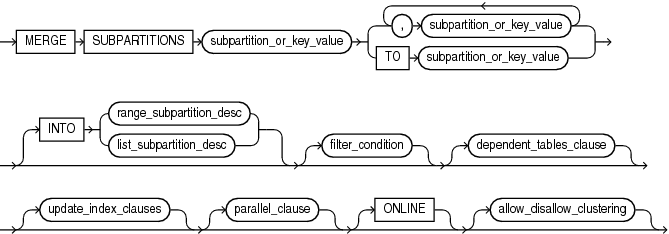
Description of the illustration merge_table_subpartitions.gif
(subpartition_or_key_value::=, range_subpartition_desc::=, list_subpartition_desc::=, filter_condition::=, dependent_tables_clause:=, update_index_clauses::=, parallel_clause::=, allow_disallow_clustering::=)
subpartition_or_key_value::=
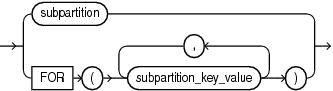
Description of the illustration subpartition_or_key_value.gif
exchange_partition_subpart::=
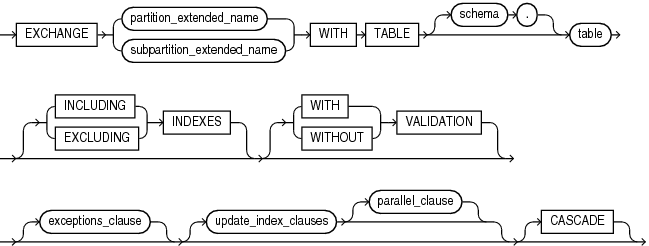
Description of the illustration exchange_partition_subpart.gif
(partition_extended_name::=, subpartition_extended_name::=, exceptions_clause::=, update_index_clauses::=, parallel_clause::=)
exceptions_clause::=

Description of the illustration exceptions_clause.gif
range_values_clause::=
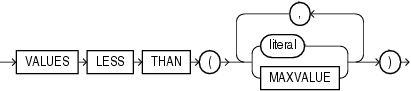
Description of the illustration range_values_clause.gif
list_values_clause::=
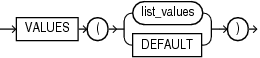
Description of the illustration list_values_clause.gif
list_values::=
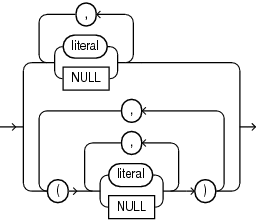
Description of the illustration list_values.gif
table_partition_description::=
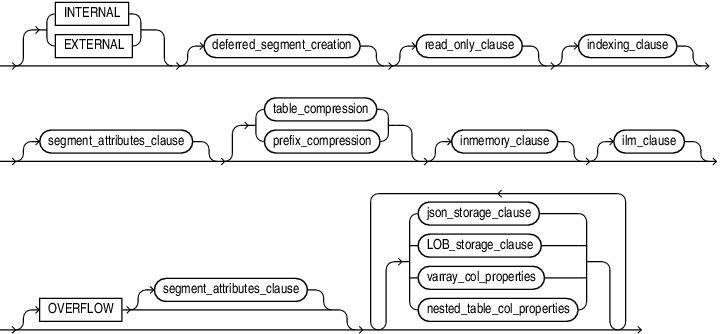
Description of the illustration table_partition_description.gif
(deferred_segment_creation::=, read_only_clause::=, indexing_clause::=, segment_attributes_clause::=, table_compression::=, prefix_compression::=, inmemory_clause::=, LOB_storage_clause::=, varray_col_properties::=)
range_partition_desc::=
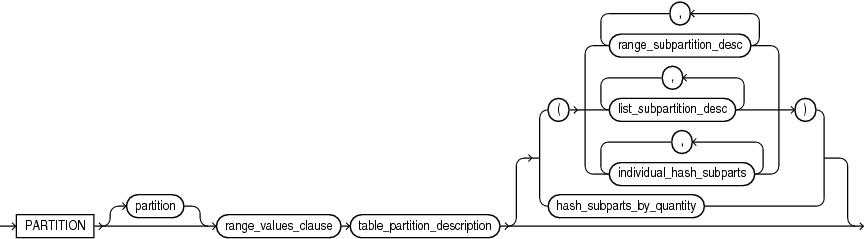
Description of the illustration range_partition_desc.gif
(range_values_clause::=, table_partition_description::=, range_subpartition_desc::=, list_subpartition_desc::=)
list_partition_desc::=
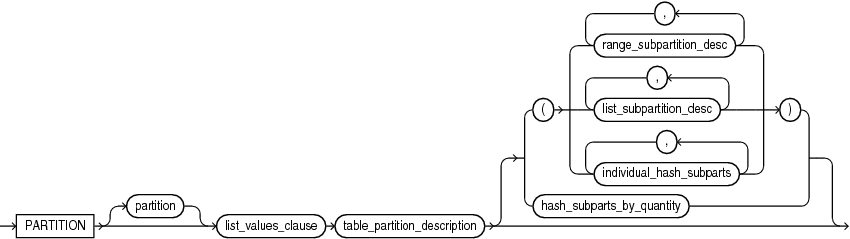
Description of the illustration list_partition_desc.gif
(list_values_clause::=, table_partition_description::=, range_subpartition_desc::=, list_subpartition_desc::=)
range_subpartition_desc::=

Description of the illustration range_subpartition_desc.gif
(range_values_clause::=, read_only_clause::=, indexing_clause::=, partitioning_storage_clause::=, external_part_subpart_data_props::=)
list_subpartition_desc::=

Description of the illustration list_subpartition_desc.gif
(list_values_clause::=, read_only_clause::=, indexing_clause::=, partitioning_storage_clause::=, external_part_subpart_data_props::=)
individual_hash_subparts::=

Description of the illustration individual_hash_subparts.gif
(read_only_clause::=, indexing_clause::=, partitioning_storage_clause::=)
hash_subparts_by_quantity::=

Description of the illustration hash_subparts_by_quantity.gif
partitioning_storage_clause::=
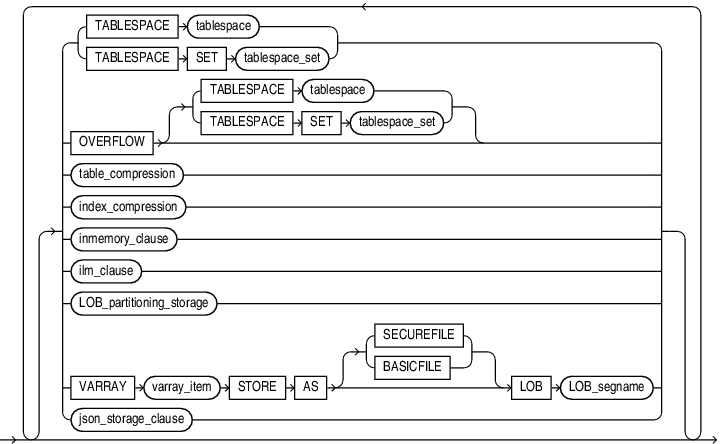
Description of the illustration partitioning_storage_clause.gif
(TABLESPACE SET: not supported with ALTER TABLE, table_compression::=, index_compression::=, inmemory_clause::=, LOB_partitioning_storage::=)
partition_attributes::=
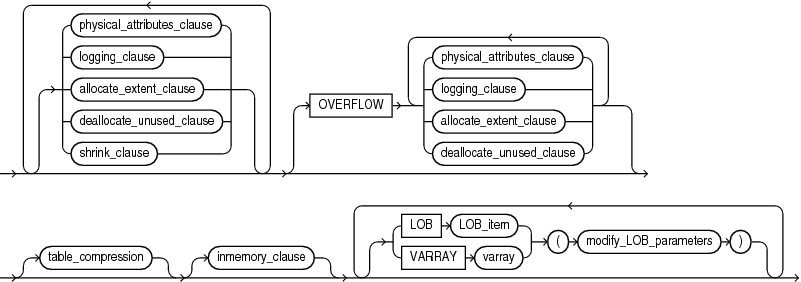
Description of the illustration partition_attributes.gif
(physical_attributes_clause::=, logging_clause::=, allocate_extent_clause::=, deallocate_unused_clause::=, shrink_clause::=, table_compression::=, inmemory_clause::=, modify_LOB_parameters::=)
partition_spec::=

Description of the illustration partition_spec.gif
(table_partition_description::=)
update_index_clauses::=
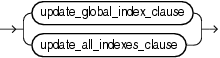
Description of the illustration update_index_clauses.gif
(update_global_index_clause::=, update_all_indexes_clause::=)
update_global_index_clause::=
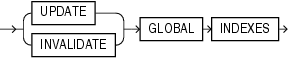
Description of the illustration update_global_index_clause.gif
update_all_indexes_clause::=

Description of the illustration update_all_indexes_clause.gif
(update_index_partition::=, update_index_subpartition::=)
update_index_partition::=

Description of the illustration update_index_partition.gif
(index_partition_description::=, index_subpartition_clause::=)
update_index_subpartition::=

Description of the illustration update_index_subpartition.gif
index_partition_description::=

Description of the illustration index_partition_description.gif
(segment_attributes_clause::=, index_compression::=)
index_subpartition_clause::=

Description of the illustration index_subpartition_clause.gif
parallel_clause::=
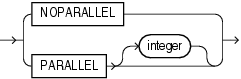
Description of the illustration parallel_clause.gif
alter_table_partitionset::=
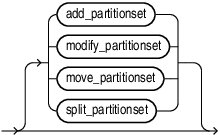
Description of the illustration alter_table_partitionset.gif
split_partitionset::=
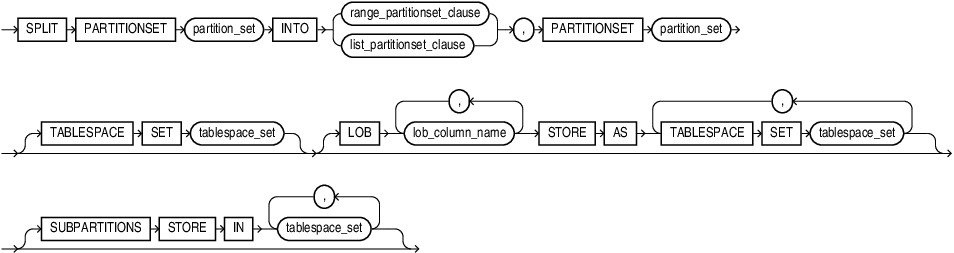
Description of the illustration split_partitionset.gif
add_partitionset::=
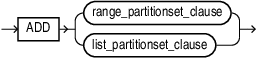
Description of the illustration add_partitionset.gif
modify_partitionset::=

Description of the illustration modify_partitionset.gif
move_partitionset::=

Description of the illustration move_partitionset.gif
move_table_clause::=
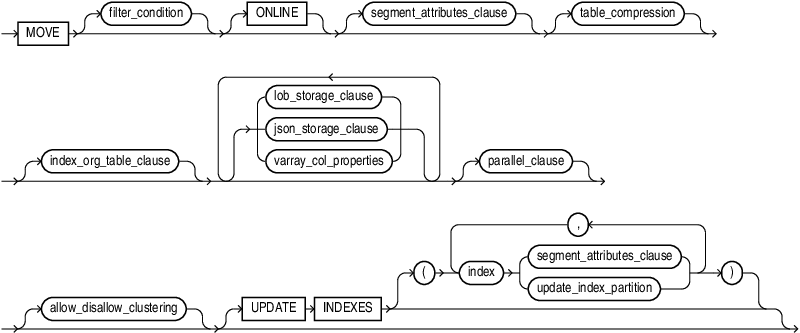
Description of the illustration move_table_clause.gif
(filter_condition::=, segment_attributes_clause::=, table_compression::=, index_org_table_clause::=, LOB_storage_clause::=, varray_col_properties::=, parallel_clause::=, allow_disallow_clustering::=, update_index_partition::=)
modify_to_partitioned::=
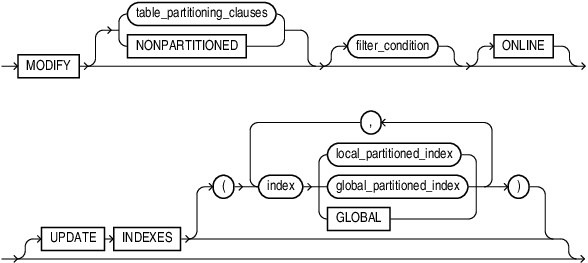
Description of the illustration modify_to_partitioned.gif
modify_opaque_type::=

Description of the illustration modify_opaque_type.gif
alter_immutable_table_clauses::=

Description of the illustration alter_immutable_table_clauses.gif
immutable_table_no_drop_clause::=, immutable_table_no_delete_clause::=, , immutable_data_format_clause::=, immutable_row_version_clause::=
blockchain_table_clauses::=
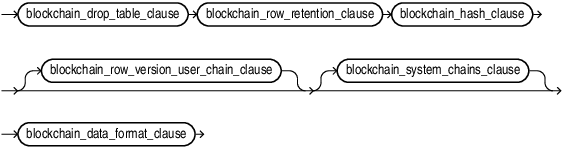
Description of the illustration blockchain_table_clauses.gif
duplicated_table_refresh::=
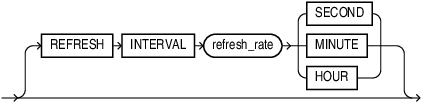
Description of the illustration duplicated_table_refresh.gif
enable_disable_clause::=
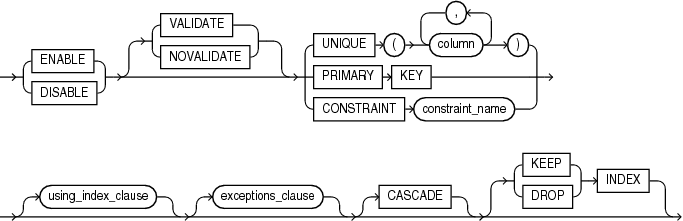
Description of the illustration enable_disable_clause.gif
(using_index_clause::=, exceptions_clause::=,)
using_index_clause::=
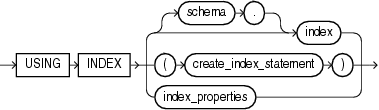
Description of the illustration using_index_clause.gif
(create_index::=, index_properties::=)
index_properties::=
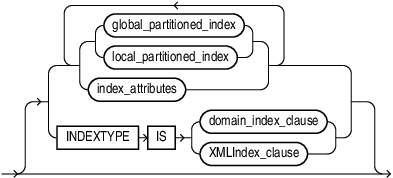
Description of the illustration index_properties.gif
(global_partitioned_index::=, local_partitioned_index::=-part of CREATE INDEX, index_attributes::=, domain_index_clause: not supported in using_index_clause)
index_attributes::=
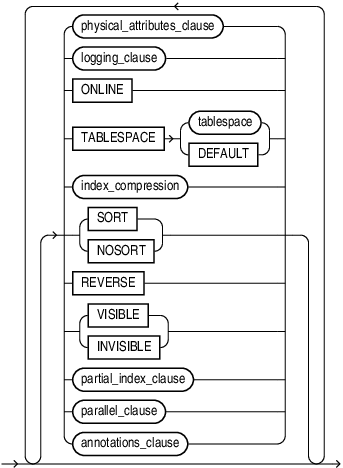
Description of the illustration index_attributes.gif
(physical_attributes_clause::=, logging_clause::=, index_compression::=, partial_index_clause and parallel_clause: not supported in using_index_clause)
Semantics
Many clauses of the ALTER TABLE statement have the same functionality they have in a CREATE TABLE statement. For more information on such clauses, see CREATE TABLE.
Note:
Operations performed by the ALTER TABLE statement can cause the database to invalidate procedures and stored functions that access the table. For information on how and when the database invalidates such objects, see Oracle AI Database Development Guide.
IF EXISTS
Specify IF EXISTS to alter an existing table.
Specifying IF NOT EXISTS with ALTER VIEW errors out with the message: Incorrect IF EXISTS clause for ALTER/DROP statement.
schema
Specify the schema containing the table. If you omit schema, then the database assumes the table is in your own schema.
table
Specify the name of the table to be altered.
Note: If you alter a table that is a master table for one or more materialized views, then the database marks the materialized views INVALID. Invalid materialized views cannot be used by query rewrite and cannot be refreshed. For information on revalidating a materialized view, see ALTER MATERIALIZED VIEW.
See Also: Oracle AI Database Data Warehousing Guide for more information on materialized views in general
Restrictions on Altering Temporary Tables
You can modify, drop columns from, or rename a temporary table. However, for a temporary table you cannot:
-
Add columns of nested table type. You can add columns of other types.
-
Specify referential integrity (foreign key) constraints for an added or modified column.
-
Specify the following clauses of the LOB_storage_clause for an added or modified LOB column:
TABLESPACE, storage_clause, logging_clause, allocate_extent_clause, or deallocate_unused_clause. -
Specify the physical_attributes_clause, nested_table_col_properties, parallel_clause, allocate_extent_clause, deallocate_unused_clause, or any of the index-organized table clauses.
-
Exchange partitions between a partition and a temporary table.
-
Specify the logging_clause.
-
Specify
MOVE. -
Add an
INVISIBLEcolumn or modify an existing column to beINVISIBLE.
Restrictions on Altering External Tables
You can add, drop, or modify the columns of an external table. However, for an external table you cannot:
-
Add a
LONG, LOB, or object type column or change the data type of an external table column to any of these data types. -
Modify the storage parameters of an external table.
-
Specify the logging_clause.
-
Specify
MOVE. -
Add an
INVISIBLEcolumn or modify an existing column to beINVISIBLE.
become_immutable_table_clauses
Use this clause to convert tables into immutable tables in place. The data format for a converted immutable table must be version v2.
The creation time for each row in an immutable table is stored in the hidden column ORABCTAB_CREATION_TIME$. By default, the creation time for all the rows in a table being converted into an immutable table is the time the ALTER TABLE statement runs. You can override the default and provide a date or timestamp expression that is evaluated for each row by using the following clause:
USE expr FOR ROW CREATION TIME
The expression may be a constant or may depend on other columns in the table.
Restrictions:
-
Regular tables can be converted to only version-v2 immutable tables.
-
The table cannot be a queue table, IOT, external table, or nested table.
-
All column types must be supported by an immutable table
-
If the table retention value in the
ALTER TABLEstatement exceeds the threshold specified by the parameterBLOCKCHAIN_TABLE_RETENTION_THRESHOLD, then the owner of the table must have theTABLE RETENTIONprivilege.
memoptimize_read_clause
Use this clause to improve the performance high frequency data query operations. The MEMOPTIMIZE_POOL_SIZE initialization parameter controls the size of the memoptimize pool. Note that the feature uses additional memory from the SGA.
-
You must specify this clause as a top-level attribute of the table, it cannot be specified at the partition or subpartition level.
-
You must explicitly enable the table for
MEMOPTIMIZE FOR READbefore you can read data from the table. -
You must explicitly disable the table for
NO MEMOPTIMIZE FOR READwhen you no longer need it.
memoptimize_write_clause
Use this clause to enable fast ingest. Fast ingest optimizes the processing of high frequency single row data inserts from Internet of Things (IoT) applications by using a large buffering pool to store the inserts before writing them to disk.
Restrictions
Blockchain and immutable tables do not support the memoptimize_write_clause.
alter_table_properties
Use the alter_table_clauses to modify a database table.
physical_attributes_clause
The physical_attributes_clause lets you change the value of the PCTFREE, PCTUSED, and INITRANS parameters and storage characteristics. Refer to physical_attributes_clause and storage_clause for a full description of these parameters and characteristics.
Restrictions on Altering Table Physical Attributes
Altering physical attributes is subject to the following restrictions:
-
You cannot specify the
PCTUSEDparameter for the index segment of an index-organized table. -
If you attempt to alter the storage attributes of tables in locally managed tablespaces, then the database raises an error. However, if some segments of a partitioned table reside in a locally managed tablespace and other segments reside in a dictionary-managed tablespace, then the database alters the storage attributes of the segments in the dictionary-managed tablespace but does not alter the attributes of the segments in the locally managed tablespace, and does not raise an error.
-
For segments with automatic segment-space management, the database ignores attempts to change the
PCTUSEDsetting. If you alter thePCTFREEsetting, then you must subsequently run theDBMS_REPAIR.SEGMENT_FIX_STATUSprocedure to implement the new setting on blocks already allocated to the segment.
Cautions on Altering Tables Physical Attributes
The values you specify in this clause affect the table as follows:
-
For a nonpartitioned table, the values you specify override any values specified for the table at create time.
-
For a range-, list-, or hash-partitioned table, the values you specify are the default values for the table and the actual values for every existing partition, overriding any values already set for the partitions. To change default table attributes without overriding existing partition values, use the modify_table_default_attrs clause.
-
For a composite-partitioned table, the values you specify are the default values for the table and all partitions of the table and the actual values for all subpartitions of the table, overriding any values already set for the subpartitions. To change default partition attributes without overriding existing subpartition values, use the modify_table_default_attrs clause with the
FORPARTITIONclause.
logging_clause
Use the logging_clause to change the logging attribute of the table. Thelogging_clause specifies whether subsequent ALTER TABLE … MOVE and ALTER TABLE … SPLIT operations will be logged or not logged.
When used with the modify_table_default_attrs clause, this clause affects the logging attribute of a partitioned table.
See Also:
-
logging_clause for a full description of this clause
-
Oracle AI Database VLDB and Partitioning Guide for more information about the logging_clause and parallel DML
table_compression
The table_compression clause is valid only for heap-organized tables. Use this clause to instruct the database whether to compress data segments to reduce disk and memory use. Refer to the CREATE TABLE table_compression for the full semantics of this clause and for information on creating objects with table compression.
Note:
The first time a table is altered in such a way that compressed data will be added, all bitmap indexes and bitmap index partitions on that table must be marked UNUSABLE.
inmemory_table_clause
Use this clause to enable or disable a table or table column for the In-Memory Column Store (IM column store), or to change the In-Memory attributes for a table or table column.
-
Specify
INMEMORYto enable a table for the IM column store, or to change the inmemory_attributes for a table that is already enabled for the IM column store. -
Specify
NOINMEMORYto disable a table for the IM column store. -
Specify the inmemory_column_clause to enable or disable a table column for the IM column store, or to change the inmemory_memcompress setting for a table column. If you specify this clause when the table or partition is disabled for the IM column store, then the column settings will take effect when the table or partition is subsequently enabled for the IM column store. Regardless of whether the table or partition is enabled or disabled for the IM column store, when you specify
NOINMEMORYfor a column, any previously specified inmemory_memcompress setting for the column is lost. Refer to the inmemory_column_clause ofCREATETABLEfor the full semantics of this clause.
This inmemory_table_clause has the same semantics as the inmemory_table_clause of CREATE TABLE, with the following additions:
-
When you specify the inmemory_memcompress clause to change the data compression method for a table that is already enabled for the IM column store, any columns that were previously assigned a specific data compression method will retain that data compression method. Refer to the inmemory_memcompress clause of
CREATETABLEfor more information on this clause. -
When you specify the inmemory_distribute clause, if you omit one subclause, then its setting remains unchanged. That is, if you specify only the
AUTOorBYclause, then theFORSERVICEsetting for the table remains unchanged, and if you specify only theFORSERVICEclause, then theAUTOorBYsetting for the table remains unchanged. If you omit both subclauses and specify only theDISTRIBUTEkeyword, then the table is assigned theDISTRIBUTEAUTOsetting and itsFORSERVICEsetting remains unchanged. Refer to the inmemory_distribute clause ofCREATETABLEfor more information on this clause. -
When you specify
NOINMEMORYto disable a partitioned or nonpartitioned table for the IM column store, any column-level In-Memory settings are lost. If you subsequently enable the table for the IM column store, then all columns will use the In-Memory settings for the table, unless you specify otherwise when enabling the table. -
When you specify
NOINMEMORYto disable a partition for the IM column store, the column-level In-Memory settings are retained, even if all partitions in the table are disabled. If you subsequently enable the table or a partition for the IM column store, then the column-level In-Memory settings will go into effect, unless you specify otherwise when enabling the table or partition. -
If a table is currently populated in the IM column store and you change any inmemory_attribute of the table other than
PRIORITY, then the database evicts the table from the IM column store. The repopulation behavior depends on thePRIORITYsetting.
inmemory_clause
Use this clause to enable or disable a table partition for the IM column store, or to change the In-Memory parameters for a table partition. This clause has the same semantics in CREATE TABLE and ALTER TABLE. Refer to the inmemory_clause in the documentation on CREATE TABLE for the full semantics of this clause.
You can specify IMEMORY on non-partitioned tables using the ORACLE_HIVE, ORACLE_HDFS, and ORACLE_BIGDATA driver types.
For more details on the In-Memory column architecture see Oracle AI Database In-Memory Guide
Restriction
If a segment on disk is 64 KB or less, then it is not populated in the IM column store. Therefore, some small database objects that were enabled for the IM column store might not be populated.
ilm_clause
Use this clause to add, delete, enable, or disable Automatic Data Optimization policies for the table.
ADD POLICY
Specify this clause to add a policy for the table.
Use ilm_policy_clause to specify the policy. Refer to the ilm_policy_clause for the full semantics of this clause
The database assigns a name to the policy of the form Pn where n is an integer value
{ DELETE | ENABLE | DISABLE } POLICY
Specify these clauses to delete a policy for the table, enable a policy for the table, or disable a policy for the table, respectively.
For ilm_policy_name, specify the name of the policy. You can view policy names by querying the POLICY_NAME column of the DBA_ILMPOLICIES view.
{ DELETE_ALL, ENABLE_ALL, DISABLE_ALL }
Specify these clauses to delete all policies for the table, enable all policies for the table, or disable all policies for the table, respectively.
See Also: Oracle AI Database VLDB and Partitioning Guide for more information on managing policies for Automatic Data Optimization
ilm_policy_clause
This clause lets you specify an Automatic Data Optimization policy. You can use the ilm_compression_policy clause to specify a compression policy, the ilm_tiering_policy clause to specify a storage tiering policy, or the ilm_inmemory_policy clause to specify an In-Memory Column Store policy.
ilm_compression_policy
Use this clause to specify a compression policy. This type of policy instructs the database to compress data when a specified condition is met. Use the SEGMENT, GROUP, or ROW clause to specify a segment-level, group-level, or row-level compression policy.
table_compression
Use the table_compression clause to specify the compression type. This clause applies to segment-level and group-level compression policies.
You must specify a compression type that is higher than the current compression type. The order of compression types from lowest to highest is:
-
NOCOMPRESS -
ROWSTORECOMPRESSBASIC -
ROWSTORECOMPRESSADVANCED -
COLUMNSTORECOMPRESSFORQUERYLOW -
COLUMNSTORECOMPRESSFORQUERYHIGH -
COLUMNSTORECOMPRESSFORARCHIVELOW -
COLUMNSTORECOMPRESSFORARCHIVEHIGH
Refer to table_compression for the full semantics of this clause.
SEGMENT
Specify SEGMENT to create a segment-level compression policy. This type of policy instructs the database to compress table segments when the condition specified in the AFTER clause is met or when the PL/SQL function specified in the ON clause returns TRUE.
Note that you cannot modify a segment using ALTER TABLE.
GROUP
Specify GROUP to create a group-level compression policy. This type of policy instructs the database to compress the table and its dependent objects, such as indexes and SecureFiles LOBs, when the condition specified in the AFTER clause is met or when the PL/SQL function specified in the ON clause returns TRUE.
ROW
Specify ROW to create a row-level compression policy. This type of policy instructs the database to compress database blocks in which all the rows have not been modified for a specified period of time. When creating a row-level policy, you must specify ROW STORE COMPRESS ADVANCED or COLUMN STORE COMPRESS FOR QUERY compression, and you must specify AFTER ilm_time_period OF NO MODIFICATION. Refer to table_compression for the full semantics of the ROW STORE COMPRESS ADVANCED and COLUMN STORE COMPRESS FOR QUERY clauses.
AFTER
Use this clause to describe the condition that must be met in order for the policy to take effect. The condition consists of a length of time, specified with the ilm_time_period clause, and one of the following condition types:
-
OFNOACCESS: The policy will take effect after table has not been accessed for the specified length of time. -
OFNOMODIFICATION: The policy will take effect after table has not been modified for the specified length of time. -
OFCREATION: The policy will take effect when the specified length of time has passed since table was created.
ilm_time_period
Specify a length of time in days, months, or years after which the condition must be met. For integer, specify a positive integer. The DAY and DAYS keywords can be used interchangeably and are provided for semantic clarity. This is also the case for the MONTH and MONTHS keywords, and the YEAR and YEARS keywords.
ON
Use this clause to specify a PL/SQL function that returns a boolean value. For function_name, specify the name of the function. The policy will take effect when the function returns TRUE.
Note: The ON function_name clause is not supported for tablespaces.
ilm_tiering_policy
Use this clause to specify a storage tiering policy. This type of policy instructs the database to migrate data to a specified tablespace, either when a specified condition is met or when data usage reaches a specified limit. Use the SEGMENT or GROUP clause to specify a segment-level or group-level policy. You can migrate data to a read/write tablespace or a read-only tablespace.
TIER TO tablespace
Use this clause to migrate data to a read/write tablespace.
-
If you specify the
ONfunction clause, then data will be migrated when function returnsTRUE. Refer to the ON clause for the full semantics of this clause. -
If you omit the
ONfunction clause, then data will be migrated when data usage of the tablespace quota reaches the percentage defined byTBS_PERCENT_USED. The database will make a best effort to migrate enough data so that the amount of free space within the tablespace quota reaches the percentage defined byTBS_PERCENT_FREE. Refer to Oracle AI Database PL/SQL Packages and Types Reference for more information onTBS_PERCENT_USEDandTBS_PERCENT_FREE, which are constants in theDBMS_ILM_ADMINpackage.
TIER TO tablespace READ ONLY
Use this clause to migrate data to a read-only tablespace. When migrating data to the tablespace, the database temporarily places the tablespace in read/write mode, migrates the data, and then places the tablespace back in read-only mode.
-
If you specify the
AFTERclause, then data will be migrated when the specified condition is met. Refer to the AFTER clause for the full semantics of this clause -
If you specify the
ONfunction clause, then data will be migrated when function returnsTRUE. Refer to the ON clause for the full semantics of this clause.
SEGMENT | GROUP
Specify SEGMENT to create a segment-level storage tiering policy. This type of policy instructs the database to migrate table segments to tablespace. Specify GROUP to create a group-level storage tiering policy. This type of policy instructs the database to migrate the table and its dependent objects, such as indexes and SecureFiles LOBs, to tablespace. The default is SEGMENT.
Note: The ON function_name clause is not supported for tablespaces.
ilm_inmemory_policy
Use this clause to specify an In-Memory Column Store (IM column store) policy. This type of policy instructs the database to enable or disable the table for the IM column store, or to change the compression method for the table in the IM column store, when a specified condition is met.
SET INMEMORY
Use this clause to enable the table for the IM column store when the specified condition is met. You can optionally use the inmemory_attributes clause to specify how table data will be stored in the IM column store. Refer to inmemory_attributes for the full semantics of this clause.
MODIFY INMEMORY
Use this clause to change the compression method for table data stored in the IM column store when the specified condition is met. The table must be enabled for the IM column store.
You must specify a compression method that his higher than the current compression method. The order of compression methods from lowest to highest is:
-
NOINMEMORY -
MEMCOMPRESSFORDML -
MEMCOMPRESSFORQUERYLOW -
MEMCOMPRESSFORQUERYHIGH -
MEMCOMPRESSFORCAPACITYLOW -
MEMCOMPRESSFORCAPACITYHIGH
Refer to inmemory_memcompress for the full semantics of this clause.
NO INMEMORY
Use this clause to disable the table for the IM column store when the specified condition is met.
SEGMENT
The SEGMENT keyword is optional and is provided for semantic clarity. IM column store policies are always segment-level policies.
AFTER | ON
The AFTER and ON clauses enable you to specify the condition that must be met in order for the IM column store policy to take effect:
-
If you specify the
AFTERclause, then the policy will take effect when the specified condition is met. Refer to the AFTER clause for the full semantics of this clause -
If you specify the
ONfunction clause, then the policy will take effect when function returnsTRUE. Refer to the ON clause for the full semantics of this clause.
Note: The ON function_name clause is not supported for tablespaces.
See Also: Oracle AI Database In-Memory Guide for more information on using Automatic Data Optimization policies with the IM column store
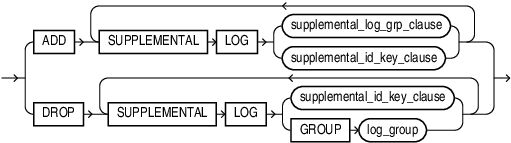
supplemental_table_logging
Use the supplemental_table_logging clause to add or drop a redo log group or one or more supplementally logged columns in a redo log group.
-
In the
ADDclause, use supplemental_log_grp_clause to create named supplemental log group. Use the supplemental_id_key_clause to create a system-generated log group. -
On the
DROPclause, useGROUPlog_group syntax to drop a named supplemental log group and use the supplemental_id_key_clause to drop a system-generated log group.
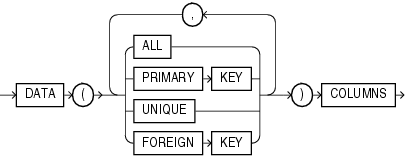
The supplemental_log_grp_clause and the supplemental_id_key_clause have the same semantics in CREATE TABLE and ALTER TABLE statements. For full information on these clauses, refer to supplemental_log_grp_clause and supplemental_id_key_clause in the documentation on CREATE TABLE.
See Also: Oracle Data Guard Concepts and Administration for information on supplemental redo log groups
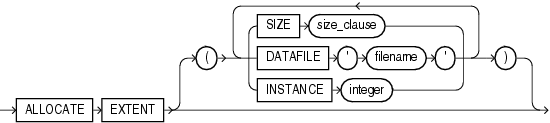
allocate_extent_clause
Use the allocate_extent_clause to explicitly allocate a new extent for the table, the partition or subpartition, the overflow data segment, the LOB data segment, or the LOB index.
Restriction on Allocating Table Extents
You cannot allocate an extent for a temporary table or for a range- or composite-partitioned table.
See Also: allocate_extent_clause for a full description of this clause and “Allocating Extents: Example”
deallocate_unused_clause
deallocate_unused_clause Use the deallocate_unused_clause to explicitly deallocate unused space at the end of the table, partition or subpartition, overflow data segment, LOB data segment, or LOB index and make the space available for other segments in the tablespace.
See Also: deallocate_unused_clause for a full description of this clause and “Deallocating Unused Space: Example”
rename_lob_storage_clause
Specify this clause to rename a LOB data segment internally.
Specify the following arguments:
-
table_name
-
column_name can be of type
BLOBorBLOB -
old_segment_name can query all_lobs, all_lob_partition or all_lob_subpartition
-
PARTITIONorSUBPARTITIONfor partitioned tables, NULL for non-partitioned tables -
new_segment_name. The rename ensures that the new segment name is unique within the database. A name conflict results in an error.
CACHE | NOCACHE
The CACHE and NOCACHE clauses have the same semantics in CREATE TABLE and ALTER TABLE statements. For complete information on these clauses, refer to “CACHE | NOCACHE | CACHE READS” in the documentation on CREATE TABLE. If you omit both of these clauses in an ALTER TABLE statement, then the existing value is unchanged.
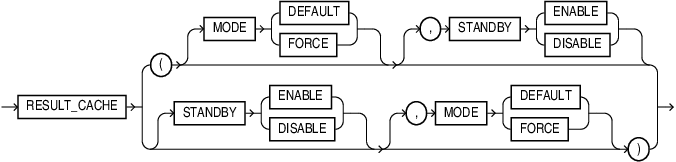
result_cache_clause
The result_cache_clause clause has the same semantics in CREATE TABLE and ALTER TABLE statements. For complete information on this clause, refer to “result_cache_clause” in the documentation on CREATE TABLE. If you omit this clause in an ALTER TABLE statement, then the existing setting is unchanged.
Examples
ALTER TABLE employee RESULT_CACHE (MODE DEFAULT)
    ALTER TABLE employee RESULT_CACHE (STANDBY ENABLE)
    ALTER TABLE employee RESULT_CACHE (MODE DEFAULT, STANDBY ENABLE)
    ALTER TABLE employee RESULT_CACHE (STANDBY ENABLE, MODE FORCE)
upgrade_table_clause
The upgrade_table_clause is relevant for object tables and for relational tables with object columns. It lets you instruct the database to convert the metadata of the target table to conform with the latest version of each referenced type. If table is already valid, then the table metadata remains unchanged.
Restriction on Upgrading Object Tables and Columns
Within this clause, you cannot specify object_type_col_properties as a clause of column_properties.
INCLUDING DATA
Specify INCLUDING DATA if you want the database to convert the data in the table to the latest type version format. You can define the storage for any new column while upgrading the table by using the column_properties and the LOB_partition_storage. This is the default.
You can convert data in the table at the time you upgrade the type by specifying CASCADE INCLUDING TABLE DATA in the dependent_handling_clause of the ALTER TYPE statement. See Oracle AI Database PL/SQL Language Reference for information on this clause. For information on whether a table contains data based on an older type version, refer to the DATA_UPGRADED column of the USER_TAB_COLUMNS data dictionary view.
NOT INCLUDING DATA
Specify NOT INCLUDING DATA if you want the database to leave column data unchanged.
Restriction on NOT INCLUDING DATA
You cannot specify NOT INCLUDING DATA if the table contains columns in Oracle8 release
8.0.x image format. To determine whether the table contains such columns, refer to the V80_FMT_IMAGE column of the USER_TAB_COLUMNS data dictionary view.
See Also:
-
Oracle AI Database Reference for information on the data dictionary views
-
ALTER TYPE for information on converting dependent table data when modifying a type upon which the table depends
records_per_block_clause
The records_per_block_clause lets you specify whether the database restricts the number of records that can be stored in a block. This clause ensures that any bitmap indexes subsequently created on the table will be as compressed as possible.
Restrictions on Records in a Block
The record_per_block_clause is subject to the following restrictions:
-
You cannot specify either
MINIMIZEorNOMINIMIZEif a bitmap index has already been defined on table. You must first drop the bitmap index. -
You cannot specify this clause for an index-organized table or a nested table.
MINIMIZE
Specify MINIMIZE to instruct the database to calculate the largest number of records in any block in the table and to limit future inserts so that no block can contain more than that number of records.
Oracle recommends that a representative set of data already exist in the table before you specify MINIMIZE. If you are using table compression (see table_compression), then a representative set of compressed data should already exist in the table.
Restriction on MINIMIZE
You cannot specify MINIMIZE for an empty table.
NOMINIMIZE
Specify NOMINIMIZE to disable the MINIMIZE feature. This is the default.
row_movement_clause
You cannot disable row movement in a reference-partitioned table unless row movement is also disabled in the parent table. Otherwise, this clause has the same semantics in CREATE TABLE and ALTER TABLE statements. For complete information on these clauses, refer to row_movement_clause in the documentation on CREATE TABLE.
logical_replication_clause
You can perform partial database replication for users such as Oracle GoldenGate, and reduce the supplemental logging overhead of uninteresting tables in interesting schema where supplemental logging is enabled. For full semantics see CREATE TABLE logical_replication_clause::=.
flashback_archive_clause
You must have the FLASHBACK ARCHIVE object privilege on the specified flashback archive to specify this clause. Use this clause to enable or disable historical tracking for the table.
-
Specify
FLASHBACKARCHIVEto enable tracking for the table. You can specify flashback_archive to designate a particular flashback archive for this table. The flashback archive you specify must already exist.If you omit the archive name, then the database uses the default flashback archive designated for the system. If no default flashback archive has been designated for the system, then you must specify flashback_archive.
You cannot specify
FLASHBACKARCHIVEto change the flashback archive for this table. Instead you must first issue anALTERTABLEstatement with theNOFLASHBACKARCHIVEclause and then issue anALTERTABLEstatement with theFLASHBACKARCHIVEclause. -
Specify
NOFLASHBACKARCHIVEto disable tracking for the table.
Note:
Related internal tables are not cleaned up as soon as the DDL completes. Instead, the FBDA background process cleans them up eventually.
See Also:
The CREATE TABLE flashback_archive_clause for information on creating a table with tracking enabled and CREATE FLASHBACK ARCHIVE for information on creating default flashback archives
RENAME TO
Use the RENAME clause to rename table to new_table_name.
Using this clause invalidates any dependent materialized views. For more information on materialized views, see CREATE MATERIALIZED VIEW and Oracle AI Database Data Warehousing Guide
If a domain index is defined on the table, then the database invokes the ODCIIndexAlter() method with the RENAME option. This operation establishes correspondence between the indextype metadata and the base table.
Restrictions on Renaming Tables
-
You cannot rename a sharded table or a duplicated table.
You cannot rename a blockchain table or an immutable table.
You cannot rename a table that is referenced by a SQL assertion.
shrink_clause
The shrink clause lets you manually shrink space in a table, index-organized table or its overflow segment, index, partition, subpartition, LOB segment, materialized view, or materialized view log. This clause is valid only for segments in tablespaces with automatic segment management. By default, the database compacts the segment, adjusts the high water mark, and releases the recuperated space immediately.
Compacting the segment requires row movement. Therefore, you must enable row movement for the object you want to shrink before specifying this clause. Further, if your application has any rowid-based triggers, you should disable them before issuing this clause.
With release 21c, you can use the shrink_clause on SecureFile LOB segments. There are two ways to invoke the shrink_clause: 1. This command targets a specific LOB column and all its partitions.
ALTER TABLE <table_name> MODIFY LOB <lob_column> SHRINK SPACE- This command cascades the shrink operation for all the LOB columns and its partitions for the given table .
ALTER TABLE <table_name> SHRINK SPACE CASCADERestrictions:
The shrink_clause is not supported on IOT partition tables.
Note:
Do not attempt to enable row movement for an index-organized table before specifying the shrink_clause. The ROWID of an index-organized table is its primary key, which never changes. Therefore, row movement is neither relevant nor valid for such tables.
COMPACT
If you specify COMPACT, then the database only defragments the segment space and compacts the table rows for subsequent release. The database does not readjust the high water mark and does not release the space immediately. You must issue another ALTER TABLE … SHRINK SPACE statement later to complete the operation. This clause is useful if you want to accomplish the shrink operation in two shorter steps rather than one longer step.
For an index or index-organized table, specifying ALTER [INDEX | TABLE] … SHRINK SPACE COMPACT is equivalent to specifying ALTER [INDEX | TABLE … COALESCE. The shrink_clause can be cascaded (refer to the CASCADE clause, which follows) and compacts the segment more densely than does a coalesce operation, which can improve performance. However, if you do not want to release the unused space, then you can use the appropriate COALESCE clause.
CASCADE
If you specify CASCADE, then the database performs the same operations on all dependent objects of table, including secondary indexes on index-organized tables.
Restrictions on the shrink_clause
The shrink_clause is subject to the following restrictions:
-
You cannot combine this clause with any other clauses in the same
ALTERTABLEstatement.You cannot specify this clause for a cluster, a clustered table, or any object with a
LONGcolumn. -
Segment shrink is not supported for tables with function-based indexes, domain indexes, or bitmap join indexes.
-
This clause does not shrink mapping tables of index-organized tables, even if you specify
CASCADE. -
You can specify this clause for a table with Advanced Row Compression enabled (
ROWSTORECOMPRESSADVANCED). You cannot specify this clause for a table with any other type of table compression enabled. -
You cannot shrink a table that is the master table of an
ONCOMMITmaterialized view. Rowid materialized views must be rebuilt after the shrink operation.
READ ONLY | READ WRITE
Specify READ ONLY to put the table in read-only mode. When the table is in READ ONLY mode, you cannot issue any DML statements that affect the table or any SELECT … FOR UPDATE statements. You can issue DDL statements as long as they do not modify any table data. Operations on indexes associated with the table are allowed when the table is in READ ONLY mode. See Oracle AI Database Administrator’s Guide for the complete list of operations that are allowed and disallowed on read-only tables.
Specify READ WRITE to return a read-only table to read/write mode.
REKEYencryption_spec
Use the REKEY clause to generate a new encryption key or to switch between different algorithms. This operation returns only after all encrypted columns in the table, including LOB columns, have been reencrypted.
DEFAULT COLLATION
This clause lets you change the default collation for the table. For collation_name, specify a valid named collation or pseudo-collation.
The new default collation for the table is assigned to columns of a character data type that are subsequently added to the table with an ALTER TABLE ADD statement or modified from a non-character data type with an ALTER TABLE MODIFY statement. The collations for existing columns in the table are not changed. Refer to the DEFAULT COLLATION clause of CREATE TABLE for the full semantics of this clause.
[NO] ROW ARCHIVAL
Specify this clause to enable or disable table for row archival.
-
Specify
ROWARCHIVALto enable table for row archival. A hidden columnORA_ARCHIVE_STATEis created in the table. If the table is already populated with data, then the value ofORA_ARCHIVE_STATEis set to0for each existing row in the table. You can subsequently use theUPDATEstatement to set the value ofORA_ARCHIVE_STATEto1for rows you want to archive. -
Specify
NOROWARCHIVALto disable table for row archival. The hidden columnORA_ARCHIVE_STATEis dropped from the table.
Restrictions on [NO] ROW ARCHIVAL
The following restrictions apply to this clause:
-
You cannot specify the
ROWARCHIVALclause for a table that already contains a column namedORA_ARCHIVE_STATE. -
You cannot specify the
NOROWARCHIVALclause for tables owned bySYS.
See Also:
-
The
CREATETABLEROW ARCHIVAL clause for the full semantics of this clause -
See Database VLDB and Partitioning GuideOracle AI Database VLDB and Partitioning Guide for more information on In-Database Archiving
attribute_clustering_clause
Use the ADD attribute_clustering_clause to enable the table for attribute clustering. The attribute_clustering_clause has the same semantics for ALTER TABLE and CREATE TABLE. Refer to the attribute_clustering_clause in the documentation on CREATE TABLE.
MODIFY CLUSTERING
Use this clause to allow or disallow attribute clustering for the table during direct-path insert operations or data movement operations. The table must be enabled for attribute clustering. The clustering_when clause and the zonemap_clause have the same semantics for ALTER TABLE and CREATE TABLE. Refer to the clustering_when clause and the zonemap_clause in the documentation on CREATE TABLE.
DROP CLUSTERING
Use this clause to disable the table for attribute clustering.
If a zone map on the table was created using the WITH MATERIALIZED ZONEMAP clause of CREATE TABLE or ALTER TABLE, then the zone map will be dropped. If a zone map on the table was created using the CREATE MATERIALIZED ZONEMAP statement, then the zone map will not be dropped.
FOR STAGING
You can change the staging property of an exisiting table with ALTER TABLE t FOR STAGING. The staging table t now has all the characteristics of a staging table created with CREATE TABLE t FOR STAGING.
Refer to CREATE TABLE clause for the full semantics of staging tables: FOR STAGING
ALTER TABLE t NOT FOR STAGING
You can change a staging table with ALTER TABLE t NOT FOR STAGING. This means:
-
You can enable compression explicitly on the table, its partitions, and future data loads.
-
You can gather statistics on the table explictly or by using an statistics gathering application.
-
When you drop the table, it can be put in the recyclebin.
alter_iot_clauses
index_org_table_clause
This clause lets you alter some of the characteristics of an existing index-organized table. Index-organized tables keep data sorted on the primary key and are therefore best suited for primary-key-based access and manipulation. See index_org_table_clause in the context of CREATE TABLE.
See Also: “Modifying Index-Organized Tables: Examples”
prefix_compression
Use the prefix_compression clause to enable prefix compression for the table. Specify COMPRESS to instruct the database to combine the primary key index blocks of the index-organized table where possible to free blocks for reuse. You can specify this clause with the parallel_clause. Specify NOCOMPRESS to disable prefix compression for the table.
iot_advanced_compression
Specify iot_advanced_compression to compress the indexes of index organized tables (IOTs) and table partitions in order to reduce the storage footprint of IOTs.
You can enable advanced low index compression for all IOTs on specific partitions of a table, and leave other partitions uncompressed.
PCTTHRESHOLDinteger
Refer to “PCTTHRESHOLD integer” in the documentation on CREATE TABLE.
INCLUDINGcolumn_name
Refer to “INCLUDING column_name” in the documentation on CREATE TABLE.
overflow_attributes
The overflow_attributes let you specify the overflow data segment physical storage and logging attributes to be modified for the index-organized table. Parameter values specified in this clause apply only to the overflow data segment.
See Also: CREATE TABLE
add_overflow_clause
The add_overflow_clause lets you add an overflow data segment to the specified index-organized table. You can also use this clause to explicitly allocate an extent to or deallocate unused space from an existing overflow segment.
Use the STORE IN tablespace clause to specify tablespace storage for the entire overflow segment. Use the PARTITION clause to specify tablespace storage for the segment by partition.
For a partitioned index-organized table:
-
If you do not specify
PARTITION, then the database automatically allocates an overflow segment for each partition. The physical attributes of these segments are inherited from the table level. -
If you want to specify separate physical attributes for one or more partitions, then you must specify such attributes for every partition in the table. You need not specify the name of the partitions, but you must specify their attributes in the order in which they were created.
You can find the order of the partitions by querying the PARTITION_NAME and PARTITION_POSITION columns of the USER_IND_PARTITIONS view.
If you do not specify TABLESPACE for a particular partition, then the database uses the tablespace specified for the table. If you do not specify TABLESPACE at the table level, then the database uses the tablespace of the partition primary key index segment.
Restrictions on Overflow Attributes
Within the segment_attributes_clause:
-
You cannot specify the
OPTIMALparameter of the physical_attributes_clause. -
You cannot specify tablespace storage for the overflow segment using this clause. For a nonpartitioned table, you can use
ALTERTABLE...MOVE...OVERFLOWto move the segment to a different tablespace. For a partitioned table, useALTERTABLE...MODIFYDEFAULTATTRIBUTES...OVERFLOWto change the default tablespace of the overflow segment.
Additional restrictions apply if table is in a locally managed tablespace, because in such tablespaces several segment attributes are managed automatically by the database.
See Also:
allocate_extent_clause and deallocate_unused_clause for full descriptions of these clauses of the add_overflow_clause
alter_overflow_clause
The alter_overflow_clause lets you change the definition of the overflow segment of an existing index-organized table.
The restrictions that apply to the add_overflow_clause also apply to the alter_overflow_clause.
Note:
When you add a column to an index-organized table, the database evaluates the maximum size of each column to estimate the largest possible row. If an overflow segment is needed but you have not specified OVERFLOW, then the database raises an error and does not execute the ALTER TABLE statement. This checking function guarantees that subsequent DML operations on the index-organized table will not fail because an overflow segment is lacking.
alter_mapping_table_clauses
The alter_mapping_table_clauses is valid only if table is index organized and has a mapping table.
allocate_extent_clause
Use the allocate_extent_clause to allocate a new extent at the end of the mapping table for the index-organized table. Refer to allocate_extent_clause for a full description of this clause.
deallocate_unused_clause
Specify the deallocate_unused_clause to deallocate unused space at the end of the mapping table of the index-organized table. Refer to deallocate_unused_clause for a full description of this clause.
The database automatically maintains all other attributes of the mapping table or its partitions.
COALESCE Clause
Specify COALESCE to instruct the database to merge the contents of index blocks of the index the database uses to maintain the index-organized table where possible to free blocks for reuse. Refer to the shrink_clause for information on the relationship between these two clauses.
alter_XMLSchema_clause
This clause is valid as part of alter_table_properties only if you are modifying an XMLType table with BINARY XML storage. Refer to XMLSchema_spec in the documentation on CREATE TABLE for more information on the ALLOW and DISALLOW clauses.
column_clauses
Use these clauses to add, drop, or otherwise modify a column.
add_column_clause
The add_column_clause lets you add a column to a table.
See Also: CREATE TABLE for a description of the keywords and parameters of this clause and “Adding a Table Column: Example”
Use ALTER TABLE ADD to associate columns to a domain:
ALTER TABLE [owner.]name ADD (<column_list_def_clause> [, DOMAIN [domain_owner.]domain_name (<column_name_list>)]+)column_definition
Unless otherwise noted in this section, the elements of column_definition have the same behavior when adding a column to an existing table as they do when creating a new table. Refer to thecolumn_definition clause of CREATE TABLE for information.
Restriction on column_definition
The SORT parameter is valid only when creating a new table. You cannot specify SORT in the column_definition of an ALTER TABLE … ADD statement.
When you add a column, the initial value of each row for the new column is null, unless you specify the DEFAULT clause.
You can add an overflow data segment to each partition of a partitioned index-organized table.
You can add LOB columns to nonpartitioned and partitioned tables. You can specify LOB storage at the table and at the partition or subpartition level.
If you previously created a view with a query that used the SELECT * syntax to select all columns from table, and you now add a column to table, then the database does not automatically add the new column to the view. To add the new column to the view, re-create the view using the CREATE VIEW statement with the OR REPLACE clause. Refer to CREATE VIEW for more information.
Restrictions on Adding Columns
The addition of columns is subject to the following restrictions:
-
You cannot add a LOB column or an
INVISIBLEcolumn to a cluster table. -
If you add a LOB column to a hash-partitioned table, then the only attribute you can specify for the new partition is
TABLESPACE. -
You cannot add a column with a
NOTNULLconstraint if table has any rows unless you also specify theDEFAULTclause. -
If you specify this clause for an index-organized table, then you cannot specify any other clauses in the same statement.
-
You cannot add a column to a duplicated table.
DEFAULT
Use the DEFAULT clause to specify a default for a new column or a new default for an existing column. The database assigns this value to the column if a subsequent INSERT statement omits a value for the column.
The data type of the expression must match the data type specified for the column. The column must also be large enough to hold this expression.
The DEFAULT expression can include any SQL function as long as the function does not return a literal argument, a column reference, or a nested function invocation.
The DEFAULT expression can include the sequence pseudocolumns CURRVAL and NEXTVAL, as long as the sequence exists and you have the privileges necessary to access it. Users who perform subsequent inserts that use the DEFAULT expression must have the INSERT privilege on the table and the SELECT privilege on the sequence. If the sequence is later dropped, then subsequent insert statements where the DEFAULT expression is used will result in an error. If you are adding a new column to a table, then the order in which NEXTVAL is assigned to each existing row is nondeterministic. If you do not fully qualify the sequence by specifying the sequence owner, for example, SCOTT.SEQ1, then the database will default the sequence owner to be the user who issues the ALTER TABLE statement. For example, if user MARY adds a column to SCOTT.TABLE and refers to a sequence that is not fully qualified, such as SEQ2, then the column will use sequence MARY.SEQ2. Synonyms on sequences undergo a full name resolution and are stored as the fully qualified sequence in the data dictionary; this is true for public and private synonyms. For example, if user BETH adds a column referring to public or private synonym SYN1 and the synonym refers to PETER.SEQ7, then the column will store PETER.SEQ7 as the default.
If you specify the DEFAULT clause for a column, then the default value is stored as metadata but the column itself is not populated with data. However, subsequent queries that specify the new column are rewritten so that the default value is returned in the result set. This optimized behavior is subject to the following restrictions:
-
It cannot be index-organized, temporary, or part of a cluster. It also cannot be a queue table, an object table, or the container table of a materialized view.
-
If the table has a Virtual Private Database (VPD) policy on it, then the optimized behavior will not take place unless the user who issues the
ALTERTABLE...ADDstatement has theEXEMPTACCESSPOLICYsystem privilege. -
The column being added cannot be encrypted, and cannot be an object column, nested table column, or a LOB column.
-
The
DEFAULTexpression cannot include the sequence pseudocolumnsCURRVALorNEXTVAL.
If the optimized behavior cannot take place due to the preceding restrictions, then the database updates each row in the newly created column with the default value. In this case, the database does not fire any UPDATE triggers that are defined on the table.
Restrictions on Default Column Values
Default column values are subject to the following restrictions:
-
A
DEFAULTexpression cannot contain references to PL/SQL functions or to other columns, the pseudocolumnsLEVEL,PRIOR, andROWNUM, or date constants that are not fully specified. -
The expression can be of any form except a scalar subquery expression.
ON NULL
If you specify the ON NULL clause, then the database assigns the DEFAULT column value when a subsequent INSERT or optionally an UPDATE statement attempts to assign a value that evaluates to NULL.
When you specify ON NULL, the NOT NULL constraint and NOT DEFERRABLE constraint state are implicitly specified. If you specify an inline constraint that conflicts with NOT NULL and NOT DEFERRABLE, then an error is raised.
Refer to CREATE TABLE ON NULL for the full semantics of DEFAULT ON NULL.
See Also: “Specifying a Default Column Value: Examples”
identity_clause
The identity_clause has the same semantics when you add an identity column that it has when you create an identity column. Refer to CREATE TABLE identity_clause for more information.
When you add a new identity column to a table, all existing rows are updated using the sequence generator. The order in which a value is assigned to each existing row is nondeterministic.
identity_options
Use the identity_options clause to configure the sequence generator. The identity_options clause has the same parameters as the CREATE SEQUENCE statement. Refer to CREATE SEQUENCE for a full description of these parameters and characteristics. The exception is START WITH LIMIT VALUE, which is specific to identity_options and can only be used with ALTER TABLE MODIFY. Refer to identity_options for more information.
inline_constraint
Use inline_constraint to add a constraint to the new column.
inline_ref_constraint
This clause lets you describe a new column of type REF. Refer to constraint for syntax and description of this type of constraint, including restrictions.
virtual_column_definition
The virtual_column_definition has the same semantics when you add a column that it has when you create a column.
See Also: The CREATE TABLE virtual_column_definition and “Adding a Virtual Table Column: Example” for more information
Restriction on Adding a Virtual Column
You cannot add a virtual column when the SQL expression for the virtual column involves a column on which an Oracle Data Redaction policy is defined.
column_properties
The clauses of column_properties determine the storage characteristics of an object type, nested table, varray, or LOB column.
object_type_col_properties
This clause is valid only when you are adding a new object type column or attribute. To modify the properties of an existing object type column, use the modify_column_clauses. The semantics of this clause are the same as for CREATE TABLE unless otherwise noted.
Use the object_type_col_properties clause to specify storage characteristics for a new object column or attribute or an element of a collection column or attribute.
For complete information on this clause, refer to object_type_col_properties in the documentation on CREATE TABLE.
nested_table_col_properties
The nested_table_col_properties clause lets you specify separate storage characteristics for a nested table, which in turn lets you to define the nested table as an index-organized table. You must include this clause when creating a table with columns or column attributes whose type is a nested table. (Clauses within this clause that function the same way they function for parent object tables are not repeated here. See the CREATE TABLE clause nested_table_col_properties for more information about these clauses.)
-
For nested_item, specify the name of a column (or a top-level attribute of the nested table object type) whose type is a nested table.
If the nested table is a multilevel collection, and the inner nested table does not have a name, then specify
COLUMN_VALUEin place of the nested_item name. -
For storage_table, specify the name of the table where the rows of nested_item reside. The storage table is created in the same schema and the same tablespace as the parent table.
Restrictions on Nested Table Column Properties
Nested table column properties are subject to the following restrictions:
-
You cannot specify the parallel_clause.
-
You cannot specify
CLUSTERas part of the physical_properties clause.
See Also: “Nested Tables: Examples”
varray_col_properties
The varray_col_properties clause lets you specify separate storage characteristics for the LOB in which a varray will be stored. If you specify this clause, then the database will always store the varray in a LOB, even if it is small enough to be stored inline. If varray_item is a multilevel collection, then the database stores all collection items nested within varray_item in the same LOB in which varray_item is stored.
Restriction on Varray Column Properties
You cannot specify TABLESPACE as part of LOB_parameters for a varray column. The LOB tablespace for a varray defaults to the tablespace of the containing table.
out_of_line_part_storage
This clause lets you specify storage attributes the newly added column for each partition or subpartition in a partitioned table. For any partition or subpartition you do not name in this clause, the storage attributes for the new column are the same as those specified in the nested_table_col_properties at the table level.
LOB_storage_clause
Use the LOB_storage_clause to specify the LOB storage characteristics for a newly added LOB column, LOB partition, or LOB subpartition, or when you are converting a LONG column into a LOB column. You cannot use this clause to modify an existing LOB. Instead, you must use the modify_LOB_storage_clause.
Unless otherwise noted in this section, all LOB parameters, in both the LOB_storage_clause and the modify_LOB_storage_clause, have the same semantics in an ALTER TABLE statement that they have in a CREATE TABLE statement. Refer to the CREATE TABLE LOB_storage_clause for complete information on this clause.
Restriction on LOB Parameters
The only parameter of LOB_parameters you can specify for a hash partition or hash subpartition is TABLESPACE.
CACHE READS Clause
When you add a new LOB column, you can specify the logging attribute with CACHE READS, as you can when defining a LOB column at create time. Refer to the CREATE TABLE clause CACHE READS for full information on this clause.
ENABLE | DISABLE STORAGE IN ROW
You cannot change STORAGE IN ROW once it is set. Therefore, you cannot specify this clause as part of the modify_col_properties clause. However, you can change this setting when adding a new column (add_column_clause) or when moving the table (move_table_clause). Refer to the CREATE TABLE clause ENABLE STORAGE IN ROW for complete information on this clause.
CHUNKinteger
You cannot use the modify_col_properties clause to change the value of CHUNK after it has been set. If you require a different CHUNK value for a column after it has been created, use ALTER TABLE … MOVE. Refer to the CREATE TABLE clause CHUNK integer for more information.
RETENTION
For BasicFiles LOBs, if the database is in automatic undo mode, then you can specify RETENTION instead of PCTVERSION to instruct the database to retain old versions of this LOB. This clause overrides any prior setting of PCTVERSION. Refer to the CREATE TABLE clause LOB_retention_clause for a full description of this parameter.
FREEPOOLSinteger
For BasicFiles LOBs, if the database is in automatic undo mode, then you can use this clause to specify the number of freelist groups for this LOB. This clause overrides any prior setting of FREELIST GROUPS. Refer to the CREATE TABLE clause FREEPOOLS integer for a full description of this parameter. The database ignores this parameter for SecureFiles LOBs.
LOB_partition_storage
You can specify only one list of LOB_partition_storage clauses in a single ALTER TABLE statement, and all LOB_storage_clauses and varray_col_properties clause must precede the list of LOB_partition_storage clauses. Refer to the CREATE TABLE clause LOB_partition_storage for full information on this clause, including restrictions.
XMLType_column_properties
Refer to the CREATE TABLE clause XMLType_column_properties for a full description of this clause.
See Also:
-
LOB_storage_clause for information on the LOB_segname and LOB_parameters clauses
-
“XMLType Column Examples” for an example of
XMLTypecolumns in object-relational tables and “Using XML in SQL Statements” for an example of creating an XMLSchema -
XMLTypeOracle XML DB Developer’s Guide columns and tables and on creating an Oracle XML DB Developer’s Guide XMLSchema
XMLType_storage
Refer to the CREATE TABLE clause XMLType_storage.
JSON_storage_clause
With 21c you can define a column of JSON data type using the JSON_storage_clause.
Example
ALTER TABLE t ADD (jcol JSON)modify_column_clauses
Use the modify_column_clauses to modify the properties of an existing column, the visibility of an existing column, or the substitutability of an existing object type column.
See Also: “Modifying Table Columns: Examples”
modify_col_properties
Use this clause to modify the properties of the column. Any of the optional parts of the column definition (data type, default value, or constraint) that you omit from this clause remain unchanged.
datatype
You can change the data type of any column if all rows of the column contain nulls. However, if you change the data type of a column in a materialized view container table, then the database invalidates the corresponding materialized view.
You can omit the data type only if the statement also designates the column as part of the foreign key of a referential integrity constraint. The database automatically assigns the column the same data type as the corresponding column of the referenced key of the referential integrity constraint.
You can always increase the size of a character or raw column or the precision of a numeric column, whether or not all the rows contain nulls. You can reduce the size of a data type of a column as long as the change does not require data to be modified. The database scans existing data and returns an error if data exists that exceeds the new length limit.
When you increase the size of a VARCHAR2, NVARCHAR2, or RAW column to exceed 4000 bytes, the database performs an in-place length extension and does not migrate the inline storage to external LOB storage. This enables uninterrupted migration of large tables, especially after migration, to leverage extended data types. However, the inline storage of the column will not be preserved during table reorganization operations, such as CREATE TABLE … AS SELECT, export, import, or online redefinition. To migrate to the new out-of-line storage of extended data type columns, you must recreate the table using one of the aforementioned methods. The inline storage of the column will be preserved during table or partition movement operations, such as ALTER TABLE MOVE [[SUB]PARTITION], and partition maintenance operations, such as ALTER TABLE SPLIT [SUB]PARTITION, ALTER TABLE MERGE [SUB]PARTITIONS, and ALTER TABLE COALESCE [SUB]PARTITIONS.
Note:
Oracle recommends against excessively increasing the size of a VARCHAR2, NVARCHAR2, or RAW column beyond 4000 bytes for the following reasons:
-
Row chaining may occur.
-
Data that is stored inline must be read in its entirety, whether a column is selected or not. Therefore, extended data type columns that are stored inline can have a negative impact on performance.
You can reduce the size of a data type of a column as long as the change does not require data to be modified. The database scans existing data and returns an error if data exists that exceeds the new length limit.
You can change a DATE column to a TIMESTAMP or TIMESTAMP WITH LOCAL TIME ZONE column, and you can change a TIMESTAMP or TIMESTAMP WITH LOCAL TIME ZONE column to a DATE column. The following rules apply:
-
When you change a
TIMESTAMPorTIMESTAMPWITHLOCALTIMEZONEcolumn to aDATEcolumn, the database updates each column value that has nonzero fractional seconds by rounding the value to the nearest second. If, while updating such a value, the database encounters a minute field greater than or equal to 60 (which can occur in a boundary case when the daylight saving rule switches), then it updates the minute field by subtracting 60 from it. -
After you change a
TIMESTAMPWITHLOCALTIMEZONEcolumn to aDATEcolumn, the values in the column still represent the local time that they represented in the database time zone. However, the database time zone is no longer associated with the values. When queried in SQL*Plus, the values are no longer automatically adjusted to the session time zone. It is now the responsibility of applications processing the column values to interpret them in a particular time zone.
If the table is empty, then you can increase or decrease the leading field or the fractional second value of a datetime or interval column. If the table is not empty, then you can only increase the leading field or fractional second of a datetime or interval column.
You can use the TO_LOB function to change a LONG column to a CLOB or NCLOB column, and a LONG RAW column to a BLOB column. However, you cannot use the TO_LOB function from within a PL/SQL package. Instead use the TO_CLOB (character) or TO_BLOB (raw) functions.
-
The modified LOB column inherits all constraints and triggers that were defined on the original
LONGcolumn. If you want to change any constraints, then you must do so in a subsequentALTERTABLEstatement. -
If any domain indexes are defined on the
LONGcolumn, then you must drop them before modifying the column to a LOB. -
After the modification, you will have to rebuild all other indexes on all columns of the table.
You can use the TO_CLOB (character) function to convert NCLOB columns CLOB columns.
See Also:
-
Oracle AI Database SecureFiles and Large Objects Developer’s Guide for information on
LONGto LOB migration -
ALTER INDEX for information on dropping and rebuilding indexes
For CHAR and VARCHAR2 columns, you can change the length semantics by specifying CHAR (to indicate character semantics for a column that was originally specified in bytes) or BYTE (to indicate byte semantics for a column that was originally specified in characters). To learn the length semantics of existing columns, query the CHAR_USED column of the ALL_, USER_, or DBA_TAB_COLUMNS data dictionary view.
See Also:
-
Oracle AI Database Globalization Support Guide for information on byte and character semantics
-
Oracle AI Database Reference for information on the data dictionary views
You can specify a user-defined data type as non-persistable when creating or altering the data type. Instances of non-persistable types cannot persist on disk. See CREATE TYPE for more on user-defined data types declared as non-persistable types.
DOMAIN
Use this clause to associate domain_name with the column. The domain’s data type must be compatible with the column’s data type.
COLLATE
Use this clause to set or change the data-bound collation for a column. For column_collation_name, specify a valid named collation or pseudo-collation. Refer to the DEFAULT COLLATION clause of CREATE TABLE for more information on data-bound collations.
Restrictions on Changing Column Collation
The modification of the column collation is subject to the following restrictions:
-
If the column belongs to an index key, then its collation can only be changed:
-
among collations:
BINARY,USING_NLS_COMP,USING_NLS_SORT, andUSING_NLS_SORT_CS -
between collations
BINARY_CIandUSING_NLS_SORT_CI -
between collations
BINARY_AIandUSING_NLS_SORT_AI
-
-
If the column belongs to a range- or list-partitioning key, is referenced by a bitmap join index, belongs to the primary key of an index-organized table, or to the key of a domain index, including an Oracle Text index, then its collation can only be changed among the collations
BINARY,USING_NLS_COMP,USING_NLS_SORT, andUSING_NLS_SORT_CS. -
If the column belongs to an attribute clustering key, then its collation can only be changed between the collations
BINARYandUSING_NLS_COMP.
See Also: Modifying the Collation of a Column for Fine-Grained Case-Insensitivity: Example
identity_clause
Use identity_clause to modify the properties of an identity column. You cannot specify this clause on a column that is not an identity column. If you do not specify ALWAYS or BY DEFAULT, then the current generation type is retained. Refer to CREATE TABLE identity_clause for more information on ALWAYS and BY DEFAULT.
identity_options
Use the identity_options clause to configure the sequence generator. The identity_options clause has the same parameters as the CREATE SEQUENCE statement. Refer to CREATE SEQUENCE for a full description of these parameters and characteristics. The exceptions are:
-
STARTWITHLIMIT VALUE, which is specific to identity_options, can only be used withALTERTABLEMODIFY. If you specifySTARTWITHLIMIT VALUE, then the database locks the table and finds the maximum identity column value in the table (for increasing sequences) or the minimum identity column value (for decreasing sequences) and assigns the value as the sequence generator’s high water mark. The next value returned by the sequence generator will be the high water mark +INCREMENTBYinteger for increasing sequences, or the high water mark -INCREMENTBYinteger for decreasing sequences. -
If you change the value of
STARTWITH, then the default values will be used for all other parameters in this clause unless you specify otherwise.
DROP IDENTITY
Use this clause to remove the identity property from a column, including the sequence generator and NOT NULL and NOT DEFERRABLE constraints. Identity column values in existing rows are not affected.
ENCRYPT encryption_spec | DECRYPT
Use this clause to decrypt an encrypted column, to encrypt an unencrypted column, or to change the integrity algorithm or the SALT option of an encrypted column.
When encrypting an existing column, if you specify encryption_spec, it must match the encryption specification of any other encrypted columns in the same table. Refer to the CREATE TABLE clause encryption_spec for additional information and restrictions on the encryption_spec.
If a materialized view log is defined on the table, then the database encrypts or decrypts in the materialized view log any columns you encrypt or decrypt in this clause.
Restrictions on ENCRYPT encryption_spec | DECRYPT
This clause is subject to the following restrictions:
-
If the new or existing column is a LOB column, then it must be stored as a SecureFiles LOB, and you cannot specify the
SALToption. -
You cannot encrypt or decrypt a column on which a fine-grained audit policy for the
UPDATEstatement is enabled. However, you can disable the fine-grained audit policy, encrypt or decrypt the column, and then enable the fine-grained audit policy.
See Also: “Data Encryption: Examples”
inline_constraint
This clause lets you add a constraint to a column you are modifying. To change the state of existing constraints on existing columns, use the constraint_clauses.
LOB_storage_clause
The LOB_storage_clause is permitted within modify_col_properties only if you are converting a LONG column to a LOB column. In this case only, you can specify LOB storage for the column using the LOB_storage_clause. However, you can specify only the single column as a LOB_item. Default LOB storage attributes are used for any attributes you omit in the LOB_storage_clause.
alter_XMLSchema_clause
This clause is valid within modify_col_properties only for XMLType tables with BINARY XML storage. Refer to XMLSchema_spec in the documentation on CREATE TABLE for more information on the ALLOW and DISALLOW clauses.
Restrictions on Modifying Column Properties
The modification of column properties is subject to the following restrictions:
-
You cannot change the data type of a LOB column.
-
You cannot modify a column of a table if a domain index is defined on the column. You must first drop the domain index and then modify the column.
-
You cannot modify the data type or length of a column that is part of the partitioning or subpartitioning key of a table or index.
-
You can change a
CHARcolumn toVARCHAR2(orVARCHAR) and aVARCHAR2(orVARCHAR) column toCHARonly if theBLANK_TRIMMINGinitialization parameter is set toTRUEand the column size stays the same or increases. If theBLANK_TRIMMINGinitialization parameter is set toTRUE, then you can also reduce the column size to any size greater than or equal to the maximum trimmed data value. -
You cannot change a
LONGorLONGRAWcolumn to a LOB if the table is part of a cluster. If you do change aLONGorLONGRAWcolumn to a LOB, then the only other clauses you can specify in thisALTERTABLEstatement are theDEFAULTclause and the LOB_storage_clause. -
You can specify the LOB_storage_clause as part of modify_col_properties only when you are changing a
LONGorLONGRAWcolumn to a LOB. -
You cannot specify a column of data type
ROWIDfor an index-organized table, but you can specify a column of typeUROWID. -
You cannot change the data type of a column to
REF. -
You cannot modify the properties of a column in a duplicated table.
See Also: ALTER MATERIALIZED VIEW for information on revalidating a materialized view
modify_virtcol_properties
This clause lets you modify a virtual column in the following ways:
-
Specify the
COLLATEclause to set or change the data-bound collation for a virtual column. For column_collation_name, specify a valid named collation or pseudo-collation. Refer to the DEFAULT COLLATION clause ofCREATETABLEfor more information on data-bound collations. -
If the virtual column refers to an editioned PL/SQL function, then you can modify the evaluation edition or the unusable editions for a virtual column. The evaluation_edition_clause and the unusable_editions_clause have the same semantics when you modify a virtual column that they have when you create a virtual column. For complete information, refer to evaluation_edition_clause and unusable_editions_clause in the documentation on
CREATETABLE.
Restrictions on Modifying Virtual Columns
The following restrictions apply to modifying virtual columns:
-
Specifying the
COLLATEclause to set or change the data-bound collation for a virtual column is subject to the restrictions listed in Restrictions on Changing Column Collation. -
If an index is defined on a virtual column and you modify its evaluation edition or unusable editions, then the database will invalidate all indexes on the virtual column. If you attempt to modify any other properties of the virtual column, then an error occurs.
modify_col_visibility
Use this clause to change the visibility of column. For complete information, refer to “VISIBLE | INVISIBLE” in the documentation on CREATE TABLE.
Restriction on Modifying Column Visibility
You cannot change a VISIBLE column to INVISIBLE in a table owned by SYS.
modify_col_substitutable
Use this clause to set or change the substitutability of an existing object type column.
The FORCE keyword drops any hidden columns containing typeid information or data for subtype attributes. You must specify FORCE if the column or any attributes of its type are not FINAL.
Restrictions on Modifying Column Substitutability
The modification of column substitutability is subject to the following restrictions:
-
You can specify this clause only once in any
ALTERTABLEstatement. -
You cannot modify the substitutability of a column in an object table if the substitutability of the table itself has been set.
-
You cannot specify this clause if the column was created or added using the
ISOFTYPEsyntax, which limits the range of subtypes permitted in an object column or attribute to a particular subtype. Refer to substitutable_column_clause in the documentation onCREATETABLEfor information on theISOFTYPEsyntax. -
You cannot change a varray column to
NOTSUBSTITUTABLE, even by specifyingFORCE, if any of its attributes are nested object types that are notFINAL.
modify_domain::=
Use this clause to add or remove a domain from the table.
ADD DOMAIN
Use this to add a domain to the listed columns. You must specify as many columns as the domain. The first column is associated with the first domain column, second column is associated with the second domain column, and so on.
Example: Create a Domain phone_number and Add a Column
CREATE DOMAIN phone_number as VARCHAR2(12)
  CONSTRAINT CHECK (phone_number not like '%[0-9]%')
  NOT NULL;
To add a new column to a table with domain, the ALTER TABLE statement can be used as follows:
ALTER TABLE customers ADD (cust_cell_phone_number Varchar2(12) DOMAIN phone_number);ALTER TABLE customers ADD (cust_cell_phone_number Varchar2(12) DOMAIN phone_number DEFAULT ON NULL '650-000-0000');DROP DOMAIN
Use this clause to dissociate a domain from the listed columns. The number of columns in this statement must match the number of columns in the domain.
If the domain has a collation, this will be preserved.
PRESERVE CONSTRAINTS
By default, any constraints from the domain are removed from the column. Use this clause to copy the domain constraints to the column.
An error is raised in the following cases:
-
If you alter a column to have a collation different than the collation of the column’s domain.
-
If you alter a domain to add or modify the domain’s collation to a value different than the collation of any column marked of the given domain.
drop_column_clause
The drop_column_clause lets you free space in the database by dropping columns you no longer need or by marking them to be dropped at a future time when the demand on system resources is less.
-
If you drop a nested table column, then its storage table is removed.
-
If you drop a LOB column, then the LOB data and its corresponding LOB index segment are removed.
-
If you drop a
BFILEcolumn, then only the locators stored in that column are removed, not the files referenced by the locators. -
If you drop or mark unused a column defined as an
INCLUDINGcolumn, then the column stored immediately before this column will become the newINCLUDINGcolumn.
You cannot drop a column that is referenced by SQL assertions, unless you specify CASCADE CONSTRAINTS, which will also drop those SQL assertions.
If you drop a column which had a column-level data grant on it, the data grant becomes invalid and results in a run-time error. You can query the DBA_DATA_GRANTS view to find the invalid column to replace the data grant. You can also fix the invalid data grant by adding the column back to the table definition.
SET UNUSED Clause
Specify SET UNUSED to mark one or more columns as unused. For an internal heap-organized table, specifying this clause does not actually remove the target columns from each row in the table. It does not restore the disk space used by these columns. Therefore, the response time is faster than when you execute the DROP clause.
When you specify this clause for a column in an external table, the clause is transparently converted to an ALTER TABLE … DROP COLUMN statement. The reason for this is that any operation on an external table is a metadata-only operation, so there is no difference in the performance of the two commands.
You can view all tables with columns marked UNUSED in the data dictionary views USER_UNUSED_COL_TABS, DBA_UNUSED_COL_TABS, and ALL_UNUSED_COL_TABS.
See Also: Oracle AI Database Reference for information on the data dictionary views
Unused columns are treated as if they were dropped, even though their column data remains in the table rows. After a column has been marked UNUSED, you have no access to that column. A SELECT * query will not retrieve data from unused columns. In addition, the names and types of columns marked UNUSED will not be displayed during a DESCRIBE, and you can add to the table a new column with the same name as an unused column.
Note:
Until you actually drop these columns, they continue to count toward the maximum number of columns in a single table, i.e. 1000 if the MAX_COLUMNS initialization parameter is set to STANDARD, or 4096 columns if MAX_COLUMNS is set to EXTENDED. However, as with all DDL statements, you cannot roll back the results of this clause. You cannot issue SET USED counterpart to retrieve a column that you have SET UNUSED. Refer to CREATE TABLE for more information on the 1000-column limit.
Also, if you mark a LONG column as UNUSED, then you cannot add another LONG column to the table until you actually drop the unused LONG column.
ONLINE
Specify ONLINE to indicate that DML operations on the table will be allowed while marking the column or columns UNUSED.
Restrictions on Marking Columns Unused
The following restrictions apply to the SET UNUSED clause:
-
You cannot specify the
ONLINEclause when marking a column with aDEFERRABLEconstraint asUNUSED. -
Columns in tables owned by
SYScannot be marked asUNUSED.
DROP Clause
Specify DROP to remove the column descriptor and the data associated with the target column from each row in the table. If you explicitly drop a particular column, then all columns currently marked UNUSED in the target table are dropped at the same time.
When the column data is dropped:
-
All indexes defined on any of the target columns are also dropped.
-
All constraints that reference a target column are removed.
-
If any statistics types are associated with the target columns, then the database disassociates the statistics from the column with the
FORCEoption and drops any statistics collected using the statistics type.
Note:
If the target column is a parent key of a nontarget column, or if a check constraint references both the target and nontarget columns, then the database returns an error and does not drop the column unless you have specified the CASCADE CONSTRAINTS clause. If you have specified that clause, then the database removes all constraints that reference any of the target columns.
See Also:
DISASSOCIATE STATISTICS for more information on disassociating statistics types
DROP UNUSED COLUMNS Clause
Specify DROP UNUSED COLUMNS to remove from the table all columns currently marked as unused. Use this statement when you want to reclaim the extra disk space from unused columns in the table. If the table contains no unused columns, then the statement returns with no errors.
column
Specify one or more columns to be set as unused or dropped. Use the COLUMN keyword only if you are specifying only one column. If you specify a column list, then it cannot contain duplicates.
CASCADE CONSTRAINTS
Specify CASCADE CONSTRAINTS if you want to drop all foreign key constraints that refer to the primary and unique keys defined on the dropped columns as well as all multicolumn constraints defined on the dropped columns. If any constraint is referenced by columns from other tables or remaining columns in the target table, then you must specify CASCADE CONSTRAINTS. Otherwise, the statement aborts and an error is returned.
INVALIDATE
The INVALIDATE keyword is optional. The database automatically invalidates all dependent objects, such as views, triggers, and stored program units. Object invalidation is a recursive process. Therefore, all directly dependent and indirectly dependent objects are invalidated. However, only local dependencies are invalidated, because the database manages remote dependencies differently from local dependencies.
An object invalidated by this statement is automatically revalidated when next referenced. You must then correct any errors that exist in that object before referencing it.
See Also: Oracle AI Database Concepts for more information on dependencies
CHECKPOINT
Specify CHECKPOINT if you want the database to apply a checkpoint for the DROP COLUMN operation after processing integer rows; integer is optional and must be greater than zero. If integer is greater than the number of rows in the table, then the database applies a checkpoint after all the rows have been processed. If you do not specify integer, then the database sets the default of
- Checkpointing cuts down the amount of undo logs accumulated during the
DROPCOLUMNoperation to avoid running out of undo space. However, if this statement is interrupted after a checkpoint has been applied, then the table remains in an unusable state. While the table is unusable, the only operations allowed on it areDROPTABLE,TRUNCATETABLE, andALTERTABLEDROP…COLUMNSCONTINUE(described in sections that follow).
You cannot use this clause with SET UNUSED, because that clause does not remove column data.
DROP COLUMNS CONTINUE Clause
Specify DROP COLUMNS CONTINUE to continue the drop column operation from the point at which it was interrupted. Submitting this statement while the table is in an invalid state results in an error.
Restrictions on Dropping Columns
Dropping columns is subject to the following restrictions:
- Each of the parts of this clause can be specified only once in the statement and cannot be mixed with any other
ALTERTABLEclauses. For example, the following statements are not allowed:
ALTER TABLE t1 DROP COLUMN f1 DROP (f2);
ALTER TABLE t1 DROP COLUMN f1 SET UNUSED (f2);
ALTER TABLE t1 DROP (f1) ADD (f2 NUMBER);

ALTER TABLE t1 SET UNUSED (f3)
ADD (CONSTRAINT ck1 CHECK (f2 > 0));-
You can drop an object type column only as an entity. To drop an attribute from an object type column, use the
ALTERTYPE...DROPATTRIBUTEstatement with theCASCADEINCLUDINGTABLEDATAclause. Be aware that dropping an attribute affects all dependent objects. See Oracle AI Database PL/SQL Language Reference for more information. -
You can drop a column from an index-organized table only if it is not a primary key column. The primary key constraint of an index-organized table can never be dropped, so you cannot drop a primary key column even if you have specified
CASCADECONSTRAINTS. -
You can export tables with dropped or unused columns. However, you can import a table only if all the columns specified in the export files are present in the table (none of those columns has been dropped or marked unused). Otherwise, the database returns an error.
-
You can set unused a column from a table that uses
COMPRESSBASIC, but you cannot drop the column. However, all clauses of the drop_column_clause are valid for tables that useROWSTORECOMPRESSADVANCED. See the semantics for table_compression for more information. -
You cannot drop a column on which a domain index has been built.
-
You cannot drop a
SCOPEtable constraint or aWITHROWIDconstraint on aREFcolumn. -
You cannot use this clause to drop:
-
A pseudocolumn, cluster column, or partitioning column. You can drop nonpartitioning columns from a partitioned table if all the tablespaces where the partitions were created are online and in read/write mode.
-
A column from a nested table, an object table, a duplicated table, or a table owned by
SYS.
-
See Also: “Dropping a Column: Example”
add_period_clause
Use the add_period_clause to add a valid time dimension to table.
The period_definition clause of ALTER TABLE has the same semantics as in CREATE TABLE, with the following exceptions and additions:
-
valid_time_column must not already exist in table.
-
If you specify start_time_column and end_time_column, then these columns must already exist in table or you must specify the add_column_clause for each of these columns.
-
If you specify start_time_column and end_time_column and these columns already exist in table and are populated with data, then for all rows where both columns have non-NULL values, the value of start_time_column must be earlier than the value of end_time_column.
See Also: CREATE TABLE period_definition for the full semantics of this clause
drop_period_clause
Use the drop_period_clause to drop a valid time dimension from table.
For valid_time_column, specify the name of the valid time dimension you want to drop.
This clause has the following effects:
-
The valid_time_column will be dropped from table.
-
If the start time column and end time column were automatically created by the database when the valid time dimension was created, either with
CREATETABLE... period_definition orALTERTABLE... add_period_clause, then they will be dropped. Otherwise, these columns will remain in table and revert to regular table columns.
See Also: CREATE TABLE period_definition for more information on the valid_time_column, start time column, and end time column
rename_column_clause
Use the rename_column_clause to rename a column of table. The new column name must not be the same as any other column name in table.
When you rename a column, the database handles dependent objects as follows:
-
Function-based indexes and check constraints that depend on the renamed column remain valid.
-
Dependent views, triggers, functions, procedures, and packages are invalidated. The database attempts to revalidate them when they are next accessed, but you may need to alter these objects with the new column name if revalidation fails.
-
If a domain index is defined on the column being renamed, then the database invokes the ODCIIndexAlter method with the
RENAMEoption. This operation establishes correspondence between the indextype metadata and the base table
If you rename a column which had a column-level data grant on it, the data grant becomes invalid and results in a run-time error. You can query the DBA_DATA_GRANTS view to find the invalid column to replace the data grant. You can also fix the invalid data grant by renaming the column back to the original name.
Restrictions on Renaming Columns
Renaming columns is subject to the following restrictions:
-
You cannot combine this clause with any of the other column_clauses in the same statement.
-
You cannot rename a column that is used to define a join index. Instead you must drop the index, rename the column, and re-create the index.
-
You cannot rename a column in a duplicated table.
You cannot rename a column that is referenced by a SQL assertion.
See Also: “Renaming a Column: Example”
modify_collection_retrieval
Use the modify_collection_retrieval clause to change what the database returns when a collection item is retrieved from the database.
collection_item
Specify the name of a column-qualified attribute whose type is nested table or varray.
RETURN AS
Specify what the database should return as the result of a query:
-
LOCATORspecifies that a unique locator for the nested table is returned. -
VALUEspecifies that a copy of the nested table itself is returned.
See Also: “Collection Retrieval: Example”
modify_LOB_storage_clause
The modify_LOB_storage_clause lets you change the physical attributes of LOB_item. You can specify only one LOB_item for each modify_LOB_storage_clause.
The sections that follow describe the semantics of parameters specific to modify_LOB_parameters. Unless otherwise documented in this section, the remaining LOB parameters have the same semantics when altering a table that they have when you are creating a table. Refer to the restrictions at the end of this section and to the CREATE TABLE clause LOB_storage_parameters for more information.
Note:
-
You can modify LOB storage with an
ALTERTABLEstatement or with online redefinition by using theDBMS_REDEFINITIONpackage. If you have not enabled LOB encryption, compression, or deduplication at create time, Oracle recommends that you use online redefinition to enable them after creation, as this process is more disk space efficient for changes to these three parameters. SeeDBMS_REDEFINITIONfor more information on Oracle AI Database PL/SQL Packages and Types Reference . -
You cannot convert a LOB from one type of storage to the other. Instead you must migrate to SecureFiles or BasicFiles by using online redefinition or partition exchange.
Refer to the CREATE TABLE clause PCTVERSION integer for information on this clause.
LOB_retention_clause
If the database is in automatic undo mode, then you can specify RETENTION instead of PCTVERSION to instruct the database to retain old versions of this LOB. This clause overrides any prior setting of PCTVERSION.
FREEPOOLS integer
For BasicFiles LOBs, if the database is in automatic undo mode, then you can use this clause to specify the number of freelist groups for this LOB. This clause overrides any prior setting of FREELIST GROUPS. Refer to the CREATE TABLE clause FREEPOOLS integer for a full description of this parameter. The database ignores this parameter for SecureFiles LOBs.
REBUILD FREEPOOLS
This clause applies only to BasicFiles LOBs, not to SecureFiles LOBs. The REBUILD FREEPOOLS clause removes all the old versions of data from the LOB column. This clause is useful for removing all retained old version space in a LOB segment, freeing that space to be used immediately by new LOB data.
LOB_deduplicate_clause
This clause is valid only for SecureFiles LOBs. KEEP_DUPLICATES disables LOB deduplication. DEDUPLICATE enables LOB deduplication. All lobs in the segment are read, and any matching LOBs are deduplicated before returning.
LOB_compression_clause
This clause is valid only for SecureFiles LOBs. COMPRESS compresses all LOBs in the segment and then returns. NOCOMPRESS uncompresses all LOBs in the segment and then returns.
ENCRYPT | DECRYPT
LOB encryption has the same semantics as column encryption in general. See “ENCRYPT encryption_spec | DECRYPT” for more information.
CACHE, NOCACHE, CACHE READS
When you modify a LOB column from CACHE or NOCACHE to CACHE READS, or from CACHE READS to CACHE or NOCACHE, you can change the logging attribute. If you do not specify LOGGING or NOLOGGING, then this attribute defaults to the current logging attribute of the LOB column. If you do not specify CACHE, NOCACHE, or CACHE READS, then the database retains the existing values of the LOB attributes.
Restrictions on Modifying LOB Storage
Modifying LOB storage is subject to the following restrictions:
-
You cannot modify the value of the
INITIALparameter in the storage_clause when modifying the LOB storage attributes. -
You cannot specify both the allocate_extent_clause and the deallocate_unused_clause in the same statement.
-
You cannot specify both the
PCTVERSIONandRETENTIONparameters. -
You cannot specify the shrink_clause for SecureFiles LOBs.
See Also: LOB_storage_clause (in CREATE TABLE) for information on setting LOB parameters and “LOB Columns: Examples”
alter_varray_col_properties
The alter_varray_col_properties clause lets you change the storage characteristics of an existing LOB in which a varray is stored.
Restriction on Altering Varray Column Properties
You cannot specify the TABLESPACE clause of LOB_parameters as part of this clause. The LOB tablespace for a varray defaults to the tablespace of the containing table.
REKEYencryption_spec
The REKEY clause causes the database to generate a new encryption key. All encrypted columns in the table are reencrypted using the new key and, if you specify the USING clause of the encryption_spec, a new encryption algorithm. You cannot combine this clause with any other clauses in this ALTER TABLE statement.
See Also: Transparent Data Encryption for more information on transparent column encryption
constraint_clauses
Use the constraint_clauses to add a new constraint using out-of-line declaration, modify the state of an existing constraint, or drop a constraint. Refer to constraint for a description of all the keywords and parameters of out-of-line constraints and constraint_state.
The ADD clause lets you add a new out-of-line constraint or out-of-line REF constraint to the table.
Restrictions on Adding a Constraint
Adding constraints is subject to the following restrictions:
-
You cannot add a constraint to a duplicated table.
-
You cannot add a foreign key constraint to a sharded table.
See Also: “Disabling a CHECK Constraint: Example”, “Specifying Object Identifiers: Example”, and “REF Columns: Examples”
Modifying a Constraint**
The MODIFY CONSTRAINT clause lets you change the state of an existing constraint.
The CASCADE keyword is valid only when you are disabling a unique or primary key constraint on which a foreign key constraint is defined. In this case, you must specify CASCADE so that the unique or primary key constraint and all of its dependent foreign key constraints are disabled.
Like the other constraint states you can set the precheck state of a constraint to PRECHECK and unset it with NOPRECHECK.
Restrictions on Modifying Constraints
Modifying constraints is subject to the following restrictions:
-
You cannot change the state of a
NOTDEFERRABLEconstraint toINITIALLYDEFERRED. -
If you specify this clause for an index-organized table, then you cannot specify any other clauses in the same statement.
-
You cannot change the
NOTNULLconstraint on a foreign key column of a reference-partitioned table, and you cannot change the state of a partitioning referential constraint of a reference-partitioned table.
You cannot modify a constraint on a duplicated table.
You can specify precheck_state only with constraint_name. Primary key and unique constraints are not supported.
See Also:
The RENAME CONSTRAINT clause lets you rename any existing constraint on table. The new constraint name cannot be the same as any existing constraint on any object in the same schema. All objects that are dependent on the constraint remain valid.
See Also: “Renaming Constraints: Example”
The drop_constraint_clause lets you drop an integrity constraint from the database. The database stops enforcing the constraint and removes it from the data dictionary. You can specify only one constraint for each drop_constraint_clause, but you can specify multiple drop_constraint_clause in one statement.
PRIMARY KEY
Specify PRIMARY KEY to drop the primary key constraint of table.
UNIQUE
Specify UNIQUE to drop the unique constraint on the specified columns.
If you drop the primary key or unique constraint from a column on which a bitmap join index is defined, then the database invalidates the index. See CREATE INDEX for information on bitmap join indexes.
CONSTRAINT
Specify CONSTRAINT constraint_name to drop an integrity constraint other than a primary key or unique constraint.
CASCADE
Specify CASCADE if you want all other integrity constraints that depend on the dropped integrity constraint to be dropped as well.
Specify KEEP INDEX or DROP INDEX to indicate whether the database should preserve or drop the index it has been using to enforce the PRIMARY KEY or UNIQUE constraint.
ONLINE
Specify ONLINE to indicate that DML operations on the table will be allowed while dropping the constraint.
Restrictions on Dropping Constraints
Dropping constraints is subject to the following restrictions:
-
You cannot drop a primary key or unique key constraint that is part of a referential integrity constraint without also dropping the foreign key. To drop the referenced key and the foreign key together, use the
CASCADEclause. If you omitCASCADE, then the database does not drop the primary key or unique constraint if any foreign key references it. -
You cannot drop a primary key constraint (even with the
CASCADEclause) on a table that uses the primary key as its object identifier (OID). -
If you drop a referential integrity constraint on a
REFcolumn, then theREFcolumn remains scoped to the referenced table. -
You cannot drop the scope of a
REFcolumn. -
You cannot drop the
NOTNULLconstraint on a foreign key column of a reference-partitioned table, and you cannot drop a partitioning referential constraint of a reference-partitioned table. -
You cannot drop the
NOTNULLconstraint on a column that is defined with a default column value using theONNULLclause. -
You cannot specify the
ONLINEclause when dropping aDEFERRABLEconstraint.
See Also: “Dropping Constraints: Examples”
alter_external_table
Use the alter_external_table clauses to change the characteristics of an external table. This clause has no affect on the external data itself. The syntax and semantics of the parallel_clause, enable_disable_clause, external_table_data_props, and REJECT LIMIT clause are the same as described for CREATE TABLE. See the external_table_clause (in CREATE TABLE).
PROJECT COLUMN Clause
This clause lets you determine how the access driver validates the rows of an external table in subsequent queries. The default is PROJECT COLUMN ALL, which means that the access driver processes all column values, regardless of which columns are selected, and validates only those rows with fully valid column entries. If any column value would raise an error, such as a data type conversion error, then the row is rejected even if that column was not referenced in the select list. If you specify PROJECT COLUMN REFERENCED, then the access driver processes only those columns in the select list.
The ALL setting guarantees consistent result sets. The REFERENCED setting can result in different numbers of rows returned, depending on the columns referenced in subsequent queries, but is faster than the ALL setting. If a subsequent query selects all columns of the external table, then the settings behave identically.
Restrictions on Altering External Tables
Altering external tables is subject to the following restrictions:
-
You cannot modify an external table using any clause outside of this clause.
-
You cannot add a
LONG, varray, or object type column to an external table, nor can you change the data type of an external table column to any of these data types. -
You cannot modify the storage parameters of an external table.
alter_table_partitioning
The clauses in this section apply only to partitioned tables. You cannot combine partition operations with other partition operations or with operations on the base table in the same ALTER TABLE statement.
Notes on Changing Table Partitioning
The following notes apply when changing table partitioning:
-
If you drop, exchange, truncate, move, modify, or split a partition on a table that is a master table for one or more materialized views, then existing bulk load information about the table will be deleted. Therefore, be sure to refresh all dependent materialized views before performing any of these operations.
-
If a bitmap join index is defined on table, then any operation that alters a partition of table causes the database to mark the index
UNUSABLE. -
The only alter_table_partitioning clauses you can specify for a reference-partitioned table are modify_table_default_attrs, move_table_[sub]partition, truncate_partition_subpart, and exchange_partition_subpart. None of these operations cascade to any child table of the reference-partitioned table. No other partition maintenance operations are valid on a reference-partitioned table, but you can specify the other partition maintenance operations on the parent table of a reference-partitioned table, and the operation will cascade to the child reference-partitioned table.
-
When adding partitions and subpartitions, bear in mind that you can specify up to a total of 1024K-1 partitions and subpartitions for each table.
-
When you add a table partition or subpartition and you omit the partition name, the database generates a name using the rules described in “Notes on Partitioning in General”.
-
When you move, add (hash only), coalesce, drop, split, merge, rename, or truncate a table partition or subpartition, the procedures, functions, packages, package bodies, views, type bodies, and triggers that reference the table remain valid. All other dependent objects are invalidated.
-
Deferred segment creation is not supported for partition maintenance operations that create new segments on tables with LOB columns; segments will always be created for the involved (sub)partitions.
-
For sharded tables, the only clauses you can specify for modifying table partitions and subpartitions are
UNUSABLELOCALINDEXESandREBUILDUNUSABLELOCALINDEXES. You cannot perform any other modifications for individual partitions and subpartitions on a system sharded table. -
For user-defined sharded tables the following operations on partitions and subpartitions are supported:
-
add partition, add subpartition
-
drop partition, drop subpartition
-
split partition
-
modify partition to add or drop values to a list partition
-
-
For sharded tables, the only supported partition maintenance operations are truncating partitions and subpartitions. You cannot perform any other partition maintenance operations on a sharded table.
For additional information on partition operations on tables with an associated CONTEXT domain index, refer to Oracle Text Reference.
The storage of partitioned database entities in tablespaces of different block sizes is subject to several restrictions. Refer to Oracle AI Database VLDB and Partitioning Guide for a discussion of these restrictions.
modify_table_default_attrs
The modify_table_default_attrs clause lets you specify new default values for the attributes of table. Only attributes named in the statement are affected. Partitions and LOB partitions you create subsequently will inherit these values unless you override them explicitly when creating the partition or LOB partition. Existing partitions and LOB partitions are not affected by this clause.
Only attributes named in the statement are affected, and the default values specified are overridden by any attributes specified at the individual partition or LOB partition level.
-
FORpartition_extended_name applies only to composite-partitioned tables. This clause specifies new default values for the attributes of the partition identified in partition_extended_name. Subpartitions and LOB subpartitions of that partition that you create subsequently will inherit these values unless you override them explicitly when creating the subpartition or LOB subpartition. Existing subpartitions are not affected by this clause.If you are modifying the default directory, you can save its location using
DEFAULT DIRECTORYdirectory. -
PCTTHRESHOLD, prefix_compression, and the alter_overflow_clause are valid only for partitioned index-organized tables. -
You can specify the prefix_compression clause only if prefix compression is already specified at the table level. Further, you cannot specify an integer after the
COMPRESSkeyword. Prefix length can be specified only when you create the table. -
You cannot specify the
PCTUSEDparameter in segment_attributes for the index segment of an index-organized table. -
The read_only_clause lets you modify the default read-only or read/write mode for the table. The new default mode will be assigned to partitions or subpartitions that are subsequently added to the table, unless you override this behavior by specifying the mode for the new partition or subpartition. When you modify the default read-only or read/write mode of a table, you do not change the mode of the existing partitions and subpartitions in the table. Refer to the read_only_clause of
CREATETABLEfor the full semantics of this clause. -
The indexing_clause lets you modify the default indexing property for the table. The new default indexing property will be assigned to partitions or subpartitions that are subsequently added to the table, unless you override this behavior by specifying the indexing property for the new partition or subpartition. When you modify the default indexing property of a table, you do not change the indexing property of the existing partitions and subpartitions in the table. Refer to the indexing_clause of
CREATETABLEfor the full semantics of this clause.
alter_automatic_partitioning
This clause allows you to manage automatic list-partitioned tables, as follows:
-
Use the
SETPARTITIONINGAUTOMATICclause to convert a regular list-partitioned table to an automatic list-partitioned table. -
Use the
SETPARTITIONINGMANUALclause to convert an automatic list-partitioned table to a regular list-partitioned table. -
You can specify the
SETSTOREINclause only for automatic list-partitioned tables. It lets you specify one or more tablespaces into which the database will store data for any subsequent automatically created list partitions. This clause overrides any tablespaces that might have been set for the table by a previously issuedSETSTOREINclause.
To determine whether an existing table is an automatic list-partitioned table, you can query the AUTOLIST column of the USER_, DBA_, ALL_PART_TABLES data dictionary views.
Restriction on alter_automatic_partitioning
You cannot convert a regular list-partitioned table that contains a DEFAULT partition to an automatic list-partitioned table.
See Also: The AUTOMATIC clause in the documentation on CREATE TABLE for more information on automatic list-partitioned tables
alter_interval_partitioning
-
To convert an existing range-partitioned table to interval partitioning. The database automatically creates partitions of the specified numeric range or datetime interval as needed for data beyond the highest value allowed for the last range partition. If the table has reference-partitioned child tables, then the child tables are converted to interval reference-partitioned child tables.
-
To change the interval of an existing interval-partitioned table. The database first converts existing interval partitions to range partitions and determines the high value of the defined range partitions. The database then automatically creates partitions of the specified numeric range or datetime interval as needed for data that is beyond that high value.
-
To change the tablespace storage for an existing interval-partitioned table. If the table has interval reference-partitioned child tables, then the new tablespace storage is inherited by any child table that does not have its own table-level default tablespace.
-
To change an interval-partitioned table back to a range-partitioned table. Use
SETINTERVAL()to disable interval partitioning. The database converts existing interval partitions to range partitions, using the higher boundaries of created interval partitions as upper boundaries for the range partitions to be created. If the table has interval reference-partitioned child tables, then the child tables are converted to ordinary reference-partitioned child tables.
For expr, specify a valid number or interval expression.
See Also: The CREATE TABLE “INTERVAL Clause” and Oracle AI Database VLDB and Partitioning Guide for more information on interval partitioning
set_subpartition_template
Use the set_subpartition_template clause to create or replace existing default range, list, or hash subpartition definitions for each table partition. This clause is valid only for composite-partitioned tables. It replaces the existing subpartition template or creates a new template if you have not previously created one. Existing subpartitions are not affected, nor are existing local and global indexes. However, subsequent partitioning operations (such as add and merge operations) will use the new template.
You can drop an existing subpartition template by specifying ALTER TABLE table SET SUBPARTITION TEMPLATE ().
The set_subpartition_template clause has the same semantics as the subpartition_template clause of CREATE TABLE. Refer to the subpartition_template clause of CREATE TABLE for more information.
modify_table_partition
The modify_table_partition clause lets you change the real physical attributes of a range, hash, list partition, or system partition. This clause optionally modifies the storage attributes of one or more LOB items for the partition. You can specify new values for physical attributes (with some restrictions, as noted in the sections that follow), logging, and storage parameters.
For all types of partitions, you can also specify how the database should handle local indexes that become unusable as a result of the modification to the partition. See “UNUSABLE LOCAL INDEXES Clauses”.
For partitioned index-organized tables, you can also update the mapping table in conjunction with partition changes. See the alter_mapping_table_clauses.
read_only_clause
Use the read_only_clause to put a table partition in read-only or read/write mode. Refer to the read_only_clause of CREATE TABLE for the full semantics of this clause.
indexing_clause
Use the indexing_clause to modify the indexing property of a table partition. The indexing property determines whether the partition is included in partial indexes on the table. You can specify the indexing_clause in the modify_range_partition, modify_hash_partition, and modify_list_partition clauses.
Specify INDEXING ON to change the indexing property for a table partition to ON. This operation has no effect on full indexes on the table. It has the following effects on partial indexes on the table:
-
Local partial indexes: The table partition is included in the index. The corresponding index partition is rebuilt and marked
USABLE. -
Global partial indexes: The table partition is included in the index. Index entries for the table partition are added to the index as part of routine index maintenance.
Specify INDEXING OFF to change the indexing property for a table partition to OFF. This operation has no effect on full indexes on the table. It has the following effects on partial indexes on the table:
-
Local partial indexes: The table partition is excluded from the index. The corresponding index partition is marked
UNUSABLE. -
Global partial indexes: The table partition is excluded from the index. Index entries for the table partition are removed from the index. This is a metadata-only operation and the index entries will continue to be physically stored in the index. You can remove these orphaned index entries by specifying
COALESCECLEANUPin the ALTER INDEX statement or in the modify_index_partition clause.
Restriction on column of type object
You cannot partition a table that has an object type. The alter table modification to a partitioned state is only supported for non-partitioned heap tables with zero columns of type object.
Restriction on the indexing_clause
You can specify this clause only for partitions of a simple partitioned table. For composite-partitioned tables, you can specify the indexing_clause at the table subpartition level. Refer to modify_table_subpartition for more information.
Notes on Modifying Table Partitions
The following notes apply to operations on range, list, and hash table partitions:
-
For all types of table partition, in the partition_attributes clause, the shrink_clause lets you compact an individual partition segment. Refer to shrink_clause for additional information on this clause.
-
The syntax and semantics for modifying a system partition are the same as those for modifying a hash partition. Refer to modify_hash_partition.
-
If table is composite partitioned, then:
-
If you specify the allocate_extent_clause, then the database allocates an extent for each subpartition of partition.
-
If you specify the deallocate_unused_clause, then the database deallocates unused storage from each subpartition of partition.
-
Any other attributes changed in this clause will be changed in subpartitions of partition as well, overriding existing values. To avoid changing the attributes of existing subpartitions, use the
FORPARTITIONclause of modify_table_default_attrs.
-
-
When you modify the partition_attributes of a table partition with equipartitioned nested tables, the changes do not apply to the nested table partitions corresponding to the table partition being modified. However, you can modify the storage table of the nested table partition directly with an
ALTERTABLEstatement. -
Unless otherwise documented, the remaining clauses of partition_attributes have the same behavior they have when you are creating a partitioned table. Refer to the
CREATETABLEtable_partitioning_clauses for more information.
See Also: “Modifying Table Partitions: Examples”
modify_range_partition
Use this clause to modify the characteristics of a range partition.
add_range_subpartition
This clause is valid only for range-range composite partitions. It lets you add one or more range subpartitions to partition.
Starting with Oracle database 12c Release 2 (12.2), you can use this clause to add a subpartition to composite-partitioned external table. In this case, you can specify the optional external_part_subpart_data_props clause of the range_subpartition_desc clause. Refer to external_part_subpart_data_props for the full semantics of this clause.
Restriction on Adding Range Subpartitions
If table is an index-organized table, then you can add only one range subpartition at a time.
add_hash_subpartition
This clause is valid only for range-hash composite partitions. The add_hash_subpartition clause lets you add a hash subpartition to partition. The database populates the new subpartition with rows rehashed from the other subpartition(s) of partition as determined by the hash function. For optimal load balancing, the total number of subpartitions should be a power of 2.
In the partitioning_storage_clause, the only clause you can specify for subpartitions is the TABLESPACE clause. If you do not specify TABLESPACE, then the new subpartition will reside in the default tablespace of partition.
The database adds local index partitions corresponding to the selected partition.
The database marks UNUSABLE the local index partitions corresponding to the added partitions. The database invalidates any indexes on heap-organized tables. You can update these indexes during this operation using the update_index_clauses.
add_list_subpartition
This clause is valid only for range-list and list-list composite partitions. It lets you add one or more list subpartitions to partition, and only if you have not already created a DEFAULT subpartition.
-
The list_values_clause is required in this operation, and the values you specify in the list_values_clause cannot exist in any other subpartition of partition. However, these values can duplicate values found in subpartitions of other partitions.
-
In the partitioning_storage_clause, the only clauses you can specify for subpartitions are the
TABLESPACEclause and table compression. -
Starting with Oracle Database 12c Release 2 (12.2), you can use this clause to add a subpartition to composite-partitioned external table. In this case, you can specify the optional external_part_subpart_data_props clause of the list_subpartition_desc clause. Refer to external_part_subpart_data_props for the full semantics of this clause.
For each added subpartition, the database also adds a subpartition with the same value list to all local index partitions of the table. The status of existing local and global index partitions of table are not affected.
Restrictions on Adding List Subpartitions
The following restrictions apply to adding list subpartitions:
-
You cannot specify this clause if you have already created a
DEFAULTsubpartition for this partition. Instead you must split theDEFAULTpartition using the split_list_subpartition clause. -
If table is an index-organized table, then you can add only one list subpartition at a time.
coalesce_table_subpartition
COALESCE SUBPARTITION applies only to hash subpartitions. Use the COALESCE SUBPARTITION clause if you want the database to select the last hash subpartition, distribute its contents into one or more remaining subpartitions (determined by the hash function), and then drop the last subpartition.
-
The database drops local index partitions corresponding to the selected partition.
-
The database marks
UNUSABLEthe local index partitions corresponding to one or more absorbing partitions. The database invalidates any global indexes on heap-organized tables. You can update these indexes during this operation using the update_index_clauses.
modify_hash_partition
When modifying a hash partition, in the partition_attributes clause, you can specify only the allocate_extent_clause and deallocate_unused_clause. All other attributes of the partition are inherited from the table-level defaults except TABLESPACE, which stays the same as it was at create time.
modify_list_partition
Clauses available to you when modifying a list partition have the same semantics as when you are modifying a range partition. When modifying a list partition, the following additional clauses are available:
These clauses are valid only when you are modifying composite partitions. Local and global indexes on the table are not affected by either of these clauses.
-
Use the
ADDVALUESclause to extend the partition_key_value list of partition to include additional values. The added partition values must comply with all rules and restrictions listed in theCREATETABLEclause list_partitions. -
Use the
DROPVALUESclause to reduce the partition_key_value list of partition by eliminating one or more partition_key_value. When you specify this clause, the database checks to ensure that no rows with this value exist. If such rows do exist, then the database returns an error.
Note:
ADD VALUES and DROP VALUES operations on a table with a DEFAULT list partition are enhanced if you have defined a local prefixed index on the table.
Restrictions on Adding and Dropping List Values
Adding and dropping list values are subject to the following restrictions:
-
You cannot add values to or drop values from a
DEFAULTlist partition. -
If table contains a
DEFAULTpartition and you attempt to add values to a nondefault partition, then the database will check that the values being added do not already exist in theDEFAULTpartition. If the values do exist in theDEFAULTpartition, then the database returns an error.
modify_table_subpartition
This clause applies only to composite-partitioned tables. Its subclauses let you modify the characteristics of an individual range, list, or hash subpartition.
The shrink_clause lets you compact an individual subpartition segment. Refer to shrink_clause for additional information on this clause.
You can also specify how the database should handle local indexes that become unusable as a result of the modification to the partition. See “UNUSABLE LOCAL INDEXES Clauses”.
Use the read_only_clause to put a table subpartition in read-only or read/write mode. Refer to the read_only_clause of CREATE TABLE for the full semantics of this clause.
Use the indexing_clause to modify the indexing property of a table subpartition. The indexing property determines whether the subpartition is included in partial indexes on the table. Modifying the indexing property of table subpartitions has the same effect on index subpartitions as modifying the indexing property of table partitions has on index partitions. Refer to the indexing_clause of modify_table_partition for details.
Restriction on Modifying Hash Subpartitions
The only modify_LOB_parameters you can specify for subpartition are the allocate_extent_clause and deallocate_unused_clause.
These clauses are valid only when you are modifying list subpartitions. Local and global indexes on the table are not affected by either of these clauses.
-
Use the
ADDVALUESclause to extend the subpartition_key_value list of subpartition to include additional values. The added partition values must comply with all rules and restrictions listed in theCREATETABLEclause list_partitions. -
Use the
DROPVALUESclause to reduce the subpartition_key_value list of subpartition by eliminating one or more subpartition_key_value. When you specify this clause, the database checks to ensure that no rows with this value exist. If such rows do exist, then the database returns an error.
You can also specify how the database should handle local indexes that become unusable as a result of the modification to the partition. See “UNUSABLE LOCAL INDEXES Clauses”.
Restriction on Modifying List Subpartitions
The only modify_LOB_parameters you can specify for subpartition are the allocate_extent_clause and deallocate_unused_clause.
move_table_partition
Use the move_table_partition clause to move partition to another segment. You can move partition data to another tablespace, recluster data to reduce fragmentation, or change create-time physical attributes.
If the table contains LOB columns, then you can use the LOB_storage_clause to move the LOB data and LOB index segments associated with this partition. Only the LOBs named are affected. If you do not specify the LOB_storage_clause for a particular LOB column, then its LOB data and LOB index segments are not moved.
If the table contains nested table columns, then you can use the nested_table_col_properties clause of the table_partition_description to move the nested table segments associated with this partition. Only the nested table items named are affected. If you do not specify the nested_table_col_properties clause of the table_partition_description for a particular nested table column, then its segments are not moved.
The database moves local index partitions corresponding to the specified partition. If the moved partitions are not empty, then the database marks them UNUSABLE. The database invalidates global indexes on heap-organized tables. You can update these indexes during this operation using the update_index_clauses.
When you move a LOB data segment, the database drops the old data segment and corresponding index segment and creates new segments even if you do not specify a new tablespace.
The move operation obtains its parallel attribute from the parallel_clause, if specified. When it is not specified, the default parallel attributes of the table, if any, are used. If neither is specified, then the database performs the move serially.
Specifying the parallel_clause in MOVE PARTITION does not change the default parallel attributes of table.
Note: For index-organized tables, the database uses the address of the primary key, as well as its value, to construct logical rowids. The logical rowids are stored in the secondary index of the table. If you move a partition of an index-organized table, then the address portion of the rowids will change, which can hamper performance. To ensure optimal performance, rebuild the secondary index(es) on the moved partition to update the rowids.
See Also: “Moving Table Partitions: Example”
The MAPPING TABLE clause is relevant only for an index-organized table that already has a mapping table defined for it. The database moves the mapping table along with the moved index-organized table partition. The mapping table partition inherits the physical attributes of the moved index-organized table partition. This is the only way you can change the attributes of the mapping table partition. If you omit this clause, then the mapping table partition retains its original attributes.
The database marks UNUSABLE all corresponding bitmap index partitions.
Refer to the mapping_table_clauses (in CREATE TABLE) for more information on this clause.
ONLINE
Specify ONLINE to indicate that DML operations on the table partition will be allowed while moving the table partition.
Restrictions on the ONLINE Clause
The ONLINE clause is subject to the following restrictions when moving table partitions:
-
You cannot specify the
ONLINEclause for tables owned bySYS. -
You cannot specify the
ONLINEclause for index-organized tables. -
You cannot specify the
ONLINEclause for heap-organized tables that contain object types or on which bitmap join indexes or domain indexes are defined. -
Parallel DML and direct path
INSERToperations require an exclusive lock on the table. Therefore, these operations are not supported concurrently with an ongoing online partitionMOVE, due to conflicting locks.
Restrictions on Moving Table Partitions
Moving table partitions is subject to the following restrictions:
-
If partition is a hash partition, then the only attribute you can specify in this clause is
TABLESPACE. -
You cannot specify this clause for a partition containing subpartitions. However, you can move subpartitions using the move_table_subpartition clause.
move_table_subpartition
Use the move_table_subpartition clause to move the subpartition identified by subpartition_extended_name to another segment. If you do not specify TABLESPACE, then the subpartition remains in the same tablespace.
If the subpartition is not empty, then the database marks UNUSABLE all local index subpartitions corresponding to the subpartition being moved. You can update all indexes on heap-organized tables during this operation using the update_index_clauses.
If the table contains LOB columns, then you can use the LOB_storage_clause to move the LOB data and LOB index segments associated with this subpartition. Only the LOBs specified are affected. If you do not specify the LOB_storage_clause for a particular LOB column, then its LOB data and LOB index segments are not moved.
When you move a LOB data segment, the database drops the old data segment and corresponding index segment and creates new segments even if you do not specify a new tablespace.
ONLINE
Specify ONLINE to indicate that DML operations on the table subpartition will be allowed while moving the table subpartition.
Restrictions on the ONLINE Clause
The ONLINE clause for moving table subpartitions is subject to the same restrictions as the ONLINE clause for moving table partitions. Refer to “Restrictions on the ONLINE Clause.”
Restriction on Moving Table Subpartitions
The only clauses of the partitioning_storage_clause you can specify are the TABLESPACE clause and table_compression.
add_external_partition_attrs
Use this clause to add external parameters to a partitioned table.
add_table_partition
Use the add_table_partition clause to add one or more range, list, or system partitions to table, or to add one hash partition to table.
For each partition added, the database adds to any local index defined on table a new partition with the same name as that of the base table partition. If the index already has a partition with such a name, then the database generates a partition name of the form SYS_Pn.
If table is index organized, then for each partition added the database adds a partition to any mapping table and overflow area defined on the table as well.
If table is the parent table of a reference-partitioned table, then you can use the dependent_tables_clause to propagate the partition maintenance operation you are specifying in this statement to all the reference-partitioned child tables.
The default indexing property of table is inherited by the new table partition(s). You can override this by setting the indexing property of a list, range, or system partition using the indexing_clause in the table_partition_description clause, or a hash partition using the indexing_clause in the add_hash_partition_clause.
For each partition added to a composite-partitioned table, the database adds a new index partition with the same subpartition descriptions to all local indexes defined on table. Global indexes defined on table are not affected. If you specify the indexing property for the new table partition, then the new subpartitions inherit the indexing property for the partition. Otherwise, the new subpartitions inherit the default indexing property for the table. You can override this by setting the indexing property of a subpartition using the indexing_clause in the range_subpartition_desc, individual_hash_subparts, and list_subpartition_desc clauses.
BEFORE Clause
You can specify the optional BEFORE clause only when adding system partitions to table. This clause lets you specify where the new partition(s) should be added in relation to existing partitions. You cannot split a system partition. Therefore, this clause is useful if you want to divide the contents of one existing partition among multiple new partitions. If you omit this clause, then the database adds the new partition(s) after the existing partitions.
Restriction on Adding Table Partitions
If table is an index-organized table, or if a local domain index is defined on table, then you can add only one partition at a time.
See Also: “Adding a Table Partition with a LOB and Nested Table Storage: Examples” and “Adding Multiple Partitions to a Table: Example”
add_range_partition_clause
The add_range_partition_clause lets you add a new range partition to the high end of a range-partitioned or composite range-partitioned table (after the last existing partition).
If a domain index is defined on table, then the index must not be marked IN_PROGRESS or FAILED.
Restrictions on Adding Range Partitions
Adding range partitions is subject to the following restrictions:
-
If the upper partition bound of each partitioning key in the existing high partition is
MAXVALUE, then you cannot add a partition to the table. Instead, use the split_table_partition clause to add a partition at the beginning or the middle of the table. -
The prefix_compression and
OVERFLOWclauses, are valid only for a partitioned index-organized table. You can specify prefix_compression only if prefix compression is enabled at the table level. You can specifyOVERFLOWonly if the partitioned table already has an overflow segment. -
You cannot specify the
PCTUSEDparameter for the index segment of an index-organized table.
range_values_clause
Specify the upper bound for the new partition. The value_list is a comma-delimited, ordered list of literal values corresponding to the partitioning key columns. The value_list must collate greater than the partition bound for the highest existing partition in the table.
table_partition_description
Use this clause to specify any create-time physical attributes for the new partition. If the table contains LOB columns, then you can also specify partition-level attributes for one or more LOB items.
external_part_subpart_data_props
Starting with Oracle Database 12c Release 2 (
12.2), Oracle supports partitioned and composite-partitioned external tables. When adding a partition to such a table, you can optionally use this clause to specify the DEFAULT DIRECTORY and LOCATION for the partition. Refer to DEFAULT DIRECTORY and LOCATION in the documentation on CREATE TABLE for the full semantics of these clauses.
Subpartition Descriptions
These clauses are valid only for composite-partitioned tables. Use the range_subpartition_desc, list_subpartition_desc, individual_hash_subparts, or hash_subparts_by_quantity clause as appropriate, if you want to specify subpartitions for the new partition. This clause overrides any subpartition descriptions defined in subpartition_template at the table level.
add_hash_partition_clause
The add_hash_partition_clause lets you add a new hash partition to the high end of a hash-partitioned table. The database populates the new partition with rows rehashed from other partitions of table as determined by the hash function. For optimal load balancing, the total number of partitions should be a power of 2.
You can specify a name for the partition, and optionally a tablespace where it should be stored. If you do not specify a name, then the database assigns a partition name of the form SYS_Pn. If you do not specify TABLESPACE, then the new partition is stored in the default tablespace of the table. Other attributes are always inherited from table-level defaults.
If this operation causes data to be rehashed among partitions, then the database marks UNUSABLE any corresponding local index partitions. You can update all indexes on heap-organized tables during this operation using the update_index_clauses.
Use the parallel_clause to specify whether to parallelize the creation of the new partition.
Use the read_only_clause to put a table partition in read-only or read/write mode. Refer to the read_only_clause of CREATE TABLE for the full semantics of this clause.
Use the indexing_clause to specify the indexing property for the partition. If you do not specify this clause, then the partition inherits the default indexing property of table.
See Also: CREATE TABLE and Oracle AI Database VLDB and Partitioning Guide for more information on hash partitioning
add_list_partition_clause
The add_list_partition_clause lets you add a new partition to table using a new set of partition values. You can specify any create-time physical attributes for the new partition. If the table contains LOB columns, then you can also specify partition-level attributes for one or more LOB items.
Restrictions on Adding List Partitions
You cannot add a list partition if you have already defined a DEFAULT partition for the table. Instead, you must use the split_table_partition clause to split the DEFAULT partition.
See Also:
-
list_partitions of
CREATETABLEfor more information and restrictions on list partitions
add_system_partition_clause
Use this clause to add a partition to a system-partitioned table. The database adds a corresponding index partition to all local indexes defined on the table.
The table_partition_description lets you specify partition-level attributes of the new partition. The values of any unspecified attributes are inherited from the table-level values.
Restriction on Adding System Partitions
You cannot specify the OVERFLOW clause when adding a system partition.
See Also: The CREATE TABLE clause system_partitioning for more information on system partitions
coalesce_table_partition
COALESCE applies only to hash partitions. Use the coalesce_table_partition clause to indicate that the database should select the last hash partition, distribute its contents into one or more remaining partitions as determined by the hash function, and then drop the last partition.
The database drops local index partitions corresponding to the selected partition. The database marks UNUSABLE the local index partitions corresponding to one or more absorbing partitions. The database invalidates any indexes on heap-organized tables. You can update all indexes during this operation using the update_index_clauses.
Restriction on Coalescing Table Partitions
If you update global indexes using the update_all_indexes_clause, then you can specify only the keywords UPDATE INDEXES, not the subclause.
drop_external_partition_attrs
Use this clause to drop external parameters in a partitioned table.
drop_table_partition
The drop_table_partition clause removes partitions, and the data in those partitions, from a partitioned table. If you want to drop a partition but keep its data in the table, then you must merge the partition into one of the adjacent partitions.
Starting with Oracle Database 12c Release 2 (12.2), you can use this clause to drop a partition from a partitioned table or composite-partitioned external table.
See Also: merge_table_partitions
Use the partition_extended_names clause to specify one or more partitions to be dropped. When specifying multiple partitions, you must specify all partitions by name, as shown in the upper branch of the syntax diagram, or all partitions using the FOR clause, as shown in the lower branch of the syntax diagram. You cannot use both types of syntax in one drop operation.
-
If table has LOB columns, then the database also drops the LOB data and LOB index partitions and any subpartitions corresponding to the table partition(s) being dropped.
-
If table has equipartitioned nested table columns, then the database also drops the nested table partitions corresponding to the table partition(s) being dropped.
-
If table is index organized and has a mapping table defined on it, then the database drops the corresponding mapping table partition(s) as well.
-
The database drops local index partitions and subpartitions corresponding to the dropped partition(s), even if they are marked
UNUSABLE.
You can update indexes on table during this operation using the update_index_clauses. Updates to global indexes are metadata-only and the index entries for records that are dropped by the drop operation will continue to be physically stored in the index. You can remove these orphaned index entries by specifying COALESCE CLEANUP in the ALTER INDEX statement or in the modify_index_partition clause.
If you specify the parallel_clause with the update_index_clauses, then the database parallelizes the index update, not the drop operation.
If you drop a range partition and later insert a row that would have belonged to the dropped partition, then the database stores the row in the next higher partition. However, if that partition is the highest partition, then the insert will fail, because the range of values represented by the dropped partition is no longer valid for the table.
Restrictions on Dropping Table Partitions
Dropping table partitions is subject to the following restrictions:
-
You cannot drop a partition of a hash-partitioned table. Instead, use the coalesce_table_partition clause.
-
You cannot drop all of the partitions in a table. Instead, drop the table.
-
If you update global indexes using the update_all_indexes_clause, then you can specify only the
UPDATEINDEXESkeywords but not the subclause. -
If table is an index-organized table, or if a local domain index is defined on table, then you can drop only one partition at a time.
You cannot drop a partition of a duplicated table.
Dropping a partition does not place the partition in the the database recycle bin, regardless of the setting of the recycle bin. Dropped partitions are immediately removed from the system.
See Also: “Dropping a Table Partition: Example”
drop_table_subpartition
Use this clause to drop range or list subpartitions from a range, list, or hash composite-partitioned table. The database deletes any rows in the dropped subpartition(s).
Starting with Oracle Database 12c Release 2 (12.2), you can use this clause to drop a subpartition from a composite-partitioned external table.
Use the subpartition_extended_names clause to specify one or more subpartitions to be dropped. When specifying multiple subpartitions, you must specify all subpartitions by name, as shown in the upper branch of the syntax diagram, or all subpartitions using the FOR clause, as shown in the lower branch of the syntax diagram. You cannot use both types of syntax in one drop operation.
The database drops the corresponding subpartition(s) of any local index. Other index subpartitions are not affected. Any global indexes are marked UNUSABLE unless you specify the update_global_index_clause or update_all_indexes_clause. Updates to global indexes are metadata-only and the index entries for records that are dropped by the drop operation will continue to be physically stored in the index. You can remove these orphaned index entries by specifying COALESCE CLEANUP in the ALTER INDEX statement or in the modify_index_partition clause.
Restrictions on Dropping Table Subpartitions
Dropping table subpartitions is subject to the following restrictions:
-
You cannot drop a hash subpartition. Instead use the
MODIFYPARTITION...COALESCESUBPARTITIONsyntax. -
You cannot drop all of the subpartitions in a partition. Instead, use the drop_table_partition clause.
-
If you update the global indexes, then you cannot specify the optional subclause of the update_all_indexes_clause.
-
If table is an index-organized table, then you can drop only one subpartition at a time.
-
When dropping multiple subpartitions, all of the subpartitions must be in the same partition.
-
You cannot drop a subpartition of a duplicated table.
rename_partition_subpart
Use the rename_partition_subpart clause to rename a table partition or subpartition to new_name. For both partitions and subpartitions, new_name must be different from all existing partitions and subpartitions of the same table.
If table is index organized, then the database assigns the same name to the corresponding primary key index partition as well as to any existing overflow partitions and mapping table partitions.
Starting with Oracle Database 12c Release 2 (12.2), you can use this clause to rename a partition or subpartition in a partitioned or composite-partitioned external table.
See Also: “Renaming Table Partitions: Examples”
truncate_partition_subpart
Specify TRUNCATE partition_extended_names to remove all rows from the partition(s) identified by partition_extended_names or, if the table is composite partitioned, all rows from the subpartitions of those partitions. Specify TRUNCATE subpartition_extended_names to remove all rows from individual subpartitions. If table is index organized, then the database also truncates any corresponding mapping table partitions and overflow area partitions.
When specifying multiple partitions, you must specify all partitions by name, as shown in the upper branch of the partition_extended_names syntax diagram, or all partitions using the FOR clause, as shown in the lower branch of the syntax diagram. You cannot use both types of syntax in one truncate operation. The same rule applies when specifying multiple subpartitions with the subpartition_extended_names clause.
For each specified partition or subpartition:
-
If the partition or subpartition to be truncated contain data, then you must first disable any referential integrity constraints on the table. Alternatively, you can delete the rows and then truncate the partition.
-
If table contains any LOB columns, then the LOB data and LOB index segments for the partition are also truncated. If table is composite partitioned, then the LOB data and LOB index segments for the subpartitions of the partition are truncated.
-
If table contains any equipartitioned nested tables, then you cannot truncate the parent partition unless its corresponding nested table partition is empty.
-
If a domain index is defined on table, then the index must not be marked
IN_PROGRESSorFAILED, and the index partition corresponding to the table partition being truncated must not be markedIN_PROGRESS.
For each partition or subpartition truncated, the database also truncates corresponding local index partitions and subpartitions. If those index partitions or subpartitions are marked UNUSABLE, then the database truncates them and resets the UNUSABLE marker to VALID.
You can update indexes on table during this operation using the update_index_clauses. Updates to global indexes are metadata-only and the index entries for records that are dropped by the truncate operation will continue to be physically stored in the index. You can remove these orphaned index entries by specifying COALESCE CLEANUP in the ALTER INDEX statement or in the modify_index_partition clause.
If you specify the parallel_clause with the update_index_clauses, then the database parallelizes the index update, not the truncate operation.
DROP STORAGE
Specify DROP STORAGE to deallocate all space from the deleted rows, except the space allocated by the MINEXTENTS parameter. This space can subsequently be used by other objects in the tablespace.
DROP ALL STORAGE
Specify DROP ALL STORAGE to deallocate all space from the deleted rows, including the space allocated by the MINEXTENTS parameter. All segments for the partition(s) or subpartition(s), as well as all segments for their dependent objects, will be deallocated.
Restrictions on DROP ALL STORAGE
This clause is subject to the same restrictions as described in “Restrictions on Deferred Segment Creation”.
REUSE STORAGE
Specify REUSE STORAGE to keep space from the deleted rows allocated to the partition(s) or subpartition(s). The space is subsequently available only for inserts and updates to the same partition(s) or subpartition(s).
CASCADE
Specify CASCADE to truncate the corresponding partition(s) or subpartition(s) in all reference-partitioned child tables of table.
Restrictions on Truncating Table Partitions and Subpartitions
Truncating table partitions and subpartitions is subject to the following restrictions:
-
If you update global indexes using the update_all_indexes_clause, then you can specify only the
UPDATEINDEXESkeywords, not the subclause. -
If table is an index-organized table, or if a local domain index is defined on table, then you can truncate only one table partition or one table subpartition at a time.
-
You cannot truncate partitions or subpartitions in a duplicated table.
See Also: “Truncating Table Partitions: Example”
split_table_partition
The split_table_partition clause lets you create, from the partition identified by partition_extended_name, multiple new partitions, each with a new segment, new physical attributes, and new initial extents. The segment associated with the current partition is discarded.
The new partitions inherit all unspecified physical attributes from the current partition.
Note: The database can optimize and speed up SPLIT PARTITION and SPLIT SUBPARTITION operations if specific conditions are met. Refer to Oracle AI Database VLDB and Partitioning Guide for information on optimizing these operations.
-
If you split a
DEFAULTlist partition, then the last resulting partition will have theDEFAULTvalue. All other resulting partitions will have the specified split values. -
If table is index organized, then the database splits any corresponding mapping table partition and places it in the same tablespace as the parent index-organized table partition. The database also splits any corresponding overflow area, and you can use the
OVERFLOWclause to specify segment attributes for the new overflow areas. -
If table contains LOB columns, then you can use the LOB_storage_clause to specify separate LOB storage attributes for the LOB data segments resulting from the split. The database drops the LOB data and LOB index segments of the current partition and creates new segments for each LOB column, for each partition, even if you do not specify a new tablespace.
-
If table contains nested table columns, then you can use the split_nested_table_part clause to specify the storage table names and segment attributes of the nested table segments resulting from the split. The database drops the nested table segments of the current partition and creates new segments for each nested table column, for each partition. This clause allows for multiple nested table columns in the parent table as well as multilevel nested table columns.
The database splits the corresponding local index partition, even if it is marked UNUSABLE. The database marks UNUSABLE, and you must rebuild the local index partitions corresponding to the split partitions. The new index partitions inherit their attributes from the partition being split. The database stores the new index partitions in the default tablespace of the index partition being split. If that index partition has no default tablespace, then the database uses the tablespace of the new underlying table partitions.
AT Clause
The AT clause applies only to range partitions and lets you split one range partition into two range partitions. Specify the new noninclusive upper bound for the first of the two new partitions. The value list must compare less than the original partition bound for the current partition and greater than the partition bound for the next lowest partition (if there is one).
VALUES Clause
The VALUES clause applies only to list partitions and allows you to split one list partition into two list partitions. If the table is partitioned on one key column, then use the upper branch of the list_values syntax to specify a list of values for that column. You can specify NULL if you have not already specified NULL for another partition in the table. If the table is partitioned on multiple key columns, then use the lower branch of the list_values syntax to specify a list of value lists. Each value list is enclosed in parentheses and represents a list of values for the key columns. The database creates the first new partition using the list_values you specify and creates the second new partition using the remaining partition values from the current partition. Therefore, the value list cannot contain all of the partition values of the current partition, nor can it contain any partition values that do not already exist for the current partition.
INTO Clause
The INTO clause lets you describe the new partitions resulting from the split.
-
The
AT...INTOclause lets you describe the partitions resulting from splitting one range partition into two range partitions. In range_partition_desc, the keywordPARTITIONis required even if you do not specify the optional names and physical attributes of the two partitions resulting from the split. If you do not specify new partition names, then the database assigns names of the formSYS_Pn. Any attributes you do not specify are inherited from the current partition. -
The
VALUES...INTOclause lets you describe the partitions resulting from splitting one list partition into two list partitions. In list_partition_desc, the keywordPARTITIONis required even if you do not specify the optional names and physical attributes of the two partitions resulting from the split. If you do not specify new partition names, then the database assigns names of the formSYS_Pn. Any attributes you do not specify are inherited from the current partition. -
The
INTOclause lets you split one range partition into two or more range partitions, or one list partition into two or more list partitions. If you do not specify new partition names, then the database assigns names of the formSYS_Pn. Any attributes you do not specify are inherited from the current partition.-
You must specify range partitions in ascending order of their partition bounds. The partition bound of the first specified range partition must be greater than the partition bound for the next lowest partition in the table (if there is one). Do not specify a partition bound for the last range partition; it will inherit the partition bound of the current partition.
-
For list partitions, all specified partition values for the new partitions must exist in the current partition. Do not specify any partition values for the last partition. The database creates the last partition using the remaining partition values from the current partition.
-
For range-hash composite-partitioned tables, if you specify subpartitioning for the new partitions, then you can specify only TABLESPACE and table compression for the subpartitions. All other attributes are inherited from the current partition. If you do not specify subpartitioning for the new partitions, then their tablespace is also inherited from the current partition.
For range-list and list-list composite-partitioned tables, you cannot specify subpartitions for the new partitions at all. The list subpartitions of the split partition inherit the number of subpartitions and value lists from the current partition.
For all composite-partitioned tables for which you do not specify subpartition names for the newly created subpartitions, the newly created subpartitions inherit their names from the parent partition as follows:
-
For those subpartitions in the parent partition with names of the form partition_name underscore (_) subpartition_name (for example,
P1_SUBP1), the database generates corresponding names in the newly created subpartitions using the new partition names (for exampleP1A_SUB1andP1B_SUB1). -
For those subpartitions in the parent partition with names of any other form, the database generates subpartition names of the form
SYS_SUBPn.
The database splits the corresponding partition(s) in each local index defined on table, even if the index is marked UNUSABLE.
If table is the parent table of a reference-partitioned table, then you can use the dependent_tables_clause to propagate the partition maintenance operation you are specifying in this statement to all the reference-partitioned child tables.
The database invalidates any indexes on heap-organized tables. You can update these indexes during this operation using the update_index_clauses.
The parallel_clause lets you parallelize the split operation but does not change the default parallel attributes of the table.
ONLINE
Specify ONLINE to indicate that DML operations on the table will be allowed while splitting the table partition.
Restrictions on the ONLINE Clause
The ONLINE clause is subject to the following restrictions when splitting table partitions:
-
You cannot specify the
ONLINEclause for tables owned bySYS. -
You cannot specify the
ONLINEclause for index-organized tables. -
You cannot specify the
ONLINEclause if a domain index is defined on the table. -
You cannot specify the
ONLINEclause for heap-organized tables that contain object types or on which bitmap join indexes are defined. -
Parallel DML and direct path
INSERToperations require an exclusive lock on the table. Therefore, these operations are not supported concurrently with an ongoing online partition split, due to conflicting locks.
Restrictions on Splitting Table Partitions
Splitting table partitions is subject to the following restrictions:
-
You cannot specify this clause for a hash partition.
-
You cannot specify the parallel_clause for index-organized tables.
-
If table is an index-organized table, or if a local domain index is defined on table, then you can split the partition into only two new partitions.
See Also: “Splitting Table Partitions: Examples”
split_table_subpartition
Use this clause to split a subpartition into multiple new subpartitions with nonoverlapping value lists.
Note: The database can optimize and speed up SPLIT PARTITION and SPLIT SUBPARTITION operations if specific conditions are met. Refer to Oracle AI Database VLDB and Partitioning Guide for information on optimizing these operations.
AT Clause
The AT clause is valid only for range subpartitions. Specify the new noninclusive upper bound for the first of the two new subpartitions. The value list must compare less than the original subpartition bound for the subpartition identified by subpartition_extended_name and greater than the partition bound for the next lowest subpartition (if there is one).
VALUES Clause
The VALUES clause is valid only for list subpartitions. If the table is subpartitioned on one key column, then use the upper branch of the list_values syntax to specify a list of values for that column. You can specify NULL if you have not already specified NULL for another subpartition in the same partition. If the table is subpartitioned on multiple key columns, then use the lower branch of the list_values syntax to specify a list of value lists. Each value list is enclosed in parentheses and represents a list of values for the key columns. The database creates the first new subpartition using the subpartition value list you specify and creates the second new partition using the remaining partition values from the current subpartition. Therefore, the value list cannot contain all of the partition values of the current subpartition, nor can it contain any partition values that do not already exist for the current subpartition.
INTO Clause
The INTO clause lets you describe the new subpartitions resulting from the split.
-
The
AT...INTOclause lets you describe the two subpartitions resulting from splitting one range partition into two range partitions. In range_subpartition_desc, the keywordSUBPARTITIONis required even if you do not specify the optional names and attributes of the two new subpartitions. If you do not specify new subpartition names, then the database assigns names of the formSYS_SUBPn Any attributes you do not specify are inherited from the current subpartition. -
The
VALUES...INTOclause lets you describe the two subpartitions resulting from splitting one list partition into two list partitions. In list_subpartition_desc, the keywordSUBPARTITIONis required even if you do not specify the optional names and attributes of the two new subpartitions. If you do not specify new subpartition names, then the database assigns names of the formSYS_SUBPn Any attributes you do not specify are inherited from the current subpartition. -
The
INTOclause lets you split one range subpartition into two or more range subpartitions, or one list subpartition into two or more list subpartitions. If you do not specify new subpartition names, then the database assigns names of the formSYS_SUBPn. Any attributes you do not specify are inherited from the current subpartition.-
You must specify range subpartitions in ascending order of their subpartition bounds. The subpartition bound of the first specified range subpartition must be greater than the subpartition bound for the next lowest subpartition (if there is one). Do not specify a subpartition bound for the last range subpartition; it will inherit the partition bound of the current subpartition.
-
For list subpartitions, all specified subpartition values for the new subpartitions must exist in the current subpartition. Do not specify any subpartition values for the last subpartition. The database creates the last subpartition using the remaining partition values from the current subpartition.
-
The database splits any corresponding local subpartition index, even if it is marked UNUSABLE. The new index subpartitions inherit the names of the new table subpartitions unless those names are already held by index subpartitions. In that case, the database assigns new index subpartition names of the form SYS_SUBPn. The new index subpartitions inherit physical attributes from the parent subpartition. However, if the parent subpartition does not have a default TABLESPACE attribute, then the new subpartitions inherit the tablespace of the corresponding new table subpartitions.
The database invalidates indexes on heap-organized tables. You can update these indexes by using the update_index_clauses.
ONLINE
Specify ONLINE to indicate that DML operations on the table will be allowed while splitting the table subpartition.
Restrictions on the ONLINE Clause
The ONLINE clause for splitting table subpartitions is subject to the same restrictions as the ONLINE clause for splitting table partitions. Refer to Restrictions on the ONLINE Clause.
Restrictions on Splitting Table Subpartitions
Splitting table subpartitions is subject to the following restrictions:
-
You cannot specify this clause for a hash subpartition.
-
In subpartition descriptions, the only clauses of partitioning_storage_clause you can specify are
TABLESPACEand table compression. -
You cannot specify the parallel_clause for index-organized tables.
-
If table is an index-organized table, then you can split the subpartition into only two new subpartitions.
merge_table_partitions
The merge_table_partitions clause lets you merge the contents of two or more range, list, or system partitions of table into one new partition and then drop the original partitions. This clause is not valid for hash partitions. Use the coalesce_table_partition clause instead.
Specify a comma-separated list of two or more range, list, or system partitions to be merged. You can use the TO clause to specify two or more adjacent range partitions to be merged.
For each partition, use partition to specify a partition name or the FOR clause to specify a partition without using its name. See “References to Partitioned Tables and Indexes” for more information on the FOR clause.
-
The partitions to be merged must be adjacent and must be specified in ascending order of their partition bounds if they are range partitions. List partitions and system partitions need not be adjacent in order to be merged.
-
When you merge range partitions, the new partition inherits the partition bound of the highest of the original partitions.
-
When you merge list partitions, the resulting partition value list is the union of the set of the partition values lists of the partitions being merged. If you merge a
DEFAULTlist partition with other list partitions, then the resulting partition will be theDEFAULTpartition and will have theDEFAULTvalue. -
When you merge composite range partitions or composite list partitions, range-list or list-list composite partitions, you cannot specify subpartition descriptions. The database obtains the subpartitioning information from the subpartition template. If you have not specified a subpartition template, then the database creates one
MAXVALUEsubpartition from range subpartitions or oneDEFAULTsubpartition from list subpartitions.
Any attributes you do not specify explicitly for the new partition are inherited from table-level defaults. However, if you reuse one of the partition names for the new partition, then the new partition inherits values from the partition whose name is being reused rather than from table-level default values.
The database drops local index partitions corresponding to the selected partitions and marks UNUSABLE the local index partition corresponding to merged partition. The database also marks UNUSABLE any global indexes on heap-organized tables. You can update all these indexes during this operation using the update_index_clauses.
If table is the parent table of a reference-partitioned table, then you can use the dependent_tables_clause to propagate the partition maintenance operation you are specifying in this statement to all the reference-partitioned child tables.
ONLINE
Specify ONLINE to allow DML operations on the table partitions during the merge partitions operation.
Restriction on Merging Table Partitions
If table is an index-organized table, or if a local domain index is defined on table, then you can merge only two partitions at a time.
See Also: “Merging Two Table Partitions: Example”, “Merging Four Adjacent Range Partitions: Example”, and “Working with Default List Partitions: Example”
merge_table_subpartitions
The merge_table_subpartitions clause lets you merge the contents of two or more range or list subpartitions of table into one new subpartition and then drop the original subpartitions. This clause is not valid for hash subpartitions. Use the coalesce_hash_subpartition clause instead.
Specify a comma-separated list of two or more range or list subpartitions to be merged. You can use the TO clause to specify two or more adjacent range subpartitions to be merged.
For each subpartition, use subpartition to specify a subpartition name or the FOR clause to specify a subpartition without using its name. See “References to Partitioned Tables and Indexes” for more information on the FOR clause.
The subpartitions to be merged must belong to the same partition. If they are range subpartitions, then they must be adjacent. If they are list subpartitions, then they need not be adjacent. The data in the resulting subpartition consists of the combined data from the merged subpartitions.
If you specify the INTO clause, then in the range_subpartition_desc or list_subpartition_desc you cannot specify the range_values_clause or list_values_clause, respectively. Further, the only clauses you can specify in the partitioning_storage_clause are the TABLESPACE clause and table_compression.
Any attributes you do not specify explicitly for the new subpartition are inherited from partition-level values. However, if you reuse one of the subpartition names for the new subpartition, then the new subpartition inherits values from the subpartition whose name is being reused rather than from partition-level default values.
The database merges corresponding local index subpartitions and marks the resulting index subpartition UNUSABLE. The database also marks UNUSABLE both partitioned and nonpartitioned global indexes on heap-organized tables. You can update all indexes during this operation using the update_index_clauses.
ONLINE
Specify ONLINE to allow DML operations on the table subpartitions during the merge subpartitions operation.
Restriction on Merging Table Subpartitions
If table is an index-organized table, then you can merge only two subpartitions at a time.
exchange_partition_subpart
Use the EXCHANGE PARTITION or EXCHANGE SUBPARTITION clause to exchange the data and index segments of:
-
One nonpartitioned table with:
-
one range, list, or hash partition
-
one range, list, or hash subpartition
-
-
One range-partitioned table with the range subpartitions of a range-range or list-range composite-partitioned table partition
-
One hash-partitioned table with the hash subpartitions of a range-hash or list-hash composite-partitioned table partition
-
One list-partitioned table with the list subpartitions of a range-list or hash-list composite-partitioned table partition
In all cases, the structure of the table and the partition or subpartition being exchanged, including their partitioning keys, must be identical. In the case of list partitions and subpartitions, the corresponding value lists must also match.
This clause facilitates high-speed data loading when used with transportable tablespaces.
See Also: Oracle AI Database Administrator’s Guide for information on transportable tablespaces
If table contains LOB columns, then for each LOB column the database exchanges LOB data and LOB index partition or subpartition segments with corresponding LOB data and LOB index segments of table.
If table has nested table columns, then for each such column the database exchanges nested table partition segments with corresponding nested table segments of the nonpartitioned table.
If table contains an identity column, then so must the partition or subpartition being exchanged, and vice versa. The sequence generators must both be increasing or decreasing. The sequence generators are not exchanged, so table and the partition or subpartition will continue to use the same sequence generators. The high water mark for both sequence generators will be adjusted so that new identity column values will not conflict with existing values.
All of the segment attributes of the two objects (including tablespace and logging) are also exchanged.
Existing statistics for the table being exchanged into the partitioned table will be exchanged. However, the global statistics for the partitioned table will not be altered. Use the DBMS_STATS.GATHER_TABLE_STATS procedure to re-create global statistics. You can set the GRANULARITY attribute equal to ‘APPROX_GLOBAL AND PARTITION’ to speed up the process and aggregate new global statistics based on the existing partition statistics. See Oracle AI Database PL/SQL Packages and Types Reference for more information on this packaged procedure.
The database invalidates any global indexes on the objects being exchanged. You can update the global indexes on the table whose partition is being exchanged by using either the update_global_index_clause or the update_all_indexes_clause. For the update_all_indexes_clause, you can specify only the keywords UPDATE INDEXES, not the subclause. Global indexes on the table being exchanged remain invalidated. The update_global_index_clause and update_all_indexes_clause do not update local indexes during an exchange operation. You can specify local index maintenance by using the INCLUDING | EXCLUDING INDEXES clause. If you specify the parallel_clause with either of these clauses, then the database parallelizes the index update, not the exchange operation.
You cannot use exchange_partition_subpart with SQL assertions.
See Also: “Notes on Exchanging Partitions and Subpartitions”
WITH TABLE
Specify the table with which the partition or subpartition will be exchanged. If you omit schema, then the database assumes that table is in your own schema.
INCLUDING | EXCLUDING INDEXES
Specify INCLUDING INDEXES if you want local index partitions or subpartitions to be exchanged with the corresponding table index (for a nonpartitioned table) or local indexes (for a hash-partitioned table). Specify EXCLUDING INDEXES if you want all index partitions or subpartitions corresponding to the partition and all the regular indexes and index partitions on the exchanged table to be marked UNUSABLE. If you omit this clause, then the default is EXCLUDING INDEXES.
WITH | WITHOUT VALIDATION
Specify WITH VALIDATION if you want the database to return an error if any rows in the exchanged table do not map into partitions or subpartitions being exchanged. Specify WITHOUT VALIDATION if you do not want the database to check the proper mapping of rows in the exchanged table. If you omit this clause, then the default is WITH VALIDATION.
See “Handling Constraint Exceptions” for information on this clause. In the context of exchanging partitions, this clause is valid only if the partitioned table has been defined with a UNIQUE constraint, and that constraint must be in DISABLE VALIDATE state. This clause is valid only for exchanging partition, not subpartitions.
CASCADE
Specify CASCADE to exchange the corresponding partition or subpartition in all reference-partitioned child tables of table. The reference-partitioned table hierarchies of the source and target must match.
Restrictions on CASCADE
The following restrictions apply to the CASCADE clause:
-
You cannot specify
CASCADEif a parent key in the reference-partitioned table hierarchy is referenced by multiple partitioning constraints. -
You cannot specify
CASCADEif a domain index or anXMLIndexindex is defined on any of the reference-partitioned child tables of table.
See Also:
-
The
DBMS_IOTpackage in Oracle AI Database PL/SQL Packages and Types Reference for information on the SQL scripts -
Oracle AI Database Administrator’s Guide for information on eliminating migrated and chained rows
-
constraint for more information on constraint checking and “Creating an Exceptions Table for Index-Organized Tables: Example”
Notes on Exchanging Partitions and Subpartitions
The following notes apply when exchanging partitions and subpartitions:
-
Both tables involved in the exchange must have the same primary key, and no validated foreign keys can be referencing either of the tables unless the referenced table is empty.
-
When exchanging partitioned index-organized tables:
-
The source and target table or partition must have their primary key set on the same columns, in the same order.
-
If prefix compression is enabled, then it must be enabled for both the source and the target, and with the same prefix length.
-
Both the source and target must be index organized.
-
Both the source and target must have overflow segments, or neither can have overflow segments. Also, both the source and target must have mapping tables, or neither can have a mapping table.
-
Both the source and target must have identical storage attributes for any LOB columns.
-
See Also: “Exchanging Table Partitions: Example”
dependent_tables_clause
This clause is valid only when you are altering the parent table of a reference-partitioned table. The clause lets you specify attributes of partitions that are created by the operation for reference-partitioned child tables of the parent table.
-
If the parent table is not composite partitioned, then specify one or more child tables, and for each child table specify one partition_spec for each partition created in the parent table.
-
If the parent table is composite, then specify one or more child tables, and for each child table specify one partition_spec for each subpartition created in the parent table.
See Also: The CREATE TABLE clause reference_partitioning for information on creating reference-partitioned tables and Oracle AI Database VLDB and Partitioning Guide for information on partitioning by reference in general
UNUSABLE LOCAL INDEXES Clauses
These two clauses modify the attributes of local index partitions and index subpartitions corresponding to partition, depending on whether you are modifying a partition or subpartition.
-
UNUSABLELOCALINDEXESmarksUNUSABLEthe local index partition or index subpartition associated with partition. -
REBUILDUNUSABLELOCALINDEXESrebuilds the unusable local index partition or index subpartition associated with partition.
Restrictions on UNUSABLE LOCAL INDEXES
This clause is subject to the following restrictions:
-
You cannot specify this clause with any other clauses of the modify_table_partition clause.
-
You cannot specify this clause in the modify_table_partition clause for a partition that has subpartitions. However, you can specify this clause in the modify_table_subpartition clause.
update_index_clauses
Use the update_index_clauses to update the indexes on table as part of the table partitioning operation. When you perform DDL on a table partition, if an index is defined on table, then the database invalidates the entire index, not just the partitions undergoing DDL. This clause lets you update the index partition you are changing during the DDL operation, eliminating the need to rebuild the index after the DDL.
The update_index_clauses are not needed, and are not valid, for partitioned index-organized tables. Index-organized tables are primary key based, so Oracle can keep global indexes USABLE during operations that move data but do not change its value.
update_global_index_clause
Use this clause to update only global indexes on table. The database marks UNUSABLE all local indexes on table.
UPDATE GLOBAL INDEXES
Specify UPDATE GLOBAL INDEXES to update the global indexes defined on table.
Restriction on Updating Global Indexes
If the global index is a global domain index defined on a LOB column, then the database marks the domain index UNUSABLE instead of updating it.
INVALIDATE GLOBAL INDEXES
Specify INVALIDATE GLOBAL INDEXES to invalidate the global indexes defined on table.
If you specify neither, then the database invalidates the global indexes.
Restrictions on Invalidating Global Indexes
This clause is supported only for global indexes. It is not supported for index-organized tables. In addition, this clause updates only indexes that are USABLE and VALID. UNUSABLE indexes are left unusable, and INVALID global indexes are ignored.
update_all_indexes_clause
Use this clause to update all indexes on table.
update_index_partition
This clause is valid only for operations on table partitions and affects only local indexes.
-
The index_partition_description lets you specify physical attributes, tablespace storage, and logging for each partition of each local index. If you specify only the
PARTITIONkeyword, then the database updates the index partition as follows:-
For operations on a single table partition (such as
MOVEPARTITIONandSPLITPARTITION), the corresponding index partition inherits the attributes of the affected index table partition, the database does not generate names for new index partitions, so any new index partitions resulting from this operation inherit their names from the corresponding new table partition. -
For
MERGEPARTITIONoperations, the resulting local index partition inherits its name from the resulting table partition and inherits its attributes from the local index.
For a domain index, you can use the
PARAMETERSclause to specify the parameter string that is passed uninterpreted to the appropriate ODCI indextype routine. ThePARAMETERSclause is valid only for domain indexes, and is the only part of the index_partition_description you can specify for a domain index. -
See Also: Oracle AI Database Data Cartridge Developer’s Guide for more information on domain indexes
- For a composite-partitioned index, the index_subpartition_clause lets you specify tablespace storage for each subpartition. Refer to the index_subpartition_clause (in
CREATEINDEX) for more information on this component of the update_index_partition clause.
For information on the USABLE and UNUSABLE keywords, refer to ALTER INDEX … USABLE | UNUSABLE.
update_index_subpartition
This clause is valid only for operations on subpartitions of composite-partitioned tables and affects only local indexes on composite-partitioned tables. It lets you specify tablespace storage for one or more subpartitions.
Restrictions on Updating All Indexes
The following restrictions apply to the update_all_indexes_clause:
-
You cannot specify this clause for index-organized tables.
-
When you exchange a partition or subpartition with the exchange_partition_subpart clause, the update_all_indexes_clause is applicable only to global indexes. Therefore, you cannot specify the update_index_partition or update_index_subpartition clauses. You can, however, specify local index maintenance during an exchange operation by using the INCLUDING \ EXCLUDING INDEXES clause.
See Also: “Updating Global Indexes: Example” and “Updating Partitioned Indexes: Example”
parallel_clause
The parallel_clause lets you change the default degree of parallelism for queries and DML on the table.
For complete information on this clause, refer to parallel_clause in the documentation on CREATE TABLE.
Restrictions on Changing Table Parallelization
Changing parallelization is subject to the following restrictions:
-
If table contains any columns of LOB or user-defined object type, then subsequent
INSERT,UPDATE, andDELETEoperations on table are executed serially without notification. Subsequent queries, however, are executed in parallel. -
If you specify the parallel_clause in conjunction with the move_table_clause, then the parallelism applies only to the move, not to subsequent DML and query operations on the table.
See Also: “Specifying Parallel Processing: Example”
alter_table_partitionset
The clauses of alter_table_partitionset only apply to sharded tables within a composite sharding setup.
The following notes apply when changing table partitioning of sharded tables:
-
Specify add_partitionset only to root sharded tables.
-
For add and split partitionset operations you must deploy a new primary shardspace per partitionset before specifying add_partitionset .
-
For add and split partitionset operations partition names do not have a value list after them. This is different from partition by list.
Specify modify_partitionset only to root sharded tables that are partitioned by list.
- You must provide all the partitionset names as these are not generated by the system.
split_partitionset
Use split_partitionset to split an existing partitionset into one or more partitionsets. This clause is valid only for root sharded table in a composite sharding setup. New primary shardspaces must be deployed per new partitionset before executing split_partitionset.
See Operations on Directory-Based Partitioned Table for examples.
add_partitionset
add_partitionset clause is only valid for a root sharded table in a composite sharding setup. When a new primary shardspace is created, add_partitionset needs to be used to create new partitionsets.
See Operations on Directory-Based Partitioned Table for examples.
modify_partitionset
modify_partitionset clause is only value for a root sharded table that is partitionset by LIST. Use this clause to add a new list value to an existing partitionset.
move_partitionset
Use move_partitionset to move all existing partitions of a sharded table in a partitionset to new tablespace sets.
filter_condition
This clause lets you specify which rows to preserve during the following ALTER TABLE operations: moving, splitting, or merging table partitions or subpartitions; moving a table; or converting a nonpartitioned table to a partitioned table. The database preserves only the rows that satisfy the condition specified in the where_clause. Refer to the where_clause in the documentation on SELECT for the full semantics of this clause.
Restrictions on Filter Conditions
The following restrictions apply to the filter_condition clause:
-
Filter conditions are supported only for heap-organized tables.
-
Filter conditions can refer only to columns in the table being altered. Filter conditions cannot contain operations, such as joins or subqueries, that reference other database objects.
-
Filter conditions are unsupported for tables with primary or unique keys that are referenced by enabled foreign keys.
Restrictions and Notes on Using Filter Conditions with Online Operations
The following restrictions and notes apply when you specify a filter condition for an online ALTER TABLE operation:
-
You cannot specify both the filter_condition and
ONLINEclauses if supplemental logging is enabled. -
When you specify both the filter_condition and
ONLINEclauses, DML operations on the table are allowed during theALTERTABLEoperation. The filter condition does not have a direct effect on the concurrent DML operations. However, consider this combination carefully, because the filter operation and the DML operations could unintentionally conflict, as follows:-
Inserts into a nonpartitioned table will succeed. Inserts into a partitioned table will succeed if they do not violate the partitioning key criteria.
-
Delete operations will apply only to rows that are preserved by the filter condition throughout the
ALTERTABLEoperation. -
Update operations will apply only to rows that are preserved by the filter condition throughout the
ALTERTABLEoperation. These update operations will succeed, regardless of whether the update operation would have disqualified the rows for preservation by the filter condition. -
Rows that do not qualify for preservation by the filter condition at the onset of the
ALTERTABLEoperation will not be preserved, regardless of whether an update operation would qualify the rows for preservation.
-
allow_disallow_clustering
This clause is valid for tables that use attribute clustering. It lets you allow or disallow attribute clustering for data movement that occurs during the move table operation specified by the move_table_clause, and the table partition and subpartition maintenance operations specified by the coalesce_table_[sub]partition, merge_table_[sub]partitions, move_table_[sub]partition, and split_table_[sub]partition clauses.
-
Specify
ALLOWCLUSTERINGto allow attribute clustering for data movement. This clause overrides aNOONDATAMOVEMENTsetting in the DDL that created or altered the table. -
Specify
DISALLOWCLUSTERINGto disallow attribute clustering for data movement. This clause overrides aYESONDATAMOVEMENTsetting in the DDL that created or altered the table.
The allow_disallow_clustering clause has no effect if you specify it for a table that does not use attribute clustering.
See Also: clustering_when clause of CREATE TABLE for more information on the NO ON DATA MOVEMENT and YES ON DATA MOVEMENT clauses
{ DEFERRED | IMMEDIATE } INVALIDATION
This clause lets you control when the database invalidates dependent cursors while performing table partition maintenance operations.
-
If you specify
DEFERREDINVALIDATION, then the database avoids or defers invalidating dependent cursors, when possible. -
If you specify
IMMEDIATEINVALIDATION, then the database immediately invalidates dependent cursors, as it did in Oracle Database 12c Release 1 (12.1) and prior releases. This is the default.
If you omit this clause, then the value of the CURSOR_INVALIDATION initialization parameter determines when cursors are invalidated.
You can specify this clause only when performing table partition maintenance operations; it is not supported for any other ALTER TABLE operations.
See Also:
-
Oracle AI Database SQL Tuning Guide for more information on cursor invalidation
-
Oracle AI Database Reference for more information in the
CURSOR_INVALIDATIONinitialization parameter
move_table_clause
The move_table_clause lets you relocate data of a nonpartitioned or partitioned table into new segments. Alternatively you can move a partition or subpartition of a partitioned table into a new segment, optionally in a different tablespace, and optionally modify any of its storage attributes.
You can also move any LOB data segments associated with the table or partition using the LOB_storage_clause and varray_col_properties clause. LOB items not specified in this clause are not moved.
Moving Partitions and Subpartitions of Heap-Organized Tables
You can move all the partitions and subpartitions of a partitioned heap-organized table with a single ALTER TABLE MOVE statement.
Existing partition and subpartition properties that are not modified on table level will be preserved. For example, if you specify COMPRESS for the ALTER TABLE MOVE command, then all partitions will be compressed, whereas the tablespace location for each partition will be preserved. Conversely, if you specify a target tablespace for the ALTER TABLE MOVE , then all partitions will reside in the specified tablespace after the move, but the individual compression attribute for each partition will be preserved.
Restrictions on Moving All Partitions and Subpartions of a Partitioned Table with One Command
-
You cannot use this functionality if a domain index is defined on the table.
-
You cannot use this functionality if the table has columns of type
VARRAY. -
You cannot change the attribute clustering properties.
-
You can only control table-level segment attributes_clauses, such as tablespace or compression. Any segment attribute that is managed as default on the table-level is not supported.
-
You cannot use this functionality for an index-organized table .
Specify ONLINE if you want DML operations on the table to be allowed while the table is being moved.
Restrictions on Moving Tables Online
Moving tables online is subject to the following restrictions:
-
You cannot combine this clause with any other clause in the same statement.
-
You cannot specify this clause for a partitioned index-organized table.
-
You cannot specify this clause if a domain index is defined on the table, like spatial, XML, or Text indexes.
-
Parallel DML and direct path
INSERToperations require an exclusive lock on the table. Therefore, these operations are not supported concurrently with an ongoing online tableMOVE, due to conflicting locks. -
You cannot specify this clause for index-organized tables that contain any LOB,
VARRAY, Oracle-supplied type, or user-defined object type columns.
For an index-organized table, the index_org_table_clause of the move_table_clause lets you additionally specify overflow segment attributes. The move_table_clause rebuilds the primary key index of the index-organized table. The overflow data segment is not rebuilt unless the OVERFLOW keyword is explicitly stated, with two exceptions:
-
If you alter the values of
PCTTHRESHOLDor theINCLUDINGcolumn as part of thisALTERTABLEstatement, then the overflow data segment is rebuilt. -
If you explicitly move any of out-of-line columns (LOBs, varrays, nested table columns) in the index-organized table, then the overflow data segment is also rebuilt.
The index and data segments of LOB columns are not rebuilt unless you specify the LOB columns explicitly as part of this ALTER TABLE statement.
Specify MAPPING TABLE if you want the database to create a mapping table if one does not already exist. If it does exist, then the database moves the mapping table along with the index-organized table, and marks any bitmapped indexes UNUSABLE. The new mapping table is created in the same tablespace as the parent table.
Specify NOMAPPING to instruct the database to drop an existing mapping table.
Refer to mapping_table_clauses (in CREATE TABLE) for more information on this clause.
Restriction on Mapping Tables
You cannot specify NOMAPPING if any bitmapped indexes have been defined on table.
prefix_compression
Use the prefix_compression clause to enable or disable prefix compression in an index-organized table.
-
COMPRESSenables prefix compression, which eliminates repeated occurrence 1of primary key column values in index-organized tables. Use integer to specify the prefix length (number of prefix columns to compress).The valid range of prefix length values is from 1 to the number of primary key columns minus 1. The default prefix length is the number of primary key columns minus 1.
-
NOCOMPRESSdisables prefix compression in index-organized tables. This is the default.
Specify the tablespace into which the rebuilt index-organized table is to be stored.
LOB_storage_clause
Use this clause to move a LOB segment to a different tablespace. You cannot use this clause to move a LOB segment if the table contains a LONG column. Instead, you must either convert the LONG column to a LOB, or you must export the table, re-create the table specifying the desired tablespace storage for the LOB column, and re-import the table data.
UPDATE INDEXES
This clause is valid only when performing online or offline moves of heap-organized tables. It allows you to update all global indexes on the table.
You can optionally change the tablespace for an index or index partition, as follows:
-
Specify the segment_attributes_clause to change the tablespace of a nonpartitioned global index. Within this clause, you can specify only the
TABLESPACEclause. -
Specify the update_index_partition clause to change the tablespace for a partition of a partitioned global index. Within this clause, you can specify only the
TABLESPACEclause of the segment_attributes_clause.
Restrictions on Moving Tables
Moving tables is subject to the following restrictions:
-
If you specify
MOVE, then it must be the first clause in theALTERTABLEstatement, and the only clauses outside this clause that are allowed are the physical_attributes_clause, the parallel_clause, and the LOB_storage_clause. -
You cannot move a table containing a
LONGorLONGRAWcolumn. -
You cannot
MOVEan entire partitioned table (either heap- or index-organized). You must move individual partitions or subpartitions.
Note:
For any LOB columns you specify in a move_table_clause:
Reorganizes all the LOB columns in the same table even if you specify a specific lob column.
-
The database drops the old LOB data segment and corresponding index segment and creates new segments, even if you do not specify a new tablespace.
-
If the LOB index in table resided in a different tablespace from the LOB data, then the database collocates the LOB index in the same tablespace with the LOB data after the move.
See Also:
modify_to_partitioned
Use this clause to partition a nonpartitioned or partitioned table, including indexes, online or offline.
You can change a nonpartitioned or partitioned table into any type of partitioned or composite partitioned table with the following characteristics:
-
All data in the original table is preserved.
-
The data in the newly created partitions or subpartitions of the modified table is stored in the same tablespace as the original table, unless you specify otherwise in the table_partitioning_clauses.
-
Local index partitions or subpartitions and lob partitions or subpartitions of the modified table will be co- located with the table partitions or subpartitions unless you specify otherwise in the table_partitioning_clauses.
-
All triggers, constraints, and VPD policies defined on the original table are preserved.
-
If table compression is defined on the original nonpartitioned table, then the partitioned table will use the same type of table compression.
-
In case of modifying a partitioned table, the compression setting of the newly created partitions or subpartitions is derived from the default compression setting of the partitioned table prior to the modification unless all partitions or subpartitions shared the same compression method.
Each range, list, or hash partitioning or subpartitioning key column with a character data type, specified in the modify_to_partitioned clause must have one of the following declared collations: BINARY, USING_NLS_COMP, USING_NLS_SORT, or USING_NLS_SORT_CS.
table_partitioning_clauses
Use this clause to specify the partitioning attributes for the table.
Each range, list, or hash partitioning or subpartitioning key column with a character data type, specified in the modify_to_partitioned clause must have one of the following declared collations: BINARY, USING_NLS_COMP, USING_NLS_SORT, or USING_NLS_SORT_CS.
This clause has the same semantics here as it has for the CREATE TABLE statement. Refer to the CREATE TABLE table_partitioning_clauses for the full semantics of this clause.
NONPARTITIONED
Specify NONPARTITIONED to convert a partitioned table back to a nonpartitioned state.
ONLINE
Specify ONLINE to indicate that DML operations on the table will be allowed while changing to a partitioned table.
UPDATE INDEXES
Use this clause to specify how existing indexes on the table are converted into global partitioned indexes or local partitioned indexes.
-
For index, specify the name of an existing index on the table.
-
Specify the local_partitioned_index clause to convert index into a local partitioned index. This clause has the same semantics here as it has for the
CREATEINDEXstatement. Refer to the clause local_partitioned_index in the documentation onCREATEINDEXfor the full semantics of this clause. -
Specify the global_partitioned_index clause to convert index into a global partitioned index. This clause has the same semantics here as it has for the
CREATEINDEXstatement. Refer to the clause global_partitioned_index in the documentation onCREATEINDEXfor the full semantics of this clause. -
Specify the
GLOBALkeyword to allow prefixed partitioned and nonpartitioned global indexes to retain their global shape. This clause prevents such indexes from being converted to local partitioned indexes; it has no effect on nonprefixed global indexes.
If you specify only the UPDATE INDEXES keywords, or omit the UPDATE INDEXES clause altogether, then existing indexes are converted as follows:
-
Nonprefixed indexes retain their original shape: normal indexes are converted to nonpartitioned global indexes, nonpartitioned global indexes remain the same, and partitioned global indexes remain the same and retain their partitioning shape.
-
Prefixed indexes are converted to local partitioned indexes. Prefixed indexes include partitioning keys in the index definition, but the index definition is not limited to including only the partitioning keys.
-
Bitmap indexes are converted to local partitioned indexes, regardless of whether they are prefixed or not.
Default Index Rules for Conversion from Partitioned to Partitioned Table
The rule set for default index conversion for partitioned to partitioned table is identical to the one for nonpartitioned to partitioned table, with additional handling of existing local indexes on the partitioned table.
-
If the index is already local, then the index stays as a local index if the index column is prefixed on both sides of the partitioning dimensions.
-
If the partitioning columns are a subset of the key columns, (that is, they are prefixed), then the global index is converted to local. If the global index is not prefixed, then the shape of the global index is retained.
Restrictions on Changing a Nonpartitioned Table to a Partitioned Table
The following restrictions apply to the modify_to_partitioned clause:
-
You cannot specify this clause for an index-organized table.
-
You cannot specify this clause if a domain index is defined on the table.
-
You cannot specify
ONLINEwhen changing a nonpartitioned table to a reference-partitioned child table. This operation is supported only in offline mode.
See Also: Oracle AI Database VLDB and Partitioning Guide for more information on converting a nonpartitioned table into a partitioned table
modify_opaque_type
Use the modify_opaque_type clause to instruct the database to store the specified abstract data type or XMLType in an ANYDATA column using unpacked storage.
You can specify any abstract data type with this clause. However, it is primarily useful because it allows you to specify the following data types, which cannot be stored in an ANYDATA column using conventional storage:
-
XMLType -
Abstract data types that contain one or more attributes of type
XMLType,CLOB,BLOB, orNCLOB.
When you use unpacked storage, data types are stored in system-generated hidden columns that are associated with the ANYDATA column. You can insert and query these data types as you would data types that are stored in an ANYDATA column using conventional storage.
anydata_column
Specify the name of a column of type ANYDATA. If type_name is an abstract data type that does not contain an attribute of type XMLType, CLOB, BLOB, or NCLOB, then anydata_column must be empty.
type_name
Specify the name of one or more abstract data types or XMLType. The abstract data type can contain an attribute of type XMLType, CLOB, BLOB, or NCLOB. The type can be EDITIONABLE. When you subsequently insert these data types into anydata_column, they will use unpacked storage. If you previously specified this clause for the same anydata_column, then unpacked storage will continue to be used for the previously specified data types as well as the newly specified data types.
See Also: Oracle AI Database PL/SQL Packages and Types Reference for information on the ANYDATA type and “Unpacked Storage in ANYDATA Columns: Example”
immutable_table_clauses
You can use the NO DROP or NO DELETE clauses to modify the definition of an immutable table.
Use the NO DROP clause to modify the retention period for an immutable table or the retention period for rows within the immutable table. You cannot reduce the retention period.
Example : Modifying the Retention Period for an Immutable Table
The following statement modifies the definition of the immutable table imm_tab and specifies that it cannot be dropped if the newest row is less than 50 days old.
ALTER TABLE imm_tab NO DROP UNTIL 50 DAYS IDLE;Example : Modifying the Retention Period for Immutable Table Rows
The following statement modifies the definition of the immutable table imm_tab and specifies that rows cannot be deleted until 120 days after they were created.
ALTER TABLE imm_tab NO DELETE UNTIL 120 DAYS AFTER
    INSERT;
blockchain_table_clauses
You can modify a table created using the keyword BLOCKCHAIN in the ALTER TABLE statement, and one or more of the blockchain_table_clauses.
See blockchain_table_clauses of CREATE TABLE for the full semantics of the clause.
You can add, drop, and rename a column in a V2 blockchain table.
Use the blockchain_system_chains_clause to configure the number of system chains in a blockchain table. The range of permissible values is 1 to 1024. For ALTER TABLE, you can increase or decrease the number of system chains per instance, but you cannot configure a number of system chains per instance that is less than the maximum number of a system chain already in the blockchain table.
You cannot use the blockchain_hash_and_data_format_clause of the blockchain_table_clauses in the ALTER TABLE statement.
Restrictions on All Versions of Blockchain Tables V1 and V2
You can use all the clauses of ALTER TABLE on a blockchain table except the following clauses:
-
DROP (SUB)PARTITION -
TRUNCATE (SUB)PARTITION -
EXCHANGE (SUB)PARTITION -
MODIFY TYPE -
RENAME TABLE
Additional Restrictions on V1 Blockchain Tables
The following ADD, DROP, and RENAME COLUMN restrictions apply to V1 blockchain tables but not V2 blockchain tables:
-
RENAME COLUMN -
ADD COLUMN -
DROP COLUMN
duplicated_table_refresh
Use this clause to specify fine-grained refresh rate control for a duplicated table when it is created with CREATE TABLE. You can also specify the refresh rate later with ALTER TABLE.
enable_disable_clause
The enable_disable_clause lets you specify whether and how the database should apply an integrity constraint. The DROP and KEEP clauses are valid only when you are disabling a unique or primary key constraint.
See Also: The enable_disable_clause (in CREATE TABLE) for a complete description of this clause, including notes and restrictions that relate to this statement
TABLE LOCK
The database permits DDL operations on a table only if the table can be locked during the operation. Such table locks are not required during DML operations.
Note: Table locks are not acquired on temporary tables.
- Specify
ENABLETABLELOCKto enable table locks, thereby allowing DDL operations on the table. All currently executing transactions must commit or roll back before the database enables the table lock.
Note: The database waits until active DML transactions in the database have completed before locking the table. Sometimes the resulting delay is considerable.
Note: Parallel DML operations are not performed when the table lock of the target table is disabled.
ALL TRIGGERS
Use the ALL TRIGGERS clause to enable or disable all triggers associated with the table.
-
Specify
ENABLEALLTRIGGERSto enable all triggers associated with the table. The database fires the triggers whenever their triggering condition is satisfied.To enable a single trigger, use the enable_clause of
ALTERTRIGGER.
See Also: CREATE TRIGGER, ALTER TRIGGER, and “Enabling Triggers: Example”
- Specify
DISABLEALLTRIGGERSto disable all triggers associated with the table. The database does not fire a disabled trigger even if the triggering condition is satisfied.
CONTAINER_MAP
Use the CONTAINER_MAP clause to enable or disable the table to be queried using a container map.
-
Specify
ENABLECONTAINER_MAPto enable the table to be queried using a container map. -
Specify
DISABLECONTAINER_MAPto disable the table from being queried using a container map.
CONTAINERS_DEFAULT
Use the CONTAINERS_DEFAULT clause to enable or disable the table for the CONTAINERS clause.
-
Specify
ENABLECONTAINERS_DEFAULTto enable the table for theCONTAINERSclause. -
Specify
DISABLECONTAINERS_DEFAULTto disable the table for theCONTAINERSclause.
Examples
Adding Constraints to Tables: Example
The following statements create a new table to manipulate data and display the information in the newly created table:
CREATE TABLE JOBS_Temp AS SELECT * FROM HR.JOBS;

SELECT * FROM JOBS_Temp WHERE MIN_SALARY < 3000;

JOB_ID	   JOB_TITLE			       MIN_SALARY MAX_SALARY
---------- ----------------------------------- ---------- ----------
PU_CLERK   Purchasing Clerk			     2500	5500
ST_CLERK   Stock Clerk				     2008	5000
SH_CLERK   Shipping Clerk			     2500	5500
The following statement updates the column values to a higher value:
UPDATE JOBS_Temp SET MIN_SALARY = 2300 WHERE MIN_SALARY < 2010;The following statement adds a constraint:
ALTER TABLE JOBS_Temp ADD CONSTRAINT chk_sal_min CHECK (MIN_SALARY >=2010);The following statement displays the table information:
SELECT * FROM JOBS_Temp WHERE MIN_SALARY < 3000;

JOB_ID	   JOB_TITLE			       MIN_SALARY MAX_SALARY
---------- ----------------------------------- ---------- ----------
PU_CLERK   Purchasing Clerk			     2500	5500
ST_CLERK   Stock Clerk				     2300	5000
SH_CLERK   Shipping Clerk			     2500	5500
The following statement displays the constraint:
SELECT CONSTRAINT_NAME FROM USER_CONSTRAINTS WHERE TABLE_NAME='JOBS_TEMP';

CONSTRAINT_NAME
--------------------------------------------------------------------------------
SYS_C008830
CHK_SAL_MIN
Adding and Modifying Precheck State Constraint: Example
The following statement create a product table with constraint state PRECHECK set on some columns:
CREATE TABLE product(
  id NUMBER NOT NULL PRIMARY KEY,
  name VARCHAR2(50),
  price NUMBER CHECK (mod(price,4) = 0 and 10 <> price) PRECHECK,
  color NUMBER CHECK (color >= 10 and color <=50 and mod(color,2) = 0)
    PRECHECK,
  description VARCHAR2(50) CHECK (length(description) <= 40) PRECHECK,
  constant NUMBER CHECK (constant=10) PRECHECK,
  CONSTRAINT TC1 CHECK (color > 0 AND price > 10) PRECHECK,
  CONSTRAINT TC2 CHECK (CATEGORY IN ('home', 'apparel') AND price > 10)
);
Add precheck to a new constraint
ALTER TABLE product MODIFY (name VARCHAR2(50) CHECK
  (regexp_like(name, '^Product')) PRECHECK);
Modify an existing constraint TC2:
ALTER TABLE product MODIFY CONSTRAINT TC2 PRECHECK;Remove an exisiting precheck constraint on TC1:
ALTER TABLE product MODIFY CONSTRAINT TC1 NOPRECHECK;Collection Retrieval: Example
The following statement modifies nested table column ad_textdocs_ntab in the sample table sh.print_media so that when queried it returns actual values instead of locators:
ALTER TABLE print_media MODIFY NESTED TABLE ad_textdocs_ntab
   RETURN AS VALUE;
Specifying Parallel Processing: Example
The following statement specifies parallel processing for queries to the sample table oe.customers:
ALTER TABLE customers
   PARALLEL;
Changing the State of a Constraint: Examples
The following statement places in ENABLE VALIDATE state an integrity constraint named emp_manager_fk in the employees table:
ALTER TABLE employees
   ENABLE VALIDATE CONSTRAINT emp_manager_fk
   EXCEPTIONS INTO exceptions;
Each row of the employees table must satisfy the constraint for the database to enable the constraint. If any row violates the constraint, then the constraint remains disabled. The database lists any exceptions in the table exceptions. You can also identify the exceptions in the employees table with the following statement:
SELECT e.*
   FROM employees e, exceptions ex
   WHERE e.rowid = ex.row_id
      AND ex.table_name = 'EMPLOYEES'
      AND ex.constraint = 'EMP_MANAGER_FK';
The following statement tries to place in ENABLE NOVALIDATE state two constraints on the employees table:
ALTER TABLE employees
   ENABLE NOVALIDATE PRIMARY KEY
   ENABLE NOVALIDATE CONSTRAINT emp_last_name_nn;
This statement has two ENABLE clauses:
-
The first places a primary key constraint on the table in
ENABLENOVALIDATEstate. -
The second places the constraint named
emp_last_name_nninENABLENOVALIDATEstate.
In this case, the database enables the constraints only if both are satisfied by each row in the table. If any row violates either constraint, then the database returns an error and both constraints remain disabled.
Consider the foreign key constraint on the location_id column of the departments table, which references the primary key of the locations table. The following statement disables the primary key of the locations table:
ALTER TABLE locations
   MODIFY PRIMARY KEY DISABLE CASCADE;
The unique key in the locations table is referenced by the foreign key in the departments table, so you must specify CASCADE to disable the primary key. This clause disables the foreign key as well.
Creating an Exceptions Table for Index-Organized Tables: Example
The following example creates the except_table table to hold rows from the index-organized table hr.countries that violate the primary key constraint:
EXECUTE DBMS_IOT.BUILD_EXCEPTIONS_TABLE ('hr', 'countries', 'except_table');ALTER TABLE countries
ENABLE PRIMARY KEY
EXCEPTIONS INTO except_table;To specify an exception table, you must have the privileges necessary to insert rows into the table. To examine the identified exceptions, you must have the privileges necessary to query the exceptions table.
See Also: INSERT and SELECT for information on the privileges necessary to insert rows into tables
Disabling a CHECK Constraint: Example
The following statement defines and disables a CHECK constraint on the employees table:
ALTER TABLE employees ADD CONSTRAINT check_comp
   CHECK (salary + (commission_pct*salary) <= 5000)
   DISABLE;
The constraint check_comp ensures that no employee’s total compensation exceeds $5000. The constraint is disabled, so you can increase an employee’s compensation above this limit.
Enabling Triggers: Example
The following statement enables all triggers associated with the employees table:
ALTER TABLE employees
   ENABLE ALL TRIGGERS;
Deallocating Unused Space: Example
The following statement frees all unused space for reuse in table employees, where the high water mark is above MINEXTENTS:
ALTER TABLE employees
    DEALLOCATE UNUSED;
Modifying the Collation of a Column for Fine-Grained Case-Insensitivity: Example
This example shows how to modify a column to be case-insensitive. First, create and populate table students as follows:
CREATE TABLE students (last_name VARCHAR2(20), id NUMBER);

INSERT INTO students VALUES('Dodd', 364);
INSERT INTO students VALUES('de Niro', 132);
INSERT INTO students VALUES('Vogel', 837);
INSERT INTO students VALUES('van der Kamp', 549);
INSERT INTO students VALUES('van Der Meer', 624);
The following statement returns column last_name in alphabetical order. Notice that the results are case-sensitive; lowercase letters are ordered after uppercase letters.
SELECT last_name, id
  FROM students
  ORDER BY last_name;

LAST_NAME                    ID
-------------------- ----------
Dodd                        364
Vogel                       837
de Niro                     132
van Der Meer                624
van der Kamp                549
The following statement changes the data-bound collation of column last_name to case-insensitive collation BINARY_CI:
ALTER TABLE students
  MODIFY (last_name COLLATE BINARY_CI);
The following statement again returns column last_name in alphabetical order. Notice that the results are now case-insensitive:
SELECT last_name, id
  FROM students
  ORDER BY last_name;

LAST_NAME                    ID
-------------------- ----------
de Niro                     132
Dodd                        364
van der Kamp                549
van Der Meer                624
Vogel                       837
Renaming a Column: Example
The following example renames the credit_limit column of the sample table oe.customers to credit_amount:
ALTER TABLE customers
   RENAME COLUMN credit_limit TO credit_amount;
Dropping a Column: Example
This statement illustrates the drop_column_clause with CASCADE CONSTRAINTS. Assume table t1 is created as follows:
CREATE TABLE t1 (
   pk NUMBER PRIMARY KEY,
   fk NUMBER,
   c1 NUMBER,
   c2 NUMBER,
   CONSTRAINT ri FOREIGN KEY (fk) REFERENCES t1,
   CONSTRAINT ck1 CHECK (pk > 0 and c1 > 0),
   CONSTRAINT ck2 CHECK (c2 > 0)
);
An error will be returned for the following statements:
ALTER TABLE t1 DROP (pk);  -- pk is a parent key
ALTER TABLE t1 DROP (c1);  -- c1 is referenced by multicolumn
                           -- constraint ck1
Submitting the following statement drops column pk, the primary key constraint, the foreign key constraint, ri, and the check constraint, ck1:
ALTER TABLE t1 DROP (pk) CASCADE CONSTRAINTS;If all columns referenced by the constraints defined on the dropped columns are also dropped, then CASCADE CONSTRAINTS is not required. For example, assuming that no other referential constraints from other tables refer to column pk, then it is valid to submit the following statement without the CASCADE CONSTRAINTS clause:
ALTER TABLE t1 DROP (pk, fk, c1);Dropping Unused Columns: Example
The following statements create a new table to manipulate data and display the information in the newly created table:
CREATE TABLE JOBS_Temp AS SELECT * FROM HR.JOBS;

SELECT * FROM JOBS_Temp WHERE MAX_SALARY > 20000;

JOB_ID	   JOB_TITLE			       MIN_SALARY MAX_SALARY
---------- ----------------------------------- ---------- ----------
AD_PRES    President				    20080      40000
AD_VP	   Administration Vice President	    15000      30000
SA_MAN	   Sales Manager			    10000      20080
The following statement adds two new columns:
ALTER TABLE JOBS_Temp ADD (DUMMY1 NUMBER(2), DUMMY2 NUMBER(2));The following statements inserts values into the newly added columns:
INSERT INTO JOBS_Temp(JOB_ID, JOB_TITLE, DUMMY1, DUMMY2) VALUES ('D','DUMMY',10,20);

INSERT INTO JOBS_Temp(JOB_ID, JOB_TITLE, DUMMY1, DUMMY2) VALUES ('D','DUMMY',10,20)
The following statement sets the newly added columns to unused:
ALTER TABLE JOBS_TEMP SET UNUSED (DUMMY1, DUMMY2);The following statement displays the count of unused columns:
SELECT * FROM USER_UNUSED_COL_TABS WHERE TABLE_NAME='JOBS_TEMP';

TABLE_NAM      COUNT
--------- ----------
JOBS_TEMP	   2
The following statement drops the unused columns:
ALTER TABLE JOBS_TEMP DROP UNUSED COLUMNS;The following statement displays the table information:
SELECT * FROM JOBS_TEMP;

JOB_ID	   JOB_TITLE			       MIN_SALARY MAX_SALARY
---------- ----------------------------------- ---------- ----------
AD_PRES    President				    20080      40000
AD_VP	   Administration Vice President	    15000      30000
AD_ASST    Administration Assistant		     3000	6000
FI_MGR	   Finance Manager			     8200      16000
FI_ACCOUNT Accountant				     4200	9000
AC_MGR	   Accounting Manager			     8200      16000
AC_ACCOUNT Public Accountant			     4200	9000
SA_MAN	   Sales Manager			    10000      20080
SA_REP	   Sales Representative 		     6000      12008
PU_MAN	   Purchasing Manager			     8000      15000
PU_CLERK   Purchasing Clerk			     2500	5500
ST_MAN	   Stock Manager			     5500	8500
ST_CLERK   Stock Clerk				     2008	5000
SH_CLERK   Shipping Clerk			     2500	5500
IT_PROG    Programmer				     4000      10000
MK_MAN	   Marketing Manager			     9000      15000
MK_REP	   Marketing Representative		     4000	9000
HR_REP	   Human Resources Representative	     4000	9000
PR_REP	   Public Relations Representative	     4500      10500
D	   DUMMY
D	   DUMMY
Modifying Index-Organized Tables: Examples
This statement modifies the INITRANS parameter for the index segment of index-organized table countries_demo, which is based on hr.countries:
ALTER TABLE countries_demo INITRANS 4;The following statement adds an overflow data segment to index-organized table countries:
ALTER TABLE countries_demo ADD OVERFLOW;This statement modifies the INITRANS parameter for the overflow data segment of index-organized table countries:
ALTER TABLE countries_demo OVERFLOW INITRANS 4;Splitting Table Partitions: Examples
The following statement splits the old partition sales_q4_2000 in the sample table sh.sales, creating two new partitions, naming one sales_q4_2000b and reusing the name of the old partition for the other:
ALTER TABLE sales SPLIT PARTITION SALES_Q4_2000
   AT (TO_DATE('15-NOV-2000','DD-MON-YYYY'))
   INTO (PARTITION SALES_Q4_2000, PARTITION SALES_Q4_2000b);
The following statement splits the old partition sales_q1_2002 into three new partitions sales_jan_2002, sales_feb_2002, and sales_mar_2002:
ALTER TABLE sales SPLIT PARTITION SALES_Q1_2002 INTO (
 PARTITION SALES_JAN_2002 VALUES LESS THAN (TO_DATE('01-FEB-2002','DD-MON-YYYY')),
 PARTITION SALES_FEB_2002 VALUES LESS THAN (TO_DATE('01-MAR-2002','DD-MON-YYYY')),
 PARTITION SALES_MAR_2002);
The following statements create a partitioned version of the pm.print_media table. The LONG column in the print_media table has been converted to LOB. The table is stored in tablespaces created in “Creating Oracle Managed Files: Examples”. The object types underlying the ad_textdocs_ntab and ad_header columns are created in the script that creates the pm sample schema:
CREATE TABLE print_media_part (
    product_id NUMBER(6),
    ad_id              NUMBER(6),
    ad_composite       BLOB,
    ad_sourcetext      CLOB,
    ad_finaltext       CLOB,
    ad_fltextn         NCLOB,
    ad_textdocs_ntab   TEXTDOC_TAB,
    ad_photo           BLOB,
    ad_graphic         BFILE,
    ad_header          ADHEADER_TYP)
  NESTED TABLE ad_textdocs_ntab STORE AS textdoc_nt
  PARTITION BY RANGE (product_id)
    (PARTITION p1 VALUES LESS THAN (100),
     PARTITION p2 VALUES LESS THAN (200));
The following statement splits partition p2 of that table into partitions p2a and p2b:
ALTER TABLE print_media_part
   SPLIT PARTITION p2 AT (150) INTO
   (PARTITION p2a TABLESPACE omf_ts1
      LOB (ad_photo, ad_composite) STORE AS (TABLESPACE omf_ts2),
   PARTITION p2b
      LOB (ad_photo, ad_composite) STORE AS (TABLESPACE omf_ts2))
   NESTED TABLE ad_textdocs_ntab INTO (PARTITION nt_p2a, PARTITION nt_p2b);
In both partitions p2a and p2b, the database creates the LOB segments for columns ad_photo and ad_composite in tablespace omf_ts2. The LOB segments for the remaining columns in partition p2a are stored in tablespace omf_ts1. The LOB segments for the remaining columns in partition p2b remain in the tablespaces in which they resided prior to this ALTER statement. However, the database creates new segments for all the LOB data and LOB index segments, even if they are not moved to a new tablespace.
The database also creates new segments for nested table column ad_textdocs_ntab. The storage tables is those new segments are nt_p2a and nt_p2b.
Merging Two Table Partitions: Example
The following statement merges back into one partition the partitions created in “Splitting Table Partitions: Examples”:
ALTER TABLE sales
   MERGE PARTITIONS sales_q4_2000, sales_q4_2000b
   INTO PARTITION sales_q4_2000;
The next statement reverses the example in “Splitting Table Partitions: Examples”:
ALTER TABLE print_media_part
   MERGE PARTITIONS p2a, p2b INTO PARTITION p2ab TABLESPACE example
   NESTED TABLE ad_textdocs_ntab STORE AS nt_p2ab;
Merging Four Adjacent Range Partitions: Example
The following statement merges four adjacent range partitions, sales_q1_2000, sales_q2_2000, sales_q3_2000, and sales_q4_2000 into one partition sales_all_2000:
ALTER TABLE sales
  MERGE PARTITIONS sales_q1_2000 TO sales_q4_2000
  INTO PARTITION sales_all_2000;
Adding a Table Partition with a LOB and Nested Table Storage: Examples
The following statement adds a partition p3 to the print_media_part table (see preceding example) and specifies storage characteristics for the BLOB, CLOB, and nested table columns of that table:
ALTER TABLE print_media_part ADD PARTITION p3 VALUES LESS THAN (400)
  LOB(ad_photo, ad_composite) STORE AS (TABLESPACE omf_ts1)
  LOB(ad_sourcetext, ad_finaltext) STORE AS (TABLESPACE omf_ts2)
  NESTED TABLE ad_textdocs_ntab STORE AS nt_p3;
The LOB data and LOB index segments for columns ad_photo and ad_composite in partition p3 will reside in tablespace omf_ts1. The remaining attributes for these LOB columns will be inherited first from the table-level defaults, and then from the tablespace defaults.
The LOB data segments for columns ad_source_text and ad_finaltext will reside in the omf_ts2 tablespace, and will inherit all other attributes first from the table-level defaults, and then from the tablespace defaults.
The partition for the storage table for nested table storage column ad_textdocs_ntab corresponding to partition p3 of the base table is named nt_p3 and inherits all other attributes first from the table-level defaults, and then from the tablespace defaults.
Adding Multiple Partitions to a Table: Example
The following statement adds three partitions to the table print_media_part created in “Splitting Table Partitions: Examples”:
ALTER TABLE print_media_part ADD
  PARTITION p3 values less than (300),
  PARTITION p4 values less than (400),
  PARTITION p5 values less than (500);
Working with Default List Partitions: Example
The following statements use the list partitioned table created in “List Partitioning Example”. The first statement splits the existing default partition into a new south partition and a default partition:
ALTER TABLE list_customers SPLIT PARTITION rest
   VALUES ('MEXICO', 'COLOMBIA')
   INTO (PARTITION south, PARTITION rest);
The next statement merges the resulting default partition with the asia partition:
ALTER TABLE list_customers
   MERGE PARTITIONS asia, rest INTO PARTITION rest;
The next statement re-creates the asia partition by splitting the default partition:
ALTER TABLE list_customers SPLIT PARTITION rest
   VALUES ('CHINA', 'THAILAND')
   INTO (PARTITION asia, PARTITION rest);
Dropping a Table Partition: Example
The following statement drops partition p3 created in “Adding a Table Partition with a LOB and Nested Table Storage: Examples”:
ALTER TABLE print_media_part DROP PARTITION p3;Exchanging Table Partitions: Example
This example creates the table exchange_table with the same structure as the partitions of the list_customers table created in “List Partitioning Example”. It then replaces partition rest of table list_customers with table exchange_table without exchanging local index partitions with corresponding indexes on exchange_table and without verifying that data in exchange_table falls within the bounds of partition rest:
CREATE TABLE exchange_table (
   customer_id     NUMBER(6),
   cust_first_name VARCHAR2(20),
   cust_last_name  VARCHAR2(20),
   cust_address    CUST_ADDRESS_TYP,
   nls_territory   VARCHAR2(30),
   cust_email      VARCHAR2(40));

ALTER TABLE list_customers
   EXCHANGE PARTITION rest WITH TABLE exchange_table
   WITHOUT VALIDATION;
Modifying Table Partitions: Examples
The following statement marks all the local index partitions corresponding to the asia partition of the list_customers table UNUSABLE:
ALTER TABLE list_customers MODIFY PARTITION asia
   UNUSABLE LOCAL INDEXES;
The following statement rebuilds all the local index partitions that were marked UNUSABLE:
ALTER TABLE list_customers MODIFY PARTITION asia
   REBUILD UNUSABLE LOCAL INDEXES;
Moving Table Partitions: Example
The following statement moves partition p2b (from “Splitting Table Partitions: Examples”) to tablespace omf_ts1:
ALTER TABLE print_media_part
   MOVE PARTITION p2b TABLESPACE omf_ts1;
Renaming Table Partitions: Examples
The following statement renames a partition of the sh.sales table:
ALTER TABLE sales RENAME PARTITION sales_q4_2003 TO sales_currentq;Truncating Table Partitions: Example
The following statement uses the print_media_demo table created in “Partitioned Table with LOB Columns Example”. It deletes all the data in the p1 partition and deallocates the freed space:
ALTER TABLE print_media_demo
   TRUNCATE PARTITION p1 DROP STORAGE;
Updating Global Indexes: Example
The following statement splits partition sales_q1_2000 of the sample table sh.sales and updates any global indexes defined on it:
ALTER TABLE sales SPLIT PARTITION sales_q1_2000
   AT (TO_DATE('16-FEB-2000','DD-MON-YYYY'))
   INTO (PARTITION q1a_2000, PARTITION q1b_2000)
   UPDATE GLOBAL INDEXES;
Updating Partitioned Indexes: Example
The following statement splits partition costs_Q4_2003 of the sample table sh.costs and updates the local index defined on it. It uses the tablespaces created in “Creating Basic Tablespaces: Examples”.
CREATE INDEX cost_ix ON costs(channel_id) LOCAL;

ALTER TABLE costs
  SPLIT PARTITION costs_q4_2003 at
    (TO_DATE('01-Nov-2003','dd-mon-yyyy'))
    INTO (PARTITION c_p1, PARTITION c_p2)
  UPDATE INDEXES (cost_ix (PARTITION c_p1 tablespace tbs_02,
                           PARTITION c_p2 tablespace tbs_03));
Specifying Object Identifiers: Example
The following statements create an object type, a corresponding object table with a primary-key-based object identifier, and a table having a user-defined REF column:
CREATE TYPE emp_t AS OBJECT (empno NUMBER, address CHAR(30));

CREATE TABLE emp OF emp_t (
   empno PRIMARY KEY)
   OBJECT IDENTIFIER IS PRIMARY KEY;

CREATE TABLE dept (dno NUMBER, mgr_ref REF emp_t SCOPE is emp);
The next statements add a constraint and a user-defined REF column, both of which reference table emp
ALTER TABLE dept ADD CONSTRAINT mgr_cons FOREIGN KEY (mgr_ref)
   REFERENCES emp;
ALTER TABLE dept ADD sr_mgr REF emp_t REFERENCES emp;
Adding a Table Column: Example
The following statement adds to the countries table a column named duty_pct of data type NUMBER and a column named visa_needed of data type VARCHAR2 with a size of 3 and a CHECK integrity constraint:
ALTER TABLE countries
   ADD (duty_pct     NUMBER(2,2)  CHECK (duty_pct < 10.5),
        visa_needed  VARCHAR2(3));
Adding a Virtual Table Column: Example
The following statement adds to a copy of the hr.employees table a column named income, which is a combination of salary plus commission. Both salary and commission are NUMBER columns, so the database creates the virtual column as a NUMBER column even though the data type is not specified in the statement:
CREATE TABLE emp2 AS SELECT * FROM employees;

ALTER TABLE emp2 ADD (income AS (salary + (salary*commission_pct)));
Modifying Table Columns: Examples
The following statement increases the size of the duty_pct column:
ALTER TABLE countries
   MODIFY (duty_pct NUMBER(3,2));
Because the MODIFY clause contains only one column definition, the parentheses around the definition are optional.
The following statement changes the values of the PCTFREE and PCTUSED parameters for the employees table to 30 and 60, respectively:
ALTER TABLE employees
   PCTFREE 30
   PCTUSED 60;
Modifying Storage Attributes for a Table
The following statement creates a table named JOBS_TEMP by using the existing JOBS table:
CREATE TABLE JOBS_TEMP AS SELECT * FROM HR.JOBS;The following statement queries the USER_TABLES table for storage parameters:
SELECT initial_extent,
       next_extent,
       min_extents,
       max_extents,
       pct_increase,
       blocks,
       sample_size
FROM   user_tables
WHERE  table_name = 'JOBS_TEMP';

INITIAL_EXTENT NEXT_EXTENT MIN_EXTENTS MAX_EXTENTS PCT_INCREASE     BLOCKS SAMPLE_SIZE
-------------- ----------- ----------- ----------- ------------ ---------- -----------
         65536     1048576           1  2147483645                       1          19
The following statement alters the JOBS_TEMP table with new storage parameters:
ALTER TABLE JOBS_TEMP MOVE
      STORAGE ( INITIAL 20K
                NEXT 40K
                MINEXTENTS 2
                MAXEXTENTS 20
                PCTINCREASE 0 )
      TABLESPACE USERS;
The following statement queries the USER_TABLES table for the new storage parameters:
SELECT initial_extent,
       next_extent,
       min_extents,
       max_extents,
       pct_increase,
       blocks,
       sample_size
FROM   user_tables
WHERE  table_name = 'JOBS_TEMP';

INITIAL_EXTENT NEXT_EXTENT MIN_EXTENTS MAX_EXTENTS PCT_INCREASE     BLOCKS SAMPLE_SIZE
-------------- ----------- ----------- ----------- ------------ ---------- -----------
         65536       40960           1  2147483645                       1          19
Adding, Altering, Renaming and Dropping Table Columns: Example
The following statements create a new table to manipulate data and display the information in the newly created table:
CREATE TABLE JOBS_Temp AS SELECT * FROM HR.JOBS;

SELECT * FROM JOBS_Temp WHERE MAX_SALARY > 30000;

JOB_ID	   JOB_TITLE			       MIN_SALARY MAX_SALARY
---------- ----------------------------------- ---------- ----------
AD_PRES    President				    20080      40000
The following statement modifies an existing column definition:
ALTER TABLE JOBS_Temp MODIFY(JOB_TITLE VARCHAR2(100));The following statement adds two new columns to the table:
ALTER TABLE JOBS_Temp ADD (BONUS NUMBER (7,2), COMM NUMBER (5,2), DUMMY NUMBER(2));The following statement displays the newly added columns:
SELECT JOB_ID, BONUS, COMM, DUMMY FROM JOBS_Temp WHERE MAX_SALARY > 20000;

JOB_ID		BONUS	    COMM      DUMMY
---------- ---------- ---------- ----------
AD_PRES
AD_VP
SA_MAN
The following statements rename an existing column and display the modified column:
ALTER TABLE JOBS_Temp RENAME COLUMN COMM TO COMMISSION;

SELECT JOB_ID, COMMISSION FROM JOBS_Temp WHERE MAX_SALARY > 20000;

JOB_ID	   COMMISSION
---------- ----------
AD_PRES
AD_VP
SA_MAN
The following statement drops a single column from the table:
ALTER TABLE JOBS_Temp DROP COLUMN DUMMY;The following statement drops multiple columns from the table:
ALTER TABLE JOBS_Temp DROP (BONUS, COMMISSION);Data Encryption: Examples
The following statement encrypts the salary column of the hr.employees table using the encryption algorithm AES256. As described in “Semantics” above, you must first enable Transparent Data Encryption:
ALTER TABLE employees
   MODIFY (salary ENCRYPT USING 'AES256' 'NOMAC');
The following statement adds a new encrypted column online_acct_pw to the oe.customers table, using the default encryption algorithm AES192. Specifying NO SALT will allow a B-tree index to be created on the column, if desired.
ALTER TABLE customers
   ADD (online_acct_pw VARCHAR2(8) ENCRYPT 'NOMAC' NO SALT);
The following example decrypts the customer.online_acct_pw column:
ALTER TABLE customers
   MODIFY (online_acct_pw DECRYPT);
Allocating Extents: Example
The following statement allocates an extent of 5 kilobytes for the employees table and makes it available to instance 4:
ALTER TABLE employees
  ALLOCATE EXTENT (SIZE 5K INSTANCE 4);
Because this statement omits the DATAFILE parameter, the database allocates the extent in one of the data files belonging to the tablespace containing the table.
Specifying a Default Column Value: Examples
This statement modifies the min_price column of the product_information table so that it has a default value of 10:
ALTER TABLE product_information
  MODIFY (min_price DEFAULT 10);
If you subsequently add a new row to the product_information table and do not specify a value for the min_price column, then the value of the min_price column is automatically 10:
INSERT INTO product_information (product_id, product_name,
   list_price)
   VALUES (300, 'left-handed mouse', 40.50);

SELECT product_id, product_name, list_price, min_price
    FROM product_information
    WHERE product_id = 300;

PRODUCT_ID PRODUCT_NAME         LIST_PRICE  MIN_PRICE
---------- -------------------- ---------- ----------
       300 left-handed mouse          40.5         10
To discontinue previously specified default values, so that they are no longer automatically inserted into newly added rows, replace the values with NULL, as shown in this statement:
ALTER TABLE product_information
   MODIFY (min_price DEFAULT NULL);
The MODIFY clause need only specify the column name and the modified part of the definition, rather than the entire column definition. This statement has no effect on any existing values in existing rows.
The following example adds a column defined with DEFAULT ON NULL to a table. The DEFAULT column value includes the sequence pseudocolumn NEXTVAL.
Create sequence s1 and table t1 as follows:
CREATE SEQUENCE s1 START WITH 1;

CREATE TABLE t1 (name VARCHAR2(10));
INSERT INTO t1 VALUES('Kevin');
INSERT INTO t1 VALUES('Julia');
INSERT INTO t1 VALUES('Ryan');
Add column id, which defaults to s1.NEXTVAL. The default column value for id is assigned to each existing row in the table. The order in which s1.NEXTVAL is assigned to each row is nondeterministic.
ALTER TABLE t1 ADD (id NUMBER DEFAULT ON NULL s1.NEXTVAL NOT NULL);

SELECT id, name FROM t1 ORDER BY id;

        ID NAME
---------- ----------
         1 Kevin
         2 Julia
         3 Ryan
If you subsequently add a new row to the table and specify a NULL value for the id column, then the DEFAULT ON NULL expression s1.NEXTVAL is inserted.
INSERT INTO t1(id, name) VALUES(NULL, 'Sean');

SELECT id, name FROM t1 ORDER BY id;

        ID NAME
---------- ----------
         1 Kevin
         2 Julia
         3 Ryan
         4 Sean
Adding a Constraint to an XMLType Table: Example
The following example adds a primary key constraint to the xwarehouses table, created in “XMLType Examples”:
ALTER TABLE xwarehouses
   ADD (PRIMARY KEY(XMLDATA."WarehouseID"));
Refer to XMLDATA Pseudocolumn for information about this pseudocolumn.
Renaming Constraints: Example
The following statement renames the cust_fname_nn constraint on the sample table oe.customers to cust_firstname_nn:
ALTER TABLE customers RENAME CONSTRAINT cust_fname_nn
   TO cust_firstname_nn;
Dropping Constraints: Examples
The following statement drops the primary key of the departments table:
ALTER TABLE departments
    DROP PRIMARY KEY CASCADE;
If you know that the name of the PRIMARY KEY constraint is pk_dept, then you could also drop it with the following statement:
ALTER TABLE departments
    DROP CONSTRAINT pk_dept CASCADE;
The CASCADE clause causes the database to drop any foreign keys that reference the primary key.
The following statement drops the unique key on the email column of the employees table:
ALTER TABLE employees
    DROP UNIQUE (email);
The DROP clause in this statement omits the CASCADE clause. Because of this omission, the database does not drop the unique key if any foreign key references it.
LOB Columns: Examples
The following statement adds CLOB column resume to the employee table and specifies LOB storage characteristics for the new column:
ALTER TABLE employees ADD (resume CLOB)
  LOB (resume) STORE AS resume_seg (TABLESPACE example);
To modify the LOB column resume to use caching, enter the following statement:
ALTER TABLE employees MODIFY LOB (resume) (CACHE);The following statement adds a SecureFiles CLOB column resume to the employee table and specifies LOB storage characteristics for the new column. SecureFiles LOBs must be stored in tablespaces with automatic segment-space management. Therefore, the LOB data in this example is stored in the auto_seg_ts tablespace, which was created in “Specifying Segment Space Management for a Tablespace: Example”:
ALTER TABLE employees ADD (resume CLOB)
LOB (resume) STORE AS SECUREFILE resume_seg (TABLESPACE auto_seg_ts);
To modify the LOB column resume so that it does not use caching, enter the following statement:
ALTER TABLE employees MODIFY LOB (resume) (NOCACHE);Nested Tables: Examples
The following statement adds the nested table column skills to the employee table:
ALTER TABLE employees ADD (skills skill_table_type)
    NESTED TABLE skills STORE AS nested_skill_table;
You can also modify nested table storage characteristics. Use the name of the storage table specified in the nested_table_col_properties to make the modification. You cannot query or perform DML statements on the storage table. Use the storage table only to modify the nested table column storage characteristics.
The following statement creates table vet_service with nested table column client and storage table client_tab. Nested table client_tab is modified to specify constraints:
CREATE TYPE pet_t AS OBJECT
   (pet_id NUMBER, pet_name VARCHAR2(10), pet_dob DATE);
/

CREATE TYPE pet AS TABLE OF pet_t;
/

CREATE TABLE vet_service (vet_name VARCHAR2(30),
                          client   pet)
  NESTED TABLE client STORE AS client_tab;

ALTER TABLE client_tab ADD UNIQUE (pet_id);
The following statement alters the storage table for a nested table of REF values to specify that the REF is scoped:
CREATE TYPE emp_t AS OBJECT (eno number, ename char(31));
CREATE TYPE emps_t AS TABLE OF REF emp_t;
CREATE TABLE emptab OF emp_t;
CREATE TABLE dept (dno NUMBER, employees emps_t)
   NESTED TABLE employees STORE AS deptemps;
ALTER TABLE deptemps ADD (SCOPE FOR (COLUMN_VALUE) IS emptab);
Similarly, to specify storing the REF with rowid:
ALTER TABLE deptemps ADD (REF(column_value) WITH ROWID);In order to execute these ALTER TABLE statements successfully, the storage table deptemps must be empty. Also, because the nested table is defined as a table of scalar values (REF values), the database implicitly provides the column name COLUMN_VALUE for the storage table.
See Also:
-
CREATE TABLE for more information about nested table storage
-
Oracle AI Database Object-Relational Developer’s Guide for more information about nested tables
REF Columns: Examples
The following statement creates an object type dept_t and then creates table staff:
CREATE TYPE dept_t AS OBJECT
   (deptno NUMBER, dname VARCHAR2(20));
/

CREATE TABLE staff
   (name   VARCHAR2(100),
    salary NUMBER,
    dept   REF dept_t);
An object table offices is created as:
CREATE TABLE offices OF dept_t;The dept column can store references to objects of dept_t stored in any table. If you would like to restrict the references to point only to objects stored in the departments table, then you could do so by adding a scope constraint on the dept column as follows:
ALTER TABLE staff
    ADD (SCOPE FOR (dept) IS offices);
The preceding ALTER TABLE statement will succeed only if the staff table is empty.
If you want the REF values in the dept column of staff to also store the rowids, then issue the following statement:
ALTER TABLE staff
   ADD (REF(dept) WITH ROWID);
Unpacked Storage in ANYDATA Columns: Example
This example creates a table with an ANYDATA column, stores opaque data types in the ANYDATA column using unpacked storage, and then queries the data types. This example assumes that you are connected to the database as user hr.
Create table t1, which contains a NUMBER column n and an ANYDATA column x:
CREATE TABLE t1 (n NUMBER, x ANYDATA);Create an object type clob_typ, which contains a CLOB attribute:
CREATE OR REPLACE TYPE clob_typ AS OBJECT (c clob);
/
Enable unpacked storage of the opaque data types XMLType and clob_typ in ANYDATA column x of table t1:
ALTER TABLE t1 MODIFY OPAQUE TYPE x STORE (XMLType, clob_typ) UNPACKED;Insert XMLType and clob_typ objects into table t1. These types will use unpacked storage:
INSERT INTO t1
  VALUES(1, anydata.convertobject(XMLType('<Test>This is test XML</Test>')));

INSERT INTO t1
  VALUES(2, anydata.convertobject(clob_typ(TO_CLOB('This is a test CLOB'))));
Query table t1 to view the names of the types stored in ANYDATA column x:
SELECT t1.*, anydata.getTypeName(t1.x) typename FROM t1;

    N X()                  TYPENAME
----- -------------------- --------------------
    1 ANYDATA()            SYS.XMLTYPE
    2 ANYDATA()            HR.CLOB_TYP
Create functions that allow you to query the values stored in the XMLType and clob_typ data types:
CREATE FUNCTION get_xmltype (ad IN ANYDATA) RETURN VARCHAR2 AS
      rtn_val PLS_INTEGER;
      my_xmltype XMLType;
      string_val VARCHAR2(30);
   BEGIN
      rtn_val := ad.getObject(my_xmltype);
      string_val := my_xmltype.getstringval();
      return (string_val);
   END;
/

CREATE FUNCTION get_clob_typ (ad IN ANYDATA) RETURN VARCHAR2 AS
      rtn_val PLS_INTEGER;
      my_clob_typ clob_typ;
      string_val VARCHAR2(30);
   BEGIN
      rtn_val := ad.getObject(my_clob_typ);
      string_val := (my_clob_typ.c);
      return (string_val);
   END;
/
Query table t1 to view the values stored in each data type in ANYDATA column x:
SELECT t1.*, anydata.getTypeName(t1.x) typename,
  CASE
    WHEN anydata.gettypename(t1.x) = 'SYS.XMLTYPE' THEN get_xmltype(t1.x)
    WHEN anydata.gettypename(t1.x) = 'HR.CLOB_TYP' THEN get_clob_typ(t1.x)
  END string_value
FROM t1;

    N X()                  TYPENAME             STRING_VALUE
----- -------------------- -------------------- ------------------------------
    1 ANYDATA()            SYS.XMLTYPE          <Test>This is test XML</Test>
    2 ANYDATA()            HR.CLOB_TYP          This is a test CLOB
Additional Examples
For examples of defining integrity constraints with the ALTER TABLE statement, see the constraint.
For examples of changing the storage parameters of a table, see the storage_clause.
Add and Drop Annotations at the Table Level
The following examples use table1 :
CREATE TABLE table1 (T NUMBER) ANNOTATIONS(Operations 'Sort', Hidden);The following example drops all annotations from table1:
ALTER TABLE table1 ANNOTATIONS(DROP Operations, DROP Hidden);The following example adds a new annotation Operations with a JSON value:
ALTER TABLE table1 ANNOTATIONS(ADD Operations '["Sort", "Group"]');Add and Drop Annotations at the Column Level
The following example adds a new Identity annotation for column T of table1:
ALTER TABLE table1 MODIFY T ANNOTATIONS(Identity 'ID');The following example adds Hidden, and drops Identity:
ALTER TABLE table1 MODIFY T ANNOTATIONS(ADD Hidden, DROP Identity);Operations on Directory-Based Partitioned Table
Example: Create Sharded Table and Partition by Directory
CREATE SHARDED TABLE departments
  ( department_id  NUMBER(6)
   , department_name VARCHAR2(30) CONSTRAINT dept_name_nn NOT NULL
   , manager_id    NUMBER(6)
   , location_id   NUMBER(4)
   , CONSTRAINT dept_id_pk PRIMARY KEY(department_id)
   )
   PARTITION BY DIRECTORY (department_id)
   (
    PARTITION p_1 TABLESPACE tbs1,
    PARTITION p_2 TABLESPACE tbs2
   );
The following two examples use the table departments above for operations add and split.
Add Partitions to a Table Partitioned by Directory
ALTER TABLE departments ADD
    PARTITION p_3 TABLESPACE tbs3,
    PARTITION p_4 TABLESPACE tbs4;
Split Partitions of a Table Partitioned by Directory
ALTER TABLE departments
  SPLIT PARTITION p_1 INTO
   (PARTITION p_1 TABLESPACE tbs1,
    PARTITION p_3 TABLESPACE tbs3)
    UPDATE INDEXES;