Understanding Automatic Diagnostic Repository
The Automatic Diagnostic Repository (ADR) (ADR) is a system-wide tracing and logging central repository.
The repository is a file-based hierarchical data store for depositing diagnostic information, including network tracing and logging information.
The ADR home is the unit of the ADR directory that is assigned to an instance of an Oracle product. Each database instance has its own ADR home. Similarly, each listener, Oracle Connection Manager, and client instance has its own ADR home.
In case of a process failure, an incident is generated. The incident dump files are located in the ADR_BASE/ADR_HOME/incident/ directory, By default, ADR_BASE is ORACLE_BASE if the ORACLE_BASE variable is set. If the variable is not set, then ADR_BASE is ORACLE_HOME/log. ADR_BASE can be set to any location.
The incident dump file location can be found inside the process trace file.
The location of an ADR home is given by the following path, which starts at the ADR base directory:
diag/product_type/product_id/instance_idThe following table lists the values of the path components for an Oracle Net Listener instance.
Table 16-1 ADR Home Path Components for an Oracle Net Listener Instance
| Path Component | Value for Oracle Net Listener |
|---|---|
product_type |
tnslsnr |
product_id |
host name |
instance_id |
listener alias name |
The following figure illustrates the directory hierarchy of the ADR for an Oracle Net Listener instance. Other ADR homes for other Oracle products or components, such as Automatic Storage Management (ASM) or Oracle Database, can exist within this hierarchy, under the same ADR base.
Figure 16-1 Directory Structure for an Oracle Net Listener Instance
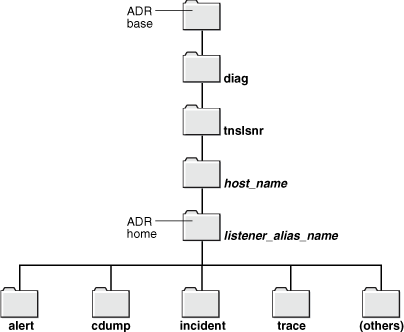
Description of the illustration netag136.gif
The following table lists the values of the path components for an Oracle Connection Manager instance.
Table 16-2 ADR Home Path Components for an Oracle Connection Manager Instance
| Path Component | Value for Oracle Connection Manager |
|---|---|
product_type |
netcman |
product_id |
host name |
instance_id |
Oracle Connection Manager instance name |
The following figure illustrates the directory hierarchy of the ADR for an Oracle Connection Manager instance. Other ADR homes for other Oracle products or components, such as Oracle ASM or Oracle Database, can exist within this hierarchy, under the same ADR base.
Figure 16-2 Directory Structure for an Oracle Connection Manager Instance
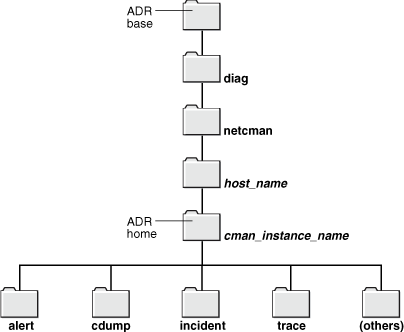
Description of the illustration netag137.gif
Within the ADR home directory are subdirectories where each instance, such as the database, listener, Oracle Connection Manager, or client, stores diagnostic data. The following table lists all the subdirectories shown in the preceding figure and their contents.
Table 16-3 ADR Home Subdirectories
| Subdirectory Name | Contents |
|---|---|
alert |
The XML-formatted log named log.xml. |
cdump |
Core files. |
incident |
Multiple subdirectories, in which each subdirectory is named for a particular incident, and each contains dumps pertaining only to that incident. |
trace |
Background and server process trace files, SQL trace files, and text version of the log.xml file in the alert directory. |
(others) |
Other subdirectories of ADR home, which store incident packages, health monitor reports, and other information. |
The ADR_BASE directory is the physical location in which one or more ADR homes are placed. Conceptually, it is the root directory of ADR.
Non-ADR (meaning that the DIAG_ADR_ENABLED parameter is set to OFF) diagnostic and tracing methods are still current and applicable but the parameters are ignored if ADR is enabled. ADR is enabled by default.
Diagnostic parameters are found in the following configuration files:
-
sqlnet.orafor clients -
listener.orafor listeners -
cman.orafor Oracle Connection Managers
The following table compares usage of diagnostic parameters found in the sqlnet.ora file, which is used in both ADR-based and non-ADR-based diagnostics.
Table 16-4 sqlnet.ora File Diagnostic Parameter Comparison
| Parameter | DIAG_ADR_ENABLED=ON | DIAG_ADR_ENABLED=OFF |
|---|---|---|
ADR_BASE |
Enabled | Disabled |
ENABLE_CONCISE_LOGS |
Enabled | Enabled |
LOG_SUPPRESSED_COUNT |
Enabled | Enabled |
LOG_SUPPRESSED_TIME |
Enabled | Enabled |
LOG_DIRECTORY_CLIENT |
Disabled | Enabled |
LOG_FILE_CLIENT |
Disabled | Enabled |
LOG_DIRECTORY_SERVER |
Disabled | Enabled |
TRACE_DIRECTORY_CLIENT |
Disabled | Enabled |
TRACE_DIRECTORY_SERVER |
Disabled | Enabled |
TRACE_LEVEL_CLIENT |
Enabled | Enabled |
TRACE_LEVEL_SERVER |
Enabled | Enabled |
TRACE_FILE_CLIENT |
Disabled | Enabled |
TRACE_FILE_SERVER |
Disabled | Enabled |
TRACE_UNIQUE_CLIENT |
Disabled | Enabled |
The following table compares usage of diagnostic parameters found in the listener.ora file, which is used in both ADR-based and non-ADR-based diagnostics.
Table 16-5 listener.ora File Diagnostic Parameter Comparison
| Parameter | DIAG_ADR_ENABLED=ON | DIAG_ADR_ENABLED=OFF |
|---|---|---|
ADR_BASE_listener_name |
Enabled | Disabled |
LOGGING_listener_name |
Enabled | Enabled |
TRACE_LEVEL_listener_name |
Enabled | Enabled |
TRACE_TIMESTAMP_listener_name |
Enabled | Enabled |
LOG_DIRECTORY_CLIENT_listener_name |
Disabled | Enabled |
LOG_FILE_CLIENT_listener_name |
Disabled | Enabled |
TRACE_DIRECTORY_CLIENT_listener_name |
Disabled | Enabled |
TRACE_FILELEN_listener_name |
Disabled | Enabled |
TRACE_FILENO_listener_name |
Disabled | Enabled |
The following table compares usage of diagnostic parameters found in the cman.ora file, which is used in both ADR-based and non-ADR-based diagnostics.
Table 16-6 cman.ora File Diagnostic Parameter Comparison
| Parameter | DIAG_ADR_ENABLED=ON | DIAG_ADR_ENABLED=OFF |
|---|---|---|
ADR_BASE |
Enabled | Disabled |
LOG_LEVEL |
Enabled | Enabled |
TRACE_LEVEL |
Enabled | Enabled |
TRACE_TIMESTAMP |
Enabled | Enabled |
LOG_DIRECTORY |
Disabled | Enabled |
TRACE_DIRECTORY |
Disabled | Enabled |
TRACE_FILELEN |
Disabled | Enabled |
TRACE_FILENO |
Disabled | Enabled |
-
For additional information about the location of the client ADR Home, see Oracle Call Interface Programmer’s Guide.
-
For additional information about ADR, see Oracle Database Administrator’s Guide.
-
For descriptions of the diagnostic parameters, see Oracle Database Net Services Reference.
ADRCI: ADR Command Interpreter
ADRCI is a command-line tool that is part of the fault diagnosability infrastructure. ADRCI enables you to do the following:
-
View diagnostic data within ADR
-
Package incident and problem information into a zip file for transmission to Oracle Support Services
Diagnostic data includes incident and problem descriptions, trace files, dumps, health monitor reports, alert log entries, and so on.
ADRCI has a rich command set, and can be used in interactive mode or within scripts. In addition, ADRCI can run scripts of ADRCI commands in the same way that SQL*Plus runs scripts with SQL and PL/SQL commands.
To view trace files using ADRCI, enter ADRCI at a command line. The following are common ADRCI commands used to check a client:
Client Side
adrci> SHOW ALERT
adrci> SHOW BASE -product client
adrci> SET BASE -product client
adrci> SHOW TRACEFILE
adrci> SHOW TRACE trace_file.trc
adrci> SHOW SPOOL
In the preceding commands, the SHOW ALERT command shows the log.xml file in a text editor, such as VI. The SHOW BASE -product client command displays the value of the ADR_BASE directory for the client. Use that value for client in the SET BASE command.
The following are common ADRCI commands used to check a server:
Server Side
adrci> SHOW BASE
adrci> SHOW TRACEFILE
adrci> SHOW TRACE trace_file.trc
Other ADRCI command options are available for a more targeted Oracle Net trace file analysis. Type HELP at the ADRCI prompt for help documentation.
See Also: Oracle Database Utilities for additional information about ADRCI