CREATE MLE MODULE
Purpose
Multilingual Engine (MLE) allows developers to write, store, and execute JavaScript code and WebAssembly modules in Oracle Database by using MLE modules.
Use CREATE MLE MODULE to create a new MLE module in the database. An MLE module can contain JavaScript source or a WebAssembly binary.
See Also: JavaScript Developer’s Guide
Syntax
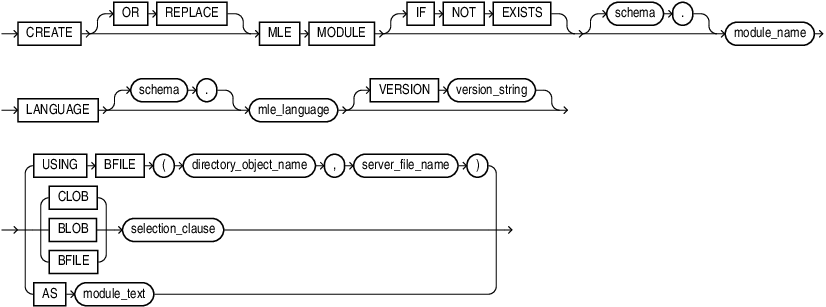
Description of the illustration create_mle_module.gif
Semantics
OR REPLACE
Specify OR REPLACE to re-create the module if it already exists. You can use this clause to change the definition of an existing module without dropping, re-creating, and regranting object privileges previously granted on it.
IF NOT EXISTS
Specifying IF NOT EXISTS has the following effects:
-
If the MLE module does not exist, a new MLE module is created at the end of the statement.
-
If the MLE module exists, this is the MLE module you have at the end of the statement. A new one is not created because the older one is detected.
You can have one of OR REPLACE or IF NOT EXISTS in a statement at a time. Using both OR REPLACE with IF NOT EXISTS in the very same statement results in the following error: ORA-11541: REPLACE and IF NOT EXISTS cannot coexist in the same DDL statement.
schema
Use schema to fully qualify the module name. If you do not specify schema, then the current schema is used.
The length of the module name must not exceed 128 bytes. MLE modules use the same namespace as tables and procedures.
LANGUAGE, VERSION
Use LANGUAGE to specify the MLE language of the created module. Specify JAVASCRIPT for a JavaScript module or WASM for a WebAssembly module. A module created with LANGUAGE WASM contains binary WebAssembly content. An ORA-04101 error is thrown if an unsupported MLE language is used.
The optional VERSION clause specifies a version string for the MLE module. Version strings are purely informational and do not influence any behavior of MLE or the RDBMS. The version string must fit into a VARCHAR2(256).
CLOB, BLOB, BFILE
Use USING to create MLE modules from code contained in CLOBs, BLOBs, or BFILEs.
You can specify the BFILE clause with a subquery or with a directory using directory_object_name and server_file_name to specify the directory and filename of the MLE module you want to use. Note that you must create the directory object before this step using CREATE DIRECTORY .
The CLOB | BLOB | BFILE clause specifies a subquery whose result must be a single row and column of the specified type (CLOB, BLOB, or BFILE) that holds the contents of the MLE module to be deployed. The CLOB option is available only if the MLE module contains textual data. The textual data in MLE modules contained in BLOBs and BFILEs is encoded in UTF-8.
For a WebAssembly module, use the BLOB or BFILE source form. The source query must return exactly one row and one column of the specified type. A WebAssembly module contains binary data and is not a text-based module.
AS
Use AS to specify the contents of the MLE module as a sequence of characters inlined in the DDL statement. As with CLOBs, the AS clause is only available when the source of the MLE module contains textual data. Do not encapsulate the character sequence within quotes. The character sequence is delimited by the end of the DDL statement.
Examples
The following example creates a JavaScript MLE module by using the AS clause:
CREATE OR REPLACE MLE MODULE hello_js
  LANGUAGE JAVASCRIPT AS
export function hello() {
  return 'Hello, World!';
}
The following statement creates a WebAssembly module from a BLOB returned by a query. The query returns one row and one column containing the WebAssembly binary:
CREATE OR REPLACE MLE MODULE test_wasm
  LANGUAGE WASM
  USING BLOB
    SELECT content
    FROM wasm_sources
    WHERE module_name = ‘MY_WASM_MODULE' AND VERSION = '1.0.1';
The following statements create a directory object and then create a WebAssembly module from a BFILE. The directory object identifies a location on the database server:
CREATE OR REPLACE DIRECTORY wasm_dir AS '<server_directory>';

CREATE OR REPLACE MLE MODULE test_wasm
  LANGUAGE WASM
  USING BFILE(wasm_dir, '<wasm_file>.wasm');
Restrictions on the AS and CLOB Forms
When you create a WebAssembly module, you cannot use the AS clause or the CLOB source form. These forms are available only for textual MLE modules because WebAssembly source is binary.
Privileges and Storage
- To create an MLE module in your own schema, you must have the
CREATE MLE MODULEprivilege. To create a module in another schema, you must have theCREATE ANY MLE MODULEprivilege. - When you use the
BLOBform, you must have access to the table that contains the WebAssembly binary or JavaScript module. - The same applies to the
CLOBform, which only applies to JavaScript modules since WASM modules are binary files by definition. - The directory object must identify a location accessible to the database server. Typically, a DBA or another user with the
CREATE DIRECTORYsystem privilege creates the directory object and grants you READ privilege on it. TheWRITEprivilege is required only when write access is needed. - A WebAssembly module contains binary data. It is not viewed as source text through
USER_SOURCE,ALL_SOURCE, orDBA_SOURCE.