CREATE ICEBERG TABLE
Purpose
Use CREATE ICEBERG TABLE to create an Iceberg table in an Iceberg catalog that has no representation in the database.
Prerequisites
To create and use a partitioned Iceberg table, the following requirements must be met:
-
The
DBMS_CLOUDpackage must be installed and available. -
For an on-premises database, the Data Studio package must be installed. See Oracle Data Studio Family of Packages of Database Utilities.
-
The
DBMS_CATALOGpackage must be installed and configured to access the remote Iceberg catalog. Mount the Iceberg catalog to the database usingDBMS_CATALOG.MOUNT_ICEBERG. -
An ACL must allow the database to reach the Iceberg catalog server and object storage endpoints.
-
You must have the
ADPUSERrole, which is part of the Data Studio installation. -
The database character set must be
AL32UTF8. -
To perform an
INSERT INTO ... SELECT(ITAS) operation, the source must be an Oracle table and the target must be an existing partitioned Iceberg table created usingCREATE ICEBERG TABLE. -
The
CREATE ICEBERG TABLEstatement must include thePARTITION BYclause and use a partition transform supported by Iceberg tables.
See Also:
-
The Data Studio Overview Page of Using Oracle Autonomous AI Database Serverless
-
Manage Catalogs with DBMS_CATALOG of Using Oracle Autonomous AI Database Serverless
-
Manage Catalogs Using Data Studio DBMS_CATALOG of Database Actions.
Syntax
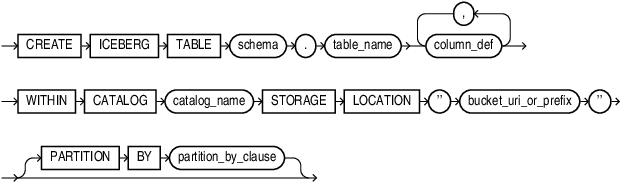
Description of the illustration create_iceberg_table.gif
partition_by_clause::=
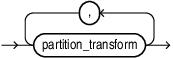
Description of the illustration partition_by_clause.gif
partition_transform::=
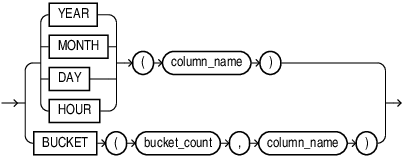
Description of the illustration partition_transform.gif
bucket_count::=
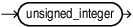
Description of the illustration bucket_count.gif
Semantics
Native Iceberg table creation supports the same data types as DML operations, including decimal, float, double, string, date, and timestamp.
-
catalog_name must identify an Iceberg REST catalog.
-
bucket_uri_or_prefix must be an S3-compatible endpoint
partition_transform
Iceberg tables use partition transforms to create partitions based on the data being ingested. The partition transforms supported by Iceberg tables are:
-
YEAR: Input columns can be ofdate,timestamp,timestamptz. Output is of typeint. -
MONTH: Inputs can be on one ofdate,timestamp,timestamptz,timestamp_ns,timestamptz_ns. Output is of typeint. -
DAY: Inputs can be on one ofdate,timestamp,timestamptz,timestamp_ns,timestamptz_ns. Output is of typeint. -
HOUR: Inputs can be on one oftimestamp,timestamptz,timestamp_ns,timestamptz_ns. Output is of typeint. -
BUCKET: Inputs can be on one ofint,long,decimal,string,date,timestamp,timestamptz,timestamp_ns,timestamptz_ns. Output is of typeint.
Restrictions
The following restrictions apply when creating or writing to partitioned Iceberg tables.
General Restrictions
-
The Iceberg table must comply with the
ICEBERG V2specification. -
An
INSERT INTO ... SELECT(ITAS) statement cannot be executed if another transaction is already open. Complete the current transaction before issuing an ITAS statement. -
After an ITAS operation, you must issue a
COMMITorROLLBACKbefore executing additional DML operations. -
While the ITAS transaction remains active:
-
DML operations on Oracle tables and Iceberg tables are not permitted.
-
Queries against the target Iceberg table are not permitted.
-
Queries against other Oracle tables and Iceberg tables are permitted.
-
-
The Parquet compression level is
ZSTD Level 3. -
A reference to the table (
schema_name.table_name@catalog_name) can appear only once in the SQL statement. -
$and#symbols are not supported in Iceberg table names.
Schema Restrictions
-
The result set returned by the
SELECTstatement in an ITAS operation must exactly match the schema of the target Iceberg table. -
Default values for omitted or missing columns are not supported.
-
Constraints are not supported in the
CREATE ICEBERG TABLEstatement. -
Iceberg table column names must not exceed 128 ASCII characters to support ITAS operations.
Unsupported Features
The following features are not supported for partitioned Iceberg tables:
-
DML error logging
-
Autonomous transactions
-
AS OF SCNqueries -
Iceberg time travel queries using the
@catalogsyntax -
Sessionless transactions and distributed transactions
-
Remote source tables referenced through database links in the
SELECTclause of an ITAS operation
Catalog Naming Restrictions
Catalog names must meet the following requirements:
-
Catalog names must contain only ASCII characters.
-
Multibyte characters are not supported.
-
Catalog names are case-insensitive and are stored internally as uppercase ASCII.
-
Catalog names must conform to the naming rules for Oracle AI Database links.
Supported Data Types
The following Iceberg table column data types are supported:
-
INT -
LONG -
DECIMAL -
FLOAT -
DOUBLE -
STRING(the maximum length of the string that can be read is 4000CHAR) -
DATE -
TIMESTAMP -
TIMESTAMPTZ
Unsupported Data Types
The following data types are not supported for partitioned Iceberg tables:
-
TIME -
UUID -
FIXED -
BINARY
Troubleshooting
To access the table after creation run the following command, if the catalog’s Oracle Database representation does not identify the table:
EXEC DBMS_CATALOG.FLUSH_CATALOG_CACHE('<catalog name>');