GRANT
Purpose
Use the GRANT statement to grant:
-
Administrative privileges to users only (not to roles). Table 18-1
Refer to the Database Security Guide for more information about administrative privileges Managing Administrative Privileges
-
System privileges to users and roles.Table 18-2
Note that
ANYsystem privileges, for example,SELECT ANY TABLE, will not work onSYSobjects or other dictionary objects. -
Schema privileges to users and roles. Table 18-3
-
Roles to users, roles, and program units. The granted roles can be either user-defined (local or external) or predefined. For a list of predefined roles, refer to Oracle AI Database Security Guide.
-
Object privileges for a particular object to users and roles. Table 18-4
Note: Global roles (created with IDENTIFIED GLOBALLY) are granted through enterprise roles and cannot be granted using the GRANT statement.
Notes on Authorizing Database Users
You can authorize database users through means other than the database and the GRANT statement.
-
Many database privileges are granted through supplied PL/SQL and Java packages. For information on those privileges, refer to the documentation for the appropriate package.
-
Some operating systems have facilities that let you grant roles to the database users with the initialization parameter
OS_ROLES. If you choose to grant roles to users through operating system facilities, then you cannot also grant roles to users with theGRANTstatement, although you can use theGRANTstatement to grant system privileges to users and system privileges and roles to other roles.
Note on Oracle Automatic Storage Management
A user authenticated AS SYSASM can use this statement to grant the administrative privileges SYSASM, SYSOPER, and SYSDBA to a user in the Oracle ASM password file of the current node.
Note on Editionable Objects
A GRANT operation to grant object privileges on an editionable object actualizes the object in the current edition. See Oracle AI Database Development Guide for more information about editions and editionable objects.
See Also:
-
CREATE USER and CREATE ROLE for definitions of local, global, and external privileges
-
Oracle AI Database Security Guide for information about other authorization methods and for information about privileges
-
REVOKE for information on revoking grants
Prerequisites
To grant a system privilege, one of the following conditions must be met:
-
You must have been granted the
GRANTANYPRIVILEGEsystem privilege. In this case, if you grant the system privilege to a role, then a user to whom the role has been granted does not have the privilege unless the role is enabled in user’s session. -
You must have been granted the system privilege with the
ADMINOPTION. In this case, if you grant the system privilege to a role, then a user to whom the role has been granted has the privilege regardless whether the role is enabled in the user’s session.
To grant a role to a user or another role, you must have been directly granted the role with the ADMIN OPTION, or you must have been granted the GRANT ANY ROLE system privilege, or you must have created the role.
To grant a role to a program unit in your own schema, you must have been directly granted the role with either the ADMIN OPTION or the DELEGATE OPTION, or you must have been granted the GRANT ANY ROLE system privilege, or you must have created the role.
To grant a role to a program unit in another user’s schema, you must be the user SYS and the role must have been created by the schema owner or directly granted to the schema owner.
To grant an object privilege on a user, by specifying the ON USER clause of the on_object_clause, you must be the user on whom the privilege is granted, or you must have been granted the object privilege on that user with the WITH GRANT OPTION, or you must have been granted the GRANT ANY OBJECT PRIVILEGE system privilege. If you can grant an object privilege on a user only because you have the GRANT ANY OBJECT PRIVILEGE, then the GRANTOR column of the *_TAB_PRIVS views displays the user on whom the privilege is granted rather than the user who issued the GRANT statement.
To grant an object privilege on all other types of objects, you must own the object, or the owner of the object must have granted you the object privileges with the WITH GRANT OPTION, or you must have been granted the GRANT ANY OBJECT PRIVILEGE system privilege. If you have the GRANT ANY OBJECT PRIVILEGE, then you can grant the object privilege only if the object owner could have granted the same object privilege. In this case, the GRANTOR column of the *_TAB_PRIVS views displays the object owner rather than the user who issued the GRANT statement.
You can revoke privileges on an object if you have the GRANT ANY object privilege. This does not apply to dictionary protected schemas. The ANY keyword in reference to a system privilege means that the user can perform the privilege on any objects owned by any user except for SYS.
To specify the CONTAINER clause, you must be connected to a multitenant container database (CDB). To specify CONTAINER = ALL, the current container must be the root.
Syntax
grant::=
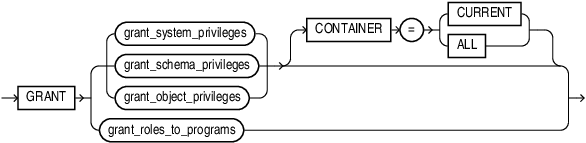
Description of the illustration grant.gif
(grant_system_privileges::=, grant_schema_privileges::=,grant_object_privileges::=, grant_roles_to_programs::=)
grant_system_privileges::=

Description of the illustration grant_system_privileges.gif
(grantee_clause::=, grantee_identified_by::=)
grant_schema_privileges::=
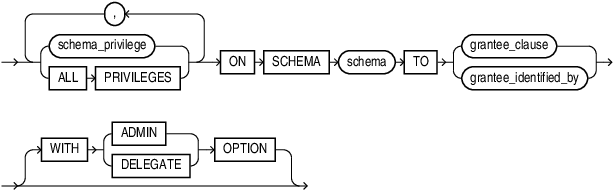
Description of the illustration grant_schema_privileges.gif
grantee_clause::=
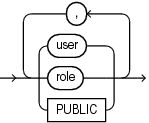
Description of the illustration grantee_clause.gif
grantee_identified_by::=

Description of the illustration grantee_identified_by.gif
grant_object_privileges::=
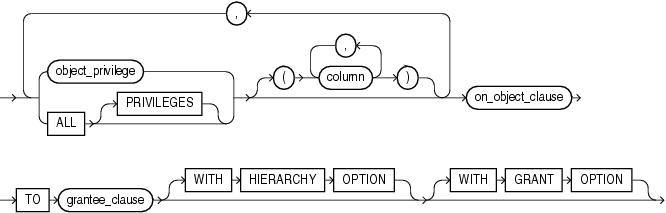
Description of the illustration grant_object_privileges.gif
(on_object_clause::=, grantee_clause::=)
on_object_clause::=
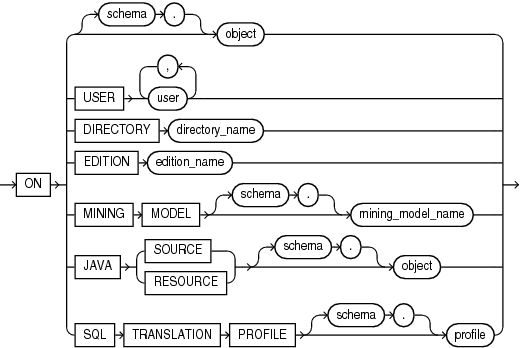
Description of the illustration on_object_clause.gif
grant_roles_to_programs::=
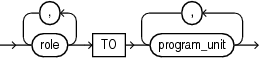
Description of the illustration grant_roles_to_programs.gif
program_unit::=
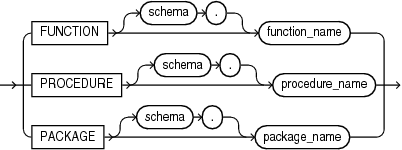
Description of the illustration program_unit.gif
Semantics
grant_system_privileges
Use these clauses to grant system privileges.
system_privilege
Specify the system privilege you want to grant. Table 18-2 lists the system privileges, organized by the database object operated upon.
-
If you grant a privilege to a user, then the database adds the privilege to the user’s privilege domain. The user can immediately exercise the privilege. Oracle recommends that you only grant the
ANYprivileges to trusted users. -
If you grant a privilege to a role, then the database adds the privilege to the privilege domain of the role. Users who have been granted and have enabled the role can immediately exercise the privilege. Other users who have been granted the role can enable the role and exercise the privilege.
See Also: Granting a System Privilege to a User: Example and “Granting System Privileges to a Role: Example”
- If you grant a privilege to PUBLIC, then the database adds the privilege to the privilege domains of each user. All users can immediately perform operations authorized by the privilege. Oracle recommends against granting system privileges to
PUBLIC.
role
Specify the role you want to grant. You can grant a database predefined role or a user-defined role.
-
If you grant a role to a user, then the database makes the role available to the user. The user can immediately enable the role and exercise the privileges in the privilege domain of the role.
In the case of a secure application role, you need not grant such a role directly to the user. You can let the associated PL/SQL package do this, assuming the user passes appropriate security policies. For more information, see the
CREATEROLEsemantics for USING package and Oracle AI Database Security Guide -
If you grant a role to another role, then the database adds the privilege domain of the granted role to the privilege domain of the grantee role. Users who have been granted the grantee role can enable it and exercise the privileges in the granted role’s privilege domain.
-
If you grant a role to PUBLIC, then the database makes the role available to all users. All users can immediately enable the role and exercise the privileges in the privilege domain of the role.
Note: Unlimited tablespace is not granted to the DBA role, but when a grant is executed to grant DBA to a user, unlimited tablespace is granted as part of the same grant, provided the user executing the GRANT command has unlimited tablespace granted with the ADMIN or GRANT ANY PRIVILEGE system privilege .
ALL PRIVILEGES
Specify ALL PRIVILEGES to grant all of the system privileges listed in Table 18-2, except the SELECT ANY DICTIONARY, ALTER DATABASE LINK, and ALTER PUBLIC DATABASE LINK privileges.
However, grant and revoke ALL PRIVILEGES do not apply to ADMINISTER KEY MANAGEMENT. Granting ALL PRIVILEGES does not grant ADMINISTER KEY MANAGEMENT. Similarly, revoking ALL PRIVILEGES does not revoke ADMINISTER KEY MANAGEMENT.
See Also:
-
Oracle AI Database Security Guide for information on the Oracle predefined roles
-
CREATE ROLE for information on creating a user-defined role
grantee_clause
Use the grantee_clause to specify the users or roles to which the system privilege, role, or object privilege is granted.
PUBLIC
Specify PUBLIC to grant the privileges to all users. Oracle recommends against granting system privileges to PUBLIC.
Restriction on Grantees
A user, role, or PUBLIC cannot appear more than once in the grantee_clause.
grantee_identified_by
The grantee_identified_by clause lets you assign passwords to users when granting them system privileges and roles. You must specify an equal number of users and passwords. The first password is assigned to the first user, the second password is assigned to the second user, and so on. If a specified user exists, then the database resets the user’s password. If a specified user does not exist, then the database creates the user with the password.
You can set the password to a maximum length of 1024 bytes.
See Also: CREATE USER for restrictions on usernames and passwords and “Assigning User Passwords When Granting a System Privilege: Example”
Specify WITH ADMIN OPTION to enable the grantee to:
-
Grant the privilege or role to another user or role, unless the role is a
GLOBALrole -
Revoke the privilege or role from another user or role
-
Alter the privilege or role to change the authorization needed to access it
-
Drop the privilege or role
-
Grant the role to a program unit in the grantee’s schema.
-
Revoke the role from a program unit in the grantee’s schema.
If you grant a system privilege or role to a user without specifying WITH ADMIN OPTION, and then subsequently grant the privilege or role to the user WITH ADMIN OPTION, then the user has the ADMIN OPTION on the privilege or role.
To revoke the ADMIN OPTION on a system privilege or role from a user, you must revoke the privilege or role from the user altogether and then grant the privilege or role to the user without the ADMIN OPTION.
See Also: “Granting a Role with the ADMIN OPTION: Example”
WITH DELEGATE OPTION
You can specify this clause only when granting a role to a user.
Specify WITH DELEGATE OPTION to enable the grantee to:
-
Grant the role to a program unit in the grantee’s schema
-
Revoke the role from a program unit in the grantee’s schema
If you grant a role to a user without specifying WITH DELEGATE OPTION, and then subsequently grant the role to the user WITH DELEGATE OPTION, then the user has the DELEGATE OPTION on the role.
To revoke the DELEGATE OPTION on a role from a user, you must revoke the role from the user altogether and then grant the role to the user without the DELEGATE OPTION.
See Also:
-
The grant_roles_to_programs clause for more information on granting roles to program units
Restrictions on Granting System Privileges and Roles
Privileges and roles are subject to the following restrictions:
-
A privilege or role cannot appear more than once in the list of privileges and roles to be granted.
-
You cannot grant a role to itself.
-
You cannot grant a role
IDENTIFIEDGLOBALLYto anything. -
You cannot grant a role
IDENTIFIEDEXTERNALLYto a global user or global role. -
You cannot grant roles circularly. For example, if you grant the role
bankerto the roleteller, then you cannot subsequently granttellertobanker. -
You cannot grant an
IDENTIFIEDBYrole,IDENTIFIEDUSINGrole, orIDENTIFIEDEXTERNALLYrole to another role.
grant_schema_privileges
You can grant a schema level privilege to any user or any role if you are a user who :
-
Owns the schema.
-
Has a schema level privilege
WITH ADMIN OPTION. -
Has the
GRANT ANY SCHEMA PRIVILEGEsystem privilege. If you specifyALL PRIVILEGES, all the schema level privileges inTable 18-3 are granted.
You cannot grant schema privileges on the SYS schema.
See Also: Oracle AI Database Security Guide
grant_object_privileges
Use these clauses to grant object privileges.
object_privilege
Specify the object privilege you want to grant. Table 18-4 lists the object privileges, organized by the type of object on which they can be granted. When you grant an object privilege on a editionable object, either to a user or to a role, the object is actualized in the edition in which the grant is made. Refer to CREATE EDITION for information on editionable object types and editions.
Note:
To grant SELECT on a view to another user, either you must own all of the objects underlying the view or you must have been granted the SELECT object privilege WITH GRANT OPTION on all of those underlying objects. This is true even if the grantee already has SELECT privileges on those underlying objects.
To grant READ on a view to another user, either you must own all of the objects underlying the view or you must have been granted the READ or SELECT object privilege WITH GRANT OPTION on all of those underlying objects. This is true even if the grantee already has the READ or SELECT privilege on those underlying objects.
Restriction on Object Privileges
A privilege cannot appear more than once in the list of privileges to be granted.
Specify ALL to grant all the privileges for the object that you have been granted with the GRANT OPTION. The user who owns the schema containing an object automatically has all privileges on the object with the GRANT OPTION. The keyword PRIVILEGES is provided for semantic clarity and is optional.
column
Specify the table or view column on which privileges are to be granted. You can specify columns only when granting the INSERT, REFERENCES, or UPDATE privilege. If you do not list columns, then the grantee has the specified privilege on all columns in the table or view.
For information on existing column object grants, query the USER_, ALL_, or DBA_COL_PRIVS data dictionary view.
See Also: Oracle AI Database Reference for information on the data dictionary views and “Granting Multiple Object Privileges on Individual Columns: Example”
on_object_clause
The on_object_clause identifies the object on which the privileges are granted. Users, directory objects, editions, data mining models, Java source and resource schema objects, and SQL translation profiles are identified separately because they reside in separate namespaces.
See Also: “Granting Object Privileges to a Role: Example”
object
Specify the schema object on which the privileges are to be granted. If you do not qualify object with schema, then the database assumes the object is in your own schema. The object can be one of the following types:
-
Table, view, or materialized view
-
Sequence
-
Procedure, function, macro, or package
-
User-defined type
-
Synonym for any of the preceding items
-
Directory, library, operator, or indextype
-
Java source, class, or resource
You cannot grant privileges directly to a single partition of a partitioned table.
See Also: “Granting Object Privileges on a Table to a User: Example”, “Granting Object Privileges on a View: Example”, and “Granting Object Privileges to a Sequence in Another Schema: Example”
ON USER
Specify the database user you want to grant privileges to.
Restriction on Granting Privileges on Users
You cannot grant privileges on user PUBLIC.
See Also: “Granting an Object Privilege on a User: Example”
ON DIRECTORY
Specify the name of the directory object on which privileges are to be granted. You cannot qualify directory_name with a schema name.
See Also: CREATE DIRECTORY and “Granting an Object Privilege on a Directory: Example”
ON EDITION
Specify the name of the edition on which the USE object privilege is to be granted. You cannot qualify edition_name with a schema name.
ON MINING MODEL
Specify the name of the mining model on which privileges are to be granted. If you do not qualify mining_model_name with schema, then the database assumes that the mining model is in your own schema.
ON JAVA SOURCE | RESOURCE
Specify the name of the Java source or resource schema object on which privileges are to be granted. If you do not qualify object with schema, then the database assumes that the object is in your own schema.
See Also: CREATE JAVA
ON SQL TRANSLATION PROFILE
Specify the name of the SQL translation profile on which privileges are to be granted. If you do not qualify profile with schema, then the database assumes that the profile is in your own schema.
Specify WITH HIERARCHY OPTION to grant the specified object privilege on all subobjects of object, such as subviews created under a view, including subobjects created subsequent to this statement.
This clause is meaningful only in combination with the READ or SELECT object privilege.
Specify WITH GRANT OPTION to enable the grantee to grant the object privileges to other users and roles.
If you grant an object privilege to a user without specifying WITH GRANT OPTION, and then subsequently grant the privilege to the user WITH GRANT OPTION, then the user has the GRANT OPTION on the privilege.
To revoke the GRANT OPTION on an object privilege from a user, you must revoke the privilege from the user altogether and then grant the privilege to the user without the GRANT OPTION.
Restriction on Granting WITH GRANT OPTION
You can specify WITH GRANT OPTION only when granting to a user or to PUBLIC, not when granting to a role.
grant_roles_to_programs
Use this clause to grant roles to program units. Such roles are called code based access control (CBAC) roles.
role
Specify the role you want to grant. You can grant a database predefined role or a user-defined role. The role must have been created by or directly granted to the schema owner of the program unit.
program_unit
Specify the program unit to which the role is to be granted. You can specify a PL/SQL function, procedure, or package. If you do not specify schema, then the database assumes the function, procedure, or package is in your own schema.
See Also: Oracle AI Database Security Guide for more information on granting code based access control roles to program units
CONTAINER Clause
If the current container is a pluggable database (PDB):
- Specify
CONTAINER=CURRENTto locally grant a system privilege, object privilege, or role to a user or role. The privilege or role is granted to the user or role only in the current PDB.
If the current container is the root:
-
Specify
CONTAINER=CURRENTto locally grant a system privilege, object privilege, or role to a common user or common role. The privilege or role is granted to the user or role only in the root. -
Specify
CONTAINER=ALLto commonly grant a system privilege, object privilege on a common object, or role, to a common user or common role.
If you omit this clause, then CONTAINER = CURRENT is the default.
Note: If you specify the CONTAINER clause when granting a privilege or role, then the current container must be the same container and you must specify the same CONTAINER clause when you revoke the privilege or role. Refer to the CONTAINER Clause of the REVOKE statement for more information.
Listings of System Administrative, System, Schema, and Object Privileges
Table 1 Administrative Privileges
| Administrative Privilege Name | Operations Authorized |
|---|---|
SYSBACKUP |
Perform the following backup and recovery operations:
Create, use, view, and drop restore points (including guaranteed restore points). Execute procedures in the
Includes the |
SYSDBA |
This is the most powerful administrative privilege. It allows most operations including the ability to view user data.
Includes the |
SYSDG |
Perform the following Oracle Data Guard operations:
Create, use, view, and drop restore points (including guaranteed restore points).
Includes the |
SYSKM |
Perform the following encryption key management operations: Connect to the database even if the database is not open.
Includes the |
SYSOPER |
Includes the |
Table 2 System Privileges (Organized by the Database Object Operated Upon)
| System Privilege Name | Operations Authorized |
|---|---|
| Advisor Framework Privileges: | All of the advisor framework privileges are part of the DBA role. |
ADVISOR |
Access the advisor framework through PL/SQL packages such as DBMS_ADVISOR and DBMS_SQLTUNE. |
ADMINISTER SQL TUNING SET |
Create, drop, select (read), load (write), and delete SQL tuning sets owned by the grantee through the DBMS_SQLTUNE package. |
ADMINISTER ANY SQL TUNING SET |
Create, drop, select (read), load (write), and delete SQL tuning sets owned by any user through the DBMS_SQLTUNE package. |
CREATE ANY SQL PROFILE |
Accept a SQL Profile recommended by the SQL Tuning Advisor, which is accessed through Enterprise Manager or by the Note: This privilege has been deprecated in favor of |
ALTER ANY SQL PROFILE |
Alter the attributes of an existing SQL Profile. Note: This privilege has been deprecated in favor of |
DROP ANY SQL PROFILE |
Drop existing SQL Profiles. Note: This privilege has been deprecated in favor of |
ADMINISTER SQL MANAGEMENT OBJECT |
Create, alter, and drop SQL Profiles owned by any user through the DBMS_SQLTUNE package. |
| ANALYTIC VIEWS: | - |
CREATE ANALYTIC VIEW |
Create analytic views in the grantee’s schema. |
CREATE ANY ANALYTIC VIEW |
Create analytic views in any schema except SYS, AUDSYS. |
ALTER ANY ANALYTIC VIEW |
Rename analytic views in any schema except SYS, AUDSYS. |
DROP ANY ANALYTIC VIEW |
Drop analytic views in any schema except SYS, AUDSYS . |
| APPLICATION IDENTITY: | - |
CREATE APPLICATION IDENTITY |
Create application identity. |
DROP APPLICATION IDENTITY |
Drop application idenity. |
| ASSERTIONS: | - |
CREATE ASSERTION |
This system privilege allows the grantee to create assertions in its schema. When CREATE ASSERTION is granted, the grantee implicitly can also execute DROP ASSERTION and ALTER ASSERTION on assertions in its schema. |
CREATE ANY ASSERTION |
This system privilege allows the grantee to create assertions in any schema except SYS, AUDSYS. |
ALTER ANY ASSERTION |
This system privilege allows the grantee to alter assertions in any schema except SYS, AUDSYS. |
DROP ANY ASSERTION |
This system privilege allows the grantee to drop assertions in any schema except SYS, AUDSYS. |
| ATTRIBUTE DIMENSIONS: | - |
CREATE ATTRIBUTE DIMENSION |
Create attribute dimensions in the grantee’s schema. |
CREATE ANY ATTRIBUTE DIMENSION |
Create attribute dimensions in any schema except SYS,AUDSYS. |
ALTER ANY ATTRIBUTE DIMENSION |
Rename attribute dimensions in any schema except SYS,AUDSYS. |
DROP ANY ATTRIBUTE DIMENSION |
Drop attribute dimensions in any schema except SYS,AUDSYS. |
| AUDIT: | - |
AUDIT ANY |
Audit an object in any schema, except SYS,AUDSYS, using AUDIT schema_objects statements. |
AUDIT SYSTEM |
Issue AUDIT statements. |
ADMINISTER FINE GRAINED AUDIT POLICY |
Allow management of fine-grained audit policies |
| CLUSTERS: | - |
CREATE CLUSTER |
Create clusters in the grantee’s schema. |
CREATE ANY CLUSTER |
Create clusters in any schema except SYS,AUDSYS. Behaves similarly to CREATE ANY TABLE. |
ALTER ANY CLUSTER |
Alter clusters in any schema except SYS, AUDSYS. |
DROP ANY CLUSTER |
Drop clusters in any schema except SYS,AUDSYS. |
| CONTEXTS: | - |
CREATE ANY CONTEXT |
Create any context namespace. |
DROP ANY CONTEXT |
Drop any context namespace. |
| DATA GRANT: | - |
CREATE DATA GRANT |
Create data grants for rows and columns on tables and views in any schema. |
ADMINISTER ANY DATA GRANT |
Create data grants for rows and columns on tables and views. |
SET USE DATA GRANTS ONLY |
Enable mandatory access control for a table or view using SET USE DATA GRANTS ONLY statement. |
DROP ANY DATA GRANT |
Drop data grants for rows and columns on tables and views in any schema. |
| DATA REDACTION: | - |
EXEMPT REDACTION POLICY |
Bypass any existing Oracle Data Redaction policies and view actual data from tables or views on which Data Redaction policies are defined. |
ADMINISTER REDACTION POLICY |
Allow management of Redaction policies . |
| DATA ROLE: | - |
CREATE DATA ROLE |
Create data role. |
DROP DATA ROLE |
Drop data role. |
GRANT ANY DATA ROLE |
Granting and revoking data roles. |
| DATABASE: | - |
ALTER DATABASE |
Alter the database. |
ALTER SYSTEM |
Issue ALTER SYSTEM statements. |
| DATABASE LINKS: | - |
CREATE DATABASE LINK |
Create private database links in the grantee’s schema. |
CREATE PUBLIC DATABASE LINK |
Create public database links. |
ALTER DATABASE LINK |
Modify a fixed-user database link when the password of the connection or authentication user changes. |
ALTER PUBLIC DATABASE LINK |
Modify a public fixed-user database link when the password of the connection or authentication user changes. |
DROP PUBLIC DATABASE LINK |
Drop public database links. |
| DEBUGGING: | - |
DEBUG CONNECT SESSION |
Connect the current session to a debugger. |
DEBUG ANY PROCEDURE |
Debug all PL/SQL and Java code in any database object. Display information on all SQL statements executed by the application. Note: Granting this privilege is equivalent to granting the |
| DICTIONARIES: | - |
ANALYZE ANY DICTIONARY |
Analyze any data dictionary object. |
| DIMENSIONS: | - |
CREATE DIMENSION |
Create dimensions in the grantee’s schema. |
CREATE ANY DIMENSION |
Create dimensions in any schema except SYS,AUDSYS. |
ALTER ANY DIMENSION |
Alter dimensions in any schema except SYS,AUDSYS. |
DROP ANY DIMENSION |
Drop dimensions in any schema except SYS,AUDSYS. |
| DIRECTIVES: | - |
CREATE ANY VALIDATION DIRECTIVE |
Create a directive in your own schema on a table in another user's schema . Create a directive in an other schema on a table in another user's schema . This privilege grants read-equivalent access to all duality view DML payloads. |
CREATE NOTIFICATION DIRECTIVE |
Create a notification directive in your own schema on a table or JSON-relational duality view in your schema. |
CREATE ANY NOTIFICATION DIRECTIVE |
Create a notification directive in any schema on a table or JSON-relational duality view in any schema. |
DROP ANY NOTIFICATION DIRECTIVE |
Drop a notification directive in another user’s schema. |
ALTER ANY NOTIFICATION DIRECTIVE |
Alter a notification directive in another user’s schema. |
| DIRECTORIES: | - |
CREATE ANY DIRECTORY |
Create directory database objects. |
DROP ANY DIRECTORY |
Drop directory database objects. |
| DOMAINS: | - |
CREATE DOMAIN |
Create a domain in your own schema. |
CREATE ANY DOMAIN |
Create a domain in any schema. |
ALTER ANY DOMAIN |
Alter a domain in any schema. |
DROP ANY DOMAIN |
Drop a domain in any schema. |
EXECUTE ANY DOMAIN |
Refer to a domain in any schema. |
| EDITIONS: | - |
CREATE ANY EDITION |
Create editions. |
DROP ANY EDITION |
Drop editions. |
| END USER: | - |
CREATE END USER |
Create end users. |
ALTER END USER |
Alter end users. |
DROP END USER |
Drop end users. |
| END USER CONTEXT: | - |
CREATE END USER CONTEXT |
Create end user context. |
DROP END USER CONTEXT |
Drop end user context. |
UPDATE ANY END USER CONTEXT |
Modify end user context. |
SELECT ANY END USER CONTEXT |
Retrieve attributes and values for a context using the ORA_END_USER_CONTEXT function. |
| FLASHBACK DATA ARCHIVES: | - |
FLASHBACK ARCHIVE ADMINISTER |
Create, alter, or drop any flashback data archive. |
| HIERARCHIES | - |
CREATE HIERARCHY |
Create hierarchies in the grantee’s schema. |
CREATE ANY HIERARCHY |
Create hierarchies in any schema except SYS,AUDSYS. |
ALTER ANY HIERARCHY |
Rename hierarchies in any schema except SYS,AUDSYS. |
DROP ANY HIERARCHY |
Drop hierarchies in any schema except SYS, AUDSYS. |
| INDEXES: | - |
CREATE ANY INDEX |
Create in any schema, except SYS, AUDSYS, a domain index or an index on any table in any schema except SYS,AUDSYS. |
ALTER ANY INDEX |
Alter indexes in any schema except SYS,AUDSYS. |
DROP ANY INDEX |
Drop indexes in any schema except SYS,AUDSYS. |
| INDEXTYPES: | - |
CREATE INDEXTYPE |
Create indextypes in the grantee’s schema. |
CREATE ANY INDEXTYPE |
Create indextypes in any schema except SYS and create comments on indextypes in any schema except SYS. |
ALTER ANY INDEXTYPE |
Modify indextypes in any schema except SYS,AUDSYS. |
DROP ANY INDEXTYPE |
Drop indextypes in any schema except SYS,AUDSYS. |
EXECUTE ANY INDEXTYPE |
Reference indextypes in any schema except SYS,AUDSYS. |
| JOB SCHEDULER OBJECTS: | The following privileges are needed to execute procedures in the DBMS_SCHEDULER package. This privileges do not apply to lightweight jobs, which are not database objects. Refer to Oracle AI Database Administrator’s Guide for more information about lightweight jobs. |
CREATE JOB |
Create, alter, or drop jobs, chains, schedules, programs, credentials, resource objects, or incompatibility resource objects in the grantee’s schema. |
CREATE ANY JOB |
Create, alter, or drop jobs, chains, schedules, programs, credentials, resource objects, or incompatibility resource objects in any schema except Note: This extremely powerful privilege allows the grantee to execute code as any other user. It should be granted with caution. |
CREATE EXTERNAL JOB |
Create in the grantee’s schema an executable scheduler job that runs on the operating system. |
EXECUTE ANY CLASS |
Specify any job class in a job in the grantee’s schema. |
EXECUTE ANY PROGRAM |
Use any program in a job in the grantee’s schema. |
MANAGE SCHEDULER |
Create, alter, or drop any job class, window, or window group. |
USE ANY JOB RESOURCE |
Associate any schedule resource object with any program or job in the grantee’s schema. |
| KEY MANAGEMENT FRAMEWORK: | - |
ADMINISTER KEY MANAGEMENT |
Manage keys and keystores. |
| LIBRARIES: | Caution: CREATE LIBARARY, CREATE ANY LIBRARY, ALTER ANY LIBRARY, and EXECUTE ANY LIBRARY are extremely powerful privileges that should be granted only to trusted users. Refer to Oracle AI Database Security Guide before granting these privileges. |
CREATE LIBRARY |
Create external procedure or function libraries in the grantee’s schema. |
CREATE ANY LIBRARY |
Create external procedure or function libraries in any schema except SYS,AUDSYS. |
ALTER ANY LIBRARY |
Alter external procedure or function libraries in any schema except SYS,AUDSYS. |
DROP ANY LIBRARY |
Drop external procedure or function libraries in any schema except SYS,AUDSYS. |
EXECUTE ANY LIBRARY |
Use external procedure or function libraries in any schema except SYS,AUDSYS. |
| LOGMINER: | - |
LOGMINING |
Execute procedures in the DBMS_LOGMNR package in a CDB or a PDB. Query the contents of the V$LOGMNR_CONTENTS view. |
| MATERIALIZED VIEWS: | - |
CREATE MATERIALIZED VIEW |
Create materialized views in the grantee’s schema. |
CREATE ANY MATERIALIZED VIEW |
Create materialized views in any schema except SYS,AUDSYS. |
ALTER ANY MATERIALIZED VIEW |
Alter materialized views in any schema except SYS,AUDSYS. |
DROP ANY MATERIALIZED VIEW |
Drop materialized views in any schema except SYS,AUDSYS. |
QUERY REWRITE |
This privilege has been deprecated. No privileges are needed for a user to enable rewrite for a materialized view that references tables or views in the user’s own schema. |
GLOBAL QUERY REWRITE |
Enable rewrite using a materialized view when that materialized view references tables or views in any schema except SYS. |
ON COMMIT REFRESH |
Create a refresh-on-commit materialized view on any table in the database. Alter a refresh-on-demand materialized view on any table in the database to refresh-on-commit. |
FLASHBACK ANY TABLE |
Issue a SQL Flashback Query on any table, view, or materialized view in any schema except SYS. This privilege is not needed to execute the DBMS_FLASHBACK procedures. |
| MINING MODELS: | - |
CREATE MINING MODEL |
Create mining models in the grantee’s schema using the DBMS_DATA_MINING.CREATE_MODEL procedure. |
CREATE ANY MINING MODEL |
Create mining models in any schema, except SYS, AUDSYS, using the DBMS_DATA_MINING.CREATE_MODEL procedure. |
ALTER ANY MINING MODEL |
Change the mining model name or the associated cost matrix of a model in any schema, except SYS, AUDSYS, using the applicable DBMS_DATA_MINING procedures. |
DROP ANY MINING MODEL |
Drop mining models in any schema, except SYS,AUDSYS, using the DBMS_DATA_MINING.DROP_MODEL procedure. |
SELECT ANY MINING MODEL |
Score or view mining models in any schema except SYS, AUDSYS. Scoring is done either with the PREDICTION family of SQL functions or with the DBMS_DATA_MINING.APPLY procedure. Viewing the model is done with the DBMS_DATA_MINING.GET_MODEL_DETAILS_* procedures. |
COMMENT ANY MINING MODEL |
Create comments on mining models in any schema, except SYS, AUDSYS, using the SQL COMMENT statement. |
| OLAP CUBES: | The following privileges are valid when you are using the database with the OLAP option. |
CREATE CUBE |
Create OLAP cubes in the grantee’s schema. |
CREATE ANY CUBE |
Create OLAP cubes in any schema except SYS,AUDSYS. |
ALTER ANY CUBE |
Alter OLAP cubes in any schema except SYS,AUDSYS. |
DROP ANY CUBE |
Drop OLAP cubes in any schema except SYS,AUDSYS. |
SELECT ANY CUBE |
Query or view OLAP cubes in any schema except SYS,AUDSYS. |
UPDATE ANY CUBE |
Update OLAP cubes in any schema except SYS,AUDSYS. |
| OLAP CUBE MEASURE FOLDERS: | The following privileges are valid when you are using the database with the OLAP option. |
CREATE MEASURE FOLDER |
Create OLAP measure folders in the grantee’s schema. |
CREATE ANY MEASURE FOLDER |
Create OLAP measure folders in any schema except SYS,AUDSYS. |
DELETE ANY MEASURE FOLDER |
Delete a measure from an OLAP measure folder in any schema except SYS,AUDSYS. |
DROP ANY MEASURE FOLDER |
Drop OLAP measure folders in any schema except SYS,AUDSYS. |
INSERT ANY MEASURE FOLDER |
Insert a measure into an OLAP measure folder in any schema except SYS,AUDSYS. |
| OLAP CUBE DIMENSIONS: | The following privileges are valid when you are using the database with the OLAP option. |
CREATE CUBE DIMENSION |
Create OLAP cube dimension in the grantee’s schema. |
CREATE ANY CUBE DIMENSION |
Create OLAP cube dimensions in any schema except SYS,AUDSYS. |
ALTER ANY CUBE DIMENSION |
Alter OLAP cube dimensions in any schema except SYS,AUDSYS. |
DELETE ANY CUBE DIMENSION |
Delete from OLAP cube dimensions in any schema except SYS, AUDSYS. |
DROP ANY CUBE DIMENSION |
Drop OLAP cube dimensions in any schema except SYS,AUDSYS. |
INSERT ANY CUBE DIMENSION |
Insert into OLAP cube dimensions in any schema except SYS,AUDSYS. |
SELECT ANY CUBE DIMENSION |
View or query OLAP cube dimensions in any schema except SYS,AUDSYS. |
UPDATE ANY CUBE DIMENSION |
Update OLAP cube dimensions in any schema except SYS,AUDSYS. |
| OLAP CUBE BUILD PROCESSES: | - |
CREATE CUBE BUILD PROCESS |
Create OLAP cube build processes in the grantee’s schema. |
CREATE ANY CUBE BUILD PROCESS |
Create OLAP cube build processes in any schema except SYS,AUDSYS. |
DROP ANY CUBE BUILD PROCESS |
Drop OLAP cube build processes in any schema except SYS,AUDSYS. |
UPDATE ANY CUBE BUILD PROCESS |
Update OLAP cube build processes in any schema except SYS,AUDSYS. |
| OPERATORS: | - |
CREATE OPERATOR |
Create an operator and its bindings in the grantee’s schema. |
CREATE ANY OPERATOR |
Create an operator and its bindings in any schema and create a comment on an operator in any schema. |
ALTER ANY OPERATOR |
Modify operators in any schema. |
DROP ANY OPERATOR |
Drop operators in any schema. |
EXECUTE ANY OPERATOR |
Reference operators in any schema. |
| OUTLINES: | - |
CREATE ANY OUTLINE |
Create public outlines that can be used in any schema that uses outlines. |
ALTER ANY OUTLINE |
Modify outlines. |
DROP ANY OUTLINE |
Drop outlines. |
| PDB LOCKDOWN PROFILES: | - |
CREATE LOCKDOWN PROFILE |
Create PDB lockdown profiles. |
ALTER LOCKDOWN PROFILE |
Alter PDB lockdown profiles. |
DROP LOCKDOWN PROFILE |
Drop PDB lockdown profiles. |
| PLAN MANAGEMENT: | - |
ADMINISTER SQL MANAGEMENT OBJECT |
Perform controlled manipulation of plan history and SQL plan baselines maintained for various SQL statements. |
| PLUGGABLE DATABASES: | - |
CREATE PLUGGABLE DATABASE |
Create a PDB. Plug in a PDB that was previously unplugged from a CDB. Clone a PDB. |
SET CONTAINER |
Allow a common user to switch into the container for which this privilege was granted. This privilege can be granted only to a common user or common role. |
| PROCEDURES: | - |
CREATE PROCEDURE |
Create stored procedures, functions, macros, or packages in the grantee’s schema. |
CREATE ANY PROCEDURE |
Create stored procedures, functions, macros, or packages in any schema except SYS,AUDSYS. |
ALTER ANY PROCEDURE |
Alter stored procedures, functions, macros, or packages in any schema except SYS,AUDSYS. |
DROP ANY PROCEDURE |
Drop stored procedures, functions, macros, or packages in any schema except SYS,AUDSYS. |
EXECUTE ANY PROCEDURE |
Execute procedures or functions, either standalone or packaged, invoke macros. Reference public package variables in any schema except |
INHERIT ANY REMOTE PRIVILEGES |
Execute definer’s rights procedures or functions that contain current user database links. |
| PROFILES: | - |
CREATE PROFILE |
Create profiles. |
ALTER PROFILE |
Alter profiles. |
DROP PROFILE |
Drop profiles. |
| PROPERTY GRAPHS: | - |
CREATE PROPERTY GRAPH |
Create property graph in the grantee’s schema. |
CREATE ANY PROPERTY GRAPH |
Create property graph in any schema except SYS, AUDSYS. |
ALTER ANY PROPERTY GRAPH |
Alter property graph in any schema except SYS, AUDSYS. |
DROP ANY PROPERTY GRAPH |
Drop property graph in any schema except SYS, AUDSYS. |
READ ANY PROPERTY GRAPH |
Query property graph in any schema except SYS, AUDSYS. |
COMMENT ANY PROPERTY GRAPH |
Create comments on property graphs in any schema except SYS, AUDSYS. |
| ROLES: | - |
CREATE ROLE |
Create roles. |
ALTER ANY ROLE |
Alter any role in the database. |
DROP ANY ROLE |
Drop roles. |
GRANT ANY ROLE |
Grant any role in the database. |
| ROLLBACK SEGMENTS: | - |
CREATE ROLLBACK SEGMENT |
Create rollback segments. |
ALTER ROLLBACK SEGMENT |
Alter rollback segments. |
DROP ROLLBACK SEGMENT |
Drop rollback segments. |
| SEQUENCES: | - |
CREATE SEQUENCE |
Create sequences in the grantee’s schema. |
CREATE ANY SEQUENCE |
Create sequences in any schema except SYS,AUDSYS. |
ALTER ANY SEQUENCE |
Alter sequences in any schema except SYS,AUDSYS. |
DROP ANY SEQUENCE |
Drop sequences in any schema except SYS,AUDSYS. |
SELECT ANY SEQUENCE |
Reference sequences in any schema except SYS,AUDSYS. |
| SESSIONS: | - |
CREATE SESSION |
Connect to the database. |
ALTER RESOURCE COST |
Set costs for session resources. |
ALTER SESSION |
Enable and disable the SQL trace facility. |
RESTRICTED SESSION |
Logon after the instance is started using the SQL*Plus STARTUP RESTRICT statement. |
| SNAPSHOTS: | See MATERIALIZED VIEWS |
| SQL Firewall Administration | - |
ADMINISTER SQL FIREWALL |
This system privilege is required to execute the PL/SQL procedures in SYS.DBMS_SQL_FIREWALL package. Just like any other system privileges, SYS is assumed to have this privilege. However this system privilege will not be granted to the DBA role by default. |
| SQL TRANSLATION PROFILES: | - |
CREATE SQL TRANSLATION PROFILE |
Create SQL translation profiles in the grantee’s schema. |
CREATE ANY SQL TRANSLATION PROFILE |
Create SQL translation profiles in any schema except SYS,AUDSYS. |
ALTER ANY SQL TRANSLATION PROFILE |
Alter the translator, custom SQL statement translations, or custom error translations of a SQL translation profile in any schema except SYS,AUDSYS. |
USE ANY SQL TRANSLATION PROFILE |
Use SQL translation profiles in any schema except SYS,AUDSYS. |
DROP ANY SQL TRANSLATION PROFILE |
Drop SQL translation profiles in any schema except SYS,AUDSYS. |
TRANSLATE ANY SQL |
Translate SQL through the grantee’s SQL translation profile for any user. |
| SYNONYMS: | Caution: CREATE PUBLIC SYNONYM and DROP PUBLIC SYNONYM are extremely powerful privileges that should be granted only to trusted users. Refer to Oracle AI Database Security Guide before granting these privileges. |
CREATE SYNONYM |
Create synonyms in the grantee’s schema. |
CREATE ANY SYNONYM |
Create private synonyms in any schema except SYS,AUDSYS. |
CREATE PUBLIC SYNONYM |
Create public synonyms. |
DROP ANY SYNONYM |
Drop private synonyms in any schema except SYS,AUDSYS. |
DROP PUBLIC SYNONYM |
Drop public synonyms. |
| TABLES: | Note: For external tables, the only valid privileges are CREATE ANY TABLE, ALTER ANY TABLE, DROP ANY TABLE, READ ANY TABLE, and SELECT ANY TABLE. |
CREATE TABLE |
Create tables in the grantee’s schema. |
CREATE ANY TABLE |
Create a table in any schema except SYS,AUDSYS. The owner of the schema containing the table must have space quota on the tablespace to contain the table. |
ALTER ANY TABLE |
Alter a table or view in any schema except SYS, AUDSYS. |
BACKUP ANY TABLE |
Use the Export utility to incrementally export objects from the schema of other users except SYS,AUDSYS. |
DELETE ANY TABLE |
Delete rows from tables, table partitions, or views in any schema except SYS,AUDSYS. |
DROP ANY TABLE |
Drop or truncate tables or table partitions in any schema except SYS,AUDSYS. |
INSERT ANY TABLE |
Insert rows into tables and views in any schema except SYS,AUDSYS. |
LOCK ANY TABLE |
Lock tables and views in any schema except SYS,AUDSYS. |
READ ANY TABLE |
Query tables, views, or materialized views in any schema except SYS,AUDSYS. |
SELECT ANY TABLE |
Query tables, views, or materialized views in any schema except SYS,AUDSYS. Obtain row locks using a SELECT … FOR UPDATE. |
FLASHBACK ANY TABLE |
Issue a SQL Flashback Query on any table, view, or materialized view in any schema except SYS,AUDSYS. This privilege is not needed to execute the DBMS_FLASHBACK procedures. |
UPDATE ANY TABLE |
Update rows in tables and views in any schema except SYS,AUDSYS. |
REDEFINE ANY TABLE |
Perform online redefinition without granting any of the privileges in USER or FULL mode. |
TABLE RETENTION |
Create a blockchain table or an immutable table whose table retention exceeds the threshold specified by the parameter BLOCKCHAIN_TABLE_RETENTION_THRESHOLD. Increase the table retention for an existing blockchain table or immutable table to a value above the threshold specified by the parameter BLOCKCHAIN_TABLE_RETENTION_THRESHOLD. |
| TABLESPACES: | - |
CREATE TABLESPACE |
Create tablespaces. |
ALTER TABLESPACE |
Alter tablespaces. |
DROP TABLESPACE |
Drop tablespaces. |
MANAGE TABLESPACE |
Take tablespaces offline and online and begin and end tablespace backups. |
UNLIMITED TABLESPACE |
Use an unlimited amount of any tablespace. This privilege overrides any specific quotas assigned. If you revoke this privilege from a user, then the user’s schema objects remain but further tablespace allocation is denied unless authorized by specific tablespace quotas. You cannot grant this system privilege to roles. |
| TRIGGERS: | - |
CREATE TRIGGER |
Create database triggers in the grantee’s schema. |
CREATE ANY TRIGGER |
Create database triggers in any schema except SYS, AUDSYS. |
ALTER ANY TRIGGER |
Enable, disable, or compile database triggers in any schema except SYS,AUDSYS. |
DROP ANY TRIGGER |
Drop database triggers in any schema except SYS,AUDSYS. |
ADMINISTER DATABASE TRIGGER |
Create a trigger on DATABASE. You must also have the CREATE TRIGGER or CREATE ANY TRIGGER system privilege. |
| TYPES: | - |
CREATE TYPE |
Create object types and object type bodies in the grantee’s schema. |
CREATE ANY TYPE |
Create object types and object type bodies in any schema except SYS,AUDSYS. |
ALTER ANY TYPE |
Alter object types in any schema except SYS,AUDSYS. |
DROP ANY TYPE |
Drop object types and object type bodies in any schema except SYS,AUDSYS. |
EXECUTE ANY TYPE |
Use and reference object types and collection types in any schema except SYS,AUDSYS, and invoke methods of an object type in any schema, except SYS,AUDSYS, if you make the grant to a specific user. If you grant EXECUTE ANY TYPE to a role, then users holding the enabled role will not be able to invoke methods of an object type in any schema. |
UNDER ANY TYPE |
Create subtypes under any nonfinal object types. |
| USERS: | - |
CREATE USER |
Create users. This privilege also allows the creator to:
|
ALTER USER |
Alter any user except
|
DROP USER |
Drop users |
| VIEWS: | - |
CREATE VIEW |
Create views in the grantee’s schema. |
CREATE ANY VIEW |
Create views in any schema except SYS,AUDSYS. |
DROP ANY VIEW |
Drop views in any schema except SYS,AUDSYS. |
UNDER ANY VIEW |
Create subviews under any object views. |
FLASHBACK ANY TABLE |
Issue a SQL Flashback Query on any table, view, or materialized view in any schema except SYS,AUDSYS. This privilege is not needed to execute the DBMS_FLASHBACK procedures. |
<p id="GUID-20B4E2C0-A7F8-4BC8-A5E8-BE61BDC41AC3__BGBHCCFH">MERGE ANY VIEW</p> |
If a user has been granted the MERGE ANY VIEW privilege, then for any query issued by that user, the optimizer can use view merging to improve query performance without performing the checks that would otherwise be performed to ensure that view merging does not violate any security intentions of the view creator. See Oracle AI Database SQL Tuning Guide for information on view merging. |
| VIRTUAL PRIVATE DATABASE | |
EXEMPT ACCESS POLICY |
Bypass fine-grained access control. Caution: This is a very powerful system privilege, as it lets the grantee bypass application-driven security policies. Database administrators should use caution when granting this privilege. |
ADMINISTER ROW LEVEL SECURITY POLICY |
Allow management of Virtual Private Database (VPD) policies (fine-grained access control, row-level security) |
| MISCELLANEOUS: | - |
ANALYZE ANY |
Analyze a table, cluster, or index in any schema except SYS. |
BECOME USER |
Allow users of the Data Pump Import utility (impdp) and the original Import utility (imp) to assume the identity of another user in order to perform operations that cannot be directly performed by a third party (for example, loading objects such as object privilege grants). Allow Streams administrators to create or alter capture users and apply users in a Streams environment. By default this privilege is part of the DBA role. Database Vault removes this privileges from the DBA role. Therefore, this privilege is needed by Streams only in an environment where Database Vault is installed. |
CHANGE NOTIFICATION |
Create a registration on queries and receive database change notifications in response to DML or DDL changes to the objects associated with the registered queries. Refer to Oracle AI Database Development Guide for more information on database change notification. |
COMMENT ANY TABLE |
Comment on a table, view, or column in any schema except SYS,AUDSYS. |
ENABLE DIAGNOSTICS |
|
FORCE ANY TRANSACTION |
Force the commit or rollback of any in-doubt distributed transaction in the local database. Induce the failure of a distributed transaction. |
FORCE TRANSACTION |
Force the commit or rollback of the grantee’s in-doubt distributed transactions in the local database. |
GRANT ANY OBJECT PRIVILEGE |
Grant any object privilege that the object owner is permitted to grant. Revoke any object privilege that was granted by the object owner or by some other user with the |
GRANT ANY PRIVILEGE |
Grant any system privilege. |
INHERIT ANY PRIVILEGES |
Execute invoker’s rights procedures owned by the grantee with the privileges of the invoker. |
KEEP DATE TIME |
The Note: If this privilege is granted or revoked between runtime and failover of a request, then the original values are not returned during replay for Application Continuity for that request. |
KEEP SYSGUID |
The Note: If this privilege is granted or revoked between runtime and failover of a request, then the original value is not returned during replay for Application Continuity for that request. |
PURGE DBA_RECYCLEBIN |
Remove all objects from the system-wide recycle bin. |
RESUMABLE |
Enable resumable space allocation. |
SELECT ANY DICTIONARY |
Query any data dictionary object in the dictioanry protected schema, with the exception of the following objects: Note: The privilege will NOT allow the grantee to execute |
SELECT ANY TRANSACTION |
Query the contents of the Caution: This is a very powerful system privilege, as it lets the grantee view all data in the database, including past data. This privilege should be granted only to users who need to use the Oracle Flashback Transaction Query feature. |
Table 3 Schema Privileges (Organized by the Operations Authorized)
| Schema Privilege Name | Operations Authorized |
|---|---|
| ANALYTIC VIEWS | - |
CREATE ANY ANALYTIC VIEW |
Create analytic views in any schema except If the grantee is the schema owner, then grantee should have been granted |
ALTER ANY ANALYTIC VIEW |
Rename analytic views in any schema except SYS, AUDSYS. |
DROP ANY ANALYTIC VIEW |
Drop analytic views in any schema except SYS, AUDSYS . |
| ASSERTIONS | - |
CREATE ANY ASSERTION |
This system privilege allows the grantee to create assertions in any schema except SYS, AUDSYS. |
ALTER ANY ASSERTION |
This system privilege allows the grantee to alter assertions in any schema except SYS, AUDSYS. |
DROP ANY ASSERTION |
This system privilege allows the grantee to drop assertions in any schema except SYS, AUDSYS. |
| ATTRIBUTE DIMENSIONS | - |
CREATE ANY ATTRIBUTE DIMENSION |
Create attribute dimensions in any schema except If the grantee is the schema owner, then grantee should have been granted |
ALTER ANY ATTRIBUTE DIMENSION |
Rename attribute dimensions in any schema except SYS,AUDSYS. |
DROP ANY ATTRIBUTE DIMENSION |
Drop attribute dimensions in any schema except SYS,AUDSYS. |
| AUDIT GROUP: | - |
AUDIT ANY |
Audit an object in any schema, except SYS,AUDSYS, using AUDIT schema_objects statements. |
ADMINISTER FINE GRAINED AUDIT POLICY |
Allow management of fine-grained audit policies in a schema. |
| CLUSTERS: | - |
CREATE ANY CLUSTER |
Create clusters in any schema except If the grantee is the schema owner, then grantee should have been granted |
ALTER ANY CLUSTER |
Alter clusters in any schema except SYS, AUDSYS. |
DROP ANY CLUSTER |
Drop clusters in any schema except SYS,AUDSYS. |
| DATA REDACTION: | - |
EXEMPT REDACTION POLICY |
Bypass any existing Oracle Data Redaction policies and view actual data from tables or views on which Data Redaction policies are defined in the schema. |
ADMINISTER REDACTION POLICY |
Allow management of redaction policies in a schema. |
| DIMENSIONS: | - |
CREATE ANY DIMENSION |
Create dimensions in any schema except If the grantee is the schema owner, then grantee should have been granted |
ALTER ANY DIMENSION |
Alter dimensions in any schema except SYS,AUDSYS. |
DROP ANY DIMENSION |
Drop dimensions in any schema except SYS,AUDSYS. |
| DOMAINS: | - |
CREATE ANY DOMAIN |
Create a If the grantee is the schema owner, then grantee should have been granted |
ALTER ANY DOMAIN |
Rename a domain in any non-dictionary protected schema. |
DROP ANY DOMAIN |
Drop a domain in any non-dictionary protected schema. |
EXECUTE ANY DOMAIN |
Execute a domain in a designated non-dictionary protected schema. |
| HIERARCHIES | - |
CREATE ANY HIERARCHY |
Create hierarchies in any schema except If the grantee is the schema owner, then grantee should have been granted |
ALTER ANY HIERARCHY |
Rename hierarchies in any schema except SYS,AUDSYS. |
DROP ANY HIERARCHY |
Drop hierarchies in any schema except SYS, AUDSYS. |
| INDEXES: | - |
CREATE ANY INDEX |
Create in any schema, except If the grantee is the schema owner, then grantee should have been granted |
ALTER ANY INDEX |
Alter indexes in any schema except SYS,AUDSYS. |
DROP ANY INDEX |
Drop indexes in any schema except SYS,AUDSYS. |
| INDEXTYPES: | - |
CREATE ANY INDEXTYPE |
Create indextypes in any schema except If the grantee is the schema owner, then grantee should have been granted |
ALTER ANY INDEXTYPE |
Modify indextypes in any schema except SYS,AUDSYS. |
DROP ANY INDEXTYPE |
Drop indextypes in any schema except SYS,AUDSYS. |
EXECUTE ANY INDEXTYPE |
Reference indextypes in any schema except SYS,AUDSYS. |
| JOB SCHEDULER OBJECTS: | The following privileges are needed to execute procedures in the DBMS_SCHEDULER package. This privileges do not apply to lightweight jobs, which are not database objects. Refer to Oracle AI Database Administrator’s Guide for more information about lightweight jobs. |
CREATE ANY JOB |
Create, alter, or drop jobs, chains, schedules, programs, credentials, resource objects, or incompatibility resource objects in any schema except If the grantee is the schema owner, then grantee should have been granted Note: This extremely powerful privilege allows the grantee to execute code as any other user. It should be granted with caution. |
| LIBRARIES: | Caution: CREATE LIBARARY, CREATE ANY LIBRARY, ALTER ANY LIBRARY, and EXECUTE ANY LIBRARY are extremely powerful privileges that should be granted only to trusted users. Refer to Oracle AI Database Security Guide before granting these privileges. |
CREATE ANY LIBRARY |
Create external procedure or function libraries in any schema except If the grantee is the schema owner, then grantee should have been granted |
ALTER ANY LIBRARY |
Alter external procedure or function libraries in any schema except SYS,AUDSYS. |
DROP ANY LIBRARY |
Drop external procedure or function libraries in any schema except SYS,AUDSYS. |
EXECUTE ANY LIBRARY |
Use external procedure or function libraries in any schema except SYS,AUDSYS. |
| MATERIALIZED VIEWS: | - |
CREATE ANY MATERIALIZED VIEW |
Create materialized views in any schema except If the grantee is the schema owner, then grantee should have been granted |
ALTER ANY MATERIALIZED VIEW |
Alter materialized views in any schema except SYS,AUDSYS. |
DROP ANY MATERIALIZED VIEW |
Drop materialized views in any schema except SYS,AUDSYS. |
GLOBAL QUERY REWRITE |
Enable rewrite using a materialized view when that materialized view references tables or views in any schema except SYS. |
FLASHBACK ANY TABLE |
Issue a SQL Flashback Query on any table, view, or materialized view in any schema except SYS. This privilege is not needed to execute the DBMS_FLASHBACK procedures. |
| MINING MODELS: | - |
CREATE ANY MINING MODEL |
Create mining models in any schema, except If the grantee is the schema owner, then grantee should have been granted |
ALTER ANY MINING MODEL |
Change the mining model name or the associated cost matrix of a model in any schema, except SYS, AUDSYS, using the applicable DBMS_DATA_MINING procedures. |
DROP ANY MINING MODEL |
Drop mining models in any schema, except SYS,AUDSYS, using the DBMS_DATA_MINING.DROP_MODEL procedure. |
SELECT ANY MINING MODEL |
Score or view mining models in any schema except SYS, AUDSYS. Scoring is done either with the PREDICTION family of SQL functions or with the DBMS_DATA_MINING.APPLY procedure. Viewing the model is done with the DBMS_DATA_MINING.GET_MODEL_DETAILS_* procedures. |
COMMENT ANY MINING MODEL |
Create comments on mining models in any schema, except SYS, AUDSYS, using the SQL COMMENT statement. |
| OLAP CUBES: | The following privileges are valid when you are using the database with the OLAP option. |
CREATE ANY CUBE |
Create OLAP cubes in any schema except If the grantee is the schema owner, then grantee should have been granted |
ALTER ANY CUBE |
Alter OLAP cubes in any schema except SYS,AUDSYS. |
DROP ANY CUBE |
Drop OLAP cubes in any schema except SYS,AUDSYS. |
SELECT ANY CUBE |
Query or view OLAP cubes in any schema except SYS,AUDSYS. |
UPDATE ANY CUBE |
Update OLAP cubes in any schema except SYS,AUDSYS. |
| OLAP CUBE MEASURE FOLDERS: | The following privileges are valid when you are using the database with the OLAP option. |
CREATE ANY MEASURE FOLDER |
Create OLAP measure folders in any schema except If the grantee is the schema owner, then grantee should have been granted |
DELETE ANY MEASURE FOLDER |
Delete a measure from an OLAP measure folder in any schema except SYS,AUDSYS. |
DROP ANY MEASURE FOLDER |
Drop OLAP measure folders in any schema except SYS,AUDSYS. |
INSERT ANY MEASURE FOLDER |
Insert a measure into an OLAP measure folder in any schema except SYS,AUDSYS. |
| OLAP CUBE DIMENSIONS: | The following privileges are valid when you are using the database with the OLAP option. |
CREATE ANY CUBE DIMENSION |
Create OLAP cube dimensions in any schema except If the grantee is the schema owner, then grantee should have been granted |
ALTER ANY CUBE DIMENSION |
Alter OLAP cube dimensions in any schema except SYS,AUDSYS. |
DELETE ANY CUBE DIMENSION |
Delete from OLAP cube dimensions in any schema except SYS, AUDSYS. |
DROP ANY CUBE DIMENSION |
Drop OLAP cube dimensions in any schema except SYS,AUDSYS. |
INSERT ANY CUBE DIMENSION |
Insert into OLAP cube dimensions in any schema except SYS,AUDSYS. |
SELECT ANY CUBE DIMENSION |
View or query OLAP cube dimensions in any schema except SYS,AUDSYS. |
UPDATE ANY CUBE DIMENSION |
Update OLAP cube dimensions in any schema except SYS,AUDSYS. |
| OLAP CUBE BUILD PROCESSES: | - |
CREATE ANY CUBE BUILD PROCESS |
Create OLAP cube build processes in any schema except If the grantee is the schema owner, then grantee should have been granted |
DROP ANY CUBE BUILD PROCESS |
Drop OLAP cube build processes in any schema except SYS,AUDSYS. |
UPDATE ANY CUBE BUILD PROCESS |
Update OLAP cube build processes in any schema except SYS,AUDSYS. |
| OPERATORS: | - |
CREATE ANY OPERATOR |
Create an operator and its bindings in any schema and create a comment on an operator in any schema. If the grantee is the schema owner, then grantee should have been granted |
ALTER ANY OPERATOR |
Modify operators in any schema. |
DROP ANY OPERATOR |
Drop operators in any schema. |
EXECUTE ANY OPERATOR |
Reference operators in any schema. |
| PROCEDURES: | - |
CREATE ANY PROCEDURE |
Create stored procedures, functions, or packages in any schema except If the grantee is the schema owner, then grantee should have been granted |
ALTER ANY PROCEDURE |
Alter stored procedures, functions, or packages in any schema except SYS,AUDSYS. |
DROP ANY PROCEDURE |
Drop stored procedures, functions, or packages in any schema except SYS,AUDSYS. |
EXECUTE ANY PROCEDURE |
Execute procedures or functions, either standalone or packaged. Reference public package variables in any schema except |
| PROPERTY GRAPHS: | - |
CREATE ANY PROPERTY GRAPH |
Create property graph in any schema except If the grantee is the schema owner, then grantee should have been granted |
ALTER ANY PROPERTY GRAPH |
Alter property graph in any schema except SYS, AUDSYS. |
DROP ANY PROPERTY GRAPH |
Drop property graph in any schema except SYS, AUDSYS. |
READ ANY PROPERTY GRAPH |
Query property graph in any schema except SYS, AUDSYS. |
COMMENT ANY PROPERTY GRAPH |
Create comments on property graphs in any schema except SYS, AUDSYS. |
| SEQUENCES: | - |
CREATE ANY SEQUENCE |
Create sequences in any schema except If the grantee is the schema owner, then grantee should have been granted |
ALTER ANY SEQUENCE |
Alter sequences in any schema except SYS,AUDSYS. |
DROP ANY SEQUENCE |
Drop sequences in any schema except SYS,AUDSYS. |
SELECT ANY SEQUENCE |
Reference sequences in any schema except SYS,AUDSYS. |
| SQL TRANSLATION PROFILES: | - |
CREATE ANY SQL TRANSLATION PROFILE |
Create SQL translation profiles in any schema except If the grantee is the schema owner, then grantee should have been granted |
ALTER ANY SQL TRANSLATION PROFILE |
Alter the translator, custom SQL statement translations, or custom error translations of a SQL translation profile in any schema except SYS,AUDSYS. |
USE ANY SQL TRANSLATION PROFILE |
Use SQL translation profiles in any schema except SYS,AUDSYS. |
DROP ANY SQL TRANSLATION PROFILE |
Drop SQL translation profiles in any schema except SYS,AUDSYS. |
TRANSLATE ANY SQL |
Translate SQL through the grantee’s SQL translation profile for any user. |
| SYNONYMS: | - |
CREATE ANY SYNONYM |
Create private synonyms in any schema except If the grantee is the schema owner, then grantee should have been granted |
DROP ANY SYNONYM |
Drop private synonyms in any schema except SYS,AUDSYS. |
| TABLES: | - |
CREATE ANY TABLE |
Create a table in any schema except If the grantee is the schema owner, then grantee should have been granted |
ALTER ANY TABLE |
Alter a table or view in any schema except SYS, AUDSYS. |
BACKUP ANY TABLE |
Use the Export utility to incrementally export objects from the schema of other users except SYS,AUDSYS. |
DELETE ANY TABLE |
Delete rows from tables, table partitions, or views in any schema except SYS,AUDSYS. |
DROP ANY TABLE |
Drop or truncate tables or table partitions in any schema except SYS,AUDSYS. |
INSERT ANY TABLE |
Insert rows into tables and views in any schema except SYS,AUDSYS. |
LOCK ANY TABLE |
Lock tables and views in any schema except SYS,AUDSYS. |
READ ANY TABLE |
Query tables, views, or materialized views in any schema except SYS,AUDSYS. |
SELECT ANY TABLE |
Query tables, views, or materialized views in any schema except SYS,AUDSYS. Obtain row locks using a SELECT … FOR UPDATE. |
FLASHBACK ANY TABLE |
Issue a SQL Flashback Query on any table, view, or materialized view in any schema except SYS,AUDSYS. This privilege is not needed to execute the DBMS_FLASHBACK procedures. |
UPDATE ANY TABLE |
Update rows in tables and views in any schema except SYS,AUDSYS. |
| TRIGGERS: | - |
CREATE ANY TRIGGER |
Create database triggers in any schema except If the grantee is the schema owner, then grantee should have been granted |
ALTER ANY TRIGGER |
Enable, disable, or compile database triggers in any schema except SYS,AUDSYS. |
DROP ANY TRIGGER |
Drop database triggers in any schema except SYS,AUDSYS. |
| TYPES: | - |
CREATE ANY TYPE |
Create object types and object type bodies in any schema except If the grantee is the schema owner, then grantee should have been granted |
ALTER ANY TYPE |
Alter object types in any schema except SYS,AUDSYS. |
DROP ANY TYPE |
Drop object types and object type bodies in any schema except SYS,AUDSYS. |
EXECUTE ANY TYPE |
Use and reference object types and collection types in any schema except SYS,AUDSYS, and invoke methods of an object type in any schema, except SYS,AUDSYS, if you make the grant to a specific user. If you grant EXECUTE ANY TYPE to a role, then users holding the enabled role will not be able to invoke methods of an object type in any schema. |
UNDER ANY TYPE |
Create subtypes under any nonfinal object types. |
| VIEWS: | - |
CREATE ANY VIEW |
Create views in any schema except If the grantee is the schema owner, then grantee should have been granted |
DROP ANY VIEW |
Drop views in any schema except SYS,AUDSYS. |
UNDER ANY VIEW |
Create subviews under any object views. |
FLASHBACK ANY TABLE |
Issue a SQL Flashback Query on any table, view, or materialized view in any schema except SYS,AUDSYS. This privilege is not needed to execute the DBMS_FLASHBACK procedures. |
| VIRTUAL PRIVATE DATABASE: | - |
EXEMPT ACCESS POLICY |
Bypass fine-grained access control. Caution: This is a very powerful system privilege, as it lets the grantee bypass application-driven security policies. Database administrators should use caution when granting this privilege. |
ADMINISTER ROW LEVEL SECURITY POLICY |
Allow management of Virtual Private Database (VPD) policies in a schema (fine-grained access control, row-level security). |
| MISCELLANEOUS: | - |
ANALYZE ANY |
Analyze a table, cluster, or index in any schema except SYS. |
COMMENT ANY TABLE |
Comment on a table, view, or column in any schema except SYS,AUDSYS. |
Table 4 Object Privileges (Organized by the Database Object Operated Upon)
| Object Privilege Name | Operations Authorized |
|---|---|
| ANALYTIC VIEW PRIVILEGES | The following analytic view privileges authorize operations on analytic views. |
ALTER |
Rename the analytic view. |
READ |
Query the object with the SELECT statement. |
SELECT |
Query the object with the SELECT statement. |
| ATTRIBUTE DIMENSION PRIVILEGES | The following attribute dimension privileges authorize operations on attribute dimensions.. |
ALTER |
Rename the attribute dimension. |
| DIRECTIVE PRIVILEGES | The object level directive privilege on a user’s table allows another user to create a notification directive on it. |
NOTIFICATION DIRECTIVE |
Grants the NOTIFICATION DIRECTIVE privilege on a specific table or JSON-relational duality view to a user. |
| DIRECTORY PRIVILEGES | The following directory privileges provide secured access to the files stored in the operating system directory to which the directory object serves as a pointer. The directory object contains the full path name of the operating system directory where the files reside. Because the files are actually stored outside the database, the database server processes also need to have appropriate file permissions on the file system server. Granting object privileges on the directory database object to individual database users, rather than on the operating system, allows the database to enforce security during file operations. |
READ |
Read files in the directory. |
WRITE |
Write files in the directory. This privilege is useful only in connection with external tables. It allows the grantee to determine whether the external table agent can write a log file or a bad file to the directory. Restriction: This privilege does not allow the grantee to write to a |
EXECUTE |
Execute a preprocessor program that resides in the directory. A preprocessor program converts data to a supported format when loading data records from an external table with the ORACLE_LOADER access driver. Refer to Oracle AI Database Utilities for more information. This privilege does not implicitly allow READ access on the external table data. |
| EDITION PRIVILEGE | The following edition privilege authorizes the use of an edition. |
USE |
Use an edition. |
| FLASHBACK DATA ARCHIVE PRIVILEGE | The following flashback data archive privilege authorizes operations on flashback data archives. |
FLASHBACK ARCHIVE |
Enable or disable historical tracking for a table. |
| HIERARCHY PRIVILEGES | The following hierarchy privileges authorize operations on hierarchies. |
ALTER |
Rename the hierarchy. |
READ |
Query the object with the SELECT statement. |
SELECT |
Query the object with the SELECT statement. |
| INDEXTYPE PRIVILEGE | The following indextype privilege authorizes operations on indextypes. |
EXECUTE |
Reference an indextype. |
| LIBRARY PRIVILEGE | The following library privilege authorizes operations on a library. |
EXECUTE |
Use and reference the specified object and invoke its methods. Caution: This extremely powerful privilege should be granted only to trusted users. Refer to Oracle AI Database Security Guide before granting this privilege. |
| MATERIALIZED VIEW PRIVILEGES | The following materialized view privileges authorize operations on a materialized view. The DELETE, INSERT, and UPDATE privileges can be granted only to updatable materialized views. |
ON COMMIT REFRESH `` |
Create a refresh-on-commit materialized view on the specified table. |
QUERY REWRITE `` |
Create a materialized view for query rewrite using the specified table. |
READ |
Query the materialized view. |
SELECT |
Query the materialized view. Obtain row locks with the SELECT … FOR UPDATE or LOCK TABLE statement. |
| MINING MODEL PRIVILEGES | The following mining model privileges authorize operations on a mining model. These privileges are not required for models within the users own schema. |
ALTER |
Change the mining model name or the associated cost matrix using the applicable DBMS_DATA_MINING procedures. |
SELECT |
Score or view the mining model. Scoring is done with the PREDICTION family of SQL functions or with the DBMS_DATA_MINING.APPLY procedure. Viewing the model is done with the DBMS_DATA_MINING.GET_MODEL_DETAILS_* procedures. |
| OBJECT TYPE PRIVILEGES | The following object type privilegesauthorize operations on a database object type. |
DEBUG |
Access, through a debugger, all public and nonpublic variables, methods, and types defined on the object type. Place a breakpoint or stop at a line or instruction boundary within the type body. |
EXECUTE |
Use and reference the specified object and invoke its methods. Access, through a debugger, public variables, types, and methods defined on the object type. |
UNDER |
Create a subtype under this type. You can grant this object privilege only if you have the UNDER ANY TYPE privilege WITH GRANT OPTION on the immediate supertype of this type. |
| OLAP PRIVILEGES | The following object privileges are valid if you are using the database with the OLAP option. |
INSERT |
Insert members into the OLAP cube dimension or measures into the measures folder. |
ALTER |
Change the definition of the OLAP cube dimension or cube. |
DELETE |
Delete members from the OLAP cube dimension or measures from the measures folder. |
SELECT |
View or query the OLAP cube or cube dimension. |
UPDATE |
Update measure values of the OLAP cube or attribute values of the cube dimension. |
| OPERATOR PRIVILEGE | The following operator privilege authorizes operations on user-defined operators. |
EXECUTE |
Reference an operator. |
| PROCEDURE, FUNCTION, PACKAGE PRIVILEGES | The following procedure, function, and package privilegesauthorize operations on procedures, functions, and packages. These privileges also apply to Java sources, classes, and resources, which the database treats as though they were procedures for purposes of granting object privileges. |
DEBUG |
Access, through a debugger, all public and nonpublic variables, methods, and types defined on the object. Place a breakpoint or stop at a line or instruction boundary within the procedure, function, or package. This privilege grants access to the declarations in the method or package specification and body. |
EXECUTE |
Execute the procedure or function directly, invoke a macro, or access any program object declared in the specification of a package, or compile the object implicitly during a call to a currently invalid or uncompiled function, procedure, or macro. This privilege does not allow the grantee to explicitly compile using Access, through a debugger, public variables, types, and methods defined on the procedure, function, or package. This privilege grants access to the declarations in the method or package specification only. Job scheduler objects are created using the Note: Users do not need this privilege to execute a procedure, function, or package indirectly. |
| PROPERTY GRAPH PRIVILEGES | The following object privileges authorize operations on property graphs. |
ALTER |
Change the graph definition using ALTER PROPERTY GRAPH statement. |
READ |
Query the Does not allow |
SELECT |
Query the PROPERTY GRAPH with the SELECT statement. |
| SCHEDULER PRIVILEGES | Job scheduler objects are created using the DBMS_SCHEDULER package. After these objects are created, you can grant the following privileges. |
EXECUTE |
Operations on job classes, programs, chains, and credentials. |
ALTER |
Modifications to jobs, programs, chains, credentials, and schedules. |
USE |
Associate the specified scheduler resource object with programs and jobs. |
| SEQUENCE PRIVILEGES | The following sequence privileges authorize operations on a sequence. |
ALTER |
Change the sequence definition with the ALTER SEQUENCE statement. |
KEEP SEQUENCE |
The sequence pseudocolumn If this privilege is granted or revoked between runtime and failover of a request, then the original value of Note: This privilege is not granted by the Note: This privilege is part of the DBA role. |
SELECT |
Examine and increment values of the sequence with the CURRVAL and NEXTVAL pseudocolumns. |
| SQL TRANSLATION PROFILE PRIVILEGES | The following SQL translation profile privileges authorize operations on a SQL translation profile. |
ALTER |
Alter the translator, custom SQL statement translations, or custom error translations of a SQL translation profile. |
USE |
Use a SQL translation profile. |
| SYNONYM PRIVILEGES | Synonym privilegesare the same as the privileges for the target object. Granting a privilege on a synonym is equivalent to granting the privilege on the base object. Similarly, granting a privilege on a base object is equivalent to granting the privilege on all synonyms for the object. If you grant to a user a privilege on a synonym, then the user can use either the synonym name or the base object name in the SQL statement that exercises the privilege. |
| TABLE PRIVILEGES | The following table privileges authorize operations on a table. Any one of following object privileges, except the Note: For external tables, the only valid object privileges are |
ALTER |
Change the table definition with the ALTER TABLE statement. |
ASSERTION REFERENCES |
Create an assertion that refers to the table. Like REFERENCES this new object privilege needs to be granted directly, i.e., not via a role. |
DEBUG |
Access, through a debugger:
|
DELETE |
Remove rows from the table with the Note: You must grant the |
INDEX |
Create an index on the table with the CREATE INDEX statement. |
INSERT |
Add new rows to the table with the Note: You must grant the |
READ |
Query the table with the SELECT statement. Does not allow SELECT … FOR UPDATE. |
REFERENCES |
Create a constraint that refers to the table. You cannot grant this privilege to a role. |
SELECT |
To allow access to specific tables during queries, grant the Query the table with the |
UPDATE |
Change data in the table with the Note: You must grant the |
FLASHBACK |
To allow access to a specific table during queries, grant the Issue a SQL Flashback Query on the table. |
SIGN |
A user The row does not already have a delegate signature The row does not contain a non-NULL delegate user ID that is different than the ID of user |
| USER PRIVILEGES | The following privileges authorize operations on a user. |
INHERIT PRIVILEGES |
Execute invoker’s rights procedures or functions owned by the grantee with the privileges of the invoker when the invoker is the user on whom this privilege is granted. |
INHERIT REMOTE PRIVILEGES |
Allow the user on whom this privilege is granted to execute definer’s rights procedures or functions that contain current user database links and are owned by the grantee. |
TRANSLATE SQL |
Translate SQL through the grantee’s SQL translation profile for the user on whom this privilege is granted. |
| VIEW PRIVILEGES | The following view privileges authorize operations on a view. Any one of the following object privileges, except the To grant a privilege on a view, you must have that privilege with the |
DEBUG |
Access, through a debugger:
|
DELETE |
Remove rows from the view with the DELETE statement. |
INSERT |
Add new rows to the view with the INSERT statement. |
MERGE VIEW |
This object privilege has the same behavior as the system privilege MERGE ANY VIEW, except that the privilege is limited to the views specified in the ON clause. For any query issued by the grantee on the specified views, the optimizer can use view merging to improve query performance without performing the checks that would otherwise be performed to ensure that view merging does not violate any security intentions of the view creator. |
READ |
Query the view with the SELECT statement. Does not allow SELECT … FOR UPDATE. |
REFERENCES |
Define foreign key constraints on the view. |
SELECT |
Query the view with the See Also: object_privilege for additional information on granting this object privilege on a view |
UNDER |
Create a subview under this view. You can grant this object privilege only if you have the UNDER ANY VIEW privilege WITH GRANT OPTION on the immediate superview of this view. |
UPDATE |
Change data in the view with the UPDATE statement. |
FLASHBACK |
To allow access to a specific view during queries, grant the FLASHBACK privilege on the view. Issue a SQL Flashback Query on the view. |
Examples
Granting a System Privilege to a User: Example
To grant the CREATE SESSION system privilege to the sample user hr, allowing hr to log on to the database, issue the following statement:
GRANT CREATE SESSION
   TO hr;
Assigning User Passwords When Granting a System Privilege: Example
Assume that user hr exists and user newuser does not exist. The following statement resets the user hr password to password1, creates user newuser with password2, and grants both users the CREATE SESSION system privilege:
GRANT CREATE SESSION
  TO hr, newuser IDENTIFIED BY password1, password2;
Granting System Privileges to a Role: Example
The following statement grants appropriate system privileges to a data warehouse manager role, which was created in the “Creating a Role: Example”:
GRANT
     CREATE ANY MATERIALIZED VIEW
   , ALTER ANY MATERIALIZED VIEW
   , DROP ANY MATERIALIZED VIEW
   , QUERY REWRITE
   , GLOBAL QUERY REWRITE
   TO dw_manager
   WITH ADMIN OPTION;
The dw_manager privilege domain now contains the system privileges related to materialized views.
Granting a Role with the ADMIN OPTION: Example
To grant the dw_manager role with the ADMIN OPTION to the sample user sh, issue the following statement:
GRANT dw_manager
   TO sh
   WITH ADMIN OPTION;
User sh can now perform the following operations with the dw_manager role:
-
Enable the role and exercise any privileges in the privilege domain of the role, including the
CREATEMATERIALIZEDVIEWsystem privilege -
Grant and revoke the role to and from other users
-
Drop the role
-
Grant and revoke the
dw_managerrole to and from program units in theshschema
Granting a Role with the DELEGATE OPTION: Example
To grant the dw_manager role with the DELEGATE OPTION to the sample user sh, issue the following statement:
GRANT dw_manager
   TO sh
   WITH DELEGATE OPTION;
User sh can now grant and revoke the dw_manager role to and from program units in the sh schema.
Granting Object Privileges to a Role: Example
The following example grants the SELECT object privileges to a data warehouse user role, which was created in the “Creating a Role: Example”:
GRANT SELECT ON sh.sales TO warehouse_user;Granting a Role to a Role: Example
The following statement grants the warehouse_user role to the dw_manager role. Both roles were created in the “Creating a Role: Example”:
GRANT warehouse_user TO dw_manager;The dw_manager role now contains all of the privileges in the domain of the warehouse_user role.
Granting an Object Privilege on a User: Example
To grant the INHERIT PRIVILEGES object privilege on user sh to user hr, issue the following statement:
GRANT INHERIT PRIVILEGES ON USER sh TO hr;Granting an Object Privilege on a Directory: Example
To grant READ on directory bfile_dir to user hr, with the GRANT OPTION, issue the following statement:
GRANT READ ON DIRECTORY bfile_dir TO hr
   WITH GRANT OPTION;
Granting Object Privileges on a Table to a User: Example
To grant all privileges on the table oe.bonuses, which was created in “Merging into a Table: Example”, to the user hr with the GRANT OPTION, issue the following statement:
GRANT ALL ON bonuses TO hr
   WITH GRANT OPTION;
The user hr can subsequently perform the following operations:
-
Exercise any privilege on the
bonusestable -
Grant any privilege on the
bonusestable to another user or role
Granting Object Privileges on a View: Example
To grant SELECT and UPDATE privileges on the view emp_view, which was created in “Creating a View: Example”, to all users, issue the following statement:
GRANT SELECT, UPDATE
   ON emp_view TO PUBLIC;
All users can subsequently query and update the view of employee details.
Granting Object Privileges to a Sequence in Another Schema: Example
To grant SELECT privilege on the customers_seq sequence in the schema oe to the user hr, issue the following statement:
GRANT SELECT
   ON oe.customers_seq TO hr;
The user hr can subsequently generate the next value of the sequence with the following statement:
SELECT oe.customers_seq.NEXTVAL
   FROM DUAL;
Granting Multiple Object Privileges on Individual Columns: Example
To grant to user oe the REFERENCES privilege on the employee_id column and the UPDATE privilege on the employee_id, salary, and commission_pct columns of the employees table in the schema hr, issue the following statement:
GRANT REFERENCES (employee_id),
      UPDATE (employee_id, salary, commission_pct)
   ON hr.employees
   TO oe;
The user oe can subsequently update values of the employee_id, salary, and commission_pct columns. User oe can also define referential integrity constraints that refer to the employee_id column. However, because the GRANT statement lists only these columns, oe cannot perform operations on any of the other columns of the employees table.
For example, oe can create a table with a constraint:
CREATE TABLE dependent
   (dependno   NUMBER,
    dependname VARCHAR2(10),
    employee   NUMBER
   CONSTRAINT in_emp REFERENCES hr.employees(employee_id) );
The constraint in_emp ensures that all dependents in the dependent table correspond to an employee in the employees table in the schema hr.