配置双向复制
在设置单向复制后,只需执行几个额外的步骤即可按相反的方向复制数据。此快速入门示例使用 Autonomous AI Transaction Processing 和 Autonomous AI Lakehouse 作为两个云数据库。
开始之前
必须在同一租户和区域中有两个现有数据库,才能继续执行此快速入门。如果需要示例数据,请下载 Archive.zip ,然后按照练习 1,任务 3:加载 ATP 方案中的说明进行操作
概述
以下步骤将指导您了解如何使用 Oracle Data Pump 实例化目标数据库,以及如何在同一区域中的两个数据库之间设置双向(双向)复制。
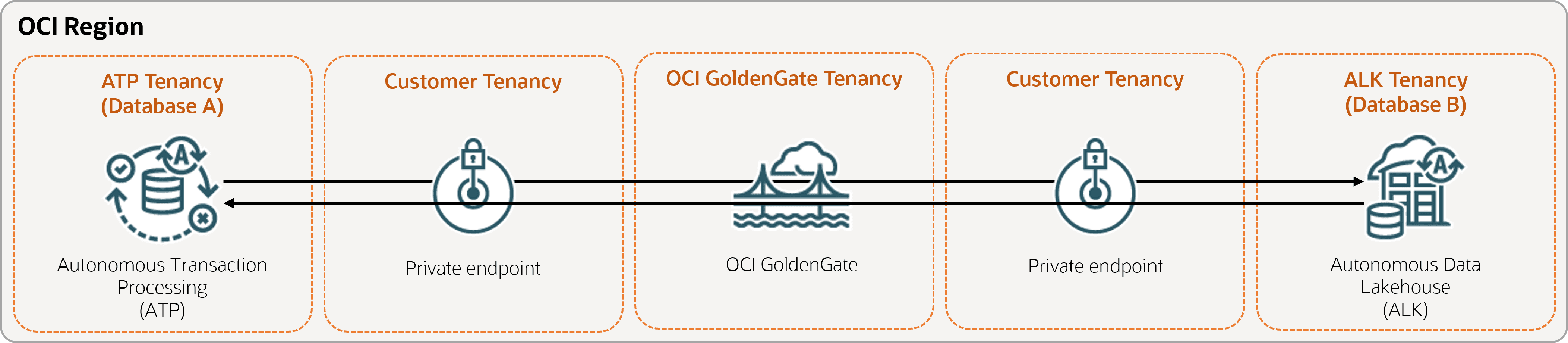
任务 1:设置的环境
-
创建部署。
-
启用补充事件记录:
ALTER DATABASE ADD SUPPLEMENTAL LOG DATA -
运行以下查询以确保源数据库中的所有表的
support_mode=FULL:select * from DBA_GOLDENGATE_SUPPORT_MODE where owner = 'SRC_OCIGGLL'; -
对数据库 B 运行以下查询,以确保数据库中的所有表都使用
support_mode=FULL:select * from DBA_GOLDENGATE_SUPPORT_MODE where owner = 'SRCMIRROR_OCIGGLL';
任务 2:为两个数据库添加事务处理信息和检查点表
在 OCI GoldenGate 部署控制台中,转至管理服务的 "Configuration"(配置)屏幕,然后完成以下操作:
-
在数据库 A 和 B 上添加事务处理信息:
-
对于数据库 A,为方案名称输入
SRC_OCIGGLL。 -
对于数据库 B,为方案名称输入
SRCMIRROR_OCIGGLL。注:如果要使用与本示例不同的数据集,方案名称应是唯一的,并且与数据库方案名称匹配。
-
-
为数据库 A 和 B 创建检查点表:
-
对于数据库 A,为检查点表输入
"SRC_OCIGGLL"."ATP_CHECKTABLE"。 -
对于数据库 B,为检查点表输入
"SRCMIRROR_OCIGGLL"."CHECKTABLE"。
-
任务 3:创建集成提取
集成提取捕获对源数据库的持续更改。
-
在“部署详细信息”页上,选择启动控制台。
-
注:有关可用于指定源表的参数的详情,请参阅附加提取参数选项。
-
在“提取参数”页上,在
EXTTRAIL <extract-name>下附加以下行:-- Capture DDL operations for listed schema tables ddl include mapped -- Add step-by-step history of -- to the report file. Very useful when troubleshooting. ddloptions report -- Write capture stats per table to the report file daily. report at 00:01 -- Rollover the report file weekly. Useful when IE runs -- without being stopped/started for long periods of time to -- keep the report files from becoming too large. reportrollover at 00:01 on Sunday -- Report total operations captured, and operations per second -- every 10 minutes. reportcount every 10 minutes, rate -- Table list for capture table SRC_OCIGGLL.*; -- Exclude changes made by GGADMIN tranlogoptions excludeuser ggadmin注:
tranlogoptions excludeuser ggadmin可避免重新获取ggadmin在双向复制方案中应用的事务处理。
-
-
检查长耗时事务处理:
-
在源数据库上运行以下脚本:
select start_scn, start_time from gv$transaction where start_scn < (select max(start_scn) from dba_capture);如果查询返回任何行,则必须找到事务处理的 SCN,然后提交或回退事务处理。
-
任务 4:使用 Oracle Data Pump 导出数据 (ExpDP)
使用 Oracle Data Pump (ExpDP) 将数据从源数据库导出到 Oracle 对象存储。
-
记下与导出和导入脚本一起使用的名称空间和存储桶名称。
-
创建验证令牌,然后将令牌字符串复制并粘贴到文本编辑器以供日后使用。
-
在源数据库中创建一个身份证明,将
<user-name>和<token>替换为您的 Oracle Cloud 账户用户名和在上一步中创建的令牌字符串:BEGIN DBMS_CLOUD.CREATE_CREDENTIAL( credential_name => 'ADB_OBJECTSTORE', username => '<user-name>', password => '<token>' ); END; -
在源数据库中运行以下脚本以创建导出数据作业。确保相应地替换对象存储 URI 中的
<region>、<namespace>和<bucket-name>。SRC_OCIGGLL.dmp是将在此脚本运行时创建的文件。DECLARE ind NUMBER; -- Loop index h1 NUMBER; -- Data Pump job handle percent_done NUMBER; -- Percentage of job complete job_state VARCHAR2(30); -- To keep track of job state le ku$_LogEntry; -- For WIP and error messages js ku$_JobStatus; -- The job status from get_status jd ku$_JobDesc; -- The job description from get_status sts ku$_Status; -- The status object returned by get_status BEGIN -- Create a (user-named) Data Pump job to do a schema export. h1 := DBMS_DATAPUMP.OPEN('EXPORT','SCHEMA',NULL,'SRC_OCIGGLL_EXPORT','LATEST'); -- Specify a single dump file for the job (using the handle just returned) -- and a directory object, which must already be defined and accessible -- to the user running this procedure. DBMS_DATAPUMP.ADD_FILE(h1,'https://objectstorage.<region>.oraclecloud.com/n/<namespace>/b/<bucket-name>/o/SRC_OCIGGLL.dmp','ADB_OBJECTSTORE','100MB',DBMS_DATAPUMP.KU$_FILE_TYPE_URIDUMP_FILE,1); -- A metadata filter is used to specify the schema that will be exported. DBMS_DATAPUMP.METADATA_FILTER(h1,'SCHEMA_EXPR','IN (''SRC_OCIGGLL'')'); -- Start the job. An exception will be generated if something is not set up properly. DBMS_DATAPUMP.START_JOB(h1); -- The export job should now be running. In the following loop, the job -- is monitored until it completes. In the meantime, progress information is displayed. percent_done := 0; job_state := 'UNDEFINED'; while (job_state != 'COMPLETED') and (job_state != 'STOPPED') loop dbms_datapump.get_status(h1,dbms_datapump.ku$_status_job_error + dbms_datapump.ku$_status_job_status + dbms_datapump.ku$_status_wip,-1,job_state,sts); js := sts.job_status; -- If the percentage done changed, display the new value. if js.percent_done != percent_done then dbms_output.put_line('*** Job percent done = ' \|\| to_char(js.percent_done)); percent_done := js.percent_done; end if; -- If any work-in-progress (WIP) or error messages were received for the job, display them. if (bitand(sts.mask,dbms_datapump.ku$_status_wip) != 0) then le := sts.wip; else if (bitand(sts.mask,dbms_datapump.ku$_status_job_error) != 0) then le := sts.error; else le := null; end if; end if; if le is not null then ind := le.FIRST; while ind is not null loop dbms_output.put_line(le(ind).LogText); ind := le.NEXT(ind); end loop; end if; end loop; -- Indicate that the job finished and detach from it. dbms_output.put_line('Job has completed'); dbms_output.put_line('Final job state = ' \|\| job_state); dbms_datapump.detach(h1); END;
任务 5:使用 Oracle Data Pump (ImpDP) 实例化目标数据库
使用 Oracle Data Pump (ImpDP) 可以将数据从从源数据库导出的 SRC_OCIGGLL.dmp 导入到目标数据库。
-
在目标数据库中创建一个身份证明以访问 Oracle 对象存储(使用前面部分中的相同信息)。
BEGIN DBMS_CLOUD.CREATE_CREDENTIAL( credential_name => 'ADB_OBJECTSTORE', username => '<user-name>', password => '<token>' ); END; -
在目标数据库中运行以下脚本以从
SRC_OCIGGLL.dmp导入数据。确保相应地替换对象存储 URI 中的<region>、<namespace>和<bucket-name>:DECLARE ind NUMBER; -- Loop index h1 NUMBER; -- Data Pump job handle percent_done NUMBER; -- Percentage of job complete job_state VARCHAR2(30); -- To keep track of job state le ku$_LogEntry; -- For WIP and error messages js ku$_JobStatus; -- The job status from get_status jd ku$_JobDesc; -- The job description from get_status sts ku$_Status; -- The status object returned by get_status BEGIN -- Create a (user-named) Data Pump job to do a "full" import (everything -- in the dump file without filtering). h1 := DBMS_DATAPUMP.OPEN('IMPORT','FULL',NULL,'SRCMIRROR_OCIGGLL_IMPORT'); -- Specify the single dump file for the job (using the handle just returned) -- and directory object, which must already be defined and accessible -- to the user running this procedure. This is the dump file created by -- the export operation in the first example. DBMS_DATAPUMP.ADD_FILE(h1,'https://objectstorage.<region>.oraclecloud.com/n/<namespace>/b/<bucket-name>/o/SRC_OCIGGLL.dmp','ADB_OBJECTSTORE',null,DBMS_DATAPUMP.KU$_FILE_TYPE_URIDUMP_FILE); -- A metadata remap will map all schema objects from SRC_OCIGGLL to SRCMIRROR_OCIGGLL. DBMS_DATAPUMP.METADATA_REMAP(h1,'REMAP_SCHEMA','SRC_OCIGGLL','SRCMIRROR_OCIGGLL'); -- If a table already exists in the destination schema, skip it (leave -- the preexisting table alone). This is the default, but it does not hurt -- to specify it explicitly. DBMS_DATAPUMP.SET_PARAMETER(h1,'TABLE_EXISTS_ACTION','SKIP'); -- Start the job. An exception is returned if something is not set up properly. DBMS_DATAPUMP.START_JOB(h1); -- The import job should now be running. In the following loop, the job is -- monitored until it completes. In the meantime, progress information is -- displayed. Note: this is identical to the export example. percent_done := 0; job_state := 'UNDEFINED'; while (job_state != 'COMPLETED') and (job_state != 'STOPPED') loop dbms_datapump.get_status(h1, dbms_datapump.ku$_status_job_error + dbms_datapump.ku$_status_job_status + dbms_datapump.ku$_status_wip,-1,job_state,sts); js := sts.job_status; -- If the percentage done changed, display the new value. if js.percent_done != percent_done then dbms_output.put_line('*** Job percent done = ' \|\| to_char(js.percent_done)); percent_done := js.percent_done; end if; -- If any work-in-progress (WIP) or Error messages were received for the job, display them. if (bitand(sts.mask,dbms_datapump.ku$_status_wip) != 0) then le := sts.wip; else if (bitand(sts.mask,dbms_datapump.ku$_status_job_error) != 0) then le := sts.error; else le := null; end if; end if; if le is not null then ind := le.FIRST; while ind is not null loop dbms_output.put_line(le(ind).LogText); ind := le.NEXT(ind); end loop; end if; end loop; -- Indicate that the job finished and gracefully detach from it. dbms_output.put_line('Job has completed'); dbms_output.put_line('Final job state = ' \|\| job_state); dbms_datapump.detach(h1); END;
任务 6:添加和运行非集成复制
-
Add and run a Replicat (添加和运行复制)。
-
在 Parameter File 屏幕上,将
MAP *.*, TARGET *.*;替换为以下脚本:-- Capture DDL operations for listed schema tables ddl include mapped -- Add step-by-step history of ddl operations captured -- to the report file. Very useful when troubleshooting. ddloptions report -- Write capture stats per table to the report file daily. report at 00:01 -- Rollover the report file weekly. Useful when PR runs -- without being stopped/started for long periods of time to -- keep the report files from becoming too large. reportrollover at 00:01 on Sunday -- Report total operations captured, and operations per second -- every 10 minutes. reportcount every 10 minutes, rate -- Table map list for apply DBOPTIONS ENABLE_INSTANTIATION_FILTERING; MAP SRC_OCIGGLL.*, TARGET SRCMIRROR_OCIGGLL.*;注:
DBOPTIONS ENABLE_INSTATIATION_FILTERING允许对使用 Oracle Data Pump 导入的表进行 CSN 筛选。有关更多信息,请参见《 DBOPTIONS Reference 》。
-
-
对数据库 A 执行一些更改,以查看它们已复制到数据库 B。
任务 7:配置从数据库 B 到数据库 A 的复制
任务 1 到 6 已建立从数据库 A 到数据库 B 的复制。以下步骤设置从数据库 B 到数据库 A 的复制。
-
在数据库 B 上添加和运行提取。在 EXTRAIL <extract-name> 之后的提取参数页面上,确保包括:
-- Table list for capture table SRCMIRROR_OCIGGLL.*; -- Exclude changes made by GGADMIN tranlogoptions excludeuser ggadmin -
向数据库 A 添加并运行复制。在“参数”页上,将
MAP *.*, TARGET *.*;替换为:MAP SRCMIRROR_OCIGGLL.*, TARGET SRC_OCIGGLL.*; -
对数据库 B 执行一些更改,以查看它们已复制到数据库 A。