使用 Terraform 更新全局活动表
添加区域副本
可以添加现有全局活动表的区域副本。
mr_test 已存在,并且具有加拿大东南部(蒙特利尔)区域中的区域副本。要在加拿大东南部(多伦多)的另一个区域中添加此表的区域副本,请使用以下 nosql.tf 文件。
注意:
表 (CREATE TABLE IF NOT EXISTS mr_test...) 的定义和现有副本必须始终包含在 terraform 脚本中,即使表和副本已存在也是如此。从 terraform 脚本中删除 CREATE TABLE 定义时,会将表从区域中删除。同样,从 terraform 脚本中删除现有副本定义也会删除区域表副本。
variable "compartment_ocid" {
}
variable "table_ddl_statement" {
  default = "CREATE TABLE IF NOT EXISTS mr_test(id INTEGER,
             name STRING, info JSON,PRIMARY KEY(id))
             using TTL 10 days with schema frozen"
}
resource "oci_nosql_table" "mr_test" {
  #Required
  compartment_id = var.compartment_ocid
  ddl_statement  = var.table_ddl_statement
  name           = "mr_test"
  table_limits {
    #Required
    max_read_units = 51
    max_write_units = 51
    max_storage_in_gbs = 2
  }
}
resource "oci_nosql_table_replica" "replica_montreal" {
  table_name_or_id = oci_nosql_table.mr_test.id
  region = "ca-montreal-1"
  #Optional
  max_read_units     = "60"
  max_write_units    = "60"
}
#add a regional replica
resource "oci_nosql_table_replica" "replica_toronto" {
  compartment_id = var.compartment_ocid
  table_name_or_id = "mr_test"
  region = "ca-toronto-1"
  depends_on = [oci_nosql_table.mr_test]
}terraform applyDo you want to perform these actions? Terraform will perform the actions described above. Only 'yes' will be accepted to approve. 确认后,Terraform 将在多伦多区域添加“Global Active”表的新区域副本。由于此区域中没有为副本显式提供读写单元,因此这些值将从 US East (Ashburn) 区域中的 mr_test 表中接管。在上例中,Canada Southeast(Toronto) 区域中副本表的读写单位为 51。
删除区域副本
可以删除现有全局活动表的区域副本。
mr_test 已存在,并在加拿大东南部(蒙特利尔)和加拿大东南部(多伦多)区域具有副本。要从加拿大东南部(多伦多)区域删除副本,请使用以下 nosql.tf 文件,在其中注释(或删除)与在加拿大东南部(多伦多)添加副本相关的代码。
注意:
表的定义 (CREATE TABLE IF NOT EXISTS mr_test...) 必须始终包括在 terraform 脚本中,即使该表已存在也是如此。从 terraform 脚本中删除 CREATE TABLE 定义时,会将表从区域中删除。
variable "compartment_ocid" {
}
variable "table_ddl_statement" {
  default = "CREATE TABLE IF NOT EXISTS mr_test(id INTEGER,
             name STRING, info JSON,PRIMARY KEY(id))
             using TTL 10 days with schema frozen"
}
resource "oci_nosql_table" "mr_test" {
  #Required
  compartment_id = var.compartment_ocid
  ddl_statement  = var.table_ddl_statement
  name           = "mr_test"
  table_limits {
    #Required
    max_read_units = 51
    max_write_units = 51
    max_storage_in_gbs = 2
  }
}
resource "oci_nosql_table_replica" "replica_montreal" {
  table_name_or_id = oci_nosql_table.mr_test.id
  region = "ca-montreal-1"
  #Optional
  max_read_units     = "60"
  max_write_units    = "60"
}
#resource "oci_nosql_table_replica" "replica_toronto" {
#  compartment_id = var.compartment_ocid
#  table_name_or_id = "mr_test"
#  region = "ca-toronto-1"
#  depends_on = [oci_nosql_table.mr_test]
#}terraform applyDo you want to perform these actions? Terraform will perform the actions described above. Only 'yes' will be accepted to approve.确认后,Terraform 将删除位于加拿大东南部(多伦多)地区的副本。
更改全局活动表的 TTL 和表限制
您可以使用 Terraform 更改全局活动表的读取单位数、写入单位数、存储容量和表 TTL。
在“全局活动”表中,更改读取容量限制或写入容量限制仅适用于更改它的区域。但是,更改存储容量或更改表级 TTL 值会将更改应用于本地表以及表的所有区域副本。
mr_test 表的表容量,请使用以下 nosql.tf 文件。variable "compartment_ocid" {
}
variable "table_ddl_statement" {
default = "CREATE TABLE IF NOT EXISTS mr_test(id INTEGER,
name STRING, info JSON,PRIMARY KEY(id))
using TTL 15 days with schema frozen"
}
resource "oci_nosql_table" "mr_test" {
#Required
compartment_id = var.compartment_ocid
ddl_statement = var.table_ddl_statement
name = "mr_test"
table_limits {
#Required
max_read_units = 70
max_write_units = 70
max_storage_in_gbs = 2
}
}
resource "oci_nosql_table_replica" "replica_montreal" {
table_name_or_id = oci_nosql_table.mr_test.id
region = "ca-montreal-1"
#Optional
max_read_units = 60
max_write_units = 60
}
resource "oci_nosql_table_replica" "replica_toronto" {
compartment_id = var.compartment_ocid
table_name_or_id = "mr_test"
region = "ca-toronto-1"
depends_on = [oci_nosql_table.mr_test]
}terraform applyDo you want to perform these actions? Terraform will perform the actions described above. Only 'yes' will be accepted to approve.us-ashburn-1) 中表的读取和写入单位将更改为 70。其他区域中副本的表限制不会更改。但是,本地表和所有副本中的 TTL 值都更改为 15 天。
注意:
全局活动表具有对称表定义,包括所有区域副本中的方案、索引、TTL 和存储大小。如果更改一个区域副本中的索引、TTL 或存储大小,则会自动将其应用于所有其他区域副本。因此,建议仅从一个区域管理这些表定义。编辑区域副本的表限制
Terraform 中的 OCI 提供程序针对单个区域进行了配置。由于表限制更新特定于区域,因此只能从多伦多区域管理在 ca-toronto-1 中创建的副本的读取和写入单位。同样,如果您要管理全局活动表的不同区域的表限制,我们建议您按如下所示的形状构造模块。此处,区域 1、区域 2 等是 Terraform 目录中的目录。Terraform 目录是在安装 Terraform 时创建的目录。
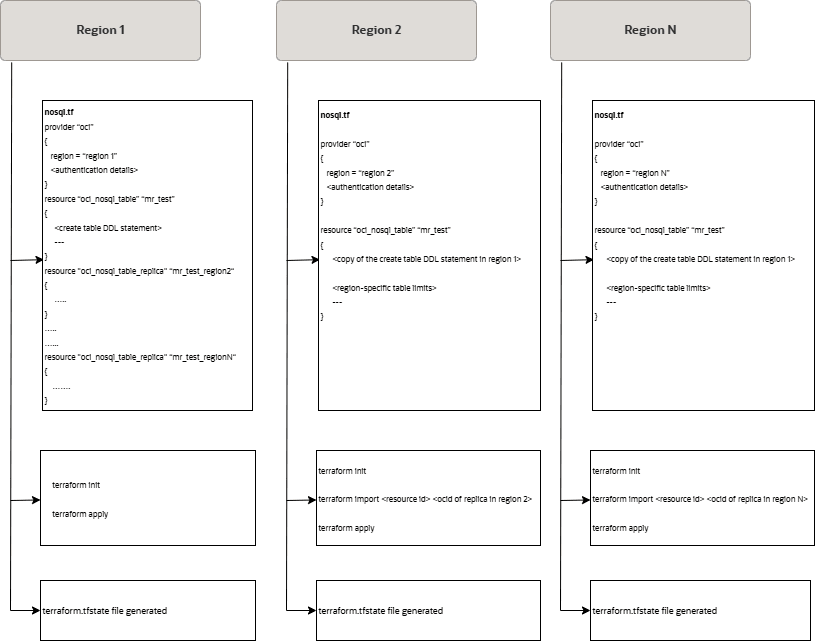
在 Terraform 目录中,为每个区域维护单独的目录,并维护包含特定于区域的表限制的配置(在上图中表示为 nosql.tf)。也会为每个区域分别创建和管理 terraform 状态文件 (terraform.tfstate)。
在我们的例子中,Terraform 目录中有三个目录,对应于三个区域:us-ashburn-1、ca-montreal-1 和 ca-toronto-1。让我们调用目录 Ashburn、Montreal 和 Toronto。
ca-toronto-1 区域中修改副本表的读/写单元的步骤:
- 导航到
Toronto目录。通过从美国东部(阿什本)区域中使用的配置复制oci_nosql_table资源定义来创建 Terraform 配置(此处为nosql.tf)。 - 根据需要更新表的读取和/或写入单位数。
resource "oci_nosql_table" "mr_test" { #Required compartment_id = var.compartment_ocid ddl_statement = "CREATE TABLE IF NOT EXISTS mr_test(id INTEGER, name STRING, info JSON, PRIMARY KEY(id)) with schema frozen" name = "mr_test" table_limits { #Required max_read_units = 100 max_write_units = 90 max_storage_in_gbs = 1 } } - 将现有表导入到您的 Terraform 状态。如上图所示,状态文件也特定于区域,因此导入表不会产生任何状态冲突。您可以从 OCI 控制台获取位于加拿大东南部(多伦多)区域的副本表的
ocid。terraform import oci_nosql_table.mr_test <ocid-of-replica-table-in-ca-toronto-1> - 应用更改
terraform apply

Terraform shows the plan to be applied and prompts for confirmation as shown below.
Do you want to perform these actions?
Terraform will perform the actions described above.
Only 'yes' will be accepted to approve.
在确认时,对于
ca-toronto-1区域中的副本,读取和写入单位将分别修改为 100 和 90。