OAM 和 SP 中的定制验证后模块
本文介绍如何实施将在联邦 SSO 完成后调用的定制验证插件,该插件将:
- 访问 SAML 断言中包含的信息(IdP 名称,用户属性 ...)
- 根据 SAML 用户属性更新 LDAP 用户属性
有关如何设计定制验证插件的更多信息,请参阅《 OAM Developer’s Guide 》第 3 章,其中介绍了如何开发此类模块:http://docs.oracle.com/cd/E40329_01/dev.1112/e27134/authnapi.htm。重点介绍如何:
- 实施插件
- 编译
- 打包
- 将插件上载到 OAM
- 创建新的联盟验证模块
联盟验证模块
重要说明:使用联合测试 SP 应用程序时,将绕过验证模块,因此不会执行此类模块中定义的插件。
OAM 验证模块为:
- 验证插件的集合
- 确定插件执行顺序的业务流程
OOTB 联盟验证模块(称为 FederationPlugin)由两个插件组成:
- FedAuthnRequestPlugin:启动联盟 SSO 流,确定在以前的验证插件未提供时要使用的 IdP,创建 SSO 请求并将用户重定向到 IdP
- AssertionProcessing:处理传入的 SAML/OpenID SSO 响应并将消息映射到 LDAP 目录中的本地用户记录
可通过以下方式查看该编排:
- 转到 OAM 管理控制台:
http(s)://oam-adminhost:oam-admin-port/oamconsole。 - 导航到 Access Manager(访问管理器)、 Authentication Modules(验证模块)。
- 打开 FederationScheme 。
- 单击步骤选项卡以查看插件。
- 单击步骤业务流程选项卡以查看不同插件与用于启动操作的插件之间的业务流程。
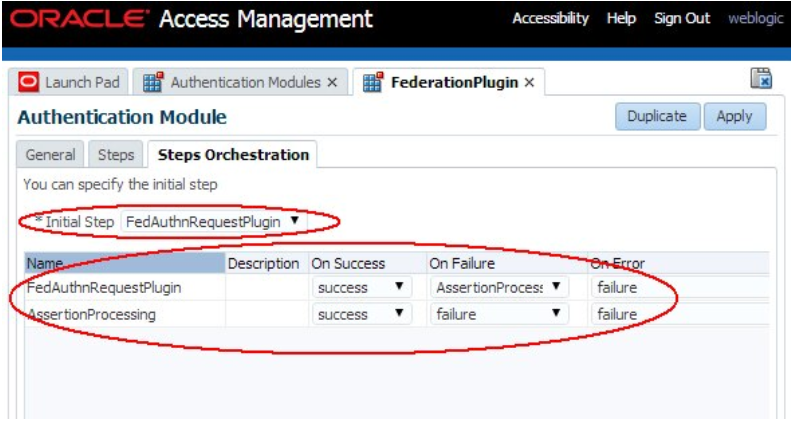
插图 Federation_Plugin_Screen.png 的说明
AssertionProcessing 插件
AssertionProcessing 插件负责验证和使用传入的 SSO 断言,将断言映射到本地 LDAP 用户记录,并返回用户的身份以及断言到 OAM 的内容。验证插件之间共享的 AuthenticationContext 实例包含 CredentialParam 对象,这些对象允许各种插件在运行时进行通信以及验证操作的结果。
oracle.security.am.plugin.authn.AuthenticationContext:在各种验证插件之间共享的验证操作的上下文oracle.security.am.plugin.authn.Credential:收集存储在 AuthenticationContext 中的凭证数据oracle.security.am.plugin.authn.CredentialParam:由名称引用的单个身份证明参数,其类型(大部分时间是字符串)取决于身份证明实例中存储的类型
验证上下文数据
验证成功后,OAM 验证插件将返回 AuthenticationContext 中的以下数据:
- 标识用户的 JaaS 主题,具有以下主用户实例:
oracle.security.am.common.utilities.principal.OAMUserPrincipal,其名称包含userIDoracle.security.am.common.utilities.principal.OAMUserDNPrincipal,其名称包含用户的 DNoracle.security.am.common.utilities.principal.OAMGUIDPrincipal(如果存在),其名称包含用户的 GUID
AuthenticationContext 的 Credential 对象中包含以下 CredentialParam 实例
- KEY_USERNAME_DN 字符串引用的用户 DN
- 类型:字符串
- 值:用户的 DN
AuthenticationContext 中包含以下 PluginResponse 实例:
KEY_AUTHENTICATED_USER_NAME字符串引用的 userID- 类型:PluginAttributeContextType.LITERAL
- 值:userID
用户记录所在的身份存储库的名称
- 由
KEY_IDENTITY_STORE_REF字符串引用 - 类型:PluginAttributeContextType.LITERAL
- 值:OAM ID 存储名称
如果在联盟 SP 处理过程中覆盖了验证级别(有关更多信息,请参见本文):Art 27 Mapping Fed Authn Method to Authn Levels in OAM SP)
- 由 KEY_AUTHN_LEVEL 字符串引用
- 类型:PluginAttributeContextType.LITERAL
- 值:以字符串表示的验证级别
断言数据,每个元素都是独立的 PluginResponse 实例:
- 由其名称引用(请参见下文)
- 类型:PluginAttributeContextType.SESSION
- 值:字符串对象
OAM 使用 AuthenticationContext 中包含的数据进一步进行处理。
断言数据由以下元素组成:
- IdP 合作伙伴名称,由
fed.partner引用 - SAML NameID 格式,由
fed.nameidformat引用 fed.nameidvalue引用的 NameID 值- 断言中包含的用户属性,由
fed.aLr.ATTRIBUTE_NAME引用,其中ATTRIBUTE_NAME为 - 断言中包含的属性的名称(如果没有 IdP 属性概要文件将名称映射到本地 OAM 会话属性名称)
- 或者 OAM 会话属性名称,它是根据用于 IdP 合作伙伴的 IdP 属性概要文件将断言中的属性名称映射到本地 OAM 会话属性名称的结果。
示例
让我们使用以下示例检查 AssertionProcessing 插件在流末尾返回的数据:
- OAM 用作 SP
- 合作伙伴 IdP 是注册为 OAM/SP 服务器中
acmeIdP的 SAML 2.0 IdP,IdP 的 ProviderID/Issuer 是http://acme.com/idp - IdP 发送包含以下内容的 SAML 2.0 断言
- 格式为
urn:oasis:names:tc:SAML:1.1:nameidformat:emailAddress的 NameID,值为用户的电子邮件地址 - 三个 SAML 属性
- 名称设置为包含
userID的 uid - 设置为包含用户姓氏的姓氏的名称
- 设置为包含用户名字的名字的名称
OAM/SP 中的 IdP 合作伙伴绑定到仅包含一个条目的 IdP 属性概要文件,该条目将 SAML 属性名称 uid 映射到 OAM 会话属性名称用户 ID。在示例中,测试用户将是 alice:
- UserID,位于 OAM/SP alice
- 在 SAML 断言中发送的属性:
- userID:alice
- lastname:Appleton
- firstname:Alice
- alice 的电子邮件地址为
alice@oracle.com
SAML 2.0 断言的一个示例为:
<samlp:Response ..>
     <saml:Issuer ...>hLp://acme.com/idp</saml:Issuer>
     <samlp:Status>
         <samlp:StatusCode
 Value="urn:oasis:names:tc:SAML:2.0:status:Success"/>
     </samlp:Status>
     <saml:Assertion ...>
         <saml:Issuer ...>hLp://acme.com/idp</saml:Issuer>
         <dsig:Signature ...>
         ...
         </dsig:Signature>
         <saml:Subject>
 <saml:NameID ...>alice@oracle.com</saml:NameID>
             ...
         </saml:Subject>         <saml:Conditions ...>
          ...
         </saml:Conditions>         <saml:AuthnStatement ...>
         ...
         </saml:AuthnStatement>
         <saml:AttributeStatement ...>
             <saml:Attribute Name="userid" ...>
                 <saml:AttributeValue ...>alice</saml:AttributeValue>
             </saml:Attribute>
             <saml:Attribute Name="lastname" ...>
                 <saml:AttributeValue ...>Appleton</saml:AttributeValue>             </saml:Attribute>
             <saml:Attribute Name="firstname" ...>
                 <saml:AttributeValue ...>Alice</saml:AttributeValue>
             </saml:Attribute>
         </saml:AttributeStatement>
     </saml:Assertion>
 </samlp:Response>
After a successful processing of the SAML 2.0 Assertion and the mapping of the incoming SSO response to a local user record, the AssertionProcessing plugin returns to OAM the AuthenticationContext with the following data: The Subject containing:
- 名称设置为 alice 的
oracle.security.am.common.utilities.principal.OAMUserPrincipal(alice 的本地 userID) oracle.security.am.common.utilities.principal.OAMUserDNPrincipal,名称设置为 cn=alice,ou=users,dc=us,dc=oracle,dc=com(alice 的本地 DN)oracle.security.am.common.utilities.principal.OAMGUIDPrincipal,名称设置为 alice 的本地 GUID
AuthenticationContext 的 Credential 对象中包含以下 CredentialParam 实例
- 值设置为
cn=alice、ou=users、dc=us、dc=oracle、dc=com(alice 的本地 DN)的KEY_USERNAME_DN
AuthenticationContext 中包含以下 PluginResponse 实例:
KEY_AUTHENTICATED_USER_NAME,字符串值设置为alice(alice 的本地 userID),类型设置为文字KEY_IDENTITY_STORE_REF,字符串值设置为IDStore(本地 OAM ID 存储的名称),类型设置为文字fed.partner,字符串值设置为acmeIdP(本地 IdP 合作伙伴名称),类型设置为会话fed.nameidformat,字符串值设置为urn:oasis:names:tc:SAML:1.1:nameid-format:emailAddress,类型设置为会话fed.nameidvalue,字符串值设置为 alice@oracle.com,类型设置为 sessionfed.attr.uid,字符串值设置为 alice,类型为 session(由于 IdP 属性概要文件,属性名称从 userid 映射到 uid)fed.attr.lastname,字符串值设置为 Appleton,类型为 sessionfed.attr.firstname,字符串值设置为 Alice,类型为 session
定制验证插件
概述
在本文中,假设 OAM/SP 部署需要支持:
- 当用户重定向到 OAM/SP 但没有本地帐户时创建/预配用户帐户:新创建的帐户使用 SAML 2.0 断言数据填充
- 自动更新用户帐户,以便使用最新的 SAML 2.0 断言数据刷新 LDAP 用户属性。
使用即时用户配置模块,为 #1 提供支持。为了满足 #2 的要求,需要使用定制验证插件来执行以下操作:
- 在成功处理
AssertionProcessing插件后调用 - 检查从 SAML 2.0 断言中提取的数据
- 连接到 LDAP 并最终更新 LDAP 用户属性
对于此示例,环境由以下各项组成:
-
OAM 作为 SAML 2.0 SP
-
合作伙伴 IdP 是注册为 OAM/SP 服务器中 acmeIdP 的 SAML 2.0 IdP,IdP 的 ProviderID/Issuer 是 http://acme.com/idp
-
IdP 发送包含以下内容的 SAML 2.0 断言
-
格式为
urn:oasis:names:tc:SAML:1.1:nameidformat:emailAddress的NameID,值为用户的电子邮件地址 -
三个 SAML 属性
-
名称设置为包含 userID 的 uid
-
设置为包含用户姓氏的姓氏的名称
-
设置为包含用户名字的名字的名称
-
OAM/SP 中的 IdP 合作伙伴绑定到仅包含一个条目的 IdP 属性概要文件,该条目将 SAML 属性名称 uid 映射到 OAM 会话属性名称用户 ID
定制验证插件由以下项组成:
- 一个扩展了
oracle.security.am.plugin.authn.AbstractAuthenticationPlugIn类的 Java 类 - 描述 Java 类的
MANIFEST.MF文件 - 描述插件的 XML 文件
这三个元素捆绑在一个 JAR 文件中,然后通过 OAM 管理控制台上载到 OAM 服务器。上载并激活后,修改联盟验证模块。
Java 类
实施定制验证插件的类必须符合以下条件:
-
扩展
oracle.security.am.plugin.authn.AbstractAuthenticationPlugIn类 -
实施以下方法:
-
public ExecutionStatus进程(AuthenticationContext 上下文)引发AuthenticationException -
必须返回状态(失败或成功)
-
在此示例中,此方法检索断言数据和用户 DN 连接 LDAP 并根据断言数据更新用户记录属性
-
public String getPluginName()返回自定义插件的名称 在我们的示例中,它返回CustomAttributesUpdatePlugin -
public String getDescription()返回定制验证插件的说明 在此示例中,它返回Custom Attributes Update Plugin -
public Map<String, MonitoringData> getMonitoringData()未在验证插件流中使用,在我们的示例中,它返回空值 -
public boolean getMonitoringStatus()未用于验证插件流 在我们的示例中,它返回 false -
public int getRevision()必须与清单文件中指定的版本相同。在我们的示例中,它返回 10 -
public void setMonitoringStatus(boolean status)未在验证插件流中使用。在我们的示例中,此方法将为空
以下代码是定制插件的一个示例。
package postsp;
 import java.util.Hashtable;
 import java.util.Map;
 import java.util.Set;
 import javax.naming.Context;
 import javax.naming.NamingException;
 import javax.naming.directory.Attributes;
 import javax.naming.directory.BasicAttribute;
 import javax.naming.directory.BasicAttributes;
 import javax.naming.directory.DirContext;
 import javax.naming.directory.InitialDirContext;
 import javax.security.auth.Subject;
 import oracle.security.am.common.utilities.principal.OAMUserDNPrincipal;
 import oracle.security.am.common.utilities.principal.OAMUserPrincipal;
 import oracle.security.am.plugin.ExecutionStatus;
 import oracle.security.am.plugin.MonitoringData;
 import oracle.security.am.plugin.PluginAttributeContextType;
 import oracle.security.am.plugin.PluginResponse;
 import oracle.security.am.plugin.authn.AbstractAuthenticationPlugIn;
 import oracle.security.am.plugin.authn.AuthenticationContext;
 import oracle.security.am.plugin.authn.AuthenticationException;
 public class CustomAttributesUpdatePlugin extends
 AbstractAuthenticationPlugIn
 {
   public ExecutionStatus process(AuthenticationContext context)
               throws AuthenticationException {
     // user's ID and DN. Note: we are not making necessary checks for size/null to
     // keep the sample code minimal.
     Subject subject = context.getSubject();
     Set<OAMUserPrincipal> principalsUserID =
               subject.getPrincipals(OAMUserPrincipal.class);
     Set<OAMUserDNPrincipal> principalsDN =
               subject.getPrincipals(OAMUserDNPrincipal.class);
     String localUserID =
 (String)principalsUserID.iterator().next().getName();
     String localUserDN = (String)principalsDN.iterator().next().getName();
     // get the assertion data. Note: We are not making necessary checks for size/null to
     // keep the sample code minimal.
     PluginResponse partnerResponse = context.getResponse(               PluginAttributeContextType.SESSION, "fed.partner");
     String partnerName = (String)partnerResponse.getValue();     PluginResponse nameIDResponse = context.getResponse(
               PluginAttributeContextType.SESSION, "fed.nameidvalue");
     String nameID = (String)nameIDResponse.getValue();
     PluginResponse uidResponse = context.getResponse(
               PluginAttributeContextType.SESSION, "fed.aLr.uid");
     String uid = (String)uidResponse.getValue();
     PluginResponse firstnameResponse = context.getResponse(
               PluginAttributeContextType.SESSION, "fed.aLr.firstname");
     String firstname = (String)firstnameResponse.getValue();     PluginResponse lastnameResponse = context.getResponse(
               PluginAttributeContextType.SESSION, "fed.aLr.lastname");
     String lastname = (String)lastnameResponse.getValue();
     try {
       // open ldap connection
       Hashtable env = new Hashtable();
       env.put(Context.INITIAL_CONTEXT_FACTORY,
 "com.sun.jndi.ldap.LdapCtxFactory");
       env.put(Context.PROVIDER_URL, "ldap://host:port");
       env.put(Context.SECURITY_PRINCIPAL, "admin");
       env.put(Context.SECURITY_CREDENTIALS, "password");       DirContext ldapContext = new InitialDirContext(env);
       // modify user ldap record. Note: We are not making the necessary checks to
       // keep the sample code minimal.
       Attributes attributes = new BasicAttributes();
       attributes.put(new BasicAttribute("givenname", firstname));
       attributes.put(new BasicAttribute("sn", lastname));
       attributes.put(new BasicAttribute("mail", nameID));
       attributes.put(new BasicAttribute("uid", uid));
       ldapContext.modifyAttributes(localUserDN,
                          DirContext.REPLACE_ATTRIBUTE, attributes);
     }
     catch (NamingException ex) {
       throw new AuthenticationException(ex);
     }
     // return success, so that OAM can resume the flow
     return ExecutionStatus.SUCCESS;
   }
   public String getPluginName() {
     return "CustomAttributesUpdatePlugin";
   }
   public String getDescription() {
     return "Custom Attributes Update Plugin";
   }
   public Map<String, MonitoringData> getMonitoringData() {
     return null;
   }
   public boolean getMonitoringStatus() {
     return false;
   }
   public int getRevision() {
     return 10;
   }
   public void setMonitoringStatus(boolean arg0) {
   } }
插件注册文件
自定义验证插件必须在插件 XML 文件中定义,例如:
<Plugin type="Authentication">
<author>uid=admin</author>
<email>admin@example</email>
<creationDate>08:00:00,2014-01-15</creationDate>
<description>Custom Attributes Update Plugin</description>
<conhguration>
</conhguration>
</Plugin>
重要说明:XML 文件必须与实现插件的类具有相同的名称,在本例中为 CustomAttributesUpdatePlugin.xml
有关详细信息,请参阅 OAM 开发人员指南
清单文件
Before packaging the custom Authentication plugin in a JAR file, a MANIFEST.MF must be defined such as: Manifest-Version: 1.0 Bundle-ManifestVersion: 2 Bundle-Name: CustomAttributesUpdatePlugin Bundle-SymbolicName: CustomAttributesUpdatePlugin Bundle-Version: 10 Bundle-Activator: postsp.CustomAttributesUpdatePlugin Import-Package: org.osgi.framework;version=”1.3.0”,oracle.security.am.plugin,oracle.security.am.plugin.authn,oracle.security.am.common.utilities.principal,javax.naming,javax.naming.directory,javax.security.auth Bundle-RequiredExecutionEnvironment: JavaSE-1.6
有关详细信息,请参阅 OAM 开发人员指南
注:清单文件必须包括 "Import-Package" 属性,该属性列出插件中使用的所有软件包
构建插件
编译
需要使用 OAM 部署中的以下 JAR 文件进行编译:
- felix.jar
- oam-plugin.jar
- utilities.jar
这些文件位于以下位置:
- felix.jar:
$IAM_HOME/oam/server/lib/plugin/felix.jar - oam-plugin.jar:
$IAM_HOME/oam/server/lib/plugin/oamplugin.jar - utilities.jar:
$IAM_HOME/oam/server/lib/plugin/utilities.jar
在此示例中,将 CustomAttributesUpdatePlugin.java 文件放置在 src/postsp 文件夹中:
bash-4.1$ ls -l src/postsp/ total 4
-rw-r--r-- 1 root root 4377 Oct 1 09:54 CustomAttributesUpdatePlugin.java
要进行编译,请执行以下命令:
$JDK_HOME/bin/javac -cp $IAM_HOME/oam/server/lib/plugin /felix.jar:$IAM_HOME/oam/server/lib/plugin/oam-
plugin.jar:$IAM_HOME/oam/server/lib/plugin/utilities.jar src/postsp /\*.java
打包定制插件
我们根据上一节中列出的内容在当前目录中创建了 MANIFEST.MF,在 src 目录中创建了 CustomAttributesUpdatePlugin.xml,该目录包含上一节中列出的插件定义。
find
.
./MANIFEST.MF
./src
./src/userauthn
./src/userauthn/CustomAttributesUpdatePlugin.class
./src/userauthn/CustomAttributesUpdatePlugin.java
./src/CustomAttributesUpdatePlugin.xml
要创建包含插件和所需文件的 CustomAttributesUpdatePlugin.jar JAR 文件,请执行以下命令:
jar cfvm CustomAttributesUpdatePlugin.jar MANIFEST.MF -C src/ . added manifest adding: CustomAttributesUpdatePlugin.xml(in = 238) (out= 158)(deflated 33%) adding: postsp/(in = 0) (out= 0)(stored 0%) adding: postsp/CustomAttributesUpdatePlugin.java(in = 4377) (out= 1206)(deflated 72%) adding: postsp/CustomAttributesUpdatePlugin.class(in = 3726) (out= 1667)(deflated 55%)
这将创建 CustomAttributesUpdatePlugin.jar。查看文件内容:
unzip -l CustomAttributesUpdatePlugin.jar Archive: CustomAttributesUpdatePlugin.jar
| 长度 | 日期 | 时间 | 名称 |
|---|---|---|---|
| 0 | 10-01-2014 | 10:04 | 元信息/ |
| 542 | 10-01-2014 | 10:04 | 元信息/MANIFEST.MF |
| 238 | 10-01-2014 | 09:11 | CustomAttributesUpdatePlugin.xml |
| 0 | 10-01-2014 | 09:59 | 邮政编码 |
| 4377 | 10-01-2014 | 09:54 | Postsp/CustomAttributesUpdatePlugin.java |
| 3726 | 10-01-2014 | 09:54 | Postsp/CustomAttributesUpdatePlugin.class |
| 8883 | 6 |
重要说明:JAR 文件必须与实现插件的类具有相同的名称,在本例中为
CustomAttributesUpdatePlugin.jar
部署定制验证插件
执行以下步骤以在 OAM 中部署定制验证插件:
- 转到 OAM 管理控制台:
http(s)://oam-adminhost:oam-admin-port/oamconsole - 导航到访问管理器、插件
- 单击导入插件
- 选择插件 JAR 文件(在此示例中为
CustomAttributesUpdatePlugin.jar)
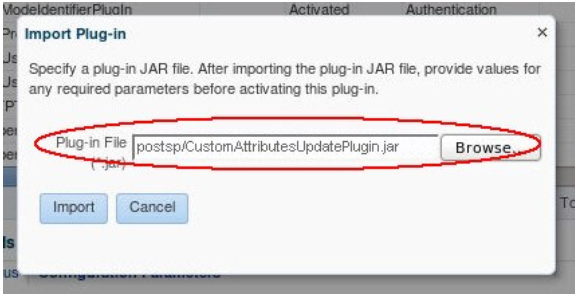
插图 Specifying_Plug-in_JAR_file.png 的说明
该插件将处于已上载状态:
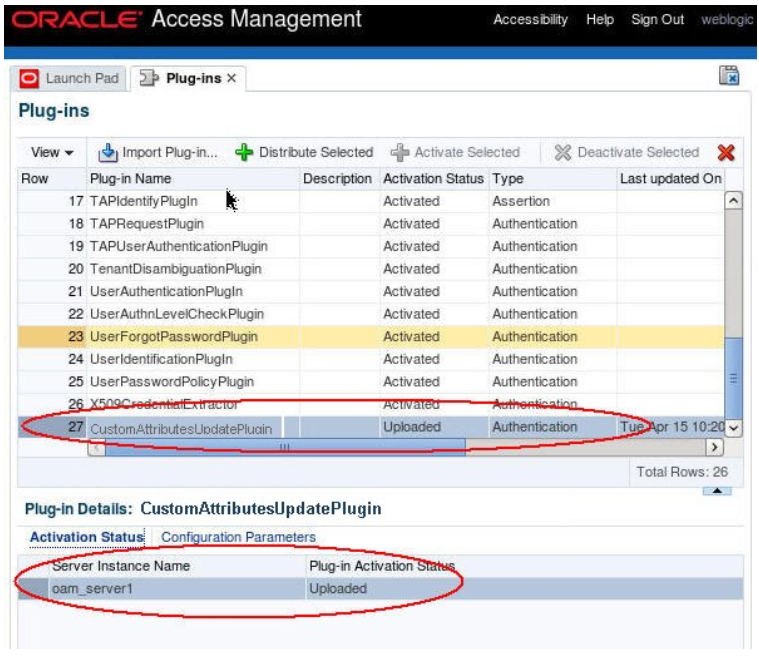
插图 Plug-in_loaded_Screen.png 的说明
您需要将插件分发到运行时 OAM 服务器并激活它:
- 选择插件
- 单击“分发所选项”插件的“激活状态”选项卡显示插件的状态
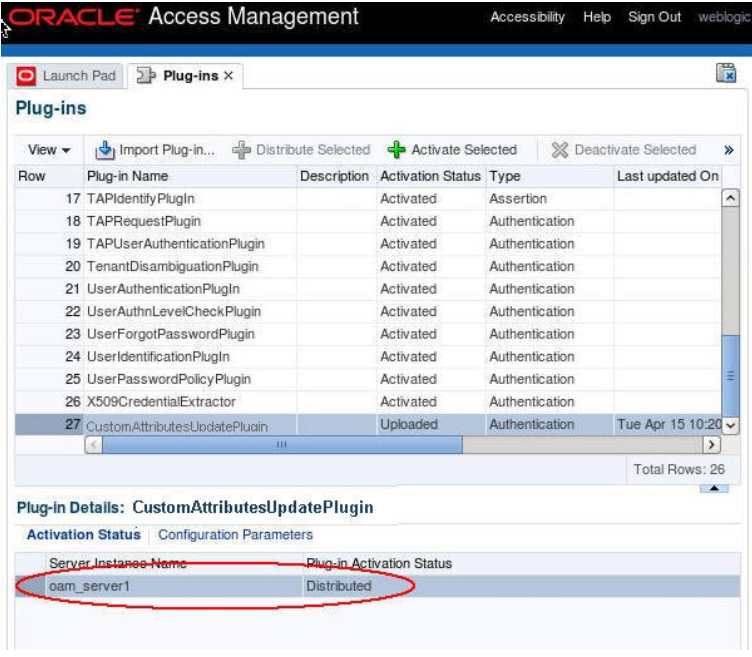
插图 Plug-in_Screen_with_Status.png 的说明
您需要激活插件:
- 选择插件
- 单击“激活所选项”插件的“激活状态”选项卡显示插件的状态
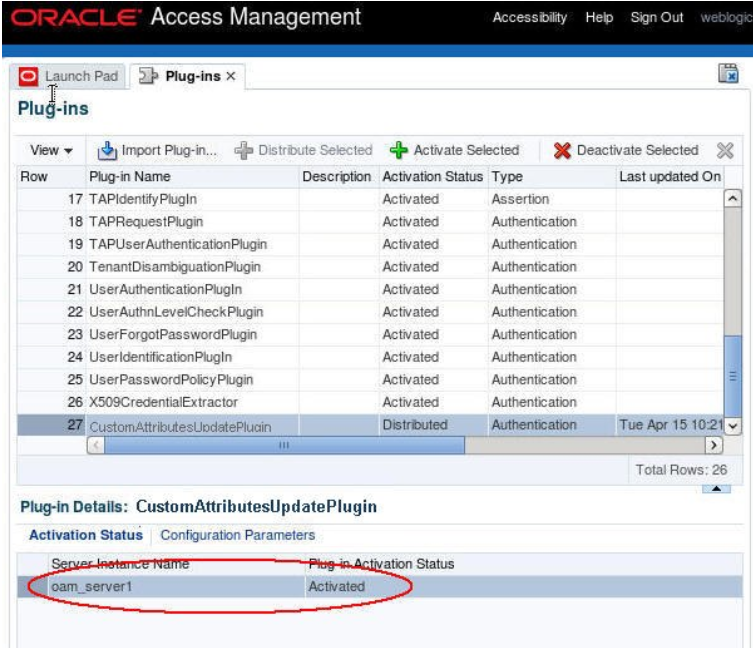
插图 Plug-in_Screen_with_Status_Activated.png 的说明
创建验证模块
根据现有 FederationPlugin 验证模块创建新的联盟验证模块,该模块与现有模块不同:
-
CustomAttributesUpdatePlugin是AssertionProcessing插件成功生成后调用的步骤 -
业务流程:
-
成功时将映射成功
-
失败时将映射到失败
-
出错时将映射到失败
要创建新的验证模块,请执行以下操作:
- 转到 OAM 管理控制台:
http(s)://oam-adminhost: oam-admin-port/oamconsole - 导航到 Access Manager 、 Authentication Modules
- 单击创建验证模块
- 选择创建定制验证模块
- 输入名称(例如
CustomFedModule)
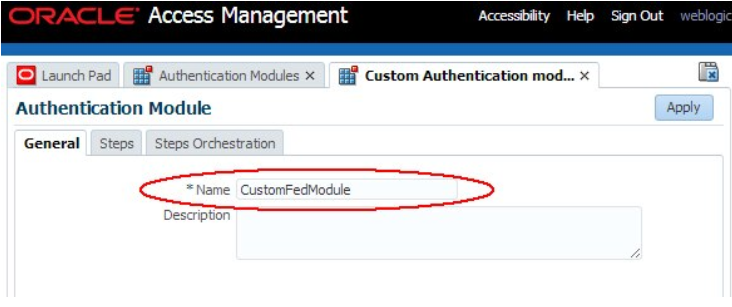
插图 Creating_Authentication_Module.png 的说明
执行以下步骤向新验证模块添加步骤:
- 单击“步骤”选项卡
- 单击添加以添加
FedAuthnRequestPlugin步骤: - 幅度名称:
FedAuthnRequestPlugin - 插件名称:
FedAuthnRequestPlugin - 单击确定
- 单击添加以添加
AssertionProcessing步骤: - 幅度名称:
AssertionProcessing - 插件名称:
FedUserAuthenticationPlugin - 单击确定
- 单击添加以添加
AttributesUpdate步骤: - 幅度名称:
AttributesUpdate - 插件名称:
CustomAttributesUpdatePlugin - 单击确定
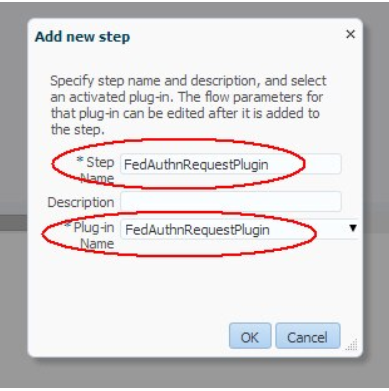
插图 Add_Authentication_Module.png 的说明
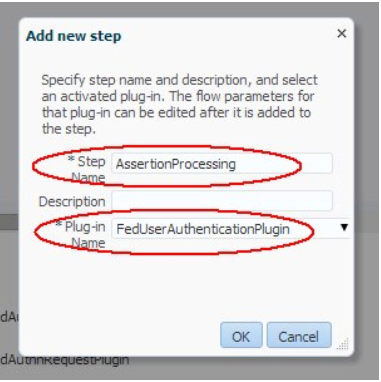
插图 Add_Assertion_Processing_Screen.png 的说明
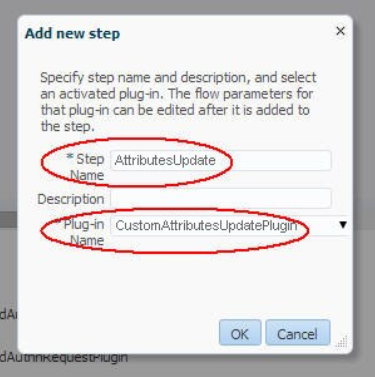
插图 Attributes_Update_Screen.png 的说明
“步骤”选项卡显示:
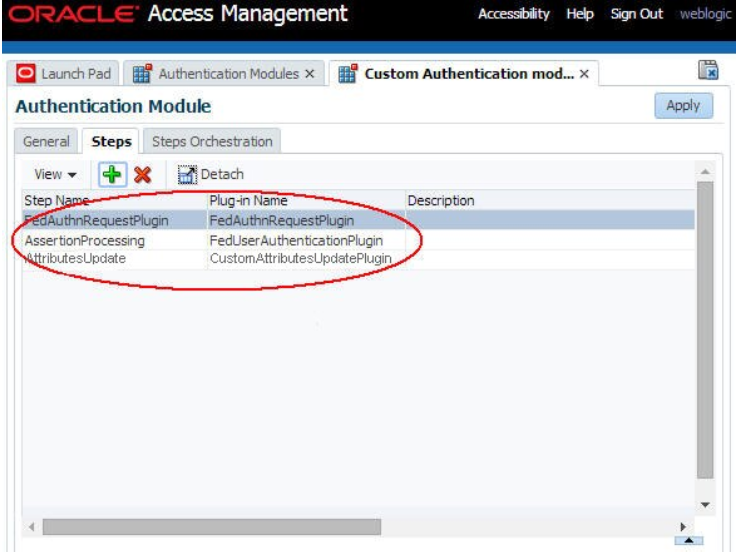
执行以下步骤可定义新验证模块的步骤编排:
- 单击“步骤业务流程”选项卡,选择
FedAuthnRequestPlugin作为FedAuthnRequestPlugin的初始步骤: - 选择成功时成功
- 为失败时选择
AssertionProcessing为出错时选择失败 - 对于
AssertionProcessing: - 为“成功时”选择
AttributesUpdate - 选择“失败时失败”,选择“出错时失败”
- 对于
AttributesUpdate: - 选择成功时成功
- 选择失败时失败
- 选择出错时失败
- 单击应用
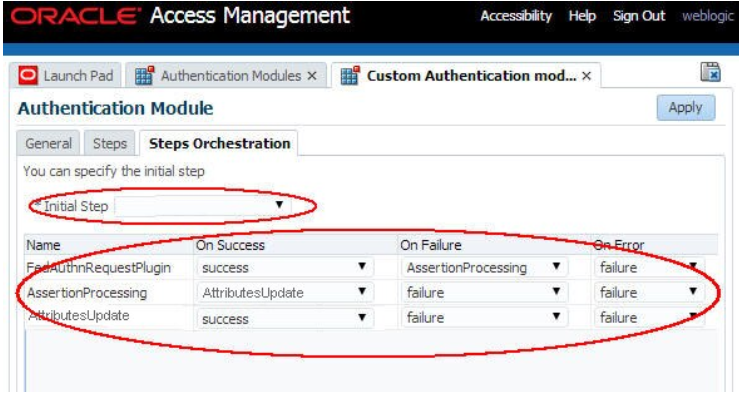
插图 Define_Orchestration_Screen.png 的说明
验证方案
在使用新的验证模块的验证策略保护资源之前,需要创建一个新的验证方案,引用该新的定制模块。这是必需的,因为验证策略绑定到验证方案,而不是验证模块。要为该定制模块创建新的验证方案,请执行以下步骤:
- 转到 OAM 管理控制台:
http(s)://oam-adminhost:oam-admin-port/oamconsole - 导航到 Access Manager(访问管理器)、 Authentication Schemes(验证方案)
- 单击“Create Authentication Scheme(创建验证方案)”
- 输入名称(例如
CustomFedScheme)和说明 将验证级别设置为可接受的值(在此示例中为 2) - 选择
FORM作为质询方法 - 设置质询重定向 URL (在此示例中,将其设置为
/oam/server/) - 选择新创建的定制验证模块(示例中的
CustomFedModule) - 设置质询 URL (在此示例中为
/pages/servererror.jsp) - 设置上下文类型(例如
customWar) - 设置上下文值(在此处为
/oam,因为我们不使用任何页) - 至少为质询参数输入以下内容:
- initial_command = 无
- is_rsa=true
- 单击应用
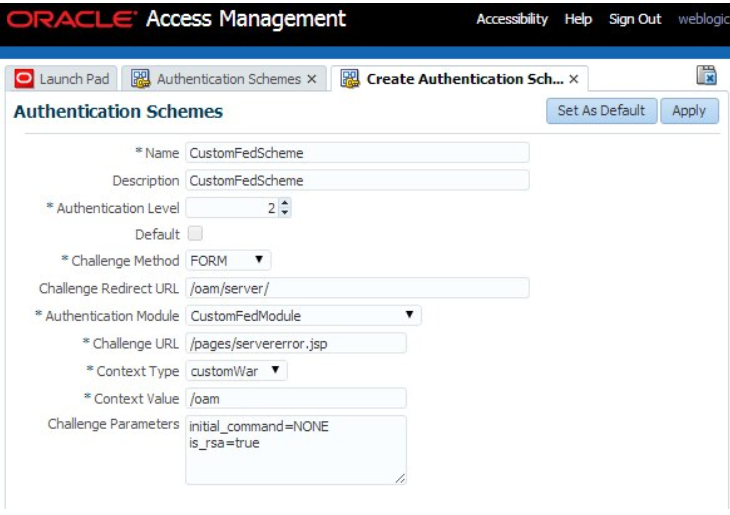
插图 Authentication_Schemes_Screen.png 的说明
测试
使用新创建的验证方案通过验证策略保护资源。这将调用定制验证模块。在联盟 SSO 之前,OAM/SP 中的 alice 的 LDAP 用户记录为:
dn: cn=alice,ou=users,dc=us,dc=oracle,dc=com
objectClass: person
objectClass: organizationalPerson
objectClass: inetOrgPerson
objectClass: top
givenName: al
title: manager
uid: alice
cn: alice
sn: APPLETON
userPassword:: e1NTSEE1MTJ9TXp0R2d0Si9GT1NzYUxvRXJqZW0rM1Q2eU5QMW9ZZmZ2Y3FkVWpaS1o1OFNGMy95ZDBueUxUbnllRi83SFRtS2JmOTJ0anY4TFd6di9UanliOGw4WFNQV1BxSnF3N mail: alice@oracle.com
验证后,IdP 将为 SAML 2.0 断言中的用户别名发送以下信息:
- SAML 属性:
- userID:alice
- 姓氏:Appleton
- 名字:Alice
- SAML NameID:alice@oracle.com
在联盟 SSO 之后,CustomAttributesUpdatePlugin 必须更新 alice 的 LDAP 记录,以便将 sn、assname、uid 和 mail 设置为来自 SAML 断言的值。在 OAM/SP 中执行联合 SSO 操作后的别名 LDAP 用户记录现在为:
dn: cn=alice,ou=users,dc=us,dc=oracle,dc=com
objectClass: person
objectClass: inetOrgPerson
objectClass: organizationalPerson
objectClass: top
givenName: Alice
title: manager
uid: alice
cn: alice
sn: Appleton
userPassword:: e1NTSEE1MTJ9TXp0R2d0Si9GT1NzYUxvRXJqZW0rM1Q2eU5QMW9ZZmZ2Y3FkVWpaS1o1OFNGMy95ZDBueUxUbnllRi83SFRtS2JmOTJ0anY4TFd6di9UanliOGw4WFNQV1BxSnF3N
mail: alice@oracle.com
更多学习资源
浏览 docs.oracle.com/learn 上的其他实验室,或在 Oracle Learning YouTube 频道上访问更多免费学习内容。此外,请访问 education.oracle.com/learning-explorer 以成为 Oracle Learning Explorer。
有关产品文档,请访问 Oracle 帮助中心。
Custom Post-Authentication Module in OAM and SP
F60230-01
September 2022
Copyright © 2022, Oracle and/or its affiliates.