关于卷数据迁移过程
迁移过程涉及以下步骤:
- 在旧租户中定义入学策略。
- 在新租户中定义背书策略。
- 配置 CLI 配置文件。
- 对卷进行克隆或恢复。
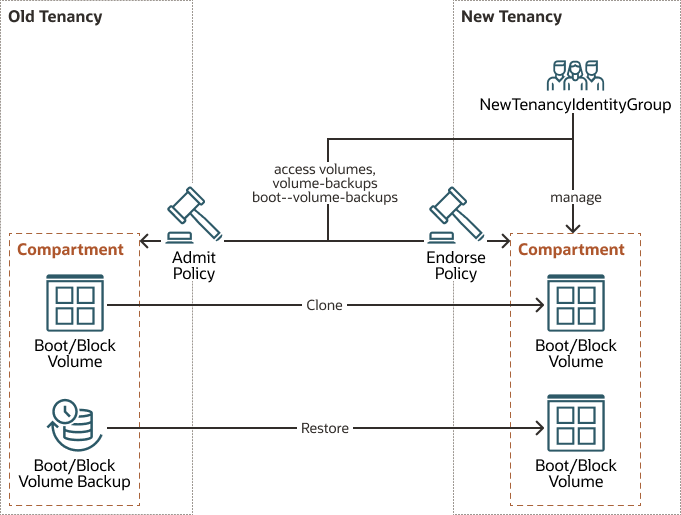
定义旧租户中的入学策略
NewTenancyIdentityGroup 的权限。
克隆和还原操作都会创建新卷,因此策略仅允许创建操作。在随背书策略一起定义策略后(如下所述),新租户中的 NewTenancyIdentityGroup 用户将有权克隆卷或将卷从旧租户恢复到新租户。
克隆的入学策略
要允许克隆,请使用 OCI 控制台或 CLI 在旧租户中创建以下身份策略。通过将 in tenancy 替换为 in compartment compartment name,可以进一步限制这些策略以允许访问区间中的卷。
Define tenancy NewTenancy as ocid1.tenancy.oc1..xxxxxxxxxxxxxxxxxxxxxxxxxxxxxxxxxxxxxxxxxxxxxxxxxx
Define group NewTenancyIdentityGroup as ocid1.group.oc1.. xxxxxxxxxxxxxxxxxxxxxxxxxxxxxxxxxxxxxxxxxxxxxxxxxx
Admit group NewTenancyIdentityGroup of tenancy NewTenancy to use volumes in tenancy where ANY { request.operation='CreateVolume', request.operation='GetVolume', request.operation='CreateBootVolume', request.operation='GetBootVolume' }
用于恢复的入学策略
要允许恢复,请使用 OCI 控制台或 CLI 在旧租户中创建以下身份策略。通过将 in tenancy 替换为 in compartment compartment name,可以进一步限制这些策略以允许访问区间中的卷。
Define tenancy NewTenancy as ocid1.tenancy.oc1.. xxxxxxxxxxxxxxxxxxxxxxxxxxxxxxxxxxxxxxxxxxxxxxxxxx
Define group NewTenancyIdentityGroup as ocid1.group.oc1.. xxxxxxxxxxxxxxxxxxxxxxxxxxxxxxxxxxxxxxxxxxxxxxxxxx
Admit group NewTenancyIdentityGroup of tenancy NewTenancy to read boot-volume-backups in tenancy
Admit group NewTenancyIdentityGroup of tenancy NewTenancy to read volume-backups in tenancy
Admit group NewTenancyIdentityGroup of tenancy NewTenancy to inspect volumes in tenancy
在新租户中定义背书策略
OCI 背书策略为租户的用户提供背书,以在租户中运行操作。应在新租户中定义以下策略,并为新租户的身份组 NewTenancyIdentityGroup 授予从旧租户克隆或恢复卷的权限。克隆和还原会创建新卷,因此策略认可创建操作
用于克隆的背书策略
要允许克隆,请使用 OCI 控制台或 CLI 在新租户中创建以下身份策略。
Define tenancy OldTenancy as ocid1.tenancy.oc1.. xxxxxxxxxxxxxxxxxxxxxxxxxxxxxxxxxxxxxxxxxxxxxxxxxx
Endorse group NewTenancyIdentityGroup to use volumes in tenancy OldTenancy where ANY { request.operation = 'CreateVolume', request.operation='GetVolume', request.operation='CreateBootVolume', request.operation='GetBootVolume' }
用于恢复的背书策略
要允许恢复,请使用 OCI 控制台或 CLI 在新租户中创建以下身份策略。
Define tenancy OldTenancy as ocid1.tenancy.oc1.. xxxxxxxxxxxxxxxxxxxxxxxxxxxxxxxxxxxxxxxxxxxxxxxxxx
Endorse group NewTenancyIdentityGroup to read boot-volume-backups in tenancy OldTenancy
Endorse group NewTenancyIdentityGroup to read volume-backups in tenancy OldTenancy
Endorse group NewTenancyIdentityGroup to inspect volumes in tenancy OldTenancy
配置 CLI 配置文件
为 NewTenancyIdentityGroup 用户创建 CLI 配置文件 cross_tenancy_user_profile。在以下示例中,此用户用于运行跨租户操作。请参见有关在 "Configuring the CLI" 中配置 CLI 配置文件的完整说明,您可以从本手册其他位置的 "Explore More" 主题中访问该说明。
对卷进行克隆或恢复
最后,要完成卷迁移,您可以克隆或恢复卷。
跨租户克隆卷
现在策略是在旧租户和新租户上配置的,请通过从配置的 CLI 配置文件运行以下命令,将卷从旧租户克隆到新租户。选择要将卷克隆到的区间,并将其作为 --compartment-id 参数传递,如下所示:
# Clone Volume
$ oci bv volume create --profile=cross_tenancy_user_profile --region=us-ashburn-1 --source-volume-id=ocid1.volume.oc1. xxxxxxxxxxxxxxxxxxxxxxxxxxxxxxxxxxxxxxxxxxxxxxxxxx --compartment-id=ocid1.compartment.oc1.. xxxxxxxxxxxxxxxxxxxxxxxxxxxxxxxxxxxxxxxxxxxxxxxxxx
# Clone Boot Volume
$ oci bv boot-volume create --profile=cross_tenancy_user_profile --region=us-ashburn-1 --source-boot-volume-id=ocid1.bootvolume.oc1.iad. xxxxxxxxxxxxxxxxxxxxxxxxxxxxxxxxxxxxxxxxxxxxxxxxxx --compartment-id=ocid1.compartment.oc1..xxxxxxxxxxxxxxxxxxxxxxxxxxxxxxxxxxxxxxxxxxxxxxxxxx
跨租户恢复卷
现在策略是在旧租户和新租户上配置的,请通过运行以下命令将卷从旧租户恢复到新租户。选择要将卷还原到的区间和 AD,并将其作为 --compartment-id 和 --availability-domain 参数传递,如下所示:
# Restore Volume
$ oci bv volume create --profile=cross_tenancy_user_profile --region=us-ashburn-1 ---volume-backup-id=ocid1.volumebackup.oc1.iad. xxxxxxxxxxxxxxxxxxxxxxxxxxxxxxxxxxxxxxxxxxxxxxxxxx --compartment-id=ocid1.compartment.oc1.. xxxxxxxxxxxxxxxxxxxxxxxxxxxxxxxxxxxxxxxxxxxxxxxxxx --availability-domain=XXXX:US-ASHBURN-AD-1
# Restore Boot Volume
$ oci bv boot-volume create --profile=cross_tenancy_user_profile --region=us-ashburn-1 --boot-volume-backup-id=ocid1.bootvolumebackup.oc1.iad. xxxxxxxxxxxxxxxxxxxxxxxxxxxxxxxxxxxxxxxxxxxxxxxxxx --compartment-id=ocid1.compartment.oc1.. xxxxxxxxxxxxxxxxxxxxxxxxxxxxxxxxxxxxxxxxxxxxxxxxxx --availability-domain=pjBI:US-ASHBURN-AD-1