将应用程序部署到 Oracle 管理的 Kubernetes 集群
要将容器部署到 Oracle Container Engine for Kubernetes 集群,请将图像上载到注册表,然后创建描述部署到 Oracle Container Engine for Kubernetes 集群的部署清单文件。
将 Docker 图像上载到 Oracle Cloud Infrastructure Registry
Oracle Cloud Infrastructure 注册表是可在其中存储应用程序映像的专用注册表。只要您的云基础结构可以访问此目的,您就可以使用任何注册表。
要将图像上载到 Oracle Cloud Infrastructure 注册表,您需要相应地进行标记,然后将其上载到注册表。要将图像上载到 Oracle Cloud Infrastructure 注册表,请在 Oracle Cloud Infrastructure 注册表中指定要将图像上载到的目标位置的全限定路径(可选),包括资料档案库的名称。在这里,通过在 build.gradle 中指定标记名称,您已使用 Docker 插件将该插件标记为进行抓取。
tag = 'data-region.ocir.io/my-tenant/my-repo/omc-sample-app:latest'
图像准备好上载到 Oracle Cloud Infrastructure 注册表后,请登录 Oracle Cloud Infrastructure 控制台在 Oracle Cloud Infrastructure 中设置访问标记。访问标记有助于您使用 Docker 命令行界面(CLI)登录 Oracle Cloud Infrastructure。
- 在 Oracle Cloud Infrastructure 控制台的右上角,单击用户菜单,然后单击用户设置以查看详细信息。
- 在“验证标记”页上,单击生成标记。
- 在生成标记对话框中,输入验证标记的友好说明,然后单击生成标记。此时将显示新的验证标记。
- 将验证标记复制到可在以后从中检索验证标记的安全位置,因为在 Oracle Cloud Infrastructure 控制台中再次看不到验证标记。
- Close the Generate Token dialog box and close the Oracle Cloud Infrastructure console.
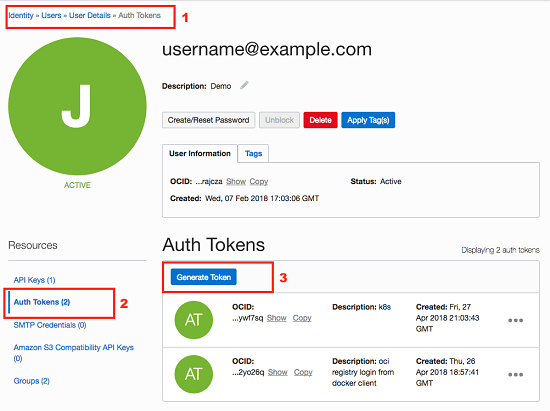
创建验证令牌后,将图像上载到 Oracle Cloud Infrastructure 注册表。
- 使用标准 Docker CLI 登录到 Oracle Cloud Infrastructure。
docker login data-region.ocir.io - 按
my-tenant/username@example.com格式输入您的用户名。出现提示时,输入先前保存的验证令牌。 - 将图像上载到 Oracle Cloud Infrastructure 注册表。
docker push data-region.ocir.io/my-tenant/my-repo/omc-sample-app
上载后,您可以在资料档案库中查看图像。
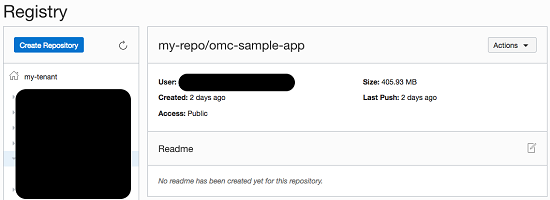
将应用程序部署到 Oracle Container Engine for Kubernetes 集群
上载映像后,您需要设置 Kubernetes 部署清单以将应用程序作为部署单元管理,然后部署 Kubernetes 集群。
此清单描述需要基于所创建的映像具有一个副本的 Deployment 对象。
- 在类似于以下内容的当前目录中创建清单文件
omc-sample-svc.yaml。apiVersion: apps/v1 kind: Deployment metadata: name: omc-sample-app spec: selector: matchLabels: app: omc-sample-app replicas: 1 template: metadata: labels: app: omc-sample-app spec: containers: - name: omc-sample-app image: data-region.ocir.io/my-tenant/my-repo/omc-sample-app:latest ports: - containerPort: 8080 --- apiVersion: v1 kind: Service metadata: name: omc-sample-app spec: selector: app: omc-sample-app ports: - protocol: "TCP" port: 8080 targetPort: 8080 type: LoadBalancer部署的名称为
omc-sample-app,用于创建应用程序容器。要允许整体访问部署,需要创建服务,在本例中为LoadBalancer类型。部署时,这会自动预配Oracle Cloud Infrastructure Load Balancing 实例以管理流量并将流量路由到应用程序。 - 通过从当前目录运行
kubectl来部署应用程序映像。kubectl apply -f omc-sample-svc.yaml