创建和部署 NFT 智能合同
在本节中,您将学习如何创建和部署设置 NFT 市场所需的 NFT 智能合同。
使用区块链应用程序构建器生成智能合同来管理薄荷、拥有和传输 NFT。此解决方案的核心推动因素是能够使用 Oracle Blockchain Platform 模拟和传输 NFT。
首先创建 NFT 规范文件,然后将智能合同部署到 Oracle Blockchain Platform 实例。然后可以测试智能合同。
安装区块链应用程序构建器
预配 Oracle Blockchain Platform 实例后,请完成以下步骤:
- 在 Oracle Blockchain Platform 控制台中,打开开发人员工具选项卡,然后选择区块链应用程序构建器窗格。
- 在 Download(下载)部分中,下载命令行界面 (command line interface, CLI) 工具归档文件或 Visual Studio (VS) 代码扩展名,然后将其在本地设置。
自定义示例 NFT 规范文件
区块链应用程序构建器附带示例 NFT 规范文件。您可以根据需要使用它并对其进行定制,如以下示例中所示:
 assets:
    - name: ArtCollection
      type: token
      symbol: ART      #mandatory
      standard: erc721+
      anatomy:
        type: nonfungible
        unit: whole
      behavior:
        - indivisible      # mandatory
        - singleton        # mandatory
        - mintable:        # mandatory
            max_min_quantity: 20000
        - transferable
        - burnable
        - roles:
            minter_role_name: minter
      properties:
        - name: price
          type: number
        - name: on_sale_flag
          type: boolean
      metadata:
        - name: painting_name
          type: string
        - name: description
          type: string
        - name: image
          type: string
        - name: painter_name
          type: string
 customMethods:
    - executeQuery
    - "createAccountByConsumers(org_id: string, user_id: string, token_type: string)" # Create accounts for consumers while signing up
    - "sell(token_id: string, selling_price: number)" # Post the token for selling in the marketplace
    - "buyWithTokens(from_org_id: string, from_user_id: string, to_org_id: string, to_user_id: string, nonfungible_token_id: string, fungible_token_id: string, amount_paid: number)"  # Buy the NFT after paying the using FT Tokens
    - "buyWithDirectPayment(from_org_id: string, from_user_id: string, to_org_id: string, to_user_id: string, nonfungible_token_id: string, amount_paid: number)"  # Buy the NFT after paying the amount using payment gateway
您可以添加定制属性和方法来扩展 NFT 链代码的此规范。由区块链应用程序构建器生成的 NFT 链代码基于 ERC-721 标准。
要使用 Visual Studio Code 扩展生成链代码(智能合同),请完成以下步骤:
- 在主要代码部分中,单击 + 图标。此时将打开 Chaincode Details 窗格。
- 填写生成链代码项目所需的字段:
- 输入链代码项目的名称。
- 选择
TypeScript或Go作为生成链代码方法所使用的语言。 - 选择先前创建的输入规范文件。
- 输入要生成项目的位置。
- 单击创建。
UI 的以下屏幕截图显示了创建链代码窗口。
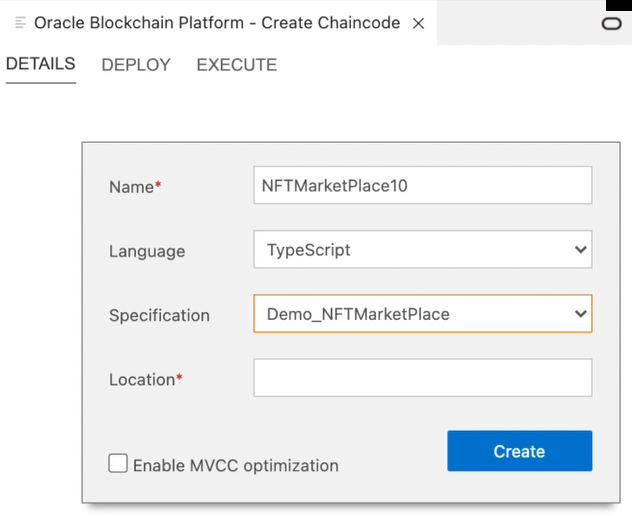
插图 blockchain_chaincode_details.png 的说明
src 目录下的文件来查看模型和控制器实现。
- 模型文件包含代表令牌、帐户等生成的所有数据结构。
- 控制器文件包含所有生成的 NFT 生命周期方法和支持函数,并根据规范提供必需的验证逻辑。
/**
*
* BDB sql rich queries can be executed in OBP CS/EE.
* This method can be invoked only when connected to remote OBP CS/EE network.
*
*/
@Validator(yup.string())
    public async executeQuery(query: string) {
        const result = await this.query(query);
        return result;
    }
@Validator(yup.string(), yup.string(), yup.string())
          public async createAccountByConsumers(org_id: string, user_id: string, token_type: string) {
          //await this.Ctx.ERC721Auth.checkAuthorization('ERC721ACCOUNT.createAccount', 'TOKEN');
          return await this.Ctx.ERC721Account.createAccount(org_id, user_id, token_type);
    }
@Validator(yup.string(), yup.number())
public async sell (token_id: string, selling_price: number) {
          try {
            const token = await this.Ctx.ERC721Token.get(token_id);
            const t = new ArtCollection(token)
            t.price =  selling_price;
            t.on_sale_flag = true;
            //console.log(token);
            await this.Ctx.ERC721Token.update(t);
            return `Token ID : '${token_id}' has been posted for selling in the marketplace'`;
          } catch(error) {
                throw new Error(error.message);
        }
}
@Validator(yup.string(), yup.string(), yup.string(), yup.string(), yup.string(), yup.string(), yup.number())
public async buyWithTokens(from_org_id: string, from_user_id: string, to_org_id: string, to_user_id: string, nonfungible_token_id: string, fungible_token_id: string, amount_paid: number) {
        try {
            const token = await this.Ctx.ERC721Token.get(nonfungible_token_id);
            const t = new ArtCollection(token);
            const oChainUtil = new OChainUtils(this.Ctx.Stub);
            var msg = `Token ID : '${nonfungible_token_id}' had not been transferred'`;
            if (t.on_sale_flag==true) {
                if(t.price == amount_paid) {
                     // @ts-ignore
                    await oChainUtil.invokeChaincode("LoyaltyToken7", "transferTokens", [fungible_token_id, from_org_id, from_user_id, amount_paid], "marketplace");
                    const from_account_id = await this.Ctx.ERC721Account.generateAccountId(from_org_id, from_user_id);
                    const to_account_id = await this.Ctx.ERC721Account.generateAccountId(to_org_id, to_user_id);
                    await this.Ctx.ERC721Token.transferFrom(from_account_id, to_account_id, t);

                    msg = `Token ID : '${nonfungible_token_id}' has been successfully transferred to UserID : '${to_user_id}'`;
              }
            }
            else {
                msg = `Token ID : '${nonfungible_token_id}' has not been transferred to UserID : '${to_user_id}' as the amount was not fully paid'`;
            }
            return msg;
       } catch(error)
          {
            throw new Error(error.message);
         }
}
@Validator(yup.string(), yup.string(), yup.string(), yup.string(), yup.string(), yup.number())
    public async buyWithDirectPayment(from_org_id: string, from_user_id: string, to_org_id: string, to_user_id: string, nonfungible_token_id: string, amount_paid: number) {
         try {
             const token = await this.Ctx.ERC721Token.get(nonfungible_token_id);
             const t = new ArtCollection(token);
             var msg = `Token ID : '${nonfungible_token_id}' had not been transferred'`;
           if (t.on_sale_flag==true) {
                 if(t.price == amount_paid) {
                 const from_account_id = await this.Ctx.ERC721Account.generateAccountId(from_org_id, from_user_id);
                 const to_account_id = await this.Ctx.ERC721Account.generateAccountId(to_org_id, to_user_id);
                 await this.Ctx.ERC721Token.transferFrom(from_account_id, to_account_id, t);

                 msg = `Token ID : '${nonfungible_token_id}' has been successfully transferred to UserID : '${to_user_id}'`;
                 }
             }
             else {
                 msg = `Token ID : '${nonfungible_token_id}' has not been transferred to UserID : '${to_user_id}' as the amount was not fully paid'`;
             }
             return msg;
         } catch(error) {
             throw new Error(error.message);
         }
      }
}
部署智能合同
创建链代码项目后,可以在本地部署该项目。
在Chaincode Details 窗格中,选择 Deploy(部署)以打开部署向导。区块链应用构建器包括一个本地区块链网络,该网络在 Docker 容器中运行,可用于测试。
您还可以通过从目标环境的列表中选择连接配置文件,将链代码部署到 Oracle Blockchain Platform 实例。还必须完成并保存初始参数,因为生成的 NFT 链代码需要 orgId 和 userId 参数才能初始化。orgId 和 userId 参数用于指定哪些用户具有令牌管理员权限。
测试智能合同
部署链代码时,Oracle Blockchain Platform 会自动公开用于标记初始化、账户和角色管理以及 NFT 生命周期方法(创建、传输、消耗)的 REST API。
您可以通过在区块链应用程序构建器的链代码详细信息窗格上选择执行或使用 REST API 客户端(例如 Postman)进行测试。
UI 的以下屏幕截图显示了创建链代码窗口的执行选项卡。
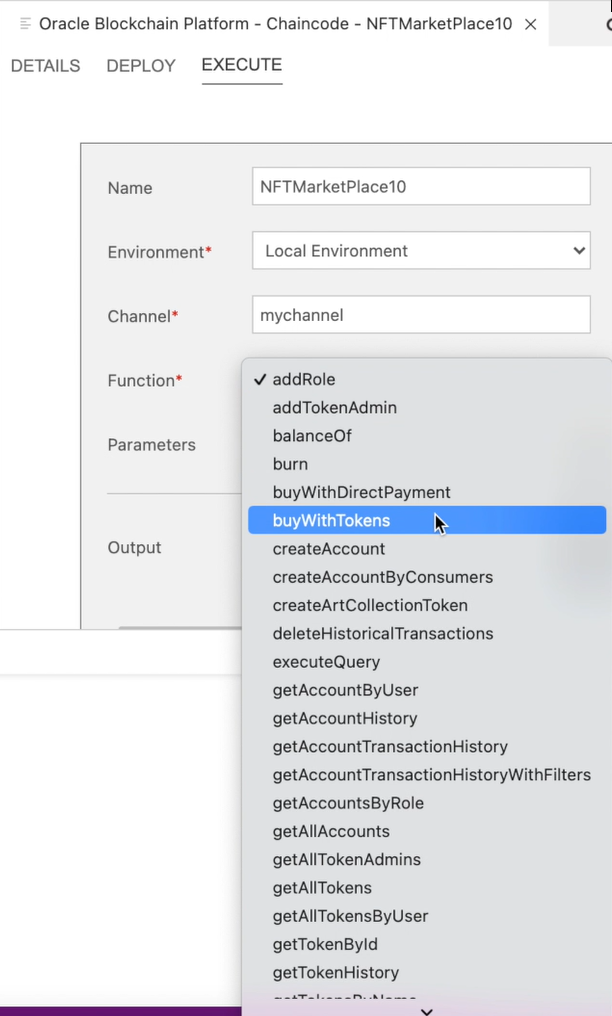
插图 blockchain_chaincode_execute.png 的说明
要使用 REST API 调用 Oracle Blockchain Platform 智能合同方法,请使用 POST 方法并指定 URL,该 URL 由两个部分连接在一起。第一部分是 Oracle Blockchain Platform 中的 REST 代理端点,您可以从 Oracle Blockchain Platform 控制台的节点选项卡中获取。
第二部分是使用 Transaction API 调用事务处理的特定 URI。要发送 POST 请求,请参阅此文档。这两个部分形成一个完整的 URL,类似于这里的 URL。
https://oabcs1-iad.blockchain.ocp.oraclecloud.com:7443/restproxy/api/v2/channels/{channelName}/transactions将 {channelName} 替换为部署链代码时指定的通道的名称,例如 marketplace。构建 API 请求时,请完成以下步骤:
- 将授权设置为将
Basic Auth与映射到REST_Client角色的指定userid and password一起使用。您还可以使用OAuth2标记。有关详细信息,请参阅 REST API 指南中的使用 OAuth 2.0 访问基于令牌的身份验证。 - 将
Content-Type标头设置为application/json。 - 在请求正文中,包括事务处理调用所需的参数,包括链代码名称和
create<TokenName>Token方法以及所需的参数。
根据从 yaml 模板生成的链代码,以下文本显示示例请求正文和关联的响应。
请求
{
    "chaincode": "{{NFTChaincode}}",
    "args": [
        "createArtCollectionToken",
        "{\"token_id\":\"{{NFTTokenID}}\",\"token_uri\":\"https://ipfs.io/ipfs/QmV68aiT7xw2WX8pmDbeTWpGP2or35NUFan9RagymsLpgV?filename=ArtCollection_NFT1.json\",\"metadata\":{\"painting_name\":\"Oracle - Red Bull Partnership\",\"image\":\"https://ipfs.io/ipfs/QmVap6Gkh3Cp9DiLLWvkvJHpuXpFmYB2GzU1caM57gNcAa?filename=Oracle_RedBull_NFT1.jpeg\",\"painter\":\"Alex\"},\"price\":200,\"on_sale_flag\":false}"
    ],
    "timeout": 0,
    "sync": true
}
响应
{
    "returnCode": "Success",
    "error": "",
    "result": {
        "txid": "c999922f04c3011bf25ca43624e4bb23e8900634f8e23a1648170a90274a9733",
        "payload": {
            "metadata": {
                "painter": "Alex",
                "painting_name": "Oracle - Red Bull Partnership",
                "image": "https://ipfs.io/ipfs/QmVap6Gkh3Cp9DiLLWvkvJHpuXpFmYB2GzU1caM57gNcAa?filename=Oracle_RedBull_NFT1.jpeg"
            },
            "assetType": "otoken",
            "created_by": "oaccount~eadf1b0ae857164f8681d1742b6328089a7d33ebec76d8248cb909da7a84f42a",
            "creation_date": "2022-04-28T12:08:38.000Z",
            "owner": "oaccount~eadf1b0ae857164f8681d1742b6328089a7d33ebec76d8248cb909da7a84f42a",
            "uri": "https://ipfs.io/ipfs/QmV68aiT7xw2WX8pmDbeTWpGP2or35NUFan9RagymsLpgV?filename=ArtCollection_NFT1.json",
            "is_burned": false,
            "token_id": "NFT17",
            "token_name": "artcollection",
            "symbol": "ART",
            "token_standard": "erc721+",
            "token_type": "nonfungible",
            "token_unit": "whole",
            "behaviors": [
                "indivisible",
                "singleton",
                "mintable",
                "transferable",
                "burnable",
                "roles"
            ],
            "roles": {
                "minter_role_name": "minter"
            },
            "mintable": {
                "max_mint_quantity": 20000
            },
            "token_uri": "https://ipfs.io/ipfs/QmV68aiT7xw2WX8pmDbeTWpGP2or35NUFan9RagymsLpgV?filename=ArtCollection_NFT1.json",
            "price": 200,
            "on_sale_flag": false
        },
有关可用于管理 NFT 链代码的方法(包括 Golang 或 TypeScript 方法以及 Platform REST API)的更多信息,请参见了解更多部分。
您可以直接从 Oracle Content Management Webhook 和基于 Visual Builder Cloud Service (Visual Builder Cloud Service, VBCS) 构建的 Web 应用程序调用 API,或者使用 API 网关重新映射这些 API 并将其包装,以供外部托管的市场 Web 应用程序使用。请注意,创建 (mint) NFT 时,必须提供的参数之一是 token_uri,这可以是指向表示数字对象的 JSON 文件的 IPFS URI。
https://ipfs.io/ipfs/QmV68aiT7xw2WX8pmDbeTWpGP2or35NUFan9RagymsLpgV?filename=ArtCollection_NFT1.json以下步骤介绍使用 IPFS Desktop 生成令牌 URI 的示例:
- 在
IPFS上上载图像文件并保存图像的 URI。 - 创建并上载包含映像 URI 的
JSON文件以及相关元数据字段。 - Share and copy the link to the
JSONfile under the ...More list.
{
    "painting_name": "Oracle - Red Bull Partnership",
    "description": "Cloud Partnership",
    "image": "https://ipfs.io/ipfs/QmVap6Gkh3Cp9DiLLWvkvJHpuXpFmYB2GzU1caM57gNcAa?filename=Oracle_RedBull.jpeg",
    "painter_name": "Alex"
}
使用指向 JSON 文件的 token_uri 参数的 URI。
您还可以在传递到 create<Token-Name>Token 方法的属性中包括相关元数据,这些属性将维护 Oracle Blockchain Platform 分类账中的元数据,以便于检索。
对于使用 Oracle Content Management (OCM) 创建的 NFT,请使用 OCM Webhook 来使用 API 网关调用 Oracle Functions,并将 REST API 调用置于 Oracle Functions 中,如体系结构图所示。您还可以直接从应用市场 Web 应用调用区块链 REST API,或者通过使用 API 网关映射来支持用户生成的内容。市场交易功能可以调用自定义方法来处理付款,然后触发 NFT 所有权的转移,例如 buyWithTokens 和 buyWithDirectPayment 示例方法。