使用 Terraform 更新全域作用中表格
新增區域複本
您可以新增現有「全域作用中表格」的區域複本。
mr_test 已存在,且在 Canada Southeast (Montreal) 區域中具有區域複本。若要在另一個加拿大東南部 (多倫多) 區域中新增此表格的區域複本,請使用下列 nosql.tf 檔案。
附註:
即使表格和複本已經存在,表格 (CREATE TABLE IF NOT EXISTS mr_test...) 和現有複本的定義也必須一律包含在 terraform 命令檔中。若從 terraform 命令檔移除 CREATE TABLE 定義,會將表格自區域刪除。同樣地,從 terraform 命令檔移除現有的複本定義會刪除區域表格複本。
variable "compartment_ocid" {
}
variable "table_ddl_statement" {
  default = "CREATE TABLE IF NOT EXISTS mr_test(id INTEGER,
             name STRING, info JSON,PRIMARY KEY(id))
             using TTL 10 days with schema frozen"
}
resource "oci_nosql_table" "mr_test" {
  #Required
  compartment_id = var.compartment_ocid
  ddl_statement  = var.table_ddl_statement
  name           = "mr_test"
  table_limits {
    #Required
    max_read_units = 51
    max_write_units = 51
    max_storage_in_gbs = 2
  }
}
resource "oci_nosql_table_replica" "replica_montreal" {
  table_name_or_id = oci_nosql_table.mr_test.id
  region = "ca-montreal-1"
  #Optional
  max_read_units     = "60"
  max_write_units    = "60"
}
#add a regional replica
resource "oci_nosql_table_replica" "replica_toronto" {
  compartment_id = var.compartment_ocid
  table_name_or_id = "mr_test"
  region = "ca-toronto-1"
  depends_on = [oci_nosql_table.mr_test]
}terraform applyDo you want to perform these actions? Terraform will perform the actions described above. Only 'yes' will be accepted to approve. 確認後,Terraform 將在多倫多區域新增 Global Active 表格的新區域複本。由於此區域中沒有明確提供給複本的讀取和寫入單位,因此會從 US East (Ashburn) 區域中的 mr_test 表格接管這些值。在上述範例中,Canada Southeast(Toronto) 區域中複本表格的讀取和寫入單位為 51。
刪除區域複本
您可以刪除現有「全域作用中表格」的區域複本。
mr_test 已經存在,且在 Canada Southeast (Montreal) 和 Canada Southeast (Toronto) 區域中有複本。若要從加拿大東南部 (多倫多) 區域刪除複本,請使用下列 nosql.tf 檔案,您可在其中加註 (或移除) 加拿大東南部 (多倫多) 複本的相關程式碼。
附註:
即使表格已經存在,表格 (CREATE TABLE IF NOT EXISTS mr_test...) 的定義也必須一律包含在 terraform 命令檔中。若從 terraform 命令檔移除 CREATE TABLE 定義,會將表格自區域刪除。
variable "compartment_ocid" {
}
variable "table_ddl_statement" {
  default = "CREATE TABLE IF NOT EXISTS mr_test(id INTEGER,
             name STRING, info JSON,PRIMARY KEY(id))
             using TTL 10 days with schema frozen"
}
resource "oci_nosql_table" "mr_test" {
  #Required
  compartment_id = var.compartment_ocid
  ddl_statement  = var.table_ddl_statement
  name           = "mr_test"
  table_limits {
    #Required
    max_read_units = 51
    max_write_units = 51
    max_storage_in_gbs = 2
  }
}
resource "oci_nosql_table_replica" "replica_montreal" {
  table_name_or_id = oci_nosql_table.mr_test.id
  region = "ca-montreal-1"
  #Optional
  max_read_units     = "60"
  max_write_units    = "60"
}
#resource "oci_nosql_table_replica" "replica_toronto" {
#  compartment_id = var.compartment_ocid
#  table_name_or_id = "mr_test"
#  region = "ca-toronto-1"
#  depends_on = [oci_nosql_table.mr_test]
#}terraform applyDo you want to perform these actions? Terraform will perform the actions described above. Only 'yes' will be accepted to approve.確認後,Terraform 將刪除加拿大東南部 (多倫多) 區域的複本。
變更「全域作用中表格」的 TTL 和表格限制
您可以使用 Terraform 變更「全域作用中」表格的讀取單位、寫入單位、儲存容量以及表格 TTL。
在「全域作用中」表格中,變更讀取容量限制或寫入容量限制只會套用到變更後的區域。不過,變更儲存容量或變更表格層次 TTL 值會將變更套用至本機表格,以及表格的所有區域複本。
mr_test 表格的表格容量,請使用下列 nosql.tf 檔案。variable "compartment_ocid" {
}
variable "table_ddl_statement" {
default = "CREATE TABLE IF NOT EXISTS mr_test(id INTEGER,
name STRING, info JSON,PRIMARY KEY(id))
using TTL 15 days with schema frozen"
}
resource "oci_nosql_table" "mr_test" {
#Required
compartment_id = var.compartment_ocid
ddl_statement = var.table_ddl_statement
name = "mr_test"
table_limits {
#Required
max_read_units = 70
max_write_units = 70
max_storage_in_gbs = 2
}
}
resource "oci_nosql_table_replica" "replica_montreal" {
table_name_or_id = oci_nosql_table.mr_test.id
region = "ca-montreal-1"
#Optional
max_read_units = 60
max_write_units = 60
}
resource "oci_nosql_table_replica" "replica_toronto" {
compartment_id = var.compartment_ocid
table_name_or_id = "mr_test"
region = "ca-toronto-1"
depends_on = [oci_nosql_table.mr_test]
}terraform applyDo you want to perform these actions? Terraform will perform the actions described above. Only 'yes' will be accepted to approve.us-ashburn-1) 中表格的讀取和寫入單位就會變更為 70。其他區域中複本的表格限制則不會變更。不過,本機表格和所有複本中的 TTL 值都會變更為 15 天。
附註:
「全域作用中」表格包含對稱表格定義,包括所有區域複本中的綱要、索引、TTL 以及儲存體大小。如果您變更一個區域複本中的索引、TTL 或儲存體大小,則會自動套用至所有其他區域複本。因此建議您僅從一個區域管理這些表格定義。編輯區域複本的表格限制
Terraform 中的 OCI 提供者是針對單一區域設定的。由於表格限制更新是區域特定的,因此您只能從多倫多區域管理在 ca-toronto-1 中建立之複本的讀取和寫入單位。同樣地,如果您要管理全域作用中表格之不同區域的表格限制,建議您使用 terraform 來建構模組,如下所示。在這裡,區域 1、區域 2 等是您 Terraform 目錄內的目錄。Terraform 目錄是安裝 Terraform 時所建立的目錄。
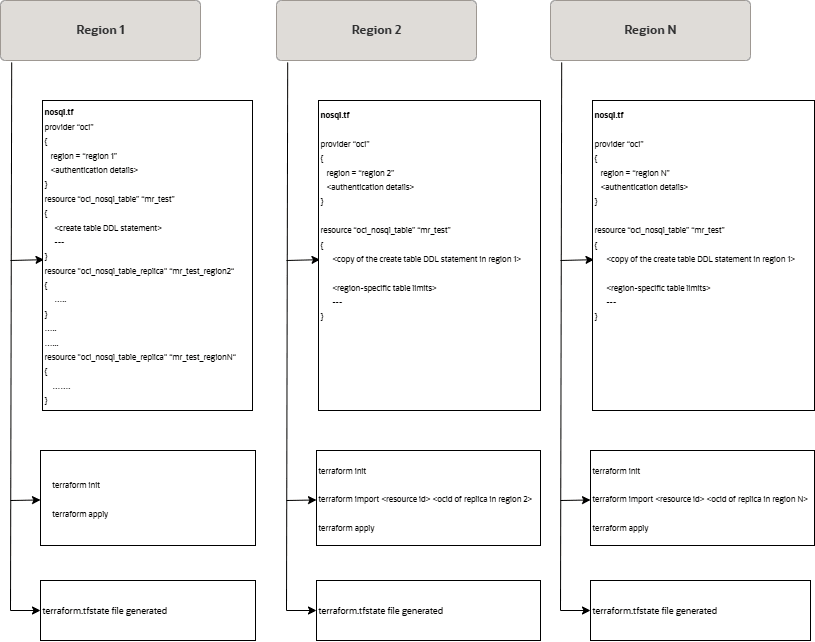
在 Terraform 目錄中,維護每個區域的個別目錄,並維護組態 (在上述圖表中以 nosql.tf 表示),其中包含區域特定的表格限制。也會個別建立及管理每個區域的 terraform 狀態檔 (terraform.tfstate)。
在我們的案例中,Terraform 目錄內會有三個相對應於三個區域 (us-ashburn-1、ca-montreal-1 和 ca-toronto-1) 的目錄。讓我們呼叫 Ashburn、Montreal 和 Toronto 目錄。
ca-toronto-1 區域中複本表格之讀取 / 寫入單位的步驟:
- 瀏覽至
Toronto目錄。從美國東部 (阿什本) 區域中使用的組態複製oci_nosql_table資源定義,以建立 Terraform 組態 (此處為nosql.tf)。 - 視需要更新表格的讀取和 (或) 寫入單位。
resource "oci_nosql_table" "mr_test" { #Required compartment_id = var.compartment_ocid ddl_statement = "CREATE TABLE IF NOT EXISTS mr_test(id INTEGER, name STRING, info JSON, PRIMARY KEY(id)) with schema frozen" name = "mr_test" table_limits { #Required max_read_units = 100 max_write_units = 90 max_storage_in_gbs = 1 } } - 將現有表格匯入您的 Terraform 狀態。如上圖所示,狀態檔案也是區域特定的,因此匯入表格不會建立任何狀態衝突。您可以從 OCI 主控台取得加拿大東南部 (多倫多) 區域複本表格的
ocid。terraform import oci_nosql_table.mr_test <ocid-of-replica-table-in-ca-toronto-1> - 套用變更
terraform apply

Terraform shows the plan to be applied and prompts for confirmation as shown below.
Do you want to perform these actions?
Terraform will perform the actions described above.
Only 'yes' will be accepted to approve.
確認時,
ca-toronto-1區域中複本的讀取和寫入單位會分別修改為 100 和 90。