繼續在 OAM 和 SP 中佈建 JIT 自訂使用者
本文說明如何在 OAM/SP 中建立自訂「使用者佈建」模組。這是以 OAM Developer's Guide (第 16 章) 為基礎,描述如何開發這類模組。
在本文章中,請將焦點放在如何:
-
實作外掛程式
-
編譯
-
封裝它
-
將 Plugin 上傳至 OAM
-
設定 OAM 以使用新上傳的外掛程式
對於此範例,請使用 OAM Developer's Guide 中所列的範例程式碼。
自訂使用者佈建模組
「使用者啟動設定」架構允許實行實行由架構定義之介面的自訂 Plugin。
自訂的「使用者啟動設定」Plugin 是由下列項目所組成:
-
一或多個實行自訂「使用者啟動設定」Plugin 的 Java 類別。其中一個類別會擴充
oracle.security.fed.plugins.fed.provisioning.OIFUserProvisioningPlugin類別。 -
描述 Java 類別的
MANIFEST.MF檔案。 -
描述此外掛程式的 XML 檔案。
這三個元素隨附在 JAR 檔案中,然後透過「OAM 管理主控台」上傳至 OAM 伺服器。上傳並啟用之後,即可由 OAM/SP 在程式實際執行時使用。
Java 類別
實行自訂「使用者啟動設定」模組的類別必須符合下列條件:
-
擴充
oracle.security.fed.plugins.fed.provisioning.OIFUserProvisioningPlugin類別。 -
實行下列方法:公用
ExecutionStatus處理作業 (UserContext相關資訊環境) 會發出UserProvisioningException。 -
此方法會在需要建立使用者記錄時呼叫。
-
必須傳回狀態 (失敗或成功)。
-
在我們的範例中,此方法會檢查
UserContext中包含的使用者資料是否具有必要的資訊。 -
開啟 LDAP 伺服器連線。
-
建立使用者記錄。
-
public String
getPluginName()會傳回自訂「使用者啟動設定」模組的名稱。 -
在我們的範例中,它會傳回
CustomProvisioningPlugin。 -
public String
getDescription()會傳回自訂「使用者啟動設定」模組的描述。 -
在我們的範例中,它會傳回
Custom Provisioning Plugin。 -
公用對應
<String, MonitoringData> getMonitoringData()不用於「使用者佈建」流程。 -
在我們的範例中,它會傳回空值。
-
公用布林值
getMonitoringStatus()不用於「使用者佈建」流程。 -
在我們的範例中,它會傳回 false。
-
public int
getRevision()必須與資訊清單檔案中指定的版本相同。 -
在範例中,它會傳回 10。
-
公用作廢
setMonitoringStatus(boolean status)不用於「使用者佈建」流程。 -
在我們的範例中,這個方法是空的。
-
類別必須實行
org.osgi.framework.BundleActivator介面和以下方法:-
公用作廢啟動 (BundleContext arg0) 發生異常狀況。
-
在我們的範例中,這個方法是空的。
-
-
公用作廢停止 (BundleContext arg0) 發生異常狀況。
-
在我們的範例中,這個方法是空的。
-
或者,如果 Plugin 需要從 Plugin 設定值讀取組態資料,可以實行
initialize()方法。 -
公用 ExecutionStatus 初始化 (PluginConfig 組態)
-
在我們的範例中,此方法會從外掛程式組態中的設定項目讀取使用者基準 DN:
USER_BASE_DN
下列程式碼是名為 CustomerUserProvisioning 之自訂外掛程式的範例。
package userprov;
import java.util.Collection;
import java.util.Hashtable;
import java.util.Map;
import javax.naming.Context;
import javax.naming.directory.BasicAttribute;
import javax.naming.directory.BasicAttributes;
import javax.naming.directory.InitialDirContext;
import oracle.security.am.plugin.ExecutionStatus;
import oracle.security.am.plugin.MonitoringData;
import oracle.security.am.plugin.PluginConfig;
import oracle.security.fed.plugins.fed.provisioning.OIFUserProvisioningPlugin;
import oracle.security.fed.plugins.fed.provisioning.UserContext;
import oracle.security.fed.plugins.fed.provisioning.UserProvisioningException;


public class CustomUserProvisioning extends OIFUserProvisioningPlugin implements
org.osgi.framework.BundleActivator
{
	private String userBaseDN = null;
	public ExecutionStatus initialize(PluginConfig config)
	{
	ExecutionStatus status = super.initialize(config);
	if (status.getStatus() == ExecutionStatus.SUCCESS.getStatus())
		userBaseDN = (String)config.getParameter("USER_BASE_DN");
		return status;
	}
public ExecutionStatus process(UserContext  context) throws UserProvisioningException
{
	try
	{
		// get user data
	 // after OIF/SP processing of the attributes sent by the IdP, we expect
// givenname, sn, mail as well as fed.nameidvalue which contains
// the userid
		Map assertionAbributes = context.getAttributes();
		Collection collection = (Collection)assertionAbributes.get("givenname");
		String firstname = (String)(collection.size() > 0 ? collection.iterator().next() : null);
		collection =  (Collection)assertionAbributes.get("sn");
		String lastname = (String)(collection.size() > 0 ? collection.iterator().next() : null);
		collection = (Collection)assertionAbributes.get("mail");
		String email = (String)(collection.size() > 0 ? collection.iterator().next() : null);
		collection =  (Collection)assertionAbributes.get("fed.nameidvalue"); String userid = (String)(collection.size() > 0 ?
collection.iterator().next() : null);

// check that the required attributes are present. If not, return an error

if (firstname == null || firstname.length() == 0 || lastname == null || lastname.length() == 0 ||  email == null || email.length() == 0 ||
userid == null || userid.length() == 0)
	{

	// failure
		return ExecutionStatus.FAILURE;
	}
	String ldap = "ldap://adc00pcc.us.oracle.com:11389";
	String username = "cn=orcladmin"; String password = "welcome1";

// connects to the LDAP directory

		Hashtable env = new Hashtable();
		env.put(Context.INITIAL_CONTEXT_FACTORY,"com.sun.jndi.ldap.LdapCtxFactory");
		env.put(Context.PROVIDER_URL, ldap);

		if (ldap.toLowerCase().startsWith("ldaps"))
			env.put(Context.SECURITY_PROTOCOL, "ssl");
			env.put(Context.SECURITY_AUTHENTICATION,"simple");
			env.put(Context.REFERRAL, "follow"); env.put(Context.SECURITY_PRINCIPAL, username);
			env.put(Context.SECURITY_CREDENTIALS, password);

		InitialDirContext ldapContext = new

		InitialDirContext(env);

// create the user entry

		BasicAttributes attributes = new

		BasicAttributes();

// object classes

		BasicAttribute objClassAbr = new

		BasicAttribute("objectClass");

		objClassAbr.add("person");

		objClassAbr.add("organizationalPerson");

		objClassAbr.add("inetOrgPerson");

		objClassAbr.add("top");

		attributes.put(objClassAbr);

// uid abr

		attributes.put(new BasicAttribute("uid", userid));

// first name

		attributes.put(new BasicAttribute("givenname", firstname));

// last name

		attributes.put(new BasicAttribute("sn", lastname));

// email

		attributes.put(new BasicAttribute("mail", email));

// DN: cn will be set to userID

		String dn = "cn=" + userid + (userBaseDN != null && userBaseDN.length() \> 0 ? "," + userBaseDN : "");

// create the user record

		ldapContext.createSubcontext(dn, attributes);

// return success

		return ExecutionStatus.SUCCESS;

	}

catch (Exception ex)

	{
		ex.printStackTrace();
		return ExecutionStatus.FAILURE;

	}
}

	public String getPluginName()
	{
		return "CustomProvisioningPlugin";
	}
	public String getDescription()
	{
		return "Custom Provisioning Plugin";
	}
	public Map<String, MonitoringData> getMonitoringData()
	{
		return null;
	}
	public boolean getMonitoringStatus()
	{
		return false;
	}
	public int getRevision()
	{
		return 10;
	}
	public void setMonitoringStatus(boolean status)
	{

	}
	public void start(BundleContext arg0) throws Exception
	{

	}
	public void stop(BundleContext arg0) throws  Exception

	{

	}

}
外掛程式註冊檔案
必須在 Plugin XML 檔案中定義自訂「使用者啟動設定」Plugin,例如:
<Plugin type="User Provisioning">
<author>uid=admin</author>
<email>admin@example</email>
<creationDate>08:00:00,2014-01-15</creationDate>
<description>Custom Provisioning Plugin</description>
 <configuration>
   <AbributeValuePair>
     <Attribute type="string" length="100">USER_BASE_DN</Abribute> <mandatory>false</mandatory>
     <instanceOverride>false</instanceOverride>
     <globalUIOverride>false</globalUIOverride>
     <value> </value>
  </AbributeValuePair>
</configuration>
</Plugin>
重要注意事項:XML 檔案的名稱必須與實行 Plugin 的類別相同,在此情況下為
CustomUserProvisioning.xml
請參閱 OAM Developer's Guide 以瞭解詳細資訊。
資訊清單檔案
將自訂「使用者啟動設定」Plugin 封裝在 JAR 檔案之前,必須先定義 MANIFEST.MF,例如:
Manifest-Version: 1.0
Bundle-ManifestVersion: 2
Bundle-Name: CustomUserProvisioning
Bundle-SymbolicName: CustomUserProvisioning
Bundle-Version: 10
Bundle-Activator: userprov.CustomUserProvisioning Import-Package: org.osgi.framework;version="1.3.0",oracle.security.fed
.plugins.fed.provisioning,javax.naming,javax.naming.directory,oracle. security.am.plugin
Bundle-RequiredExecutionEnvironment: JavaSE-1.6
請參閱 OAM Developer's Guide 以瞭解詳細資訊。
注意:清單檔案必須包含 ImportPackage 特性,其中列出外掛程式使用的所有套裝軟體。
建立外掛程式
編譯中
OAM 部署的下列 JAR 檔案需要用於編譯:
-
felix.jar
-
oam-plugin.jar
-
fed.jar
在下列位置找到這些檔案:
-
felix.jar:
$IAM_HOME/oam/server/lib/plugin/felix.jar -
oam-plugin.jar:
$IAM_HOME/oam/server/lib/plugin/oam-plugin.jar -
fed.jar :在
$DOMAIN_HOME/servers/MANAGED_INSTANCE_NAME/tmp/_WL_user/oam_server/RANDOM_STRING/APP-INF/lib中,RANDOM_STRING為含有隨機字元的目錄名稱,例如測試安裝中的 88g74i。在我們的範例中,會將 CustomerUserProvisioning.java 檔案放置在src/userprov資料夾中:bash-4.1$ ls -lsrc/userprov/總計 8-rw-r--r-- 1 root root 4717 Mar 1 11:42 CustomUserProvisioning.java
若要編譯,請執行下列命令:
$JDK_HOME/bin/javac -cp $IAM_HOME/oam/server/lib/plugin/felix.jar:$IAM_HOME/oam/server/lib/plugin/oam-plugin.jar:/tmp/oam-server/APPINF/lib/fed.jar src/userprov/*.java
封裝自訂 Plugin
我們根據上一節列出的內容,在目前的目錄中建立 MANIFEST.MF,以及 CustomUserProvisioning.xmlin src 目錄,其中包含上一節列出的外掛程式定義。
find
.
./MANIFEST.MF
./src
./src/userprov
./src/userprov/CustomUserProvisioning.class
./src/userprov/CustomUserProvisioning.java ./src/CustomUserProvisioning.xml
若要建立包含 Plugin 和必要檔案的 CustomUserProvisioning.jar JAR 檔案,請執行下列命令:
jar cfvm CustomUserProvisioning.jar MANIFEST.MF -C src/ .
added manifest adding: userprov/(in = 0) (out= 0)(stored 0%) adding: userprov/CustomUserProvisioning.class(in =3991) (out= 1954)(de_ated 51%)
adding: userprov/CustomUserProvisioning.java(in =4717) (out= 1401)(de_ated 70%)
adding: CustomUserProvisioning.xml(in = 486) (out= 266)(de_ated 45%)
這會建立 CustomUserProvisioning.jar。檢視檔案的內容:
unzip -l CustomUserProvisioning.jar 封存:CustomUserProvisioning.jar
| 長度 | 日期 | 時間 | 名稱 |
|---|---|---|---|
| 0 | 03-01-2014 | 14:32 | 後設通知 / |
| 404 | 03-01-2014 | 14:32 | 中繼資訊 /MANIFEST.MF |
| 0 | 03-01-2014 | 12:10 | 使用者提供 / |
| 3991 | 03-01-2014 | 12:10 | 使用者提供 /CustomUserProvisioning.class |
| 4717 | 03-01-2014 | 11:42 | 使用者提供 /CustomUserProvisioning.java |
| 486 | 03-01-2014 | 14:04 | CustomUserProvisioning.xml |
| 9598 | 6 檔案 |
重要注意事項: JAR 檔案的名稱必須與實行 Plugin 的類別相同,在此例中為 CustomUserProvisioning.jar
部署自訂佈建模組
請執行下列步驟,在 OAM 中部署自訂「使用者啟動設定」Plugin:
-
前往「OAM 管理主控台」:
http(s)://oam-admin-host:oam-adminport/oamconsole。 -
瀏覽至 Access Manager 、 Plugins 。
-
按一下匯入 Plug-In 。
-
選取 Plugin JAR 檔案 (此範例中的
CustomUserProvisioning.jar)。
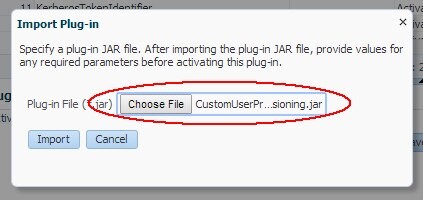
外掛程式會處於已上傳狀態:
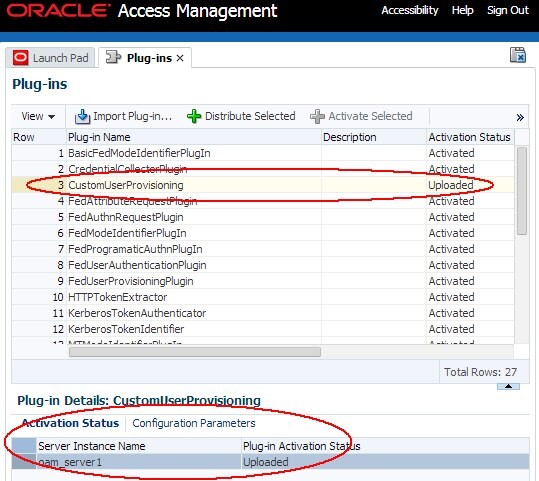
您必須將 Plugin 分配給程式實際執行 OAM 伺服器並加以啟動:
-
選取 Plugin。
-
按一下「分配選取的項目」。
-
外掛程式的 [ 啟動狀態 ] 標籤會顯示外掛程式的狀態。
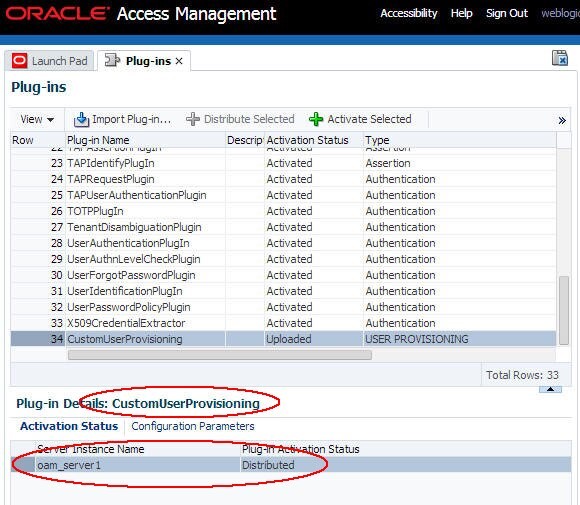
您需要啟用外掛程式:
-
選取 Plugin。
-
按一下「啟用選取的項目」。
-
外掛程式的 [ 啟動狀態 ] 標籤會顯示外掛程式的狀態。
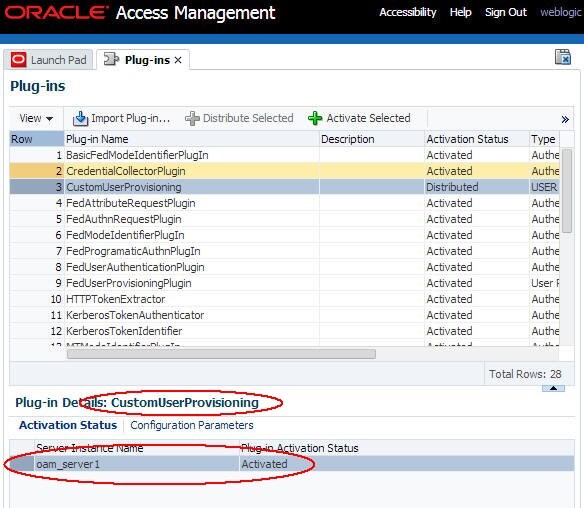
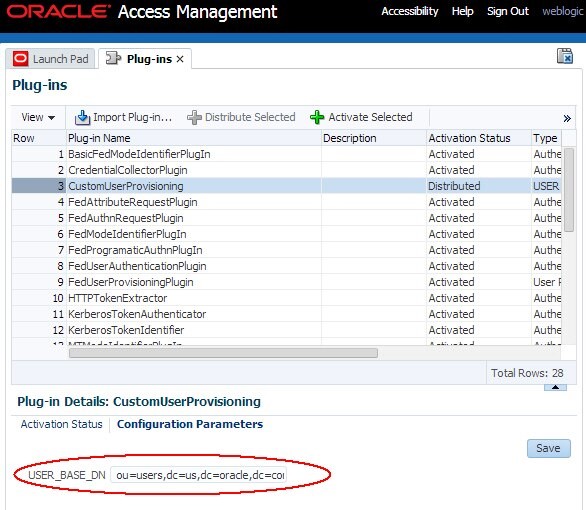
最後,必須為使用者基本 DN 設定 Plugin。執行下列步驟:
-
選取 Plugin。
-
按一下 Plugin 的組態參數頁籤。
-
輸入「使用者基本 DN」(例如,我們使用的目錄:ou=users,dc=us,dc=oracle,dc=com)。
-
按一下儲存。
使用自訂使用者啟動設定模組
在 OAM 中啟用使用者佈建
若要在 OAM/SP 中啟用 / 停用使用者佈建,請執行下列步驟:
-
執行以下步驟來輸入 WLST 環境:
$IAM_ORACLE_HOME/common/bin/wlst.sh。 -
連線「WLS 管理」伺服器:
connect()。 -
瀏覽至「網域程式實際執行」分支:
domainRuntime()。 -
將
userprovisioningenabled特性更新為: -
在 OAM/SP 中啟用使用者佈建:
putBooleanProperty("/fedserverconfig /userprovisioningenabled", "true") -
停用 OAM/SP 中的使用者佈建:
putBooleanProperty("/fedserverconfig /userprovisioningenabled", "false") -
結束 WLST 環境:
exit()。
設定 OAM 以使用自訂 Plugin
若要將 OAM/SP 設定為使用自訂 Plugin,請執行下列步驟:
-
執行以下步驟來輸入 WLST 環境:
$IAM_ORACLE_HOME/common/bin/wlst.sh。 -
連線「WLS 管理」伺服器:
connect()。 -
瀏覽至「網域程式實際執行」分支:
domainRuntime()。 -
將
userprovisioningplugin特性更新為:將 OAM 設定為使用自訂 Plugin,將特性設為 Plugin 名稱 (在範例CustomUserProvisioning中):putStringProperty("/fedserverconfig/userprovisioningplugin","CustomUserProvisioning") -
設定 OAM 使用內建的使用者佈建模組:
putStringProperty("/fedserverconfig /userprovisioningplugin","FedUserProvisioningPlugin") -
結束 WLST 環境:
exit()。
測試設定
使用先前設定的相同 SAML 2.0 同盟設定,其中:
-
OAM 作為服務提供者
-
IdP (
AcmeIdP) 會傳送「SAML 宣告」-
NameID設為userID -
已傳送屬性
-
電子郵件設定為使用者的電子郵件地址
-
已將 fname 設為使用者名字
-
-
已將姓氏設為使用者姓氏
-
使用者最後職稱的職稱集
-
使用 IdP 屬性設定檔設定的 OAM/SP
-
將名字對應至指定名稱
-
將姓氏對應到 sn
-
將電子郵件對應至郵件
-
使用者演算法用於 IdP,而 OAM/SP 沒有使用者帳戶存在:
-
userID :別名
-
電子郵件:alice@oracle.com
-
名字:愛麗絲
-
姓氏:Appleton
-
標題:管理者
-
在與遠端 IdP 夥伴的 SAML 2.0 Federation SSO 期間,IdP 傳回之宣告的 XML SAML 回應為:
<samlp:Response ..>
 <saml:Issuer ...>http://acme.com/idp</saml:Issuer>
 <samlp:Status>
   <samlp:StatusCode Value="urn:oasis:names:tc:SAML:2.0:status:Success"/>
</samlp:Status>
<saml:Assertion ...>
<saml:Issuer ...>http://acme.com/idp</saml:Issuer>
<dsig:Signature ...>
 ...
</dsig:Signature>
<saml:Subject>
<saml:NameID ...>alice</saml:NameID>
...
</saml:Subject>
<saml:Conditions ...>
 ...
</saml:Conditions>
<saml:AuthnStatement ...>
...
</saml:AuthnStatement>
<saml:AbributeStatement ...>
<saml:Attribute Name="email" ...>
 <saml:AbributeValue ...>alice@oracle.com</saml:AbributeValue>
</saml:Abribute>
<saml:Attribute Name="title" ...>
<saml:AbributeValue ...>manager</saml:AbributeValue>
</saml:Abribute>
<saml:Attribute Name="surname" ...>
<saml:AbributeValue ...>Appleton</saml:AbributeValue>
</saml:Abribute>
<saml:Attribute Name="fname" ...>
<saml:AbributeValue ...>Alice</saml:AbributeValue>
</saml:Abribute>
</saml:AbributeStatement>
</saml:Assertion>
</samlp:Response>
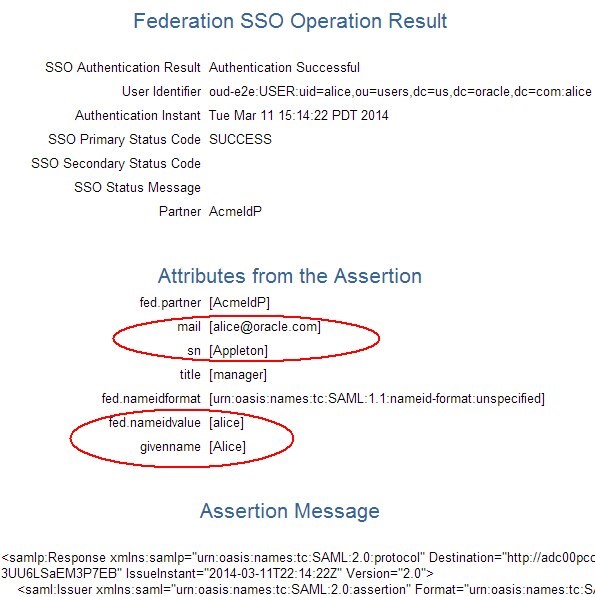
OAM/SP 處理 SAML 2.0 宣告的結果顯示轉換的屬性以及 NameID
測試
同盟 SSO 之後,建立別名的使用者記錄:
- dn:uid=alice,ou=users,dc=us,dc=oracle,dc=com
- 電子郵件:alice@oracle.com
- givenName :愛麗絲
- objectClass :人員
- objectClass:inetOrgPerson
- objectClass:organizationalPerson
- objectClass :頂端
- uid :別名
- cn :別名
- n :別名
- sn:Appleton
其他學習資源
探索 docs.oracle.com/learn 上的其他實驗室,或存取 Oracle Learning YouTube 頻道上的更多免費學習內容。此外,瀏覽 education.oracle.com/learning-explorer 成為 Oracle Learning Explorer。
如需產品文件,請造訪 Oracle Help Center 。
JIT Custom User Provisioning in OAM and SP Continued
F60939-01
September 2022
Copyright © 2022, Oracle and/or its affiliates.