| Bookshelf Home | Contents | Index | PDF | |
|
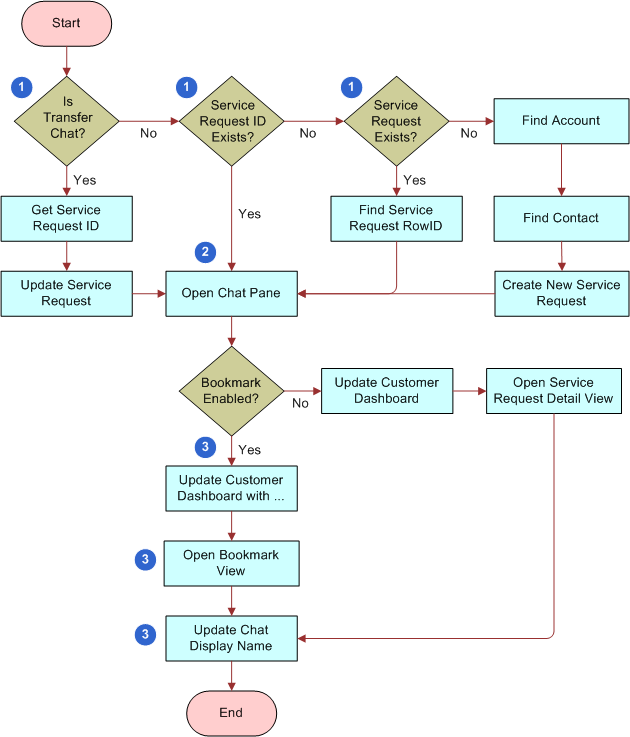
Siebel Chat Guide > Working with Siebel Chat > Processing Siebel Chat Requests > Chat Standard Accept Process WorkflowSiebel Chat provides a sample workflow called Chat Standard Accept Process - vx to handle incoming chat requests, where vx represents the version number. Currently, the latest version is v3. The Chat Standard Accept Process workflow, shown in Figure 5, is the default workflow that is called when an incoming chat request is accepted by an agent. When an agent accepts an incoming chat, Siebel Call Center attempts to identify the customer requesting the chat from the information provided on the chat request form. This information determines whether a service request is created, and consequently the application view that the agent is directed to in the Siebel Call Center application. The Chat Standard Accept Process workflow provides the following enhanced chat functionality to handle incoming chat requests:
For more information about how to configure and set up this enhanced chat functionality, see the following:
The Chat Standard Accept Process workflow is a Siebel Workflow, and you can configure the workflow as required using Siebel Tools to suit your own business needs. Workflow Description. This workflow performs the following actions:
|
 |
|
| Siebel Chat Guide | Copyright © 2013, Oracle and/or its affiliates. All rights reserved. Legal Notices. | |