Release Notes for SunTM ONE Messaging Server
Version 5.2 Patch 1
Part # 816-6456-10
June 2003
These release notes contain important information about Sun ONETM Messaging Server 5.2 Patch 1. Features and enhancements, installation notes, known problems, and other late-breaking issues are addressed here. Read this document before you install Messaging Server.
An electronic version of these release notes can be found at the Sun ONE documentation web site: http://docs.sun.com/db/prod/s1msgsrv/. Check the web site prior to installing and setting up your software and then periodically thereafter to view the most up-to-date release notes and manuals.
New to this update of the release notes is Solaris 9, Windows 2000 SP2 (Service Pack 2), and Veritas Cluster Server 3.5 support. For more information, see Supported Platforms and Veritas Cluster Server 3.5 Support.
These release notes contain the following sections:
- Messaging Server Features
- Sparse Patch Installation Procedures
- Supported Platforms
- Hardware and Software Requirements
- Tuning Requirements
- Localized Versions of Messaging Server
- Veritas Cluster Server 3.5 Support
- Product Hierarchy and Dependencies
- Deprecated Features
- Fixed Bugs
- Known Problems, Limitations, and Considerations
- Documentation Changes
- How to Report Problems
- For More Information
Messaging Server Features
Sun ONE Messaging Server provides a powerful and flexible solution to the email needs of enterprises and messaging hosts of all sizes using open Internet standards.
Sun ONE Messaging Server is an integration of the Netscape Messaging Server and Sun Internet Messaging Server. The most robust and highest performing components of each product have been combined to produce the Messaging Server. For example, the message store, LDAP directory, and Administration Console come from Netscape Messaging Server, while the message transfer agent (MTA) and delegated administrator command line interface come from Sun Internet Mail Server.
Because this is an integrated product, Netscape Messaging Server and Sun Internet Messaging Server customers might find that many processes and procedures for those products are different for Sun ONE Messaging Server. For complete information refer to the Messaging Server 5.2 documentation at http://docs.sun.com/db/prod/s1msgsrv/.
The following list describes features specific to Messaging Server 5.2:
- Compatibility with Sun ONE Directory Server 5.1 and 5.2.
- Integration with Sun ONE Web Server 6.0 SP2 (Service Pack 2).
- Enhanced HTTP service with the introduction of Messenger Express Multiplexor.
-
Enhanced Messenger Express (Webmail), including a spell checker, rich-text formatting for Internet Explorer, shared folders, and user interface improvements that facilitate navigation.
-
In addition, Thai character sets are supported in Messenger Express. To view Thai characters, set your preferred language to Thai in the user preferences.
-
- MTA direct LDAP lookup.
- POP before SMTP service to support legacy POP clients that lack support for standard SMTP authentication. This service is implemented by using a new SMTP proxy component of the Messaging Multiplexor.
- Functionality for importing and exporting between SunTM ONE Messaging Server and UNIX /var/mail format folders.
- Additional support for DNS-based databases in the dns_verify program.
- The configuration variable store.quotanotification is no longer used. To enable or disable quota notification, set or unset the store.quotaexceededmsg configuration variable. Note that you cannot disable IMAP ALERT messages.
- Support for Short Messaging Service using the SMS channel. Messaging server supports one-way email to an SMS gateway. Handling of SMS notifications (that is, replies and delivery receipts) and origination of email from SMS users (mobile to email) is presently not supported. Support for this feature is provided by a special SMS channel. For complete information on the SMS channel, refer to the Sun ONE Messaging Server Technical Notes in the Sun ONE Messaging Server Documentation web site.
- Revised and expanded MTA documentation in the Messaging Server Administrator's Guide and the Messaging Server Reference Manual.
The following list describes features specific to Sun ONE Messaging Server 5.2 Patch 1 (and later):
-
High Availability
-
As of the Messaging Server Patch 1 release, Sun Cluster 3.0 Update 3 and Veritas Cluster Server 2.0 Patch 4 are supported. See the Messaging Server Installation Guide for installation and configuration information.
In addition, Veritas Cluster Server 3.5 is supported. For more information, see Veritas Cluster Server 3.5 Support.
-
-
New Platforms
-
Messaging Server can be installed on Solaris 9 and Windows 2000 SP2 (Service Pack 2). See the sections on Solaris 9 and Microsoft Windows 2000 SP2 (Service Pack 2).
-
Sparse Patch Installation Procedures
This distribution contains a bundle of updates to Messaging Server 5.2. It includes corrections and enhancements to the core Messaging Server product (such as the MTA and the Message Store). In addition, it includes updates to Messenger Express, the MMP, SNMP, Sun Cluster HA agents, and Veritas HA agents. Updates to Delegated Administrator for Messaging and Collaboration are not included in this distribution. See the Delegated Administrator for Messaging and Collaboration 1.2 Patch 1 Release Notes for more information. The following topics outline the recommended sparse patch installation procedures:
High Availability Notes
This section describes how to install high availability when upgrading to Messaging Server 5.2 Patch 1.
Table 1 lists the versions of Sun Cluster Server and Veritas Cluster Server that are currently supported with Messaging Server:
Cluster
Supported Versions
Sun Cluster 3.0 GA, Sun Cluster 3.0 Update 1, Sun Cluster 3.0 Update 2, Sun Cluster 3.0 Update 31
Veritas Cluster Server 2.0, Veritas Cluster Server 2.0 Patch 4, Veritas Cluster Server 3.5
1If you are running Sun Cluster 3.0 U3 on a Solaris 8 platform, install Solaris Patch 110648-22 or later; if you are running Sun Cluster 3.0 U3 on a Solaris 9 platform, install Solaris Patch 112563.
Sun Cluster 3.x
The patch for the Sun Cluster 3.x HA agents is integrated in this distribution (Solaris Patch 112882-xx). This distribution checks if you need to apply additional patches.
Sun Cluster 2.2, 3.x, and Veritas Cluster Server
On all cluster nodes in the Messaging Server resource group, use the following procedure to apply this distribution:
-
Apply the distribution on the first node of the cluster. Specify the Messaging Server and HA agent components in the Perl script imspatch.pl.
-
With Veritas Cluster Server, even though the imspatch.pl only suggests the VCS 2.0 agent (item 4), the same agent works with VCS 3.5 as well.
-
- Backup (rename) the server-root/patch/patch_version/backout directory.
- Apply the distribution to the second and subsequent nodes of the cluster. Specify only the HA agent component in the Perl script imspatch.pl. Be sure to back up your installation after applying the distribution on each node.
- Backup (rename) the server-root/patch/patch_version/backout directory after applying the distribution on the second and subsequent nodes of the cluster.
- If you need to back out the distribution, you must restore the appropriate backout directory for the cluster node prior to running the Perl script imspatch.pl -u.
- Note that /usr/lib/sendmail is now patched if you specify either the Sun Cluster 2.2, 3.x HA Agent, or Veritas 2.0 HA Agent components of the distribution.
Disk Space
Systems with limited disk space should not install the distribution. The installation process requires enough disk space for installation and administrative tasks in the /, /var, or server-root directories where the distribution is typically installed. The exact amount of space depends on the components are fixed as well as the difference in the size of the new objects. It is not recommended that this distribution be installed on a system with less than 50 MB of available space in each of these directories (/, /var, or server-root). Running out of disk space during installation may result in only a partially loaded distribution. In addition, be sure a recent full system backup is available in case a problem occurs.
Save and Back out Options
The installation procedure will save the Messaging Server files that are being replaced. The files are placed in the server-root/patch/patch_version directory. Note that the installer will not be able to determine if enough system disk space is available in server-root/patch to save these files.
Note
Installation Instructions
- If the distribution is a .zip, .tar, or .tar.gz or file, untar, uncompress, or unzip the distribution into an empty directory within the existing server-root.
- Make sure that all current Messaging services are stopped (including dirsync, Direct LDAP, and smtp_servers). Verify that all processes have stopped before proceeding to the next step.
-
Go to the distribution directory and run the imspatch.pl Perl script with super user privileges. For example:
-
The installation program will look like the following example:
Welcome to the iMS Patch Installation tool.
This tool updates your messaging server installation to iPlanet Messaging Server 5.2 Patch 1.Note that webmail patches will overwrite HTML and Javascript files. These files need to be modified for the specific site, and any user changes needs to be merged into the new file.
Please make sure you have stopped your messaging server before proceeding
Please enter the full path to the directory where iPlanet Messaging Server was installed.
Messaging server root [/usr/iplanet/server5] :
Please select from the following components:
[1] Messaging MTA/Store/Webmail/Command Line Utilities
[2] Messaging Multiplexor
[3] Sun Cluster 2.2 HA Agent
[4] Veritas 2.0 HA Agent
[5] Sun Cluster 3.x HA AgentWhich of the above component(s) do you have installed [1]:
Current Installed Version is iPlanet Messaging Server 5.2.
The progress of the installation script will be displayed on your terminal, including the output of the imsimta version and the output of the imsimta test -rewrite commands.
-
- If errors are encountered during the installation of this distribution, error messages will be displayed during installation. More details about the causes of failure can be found in the detail log file: server-root/patch/patch_version/log. If this log file previously existed the latest installation, data will be concatenated to the file so check the end of the file.
Post-Installation
The following post-installation processes are occurring while the ims_patch.pl is applied. You do not have to manually perform any of these procedures
- The MTA imsimta cnbuild and imsimta chbuild commands in the server-root/msg-instance directory are run in order to rebuild the MTA configuration files.
- The MTA imsimta cleandb command (server-root/msg-instance directory) is run.
- The MTA imsimta recover-crash command (server-root/msg-instance directory) is run. However, if you are not running the dirsync command, this command is not run.
- The MTA imsimta test -rewrite -debug postmaster command (server-root/msg-instance directory) is run in order to test the MTA.
- The MTA command, imsimta version (in server-root/msg-instance directory) is run. The output will show the new patch version and build date. A one line log message of the patch installation will also be appended to server-root/README.txt file.
-
The NDAStartPage variable will have the following strings embedded in it:
- msg.da.Host - Delegated Administrator host name.
- msg.da.Port - Delegated Administrator port number.
-
msg.cfgldap.service.DefaultDomain - Default mail domain. These variables must be replaced with their correct values. Consult the old main.js files for the proper values for these variables. If NDAStartPage is not updated, the Delegated Administrator link on the Messenger Express Options page will point to a non-existent URL.
- Messenger Express bug fixes overwrite HTML and Javascript (.js) files. Therefore, any user customizations will be overwritten. User customizations should be merged into the new files.
Once the post-installation processes have completed, you can restart the Messaging Server services.
Back Out Instructions
To back out this distribution, follow these steps:
- Make sure that all Messaging Server services are stopped.
-
Run the imspatch.pl Perl script as the super user with the -u flag from the back out directory (server-root/patch/patch_version).
-
It is very important to run the command from the back out directory and not from the patch distribution directory. For example:
The progress of the script will be displayed on your terminal. It should look like the following:
Welcome to the iMS Patch Uninstallation tool.
This tool rolls back your messaging server installation from 5.2p1. Please make sure you have stopped your messaging server before proceeding
Do you want to continue [y]:Please enter the full path to the directory where iPlanet Messaging Server was installed.
Messaging server root [/usr/iplanet/server5/patch/patch_version] :
-
- Certain configuration files are not backed out automatically. These are the files in the server-root/patch/patch_version/save directory. For example, customizations to your imta.cnf and job_controller.cnf files are stored in this directory. If you want to back out these changes, you must do so manually.
Supported Platforms
Messaging Server 5.2 Patch 1 is supported on the following platforms:
- Solaris 9 for SPARC
- Solaris 2.6 and 8 for SPARC with recommended patches
- Microsoft Windows NT 4.0 SP6a
- Microsoft Windows 2000 SP2 (Service Pack 2)
- HP-UX 11.0 with recommended patches
Solaris 9
Messaging Server can be installed on either Solaris 9 Update 1 or Solaris 9 Update 2. There are no required Solaris patches. Note the following items:
- If you use the directory server that is bundled with the Solaris 9 operating environment, you will need to set and export (in ksh) LD_LIBRARY_PATH=/usr/iplanet/ds5/lib before running the ims_dssetup.pl script, or you must run the ims_dssetup.pl script that is included in Messaging Server 5.2hf1.07 (Hot Fix 1.07 bundle) or later.
-
If you choose to perform a rolling upgrade from Solaris 8 to Solaris 9, the Solaris 9 Live Upgrade substantially reduces the service outages that are sometimes associated with an operating system upgrade. You can duplicate your current running boot environment. While the original boot environment runs, you can upgrade the duplicate environment.
Solaris 2.6 and 8
The supported Solaris platforms require the following patches.
-
Solaris 2.6 for SPARC with patch 105591-09 or later versions (Shared library patch for C++) and 106613-01 or later versions (character set conversion) in addition to the recommended patches listed in the link below.
-
If you install Messaging Server in the ja_JP.PCK locale, the imadmin command line utility will not work properly without the 106361-10 patch.
-
If you install Messaging Server in the ja_JP.PCK locale, the imadmin command line utility will not work properly without the 106361-10 patch.
- Solaris 8 for SPARC with the recommended patches listed in the following link:
A list of recommended patches for Solaris 2.6 and Solaris 8 can be found at http://access1.sun.com.
Additionally, ensure that your Solaris setup specifies how to route to hosts that are not on the local subnet. To do this, ensure that:
If you are installing Messaging Server in a hardened environment, the minimum packages that you need on a Solaris 8 operating environment include:
Solaris Core packages as well as SUNWxwdv, SUNWxwdvx, SUNWxwmod, SUNWxwmox, SUNWxwplt, SUNWxwrtl.
Microsoft Windows NT 4.0
Windows NT 4.0 SP6a (Service Pack 6a) is supported.
Microsoft Windows 2000 SP2 (Service Pack 2)
Windows 2000 SP2 (Service Pack 2) is supported when you use 5.2hf1.09 (Hot Fix 1.09 bundle) or later. See Installation Instructions for Windows 2000 Platforms to install Messaging Server on a Windows 2000 platform. You must have Messaging Server 5.2hf1.09 (Hot Fix 1.09 bundle) or later to install Messaging Server on Windows 2000.
See Bug 4782958 to improve imapd performance.
Installation Instructions for Windows 2000 Platforms
Messaging Server 5.2 is now supported on Windows 2000 SP2 Platforms. To install Messaging Server on Windows 2000 SP2, you need the following components:
- Messaging Server 5.2 for Windows NT
- Messaging Server 5.2hf1.09 (Hot Fix 1.09 bundle) for Windows NT or later
- ims_dssetup.pl script from Messaging Server 5.2hf1.09 (Hot Fix 1.09 bundle) or later
-
It is strongly recommended that you configure Messaging Server with Directory Server 5.1 or 5.2.
Note
The following instructions explain how to install Messaging Server on a Windows 2000 SP2 platform:
- Unzip Messaging Server 5.2hf1.09 (Hot Fix 1.09 bundle) or later.
- If Directory Server is running on a separate machine, move the dssetup.zip file to that machine.
-
Unzip the dssetup.zip file.
-
You will use the hot fix bundle version of the ims_dssetup.pl Perl script and the config/ sub-directory with the supporting files.
-
-
Run the ims_dssetup.pl script.
-
Run the Messaging Server 5.2 Windows NT installation program. See the Messaging Server Installation Guide for Windows NT.
-
Do not start Messaging Server until you apply the Hot Fix bundle (Step 6).
-
- Run the Messaging Server 5.2hf1.09 Hot Fix bundle imspatch.pl script on your Messaging Server machine.
Configure Direct LDAP Mode. See Appendix B of the Messaging Server Administrator's Guide.
HP-UX
The HP-UX 11.0 platform requires the following operating system bundles and patches:
- XSWGR1100 (HP-UX 11.0 General Release Patches, September 2000)
- XSWHWCR1100 (HP-UX 11.0 Hardware Enablement and Critical Patches, September 2001)
- PHCO_21902 (df(1M) cumulative patch)
- PHCO_22314 (libc cumulative patch)
- PHCO_23499 (LVM commands cumulative patch)
- QPK1100 (HP-UX 11.00 Quality Pack, September 2001)
Note that switching the globalmutex back to native implementation can improve performance. To do so, use one of the following HP patches:
If you are running Sun ONE Web Server on an HP-UX platform, you need to ensure that the following patches are installed on that machine. (See Localized Versions of Messaging Server for more information on Sun ONE Web Server.) Table 2 lists the required patches for the HP-UX 11.0 (800 series), and Table 3 lists the required patches for the HP-UX 11.0 (700 series):
HP-UX 11.0 (800 series) Patches for Web Server
XSWHWCR1100 HP-UX Hardware Enablement and Critical Patches, September 2001
To identify any existing patches on your system, use the swlist command. To install HP-UX patches, use the swinstall command. Refer to the HP documentation for more information.
A list of recommended patches for HP-UX 11.00 can be found at the following URL: http://us-support.external.hp.com/index.html
Hardware and Software Requirements
Hardware Requirements
The minimum hardware requirements for Messaging Server are:
- Approximately 1GB of disk space to support the product binaries and a minimum message store.
- 128MB of RAM.
-
Adequate file system space for your user mailboxes (message store), database, log files, and message queue directory. These can grow in size dramatically depending on the size of your site, so be sure to allocate space accordingly.
Client Software Recommendations
For Messenger Express access, Messaging Server requires a JavaScript-enabled browser. For optimal performance, Sun ONE recommends the following browsers listed in Table 4:
Browsers
Solaris 2.6 and Solaris 8
HP-UX 11.00
Windows NT, Windows 98, Windows 2000 SP2
Tuning Requirements
This section describes platform-specific tuning requirements that are necessary to run Messaging Server 5.2 Patch 1, Web Server, or Delegated Administrator for Messaging and Collaboration.
HP-UX
Certain kernel parameters should be modified to optimize performance for the Web Server. The following HP-UX series are described:
Use the HP sam (System Administration Manager) tool to modify and tune specific system parameters. For information on using sam tool, refer to the following link: http://docs.hp.com/cgi-bin/fsearch/framedisplay?top=/hpux/onlinedocs/B2355-90701/B2355-90701_top.html&con=/hpux/onlinedocs/B2355-90701/00/00/25-con.html&toc=/hpux/onlinedocs/B2355-90701/00/00/25-toc.html&searchterms=sam&queryid=20020130-134720
HP-UX 11.0 (800 series)
-
The following values should serve as a baseline for kernel tuning; these values might need to be modified depending on your configuration:
HP-UX 11.0 (700 series)
- In order for Web Server 6.0 to properly work on your HP-UX machine, you will need to determine the PA-RISC chip version of your HP-UX machine. If your PA-RISC chip is 2.0, you do not need to make any modifications to the configuration. However, if the PA-RISC chip is not version 2.0, you need to modify the webserver-root/https-admserv/start-jvm file. In the NSES_JRE_RUNTIME_LIBPATH, change each occurrence of PA_RISC2.0 to PA_RISC.
- Use the same tuning guidelines in Table 5 for baseline kernel tuning; these values might need to be modified depending on your configuration.
Localized Versions of Messaging Server
Messaging Server 5.2 Patch 1 should be applied to all localized versions of Messaging Server 5.2 in order to obtain the latest fixes.
If you install this distribution on a localized version of Messaging Server, the following bug fix is not installed:
The Personal Address Book does not work with replica LDAP Directory Servers. (4541432)
Work-around: For non-English locales, you need to update the code in your locale-specific editPabEntry_fs.html file.
Be sure to keep a back up copy of your editPabEntry_fs.html file prior to making the changes.
Replace the givennameCheck(fe) and the snCheck(fe) functions with the following code in editPabEntry_fs.html:
Veritas Cluster Server 3.5 Support
Messaging Server 5.2 Patch 1 can now be configured with Veritas Cluster Server 3.5. Be sure to review the Veritas Cluster Server documentation prior to following these procedures.
Installation and Configuration Notes
The following instructions describe how to configure Messaging Server as an HA service, using Veritas Cluster Server 3.5. For more information on High Availability, see the Messaging Server Installation Guide for UNIX.
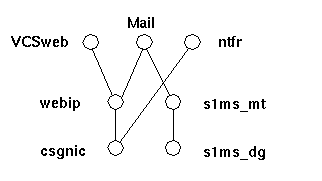
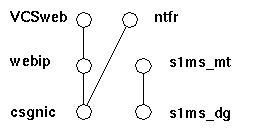
The default main.cf configuration file sets up a resource group called ClusterService that launches the VCSweb application. This group includes network logical host IP resources like csgnic and webip. In addition, the ntfr resource is created for event notification.
-
Launch Cluster Explorer from one of the nodes.
-
Note that these Veritas Cluster Server instructions assume you are using the graphical user interface to configure Messaging Server as an HA service.
To launch Cluster Explorer, run the following command:
# /opt/VRTSvcs/bin/hagui
The VRTScscm package must be installed in order to use the GUI.
-
- Add s1ms_dg disk group resource of type DiskGroup and enable it.
-
Add s1ms_mt mount resource of type Mount.
- Unlike in Veritas Cluster Server 2.0, you must add -y (or -n) to FsckOpt. Null options cause Mount to hang. See the man page for more information on fsck_vxfs.
-
Be sure to click the Link button to enable linking resources, if they are not already enabled.
-
Create a link between s1ms_mt and s1ms_dg. Enable the resource s1ms_mt.
-
Run the Messaging Server setup program from the primary node (for example, Node_A) to install Messaging Server.
- Select Custom Installation as your installation type.
- Provide the logical host name and the logical IP address whenever a host name or an IP address is required during the installation.
-
When selecting Messaging Suite components, choose Sun Cluster2.2/Veritas HA for Messaging Server in addition to your other Messaging components.
- Switch to the backup node (for example, Node_B).
-
Run the Messaging Server setup program on the backup node (Node_B), but only install the Veritas agent by selecting Sun Cluster2.2/Veritas HA for Messaging Server. Do not install other Messaging Server components on this node.
- From the Cluster Explorer, Select Import Types... from the File menu which will display a file selection box.
- Import the MsgSrvTypes.cf type from the /etc/VRTSvcs/conf/config directory. Import this type file. Note that you need to be on a cluster node to find this file.
- Now create a resource of type MsgSrv (for example, Mail). This resource requires the instance name and logical host name properties to be set.
-
The Mail resource depends on s1ms_mt and webip. Create links between the resources as shown in the following dependency tree:
- Switch over to Node_A and check if the HA configuration is working.
- Change the group attribute OnlineRetryLimit from 3 to 0, otherwise the failed-over service might restart on the same node.
MsgSrv Attributes
This section describes MsgSrv additional attributes that govern the behavior of the mail resource. To configure Messaging Server with Veritas Cluster Server, see Table 6.
Product Hierarchy and Dependencies
Messaging Server 5.2 Patch 1 requires the following Sun ONE components:
- Administration Server 4.2
-
Directory Server 5.1 or 5.2.
Note -
If you are starting a new deployment of Messaging Server, it is recommended that you install it with Directory Server 5.1 or 5.2. Note that the end of service life for Netscape Directory Server 4.16 was on January 24, 2003.
New mechanisms for enabling Class of Service (CoS) are available in Directory Server 5.1 and 5.2. For more information, see: http://docs.sun.com/source/816-5606-10/roles.htm#1115605
Counter Plug-in compatibility is currently unavailable in the Directory Server 5.1 release, but it is available in the Directory Server 5.2 release.
Note that an HA agent does not exist for Directory Server; therefore, you cannot use high availability with Directory Server 5.1 or 5.2. Instead, you can use other solutions, such as directory replication. For more information on alternate availability solutions, see the Directory Server Deployment Guide.
-
-
Delegated Administrator for Messaging and Collaboration 1.2 Patch 1
-
You cannot upgrade the Delegated Administrator from older versions of the product. Instead, you need to uninstall the previous version of Delegated Administrator and install the version that are bundled with the new Messaging Server version that you are installing.
For more information, see the Delegated Administrator for Messaging and Collaboration Release Notes.
-
-
Web Server Enterprise Edition 6.0 SP 2 (Service Pack 2) or Web Server 6.0.1
-
It is strongly recommended that you review the Web Server 6.0 SP2 release notes to determine any required operating system patches: http://docs.sun.com/db/prod/s1websrv/
-
These products are all included on the Messaging Server CD at the download site at http://www.sun.com/software/download/.
Deprecated Features
The following features were deprecated in the Messaging Server 5.2 release and will be removed in future releases:
-
Netscape Directory Server 4.x support
-
You can configure Directory Server 5.1 or 5.2 support as of this release. Note that support of Netscape Directory Server 4.16 ended on January 24, 2003.
See the Messaging Server Installation Guide for more information on installing Messaging Server and Directory Server.
-
-
Delegated Administrator for Messaging and Collaboration component
-
Delegated Administrator for Messaging and Collaboration is deprecrated and will not be supported in the next major release of Messaging Server.
-
-
The imsimta dirsync command
-
The new MTA direct LDAP lookup feature will replace the imsimta dirsync command in the next major release. For more information on using the direct LDAP lookup feature, see the Messaging Server Administrator's Guide.
-
-
Sun Cluster 2.2 support
-
If you currently use Sun Cluster 2.2, it is recommended that you use Sun Cluster 3.x. Support for Sun Cluster 2.2 will be removed in the next release of Messaging Server. For more information on Sun Cluster 3.x, see the Messaging Server Installation Guide.
-
-
Veritas Cluster Server 1.x support
-
Veritas Cluster Server 1.x support is deprecated and will not be supported in the next release of Messaging Server.
-
-
Multiple instances of Messaging Server that share the same server-root directory
-
The ability to install multiple instances of Messaging Server in the same server-root directory is now deprecated. While you can still perform this function, it is not recommended that you continue doing so. Instead, multiple Messaging Server instances can be installed on the same disk and host, but they should be installed in separate server-root directories. In the next Messaging Server release, the ability to install multiple instances in the same server-root directory will be removed.
-
-
Platform Support
- Solaris 2.6 support is deprecated as of the Messaging Server 5.2 release and will be removed in the next major release.
-
Windows NT support is deprecated as of the Messaging Server 5.2 release.
-
Vanity Domains
Fixed Bugs
This section describes the major bugs that were fixed in the Messaging Server 5.2 Patch 1 release:
Known Problems, Limitations, and Considerations
The following sections describe known problems, limitations, and considerations of SunTM ONE Messaging Server and its components. This section contains the following sub-sections:
Installation and Uninstallation
The following are known problems, issues, and considerations with the Messaging Server installation and uninstallation.
Except for the Directory Server, the servers are not started by the installer as of Messaging Server 5.1.
Note
-
ims_dssetup.pl does not regenerate the index. (no bugid)
-
If you are running Messaging Server with Netscape Directory Server 4.x, and you run the ims_dssetup.pl script to prepare the Directory Server for the Messaging Server installation, the script does not regenerate the indexes. Consequently, search operations might be erratic.
Note that the ims_dssetup.pl script properly updates the indexes for Directory Server 5.1 and 5.2.
-
- Do not install Messaging Server and Directory Server 5.1 in the same server-root directory, because they use two different versions of the Administration server. (no bugid)
-
When installing Messaging Server on a Windows platform, you must also install the Administration Server components. (4537320)
-
While the Installer program does not require you install the Administration Server component on the Windows NT version, it is mandatory for successful Messaging Server installation.
-
- On Windows NT, if you want Messaging Server and the Messaging Multiplexor (MMP) component on the same machine, you must install them at the same time. (4538016)
- The ims_dssetup.pl script requires the version of Perl found in the server-root install directory. (4538055)
-
On Windows NT, installation of only the Messaging Multiplexor (MMP) component fails if the Messaging Server component is not unchecked first. (4538240)
-
If you want to install only MMP, follow the steps listed below to select MMP; otherwise the installation will fail:
- First uncheck the Messaging Server component in the Components to Install screen.
- Click the Change... button.
-
Select Messaging Multiplexor in the Subcomponents to Install screen.
-
- If you are using an existing configuration directory, the user/group directory is determined from it. (4538276)
-
On UNIX and on Windows NT, during a custom installation, if you specify a custom mail store, you must create the directory manually after installation. (4538305)
-
On UNIX platforms, the directory should be owned by the SunTM ONE Messaging Server user and group, and have permissions 750.
-
-
In Sun Cluster 2.2 and Veritas Cluster Server 1.1 environments, uninstalling Messaging Server fails. (4538376)
-
If you are using Sun Cluster 2.2 or Veritas Cluster Server 1.1, you must uninstall Messaging Server manually.
Be aware that the following procedure will uninstall all components including the message store.
- Stop all services.
- Delete the server-root directory.
-
Rename the /etc/msgregistry.inf file. (It is recommended that you move (rename) this file; do not delete it.).
-
-
You must install Messaging Server into an empty or non-existent directory. (4540131, 4543405)
-
You must install Messaging Server in an empty directory or a directory that does not already exist. This directory cannot contain any subdirectories that serve as mount points. After you complete the Messaging Server installation, you can create mount points as desired.
Moreover, after uninstalling Messaging Server, if you use the same server-root directory that was previously uninstalled, you might get an error during re-installation. You will need to use a new server-root directory when performing the re-installation.
-
-
On Windows NT, when the Server Firewall screen appears during an installation, the Enter key does not function. (4540156)
-
During uninstallation, /usr/lib/sendmail link is not restored. (4540185)
-
During the uninstallation process, the sendmail program is not restored because it is renamed as sendmail.bk during the original installation process. To restore sendmail, after running the installation program, rename sendmail.bk to sendmail.
-
-
During an express installation, the installer chooses a random administration port. (4540494)
-
When installing Messaging Server, you should write down the administration port number you specify to the installer. You will need to know this port number to use the Administration Console. During an express installation, you are not prompted for an administration port number; instead, the installer chooses a random port number. When you start Console, you will be asked for the administration port number chosen during installation. If you do not know the port number, it is recorded in the following file: server-root/admin-serv/config/adm.conf.
-
-
On HP-UX platforms, the Messaging Server installation will intermittently fail if you select option 1 (to indicate you are using a Smart Host) on the Smart Host option installation screen. (4541640)
-
Installing the Message Transfer Agent (MTA) as a relay requires installation of the message store. (4542767, 4575870)
-
On a Windows platform, installation paths that contain spaces are not supported. (4547759)
-
For example, the following installation path would not work:
C:\Program Files\iPlanet\Server5In this example, there is a space between Program Files, therefore there will be installation problems if this server-root directory path is used.
-
-
After installing the second messaging server instance, the ACI is missing. (4548498)
-
The Messaging End User Administrators Group has been moved to the organization tree root. During an upgrade from any previous version of Messaging Server, the old group will remain with the default domain. However, all related ACIs will properly reference the new group in the organization tree root during the upgrade. While it will not affect any operation, it is highly recommended you manually remove the old group to avoid confusion.
-
-
Installation fails when BaseDN contains spaces. (4557494)
-
If you install Messaging Server and Directory Server together, and if you specify a suffix that has spaces in it, you must make the following modifications under the DN after installation:
-
Modify the nsdirectoryurl attribute to show the correct suffix. For example, if your suffix is my varrius.com, then nsdirectoryurlwould initially read: ldap://sesta.siroe.com:389/o=my
You should then change the nsdirectoryurl attribute to:
ldap://sesta.siroe.com:389/o=my varrius.com -
Modify the attribute nsdirectoryfailoverlist by setting it to a blank value.
-
-
Sun Cluster 2.2 does not properly determine the mount point of the file system where Messaging Server resides. (4558563)
-
Due to limitations in the SunTM ONE Messaging Server Sun Cluster 2.2 agent, Messaging Server must be installed at a predetermined mount point, as determined by the $LOGICAL_HOSTNAME environment variable.
-
-
If Messaging Server is installed with Directory Server 5.1, you must use two consoles to manage both servers. (4560710)
-
If you use the Console interface to manage your servers, you will have a console to manage Directory Server 5.1 and a console to manage Messaging Server. To manage Directory Server 5.1, run startconsole from the directory server server-root to invoke the Console. To manage Messaging Server, run the startconsole command from the messaging server server-root. Running this command will invoke Netscape 4.2 Console. Note which console corresponds to which server. You should only manage Messaging Server through Netscape Console 4.2, and you should only manage Directory Server 5.1 through Console 5.0.
-
-
Upon a successful installation, error messages are still found in the installation log. (4576422)
-
Occasionally, upon successful installation, error messages might be found in the installation log.
On UNIX, a successful installation ends with the following message: "Go to server-root and enter start console to begin managing your servers." In this message, server-root is the absolute directory path where you chose to install the messaging server, for example: /usr/iplanet/server5.
On Windows NT, a successful installation ends with a prompt asking if the user wants to view the README file or reboot the system.
-
-
In a Veritas Cluster environment, a Directory Server installed with Messaging Server is not a supported HA service. (4616151)
-
Currently, the Veritas Cluster framework does not have an HA agent for the Directory server; therefore, the Directory Server will not run as an HA service.
-
-
During installation, the default domain should not be the same name as the MTA host name. (4627536)
-
When installing Messaging Server on a computer, do not specify a default domain that is the same as the computer's fully qualified domain name.
-
-
The default location for the store.dbtmpdir should point to a /tmp directory on Solaris platforms. (4633090)
-
The mailbox list database temporary directory (defined by the store.dbtmpdir configutil parameter) is heavily accessed. At installation time, the value of this parameter is not defined and defaults to a subdirectory in the server-root. If the disks that house the mboxlist database temporary directory are not fast enough at very large sites, performance problems might occur.
As part of your performance and tuning steps, you should define a value for this parameter.
-
-
If the organizational DN has a long length, the installer will not function properly. (4783977, 4787098)
Migration
This section describes known problems, limitations, and considerations when migrating from earlier versions of Messaging Server.
-
Migration from Sun Internet Mail Server does not reset the default host used for provisioning. (no bugid)
-
After adding Delegated Administrator for Messaging and Collaboration support, the old Sun Internet Mail Server still appears in certain situations through the Delegated Administrator user interface. For example, on the Domain Mail Properties page, creating a user and enabling the mail service for that user will list the old Sun Internet Mail Server mail host. This behavior occurs because migrating from the Sun Internet Mail Server domain preserves the preferredMailHost domain attribute. To fix the problem, change this attribute value to point to the correct mail server.
-
-
After a migration from SIMS, complications arise when UID attributes in LDAP include uppercase characters. (no bugid)
-
If a user's uid attribute in LDAP contains any upper case characters (for example, the uppercase K in Kolander) after a migration has occurred from SIMS to Sun ONE Messaging Server 5.x, the user will not be able to access the migrated mailbox.
SIMS stores all mailbox names in lowercase characters, but Sun ONE Messaging Server 5.x does not. Moreover, SIMS converts LDAP uid attributes to lowercase characters before it searches its message store for a mailbox name that matches that uid; again, Sun ONE Messaging Server 5.x does not. During a migration, SIMS mailboxes are restored to Sun ONE Messaging Server 5.x. In this situation, because the mailboxes were migrated from SIMS, they are all in lowercase characters. Since Sun ONE Messaging Server 5.x does not convert LDAP uid attributes to lowercase, uid attributes that contain uppercase characters will not match the names of the migrated mailboxes. Mail users with uid attributes containing uppercase characters will not be able to access their mailboxes.
To fix this problem, administrators have two options.
-
In most situations, this is the preferred option. During migration, instead of using the default imsrestore command line utility, use imsrestore with the rename option, -u. Identify which characters in a user's mailbox name (the characters will all be in lowercase) need to be changed to uppercase in order to match the user's uid in LDAP and change them to uppercase. The following is an example of the command:
-
where filename is the name of a file that contains an entry such as the following:
Notice, when using the rename option, DO NOT change the case of the domain portion of the user ID, for example sesta.com. It must remain in lowercase or the mailbox name will not be recognized when a user logs in.
Refer to the Messaging Server Reference Manual for more information on renaming users with imsrestore.
-
-
Change LDAP uid attributes to all lowercase characters. However, for many sites LDAP is required for several different applications and changing the uid attribute could negatively affect those other applications.
-
-
When migrating directory entries from Netscape Messaging Server 4.x, an LDAP filter must be specified. (4554984)
-
When migrating directory entries from Netscape Messaging Server 4.x, specify an LDAP filter— using the -F argument to imsdirmig— that excludes the existing Netscape Messaging Server's postmaster entry. An example of such a filter is -F "(!(cn=postmaster))". This filter will exclude the postmaster entry from the migration processing. If such a filter is not specified, imsdirmig fails to process the entry and exits on the resulting error, unless -c is specified to force imsdirmig to continue processing after it encounters an error.
-
-
Migrating Personal Address Book (PAB) entries from Netscape Messaging Server 4.15 to Messaging Server 5.2 requires the following steps: (4557878)
- When enabling multi-schema support, comment out ns-pab-schema.conf in the ns-schema.conf file.
-
After you run the ims_dssetup utility, you must regenerate the index for the following attributes on the directory server that holds the PAB entries:
-
For information about running the ims_dssetup utility, see the Messaging Server Migration Guide, Chapter 3, section titled "Migrating from a Single-Server Netscape Messaging Server System," sub-section titled "Migration Procedures," step 3.
For information about regenerating the index for the above attributes, refer to the Directory Server documentation at: http://docs.sun.com/db/prod/s1dirsrv
-
-
After you install SunTM ONE Messaging Server, you will need to turn on the PAB migration as follows: configutil -o local.service.pab.migrate415 -v on
-
The imsrestore command fails when restoring backed up SIMS 3.5 data that contains both uppercase and lowercase user names. (4631123)
Upgrade
This section describes known problems, limitations, and considerations when upgrading Messaging Server.
-
During the upgrade process, any customizations made to the Messenger Express user interface are lost. (no bugid)
-
The upgrade process now backs up the files in the server-root/msg-instance/html directory and saves them in the server-root/msg-instance/backup.timestamp where timestamp indicates the time at which the installation took place.
-
-
During the upgrade process, you are unnecessarily prompted for information about Delegated Administrator for Messaging and Collaboration. (4538472)
-
The user is prompted by three separate screens, one prompt per screen. The three items that the user is prompted for are: the host name of the Delegated Administrator for Messaging and Collaboration (a fully qualified host name), the Web Server port, and the default domain. Though the prompted information is not needed by the server, the simplest work-around is to provide the requested information as demonstrated by the following example:
Host Name of the server: ims.india.sesta.com
Port number of the server: 80
Default Domain: india.sesta.com
-
-
Upgrading to Messaging Server 5.2 with Sun Cluster 3.x requires additional steps. (4547718)
-
If you want to upgrade to Messaging Server 5.2 and you have installed Sun Cluster 3.0, Sun Cluster 3.0 Update 1 or Update 2 with a previous version of Messaging Server 5.x, you should first upgrade the Messaging Server installation. See the Upgrade appendix in the Messaging Server Installation Guide.
After completing the Messaging Server installation, you need to install the SUNWscims package (from the Messaging Server 5.2 CDROM) on each cluster node. For more information, see the HA installation chapter (specifically the section on Sun Cluster 3.0 U1 and U2 Agent Installation) in the Messaging Server Installation Guide. This process will upgrade your Messaging Server HA Agent.
-
-
mboxutil and reconstruct should keep the mboxlist partition and mailMessageStore attribute current. (4547986)
-
If you are upgrading from a previous version of Messaging Server, you will have to make changes to two existing ACIs in the user and group LDAP directory server.
The Organization Tree base suffix and the Domain Component Tree base suffix have an ACI that grants the end user administrator account write-access to certain user attributes. Attribute mailMessageStore must be added to the existing ACI.
The ACIs are on the root nodes of the Organization and Domain Component trees. The ACIs to be modified have the name Messaging Server End User Adminstrator Write Access Rights - product=ims5.0,class=installer,num=101,version=1.
The best way to modify the ACIs in question is by using the Directory Server Console.
-
-
Because the imsimta cleanup utility does not work on an Windows NT platform, upgrading from Messaging Server 5.1 on a Windows NT platform results in hung MTA processes. (4634975)
-
Prior to upgrading from Messaging Server 5.1, stop the Messaging Server processes (by using stop-msg.bat) and manually delete the *.share files in the server-root\msg-instance\imta\tmp directory. You can also delete the *.share files after the upgrade, however, to avoid hung processes at that point, you might need to reboot your system prior to deleting the files.
-
-
Some MTA configuration file settings are not present after upgrade. (4638109)
-
Since the configuration files from the previous version of Messaging Server are backed up and used during the upgrade process, the "factory default" settings of the Messaging Server 5.2 MTA configuration files are not incorporated in the upgrade. Consequently, the configuration files will not pick up any new changes after the upgrade process.
The following procedures outline two methods for incorporating any customizations from your previous version of the MTA configuration files and the new settings in the Messaging Server 5.2 configuration files:
Method 1: To Add New Settings to the Previous Version of the MTA Configuration Files.
- Upgrade to Messaging Server 5.2. See the Messaging Server Installation Guide for upgrade instructions.
-
Add the following settings to the following configuration files:
-
In the imta.cnf file, add notices 1 7 14 21 28 after subdirs 20 but before backoff in the ims-ms channel.
-
For example:
ims-ms defragment subdirs 20 notices 1 7 14 21 28 backoff "pt5m" "pt10m" "pt30m" "pt1h" "pt2h" "pt4h" maxjobs 1 pool IMS_POOL fileinto $U+$S@$D filter ssrd:$A
-
-
In the mappings file, append the following line to the end of the file:
-
In the aliases file, the default aliases have changed to the following entries
-
For UNIX platforms:
root@default_domain: postmaster
root@localhost: postmaster
postmaster@localhost: postmaster
For Windows NT platforms:
postmaster@localhost: postmaster
Replace default_domain with your default mail domain and localhost with the host name where Messaging Server is installed.
-
-
In the option.dat file, remove the following line:
-
In the imta.cnf file, add notices 1 7 14 21 28 after subdirs 20 but before backoff in the ims-ms channel.
-
Method 2: To Add Your Customized Settings from the Previous Version of the MTA Configuration Files to the Messaging Server 5.2 Version of the Configuration Files.
-
For UNIX operating systems, follow these steps:
- Upgrade to Messaging Server 5.2. See the Messaging Server Installation Guide for upgrade instructions.
- Go to the following directory server-root/msg-instance/imta/config
- Create a directory named orig.
- Move the imta.cnf, mappings, aliases, option.dat, native_option, and channel.cat files to the orig directory.
- Remove the imta.cnf, mappings, aliases, option.dat, native_option, and channel.cat files from the server-root/msg-instance/imta/config directory.
-
Run the jre -cp command from the end of the server-root/setup/msg/iplanet-msg-install.log file. This JRE command will run the imtaconfig.jar file.
-
This command also indicates the cmdpath (the path to the JRE command and should be prepended to the jre -cp command) and the runpath (directory in which to run the command).
If the server-root/msg-instance/iplanet-msg-install.log file has the following entry:
Then, the following example describes how to execute the jre -cp command:
The JRE command will append its output to the imtaconfig.log file.
-
-
Run the following commands for the new configuration to take effect:
# cd server-root/msg-instance
# ./imsimta cnbuild
# ./imsimta refresh
-
For Windows NT operating systems, follow these steps:
- Upgrade to Messaging Server 5.2. See the Messaging Server Installation Guide for upgrade instructions.
- Go to the following directory server-root\msg-instance\imta\config
- Create a directory named orig.
- Move the imta.cnf, mappings, aliases, option.dat, and channel.cat files to the orig directory.
- Remove the imta.cnf, mappings, aliases, option.dat, and channel.cat files from the server-root\msg-instance\imta\config directory.
-
Run the jre -cp command from the tail of c:\temp\iplanet-msg-install.log. This JRE command will run the imtaconfig.jar file.
-
This command also indicates the cmdpath (the path to the JRE command and should be prepended to the jre -cp command) and the runpath (directory in which to run the command).
If the c:\temp\iplanet-msg-install.log file has the following entry:
Then, the following example describes how to execute the jre -cp command:
The JRE command will append its output to the imtaconfig.log file.
-
-
Run the following commands for the new configuration to take effect:
cd server-root\msg-instance
imsimta cnbuild
imsimta refresh
-
-
The ENS service on Windows NT platforms is not set for automatic startup after an upgrade. (4638111)
-
By default, the ENS service is set for manual startup in Messaging Server 5.1. However, in Messaging Server 5.2, the ENS service performs an automatic startup on reboot. After upgrading to Messaging Server 5.2, the setting does not change from manual to automatic.
Work-around: The following steps will change the default setting of the ENS Service from manual to automatic startup.
-
Messaging Server 5.x
This section describes known problems, limitations, and considerations with Messaging Server 5.x.
-
DOMAIN_UPLEVEL has been modified. (no bugid)
-
The following characters cannot be used in the User ID:
$ ~ = # * + % ! @ , { } ( ) / < > ; : " ` [ ] & ? (no bugid)-
This constraint is enforced by Delegated Administrator for Messaging and Collaboration as well as the MTA when operating in direct LDAP mode. Allowing these characters in the User ID can cause problems in the message store. If you want to change the list of characters forbidden by the MTA, set the following option by listing a comma-separated string of the characters' ASCII values:
LDAP_UID_INVALID_CHARS=32,33,34,35,36,37,38,40,41,42,43,44,47,58,59,60,61,
62,63,64,91,92,93,96,123,125,126in the server-root/msg-instance/imta/config/options.dat file. Note that you are strongly advised against relaxing this constraint.
-
-
The SMTP server's default behavior will change in the next major release after the Messaging Server 5.2 release. (no bugid)
-
The SMTP server's default behavior permissively accepts various line terminators. Currently, the smtp keyword is synonymous to the smtp_crorlf channel keyword on the tcp channels. While this behavior complies with the original SMTP specification (RFC 821), it does not comply with the latest revision of the SMTP specification (RFC 2821).
In the next major release of Messaging Server (after the Messaging Server 5.2 Patch 1 release), the meaning of the smtp keyword and the default behavior of the tcp channels will comply with the revised standard. Specifically, the smtp keyword will become synonymous to the smtp_crlf channel keyword. For more information, see the section on "Channel Protocol Selection and Line Terminators" in the chapter on Configuring Channel Definitions in the Messaging Server Administrator's Guide.
-
-
NFS is not supported for mailstores. (no bugid)
-
NFS is not supported for several reasons, including: open with O_EXCL is non-atomic. This technique is used for synchronizing deferred handling between various threads.
-
-
Notifications can be customized and localized. (no bugid)
-
To customize or localize notifications, you would create a complete set of return_*.txt files for each locale and/or customization and store it in a separate directory. For example, you could have French notification files stored in one directory, Spanish for another, and notifications for a special unsolicited bulk email channel stored in a third. Sample files for French, German, and Spanish are included in this release. These files can be modified to suit your specific needs. Refer to Chapter 6 of the Messaging Server Administrator's Guide for complete information on Customizing and Localizing Notification Messages.
-
- When using the MTA direct LDAP operation, you should run the imsimta restart command to immediately implement newly modified alias cache sizes or timeout values, or to immediately clear the alias cache. (no bugid)
-
If the name service cache daemon (nscd) is not running in a Solaris operating environment, the services can fail. (4353836)
-
This is a known Solaris bug. To avoid this problem, be sure to run the nscd service. In addition, the cache must be enabled for host lookups or else the mshttpd service will not work. For more information on nscd, refer to the Solaris man page.
-
-
The mailforwarding address field is limited to 1024 characters with imsimta dirsync. (4532764)
-
If you use the imsimta dirsync option, the total length of all forwarding addresses is limited to 1024 characters. If the total length of all forwarding addresses exceeds 1024 characters, it is recommended that you use the mailing lists feature. Note that if you use the MTA direct LDAP feature, you will not encounter this limitation.
-
-
The ldapsearch command fails in the ko locale on Solaris platforms. (4533913)
-
The Messaging Server installation fails if it is installed in the ko locale as a result of this problem.
Work-around: Install the Directory Server in a separate server-root directory from Messaging Server. Then, manually run ims_dssetup.pl on the Directory Server, using the default C locale instead of the ko locale.
Alternatively, you can install Messaging Server using another Korean locale, such as ko_KR.EUC, ko.UTF-8, or ko_KR.UTF-8.
-
-
LDAP search performance is significantly impacted by ACIs in Directory Server version 4.x. (4534356)
-
This affects many searches performed by SunTM ONE Messaging Server, and is especially apparent when using the dirsync utility. To speed up searches use directory manager credentials to access the directory by using the following commands:
msg-instance/configutil -o local.ugldapbinddn -v "rootdn" -l
msg-instance/configutil -o local.ugldapbindcred -v "rootdn_passwd" -lwhere rootdn and rootdn_passwd are the credentials of the Directory Server's administrator.
Note that you can now utilize the Direct LDAP Lookup feature which obviates the need to use the imsimta dirsync command. For more information, refer to Appendix B in the Messaging Server Administrator's Guide.
-
-
As of Messaging Server 5.1, logging to mail.log_current is turned off by default. (4535717, 4564207, 4811599)
-
Refer to the chapter on logging and log analysis in the Messaging Server Administrator's Guide on how to enable logging.
-
-
New Messaging Server sites that want to use Sun Cluster 3.0 High Availability will need to use Sun Cluster 3.0 Update 1 or later. (4536098)
-
For information on installation and configuring Sun Cluster 3.0 Update 1 or later, refer to the Messaging Server Installation Guide. Note that Sun Cluster 2.2 support will be removed from the next major release.
-
-
Testing dynamic criteria for email-only membership does not work correctly. (4537597)
-
While trying to add dynamic criteria to groups for email-only membership through the Messaging Console, the test button to test the dynamic criterion (also known as the LDAP URL) does not work. The functionality of email membership of the group will not be broken by this limitation.
-
-
The stored command does not recognize specific interface addresses to which servers might be bound (like in High Availability configurations). (4538253)
-
The stored only recognizes INADDR_ANY, a constant value known internally to the server that specifies that this listen socket is listening to all IP addresses for this machine.
-
-
The MMP BadGuy configuration parameter, BGExcluded, does not work. (4538273)
-
To work around this problem, you can deploy separate MMP servers to handle the clients that are excluded from bad guy rules. These servers must have BadGuy turned off.
-
- To take effect, changes made using configutil often require a restart of the affected server or servers. (4538366)
-
libimtamap.so does not parse the imta_tailor file. (4538645)
-
When working with mapping entries that use libimtamap.so, for example:
* $C$[IMTA_LIBMAP,immap_is_in_list_of_ip,$2|IMTA_TABLE:/ip.txt|$$Y]$E, do not use strings that require variable substitution from the imta_tailor file. Instead, you should write out the full directory path as shown in the following example:
* $C$[IMTA_LIBMAP,immap_is_in_list_of_ip,$2|/iplanet/server5/msg-siroe/imta/
config/ip.txt|$$Y]$E
-
-
On Windows NT platforms, the stored process does not always start. Even if no process is running, the following message is still displayed, "Can not start stored. Looks like popd is already running." (4539474/4811806)
-
The stored process reads the pid files for these services (like popd, imapd, and mshttpd) and checks if there is a process associated with that pid file. If a new process is started after an old process is stopped, the new process might associate itself with the old pid file on Windows NT platforms.
Work-around: If the popd (or imapd or mshttpd) service is not running when this error message displays, delete the /server-root/msg-instance/config/pidfile.*.
-
-
The Personal Address Book within Messenger Express only supports a limited number of objectclasses when creating nodes in the directory server. (4539553)
-
When the user tree hierarchy contains nodes other than "ou", "o", "dc", or "c", the parallel PAB hierarchy must be created manually. For example, if you have users under dept=1234,o=acme.com you need to create dept=1234,o=acme.com,o=pab.
-
-
Place users at the correct DIT level when they are created in the Administration Console. (4539837)
-
When you create a user or group through the Administration Console, ensure that you are selecting the correct organizational unit (ou) under which you want to create a user or group. To do so, use the drop-down list to choose New Organizational Unit; then click Create.
In the Select Organizational Unit window, select the directory subtree (ou) to which the organizational unit will belong. Placing your cursor on any of the directory subtrees will reveal the complete DN of the organizational unit.
-
-
On a Solaris client with a Netscape browser, Administration Console can only launch Help if a browser is already open. (4539844, 4541748)
-
If Help does not launch from the Administration Console, create a script called "netscape", such as the one given below, and place this script in your path:
-
-
On Windows NT, Administration Console does not launch Help if a browser is already open. (4539844)
-
On Windows NT, the Administration Console Help does not come up if a browser is already open. If it is not open it brings up a browser and the pages can be viewed. To work around this behavior move server-root\bin\base\viewurl.exe somewhere else, or rename the file, for example rename the file to viewulr.exe.hide.
-
-
Cannot enter 8-bit characters in certain fields. (4539912)
-
When creating a new user in the Administration Console 4.2 in a localized environment, you may not be able to enter 8-bit characters (for example, Ë) in the First Name, Last Name, and Common Name fields.
Work-around: Enter the 8-bit character into a non-Console application, copy the character, and then paste it into the Administration Console, using <Control> + V, or use Delegated Administrator for Messaging and Collaboration.
-
-
CRAM-MD5/DIGEST-MD5 do not work with external SMTP connections. (4540532)
-
The instructions to turn on CRAM-MD5/DIGEST-MD5 do not work for "external" SMTP connections (by default all connections not from the local host). However, it works as documented for IMAP/POP and internal SMTP connections. To fix this problem, run:
configutil -o sasl.external.ldap.has_plain_passwords -v 1
-
-
mailautoreplysubject does not have multi-language support from the Messaging Console. (4540780)
-
The auto-reply subject line in Messaging Server Console does not provide multi-language support. If the attribute mailautoreplysubject;lang-XX (where XX is the language) is already set in Messenger Express or in Delegated Administrator for Messaging and Collaboration, the mailautoreplysubject attribute cannot be viewed or changed through the Messaging Console, since the Console looks for the attribute mailautoreplysubject, not mailautoreplysubject;lang-XX.
-
-
Administration Server access control host names are case-sensitive. (4541448)
-
When configuring "Host Names to allow" for the Administration Server, the access control list is case-sensitive. If the DNS server uses mixed-case host names in the IN-ADDR records (used when translating from an IP address to a domain name), the access control list must use the same case. For example, if your host is test.Sesta.Com, then the access control list must include *.Sesta.Com. Due to this bug, *.sesta.com will not suffice.
For example, if the user/group base suffix is o=isp, then the DN of the service administrator group is cn=Service Administrators,ou=groups,o=isp. To designate the account uid=ofanning, o=sesta.com, o=isp as a service administrator, you should add the account's DN to the group. In the following modify record, the designated user is added as a group member in the LDIF:
-
dn: cn=Service Administrators,ou=groups,o=isp
changetype: modify
add: uniquemember
uniquemember: uid=ofanning, o=sesta.com, o=isp -
Furthermore, for users to have service administrator privileges, the attribute memberof must be added to the user entry and set to the Service Administrator Group, for example:
-
-
Cannot create expiration rules through the command line. (4542514)
-
For example, the following command returns an error if the expiration rule name does not already exist: configutil -o store.expirerule.name.folderpattern -v pattern
Use Console instead of the command line. After an expiration rule is created, you can modify the parameters by using the configutil utility.
-
-
Domain cache does not refresh. (4542726)
-
Due to the caching scheme, changing domain properties such as authorized services or status in LDAP does not take effect in IMAP, POP, SMTP, and HTTP until these services are restarted.
-
- The % character does not work correctly in expiration rules. (4542729)
-
Console does not create sslpassword.conf for MMP. (4542738)
-
The sslpassword.conf file is not created when an SSL certificate is created from the console. This occurs when only the console, administration server, and MMP are installed (no Messaging Server or Directory Server).
-
-
The mgrpErrorsTo attribute is a single-valued attribute. (4543159)
-
mgrpErrorsTo attribute does not support multiple values. If you want to specify multiple recipients for error messages, create a mailing list and specify the mailing list address as the value for the mgrpErrorsTo attribute.
-
-
Group attribute mgrpMsgRejectAction does not work. (4543187)
- Anonymous login for IMAP is not supported. (4543259)
-
If you use Microsoft Outlook Express as your IMAP mail client, the read and unread flags might not properly work. This is a known problem with the Microsoft Outlook Express client. (4543930)
-
To enable the workaround, set the following configuration variable:
configutil -o local.imap.immediateflagupdate -v yesIf, while using the work-around, you experience performance issues, it is recommended that you discontinue using the work-around.
-
-
Some options in the quotacheck utility are not working properly. (4555153)
-
In the quotacheck utility, the -d option for specifying the domain does not work for the default domain. Furthermore, the quotacheck utility returns incorrect error messages when the -u and -n options are specified.
-
-
On a Solaris client with a Netscape browser, certain fonts for Japanese Kanji characters might not display properly. (4558408)
-
The Netscape browser might not display some Japanese Kanji characters properly in certain unicode font sizes (10, for example). To fix this, change the browser's unicode font size to 14.
-
-
The program delivery function requires the Messaging Server user to have a home directory. (4560660)
-
If you wish to use the program delivery feature, the user under which SunTM ONE Messaging Server runs must have a home directory, and must have permission to create and write files in the home directory.
-
-
On Solaris, upon startup, Console might display spurious error messages related to the Sun Cluster environment. (4562861)
-
For example, you might see an error message such as:
Cluster.PMF.pmfd: Error opening procfs control file
/proc/384/ctl for tag rg.rs.0.svc: No such file or directoryYou can ignore these messages.
-
-
Incremental dirsync and HA. (4566005)
-
If an incremental dirsync is in progress at the time of an HA failover, the alias database will be marked as unsafe. The administrator will be notified of this condition when the messaging server is brought back online. The following message will appear in the log/imta/dirsync.trx-XXXX file:
-
When this occurs, run the following: imsimta recover-crash
Any updates that occurred since the imsimta dirsync -F command was last run will be lost. After running imsimta recover-crash, run: imsimta dirsync -F
Note that you do not encounter this problem if you use the MTA Direct LDAP function.
-
-
For a short period of time (default is 15 minutes), it might be possible to log in to the account of a user marked for deletion. (4576530, 4588068)
-
The IMAP, POP, and HTTP servers cache the LDAP entries of users who have recently logged in for the amount of time specified in the service.authcachettl configuration parameter. To make the deletion of a user immediately effective, you can run the servers with no authentication cache or turn off the authentication cache by setting service.authcachettl to 0 using the configutil utility and restarting all the services. Note, a setting of 0 will have an impact on performance.
This problem also applies to the Messaging Multiplexor (MMP); however, the MMP does not use configutil. It has a separate AuthCachTTL option in its configuration file.
-
-
The mail.log_current file has a file size limitation. (4621317)
-
Access control filters do not work if the short form domain in used in the /etc/hosts file. (4629001)
-
If there is a short form version of a domain name in the /etc/hosts file, there will be problems if you use a host name in an access control filter. When the IP address lookup returns a short form version of the domain name, the match will fail. Therefore, you should make sure you use a fully qualified domain name in the /etc/hosts file.
-
-
In an HA environment, you cannot send outgoing messages through Messenger Express if the service.http.smtphost configutil parameter is not properly configured. (4631446)
-
Work-around: After running the ha_ip_config script, run the following configutil command:
server-root/msg-instance/configutil -o service.http.smtphost -v logical_IP
For more information on running the ha_ip_config script, see the High Availability chapter in the Messaging Server Installation Guide for UNIX.
-
-
The MTA Direct LDAP comment in the imta.cnf file is incorrect. (4637048)
-
The rewrite rule in the following comment in the imta.cnf file is incorrect:
! Uncomment the next line for Direct LDAP mode
! $* $E$F$U%$H@budgie.siroe.com$V$H
Instead, the rewrite rule should state the following:
! Uncomment the next line for Direct LDAP mode
! $* $E$F$U%$H$V$H@budgie.siroe.com
-
-
In Sun Cluster 3.0 U2 (Update 2), the nsldap resource goes into STOP_FAILED state and the resource group does not failover, even after reaching the Retry_count limit. (4638310)
-
This is a known Sun Cluster 3.0 U2 (Update 2) problem that is due to a condition between the monitoring thread and an incoming stop. See Sun Cluster bugs: 4498808 and 4368936.
Work-around: Add -y Retry_count = 1 to the following command (Step 11 in "Configuring Messaging Server HA Support for Sun Cluster" in the Messaging Server Installation Guide for UNIX):
# scrgadm -a -j ha-ldap -t SUNW.nsldap -g IMS-RG \
-x Confdir_list=/global/ims/server5/slapd-mail \
-y Retry_count=1
-y Resource_dependencies=ha-storage
Note that if you upgrade to Sun Cluster 3.0 U3 (Update 3), you will longer have this race condition.
-
-
Console 4.2 is unresponsive if you attempt to click the Server Group that corresponds to Directory Server 5.1. (4643634)
-
If you install Directory Server 5.1 and Messaging Server on the same machine, you will see two Server Groups in the Administration Console — one for Directory Server (Server Group) and one for Messaging Server (Server Group (2)). If you click Server Group (the server group for Directory Server), the Console becomes unresponsive, and you will see error messages in a terminal window. Similarly, in Console 5.0, if you click the server group for Messaging Server (Server Group (2)), you will see an error message in a terminal window and any running operation will fail; however, the console does not become unresponsive.
Work-around: For Console 4.2, in the msgserver-root/java/jars directory, replace the following files:
ds51.jar, ds51_en.jar, admserv51.jar, and admserv51_en.jar with zero-length versions of the files with the same names. If you click Server Group in Console 4.2, you will see the following error messages and will not be allowed to inadvertantly access the wrong server:
Similarly, for Console 5.0, in the dirserver-root/java/jars directory, replace the following files:
msgadmin52.jar, msgadmin52.icon, msgadmin52_en.jar, mcc42.jar, mcc42_en.jar, admserv42.jar, admserv42_en.jar, admserv42.icon, nmclf42.jar, and nmclf42_en.jar
with zero-length versions of the files. If you click Server Group (2) in Console 5.0, you will see error messages and will not be allowed to inadvertently access the wrong server.
See also bug: 4560710 in Installation and Uninstallation. For more information on Directory Server 5.1 or 5.2 and Messaging Server, see Appendix A of the Messaging Server Installation Guide.
-
-
Messenger Express Multiplexor does not work with non-default port numbers for back-end Messenger Express (HTTP) servers. (4697690)
-
Work-around: You can configure the port number of the back-end Messenger Express (HTTP) server with the Messaging Multiplexor with the following configutil parameter:
local.service.http.proxy.port.hostname
For example, if the host name is webmail.sesta.com and the port number is 8888:
configutil -o local.service.http.proxy.port.webmail.sesta.com -v 8888
-
-
A large welcome message prevents server startup. (4721749)
-
The imsimta test -expression command does not work as designed. (4726564)
-
Localized versions of quotacheck notification incorrectly convert the % and the $ signs. (4729595)
-
Work-around: To correct the encoding, replace every $ with \24 and replace every % with \25 in the message file.
-
-
There can be performance degradation when using Messaging Server 5.2 Patch 1. (4737794)
-
Filters are ignored when there are errors in sieve filters. (4742425)
-
If the MTA encounters a filter with invalid syntax, the filter is ignored and the messages are filed into the user's INBOX. The sieve RFC 3029 requires that these messages be treated as a default "keep." A delivery notification is sent to the sieve owner stating that the filter is invalid.
-
-
Messaging Server ENS does not start when Calendar ENS is running. (4773665, 4868612)
-
If you install Messaging Server 5.2 Patch 1 and Calendar Server 5.1.1 on the same machine, the Messaging Server ENS will not start if the Calendar Server ENS is running.
-
-
Currently, MMP cannot be supported on Windows 2000 SP2 platforms. (4775089)
-
Windows 2000 SP2 platforms might encounter performance degradations. (4782958)
-
Restrict the number of imapd threads with the following configuril command:
configutil -o service.imap.maxthreads -v 10
-
-
Messenger Express Multiplexor (MEM) does not have a configuration option to make use of the OS resolver as well as NSCD. (4823042)
-
Work-around: Configure system as a caching-only DNS server in order to gain the benefit of caching MX and A records.
-
-
Difference in behavior between imsimta dirsync and the Direct LDAP mode exposes syntactically illegal addresses. (4825161)
-
In the dirsync mode, the MTA changed illegal addresses such as:
jane.b.doe.@siroe.com
.jane.b.doe@siroe.com
jane..doe@siroe.com"jane.b.doe."@siroe.com
".jane.b.doe"@siroe.com
"jane..doe"@siroe.comso that these addresses were legal (as explained in RFC822) and were found in the LDAP Directory Server. The corrected entries were first stored in the alias database and the users were found in the Directory Server.
However, in the Direct LDAP mode, the MTA no longer has a place to store corrected addresses. Consequently, the LDAP lookup is directly performed with the unquoted, illegal form of the address. If such an address is not quoted, the LDAP server does not recognize the address and the message is rejected.
Work-around: Change the mail attribute to the correct syntax as noted in RFC822. For example: "jane..doe"@siroe.com instead of jane..doe@siroe.com.
-
-
If indirect dependencies already exist between Sun Cluster resources, scds_hasp_check() may prevent HAStoragePlus from being supported with those existing configurations. (4827911)
Messenger Express
The following are known problems with Messenger Express:
-
The spell checker does not properly recognize or display the German umlaut (Ü). (4546195)
-
The spell checker expects a character with an umlaut (for example, Ü) to be a character followed by double quote. (for example, u" ). When displaying words with umlauts, the spell checker instead displays a character followed by a double quote.
-
-
If you are using Netscape Communicator, messages might shut down your browser on rare occasions. (4549239)
-
Work-around: Use Internet Explorer version 5.5 SP2 (Service Pack 2) on the rare instance that you experience this behavior.
-
-
On Internet Explorer 5.0, very large messages are truncated when placed into the Sent folder. (4558055)
-
Due to timing issues in Internet Explorer builds before 5.5 SP1, very large messages are truncated on slower machines with small amounts of memory. Use the recommended build of Internet Explorer 5.5 SP2.
-
-
Accessing Messaging Server through the standard portal gateway can cause Javascript problems. (4560703)
-
Messenger Express with Greek on Netscape Communicator creates various issues. (4560999)
-
Several minor glitches occur related to either javascript dialog or IMAP folder issues; users who run into these issues might want to use another browser.
-
-
Japanese EUC locale issues when using Netscape Communicator browser on Solaris. (4561469, 4561550).
-
When using Netscape Communicator 4.x on Solaris in a Japanese EUC locale, the vcard of a message is displayed as gibberish.
A user will not be able to attach files with Japanese file names using Netscape Communicator 4.x browser on Solaris.
-
- When using Netscape Communicator 4.x with Messenger Express, any window resize causes the session to return to the Inbox message list. (4579429)
-
When the number of messages in a folder exceeds one page, getting mail from the last page of the folder generates an error. (4618291)
-
This scenario exists when your Messaging Server is on a Solaris 2.6 operating environment or a Windows NT platform and the Messenger Express client is running on an Internet Explorer 5.5 SP2 (Service Pack 2) Web browser on either a Windows 98 or Windows 2000 SP2 platform.
-
-
With Directory Server 5.1 or 5.2, you will not be able to enter multiple email IDs for a single contact in the Personal Address Book. (4633171)
-
Note that the Directory Server is exhibiting correct behavior. Due to a bug in Netscape Directory Server 4.x, you are able to enter multiple email IDs.
-
-
Clicking Send or Save Draft generates an error if your client web browser is Internet Explorer 6.0. (4633206)
-
When you open the Compose window from the Folders tab, compose a message, and click Send or Save Draft, you will see a Javascript error if you are using Internet Explorer 6.0 as your client web browser. Despite the error, the message is sent (if you click Send) or saved (if you click Save Draft) as expected.
-
-
A blank character is trimmed in Messenger Express. (4668749)
-
In Messenger Express, when there is a blank character at the beginning of a line in a plain text message, that character is trimmed.
-
- When a maximum number of Personal Address Book user entries was reached, the Messenger Express interface produces a Javascript error. (4666448)
-
When Single Sign-on is enabled, a user might unable to logout from Messenger Express. (4670621)
-
If you log on to Delegated Administrator for Messaging and Collaboration, and you open another web browser to login to Messenger Express, you will not be prompted for your user ID and password if you have Single Sign-on enabled.
However, with Single Sign-on enabled, you will not be able to log out of Messenger Express successfully while you're still logged on to Delegated Administrator for Messaging and Collaboration.
Work-around: Enable Single Sign-off so that when you log out of Messenger Express, you also log out of other applications. Another work-around is to modify Messenger Express so that when you log out, you are sent to a web page which is different from where you originally logged into Messenger Express. To do this, edit the main.js and to change the restart() routine.
-
-
Enabling service.ldapmemcache causes error messages in Messenger Express. (4693557)
-
The configutil parameter, service.ldapmemcache, is not a valid parameter; therefore, you should not use it.
-
-
The Compose window cancellation confirmation dialog box does not close. (4726720)
-
If a user clicks the Compose button in Messenger Express, types a message, and then clicks the Cancel button, the dialog box message appears, "Close message and abandon changes." Regardless of whether the user clicks OK or Cancel, the Compose window closes, and the message is lost.
-
-
Messenger Express client in Internet Explorer (plain-text mode) emits lines longer than 1024 characters. (4732760)
-
Messenger Express emits lines longer than 1024 characters, exceeding the limit allowed by RFC 2822. This is a problem when a receiving MTA follows the RFC standard and either truncates or bounces the message. Note that this bug is fixed in RTF mode. See bug 4699959 in the Fixed Bugs section.
-
-
Messenger Express incorrectly allows users to change their passwords to high ASCII characters. (4745337)
-
If the user changes his password to high ASCII characters, he will not be able to re-login to Messenger Express with his new or old password.
-
- The Copy to Folder feature in Messenger Express has been removed from versions of Messaging Server 5.2 and later. (4817233)
Documentation Changes
This section describes any errors or changes to the SunTM ONE Messaging Server 5.2 documentation set.
Administrator's Guide
This section describes any errors or changes to the Messaging Server Administrator's Guide.
-
In Appendix B, Enabling Direct LDAP Mode, Step 7 was clarified. (no bugid)
Messenger Express
This section describes any errors or changes to the Messenger Express Customization Guide.
-
To enable spell checking, you will need to create your own dictionary. (4622136)
-
To create your own dictionary for your Messenger Express spell checker, you need to build a binary hash file and copy it to the msgserver-root/dict directory:
-
Obtain the dictionary file and the affix file for the language you want add to your dictionary.
-
The dictionary file contains language-specific vocabulary and the affix file contains grammar rules for the specific language. Refer to the following link that specifies available dictionary and affix files as well as instructions on how to obtain these files: http://www.cs.hmc.edu/~geoff/ispell-dictionaries.html
The French and English (United States) directories are shipped with this version of the Messenger Express and are located in the msgserver-root/dict directory.
-
-
Use the buildhash utility to create a platform-specific, language-specific hash file from the dictionary and affix files. This hash file is used by the Messenger Express spell checker.
- To run the buildhash utility, download the ispell source files available at the site http//www.cs.hmc.edu/~geoff/ispell.html.
-
Or, use the buildhash utility in the msgserver-root/dict/bin directory. The syntax for the buildhash utility is as follows:
buildhash dictionary_file affix_file language_name.hash
-
The language_name in the language_name.hash file is the two-letter language code used by Messenger Express (such as: en for English, fr for French). To determine your language's two-letter code, use the msgserver-root/msg-instance/configutil | grep local.supportedlanguages command.
Note
-
Copy the newly created language_name.hash file in the msgserver-root/dict directory and restart the mshttpd service.
-
In the following UNIX platform example, an Italian hash file (it.hash) is created by using the buildhash utility. The it.hash file is then copied to the msgserver-root/dict directory. Finally, the mshttpd service is restarted to enable the Messenger Express spell checker:
# cd /usr/iplanet/server5/dict/bin
# ./buildhash italian.dico italian.aff it.hash
# cp it.hash ..
# /usr/iplanet/server5/msg-budgie/start-msg http
-
-
Customize Address Search to return more LDAP attributes. (4778717)
-
The new configutil attribute, local.service.http.ldapaddresssearchattrs, accepts a list of LDAP attributes to return on an LDAP search. The syntax for the attribute is a comma-separated list. See the following example:
configutil -o local.service.http.ldapaddresssearchattrs -v "cn, mail, sn, telephoneNumber"
This attribute does not apply to Personal Address Book searches.
-
Migration Guide
This section describes any errors or changes to the Messaging Server Migration Guide.
-
Netscape Directory Server 4.12 is referenced in the guide. (no bugid)
Reference Manual
This section describes any errors or changes to the Messaging Server Reference Manual.
-
The local.ldapconnectionload configutil attribute is no longer supported. (no bugid)
-
The attribute originally enabled a temporary solution to a libldap bug. As of the Messaging Server 5.2hf0.4 (Hot Fix 0.4) bundle, the underlying problem has been resolved; consequently, the local.ldapconnectionload configutil attribute is no longer needed.
-
-
The BANNER_HOST SMTP channel option was prematurely documented in the Messaging Server 5.2 release. (no bugid)
-
The MTA channel keywords, alternatechannel, alternateblocklimit, alternatelinelimit, and alternaterecipientlimit were introduced in the Messaging Server 5.2 release. (no bugid)
-
Use the following new MTA channel keywords on destination channels when you want to send large messages to an alternate channel:
In the following channel block example, large messages over 5K, that would have gone out the tcp_local channel to the Internet, instead go out the tcp_big channel:
tcp_local smtp ... rest of keywords ... \
alternatechannel tcp_big alternateblocklimit 5
tcp-daemon
tcp_big smtp ...rest of keywords...
tcp-big-daemon
There are many ways to use the alternate* channel keywords:
-
If you want to deliver large messages at a delayed or an off-hours time, you can control when the alternatechannel (for example, tcp_big) runs.
-
One method is to use the imsimta qm utility's STOP channel_name and START channel_name commands, executing these commands periodically via your own custom periodic job that is run by the Job Controller or via a cron job.
-
-
When you want the Job Controller to process large messages or messages with many recipients in their own pool, you might also use the alternatechannel.
-
You can separate small messages or messages with few recipients from the large messages or messages with many recipients, since the latter might take longer for remote SMTP servers to process and accept; you might not want the larger messages to delay delivery of the smaller messages.
Note that the Job Controller's regular scheduling of messages and assigning of messages to threads and processes are acceptable in most configurations.
-
-
When you want to set special TCP/IP channel timeout values for large messages or for messages with many recipients, you can use the alternatechannel.
-
In particular, setting special TCP/IP channel timeout values can be helpful if you want to send messages to remote hosts that take exceptionally long to receive large messages or messages with many recipients.
Note that the default automatic timeout adjustment should be sufficient for most configurations. At most, you might want to adjust the values from the defaults and not use a special channel. In particular, see the channel options STATUS_DATA_RECV_PER_ADDR_TIME and STATUS_DATA_RECV_PER_BLOCK_TIME in the Messaging Server Reference Manual.
-
-
When you want special MIME message fragmentation for especially large messages, you can use the alternatechannel and the alternateblocklimit channel keywords along with the maxblocks channel keyword.
-
Typically, you would put the desired maxblocks size on your regular outbound TCP/IP channels, when you want to fragment messages over a specified size. The maxblocks channel keyword is normally both the threshold at which to perform fragmentation and the size to make the fragments.
But, if you want to have a larger threshold trigger and make smaller actual fragments, you can use the alternatechannel and alternateblocklimit on the outbound TCP/IP channel. You can then use the maxblock size on your alternate channel to fragment messages over a particular size.
-
-
You might use the alternatechannel in conjunction with special filtering. For instance, a message with many recipients might need more careful scrutiny of its content in case it is spam. You might want to do different filtering based on the outgoing channel (See the destinationfilter channel keyword in the Messaging Server Reference Manual).
-
If you are performing relatively resource-intensive scanning (such as virus filtering) via the conversion channel, very large messages might have a resource issue. You might want to use an alternate conversion channel. Or, you might want to do special conversion procedures within the regular conversion channel, based on the outgoing channel.
-
-
You can use the alternatechannel when you want large outgoing messages to go out their own channel, so that they stand out when you analyze the mail.log* file or in counters displays.
-
Furthermore, if you are trying to do careful analysis of delivery statistics, it is useful to process large messages in their own channel. This is because large messages or messages with many recipients that are sent to remote SMTP hosts are likely to take longer to finish processing, thus creating different delivery statistics for larger messages than for typical messages.
-
-
-
imsimta dirsync usage message parameters need to be documented. (4713515)
-
The description for the imsimta dirsync utility in Chapter 2, Message Transfer Agent Command-line Utilities is missing descriptions for the following options: -c, -C, and -u.
The descriptions for these options are:
-
-
MTA channel keywords, wrapsmtp and truncatesmtp, were implemented in the Messaging Server 5.2 release. (4547335)
-
The descriptions for the wrapsmtp and truncatesmtp channel keywords are as follows:
-
How to Report Problems
If you have problems with Sun ONE Messaging Server 5.x, contact Sun ONE customer support using one of the following mechanisms:
-
Sun ONE online support web site at http://www.sun.com/service/support/software/iplanet/index.html.
- The telephone dispatch number associated with your maintenance contract.
So that we can best assist you in resolving problems, please have the following information available when you contact support:
- Description of the problem, including the situation where the problem occurs and its impact on your operation.
- Machine type, operating system version, and product version, including any patches and other software that might be affecting the problem.
- Detailed steps on the methods you have used to reproduce the problem.
- Any error logs or core dumps.
- Output of the imsimta version command.
For More Information
Useful Sun ONE information can be found at the following Internet locations:
- Sun ONE release notes and other documentation —http://docs.sun.com/db/prod/sunone/
- Sun ONE product status — http://www.sun.com/support/software/iplanet/index.html
- Sun ONE Professional Services information — http://www.sun.com/service/sunps/sunone/index.html
- Sun ONE developer information — http://developer.iplanet.com/