Release 9.0.2
Part Number A95995-01
 Contents |
 Index |
| Oracle Internet File System Setup and Administration Guide Release 9.0.2 Part Number A95995-01 |
|
Oracle Internet File System (Oracle 9iFS) provides a mechanism for creating, storing, and managing various types of information in a common repository for users to access and update. This chapter gives you a brief look at Oracle 9iFS, how it is used out-of-the-box, customization features, the various administration tools, and the tasks an administrator needs to set up, customize, and maintain Oracle 9iFS. Topics include:
Architecturally, Oracle Internet File System (Oracle 9iFS) is a file system that stores all of its content in the Oracle 9i database. Everything, from the files themselves to all the metadata that defines the file system (foldering, security, users, etc.), is stored in a database. In addition, the file system uses many of the services and capabilities of the Oracle 9i database, such as text indexing and retrieval.
Functionally, Oracle 9iFS makes it easier to manage the content stored in a file system. For users, manageability means easier searching, better security, and built-in support for collaboration--all of which are features of Oracle 9iFS. For the administrator, it means greater reliability, scalability, security, and portability than a standard file system--again, all capabilities designed into Oracle 9iFS.
Oracle 9iFS is a more accessible file system. You can access the same files and folders stored in Oracle 9iFS from many different network protocols, such as HTTP, FTP, WebDAV, AFP, IMAP, NFS, and SMB (the Windows file sharing protocol).
Oracle 9iFS is also a more extensible file system. Increasingly, applications are migrating from clients to the server, putting a premium on the extensibility of the file systems hosting data and applications for larger and larger numbers of users. Oracle 9iFS is highly extensible, making it a superior platform for developing applications.
Oracle 9iFS stores files in a relational database, rather than on a local hard drive. Administrators can perform many tasks using Oracle 9iFS that are not possible using standard file systems. Figure 1-1, "Oracle Internet File System Architecture" is an architectural view of Oracle 9iFS.

The Oracle 9i database stores all the content that comprises the file system, from the files themselves to metadata such as owner and group information.
In addition to storage, the database also indexes content as it is being stored. Using Oracle Text, the text indexing and retrieval capability built into the database, Oracle 9iFS indexes textual content in files as they are added or updated. This feature lets you search the contents of 150+ file formats, as well as perform more sophisticated searches (for example, theme searching) than simple keyword matching.
The bulk of what comprises Oracle 9iFS as a server, however, starts with the repository. This piece of Oracle 9iFS manages all interactions with the database, making the contents stored in rows and columns look like files and folders in a standard file system. The repository runs in its own Java Virtual Machine (JVM) and communicates with the database through JDBC. To manage the repository, you use Oracle 9iFS Manager, a special management console built for Oracle 9iFS and accessible as a standalone application or through the Oracle Enterprise Manager Java Console. Through Oracle 9iFS Manager, you perform a variety of administration and development tasks including user and group setup, specification of value domains and defaults, and management of protocol servers and agents. For more information, see Chapter 3, "Working with Oracle 9iFS Manager".
The Oracle Internet File System Software Development Kit (SDK) provides several different components you can add or modify as part of an application:
Subclassing. Allows you to create new subclasses of documents and folders that have custom attributes and processing associated with them.
Parsers. Allow you to extract information from a document as it is loaded into Oracle 9iFS and store the information as attributes of the document. Oracle 9iFS utilizes Oracle's XML parser, which is part of Oracle 9i database, for processing XML documents. It also makes it possible to develop new parsers that allow you to parse other kinds of documents and plug them into Oracle 9iFS.
Renderers. A renderer takes an object stored in the repository and outputs its content in a specific format. While the information output by a renderer may be identical to the document as it was input, it doesn't have to be. You can use a renderer to:
Java Server Pages (JSP). Allow you to create dynamic web pages from HTML templates with embedded calls to the Java-based API.
Agents and Overrides. Agents and overrides allow you to add intelligence to the file system making server-side customizations possible; for example, automatically moving a file to a staging directory when it is ready for publication.
The final layer in the stack is the set of protocol servers that provide access from client systems to the file server. The current list includes:
Effectively, each protocol server is listening on a different port, understands a different set of verbs, and may behave differently for some operations. For example, when inserting a file, FTP inserts the file, while SMB tries to create a 0-byte dummy version of the file before inserting the actual file.
WebDAV is an extension of HTTP, adding capabilities that were not in the original HTTP specification. Therefore, both HTTP and WebDAV depend on running a Web server.
Provided as sample applications, and to support Oracle 9iFS as a file system with content management functionality, are two client interfaces:
The Web interface. For web access, this JSP-based user interface lets you do all the tasks (delete, move, rename, search, etc.) that you can do with the various protocols.
The Windows Utilities. These extensions to Microsoft Windows provide versioning, check in/check out, and other collaborative features. If you choose not to install this client, you can still access Oracle 9iFS in Windows through SMB.
For more information about the user interfaces, see the Help facilities built into each interface.
When a user opens a file through Microsoft Windows, the request from the user's client PC is routed through the SMB protocol server, which provides the network access to the file system. Next, if there is any custom processing associated with opening the file, the extensibility layer handles that task. Anything else that needs to be managed about opening the file--for example, checking to make sure the user has the permissions to edit the file--is the job of the repository. Finally, the content itself is accessed from a table in the database, then passed across the network through SMB.
Oracle 9iFS is entirely written in Java, with different components running in separate Java virtual machines (JVMs) on the same machine as the database or on a middle-tier machine. Since Oracle 9iFS is a Java application, the repository uses JDBC to communicate with the database.
Like any Java application, Oracle 9iFS has a class hierarchy that is the basis of object-oriented development in this environment. The Oracle 9iFS Java API exposes all the functionality of the file system, including standard file system operations (delete, move, rename, etc.) as well as the content management features unique to Oracle 9iFS.
One of the chief advantages this development environment offers programmers is the chance to tap into powerful functionality with little work. For example, instead of writing versioning for a document management and imposing it on Windows through an application, programmers can use the versioning components already in Oracle 9iFS in their own applications.
For more information on developing applications with Oracle 9iFS, see the Oracle Internet File System Developer Reference.
Oracle 9iFS stores the file's content as LOBs in the database. LOBs are designed for fast access and optimized storage for large bits of content, often binary, stored in the database. Otherwise, all content in the Oracle 9iFS schema (created when you installed Oracle 9iFS) is stored as standard datatypes in various tables. Many operations, such as browsing a directory, join data across a wide range of tables in this schema. If you want read-only access to the data through a relational tool or application, you can do so through a set of pre-defined views. However, direct access to the tables is not recommended, since you might unwittingly corrupt the schema. You can also create your own repository views. See the Oracle Internet File System Developer Reference.
Oracle 9iFS uses a combination of relational and object-oriented concepts in defining the repository.
The repository maps these Java objects to database tables. Developers cannot operate on the tables directly. Instead, management of these objects is done through the Oracle 9iFS Manager. See Chapter 6, "Managing Objects Used by Developers with Oracle 9iFS Manager" for more information.
Oracle 9iFS provides a highly secure environment for managing an Oracle 9iFS domain. Administrators must authenticate themselves in order to perform management functions.
After installing and initially configuring your Oracle Internet File System, you should periodically monitor document storage, session usage, and memory usage so you can adjust service and server parameters to maintain optimum performance. For example, if you see that use of the FTP server is heavy, you might want to add another FTP server to the domain. Or, if the storage space consumed by users is approaching the quota allocated, you might want to take steps to add storage or reduce the number of documents stored. A full range of administration tools are provided with Oracle 9iFS to manage the repository, start and stop Oracle 9iFS domains and nodes, configure nodes in the Oracle 9iFS domain, manage users and document security, work from the command line, and import/export data and users from one Oracle 9iFS schema to another. These tools include:
The Oracle 9iFS Configuration Assistant allows you to create a new Oracle 9iFS domain and add new nodes to an existing Oracle 9iFS domain. It is automatically launched by the Oracle Universal Installer during the installation of Oracle 9iFS. You can also manually launch the Configuration Assistant after installation. For installation information, see the Oracle Internet File System Installation Guide. For information on changing parameters, see Chapter 5, "Service and Server Configuration".
During Oracle 9iFS installation, you specified a default credential manager to be applied to each user profile for authenticating the user with the system. As you add users, you may change the credential manager to be assigned using Oracle 9iFS Manager. You may change the default by running the Credential Manager Configuration Assistant. For installation information, see the Oracle Internet File System Installation Guide. For information on changing parameters, see "Directory Service" in Appendix B, "Service Configuration Properties".
Oracle 9i Application Server (Oracle9iAS) is a comprehensive and integrated application server. It runs web sites, portals, or Internet applications, and it makes web sites and applications available from any browser or mobile device. It provides primary support for:
The Oracle Enterprise Manager Console for Oracle9i Application Server is an HTML-based system management tool that provides an integrated solution for centrally managing Oracle9iAS. It is a complete management solution for administering, configuring, and monitoring the application server and its components. Using it, you can perform tasks such as deploying applications, managing security, and creating and managing clusters.
Oracle Enterprise Manager for Oracle9i Application Server consists of the following components:

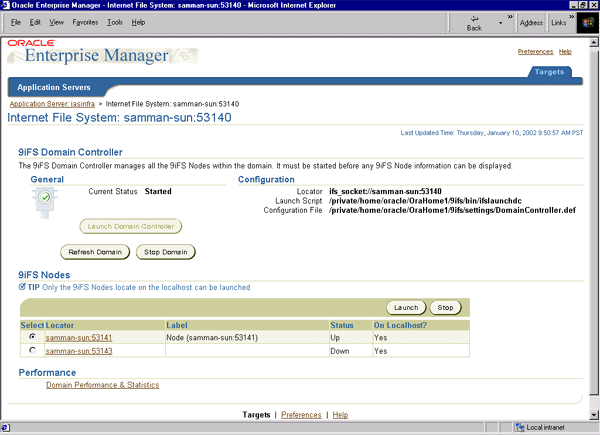
The Enterprise Manager Console for Oracle9iAS is a standalone, HTML-based console that provides access to basic Oracle 9iFS domain and node functions, such as starting and stopping the domain, nodes, services, and servers. It also allows administrators to monitor and dynamically tune the domain's nodes, services, and servers. You can use the Oracle 9iFS domain performance and statistics pages to monitor the domain and obtain an overall usage summary for the domain. See Figure 1-3, "Oracle 9iFS Top-level Page".
The Oracle Enterprise Manager Java Console is a Java-based console used to administer Oracle 9iFS domains. This includes starting and stopping the domain, starting or stopping nodes in the domain, and starting and stopping Oracle 9iFS services and servers on those nodes. It also allows administrators to monitor and dynamically tune the domain's nodes, services, and servers. The Java Console is the primary interface used for all Oracle Enterprise Manager operations. It provides menus, toolbars, and the framework to access Oracle tools and utilities in addition to those available through other vendors. The graphical configuration of the Console and the tools available are determined by the optional products installed and user preferences. See Figure 1-4, "Console Window Display Oracle 9iFS Domain" for an illustration of a Console screen displaying an Oracle 9iFS domain.
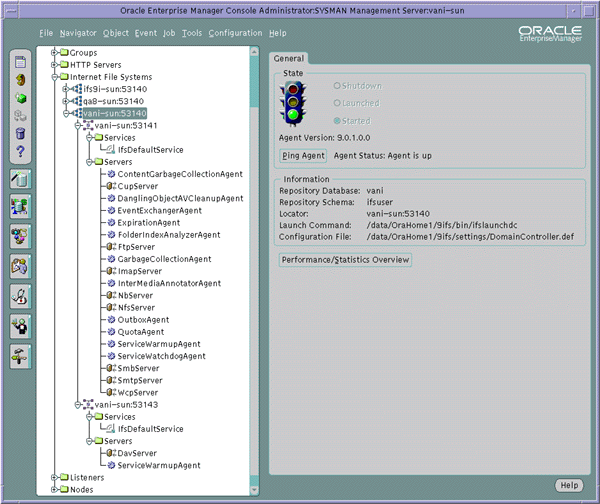
For information on the basic functionality of the Oracle Enterprise Manager Java Console, see the Oracle Enterprise Manager Administrator's Guide. For information on managing an Oracle 9iFS domain with the Oracle Enterprise Manager Java Console, see Appendix H, "Domain Administration with the Java-based Oracle Enterprise Manager Console".
Oracle 9iFS Manager is the administrative interface for Oracle 9iFS. Oracle 9iFS Manager provides a powerful and easy-to-use graphical interface, and is divided between administrative tasks and developmental tasks (see Figure 1-5, "Oracle Internet File System Manager").
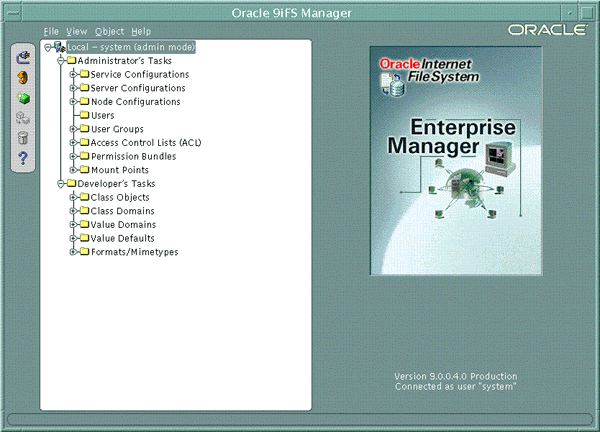
For details on using Oracle 9iFS Manager, see Chapter 3, "Working with Oracle 9iFS Manager".
Oracle 9iFS Manager is also integrated with Oracle Enterprise Manager Java Console and can be launched in an Oracle Management Server (OMS)-connected mode or in a standalone mode. For more information on using the Oracle Enterprise Manager Java Console, see Appendix H, "Domain Administration with the Java-based Oracle Enterprise Manager Console".
Though limited in its administrative functionality, the Web interface is the easiest tool to use. You must have administrative privileges to use these functions in the Web interface. For more information, click the Help icon on the Web interface.

The Command Line Utilities are an interface for administrators familiar with using the command line. These commands are best used for browsing the Oracle 9iFS objects in the repository and for performing scripted tasks. For example:
Starts the Command Line Utilities shell. If no arguments are specified, an interactive shell is started.
Syntax:
ifsshell [-i <filename>]
Options:
-i Indicates a file containing Command Line Utilities commands. This will run all the commands in a single JVM.
Examples:
ifsshell
Starts up an interactive shell that takes in Command Line Utilities commands.
ifsshell -i batchcommands.txt
Reads in the commands from the input file, batch commands.txt, and runs them.
For more information on using the Command Line Utilities, see Appendix A, "Command Line Utilities Reference".
XML configuration files can be used to streamline the creation of large numbers of repository objects. For example, the following file creates an Oracle 9iFS user:
<SimpleUser> <UserName>gking</UserName> <Password>ifs</Password> <DistinguishedNameSuffix>.yourcompany.com</DistinguishedNameSuffix> <DirectoryUserDescription>Gary King</DirectoryUserDescription> <AdminEnabled>true</AdminEnabled> <HomeFolderRoot>/home</HomeFolderRoot> <EmailAddressSuffix>@yourcompany.com</EmailAddressSuffix> </SimpleUser>Using an XML configuration file, you can configure multiple objects with a single file. If one section of the file has a problem, however, everything after it in the file does not execute. For more information on using XML files with Oracle 9iFS, see the Oracle Internet File System Developer Reference. For examples of adding users and groups with XML configuration files, see "Step 2: Create Users and Groups" in Chapter 4, "Setting Up Oracle Internet File System".
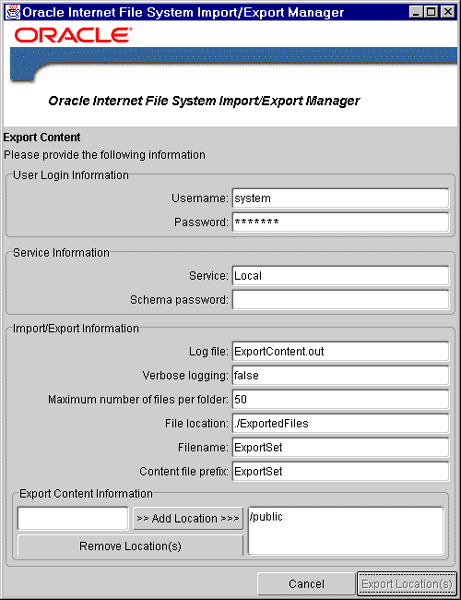
The Import/Export utility exports Oracle 9iFS objects (content and users) into an export file. The tool then uses the export file to import a copy of the Oracle 9iFS objects into a different Oracle 9iFS schema. You can use this tool to copy content from one Oracle 9iFS schema to another, migrate users from one schema to another, and also as a backup facility. For more information on using the Import/Export utility, see Chapter 8, "Migrating, Backing Up, and Restoring Data".
Built into several of the administration tools is the ability to view an overall picture of the domain's performance and to continuously monitor the domain.
You can monitor the overall performance of the domain or a particular node. On the Oracle 9iFS Top-level page, click the Domain Performance & Statistics link. The Domain Performance & Statistics page displays (see Figure 1-8).

For more information on monitoring domain performance, see "Monitoring the Performance of an Oracle 9iFS Domain" in Chapter 2, "Administering an Oracle 9iFS Domain".
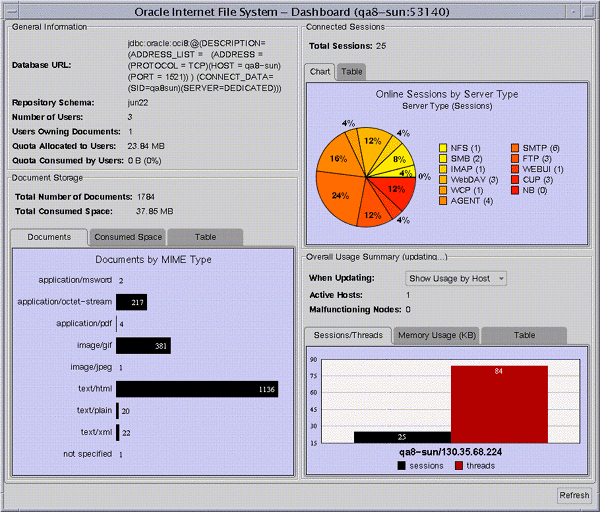
To access this monitoring function, select the domain and click the Performance/Statistics Overview button on the property sheet.
The left side of the screen monitors the Oracle 9iFS repository and its documents and users. It provides general information and information about document storage. The right side of the screen provides information about the domain, including information about usage by connected session and an overall usage summary by node showing each session on each machine. (See Figure 1-9, "Use the Dashboard to Monitor Domain Performance".)
|
 Copyright © 1999, 2002 Oracle Corporation. All Rights Reserved. |
|

