| Oracle® Retail Fiscal Management/RMS Brazil Localization Implementation Guide Release 14.2 F29404-01 |
|

 Previous |
 Next |
| Oracle® Retail Fiscal Management/RMS Brazil Localization Implementation Guide Release 14.2 F29404-01 |
|
Previous |
Next |
There are a number of tables in RMS that contain data provided by (or derived from) an external tax engine (TaxWeb Tax Rules).
This chapter covers the following topics:
Perform the following steps to install an updated set of rules from a TaxWeb Tax Rules:
Stop the WebLogic Server for the domain in which RTIL is deployed.
Copy the TaxWeb Tax Rules.jar files to WEBLOGIC_DOMAIN_HOME/lib.
Start the WebLogic Server for the domain in which RTIL is deployed.
After a new TaxWeb .jar is loaded and the RTIL WebLogic Server runs, set the L10N_BR_EXTAX_REFRESH_CONFIG.REFRESH_NEEDED to Y. This triggers updates to the tables in RMS that contain data provided by (or derived from) the external tax engine (like the TaxWeb Tax Rules)
While computing the item cost, there is no need to make a tax call to tax rules engine if the supplier linked to an item is not a Brazilian Supplier. RMS checks the country of the supplier. RMS does not make a tax call to tax rules engine, and instead populates the item costing tables (ITEM_COST_HEAD and ITEM_COST_DETAIL) without any tax details for non-Brazilian suppliers.
There is no need to navigate to item costing screen in case supplier's country is not Brazil. The Negotiated Item Cost (NIC), Base Cost (BC), Extended Base Cost (EBC), and Inclusive Cost (IC) are calculated with zero tax values. The Delivery country is set to Brazil, and primary delivery country indicator is set to Y. The NIC static indicator is also set to Y. These defaults do not impact the cost calculations as there is no tax in this case.
RMS continues to make tax calls to the tax rules engine for Brazilian suppliers that is, suppliers for which the country on the supplier's primary address is set to Brazil. All values passed to tax rules engine for Cost computation must be in Brazilian Reais (BRL), irrespective of the supplier currency. If the supplier currency is BRL, then the values passed to tax rules engine and retrieved from tax rules engine are in BRL and can be stored in BRL in the RMS tables. In case the supplier operates in a currency other than BRL, then RMS converts the cost values into BRL using the currency conversion rates defined in RMS. These converted values are passed to tax rules engine which return values of cost components and taxes in BRL. These cost and tax values are converted back into the supplier currency before storing them in the database.
Navigate to the item costing screen and click Calculate Tax. The data is retrieved with zero taxes.
The data conversion scripts for non-Brazil supplier picks the items in Approved status and inserts the data as it is from dat files to tables.
The item costing will not be made, and it is not a correct business scenario, when an item has a non-Brazil delivery country.
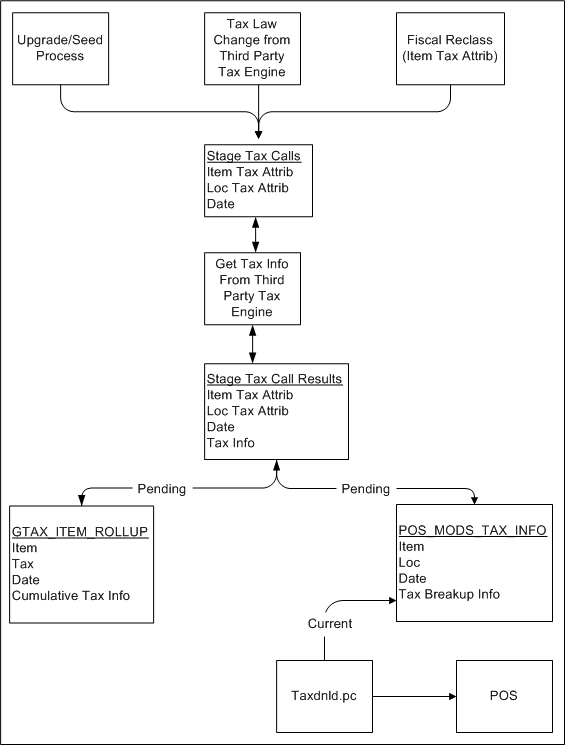
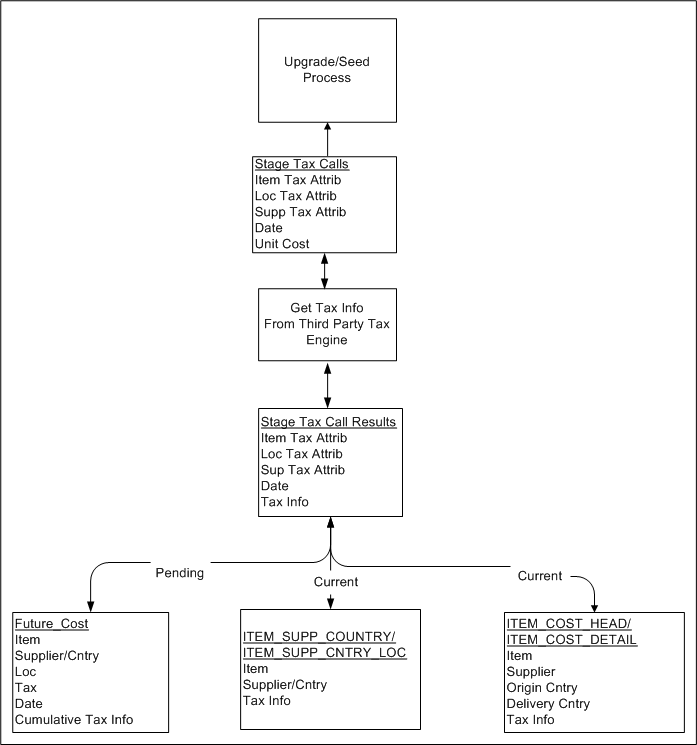
The tables can be divided into two categories depending on whether they hold data related to retail tax or cost tax.
Retail Tables – GTAX_ITEM_ROLLUP and POS_MODS_TAX_INFO
Cost Tables – ITEM_SUPP_COUNTRY, ITEM_SUPP_COUNTRY_LOC, FUTURE_COST, ITEM_COST_HEAD, ITEM_COST_DETAIL
These tables can also be categorized by whether they hold the current state tax information or pending state tax information. The current state tables only get updated when the transaction effecting tax becomes active and that pending state tables get updated as soon as the transaction effecting tax becomes known. For example, when we understand from the TaxWeb Tax Rules that the sales tax is moving from 10% to 12% in San Paulo in two weeks, the pending state tables are updated as soon this information is known. The current state tables are not updated until two weeks from now when the rate change actually occurs.
Current State Tables – ITEM_SUPP_COUNTRY, ITEM_SUPP_COUNTRY_LOC, ITEM_COST_HEAD, ITEM_COST_DETAIL
Pending State Tables – GTAX_ITEM_ROLLUP, POS_MODS_TAX_INFO, FUTURE_COST
Since the tax information is stored in RMS tables, these tables have to contain the factors that determine how tax change is calculated.
The following factors drive retail tax recalculations:
Item tax attributes (including dimensions)
Location tax attributes/location address
Date
The following factors drive cost tax recalculations:
Item tax attributes (including dimensions)
Location tax attributes/location address
Supplier tax attributes/supplier address
Unit cost
Date
L10N_BR_T_EXTAX_MAINT_SQL uses data grouping to minimize the number of calls to an external tax engine.
The idea behind grouping is that it is the fiscal attributes that determine what the tax is, not the particular entity (many different items may all share the same fiscal attributes - same thing for suppliers and locations). The ITEM_LOC table might have 1 million rows on it, but there might only be 125,000 unique combinations of item fiscal attributes and location fiscal attributes between them. If that is the case, only 125,000 calls need to be made to the external tax engine instead of 1 million calls.