| Oracle® Enterprise Service Bus Developer's Guide 10g (10.1.3.4.0) Part Number E12638-02 |
|


|
View PDF |
| Oracle® Enterprise Service Bus Developer's Guide 10g (10.1.3.4.0) Part Number E12638-02 |
|
|
View PDF |
This chapter describes how to interpret error conditions and how to handle them in Oracle Enterprise Service Bus. The Instances view in the Oracle ESB Control enables you to view and manage error conditions that occur across the enterprise service bus.
This chapter contains the following topics:
You can also view the log files with Oracle Enterprise Manager to check for details on error conditions. See "Checking Log Files".
When an error occurs in Oracle Enterprise Service Bus processing, the error is noted by visual cues, such as icon and color changes, in the Oracle ESB Control. See Figure 10-4, Figure 10-5, and Figure 10-6. Also, you can also set up notifications by email, fax, or phone when errors occur. See "Setting Up Notification Channels".
Error handling in Oracle Enterprise Service Bus involves several types of errors that can occur in transaction processing:
Application or Business Faults
Retryable Exceptions: A temporary loss of a service impacting the routing of the message, but is usually resolved in a relatively short time period
Fatal Exceptions: A disabled or deleted service or system, out of memory condition, or other serious problem that results in a serious error requiring attention by a system administrator
Error handling is processed differently whether asynchronous and synchronous execution is specified for a routing service. Errors during synchronous execution are rolled back and cannot be retried with Oracle ESB Control; errors during asynchronous execution can be resubmitted. For more information about asynchronous and synchronous execution, see "Specifying Synchronous or Asynchronous Execution".
For synchronous execution, the transaction is rolled back and an error notification is returned to the adapter that initiated the processing. The calling adapter is expected to handle the error and resubmission. See "Inbound Adapter Error Handling".
For asynchronous execution, the user can resubmit the transaction after the error condition has been resolved. See "User Error Handling".
This section discuses how to manage errors conditions that occur with Oracle Enterprise Service Bus.
The topics contained in this section are:
An inbound adapter handles exceptions and faults using the default error handling process of the adapter.
By default, an adapter retries the message three times at five second intervals for an error condition. The retry count and interval can be specified in the endpoint properties of the adapter service. For information about endpoint properties, see "Using Endpoint Properties".
If an inbound adapter fails to invoke a routing service for a certain number of consecutive times, it marks itself broken and disables itself. The Oracle ESB Control displays this event source with a special icon to visually represent its disabled state. You can enable the adapter service.
If the next service that the inbound adapter invokes does not exist, perhaps because it has been deleted or is not enabled, then the inbound adapter processor disables itself and marks itself broken.
If a subscription fails a certain number of consecutive times, the service notifies the repository to mark it as in a broken state. The dispatcher does not dispatch this subscription after it is marked as broken.
The administrator is notified of any disabled services.
For more information about adapters, including a discussion of managing errors, see Oracle Application Server Adapter Concepts.
See Also:
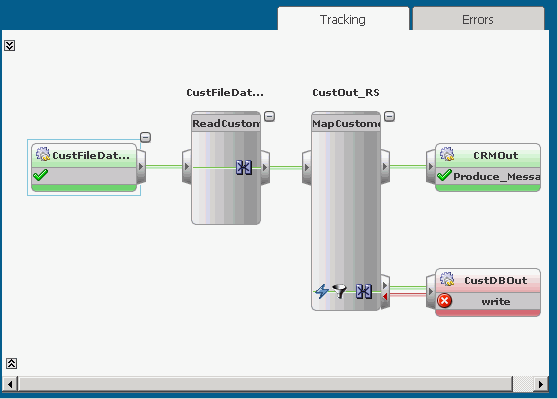
Inbound Adapter Error HandlingWhen an error occurs during process a message instance, it is indicated by a red service icon in the Tracking tab of the Oracle ESB Control Instances view.
An error condition in the Tracking tab appears similar to Figure 12-1.
Figure 12-1 Instances View – Tracking Tab
You can view the error message, trace, and payload details by clicking on the Error Details icon in the Message column on the Errors tab, shown in Figure 12-3.
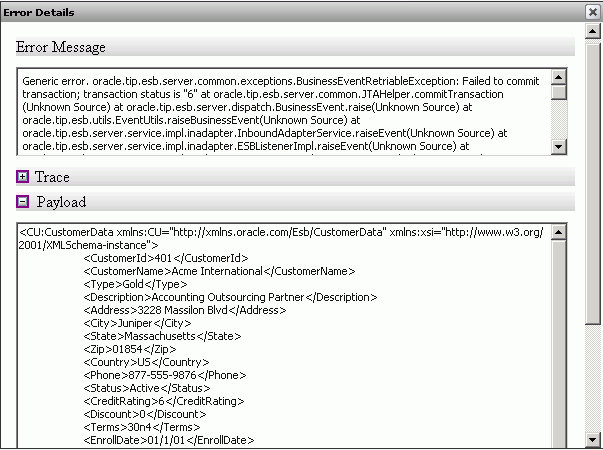
Figure 12-2 is an example of the Error Details dialog.
After you review the error details and fix the error condition, you can resubmit the message to the invoking service.
For information about enabling validation of the payload at runtime, see Table 3-6 in "Viewing Service Definitions".
In some situations, a message instance can be resubmitted. If a routing rule has been set to asynchronous execution, you can usually resubmit a message instance after fixing the error condition.
To resubmit a message on error, follow these steps:
At the top of the Oracle ESB Control, click the Instances icon to display the message instance processing.
In the Instances panel of the Instances view, click the message instance where the error occurred.
Click the Error tab to display the error information.
Click the Error Details icon under the Message column to view error message, trace, and payload details about the error condition in the Errors Detail dialog.
Click OK to close the Errors Detail dialog after reviewing the error message details.
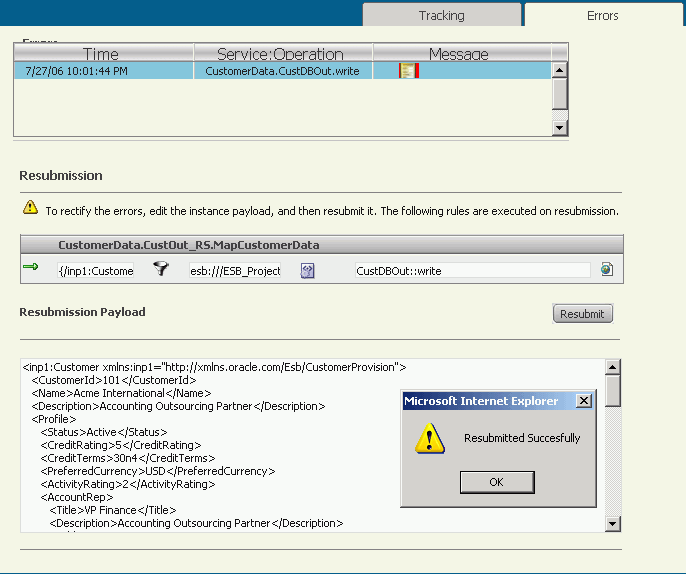
Correct the error condition, then click Resubmit in the Error tab.
For example, edit the message payload in the Resubmission Payload window if is incorrect and then click Resubmit.
Figure 12-3 is an example of the resubmitted message instance.
Oracle Application Server release 10.1.3.4 provides additional support for error handling in ESB. The error behavior in ESB can be explained with the following scenario:
Third-party Adapter --> Routing Service --> AQ Outbound Adapter
The error handling in ESB has the following enhancements in 10.1.3.4:
Third-party adapters such as the SAP adapter do not have support for the custom rejection handler. But, in the 10.1.3.4 release, you can invoke the custom rejection handler from ESB. You need to set up the SupportCustomRejectionForThirdPartyAdaptor endpoint property to true. ESB identifies this property as a third-party adapter and calls the onReject function.
The property name and description used for this feature are as follows:
Property Name: SupportCustomRejectionForThirdPartyAdaptor
Description: True refers to invoking custom rejection handler for third-party.
Whenever ESB fails to post the message on ERROR_TOPIC, you might want to shut down the inbound adapter to avoid any further loss of error messages. You can achieve this by setting the shutdownInboundAdaptorOnError endpoint property to true. This property can be used only for the synchronous ESB service and when the messages on the ERROR_TOPIC AQJMS topic are posted from the inbound service. By default, the messages on the ERROR_TOPIC AQJMS topic are enqueued at the service where the error has happened. To enable the messages on ERROR_TOPIC to be enqueued from the inbound service, you need to set the EnqueueErrorFromInbound to true in the ESB_config.ini file.
Table 12-1 summarizes the properties that need to be configured for this feature.
Table 12-1 Properties to Be Set for Shutting Down the Inbound Adapter
| Property Name | Description |
|---|---|
|
|
If the value of this property is |
|
|
If the value of this property is |
See Also:
Reverse ControlThe ERROR_TOPIC AQJMS topic contains additional information such as inbound adapter ID (INBOUND_ADAPTOR_ID) and outbound adapter ID (OUTBOUND_ADAPTOR_ID).
The reverse control mechanism helps in a scenario where you want all the inbound adapters in the cluster to be shut down and also the status to be updated on the console. You can use the reverse control mechanism, where the design-time is notified by the run time. The run-time updates the status of the service and notifies all the run time services about the change in state. Then, all the run-time services shut down the inbound adapter. This shutdown happens only when the disable_service_on_all_nodes endpoint property is set to true in the ESB_config.ini file.
The reverse control mechanism is used in conjunction with shutdownInboundAdaptorOnError. This means that when posting a message on ERROR_TOPIC fails, the inbound adapter is shut down and then, if the system is configured such that all the other nodes need to be shut down, then reverse control kicks in.
Property Name: disable_service_on_all_nodes
Description: The preceding use case is supported when disable_service_on_all_nodes=true. If it is set to false, then only the adapter on the current node will be shut down and the status on the console will not be updated.
All the technology adapters provide a unique key to identify the message. ESB uses this unique key as the primary key to determine how many times the message has been retried before it can be rejected. Third-party adapters do not provide this unique key, which results in the message never getting rejected and the message is always sent to the adapter for a retry. ESB provides the PrimaryKey endpoint property, which is an XPATH from the payload. This enables a message to be related using this XPATH, which is then retried and rejected eventually.
A sample to define a primary key is as follows:
Sample payload XML:
<ns1:userDetail xmlns:ns1="http://www.example.org">
             <ns1:key>41</ns1:key>
             <ns1:value>11</ns1:value>
             </ns1:userDetail>
PrimaryKey={/imp1:userDetail/imp1:key};{namespace imp1=http://www.example.org}
Property Name: PrimaryKey
Description: If the PrimaryKey endpoint property is not set for third-party adapter, it will always result in a RetriableException error, requesting the adapter to retry the same message. This way, the custom rejection handler will never be called. When the primary key with an XPATH returns NULL, the message will not be retried and will be rejected after the first failure in processing.
The AQ adapter, which is a technology adapter, removes the message from the main queue and places it in its own error queue when it receives a RejectionException error. This way, the messages are not sent back to ESB again. On the other hand, third-party adapters such as the SAP adapter do not have this built-in mechanism. The message remains in the main queue forever. Also, the SAP adapter does not participate in the global transaction. When you set the NotifyThirdPartyAdaptor endpoint property to false, ESB rolls back its local transaction, which invokes the rejection handler but never returns the exception to the SAP adapter. The SAP adapter then commits its transaction, and the message is removed from the queue.
Property Name: NotifyThirdPartyAdaptor
Description: False value states that do not bubble the exception back to the third-party adapter. ESB will not throw the exception back to the SAP adapter, and the value will be picked from the SAP adapter. For third-party adapters, if the PrimaryKey endpoint property is not set, then it will result in ESB always sending the notification to the adapter for a retry.
Table 12-2 describes the property relationship table and the detailed description of the actions that would occur when you set the properties in the order specified in the table.
Table 12-2 Property Relationship Table
| SL. No. |
Enqueue Error From Inbound |
disable _service _on _all_ nodes |
shutdown Inbound Adaptor On Error |
Support Custom Rejection ForThird Party Adaptor |
Notify Third Party Adaptor |
Primary Key |
Description |
|---|---|---|---|---|---|---|---|
|
1. |
true |
true |
true |
true |
false |
XPATH resulting in NOT NULL value |
1. If ESB infra is up, inbound adapter id set on ERROR_TOPIC. Message placed on ERROR_TOPIC.2. If ESB infra is down, inbound adapter is disabled on all nodes and status updated on the console.3 Else message is retried based on the inbound and outbound based on parameters set.4. Custom Rejection Handler is called after the number of inbound retries are exhausted.5. Message picked from SAP adapter. |
|
2. |
true |
true |
true |
true |
false |
End point property set but XPATH resulting in NULL value |
1. If ESB infra is up, inbound adapter id set on ERROR_TOPIC. Message placed on ERROR_TOPIC.2. If ESB infra is down, inbound adapter is disabled on all nodes and status updated on the console.3 Else message NOT tried again at the inbound service layer and |
|
3. |
true |
true |
true |
true |
false |
end point property not set |
1. If ESB infra is up, inbound adapter id set on ERROR_TOPIC. Message placed on ERROR_TOPIC.2. If ESB infra is down, inbound adapter is disabled on all nodes and status updated on the console.3 Else because the primary key is not set and also it is NULL for SAP adapter, ESB will continue to retry.4. Custom Rejection Handler is NOT called.5. Message is NOT picked from SAP adapter. |
|
4. |
false |
true |
true |
true |
false |
XPATH resulting in NOT NULL value |
1. If ESB infra is up, inbound adapter id set on ERROR_TOPIC. Message placed on ERROR_TOPIC.2. If ESB infra is down, inbound adapter is NOT disabled on the current node as well as all the other nodes.3 Else message is retried on the inbound and outbound based on parameters set.4. Custom Rejection Handler is called after the number of inbound retries are exhausted.5. Message picked from SAP adapter. |
|
5. |
true |
false |
true |
true |
false |
XPATH resulting in NOT NULL value |
1. If ESB infra is up, inbound adapter id set on ERROR_TOPIC. Message placed on ERROR_TOPIC.2. If ESB infra is down, inbound Adapter is disabled on the current but not on all other running nodes. Status is not updated on the console.3. Else message is retried on the inbound and outbound based on parameters set.4. Custom Rejection Handler is called after the number of inbound retries are exhausted.5. Message picked from SAP adapter. |
|
6. |
true |
true |
false |
true |
false |
XPATH resulting in NOT NULL value |
1. If ESB infra is up, inbound adapter id set on ERROR_TOPIC. Message placed on ERROR_TOPIC.2. If ESB infra is down, inbound Adapter is NOT disabled on the current node as well as all the other nodes.3 Else message is retried on the inbound and outbound based on parameters set.4. Custom Rejection Handler is called after the number of inbound retries are exhausted.5. Message picked from SAP adapter. |
|
7. |
true |
true |
true |
false |
false |
XPATH resulting in NOT NULL value |
1.If ESB infra is up, inbound adapter id set on ERROR_TOPIC. Message placed on ERROR_TOPIC.2. If ESB infra is down, inbound adapter disabled on all nodes and status updated on the console.3 Else message is retried on the inbound and outbound based on parameters set.4. Custom Rejection Handler is NOT called for third-party adapters after the number of inbound retries are exhausted.5. Message picked from SAP adapter. |
|
8. |
true |
true |
true |
true |
true |
XPATH resulting in NOT NULL value |
1. If ESB infra is up, inbound adapter id set on ERROR_TOPIC. Message placed on ERROR_TOPIC.2. If ESB infra is down, inbound adapter disabled on all nodes and status updated on the console.3 Else message is retried on the inbound and outbound based on parameters set.4. Custom Rejection Handler is called after the number of inbound retries are exhausted.5. Message is NOT picked from SAP adapter as the exception is bubbled back to the adapter. |