 Candidate Gateway Overview
This chapter discusses:
Candidate Gateway overview.
Candidate Gateway business processes.
Candidate Gateway integrations.
Candidate Gateway implementation.
Candidate Gateway OverviewCandidate Gateway enables internal applicants (employees and non-employees) and external applicants to:
View information about current job openings in the organization.
Search for job openings that match their interests.
Save job search criteria.
Save job openings.
Use multiple resumes in the job application process.
Submit job applications and resumes for specific job openings.
Submit job applications and resumes without applying to a specific job opening.
Submit employment references, cover letters, and other documents.
Complete online screening questionnaires.
View notifications from recruiters.
View interview schedules.
Maintain and update their personal profile information (external applicants only).
In addition, employees can use transactions located on the self-service navigation path to:
Refer friends.
Confirm and check the status of a referral.
Complete interview evaluations.
Review personal and team interview schedules.
You can use the text catalog to modify much of the text that appears on the applicant facing pages. The text catalog contains default text, but you can change the default text as needed. The text catalog enables you to change text for:
Page titles
Page instructions
Group box labels
Grid labels
Field labels
Link titles
See Configuring the Text Catalog.
Candidate Gateway Business ProcessesCandidate Gateway provides these business processes:
Search for jobs.
Apply for jobs.
Manage job application information.
Manage personal profile information (external applicants only).
We discuss these business processes in the business process chapter in this PeopleBook.
See Also
Candidate Gateway IntegrationsCandidate Gateway integrates with these PeopleSoft applications:
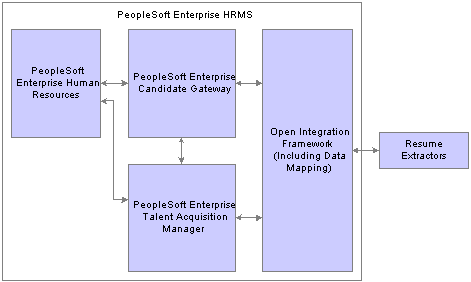
Candidate Gateway integration
We discuss integration considerations in the implementation chapter in this PeopleBook.
Supplemental information about third-party application integrations is located on the PeopleSoft Customer Connection website.
See Setting Up Sites.
Candidate Gateway Implementation
In the planning phase of your implementation, take advantage of all PeopleSoft sources of information, including the installation guides, table-loading sequences, data models, and business process maps.