Chapter 3: Creating New Domains and Administrative Class Objects


Introduction

It is important for you, as the administrator, to be able to create domains and administrative class objects (such as machines and services) quickly and easily. The GUI simplifies this job: all you have to do is fill in a form with information that is essential for the desired object.

This chapter provides a reference guide to the GUI forms you must complete in order to create new domains and objects. For each class to which you may add an object, the GUI provides a form called "Create New Object." (It is not possible to add objects in a few classes that appear in the Tree, such as "Clients.") The fields on this form vary, depending on the object class.

Each section in this chapter provides (a) instructions for accessing the appropriate form for a specified object class, and (b) helpful information about each field on that form. The field information is often provided in a table that includes some combination of the following entries:

Creating a Domain

To create a new domain, complete the following steps:

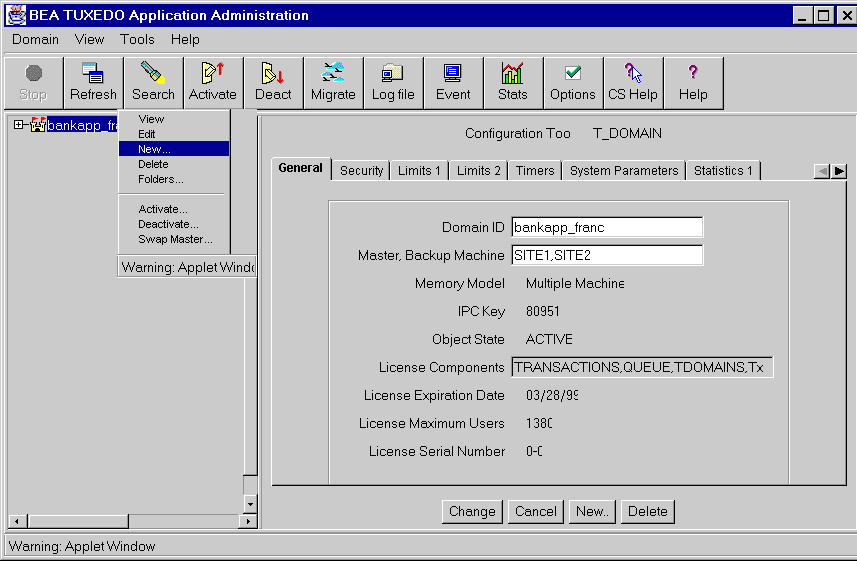
  1. Click the right mouse button on the domain name at the top of the Object Tree and choose New from the Quick Menu, as shown in Figure 3-1.

    Figure 3-1: Using the Domain Quick Menu to Create a New Domain

    A pop-up form called "Create New Object" is displayed. This form contains nine fields in which you must enter values:

  2. When you have finished filling out the fields, press the Create button at the bottom of the form.

    You can nullify your entries at any time by pressing the Cancel button at the bottom of the form.

    The rest of this section describes the fields on the "Create New Object" form.

Domain ID Field (TA_DOMAINID) for Creating a New Domain

DESCRIPTION The name of your BEA TUXEDO System/T application.
VALID VALUE string (0-30 characters, inclusive)
DEFAULT NoName
EXAMPLE bankapp
TIPS The default name ("NoName") is used only for display purposes in the GUI; it is not recorded as a value in the MIB.

IPC Key Field (TA_IPCKEY) for Creating a New Domain

DESCRIPTION A numeric key that identifies the shared memory segment in which the structures used by your application are located. In a single-processor environment, the IPC key "names" the bulletin board. In a multiple-processor or LAN environment, this key names the message queue of the DBBL.
VALID VALUE 32K+1 <= number < 262,144
EXAMPLE 34956
TIPS If you expect to define a network of machines using TCP/IP addressing, you may find it helpful to express the value of the IPC key in hexadecimal notation.

Master, Backup Machine Field (TA_MASTER) for Creating a New Domain

DESCRIPTION The name of the "master machine": the node on which the master copy of the configuration file for your application (TUXCONFIG) is located. In a multiprocessor environment, this machine is also the one on which the DBBL should be run. The name of the master machine (LMID1) must correspond to that of the local machine for inactive applications. If you are using a single-machine application, you may not specify a backup machine. The name may be assigned by you (the administrator) or specified in your application. You must specify a name for your master machine; specifying a backup machine is optional. If you specify a backup machine, it will be used as an alternate location (for the TUXCONFIG file and the DBBL) during process relocation and booting.
VALID VALUE LMID1[,LMID2] Each LMID (Logical Machine Identifier) contains a maximum of 30 characters.
EXAMPLE branch1a,branch1b

Memory Model Field (TA_MODEL) for Creating a New Domain

Select one of two memory models (SHM or MP) from a scrolling menu.l

DESCRIPTION The classification of your System/T application as a single-machine (SHM) or multiprocessor (MP) application.
VALID VALUE SHM (or) MP
DEFAULT SHM

Application Directory (Full Path) Field (TA_APPDIR) for Creating a New Domain

DESCRIPTION A colon-separated list of absolute pathnames for directories that contain BEA TUXEDO/T applications. All directories are searched when application servers are booted. The first directory serves as the current directory for all application and administrative servers booted on this machine.
VALID VALUE string (2-78 characters, inclusive)
EXAMPLE /home/apps/bankapp:/home/apps/personnelapp
TIPS You may (optionally) specify multiple pathnames, separated by colons. You must specify a full pathname for every application for which SECURITY has been set.

Application Configuration File (Full Path) Field (TA_TUXCONFIG) for Creating a New Domain

DESCRIPTION The absolute pathname for the location (either a file or device) of the configuration file for your BEA TUXEDO/T application. The "Application Configuration File" field is equivalent to the MIB attribute "TA_TUXCONFIG." "TUXCONFIG" is also the name of an environment variable that is used to compile the configuration file and activate the application. This internal entry is used by the BEA TUXEDO System software after the application is activated.
VALID VALUE string (2-78 characters, inclusive)
EXAMPLE /home/bankapp/bankconfig

Network Address Field (TA_NADDR) for Creating a New Domain

DESCRIPTION Specifies the complete network address to be used by the bridge process placed on the LMID as its listening address. The listening address for a bridge is the means by which it is contacted by other bridge processes participating in the application.
VALID VALUES TCP/IP addresses may be specified in either of the two formats shown below. Format 1: //hostname:port_number In the first format, the bridge finds an address for hostname using the local name resolution facilities (usually DNS). hostname must unambiguously resolve to the address of the machine on which the bridge resides. Format 2: //#.#.#.#:port_number In the second format, the "#.#.#.#" is in dotted decimal format. In dotted decimal format, each # should be a number from 0 to 255. This dotted decimal number represents the IP address of the local machine. In both of the above formats, port_number is the TCP port number at which the bridge will listen for incoming requests. The value of port_number can be either a number (between 0 and 65535) or a name. If port_number is a name, then it must be found in the network services database on your local machine. The address can also be specified in hexadecimal format when preceded by the characters "0x". Each character after the initial "0x" is a number between 0 and 9 or a letter between A and F (case insensitive). The hexadecimal format is useful for arbitrary binary network addresses such as IPX/SPX or TCP/IP. The address can also be specified as an arbitrary string (with a maximum of 78 characters). For example, string addresses are used in STARLAN networks.
EXAMPLE Suppose the local machine on which a /T domain is being run is using TCP/IP addressing and is named backus.company.com, with address 155.2.193.18. Further suppose that the port number at which the /T domain should accept requests is 2334. Assume that port number 2334 has been added to the network services database under the name bankapp-bridge. You can specify the address in any of the following five formats: //155.2.193.18:bankapp-bridge //155.2.193.18.2334 //backup.company.com:bankapp-bridge //backup.company.com:2334 0x0002091E9B02C112 The last line shows an address in hexadecimal format where "0002" is the first part of a TCP/IP address and "091E" is the port number "2334" translated into a hexadecimal number. The rest of the line contains hexadecimal numbers that are translations of the elements of the IP address 155.2.193.12: "155"becomes "9B", "2" becomes "02", and so on.

Network Listener Address Field (TA_NLSADDR) for Creating a New Domain

DESCRIPTION The network address used by the tlisten(1) process servicing the network on the node identified by the LMID. tmloadcf(1) prints an error if you do not enter a value in this field for most machines. If you do not enter a value in this field for the MASTER LMID, tmloadcf prints a warning, and tmadmin(1) will not be able to run in administrator mode on remote machines; it will be limited to read-only operations. This also means that the backup site will be unable to reboot the master site after failure.
VALID VALUES TCP/IP addresses may be specified in either of the two formats shown below. Format 1: //hostname:port_number In the first format, tlisten finds an address for hostname using the local name resolution facilities (usually DNS). hostname must unambiguously resolve to the address of the machine on which tlisten resides. Format 2: //#.#.#.#:port_number In the second format, the "#.#.#.#" is in dotted decimal format. In dotted decimal format, each # should be a number from 0 to 255. This dotted decimal number represents the IP address of the local machine. In both of the above formats, port_number is the TCP port number at which tlisten will listen for incoming requests. The value of port_number can be either a number (between 0 and 65535) or a name. If port_number is a name, then it must be found in the network services database on your local machine. The address can also be specified in hexadecimal format when preceded by the characters "0x". Each character after the initial "0x" is a number between 0 and 9 or a letter between A and F (case insensitive). The hexadecimal format is useful for arbitrary binary network addresses such as IPX/SPX or TCP/IP. The address can also be specified as an arbitrary string (with a maximum of 78 characters). For example, string addresses are used in STARLAN networks.
EXAMPLE Suppose the local machine on which a /T domain is being run is using TCP/IP addressing and is named backus.company.com, with address 155.2.193.18. Further suppose that the port number at which the /T domain should accept requests is 2334. Assume that port number 2334 has been added to the network services database under the name bankapp-tlisten. You can specify the address in any of the following five formats: //155.2.193.18:bankapp-tlisten //155.2.193.18.2334 //backup.company.com:bankapp-tlisten //backup.company.com:2334 0x0002091E9B02C112 The last line shows an address in hexadecimal format where "0002" is the first part of a TCP/IP address and "091E" is the port number "2334" translated into a hexadecimal number. The rest of the line contains hexadecimal numbers that are translations of the elements of the IP address 155.2.193.12: "155"becomes "9B", "2" becomes "02", and so on.

Bridge Device Field (TA_BRIDGE) for Creating a New Domain

DESCRIPTION The device name to be used by the bridge process placed on that LMID to access the network.
If your networking functionality is TLI-based, the device name must be an absolute pathname. The network transport endpoint file path has the form: /dev/provider_name. For STARLAN this is: /dev/starlan. In a multiprocessor configuration, the value in this field takes the form: /dev/starlanN, where N is the PE number.
If your networking functionality is sockets-based, you do not need to enter a value in this field.
VALID VALUES string (0-78 characters, inclusive)
EXAMPLE /dev/starlan

Creating Machines

  1. In the Tree, right-mouse click on the word "Machines"; a one-item ("New") pop-up menu will be displayed.

  2. Click on "New"." A pop-up form called "Create New Object" will be displayed. The form contains eight fields in which you must enter values:

  3. When you have finished filling out the form and are ready to have your new machine created, press the "Create" button at the bottom of the form.

    You can nullify your entries at any time by pressing the "Cancel" button at the bottom of the form.

    The rest of this section describes the fields on the "Create New Object" form.

Machine Name Field (TA_PMID) for Creating a New Machine

DESCRIPTION Physical machine identifier used by BEA TUXEDO (specifically, in the TM_MIB) for mapping application resources to machines configured for this application.
VALID VALUES string (1-30 characters, inclusive)
EXAMPLE jupiter
TIPS For UNIX users: The value of "Machine Name" is the nodename returned when you run the uname -a command on this machine.

Logical Machine Name Field (TA_LMID) for Creating a New Machine

DESCRIPTION Logical machine identifier which is used, in the TM_MIB definition, as the sole means of mapping application resources to configured machines. You have the option of assigning a logical name to a backup machine in case the first machine fails.
VALID VALUES string (1-30 characters, inclusive)
EXAMPLE SITE1

Tuxedo Root Directory (Full Path) Field (TA_TUXDIR) for Creating a New Machine

DESCRIPTION Absolute pathname of the directory (on this machine) in which the BEA TUXEDO System /T software resides. The documentation refers to it as "TUXDIR" (formerly "ROOTDIR").
VALID VALUES string_value (2-78 characters, inclusive)
EXAMPLE /home/TUXEDO

Application Configuration File (Full Path) Field (TA_TUXCONFIG) for Creating a New Machine

DESCRIPTION The absolute pathname for the location (either a file or device) of the configuration file for your BEA TUXEDO/T application. The "Application Configuration File" field is equivalent to the MIB attribute "TA_TUXCONFIG." "TUXCONFIG" is also the name of an environment variable that is used to compile the configuration file and activate the application. This internal entry is used by the BEA TUXEDO System software after the application is activated.
VALID VALUES string (2-78 characters, inclusive)
EXAMPLE /home/bankapp/bankconfig

Application Directory (Full Path) Field (TA_APPDIR) for Creating a New Machine

DESCRIPTION A colon-separated list of absolute pathnames for directories that contain BEA TUXEDO/T applications. All directories are searched when application servers are booted. The first directory serves as the current directory for all application and administrative servers booted on this machine.
VALID VALUES string_value (2-78 characters, inclusive)
EXAMPLE /home/apps/bankapp:/home/apps/personnelapp
TIPS You may (optionally) specify multiple pathnames, separated by colons. You must specify a full pathname for every application for which SECURITY has been set.

Network Address Field (TA_NADDR) for Creating a New Machine

DESCRIPTION Specifies the complete network address to be used by the bridge process placed on the LMID as its listening address. The listening address for a bridge is the means by which it is contacted by other bridge processes participating in the application.
VALID VALUES Network addresses may be specified in either of the formats shown below. Format 1 for TCP/IP: //hostname:port_number In the first format, the bridge finds an address for hostname using the local name resolution facilities (usually DNS). hostname must unambiguously resolve to the address of the machine on which the bridge resides. Format 2 for TCP/IP: //#.#.#.#:port_number In the second format, the "#.#.#.#" is in dotted decimal format. In dotted decimal format, each # should be a number from 0 to 255. This dotted decimal number represents the IP address of the local machine. In both of the above formats, port_number is the TCP port number at which the bridge will listen for incoming requests. The value of port_number can be either a number (between 0 and 65535) or a name. If port_number is a name, then it must be found in the network services database on your local machine. If you are using a network provider other than TCP/IP, you can use either of two generic formats: a hexadecimal number or an arbitrary string. To specify an address in hexadecimal format, you must precede it by the characters "0x". Each character after the initial "0x" is a number between 0 and 9 or a letter between A and F (case insensitive). The hexadecimal format is useful for arbitrary binary network addresses such as IPX/SPX or TCP/IP. The address can also be specified as an arbitrary string (with a maximum of 78 characters). For example, string addresses are used in STARLAN networks.
EXAMPLE Suppose the local machine on which a /T domain is being run is using TCP/IP addressing and is named "backus.company.com", with address 155.2.193.18. Further suppose that the port number at which the /T domain should accept requests is 2334. Assume that port number 2334 has been added to the network services database under the name "bankapp-gwtaddr." The address specified by the -l option could be represented in the following ways: //155.2.193.18:bankapp-gwtaddr

//155.2.193.18.2334

//backup.company.com:bankapp-gwtaddr

//backup.company.com:2334

0x0002091E9B02C112

The last of these representations is hexadecimal format. The 0002 is the first part of a TCP/IP address. The 091E is the port number 2334 translated into a hexadecimal number. After that each element of the IP address 155.2.193.12 is translated into a hexadecimal number. Thus the 155 becomes 9B, 2 becomes 02, and so on.

Network Listener Address Field (TA_NLSADDR) for Creating a New Machine

DESCRIPTION The network address used by the tlisten(1) process servicing the network on the node identified by the LMID. Enter the network listener address in the same format you used for the value in the "Network Address" field, above. For most machines, tmloadcf(1) prints an error if you do not enter a value in this field. If you do not enter a value in this field for the MASTER LMID, tmloadcf(1) prints a warning, and tmadmin(1) will not be able to run in administrator mode on remote machines; it will be limited to read-only operations. This also means that the backup site will be unable to reboot the master site after failure.
VALID VALUES string (0-78 characters, inclusive)
EXAMPLE 00025c60c604a629 (TCP/IP address)

Bridge Device Field (TA_BRIDGE) for Creating a New Machine

DESCRIPTION The device name to be used by the bridge process placed on that LMID to access the network. If your networking functionality is TLI-based, the device name must be an absolute pathname. The network transport endpoint file path has the form: /dev/provider_name. For STARLAN this is: /dev/starlan. In a multiprocessor configuration, the value in this field takes the form: /dev/starlanN, where N is the PE number. If your networking functionality is sockets-based, you do not need to enter a value in this field.
VALID VALUES string (0-78 characters, inclusive)
EXAMPLE /dev/starlan

Creating Application Queues

  1. In the Tree, right-mouse click on the word "Application Queues"; a one-item ("New") pop-up menu will be displayed.

  2. Click on "New". A pop-up form called "Create New Object" will be displayed. The form contains five fields in which you must enter values:

  3. When you have finished filling out the form and are ready to have your new application queue created, press the "Create" button at the bottom of the form.

    You can nullify your entries at any time by pressing the "Cancel" button at the bottom of the form.

    The rest of this section describes the fields on the "Create New Object" form.

App Queue Name Field (TA_APPQNAME) for Creating an Application Queue

DESCRIPTION The name of the application queue to be operated upon.
VALID VALUES string (1-15 characters, inclusive)
EXAMPLE Q_OPENACCT

App Queue Space Name Field (TA_APPQSPACENAME) for Creating an Application Queue

DESCRIPTION The name of the application queue space associated with the application queue. Filling in this field is half of what you must do to identify such a queue space; you must also enter a value in the "App Queue Config Device" field, below.
VALID VALUES string (1-15 characters, inclusive)
EXAMPLE QSP_BANKAPP

App Queue Space Device Field (TA_QMCONFIG) for Creating an Application Queue

DESCRIPTION The pathname for an application queue configuration device, which must be on the current machine when you are using a deactivated configuration. Filling in this field is half of what you must do to identify a queue space associated with the application queue; you must also enter a value in the "App. Queue Space Name" field, above.
VALID VALUES string (1-78 characters, inclusive)
EXAMPLE Q_DEVICE

Logical Machine Name Field (TA_LMID) for Creating an Application Queue

DESCRIPTION Logical machine identifier for the machine on which the application queue is located.
VALID VALUES string (1-30 characters, inclusive)
EXAMPLE SITE1
TIPS The value in this field must be specified as a key field except when the application is unconfigured (i.e., the TUXCONFIG environment variable is not set).

Queue Messages Processing Order Field (TA_APPQORDER) for Creating an Application Queue

This field is optional.

DESCRIPTION Select one of eight combinations of four types of order (PRIO, TIME, FIFO, and LIFO) in which you want messages in the queue to be processed. Consider your needs carefully before selecting an order for your application: the value in this field cannot be modified after the application queue is created.
VALID VALUES Select one of the items listed below. The commas indicate a secondary (or lower) processing order within the primary processing order. For example, PRIO, LIFO means that the queue is processed in priority order, but if two items in the queue share the same priority, they are then processed in Last In First Out order.
FIFO - First In, First Out
PRIO, LIFO - Priority (then Last In, First Out)
PRIO, FIFO - Priority (then First In, First Out)
TIME, LIFO - Execution Time (then Last In, First Out)
Prio, TIME, LIFO - Priority (then Execution Time (then Last In First Out))
Prio, TIME, LIFO - Priority (then Execution Time (then First In Last Out))
TIME, PRIO, LIFO - Execution Time (then Priority (then Last In, First Out))
TIME, PRIO, LIFO - Execution Time (then Priority (then First In, Last Out))
DEFAULT FIFO

Creating Application Queue Spaces

  1. In the Tree, right-mouse click on the word "Application Queue Spaces"; a one-item ("New") pop-up menu will be displayed.

  2. Click on "New". A pop-up form called "Create New Object" will be displayed. The form contains nine fields in which you must enter values:

  3. When you have finished filling out the form and are ready to have your new application queue space created, press the "Create" button at the bottom of the form.

    You can nullify your entries at any time by pressing the "Cancel" button at the bottom of the form.

    The rest of this section describes the fields on the "Create New Object" form.

IPC Key Field (TA_IPCKEY) for Creating an Application Queue Space

DESCRIPTION A numeric key used to access queue space shared memory.
VALID VALUES string (32769 <= number <= 262143
EXAMPLE 88945

Max Queues Field (TA_MAXQUEUES) for Creating an Application Queue Space

DESCRIPTION The maximum number of queues that the queue space can accommodate.
VALID VALUES 0 <= number
EXAMPLE 20

Max Messages Field (TA_MAXMSG) for Creating an Application Queue Space

DESCRIPTION The maximum number of messages allowed in the queue space.
VALID VALUES 0 <= number
EXAMPLE 200

Max Disk Pages Field (TA_MAXPAGES) for Creating an Application Queue Space

DESCRIPTION The maximum number of disk pages used by all queues in the queue space. Each time this attribute is increased, a new extent is used. You cannot decrease the number of pages by entering a lower number in this field.
VALID VALUES 0 <= number
EXAMPLE 200

Max Processes Field (TA_MAXPROC) for Creating an Application Queue Space

DESCRIPTION The maximum number of processes that can access the queue space simultaneously.
VALID VALUES 0 <= number
EXAMPLE 5

Max Open Transactions Field (TA_MAXTRANS) for Creating an Application Queue Space

DESCRIPTION The maximum number of open transactions allowed in the queue space.
VALID VALUES 0 <= number
EXAMPLE 5

App Queue Space Name Field (TA_APPQSPACENAME) for Creating an Application Queue Space

DESCRIPTION The name used to identify the application queue space.
VALID VALUES string (1-15 characters, inclusive)
EXAMPLE QSP_BANKAPP

App Queue Space Device Field (TA_QMCONFIG) for Creating an Application Queue Space

DESCRIPTION Absolute pathname of the file or device where the application queue space is located.
VALID VALUES string (1-78 characters, inclusive)
EXAMPLE /HOME$/APPS/BANKAPP/QSPDVC

Logical Machine Name Field (TA_LMID) for Creating an Application Queue Space

DESCRIPTION Logical machine identifier for the machine on which the application queue space is located.
VALID VALUES string (1-30 characters, inclusive)
EXAMPLE SITE1
TIPS The value in this field must be specified as a key field except when the application is unconfigured (i.e., the TUXCONFIG environment variable is not set).

Creating Groups

  1. In the Tree, right-mouse click on the word "Groups"; a one-item ("New") pop-up menu will be displayed.

  2. Click on "New". A pop-up form called "Create New Object" will be displayed. The form contains three fields in which you must enter values:

  3. When you have finished filling out the form and are ready to have your new group created, press the "Create" button at the bottom of the form.

    You can nullify your entries at any time by pressing the "Cancel" button at the bottom of the form.

    The rest of this section describes the fields on the "Create New Object" form.

Group Name Field (TA_SRVGRP) for Creating a New Group

DESCRIPTION Logical name of the server group. The group name must be unique among all group names in the "Groups" class and all values entered in the "Logical Machine Name" field for objects in the "Machines" class.
VALID VALUES string (1-30 characters, inclusive) The group name may not contain an asterisk (*), a comma, or a colon.
EXAMPLE BANKB1
TIPS This name is used as the value of the SRVGRP parameter in two places: (1) in the SERVERS folders (to identify a server as a part of this group), and (2) the SERVICES folder (to identify an instance of a service with its occurrences in the group).

Group No. Field (TA_GRPNO) for Creating a New Group

DESCRIPTION Number associated with this server group.
VALID VALUES 1 <= number < 30000 (This number must be unique among all entries in the "Groups" folders.)
EXAMPLE 100

Logical Machine Name, Backup Field (TA_LMID) for Creating a New Group

DESCRIPTION Primary logical machine identifier for this server group (LMID1) and optional secondary logical machine identifier (LMID2). The name must be unique within this group's configuration. Logical machine identifiers specified in this field must be configured already.
VALID VALUES LMID1[,LMID2] (maximum of 30 characters) The name of a new group may not contain an asterisk (*), comma, or colon.
EXAMPLE SITE1, SITE2
TIPS You are required to specify one machine; specifying a backup machine is optional. If you specify a backup machine and server group migration is enabled, then you will be able to migrate this server group to the backup machine, if necessary.

Creating Servers

  1. In the Tree, right-mouse click on the word "Servers"; a one-item ("New") pop-up menu will be displayed.

  2. Click on "New". A pop-up form called "Create New Object" will be displayed. The form contains three fields in which you must enter values:

  3. When you have finished filling out the form and are ready to have your new server created, press the "Create" button at the bottom of the form.

    You can nullify your entries at any time by pressing the "Cancel" button at the bottom of the form.

    The rest of this section describes the fields on the "Create New Object" form.

Group Name Field (TA_SRVGRP) for Creating a New Server

DESCRIPTION The name for the group in which the server is to run. string_value must be the logical name associated with a server group in the GROUPS section. This association with an entry in the GROUPS section means that AOUT is executed on the machine with the LMID specified for the server group. It also specifies the Group Number for the server group and parameters to pass when the associated resource manager is opened. All server entries must have a server group parameter specified.
VALID VALUES string_value (maximum of 30 characters)
EXAMPLE BANKB1

Server ID Field (TA_SRVID) for Creating a New Server

DESCRIPTION Integer, selected by you, that uniquely identifies a server within a group.
VALID VALUES 1 <= number <= 30000
EXAMPLE 4

Server Name Field (TA_SERVERNAME) for Creating a New Server

DESCRIPTION Pathname of the executable file for the server. The server identified in this field will run on the machines specified in the "Logical Machine Name" field for the "Groups" class to which this server belongs. If you specify a relative pathname, a search will be done for the executable file in five places (in the order in which they are listed here): (1) in the directory specified in the "Application Directory" field, (2) in the "bin" sub-directory of the directory specified in the "TUXEDO Root Directory" field, (3) in /bin, (4) in /usr/bin, and (5) in the pathname specified as the first "PATH=" entry in the machine environment file (if one exists).
VALID VALUES string (1-78 characters, inclusive)
EXAMPLE /home/bankapp/credit_dept/ACCT

Creating Routing Tables

  1. In the Tree, right-mouse click on the word "Routing Tables"; a one-item ("New") pop-up menu will be displayed.

  2. Click on "New". A pop-up form called "Create New Object" will be displayed. The form contains four fields in which you must enter values:

  3. When you have finished filling out the form and are ready to have your new routing table created, press the "Create" button at the bottom of the form.

    You can nullify your entries at any time by pressing the "Cancel" button at the bottom of the form.

    The rest of this section describes the fields on the "Create New Object" form.

Routing Table Name Field (TA_ROUTINGNAME) for Creating a New Routing Table

DESCRIPTION The name of the routing criteria table.
VALID VALUES string (1-15 characters, inclusive)
EXAMPLE BRNCH

Buffer Type Field (TA_BUFTYPE) for Creating a New Routing Table

DESCRIPTION A list of types and sub-types (specified with the relevant types) of data buffers for which this routing entry is valid. A maximum of 32 type/subtype combinations are allowed. The valid types are: FML, VIEW, X_C_TYPE, and X_COMMON. No subtype can be specified for type FML. Subtypes are required for VIEW, X_C_TYPE, and X_COMMON. (The wildcard character, "*", is not allowed.)
VALID VALUES type1[:subtype1[,subtype2 . . . ]][;type2[:subtype3[, . . . ]]] . . . Entries for types are separated by semi-colons. Within a type/sub-type pair, the type and sub-type components are separated by a colon. Subtype names should not contain semicolon, colon, comma, or asterisk characters. Duplicate type/subtype pairs can not be specified for the same routing criterion name; more than one routing entry can have the same criterion name as long as the type/subtype pairs are unique. If multiple buffer types are specified for a single routing entry, the data types of the routing field for each buffer type must be the same.
EXAMPLE FML

Field Name Field (TA_FIELD) for Creating a New Routing Table

DESCRIPTION Routing field name. This field is assumed to be an FML buffer or view field name that is identified in an FML field table (using the FLDTBLDIR and FIELDTBLS environment variables) or an FML view table (using the VIEWDIR and VIEWFILES environment variables), respectively. This information is used to get the associated field value for data dependent routing during the sending of a message.
VALID VALUES string (1-30 characters, inclusive)
EXAMPLE ACCOUNT_ID

Routing Table Ranges Field (TA_RANGES) for Creating a New Routing Table

DESCRIPTION An ordered, comma-separated list of pairs of ranges and associated server groups for the routing field. The list must be enclosed in double quotes and it may contain a maximum of 2048 characters. A range is either a single value (signed numeric value or character string in single quotes), or a range of the form \Q\Qlower - upper'' (where lower and upper are both signed numeric values or character strings in single quotes). Note that \Q\Qlower'' must be less than or equal to \Q\Qupper''. To embed a single quote in a character string value (as in O'Brian, for example), it must be preceded by two backslashes ('O\e\e'Brian'). The value MIN can be used to indicate the minimum value for the data type of the associated FIELD on the machine. The value MAX can be used to indicate the maximum value for the data type of the associated FIELD on the machine. Thus, \Q\QMIN - -5'' is all numbers less than or equal to -5 and \Q\Q6 - MAX'' is all numbers greater than or equal to 6. When * (the asterisk, commonly referred to as a "wild-card" or "meta" character) appears in the position of a range, it indicates any values not covered by the other ranges previously seen in the entry. Only one wild-card range is allowed per entry and it should be last (ranges following it will be ignored). The routing field can be of any data type supported in FML. A numeric routing field must have numeric range values, and a string routing field must have string range values. String range values for string, carray, and character field types must be placed inside a pair of single quotes and can not be preceded by a sign. Short and long integer values are a string of digits, optionally preceded by a plus or minus sign. Floating point numbers are of the form accepted by the C compiler or atof(): an optional sign, then a string of digits optionally containing a decimal point, then an optional e or E followed by an optional sign or space, followed by an integer. The group name indicates the associated group to which the request is routed if the field matches the range. A group name of "*" indicates that the request can go to any group that has a server offering the desired service. Within a range/group pair, the range is separated from the group name by a colon (:).
VALID VALUES carray (1-2048 characters, inclusive)
EXAMPLE 10000-59999:BANKB1
TIPS Limitation: Attribute values greater than 256 bytes in length will disable interoperability with BEA TUXEDO System/T Release 4.2.2 and earlier releases.

Creating Service Defaults

  1. In the Tree, right-mouse click on the word "Service Defaults"; a one-item ("New") pop-up menu will be displayed.

  2. Click on "New". A pop-up form called "Create New Object" will be displayed. The form contains one field in which you must enter a value:

  3. When you have finished filling out the form and are ready to have your new service default created, press the "Create" button at the bottom of the form.

    You can nullify your entries at any time by pressing the "Cancel" button at the bottom of the form.

    The rest of this section describes the fields on the "Create New Object" form.

Service Name Field (TA_SERVICENAME) for Creating a Service Default

DESCRIPTION The name of the service
VALID VALUES string (1-15 characters, inclusive)
EXAMPLE OPEN_ACCT

Creating Services

  1. In the Tree, right-mouse click on the word "Services"; a one-item ("New") pop-up menu will be displayed.

  2. Click on "New". A pop-up form called "Create New Object" will be displayed. The form contains two fields in which you must enter values:

  3. When you have finished filling out the form and are ready to have your new service created, press the "Create" button at the bottom of the form.

    You can nullify your entries at any time by pressing the "Cancel" button at the bottom of the form.

    The rest of this section describes the fields on the "Create New Object" form.

Service Name Field (TA_SERVICENAME) for Creating a New Service

DESCRIPTION Name of the service.
VALID VALUES string (1-15 characters, inclusive)
EXAMPLE SERVC1

Group Name Field (TA_SRVGRP) for Creating a New Service

DESCRIPTION Name of the server group.
VALID VALUES string (1-30 characters, inclusive; cannot include an asterisk (*), comma, or colon)
EXAMPLE SRVRGRP#3

Creating Devices

  1. In the Tree, right-mouse click on the word "Devices"; a one-item ("New") pop-up menu will be displayed.

  2. Click on "New". A pop-up form called "Create New Object" will be displayed. The form contains five fields in which you must enter values:

  3. When you have finished filling out the form and are ready to have your new device created, press the "Create" button at the bottom of the form.

    You can nullify your entries at any time by pressing the "Cancel" button at the bottom of the form.

    The rest of this section describes the fields on the "Create New Object" form.

Full Path to Device Field (TA_CFGDEVICE) for Creating a New Device

DESCRIPTION Absolute pathname of the file or device in which the BEA TUXEDO System/T filesystem is stored (or is to be stored).
VALID VALUES string (2-64 characters, inclusive)
EXAMPLE /home/apps/bankapp/tuxconfig

Logical Machine Name, Backup Field (TA_LMID) for Creating a New Device

DESCRIPTION Name (expressed as a Logical Machine Identifier) of the machine on which this device is located. Note that this attribute may be used as a key field in both unbooted and booted applications as long as they are already configured (that is, at least one machine is defined). This name is required as a key field on SET operations when you are accessing a booted application.
VALID VALUES LMID1,LMID2
DEFAULT local_lmid
TIPS You can assign a value to this field only in a configured application. If you enter a value in this field when accessing the "Devices" class in an unconfigured application, it will be ignored.

Device Name (Full Path) Field (TA_DEVICE) for Creating a New Device

This field is optional.

DESCRIPTION Absolute pathname of the device list entry
VALID VALUES string (2-64 characters, inclusive)
DEFAULT (the pathname entered in the "Full Path to Device" field, above

Numeric Offset to Start of Disk Space (in Pages) Field (TA_DEVOFFSET) for Creating a New Device

This field is optional.

DESCRIPTION The offset between the beginning of this device and the point at which the space on this device is reserved for use by the BEA TUXEDO System/T VTOC specified by the value you entered in the "Full Path to Device" field, above.
VALID VALUES 0 <= num
DEFAULT 0
TIPS Limitation: This attribute must be set to 0 for the first device list entry (TA_DEVICE) on the BEA TUXEDO System/T filesystem (TA_CFGDEVICE).

Disk Area Size (in Pages) Field (TA_DEVSIZE) for Creating a New Device

This field is optional.

DESCRIPTION The offset (specified in pages) from the start of the disk space to this device. If you use a file-based device, this is normally 0.
VALID VALUES 0 <= number
DEFAULT 1000
TIPS The only time you can specify a value for this field is when you are creating this device.

Creating WorkStation Listeners (WSLs)

  1. In the Tree, right-mouse click on the word "WS Listeners"; a one-item ("New") pop-up menu will be displayed.

  2. Click on "New". A pop-up form called "Create New Object" will be displayed. The form contains four fields in which you must enter values:

  3. When you have finished filling out the form and are ready to have your new WS listener created, press the "Create" button at the bottom of the form.

    You can nullify your entries at any time by pressing the "Cancel" button at the bottom of the form.

    The rest of this section describes the fields on the "Create New Object" form.

Group Name Field (TA_SRVGRP) for Creating a New WS Listener

DESCRIPTION Logical name of the server group
VALID VALUES string (1-30, inclusive; may not include asterisks (*), commas, or colons)
EXAMPLE WSGROUP1

Server ID Field (TA_SRVID) for Creating a New WS Listener

DESCRIPTION Unique (within the server group) server identification number
VALID VALUES 1 <= number <= 30,001
EXAMPLE 500

Network Address Field (TA_NADDR) for Creating a New WS Listener

DESCRIPTION The complete network address to be used by the WSL process as its listening address. The listening address for a WSL is the means by which it is contacted by workstation client processes participating in the application.
VALID VALUES TCP/IP addresses may be specified in either of the two formats shown below. Format 1: //hostname:port_number In the first format, the WSL finds an address for hostname using the local name resolution facilities (usually DNS). hostname must unambiguously resolve to the address of the machine on which the WSL resides. Format 2: //#.#.#.#:port_number In the second format, the "#.#.#.#" is in dotted decimal format. In dotted decimal format, each # should be a number from 0 to 255. This dotted decimal number represents the IP address of the local machine. In both of the above formats, port_number is the TCP port number at which the WSL will listen for incoming requests. The value of port_number can be either a number (between 0 and 65535) or a name. If port_number is a name, then it must be found in the network services database on your local machine. The address can also be specified in hexadecimal format when preceded by the characters "0x". Each character after the initial "0x" is a number between 0 and 9 or a letter between A and F (case insensitive). The hexadecimal format is useful for arbitrary binary network addresses such as IPX/SPX or TCP/IP. The address can also be specified as an arbitrary string (with a maximum of 78 characters). For example, string addresses are used in STARLAN networks.
EXAMPLE Suppose the local machine on which a /T domain is being run is using TCP/IP addressing and is named backus.company.com, with address 155.2.193.18. Further suppose that the port number at which the /T domain should accept requests is 2334. Assume that port number 2334 has been added to the network services database under the name bankapp-wsladdr. You can specify the address in any of the following five formats: //155.2.193.18:bankapp-wsladdr //155.2.193.18.2334 //backup.company.com:bankapp-wsladdr //backup.company.com:2334 0x0002091E9B02C112 The last line shows an address in hexadecimal format where "0002" is the first part of a TCP/IP address and "091E" is the port number "2334" translated into a hexadecimal number. The rest of the line contains hexadecimal numbers that are translations of the elements of the IP address 155.2.193.12: "155"becomes "9B", "2" becomes "02", and so on.

Bridge Device Field (TA_DEVICE) for Creating a New WS Listener

DESCRIPTION The full pathname for the device to be used by the WSL process to access the network. This is a required value for access to a network via a TLI-based BEA TUXEDO System/T binary. This attribute is not needed for sockets-based BEA TUXEDO System/T binaries.
VALID VALUES string (0-78, inclusive)
EXAMPLE /dev/tcp

Creating Domain Import Views

  1. In the Tree, right-mouse click on the word "Domain Import Views"; a one-item ("New") pop-up menu will be displayed.

  2. Click on "New". A pop-up form called "Create New Object" will be displayed. The form contains two fields in which you must enter values:

  3. When you have finished filling out the form and are ready to have your new domain import view created, press the "Create" button at the bottom of the form.

    You can nullify your entries at any time by pressing the "Cancel" button at the bottom of the form.

    The rest of this section describes the fields on the "Create New Object" form.

Domain Name Field for Creating a New Domain Import View

DESCRIPTION The name by which the remote domain is identified to other domains. This name must be unique among all domains within a particular configuration. The domain name in this field is the identifier used to connect local services with a particular gateway group.
VALID VALUES string (1-30 characters, inclusive)
EXAMPLE DOMAIN511

/Domain Import View Name Field for Creating a New Domain Import View

DESCRIPTION The alias by which the remote domain is known to this configuration. The alias must be unique within the configuration.
VALID VALUES string (1-30 characters, inclusive)
EXAMPLE REMDOM3

Creating Domain Export Views

  1. In the Tree, right-mouse click on the word "Domain Export View"; a one-item ("New") pop-up menu will be displayed.

  2. Click on "New". A pop-up form called "Create New Object" will be displayed. The form contains three fields in which you must enter values:

  3. When you have finished filling out the form and are ready to have your new domain export view created, press the "Create" button at the bottom of the form.

    You can nullify your entries at any time by pressing the "Cancel" button at the bottom of the form.

    The rest of this section describes the fields on the "Create New Object" form.

/Domain Export View Name Field for Creating a New Domain Export View

DESCRIPTION The alias by which the local domain is known to this configuration. The alias must be unique within the configuration.
VALID VALUES string (1-30 characters, inclusive)
EXAMPLE LOCDOM2

Domain Name Field for Creating a New Domain Export View

DESCRIPTION The name by which the local domain is identified to other domains. This name must be unique among all domains within a particular configuration. The domain name in this field is the identifier used to connect remote services with a particular gateway group.
VALID VALUES string (1-30 characters, inclusive)
DEFAULT * (meaning "all")

Server Group Name Field for Creating a New Domain Export View

DESCRIPTION The name of the server group in which the local domain's administrative servers and gateway processes reside.
VALID VALUES string (1-15 characters, inclusive)
EXAMPLE SRVGRP1

Creating Imported Services

  1. In the Tree, right-mouse click on the word "Imported Services"; a one-item ("New") pop-up menu will be displayed.

  2. Click on "New". A pop-up form called "Create New Object" will be displayed. The form contains one field in which you must enter values:

  3. When you have finished filling out the form and are ready to have your new imported service created, press the "Create" button at the bottom of the form.

    You can nullify your entries at any time by pressing the "Cancel" button at the bottom of the form.

    The rest of this section describes the fields on the "Create New Object" form.

Locally Advertised Service Name Field for Creating a New Imported Service

DESCRIPTION The name by which the remote service is advertised in the local domain
VALID VALUES string (1-15 characters, inclusive)
EXAMPLE REMSVC1

Creating Exported Services

  1. In the Tree, right-mouse click on the word "Exported Services"; a one-item ("New") pop-up menu will be displayed.

  2. Click on "New". A pop-up form called "Create New Object" will be displayed. The form contains one field in which you must enter values:

  3. When you have finished filling out the form and are ready to have your new exported service created, press the "Create" button at the bottom of the form.

    You can nullify your entries at any time by pressing the "Cancel" button at the bottom of the form.

    The rest of this section describes the fields on the "Create New Object" form.

Locally Advertised Service Name Field for Creating a New Imported Service

DESCRIPTION The local name (identifier) of the exported service. This name corresponds to a name advertised by one or more servers running with the local BEA TUXEDO System/Domain application. Notice that exported services inherit the default or special properties specified for the service in the "Services" folder.
VALID VALUES 0 <= number <= 15
EXAMPLE LOCDOM3

Creating Domain Routing Tables

  1. In the Tree, right-mouse click on the word "Domain Routing Tables"; a one-item ("New") pop-up menu will be displayed.

  2. Click on "New". A pop-up form called "Create New Object" will be displayed. The form contains four fields in which you must enter values:

  3. When you have finished filling out the form and are ready to have your new domain routing table created, press the "Create" button at the bottom of the form.

    You can nullify your entries at any time by pressing the "Cancel" button at the bottom of the form.

    The rest of this section describes the fields on the "Create New Object" form.

Buffer Type Field for Creating a New Domain Routing Table

DESCRIPTION A list of types and subtypes of data buffers for which this routing entry is valid. The types may include FML, VIEW, X_C_TYPE, or X_COMMON. No subtype can be specified for type FML, and subtypes are required for the other types. The "*'' (or "wildcard") value is not allowed. Duplicate type/subtype pairs can not be specified for the same routing criterion name; more than one routing entry can have the same criterion name as long as the type/subtype pairs are unique. If multiple buffer types are specified for a single routing entry, the data types of the routing field for each buffer type must be the same.
VALID VALUES type1[:subtype1[,subtype2 . . . ]][;type2[:subtype3[, . . . ]]] . . . where the maximum length is 256 characters over 32 type/subtype combinations. Subtype names may not include semicolons, colons, commas, or asterisks.
EXAMPLE FML

/Domain Routing Criteria Field for Creating a New Domain Routing Table

DESCRIPTION The name (identifier) of the routing entry that was specified on the "Services" folder.
VALID VALUES string (1-15 characters, inclusive)
EXAMPLE ROUTTAB1

Routing Field Name Field for Creating a New Domain Routing Table

DESCRIPTION The name of the routing field. This field is assumed to be a field name that is identified in an FML field table (for FML buffers) or an FML view table (for VIEW, X_C_TYPE, or X_COMMON buffers).
VALID VALUES identifier (string that is 1-30 characters, inclusive)
EXAMPLE FIELD1

Ranges Field for Creating a New Domain Routing Table

DESCRIPTION The ranges and associated remote domain names (RDOM) for the routing field. The routing field can be of any data type supported in FML. A numeric routing field must have numeric range values and a string routing field must have string range values. String range values for string, carray, and character field types must be placed inside a pair of single quotes and can not be preceded by a sign. Short and long integer values are a string of digits, optionally preceded by a plus or minus sign. Floating point numbers are of the form accepted by the C compiler or atof(): an optional sign, then a string of digits optionally containing a decimal point, then an optional e or E followed by an optional sign or space, followed by an integer. When a field value matches a range, the associated RDOM value specifies the remote domain to which the request should be routed. An RDOM value of "*" indicates that the request can go to any remote domain known by the gateway group.
VALID VALUES A comma-separated ordered list of range/RDOM pairs where a "range" is one of two types: (a) a single value (signed numeric value or character string in single quotes); or (b) a range of the form "lower - upper" (where lower and upper are both signed numeric values or character strings in single quotes). Note that "lower" must be less than or equal to "upper''. Within a range/RDOM pair, the range is separated from the RDOM by a colon ( : ). The value MIN can be used to indicate the minimum value for the data type of the associated FIELD; for strings and carrays, it is the null string; for character fields, it is 0; for numeric values, it is the minimum numeric value that can be stored in the field. The value MAX can be used to indicate the maximum value for the data type of the associated FIELD; for strings and carrays, it is effectively an unlimited string of octal-255 characters; for a character field, it is a single octal-255 character; for numeric values, it is the maximum numeric value that can be stored in the field. Thus, "MIN - -5'' is all numbers less than or equal to -5 and "6 - MAX'' is the set of all numbers greater than or equal to 6. The meta-character "*" (wild-card) in the position of a range indicates any values not covered by the other ranges previously seen in the entry; only one wild-card range is allowed per entry and it should be last (ranges following it will be ignored).
EXAMPLE 1-100:REMDOM3

Creating Domain ACLs

  1. In the Tree, right-mouse click on the word "Domain ACLs"; a one-item ("New") pop-up menu will be displayed.

  2. Click on "New". A pop-up form called "Create New Object" will be displayed. The form contains two fields in which you must enter values:

  3. When you have finished filling out the form and are ready to have your new domain ACL created, press the "Create" button at the bottom of the form.

    You can nullify your entries at any time by pressing the "Cancel" button at the bottom of the form.

    The rest of this section describes the fields on the "Create New Object" form.

Domain ACL Name Field for Creating a New Domain ACL

DESCRIPTION The name of this ACL; that is, the entity for which permissions are being granted. The entity may be a service, an event, and/or a queue.
VALID VALUES string (1-30 characters, inclusive; it must be printable and it may not include a colon, a pound sign, or a newline character)
EXAMPLE ACLGRP1

/Domain Import View List Field for Creating a New Domain ACL

DESCRIPTION The list of remote domains using this access control list
VALID VALUES string
EXAMPLE REMDOM1,REMDOM2,REMDOM3

Creating Domain Passwords

  1. In the Tree, right-mouse click on the word "Domain Passwords"; a one-item ("New") pop-up menu will be displayed.

  2. Click on "New". A pop-up form called "Create New Object" will be displayed. The form contains four fields in which you must enter values:

  3. When you have finished filling out the form and are ready to have your new domain password created, press the "Create" button at the bottom of the form.

    You can nullify your entries at any time by pressing the "Cancel" button at the bottom of the form.

    The rest of this section describes the fields on the "Create New Object" form.

/Domain Export View Name Field for Creating a New Domain Password

DESCRIPTION The local domain for which the password applies
VALID VALUES string (1-30 characters, inclusive)
EXAMPLE LOCDOM4

/Domain Import View Name Field for Creating a New Domain Password

DESCRIPTION The remote domain for which the password applies
VALID VALUES string (1-30 characters, inclusive)
EXAMPLE REMDOM4

/Domain Export View Password Field for Creating a New Domain Password

This is an optional field.

DESCRIPTION The local password
VALID VALUES string
EXAMPLE aff4d

/Domain Import View Password Field for Creating a New Domain Password

This is an optional field.

DESCRIPTION The remote password
VALID VALUES string
EXAMPLE up2u

Creating /Domain TDomain Addresses

  1. In the Tree, right-mouse click on the word "/Domain TDomain Addresses"; a one-item ("New") pop-up menu will be displayed.

  2. Click on "New". A pop-up form called "Create New Object" will be displayed. The form contains two fields in which you must enter values:

  3. When you have finished filling out the form and are ready to have your new /T domain address created, press the "Create" button at the bottom of the form.

    You can nullify your entries at any time by pressing the "Cancel" button at the bottom of the form.

    The rest of this section describes the fields on the "Create New Object" form.

/T Domain Name Field for Creating a New /Domain TDomain Address

DESCRIPTION The name by which a local or remote domain is identified when information about it is used with the data in the folders for the "Export View Name" or "Import View Name" class of objects.
VALID VALUES string (which must match a previously defined identifier for a local or remote domain)
EXAMPLE QDOM1

Network Address Field for Creating a New /Domain TDomain Address

DESCRIPTION The network address for a /T domain. This field is available only when you have specified "/T" as your domain type.
VALID VALUES TCP/IP addresses may be specified in either of the two formats shown below. Format 1: //hostname:port_number In the first format, the gwtdomain finds an address for hostname using the local name resolution facilities (usually DNS). hostname must unambiguously resolve to the address of the machine on which the gwtdomain resides. Format 2: //#.#.#.#:port_number In the second format, the "#.#.#.#" is in dotted decimal format. In dotted decimal format, each # should be a number from 0 to 255. This dotted decimal number represents the IP address of the local machine. In both of the above formats, port_number is the TCP port number at which the gwtdomain will listen for incoming requests. The value of port_number can be either a number (between 0 and 65535) or a name. If port_number is a name, then it must be found in the network services database on your local machine. The address can also be specified in hexadecimal format when preceded by the characters "0x". Each character after the initial "0x" is a number between 0 and 9 or a letter between A and F (case insensitive). The hexadecimal format is useful for arbitrary binary network addresses such as IPX/SPX or TCP/IP. The address can also be specified as an arbitrary string (with a maximum of 78 characters). For example, string addresses are used in STARLAN networks.
EXAMPLE Suppose the local machine on which a /T domain is being run is using TCP/IP addressing and is named "backus.company.com," with address 155.2.193.18. Further suppose that the port number at which the /T domain should accept requests is 2334. Assume that port number 2334 has been added to the network services database under the name bankapp-gwtdomain. You can specify the address in any of the following five formats: //155.2.193.18:bankapp-gwtdomain //155.2.193.18.2334 //backup.company.com:bankapp-gwtdomain //backup.company.com:2334 0x0002091E9B02C112 The last line shows an address in hexadecimal format where "0002" is the first part of a TCP/IP address and "091E" is the port number "2334" translated into a hexadecimal number. The rest of the line contains hexadecimal numbers that are translations of the elements of the IP address 155.2.193.12: "155"becomes "9B", "2" becomes "02", and so on.

Creating ACL Groups

  1. In the Tree, right-mouse click on the word "ACL Groups"; a one-item ("New") pop-up menu will be displayed.

  2. Click on "New". A pop-up form called "Create New Object" will be displayed. The form contains two fields in which you must enter a value:

  3. When you have finished filling out the form and are ready to have your new ACL group created, press the "Create" button at the bottom of the form.

    You can nullify your entries at any time by pressing the "Cancel" button at the bottom of the form.

    The rest of this section describes the fields on the "Create New Object" form.

Group Name Field (TA_GROUPNAME) for Creating an ACL Group

DESCRIPTION Logical name of an ACL group. An ACL group is a set of users characterized by permission to access particular administrative objects, such as services.
VALID VALUES string (1-30 characters, inclusive; the group name must be printable and it may not include a pound sign (#), a comma, a colon, or a newline character.
EXAMPLE banktellers

Group ID Field (TA_GROUPID) for Creating an ACL Group

This field is optional.

DESCRIPTION A decimal number representing the ACL group specified in the previous field ("Group Name"). A value of 0 indicates the default group "other". If not specified at creation time, it defaults to the next available (unique) identifier greater than 0.
VALID VALUES 0 < number < 16,384
DEFAULT (A unique ID number is assigned.)
EXAMPLE 201
TIPS 0 is reserved for a group named "other" which is provided by BEA TUXEDO. (You can add users to this group but you cannot modify or delete the group.)

Creating ACL Principals

  1. In the Tree, right-mouse click on the word "ACL Principals"; a one-item ("New") pop-up menu will be displayed.

  2. Click on "New". A pop-up form called "Create New Object" will be displayed. The form contains two fields in which you must enter a value:

  3. When you have finished filling out the form and are ready to have your new ACL principal created, press the "Create" button at the bottom of the form.

    You can nullify your entries at any time by pressing the "Cancel" button at the bottom of the form.

    The rest of this section describes the fields on the "Create New Object" form.

Principal Name Field (TA_PRINNAME) for Creating an ACL Principal

DESCRIPTION Logical name of a "principal." A principal is a user or domain that can access a BEA TUXEDO application.
VALID VALUES string (1-30 characters, inclusive) The principal name must be printable and it cannot contain a pound sign (#), a colon, or a newline character.
EXAMPLE bill_jones

Principal Password Field (TA_ PRINPASSWD) for Creating an ACL Principal

This field is optional.

DESCRIPTION The authentication password for the associated ACL principal. The system automatically encrypts this password.
VALID VALUES string
EXAMPLE obi1kenobi

Creating ACLs

  1. In the Tree, right-mouse click on the word "ACLs"; a one-item ("New") pop-up menu will be displayed.

  2. Click on "New". A pop-up form called "Create New Object" will be displayed. The form contains three fields in which you must enter values:

  3. When you have finished filling out the form and are ready to have your new ACL created, press the "Create" button at the bottom of the form.

    You can nullify your entries at any time by pressing the "Cancel" button at the bottom of the form.

    The rest of this section describes the fields on the "Create New Object" form.

ACL Entity Name Field (TA_ACLNAME) for Creating an ACL

DESCRIPTION The name of a service, event or queue (referred to, collectively, as an "entity") for which permissions are being granted.
VALID VALUES string (1-30 characters, inclusive) The ACL entity name must be printable and it cannot contain a colon, a pound sign (#), or a newline character.
EXAMPLE TRANSFER

ACL Entity Type Field (TA_ACLTYPE) for Creating an ACL

DESCRIPTION The type of the entity for which permissions are being granted.
VALID VALUES ENQ or DEQ or SERVICE or POSTEVENT
EXAMPLE SERVICE

Groups Field (TA_ACLGROUPIDS) for Creating an ACL

DESCRIPTION A comma-separated list of numeric IDs for groups that are permitted access to the associated entity.
VALID VALUES string The length of this list is limited only by the amount of disk space on the machine.
EXAMPLE 201, 301
TIPS The values in this list are the "Group ID" numbers you entered for the relevant ACL groups on the "General Folder" for the "ACL Groups" class.